
WhatsApp error 131026 means “Message undeliverable”: Meta could not deliver your message to that number. The usual reasons are that the number is not on WhatsApp, the person has not accepted WhatsApp’s latest terms, or they use a very old version of the app. This page explains how to find the error in Fast2SMS, how to fix it and how to avoid paying for it.
What error 131026 means
Meta returns 131026 when it accepts your request but cannot hand the message to the recipient’s WhatsApp app. According to Meta’s error code list, at the time of writing, the possible causes are:
- The number is not a WhatsApp number. This is the most common cause in bulk campaigns, especially with old lists, landline numbers or numbers typed with a mistake.
- The person has not accepted WhatsApp’s new Terms of Service and Privacy Policy. Until they accept, business messages to them fail.
- The person is on an outdated WhatsApp version. Meta lists minimum app versions; phones running older builds cannot receive Cloud API messages.
Meta does not tell the business which of these three reasons applies. It also does not say “not on WhatsApp” directly, for privacy reasons. So treat 131026 as “this number cannot receive WhatsApp business messages right now”.
How to find error 131026 in Fast2SMS
-
Open the WhatsApp Report
Go to Delivery Report and open WhatsApp Report. The page opens on “Last 2 days”. Click the filter button, choose a longer date range such as “Last 30 days”, open the Delivery Status tab, tick Failed and click Apply Filters.
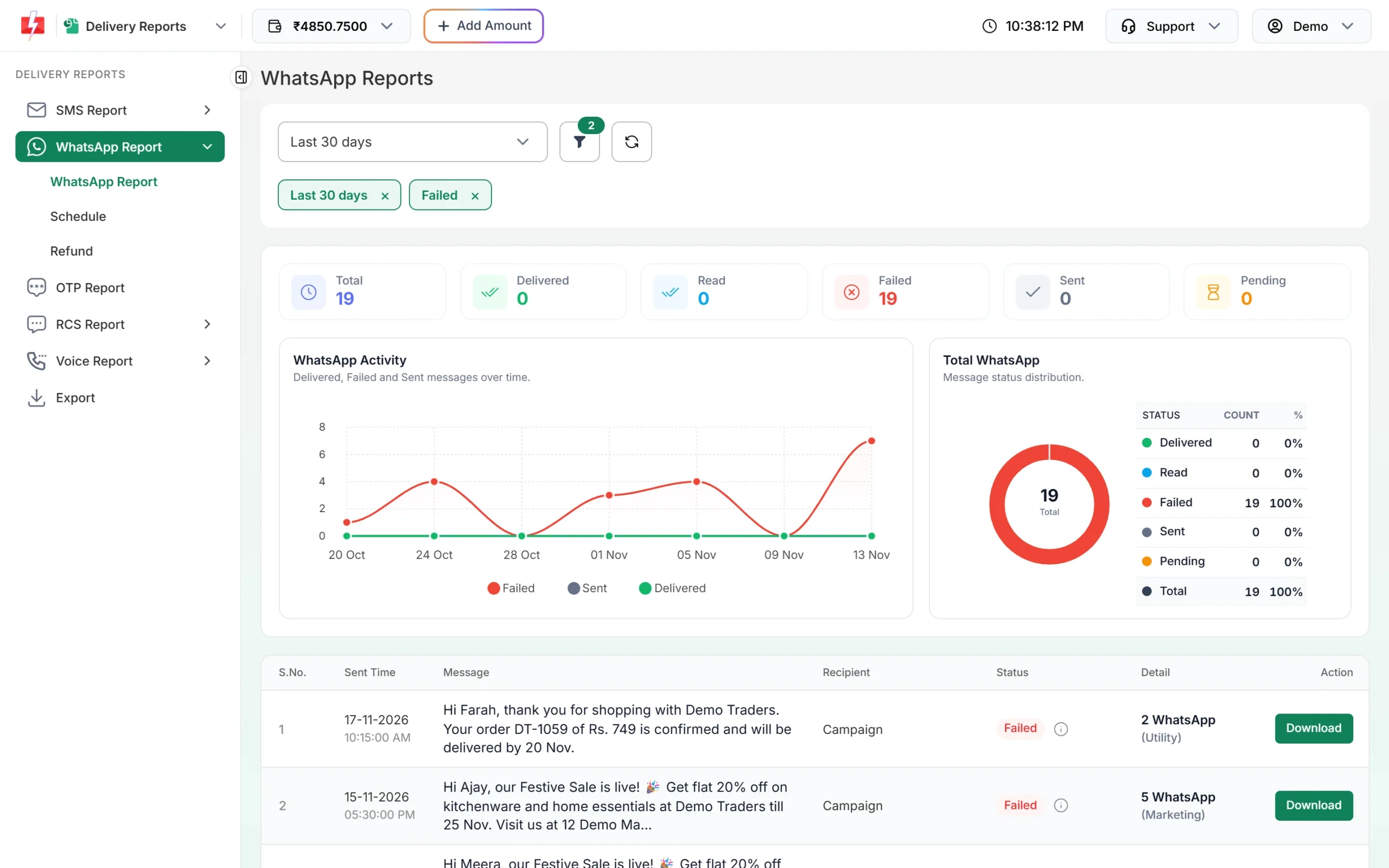
Filter the WhatsApp Report to failed messages. -
Open the campaign’s Delivery Details
Click the message text of the campaign. The Delivery Details window shows a status chart, a preview of the template and a Receivers table. The Description column shows the reason for each failed number. Error 131026 shows as “Message Undeliverable (Error: 131026)”.
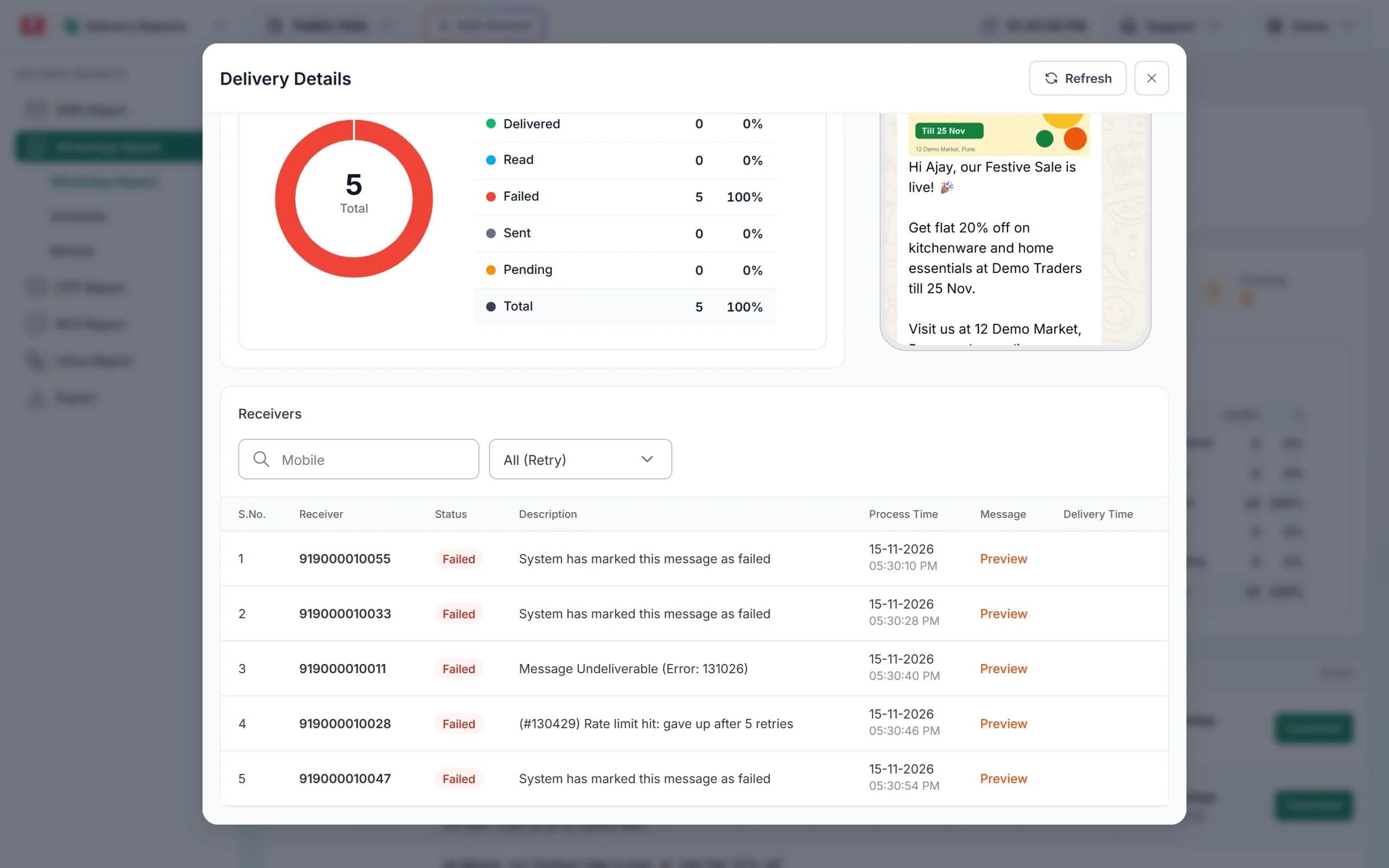
The Description column shows the Meta error for each number. -
Download the list if you need it
For large campaigns, use Export in the Delivery Reports menu to get the full list of numbers and reasons in Excel. You can then remove or move these numbers to SMS.
How to fix error 131026
- Check the number. Make sure it is a 10-digit mobile number with no extra or missing digits. Landline numbers will always fail.
- Ask the customer. If it is an important customer, reach them by SMS or a call and ask them to open WhatsApp, update the app from the Play Store or App Store, and accept any terms screen they see.
- Ask them to message you first. Once a customer has written to your business number, you know the number works on WhatsApp.
- Use SMS for the rest. Numbers that keep failing with 131026 are often not on WhatsApp at all. Send the same information by bulk SMS instead.
- Turn on Retry Failed. See the next section.
Retry Failed: automatic second attempt
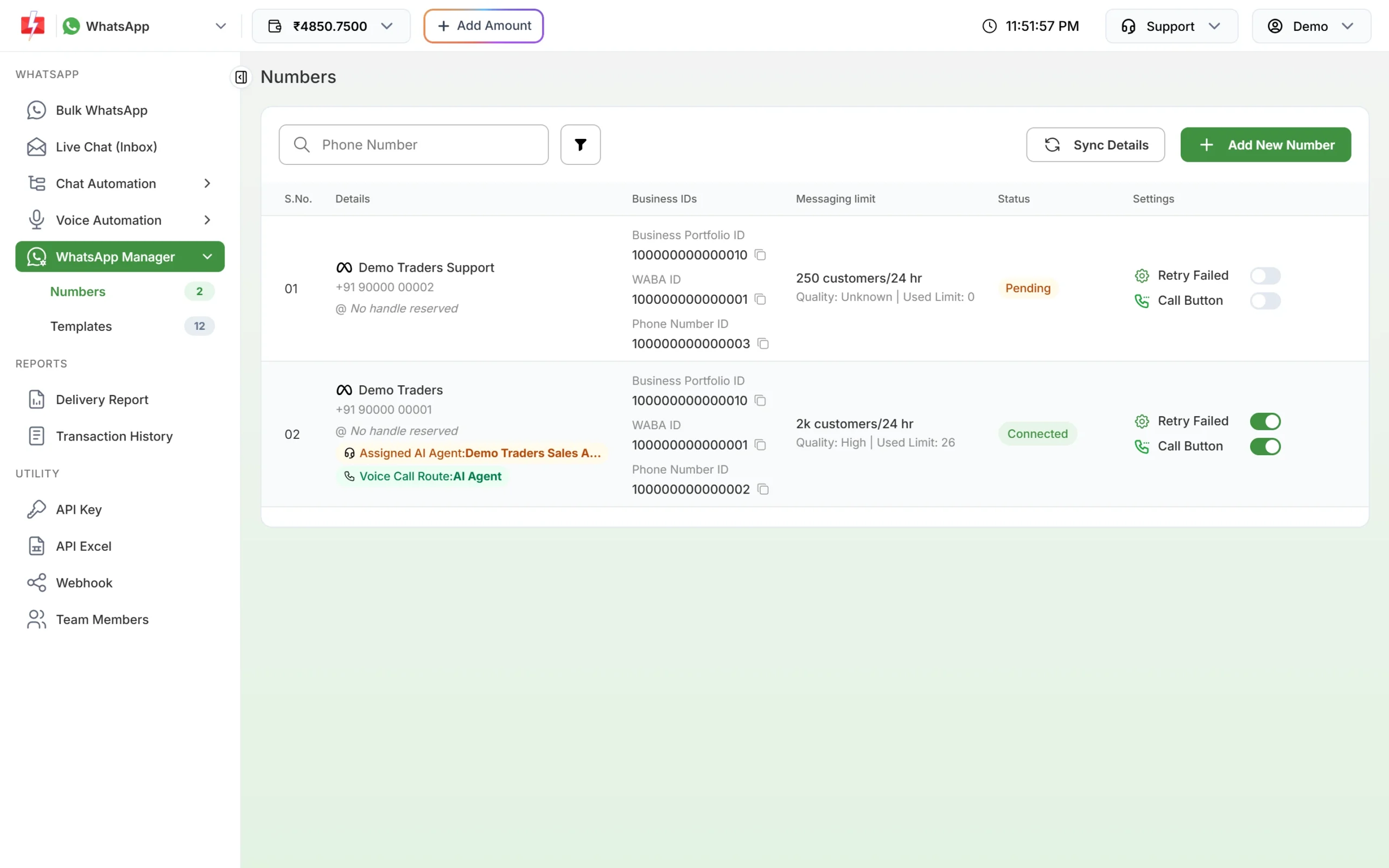
In WhatsApp Manager > Numbers, each connected number has a Retry Failed toggle. When it is on, Fast2SMS sends yesterday’s failed template messages again the next morning (around 7 AM), but only those that failed with 131026 or 131049. This helps when the failure was temporary, for example when the customer’s phone was on an old app version and has since updated.
In the Delivery Details window you can use the All (Retry) drop-down to see which numbers were retried.
Are you charged for error 131026?
No. Fast2SMS takes the campaign amount from your wallet when you send, and refunds every failed WhatsApp message automatically, whatever the error code. The refund is made about two days after the send date and shows in Transaction History as “Failed WhatsApp Refund”. You can check it campaign by campaign in Delivery Report > WhatsApp Report > Refund.
How to prevent 131026
- Collect numbers through your own forms, website or store, with WhatsApp opt-in, instead of buying lists.
- Remove numbers that fail with 131026 in two or three campaigns in a row.
- Check numbers when you collect them, for example by asking customers to confirm their WhatsApp number on your form.
- Keep an SMS fallback for important messages like OTPs and order updates. Smart OTP does this for OTPs: it tries WhatsApp and falls back to SMS.
Frequently asked questions
Does error 131026 mean the customer blocked me?
Not necessarily. Meta does not reveal blocks through 131026. It means the number could not receive the message, most often because it is not on WhatsApp or the app is outdated.
The number is on WhatsApp. Why did it still fail?
The customer may not have accepted WhatsApp’s latest terms, or may be using an old app version. Ask them to update WhatsApp and open it once, then send again.
Will sending again fix 131026?
Only if the cause has changed, for example the customer updated the app. Sending again and again to a number that is not on WhatsApp will keep failing.
Is 131026 refunded in Fast2SMS?
Yes. All failed WhatsApp messages are refunded to your wallet automatically, about two days after sending.
Does 131026 hurt my quality rating?
Your quality rating depends mainly on how customers react to your messages, such as blocks and spam reports. Many 131026 failures usually point to an old list, and old lists tend to bring more blocks, so clean the list either way.