
RCS business messaging (RBM) is the way a business sends RCS messages to customers’ phones. The message arrives in the customer’s normal messaging app with your brand name, logo and a verified tick, and it can carry images, swipeable cards and buttons. This page explains, in plain words, what RBM is, who is involved, what it takes to start in India and what it costs.
It is for business owners and marketers who have heard of RCS and want to know if it fits their messages before they register.
What is RCS business messaging?
RCS (Rich Communication Services) is the upgrade to SMS inside the phone’s own messaging app. Between two people it works like a chat app: typing dots, read receipts, photos. RCS business messaging is the business side of it. Google runs the platform that delivers these business messages and now calls it RCS for Business. Many people still say RBM.
The business sender is called an agent in Google’s documents. In the Fast2SMS panel the same thing is called a bot. Each bot has a name, a logo and one purpose, such as promotional or transactional.
What the customer sees
- Your brand, not a number. The chat shows your brand name and logo. A verified business shows a check mark, which means Google, the mobile operator or an approved provider has confirmed the business is real.
- Rich content. A message can be plain text, a rich card (image or video with a title, text and buttons), a carousel of 2 to 10 cards, or media files such as an image, video, audio or PDF.
- Buttons. In Fast2SMS you can add up to 4 buttons per message or per card: Open URL, Dial a Number or View Location.
- Replies. Customers can type a reply. In Fast2SMS the replies arrive in Live Chat (Inbox).
- Controls. Customers can unsubscribe, which sends STOP to the business, or block and report the business as spam.
How RBM works, step by step
-
Register your brand
In Fast2SMS, open Create RCS and answer the eligibility questions. You need a working website, an email on the same domain, a GST certificate, Terms and Privacy Policy pages and an opt-in form on your website. Then fill the RCS Registration Form with your brand name, description, logo, cover image and contact details. There is no registration fee in Fast2SMS.
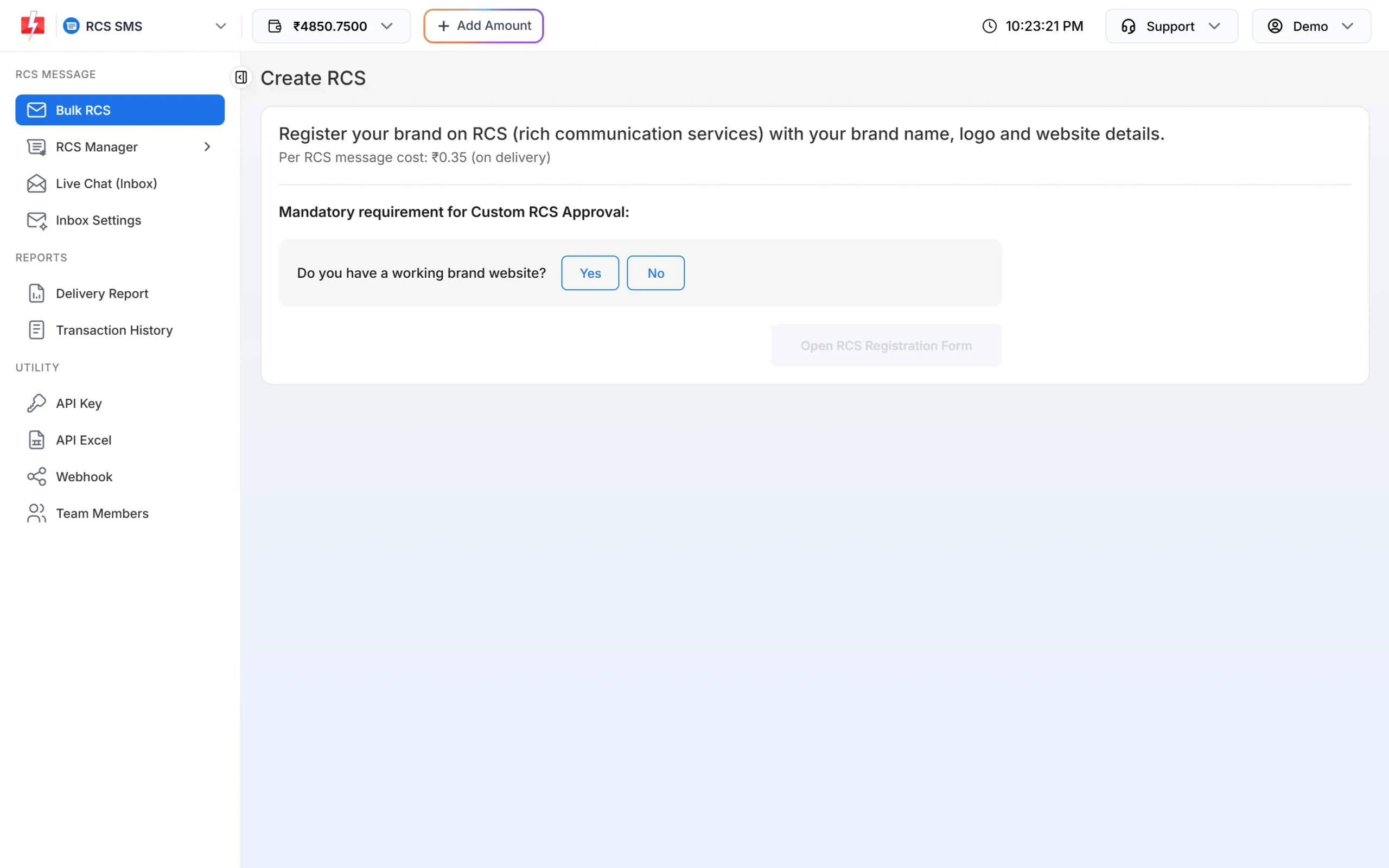
Create RCS checks that your brand meets the basic rules. -
Wait for approval
Your details are checked before the brand can send. The registration form says approval may take 3 to 7 days. Once approved, Fast2SMS adds your bot, and you see it under RCS Manager > Bots with its Bot ID, category and status.
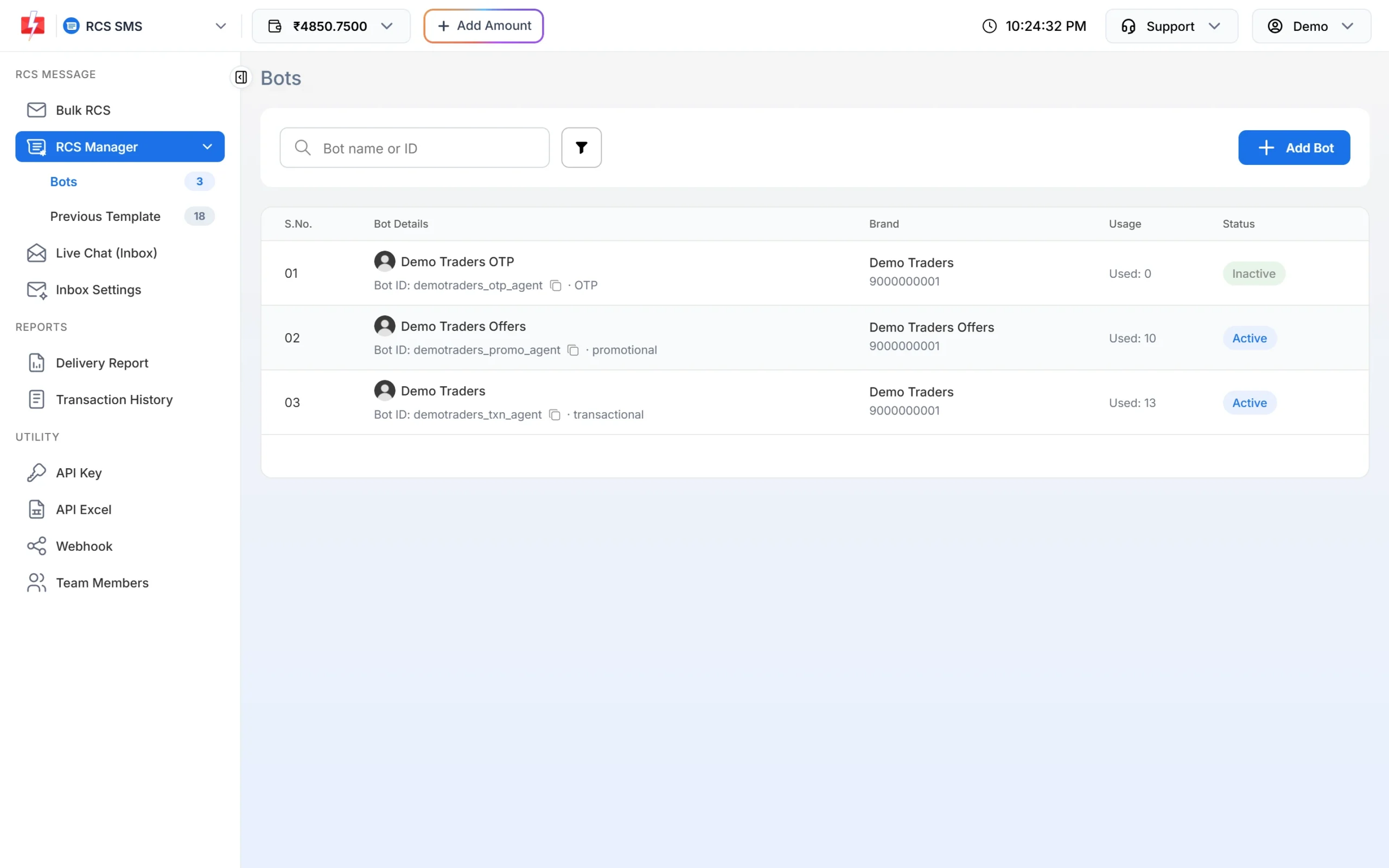
Each approved bot has its own category and Bot ID. -
Send the message
Open Bulk RCS, pick the bot, add the numbers, choose Plain, Rich, Carousel or Media, and send. Developers can send the same messages with the RCS API using the Bot ID.
-
The customer gets it in the messaging app
RCS needs mobile data or Wi-Fi on the customer’s phone. Android phones with Google Messages and RCS chats turned on can receive it, and iPhones on iOS 18 or later where the operator supports RCS. A phone that cannot receive RCS shows as Non-RCS in your report.
-
Check the result
Under Delivery Report > RCS Report you see Delivered, Read, Sent, Pending, Failed and Non-RCS for every number.
The three kinds of RCS bot in India
Google gives every agent one use case, and that decides what it may send. In India, three are available at the time of writing. Google’s fourth type, multi-use, is not available in India.
| Bot type | Used for | Not allowed |
|---|---|---|
| OTP | One-time passwords for login, password reset or payment confirmation | Offers or product information |
| Transactional | Order, delivery, booking, payment and account updates | Offers, discounts or upgrades |
| Promotional | Offers, sales, new arrivals, abandoned cart reminders | OTPs or time-sensitive service updates |
Promotional bots in Fast2SMS can send between 7:00 AM and 10:00 PM, and each number can get up to 4 promotional RCS a month. Transactional bots have no time window or monthly limit, but they are only for informative messages.
Do you need DLT for RCS?
No DLT template is needed. RCS from Fast2SMS uses open templates: you write the text, media and buttons each time you send. RCS reaches both DND and non-DND numbers. The checks happen at brand registration instead, and the opt-in rule still applies: send only to people who agreed to hear from your brand.
What RCS business messaging costs
At the time of writing, Fast2SMS charges one flat rate of ₹0.35 per RCS message, the same for plain text, rich cards and carousels. There is no setup or monthly fee. The full amount is taken from your wallet when the campaign is sent. Numbers that fail or cannot receive RCS (Failed or Non-RCS) are refunded to your wallet automatically within 48 hours. Check the current rate on the RCS pricing page.
Sending in bulk? For high RCS volumes our team offers discounted rates. Talk to our team or see RCS pricing.
RBM compared with SMS
| Point | RCS business messaging | SMS |
|---|---|---|
| Sender shown | Brand name, logo and verified tick | 6-character header such as DEMOTR |
| Content | Text, images, video, PDF, cards, carousels, buttons | Text only |
| Read status | Yes, Read shows per number | Delivered only |
| Phones | RCS-enabled phones with internet | Every mobile phone |
| Registration | RCS brand registration | DLT entity, header and template |
The biggest practical point: RCS does not reach every phone. Fast2SMS does not switch a Non-RCS number to SMS automatically today. If a message must reach everyone, such as a payment due reminder, send the Non-RCS and failed numbers by SMS or WhatsApp afterwards. The RCS fallback guide shows how.
Where RBM works well
- Offers with a picture. A product photo, a short line and a Shop now button in one card.
- Product choice. A carousel with one product per card.
- Order and booking updates. Confirmations, delivery updates and tickets from a transactional bot.
- Two-way chats. Customers reply with questions, and your team answers from Live Chat.
For OTPs that must arrive every time, use Smart OTP, which sends on SMS and WhatsApp with fallback.
Frequently asked questions
What is the full form of RBM?
RBM stands for RCS Business Messaging. Google now calls the platform RCS for Business. Both names mean business messages sent over RCS.
Is RCS business messaging the same as Google Messages?
No. Google Messages is the app on Android phones where customers read RCS messages. RCS business messaging is the service that delivers a brand’s messages into that app.
Is RCS business messaging available in India?
Yes. Indian businesses can register a brand and send RCS to Indian mobile numbers. In Fast2SMS you register under Create RCS.
What is an RCS agent?
An agent is the business sender: the name, logo and purpose customers see. Fast2SMS calls it a bot and shows its Bot ID under RCS Manager > Bots.
Can customers reply to RCS business messages?
Yes. Customers can type a reply, and it reaches your Live Chat (Inbox) in Fast2SMS. You can also set auto replies under Inbox Settings.
Does RCS work without internet?
No. The phone needs mobile data or Wi-Fi. In Fast2SMS, a message that cannot be delivered within 6 hours expires and is refunded.
Do I need a DLT template for RCS?
No. RCS from Fast2SMS uses open templates. Your brand must be approved for RCS instead.
Can I send RCS without a website?
No. A working website, an email on your website’s domain, Terms and Privacy pages and an opt-in form are required for registration.