
You set your WhatsApp Business API profile in Fast2SMS under WhatsApp Manager > Numbers > three-dot menu > Edit Profile. There you add the profile photo, category, status (about), description, address, email and up to two websites, and you can reserve a WhatsApp username such as @yourbusiness. This guide explains each field, its limits, and how usernames work.
Why your WhatsApp business profile matters
When a customer taps your business name in WhatsApp, they see your profile: photo, about line, description, address, email and website. A complete profile tells people the message is really from you, and people who trust a message are less likely to block or report it. It is free to set and you can change it any time.
How to edit your WhatsApp business profile
-
Open Edit Profile
Go to WhatsApp Manager > Numbers, click the three-dot menu at the end of the number’s row and choose Edit Profile. The Business Information page opens. Edit Profile is not offered for numbers with a Banned, Rejected, Failed, Violation or Disconnected status.
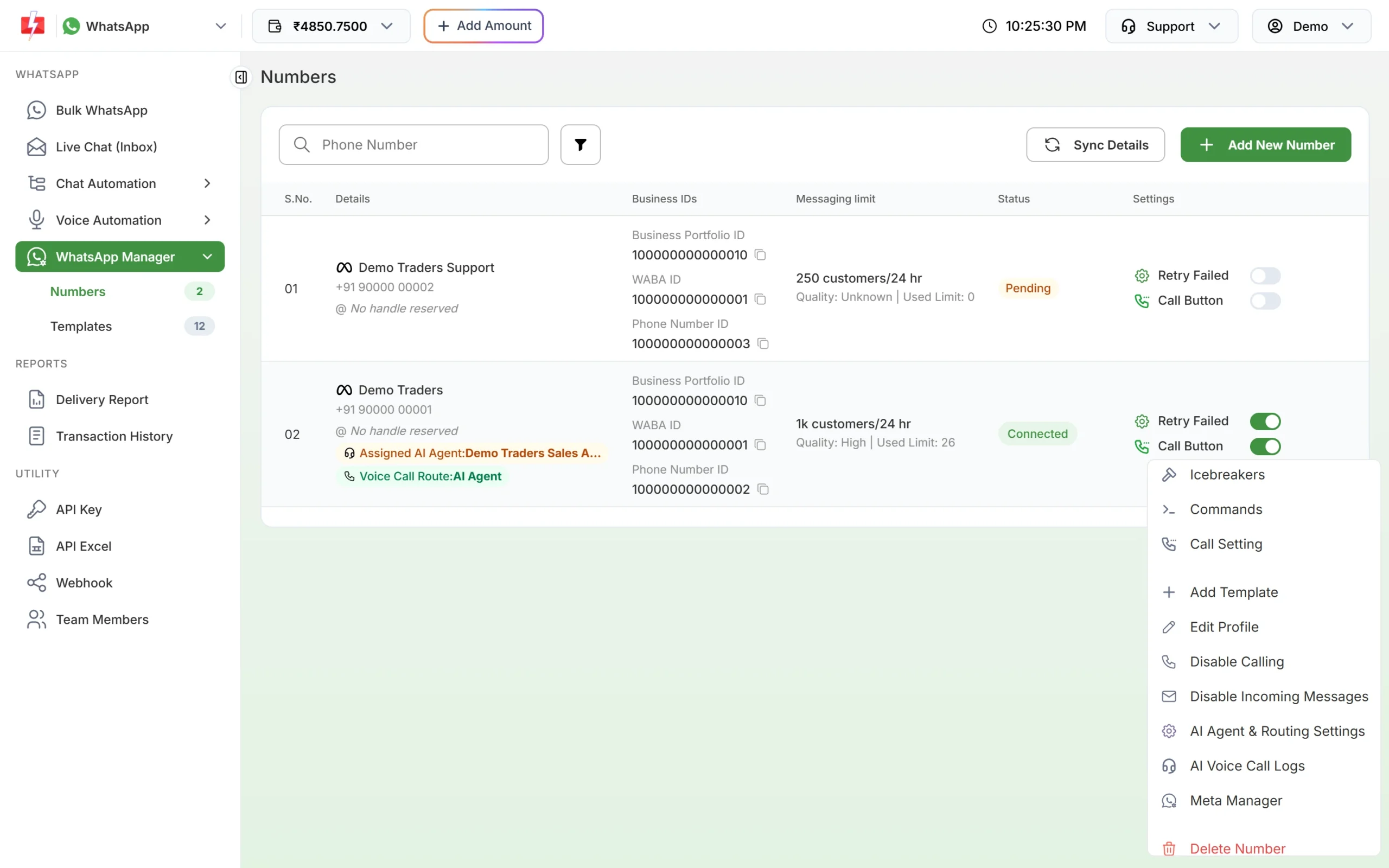
Edit Profile is in the number’s three-dot menu. -
Check the display name
The display name is shown at the top with its status. It cannot be changed on this page. The Change Display Name link opens Meta’s help page, because display names are changed and reviewed in Meta’s WhatsApp Manager.
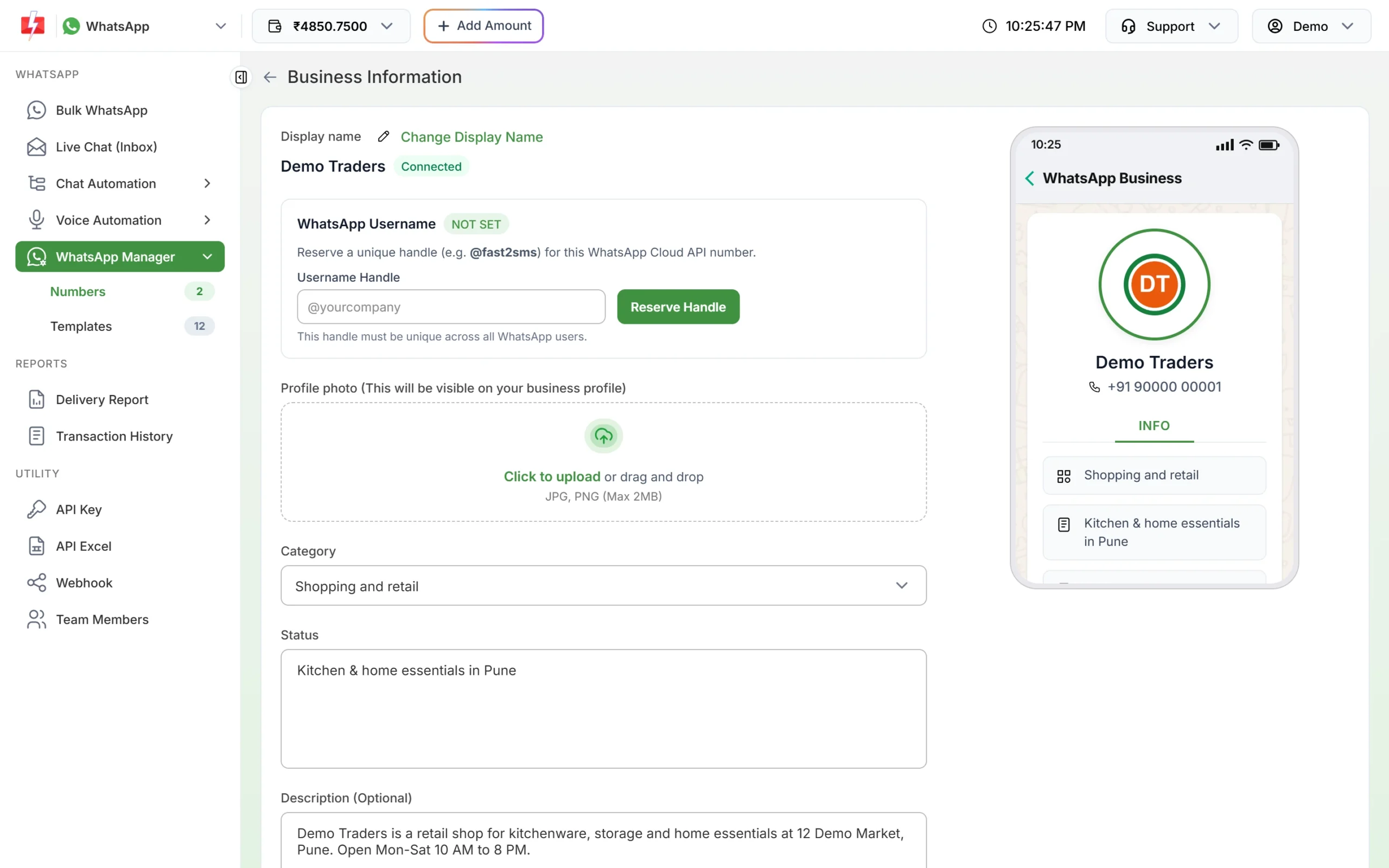
The top of the Business Information page, with a live preview on the right. -
Upload a profile photo
Under Profile photo, click to upload or drag in your logo. Use JPG or PNG up to 2MB. A square logo with some space around it looks best in WhatsApp’s round frame.
-
Choose a category and write the status
Pick the closest Category, for example Shopping and retail, Education, Medical and health or Professional services. In Status (required), write one short line about what you do, such as “Kitchen and home essentials in Pune”. Meta allows up to 139 characters here.
-
Add description, address, email and websites
All of these are optional, but fill them in. They appear on your profile as separate rows.
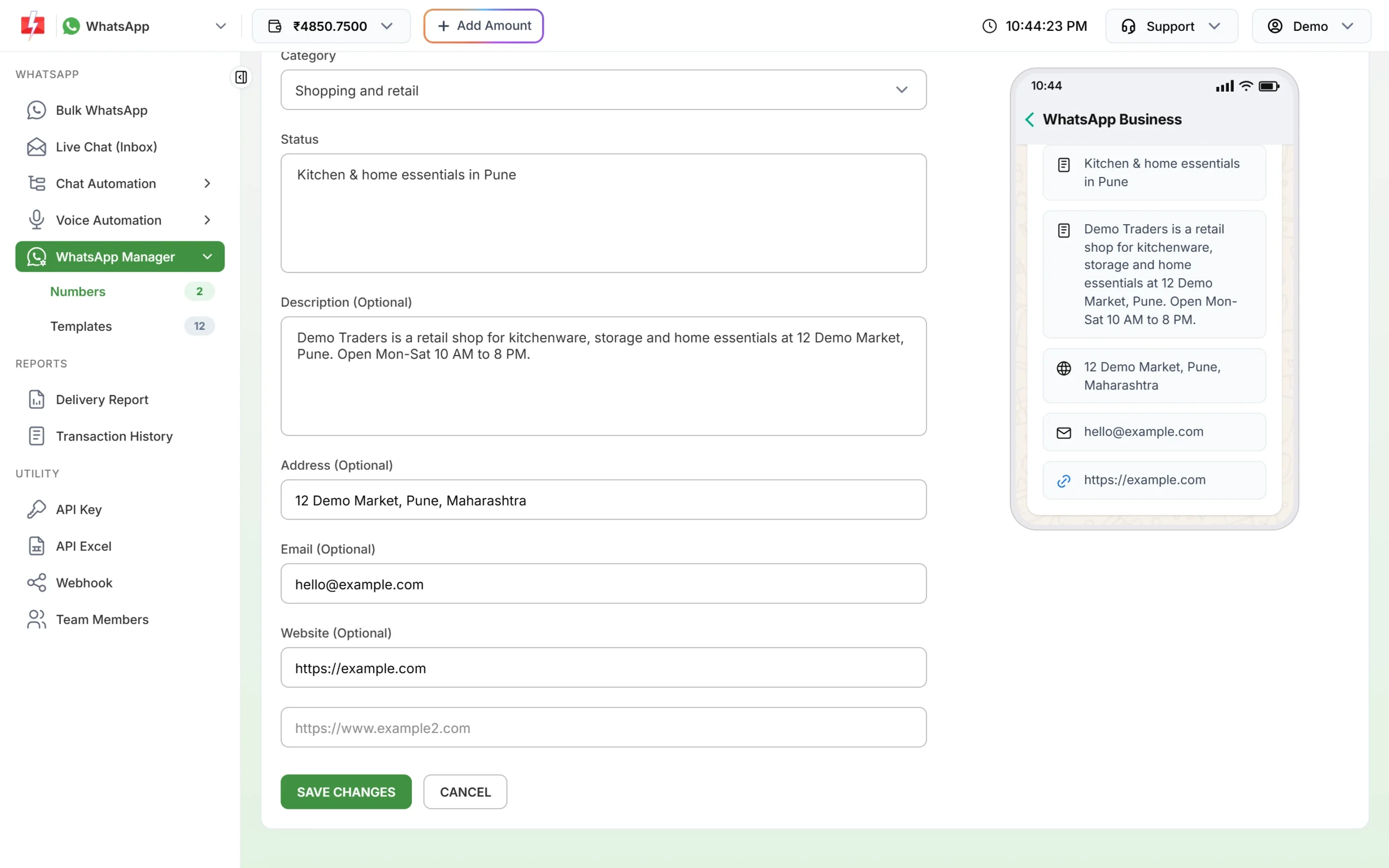
The lower part of the form. The preview shows exactly what customers will see. -
Save
Click SAVE CHANGES. You see “Business information saved successfully” when Meta accepts the update.
Business profile fields and limits
| Field | Required? | Limit |
|---|---|---|
| Profile photo | Optional | JPG or PNG, max 2MB |
| Category | Yes | One of 20 options, default Other |
| Status (about) | Yes | Up to 139 characters (Meta’s limit) |
| Description | Optional | Up to 512 characters |
| Address | Optional | Up to 256 characters |
| Optional | A valid email, up to 128 characters | |
| Website | Optional | Up to 2 websites, each a full URL starting with http:// or https://, up to 256 characters |
WhatsApp username for your business
A WhatsApp username is a unique handle, like @demotraders, that customers can use to find and message your business without your phone number. It is separate from the display name. Many businesses can share a display name, but each username is unique across WhatsApp.
How to reserve a username
- On the Business Information page, find WhatsApp Username. The badge shows NOT SET, RESERVED or LIVE.
- Type the handle in Username Handle.
- Click Reserve Handle (or Update Handle if you already have one).
Meta is rolling usernames out in stages. A reserved username becomes active when the feature launches for your region, and the badge then changes to LIVE.
Username rules
- 3 to 35 characters.
- Only English letters, numbers, full stops and underscores, with at least one letter.
- Cannot start with “www”.
- Cannot end with a domain ending such as .com, .net, .org, .in, .co, .io, .info, .biz, .me or .app.
- Must not be taken by anyone else on WhatsApp.
- Available only for numbers on the WhatsApp Cloud API.
Username errors and fixes
| Message you see | What to do |
|---|---|
| “Invalid username format…” | Follow the rules above: 3 to 35 characters, letters, numbers, full stop or underscore. |
| “This username is not available…” | Someone else has it, or WhatsApp has blocked it. Try a variation, such as adding your city. |
| “Your WhatsApp Business Account is not yet eligible…” | Meta needs a higher messaging limit before you can reserve a username. Try again once your limit grows. |
| “This username belongs to your Facebook/Instagram account…” | Link that Facebook Page or Instagram account in Meta Business Manager first, then try again. |
| “This username is already in use by another of your numbers…” | A transfer is needed. Contact support. |
| “This phone number is not registered on the WhatsApp Cloud API.” | Usernames work only on Cloud API numbers. Contact support. |
According to Meta, if you change or delete a username, the old one is held for you for 60 days so you can take it back.
Common problems
| Problem | Fix |
|---|---|
| “Image size cannot exceed 2MB” | Compress the logo or export it smaller, as JPG or PNG. |
| “Status is required” | Write a short line in Status before saving. |
| “Failed to upload the profile picture…” | Try another JPG or PNG image. |
| “Could not reach WhatsApp. Please try again.” | Wait a minute and click SAVE CHANGES again. |
| Edit Profile missing from the menu | The number has a red status such as Banned or Disconnected. Contact support with the Phone Number ID. |
Frequently asked questions
How do I add a logo to my WhatsApp Business API profile?
Open Edit Profile from the number menu in WhatsApp Manager, upload a JPG or PNG up to 2MB under Profile photo and click SAVE CHANGES.
Can I change my business name from Edit Profile?
No. The display name is changed in Meta’s WhatsApp Manager and reviewed by Meta. Use the Change Display Name link.
How long is the WhatsApp business “about” text?
Up to 139 characters, according to Meta.
How many websites can I add?
Two. Each must start with http:// or https://.
Is a WhatsApp username required?
No, it is optional. It helps customers find you without your number.
Does the username hide my business phone number?
No. Your number still shows on your profile. The username is for finding you, not for privacy.
Do profile changes need Meta approval?
The photo, about, description, address, email and websites are saved directly. Only the display name goes through Meta’s review.