
The cost of a WhatsApp campaign is simple: number of valid customers x the rate for your template’s category. At the time of writing, Fast2SMS charges ₹0.95 per Marketing message and ₹0.25 per Utility or Authentication message, so 10,000 marketing messages cost ₹9,500. This guide shows how to estimate the cost of a WhatsApp campaign before you send, with worked examples, and how to check the exact amount in the panel.
The formula
| Campaign cost | = valid numbers x rate per message x number of scheduled days |
- Valid numbers: 10-digit Indian mobile numbers starting with 6, 7, 8 or 9. Duplicates count once. Invalid numbers are removed and cost nothing.
- Rate: set by the template’s category, not by the length of the message. A long marketing message and a short one cost the same.
- Scheduled days: 1 for a normal send. If you schedule the same campaign over a range of dates, it is charged once for each date.
Rates at the time of writing
| Category | Use it for | Rate per message |
|---|---|---|
| Marketing | Offers, sales, new products, festival wishes with a promotion | ₹0.95 |
| Utility | Order, payment, delivery and appointment updates | ₹0.25 |
| Authentication | OTP and login codes | ₹0.25 |
| Service (session) | Replies within 24 hours of the customer’s message | ₹0.13 |
| Incoming | Messages customers send you | Free |
Sending in bulk? For high WhatsApp volumes our team offers discounted rates. Talk to our team or see WhatsApp pricing.
Your account may have its own rates. The FEATURES box on the Bulk WhatsApp page shows your current Utility and Marketing rates. Current public rates are on the WhatsApp pricing page.
Worked examples
| Campaign | Calculation | Cost |
|---|---|---|
| Diwali offer to 5,000 customers | 5,000 x ₹0.95 | ₹4,750 |
| Delivery updates for 2,000 orders | 2,000 x ₹0.25 | ₹500 |
| 1,200 login OTPs | 1,200 x ₹0.25 | ₹300 |
| 800 replies by your team in Live Chat | 800 x ₹0.13 | ₹104 |
| Payment reminder to 300 customers, scheduled on 3 dates | 300 x ₹0.25 x 3 | ₹225 |
The pricing page has a ready table for bigger volumes. For example, 1 lakh marketing messages come to ₹95,000 and 1 lakh utility messages to ₹25,000 at the time of writing.
A monthly budget example
A small online shop might send:
- one festival offer to 3,000 customers: 3,000 x ₹0.95 = ₹2,850
- order and shipping updates: 6,000 x ₹0.25 = ₹1,500
- checkout OTPs: 1,000 x ₹0.25 = ₹250
- team replies in Live Chat: 1,500 x ₹0.13 = ₹195
Total for the month: ₹4,795, with no setup fee, monthly fee or per-agent fee added. Failed messages in any of these are refunded, so the real spend is usually a little lower.
How to see the exact cost before sending
-
Fill the Bulk WhatsApp form
Open Bulk WhatsApp, choose the sender number, add your numbers (List, Address Book or CSV File) and pick the template. The template’s category decides the rate.
-
Click Send or Schedule
The panel checks your list and opens Message Preview & Confirmation. Nothing is sent yet.
-
Read the numbers in the preview
You will see Cost per SMS, Total Numbers, Duplicate Numbers, Valid Numbers, Invalid Number and the cost line, for example “Cost: [3 x ₹0.2500 x 1] ₹0.7500”. The last number in the brackets is the number of scheduled days.
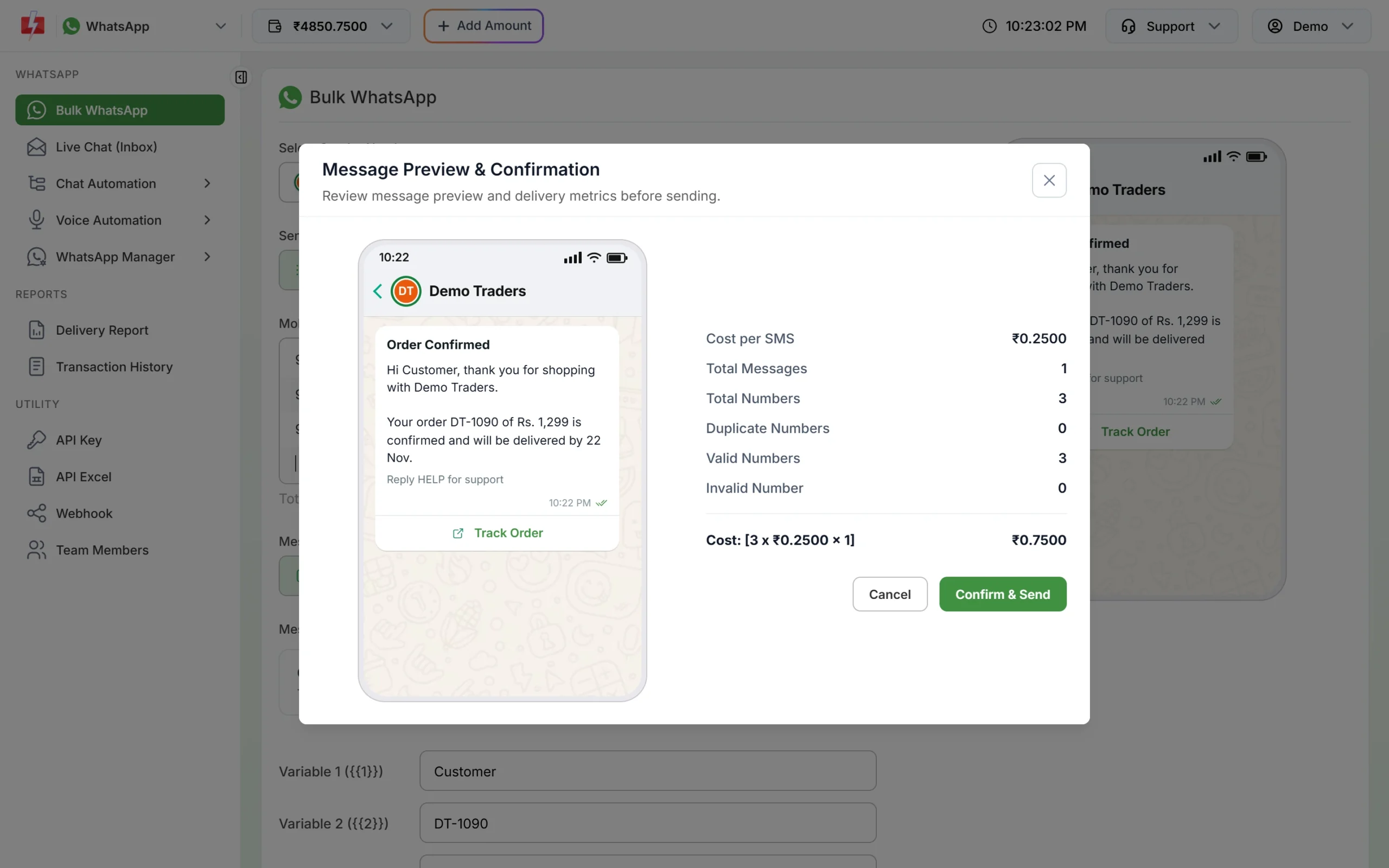
The exact cost for your list, before you confirm. -
Confirm, or cancel and change
Click Confirm & Send if the total is right. Click Cancel to change the list or template. If your wallet does not have enough, you will see “Insufficient wallet balance, you need at least ₹X…” with the amount needed. Use Add Amount to recharge.
Things that change the final amount
- Failed messages are refunded about two days after sending, so your net cost is only for delivered messages.
- Cancelled scheduled campaigns are credited back in full.
- GST at 18% is added to the recharge amount, not to each message. You get a GST invoice for every payment.
- Header images, videos and PDFs do not change the price. A template with an image costs the same as a text template of the same category.
After the campaign, check the real figures in Transaction History (the debit, for example “25 WhatsApp (Marketing)”) and in the Refund report, which shows Amount Debited, Amount Refunded and Net Amount for the month.
Tips to keep WhatsApp costs low
- Use Utility templates for real transaction updates instead of Marketing. They cost less and customers expect them.
- Clean your list. Remove old and wrong numbers so fewer messages fail.
- Send offers to customers who bought recently or asked about the product, not to everyone.
- Answer customer questions inside the 24-hour window with session replies at ₹0.13 instead of sending new templates.
- Remember your messaging limit. A 2,000 limit means a 10,000 list needs several days, so plan the budget over those days.
Frequently asked questions
How much does it cost to send 1,000 WhatsApp messages?
At the time of writing, ₹950 for marketing and ₹250 for utility or authentication templates on Fast2SMS.
Does the message length change the price?
No. WhatsApp messages are priced per message by category. Up to the template’s limits, a longer message costs the same.
Is there a minimum campaign size?
No. You can send to a single number. The minimum wallet recharge is ₹100 at the time of writing.
Are duplicate numbers charged twice?
No. A repeated number is sent once and charged once. The preview shows how many duplicates were removed.
Is GST added to every message?
No. GST at 18% is charged on the recharge amount, and you get a GST invoice for it.
Can I get a lower WhatsApp rate for high volume?
Talk to the Fast2SMS sales team about your monthly volume. Your account’s own rates appear in the panel once set.