
WhatsApp error 131009 “Parameter value is not valid” means one of the values in your API request is not allowed, most often the phone number format. Error 131008 “Required parameter is missing” means a field the request needs was not sent at all. Both are request-building errors, so they mostly affect developers who send Meta’s JSON format. This page shows the usual causes and fixes.
What the two errors mean
| Code | Meta’s meaning (at the time of writing) | Typical causes |
|---|---|---|
| 131009 | One or more parameter values are invalid | Phone number in the wrong format, a value that is not in the allowed list (for example a wrong type), a phone number ID that does not belong to the account |
| 131008 | The request is missing a required parameter | No to, no messaging_product, no template.language, or a media message with no link or ID |
Meta’s details text in the error tells you which field is wrong. Always read it before changing your code.
How to fix 131009
-
Check the phone number
Send the number with the country code and digits only, for example
919999999999for an Indian mobile. Remove spaces, dashes, brackets and a leading zero. -
Check every value against Meta’s reference
Values like
type(text, image, template and so on), the language code and button sub-types must be spelt exactly as Meta lists them, in lower case. -
Use a phone number ID from your own account
Copy the Phone Number ID from WhatsApp Manager > Numbers. An ID from another WhatsApp Business Account, or a deleted number, is rejected.
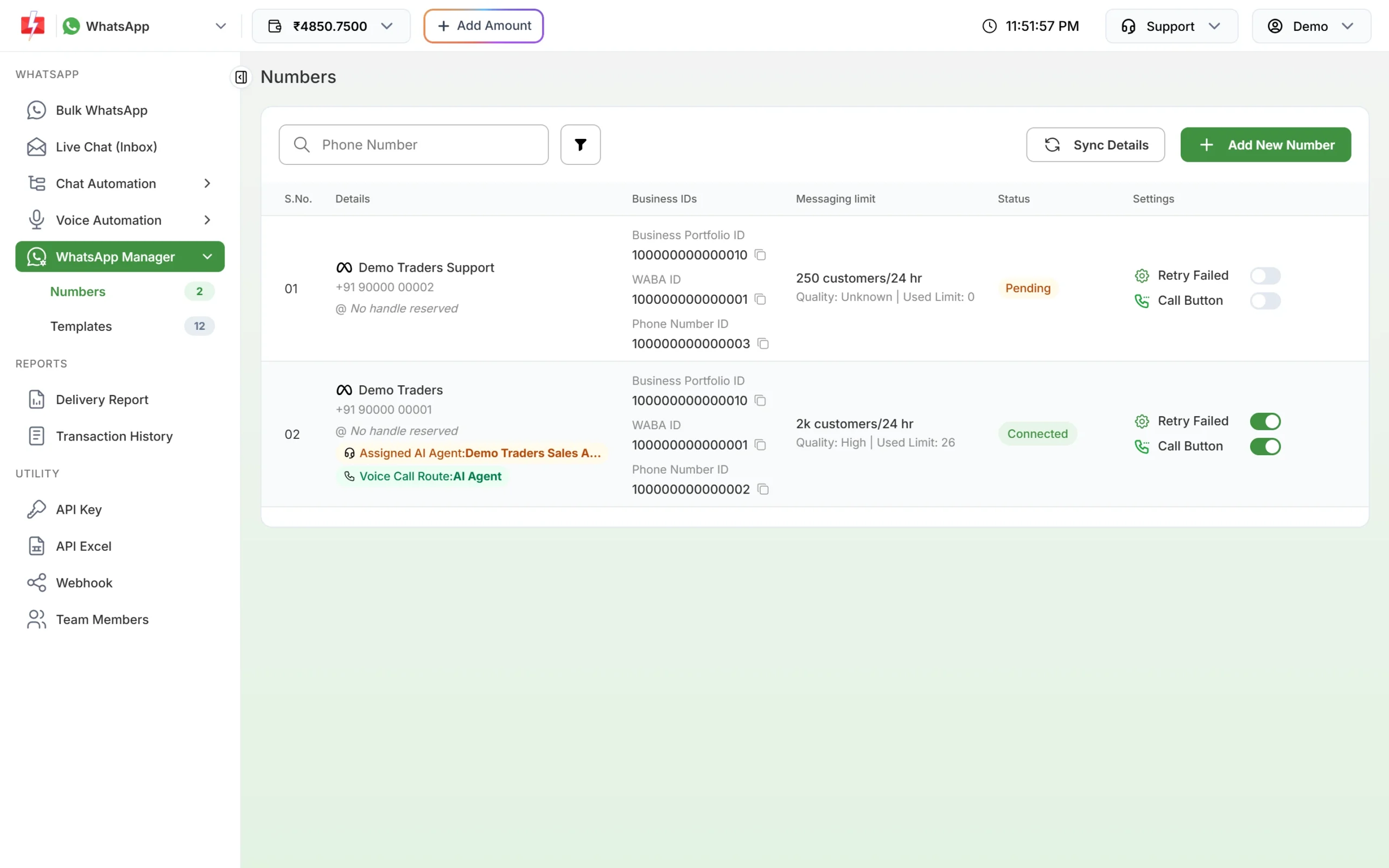
Copy the Phone Number ID and WABA ID from the Numbers tab.
How to fix 131008
Compare your request with a working example and add the missing field. A minimal template message in Meta’s format sent through Fast2SMS looks like this:
curl -X POST "https://www.fast2sms.com/dev/whatsapp/v26.0/PHONE_NUMBER_ID/messages" \
  -H "authorization: YOUR_API_KEY" -H "Content-Type: application/json" \
  -d '{"messaging_product":"whatsapp","to":"919999999999","type":"template",
       "template":{"name":"order_update","language":{"code":"en"},
       "components":[{"type":"body","parameters":[{"type":"text","text":"DT-1059"}]}]}}'
Check that messaging_product, to, type and the object for that type (here template with name and language.code) are all present.
Avoid these errors with the simple API
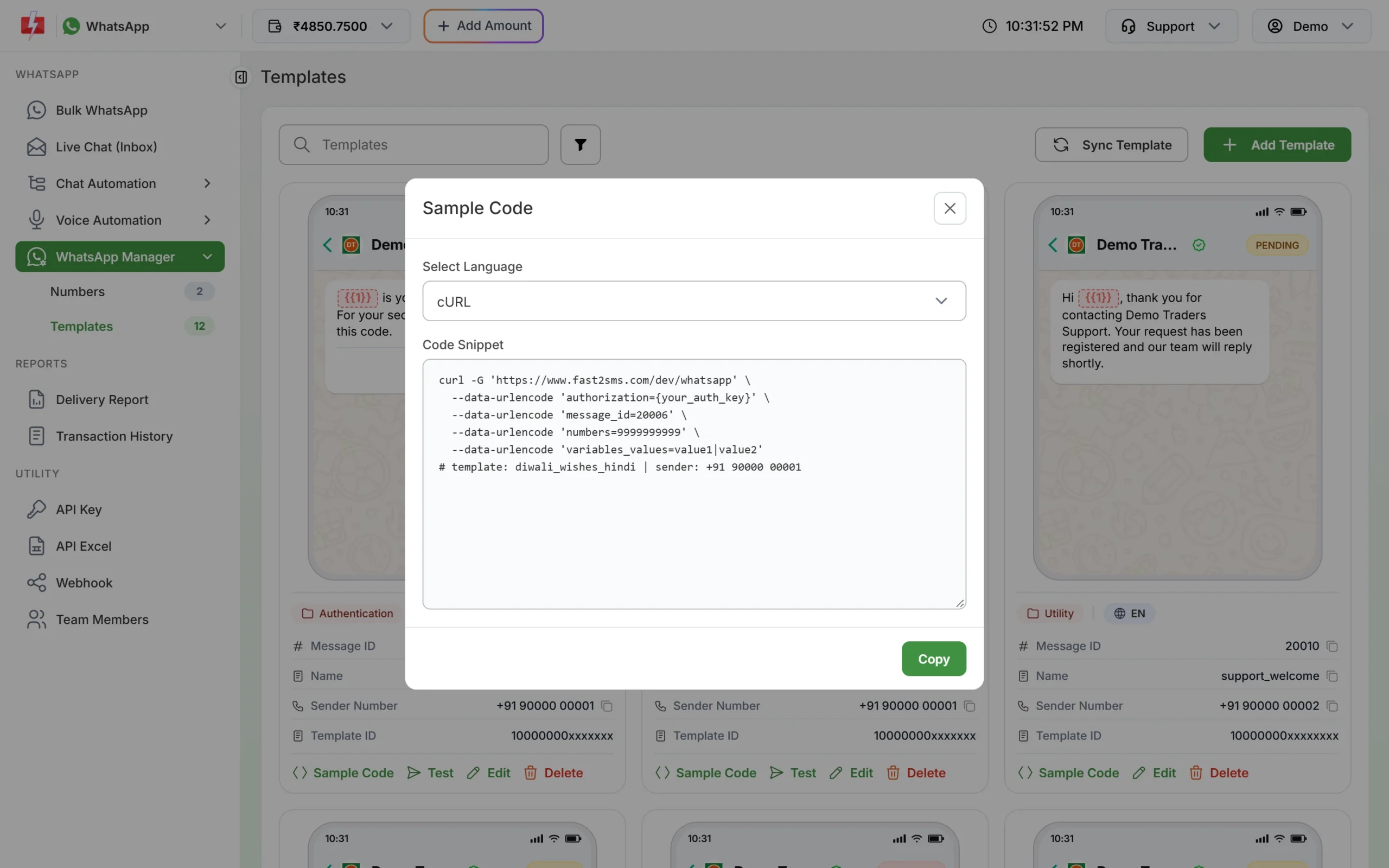
The Fast2SMS template API (/dev/whatsapp) needs only the template’s Message ID, the numbers and the variables_values. Fast2SMS builds the Meta request for you and checks your input first, so mistakes come back straight away as clear messages, such as “Mobile Number format is invalid”, instead of Meta error codes. The Sample Code button on each template card gives a ready request.
Related: error 131021
Error 131021 means the sender and the recipient are the same number. In Fast2SMS this shows as “You can not send message to your own number”. Test with a different phone.
Frequently asked questions
Should the phone number have a plus sign?
Use the country code and digits, for example 919999999999. Avoid spaces and other symbols.
Is 131009 always about the phone number?
No. It covers any invalid value. The phone number is just the most common one. Read the details text in the error.
Are failed messages with 131009 charged?
No. Messages that fail are refunded to your Fast2SMS wallet automatically. Requests that Fast2SMS refuses before sending are not charged at all.
What is the difference between 131008 and 132000?
131008 means a required field is missing from the request. 132000 means the number of template variables does not match.
Where do I find my Phone Number ID?
In WhatsApp Manager > Numbers, under Business IDs, with a copy button next to it.