
When the Fast2SMS WhatsApp API refuses a request, it answers with "return":false and an errors object that names the field at fault, such as message_id, phone_number_id, numbers or wallet. This page lists every error the template API (/dev/whatsapp) and the session API (/dev/whatsapp-session) can return, what each one means and how to fix it. Errors that come later from WhatsApp itself, after the message was accepted, are covered in a separate guide linked below.
Two kinds of WhatsApp errors
| When | Where you see it | Charged? |
|---|---|---|
| The request is refused by Fast2SMS (this page) | In the API response, and in API Logs | No. Nothing was sent |
| The request is accepted, then WhatsApp fails the message | In the delivery report, the WhatsApp DLR API and webhooks, with a Meta error code | Debited at send, then refunded automatically as a failed message |
For the second kind, see WhatsApp API error codes: full list with fixes.
What an error response looks like
{"return":false,
 "errors_keys":["phone_number_id"],
 "errors":{"phone_number_id":["WhatsApp Phone Number ID is invalid or not connected."]},
 "message":["WhatsApp Phone Number ID is invalid or not connected."]}
Read return first. If it is false, errors_keys tells you which field failed and errors holds the text. Authentication errors use a shorter shape with a status_code:
{"return":false,"status_code":412,"message":"Invalid Authentication, Check Authorization Key"}Authentication errors (HTTP 401)
| status_code | Message | Fix |
|---|---|---|
| 412 | Invalid Authentication, Check Authorization Key | Send the current key from API Key in the authorization header, with no quotes or spaces. A reset key replaces the old one |
| 413 | Invalid Authentication, Authorization Key Disabled | Turn API Access on in API Key |
| 414 | IP is blacklisted from Dev API section | API Security is on and your server’s IP is not on the list. Add it in API Security |
| 415 | Account Disabled | Contact support |
Template API errors (/dev/whatsapp, HTTP 400)
| Field | Message | Cause and fix |
|---|---|---|
| message_id | Message ID is required. / Message ID must be a valid integer. | Send the template’s Message ID, a number such as 20005 |
| message_id | WhatsApp Template ID (message_id) is invalid or not approved. | The ID is not an APPROVED template of this account. Use the Message ID from the template card, not Meta’s Template ID. Paused, rejected and pending templates cannot be sent |
| phone_number_id | WhatsApp Phone Number ID is invalid or not connected. | The number is not Connected, or it is not in the same WhatsApp Business Account as the template. Leave phone_number_id out to let Fast2SMS pick a connected number of the template’s account |
| numbers | Mobile Number is required. | Add numbers |
| numbers | Mobile Number format is invalid: … | The listed numbers are not 10-digit Indian mobiles starting 6 to 9 (91 in front is fine). One bad number stops the whole request |
| variables_values | Variables values cannot exceed 1000 characters. | Shorten the values |
| media_url | Media URL must be a valid URL. / Media URL must start with http:// or https:// | Send a full https link to the file |
| media_url | Media URL is not reachable. Please use a public link. | The link points at a private or local address. Host the file publicly |
| media_url | Media file is too large. Maximum allowed size for this type is … MB | Images up to 5 MB, video up to 16 MB, PDF up to 100 MB |
| senderId | Messaging will be available 10 minutes after onboarding. | The number was connected less than 10 minutes ago. Wait and retry |
| senderId | WhatsApp number is not valid. Please try again after some time. | The number’s account did not pass a health check with WhatsApp at that moment. Check its status in WhatsApp Manager, Numbers, and retry later |
| wallet | Insufficient wallet balance, you need at least ₹X to send this Bulk SMS campaign. | The cost for all numbers is more than your balance. Recharge or send fewer numbers per call. The text says “Bulk SMS” but applies to WhatsApp too |
| time | Schedule time is invalid. | schedule_time must be more than 1 minute in the future |
A badly formatted or past schedule_time can also return status_code 424 “Invalid Schedule Date & Time. The selected time is not greater than the current time.” with HTTP 401. Use DD-MM-YYYY-HH-MM in IST or a Unix timestamp.
Session API errors (/dev/whatsapp-session, HTTP 400)
| Message | Fix |
|---|---|
| Invalid mobile number format. / Mobile Number format is invalid. | Send one 10-digit Indian mobile in to |
| WhatsApp number not found or not connected. | Check phone_number_id (or display_number) against Numbers |
| Invalid message type. Allowed: text, image, video, audio, document, sticker, location, reaction. | Fix type |
| The ‘text’ field is required for text messages. | Send text, up to 4,096 characters |
| The ‘url’ field is required for media messages (unless media_id is provided). | Send url for image, video, audio, document and sticker |
| The ‘document_filename’ field is required for document messages. | Add the file name |
| Latitude is required for location messages. / Longitude is required… | Send both coordinates |
| The ‘message_id’ is required for reaction messages. / The ’emoji’ field is required… | Send the customer’s WhatsApp message ID and the emoji |
| Unable to reach the media URL provided. | The file link did not answer. Use a public direct link |
| File size too large. Limit for image is 5MB… | Use a smaller file |
| Invalid file format (…) for image. Allowed formats: … | The file’s type does not match type. Convert it or change type |
The session API does not check the 24-hour window. A reply sent after 24 hours is accepted and then failed by WhatsApp with error 131047. See WhatsApp session message API.
Find the error in API Logs
-
Open API Logs
Go to Account Setting and click API Logs under UTILITY. Every call made with a valid key is listed with the endpoint, method, HTTP code, IP, time taken and the response. Logs are kept for 7 days.
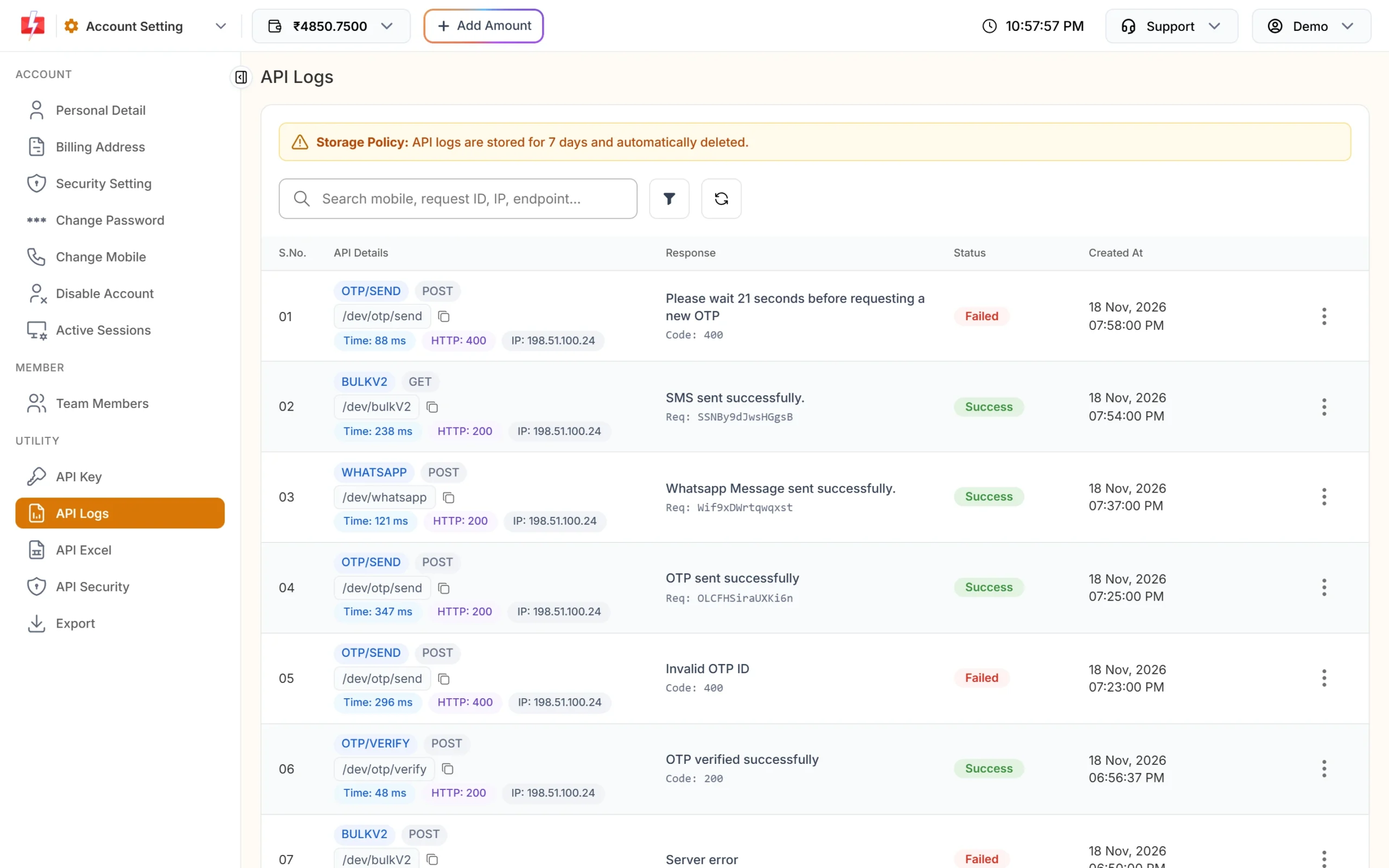
API Logs shows each WhatsApp call and its response. -
Search and open the call
Search by mobile number, request ID, IP or endpoint, or filter by HTTP code. Open the row menu and choose View Details to see the full request and response.
Calls with a wrong or missing API key are not logged, because we cannot tell which account they belong to. If you see nothing, check the key first.
Handle errors in your code
import requests

r = requests.post("https://www.fast2sms.com/dev/whatsapp",
                  headers={"authorization": "YOUR_API_KEY"},
                  json={"message_id": "20005", "numbers": "9999999999", "variables_values": "1499"},
                  timeout=30)
data = r.json()
if data.get("return") is True:
    print("Queued:", data["request_id"])
elif "errors" in data:
    for field, messages in data["errors"].items():
        print(field, "->", "; ".join(messages))
else:
    print("Error", data.get("status_code"), data.get("message"))
Retry only errors that can pass on a second try, such as a network timeout, “Messaging will be available 10 minutes after onboarding.” or a low balance after a recharge. Retrying a wrong Message ID or a bad number gives the same error.
Frequently asked questions
Am I charged when the WhatsApp API returns an error?
No. When return is false, nothing was queued and nothing was debited.
Why does the error say Bulk SMS when I sent WhatsApp?
The low-balance text is shared by several channels. It still means your wallet balance is too low for this WhatsApp send.
The API said success but the message failed. Why?
WhatsApp can reject a message after Fast2SMS accepts it, for example when the number is not on WhatsApp or the 24-hour window is closed. Check the reason in the delivery report.
Where do I find message_id and phone_number_id?
On the template card and the Numbers tab in WhatsApp Manager, or by API with /dev/dlt_manager/whatsapp?type=template. See send WhatsApp template messages by API.
What does error 414 mean on the WhatsApp API?
API Security is on and the IP address of your server is not whitelisted. Add the IP, or switch API Security off.