
WhatsApp error 131048 “Spam rate limit hit” means Meta has restricted how many messages your business number can send, because too many of your recent messages were blocked, reported or ignored by the people who got them. It is a warning about the health of your number. This page explains what triggers it, how to check your number in Fast2SMS and what to change before you send again.
What error 131048 means
Meta’s description, at the time of writing, is that the message failed because there are restrictions on how many messages can be sent from this phone number. Meta’s advice is to check the quality status of the number and review template quality. In simple words: customers have been reacting badly to your messages, so WhatsApp is slowing your number down to protect them.
131048 is different from the normal throughput limit (error 130429) and from the per-recipient limit (error 131056). Those are about speed. 131048 is about how people respond to what you send.
Common reasons
- Sending marketing messages to people who never opted in, or to an old or bought list.
- Many customers blocking the number or tapping “Report” after a campaign.
- Sending the same offer too often, or at odd hours.
- Templates that do not say clearly who you are, or that look like spam (all caps, too many links, misleading text).
- No easy way for people to stop receiving offers, so they block instead.
How to check your number in Fast2SMS
-
Open WhatsApp Manager and look at Quality
Go to WhatsApp Manager > Numbers. Under Messaging limit, each number shows its tier (for example “2k customers/24 hr”) and a line such as “Quality: High | Used Limit: 46”. Quality shows as High, Medium or Low. Click Sync Details to fetch the latest values from Meta.
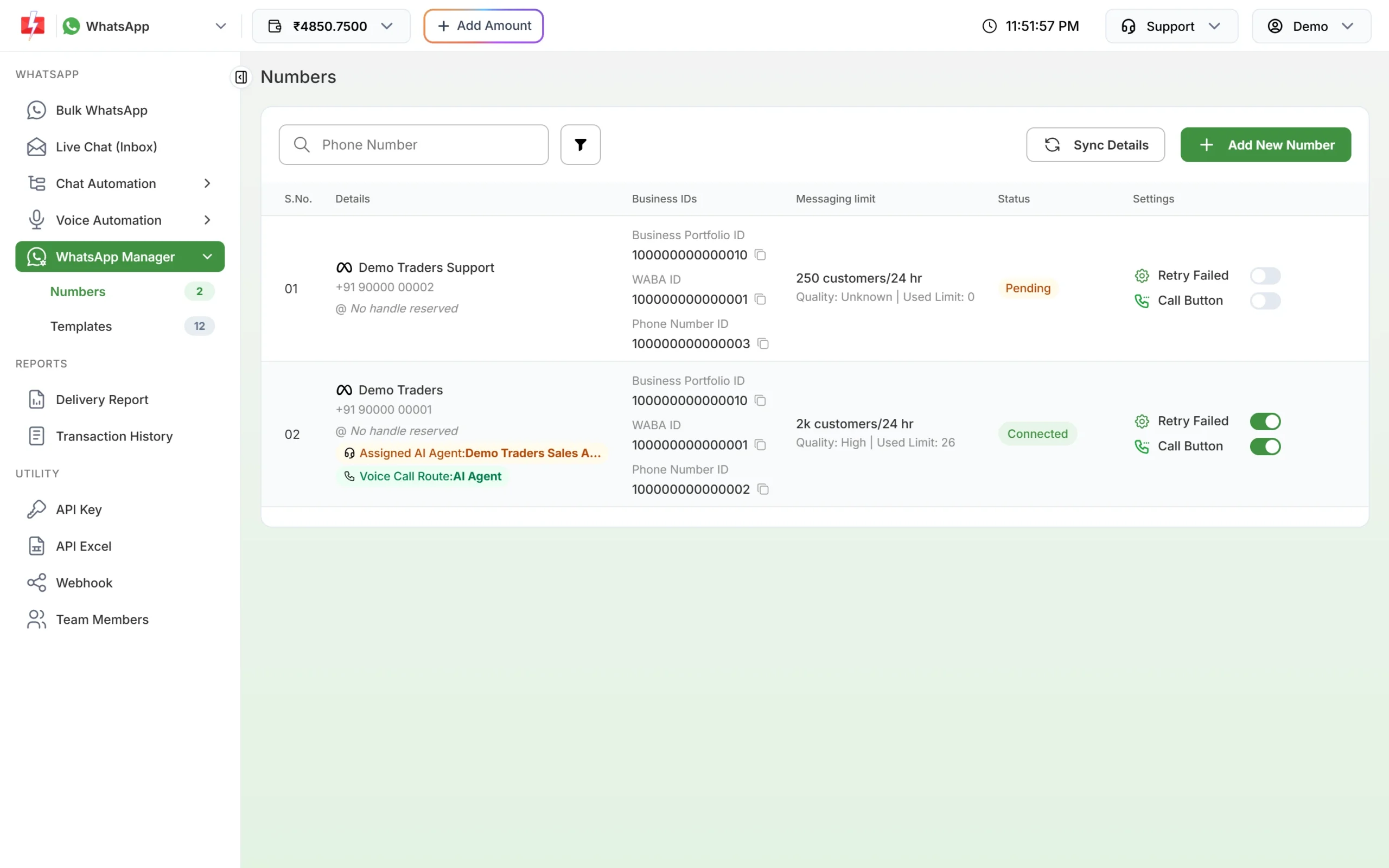
Quality and messaging limit for each number. -
Check your templates
Open WhatsApp Manager > Templates, click the filter button and choose the status PAUSED. Templates that Meta has PAUSED for low quality are a strong sign that one of your messages is causing blocks or reports.
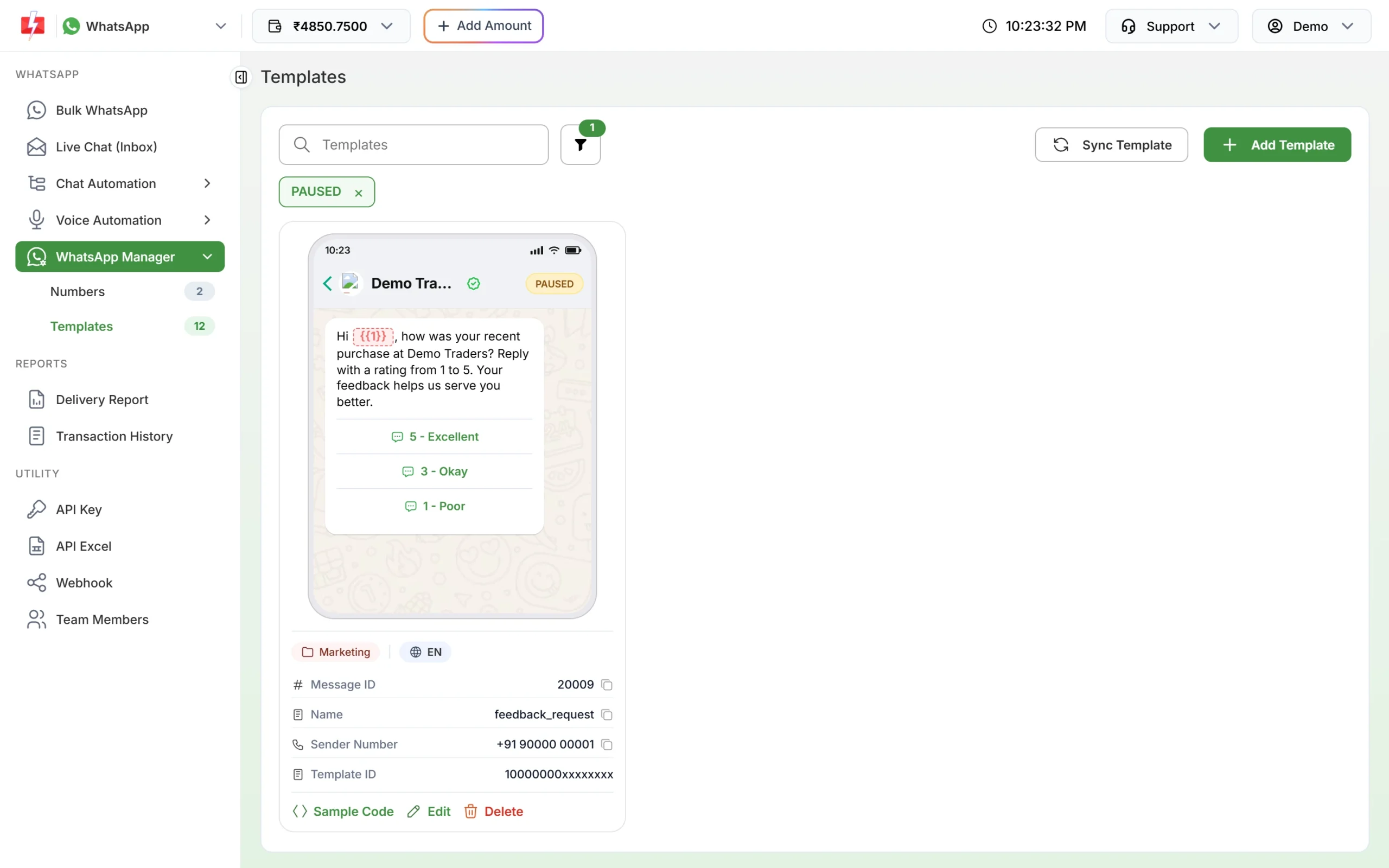
Paused templates point to the message customers did not like. -
Find the affected campaigns
In Delivery Report > WhatsApp Report, filter by Failed and open the campaign. The Description column shows Meta’s text with “(Error: 131048)” for each number that was not sent.
How to fix error 131048
- Stop marketing campaigns for a while. Keep sending only the messages customers expect, such as order and payment updates.
- Clean your list. Send only to people who gave you their number and agreed to WhatsApp messages. Remove numbers that never read or reply.
- Fix or replace the problem template. Make it clear who is writing and why. Add your business name, keep it short and relevant, and add an opt-out quick reply such as “Stop offers”.
- Send less often. Space out marketing campaigns and avoid repeating the same offer.
- Watch the quality rating. When quality goes back to High and messages stop failing with 131048, restart marketing slowly with your most engaged customers first.
Are failed messages charged?
No. Fast2SMS refunds every failed WhatsApp message to your wallet automatically, about two days after sending, whatever the error code. You can see the refunds in Delivery Report > WhatsApp Report > Refund.
Frequently asked questions
How long does the 131048 restriction last?
Meta does not publish a fixed time. It lifts as your number’s quality improves, so focus on fewer blocks and reports.
Is my number banned if I get 131048?
No. 131048 is a sending restriction, not a ban. If quality keeps falling, though, Meta can lower your limits further, so act on it quickly.
Can Fast2SMS remove the 131048 limit?
No. Meta applies it to your number based on customer feedback. Fast2SMS shows you the quality and failed messages so you can fix the cause.
Does 131048 affect utility and OTP messages too?
The restriction is on the phone number, so other messages from it can fail too. That is why stopping risky marketing quickly matters.
What is a good opt-out option?
Add a quick reply button like “Stop offers” to marketing templates and stop sending offers to anyone who taps it. People who can opt out easily block less.