
WhatsApp error 132001 “Template name does not exist in the translation” means Meta could not find an approved template with the name and language you asked for, on the WhatsApp Business Account of the sending number. Usually the name or language code is wrong, the template is not approved yet, or it belongs to a different account. This page explains how to find the cause and fix it in Fast2SMS.
What error 132001 means
Meta’s description, at the time of writing, is that the template does not exist in the specified language, or has not been approved. Meta looks for an exact match of three things:
- the template name, spelt exactly, in lower case with underscores (for example
festive_sale_offer), - the language code the template was approved in (for example
en,hiorgu), - the WhatsApp Business Account of the number you send from.
If any one of them is different, or the template’s status is not APPROVED, the message fails with 132001.
Common causes
| Cause | Fix |
|---|---|
| Name typed with a typo, capital letters or spaces | Copy the name from the template card |
Wrong language code, for example en_US for a template approved as en |
Use the language shown on the template card |
| Template still PENDING, or REJECTED | Wait for approval, or fix and resubmit |
| Template deleted in Fast2SMS or in Meta’s WhatsApp Manager | Create it again and wait for approval |
| Template created on another number’s account | Send from a number in the same WhatsApp Business Account, or create the template there |
How to fix it in Fast2SMS
-
Check the template card
Open WhatsApp Manager > Templates. Each card shows the status badge, category, language, Message ID, Name, Sender Number and Meta’s Template ID. Only templates with the green APPROVED badge can be sent.
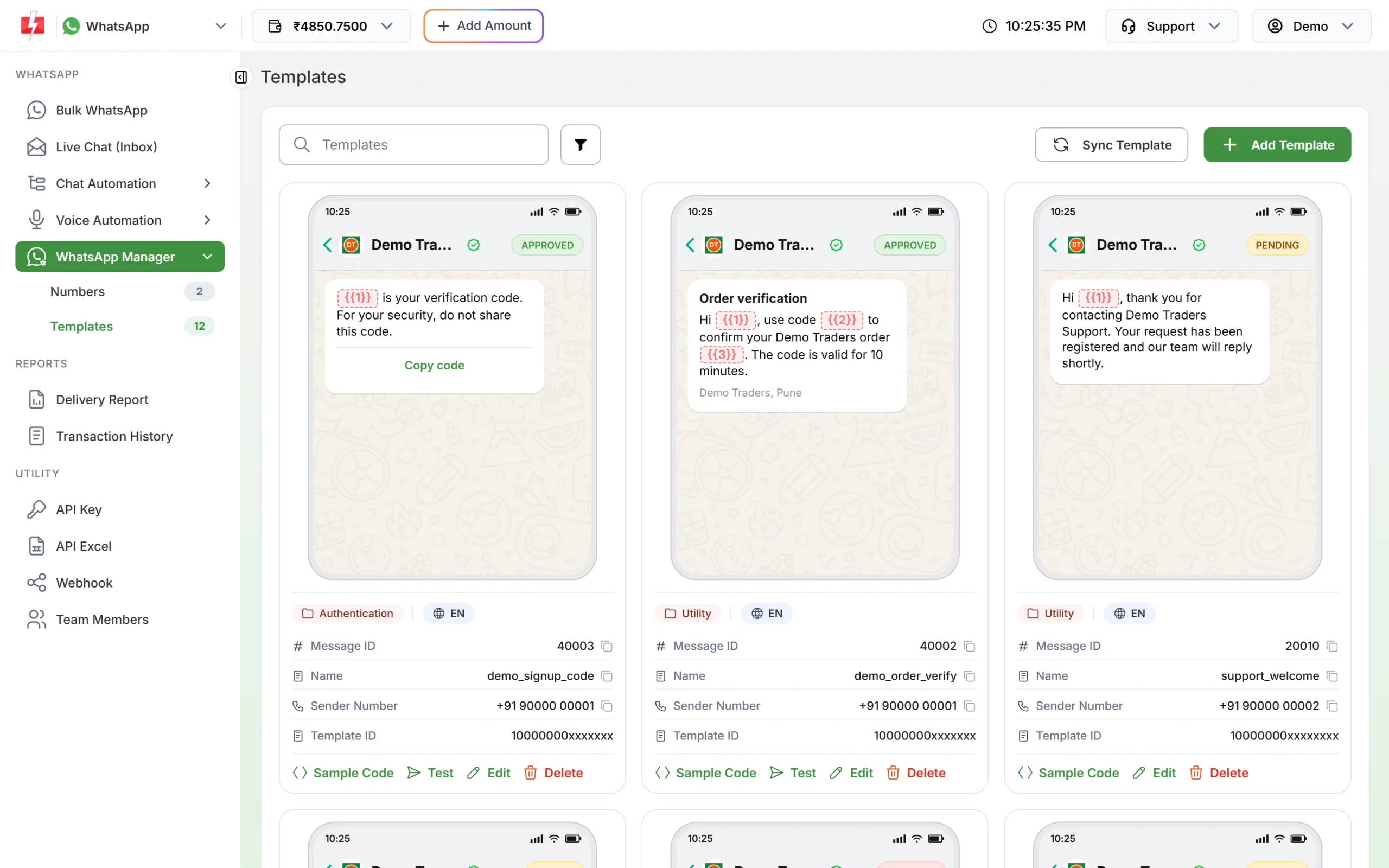
Name, language, sender number and status on each card. -
Sync templates from Meta
If you created, edited or deleted templates in Meta’s own WhatsApp Manager, click Sync Template so Fast2SMS shows the latest list and statuses.
-
Use the Message ID in the simple API
With the Fast2SMS template API (
/dev/whatsapp) you do not send the name and language at all. You send the template’s Message ID from the card, and Fast2SMS adds the right name, language and account. If the template is not approved, Fast2SMS refuses the request straight away with “WhatsApp Template ID (message_id) is invalid or not approved.” The Sample Code button gives a ready request.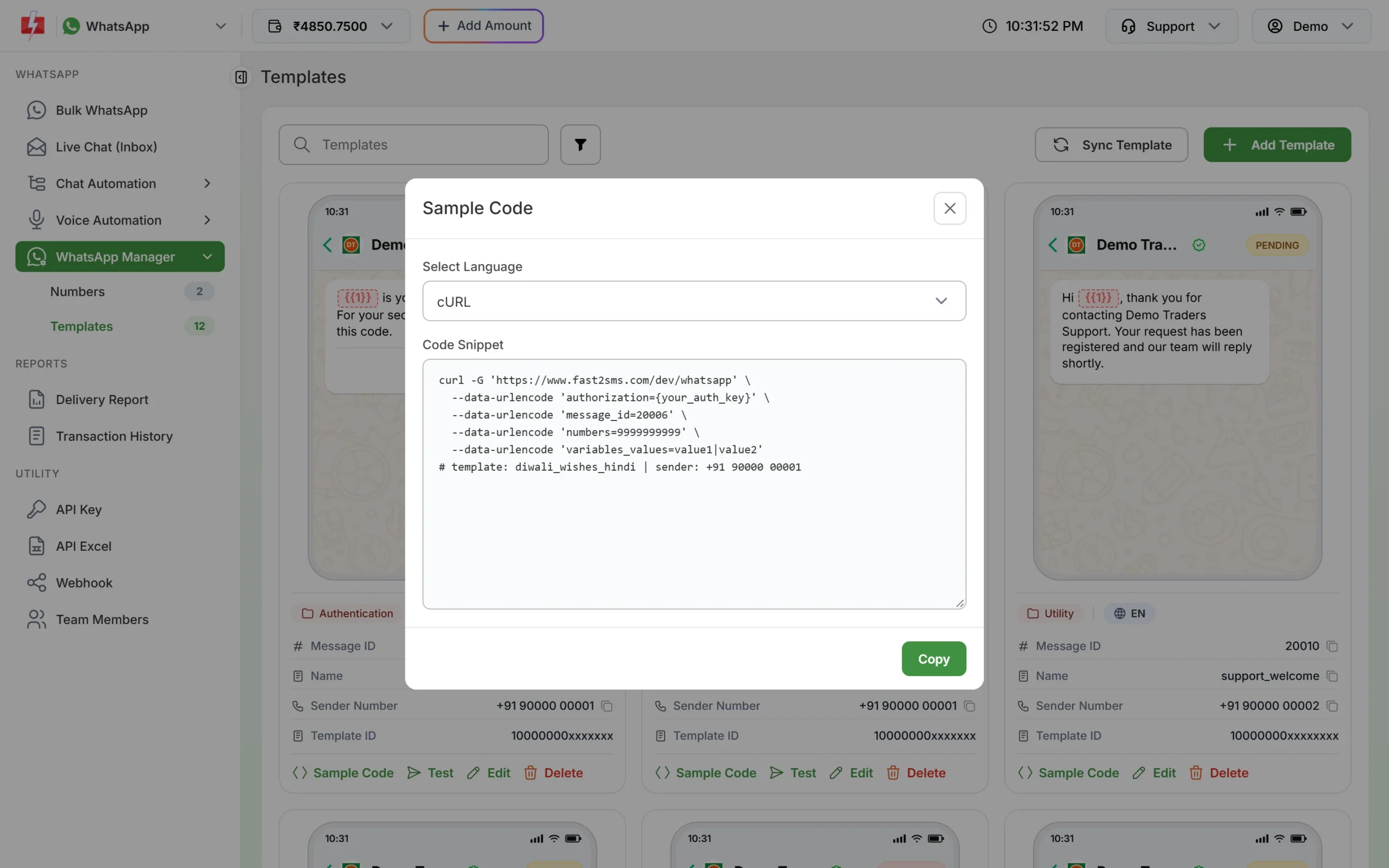
Sample Code uses the Message ID, not the name. -
In the Meta-format API, copy the name and language exactly
If you send Meta’s JSON through Fast2SMS, set
template.nameandtemplate.language.codeexactly as approved, and send from aphone_number_idin the same WhatsApp Business Account.
Templates that change status after you queue a campaign
If a template is paused or rejected by Meta after you scheduled a campaign, the queued messages fail with “Template is PAUSED” or “Template is REJECTED” in the Delivery Report. Failed messages are refunded to your wallet automatically, about two days after sending.
Frequently asked questions
My template is approved. Why do I still get 132001?
Check the language code and the sending number. A template approved in Hindi cannot be sent with the English code, and a template from one account cannot be sent from a number in another account.
Is the template name case-sensitive?
Template names use lower-case letters, numbers and underscores only. Copy the name from the card to avoid mistakes.
Can I use the same template on two numbers?
A template belongs to a WhatsApp Business Account. Numbers in the same account can share it; for a number in another account, create the template there.
How long after approval can I send?
As soon as the card shows APPROVED. If it still shows PENDING, click Sync Template to fetch the latest status.
Are 132001 failures charged?
No. Every failed WhatsApp message is refunded to your Fast2SMS wallet automatically.