
If you send WhatsApp marketing in India, the Digital Personal Data Protection Act, 2023 (DPDP Act) and the DPDP Rules, 2025 apply to the phone numbers, names and chats you collect. In short: get clear consent for a stated purpose, tell customers how to withdraw it, stop when they do, keep their data safe and delete it when you no longer need it. This page explains the WhatsApp marketing side of the DPDP Act in plain words. It is general information, not legal advice.
The DPDP Act and WhatsApp marketing in one minute
The Act applies to digital personal data: any data about a person who can be identified from it, collected in digital form or typed in later from paper (sections 2 and 3). A customer’s mobile number with a name, an order history or a WhatsApp chat is personal data. Personal or domestic use is outside the Act, but a business list is not.
The Act uses a few terms you will see again and again:
| Term in the Act | What it means for a WhatsApp campaign |
|---|---|
| Data Principal | Your customer, the person the phone number belongs to |
| Data Fiduciary | Your business, because you decide why and how the numbers are used |
| Data Processor | A service that processes the data on your behalf, under a contract |
| Data Protection Board | The body that hears complaints and can impose penalties |
| Consent Manager | A registered Indian company that lets people give, review and withdraw consent in one place |
Section 8(1) says the business stays responsible for compliance, even for processing done for it by a Data Processor. Using a messaging platform does not move that duty to the platform.
When the rules start
The Ministry of Electronics and IT notified the DPDP Rules, 2025 on 13 November 2025 (G.S.R. 846(E)). The Rules start in three steps:
| What | From when |
|---|---|
| Rules 1, 2 and 17 to 21 (definitions, the Data Protection Board) | 13 November 2025, the date of publication |
| Rule 4 (Consent Managers) | One year after publication, November 2026 |
| Rules 3, 5 to 16, 22 and 23 (notice, security, breach reporting, erasure, rights, children’s data) | Eighteen months after publication, around May 2027 |
Most of the duties that matter for marketing sit in that last group. That gives you time, but building consent records and opt-out handling takes months, so start now. The primary texts are the DPDP Act, 2023 (MeitY), the DPDP Rules, 2025 (Gazette of India) and the PIB release of 14 November 2025.
Consent for WhatsApp marketing
Section 6 says consent must be free, specific, informed, unconditional and unambiguous, with a clear affirmative action, and limited to the data needed for the stated purpose. For WhatsApp offers, that means:
- The customer takes an action to agree, such as ticking an empty box, tapping a button or signing a form. Do not pre-tick the box.
- The purpose is specific: “offers and new arrivals on WhatsApp”, not “communication”.
- Marketing consent is not a condition of buying. Ask for it separately from order updates.
- You ask only for the data you need. A WhatsApp offer list needs a number and maybe a name, not a date of birth.
WhatsApp has its own rule on top of the law. Meta’s opt-in guide says you must get opt-in before messaging people, clearly state that the person is opting in to messages from your business, name your business, and follow the law that applies to you. One clear, unticked checkbox that names your business and WhatsApp can serve both.
The notice you must show with the consent request
Section 5 and Rule 3 say every consent request must come with, or after, a notice. The notice must stand on its own (not hidden inside your general terms), use clear and plain language, and include at least:
- An itemised list of the personal data, for example “mobile number and first name”.
- The specific purpose, for example “to send you offers and new arrivals on WhatsApp”.
- A link to your website or app and the way to withdraw consent, which must be as easy as giving it.
- How to exercise the customer’s rights under the Act.
- How to complain to the Data Protection Board.
Rule 9 also asks you to publish on your website or app the contact details of a person who can answer questions about your use of personal data.
Messages that do not need fresh consent
Section 7(a) allows processing for the specified purpose for which a customer voluntarily gave you their data, as long as they have not said they do not consent. The Act’s own example is a pharmacy that sends a payment receipt to the number the buyer shared for that receipt. For WhatsApp, this fits a utility message the customer asked for, such as an order or payment update. It covers that one purpose. It is not a general permission to send offers later, so keep marketing consent separate.
Opt-out: withdrawing consent must be as easy as giving it
Section 6(4) gives customers the right to withdraw consent at any time, and withdrawing must be about as easy as giving consent was. Section 6(6) says you must then stop processing within a reasonable time and make your Data Processors stop too. If a customer opted in with one tap, one tap or one word should be enough to opt out.
On WhatsApp you can do this with tools you already have in Fast2SMS:
-
Add a “Stop promotions” button to marketing templates
In WhatsApp Manager > Templates > Add Template, choose Marketing, write the body and click Add Button. Add a Custom (quick reply) button with the text “Stop promotions”.
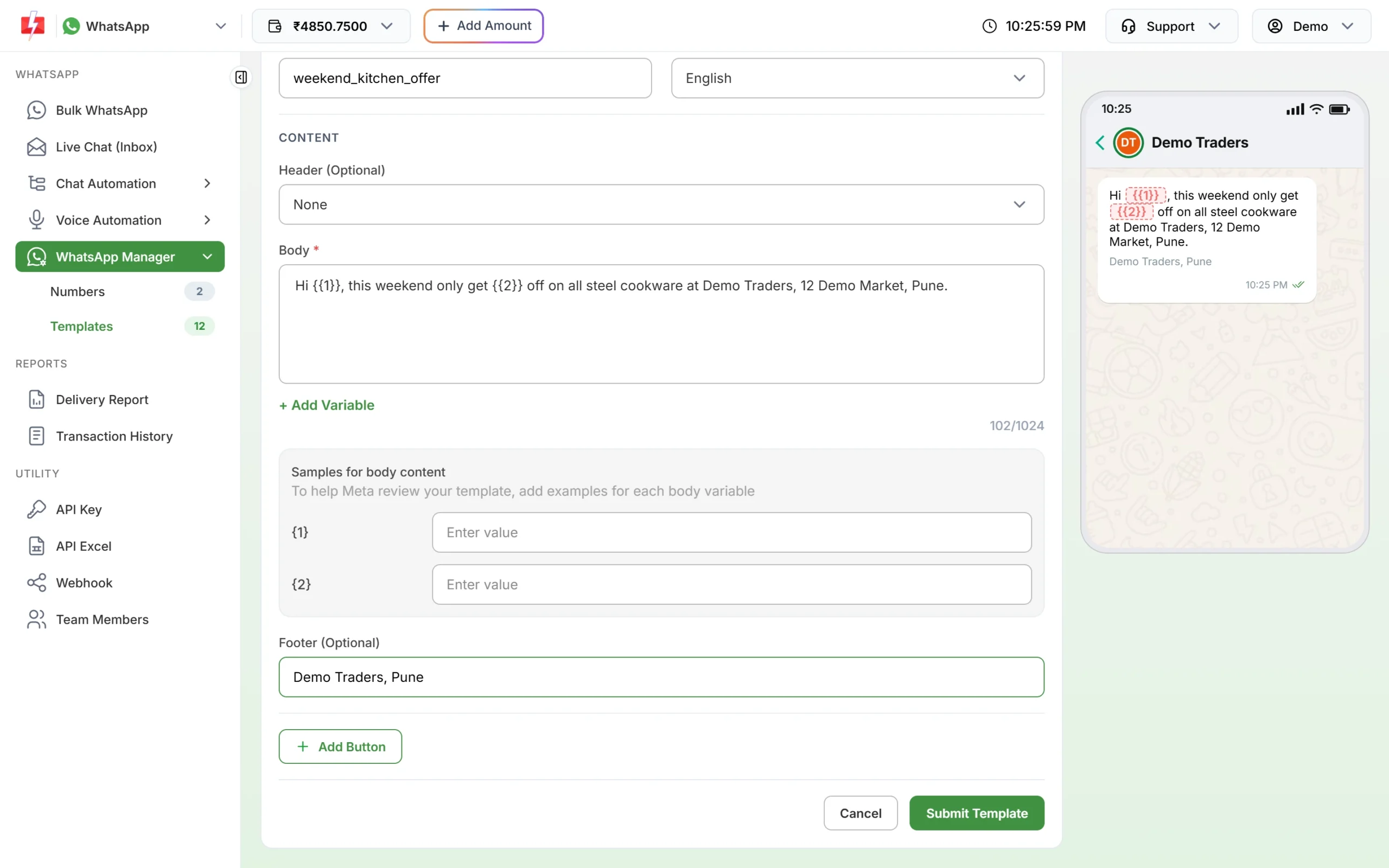
Add a quick reply button so customers can opt out in one tap. -
Confirm the opt-out with an auto reply
In Chat Automation > Inbox Settings, create an auto reply for the keywords “Stop promotions”, “STOP” and “unsubscribe” that confirms you will not send offers again. Our guide on WhatsApp opt-in and opt-out rules shows the exact settings.
-
Remove the number before the next campaign
Bulk WhatsApp sends to every valid number in the list you give it. Take opted-out numbers out of your Address Book group or Excel file before each campaign, and keep a dated record of the request.
WhatsApp also lets people stop marketing messages from a business inside the app. A marketing template sent to such a person fails with error 131050. Treat that as an opt-out too.
How long you can keep WhatsApp data
Section 8(7) says you must erase personal data when the customer withdraws consent, or as soon as it is reasonable to assume the purpose is no longer served, whichever is earlier, unless another law requires you to keep it. You must also make your Data Processor erase what you gave it.
The Rules add two points:
- At least one year for logs (Rule 8(3)). You must keep personal data, traffic data and processing logs for at least one year from the date of processing, for the purposes listed in the Seventh Schedule, and then erase them unless another law needs longer.
- Fixed periods for very large platforms (Rule 8(1) and the Third Schedule). E-commerce entities and social media intermediaries with at least two crore registered users in India, and online gaming intermediaries with at least fifty lakh, must erase data three years after the user last engaged, and warn the user at least 48 hours before.
Write down how long you keep chat history, campaign lists and exported files, and why. A few facts help you plan:
- Meta says Cloud API keeps message content for a maximum of 30 days, and deletes user identifiers within 30 days of a message’s last status update (Meta: data privacy and security).
- In Fast2SMS Live Chat, media files are available for 30 days by default.
- Report exports in Fast2SMS stay available for 48 hours and are then removed automatically. Copies you download to your computer are your responsibility.
Keeping customer data safe
Section 8(5) requires reasonable security safeguards. Rule 6 lists the minimum: protect data with measures such as encryption or masking, control who can access it, keep access logs, have backups, keep those logs for a year, and put security terms in your contracts with Data Processors. For a WhatsApp team, the practical steps are:
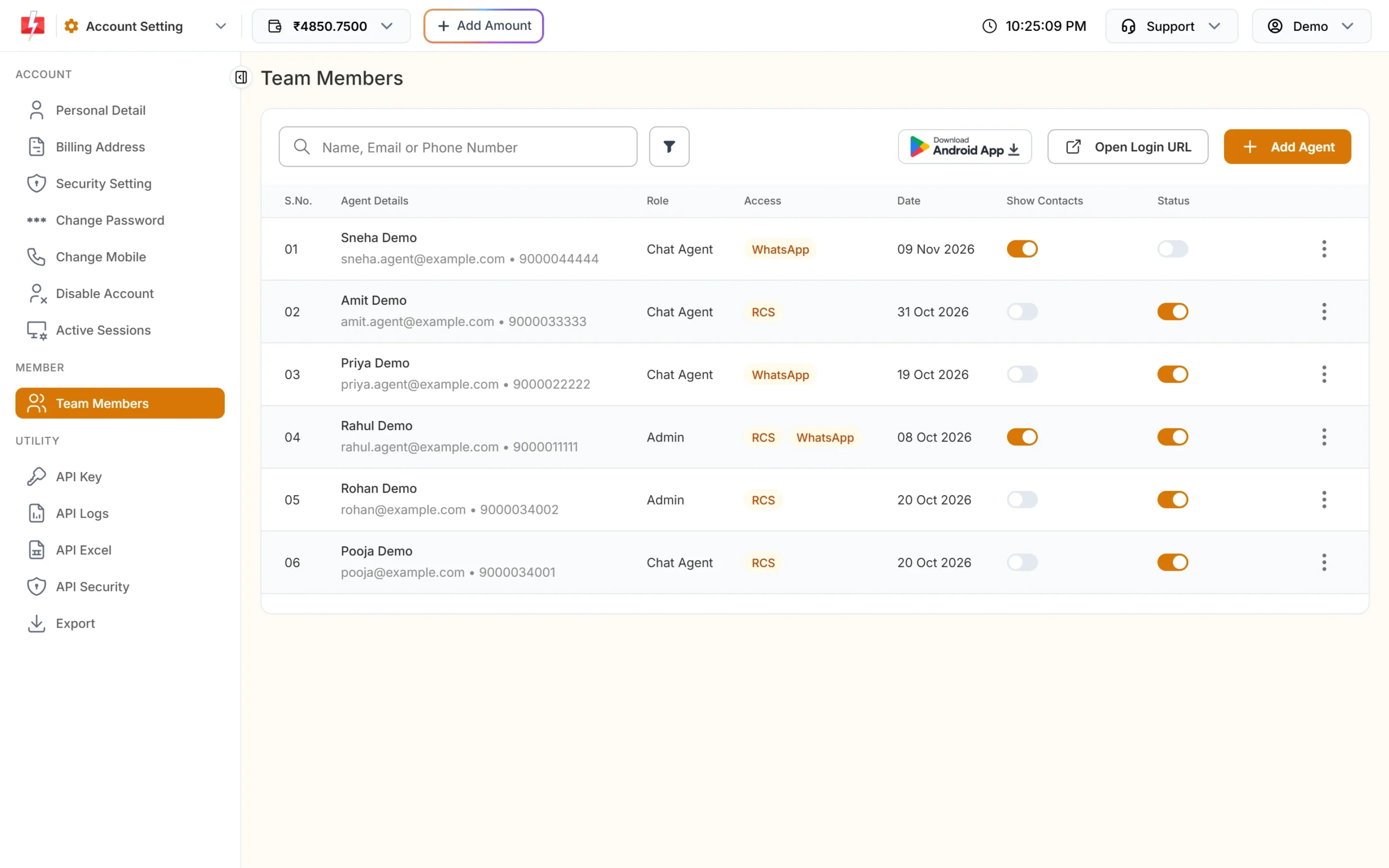
- Give each person their own login. In Team Members, a Chat Agent sees only chats assigned to them, while an Admin sees all chats.
- Leave Show Contacts off for agents who do not need your Address Book. It is off by default.
- Turn off agents who leave, and turn on two-factor login for the account owner.
- Do not ask customers to send card numbers, bank account numbers or national ID numbers on WhatsApp. Meta’s template review also rejects templates that request them.
If customer data leaks
Rule 7 sets the steps after a personal data breach:
- Tell each affected customer without delay, in plain language: what happened, the likely impact on them, what you are doing, what they can do, and who to contact.
- Tell the Data Protection Board without delay, and send a detailed report within 72 hours of becoming aware of the breach (or a longer period the Board allows on written request).
A customer Excel file shared with the wrong people, or a former employee who still has a login, are everyday ways a breach can happen.
Customer rights you need to handle
Customers can ask to access, correct, update or erase their data, and can nominate someone to act for them. Rule 14 asks you to publish how to make such a request and to answer grievances within a period of not more than 90 days. On WhatsApp, a simple route is to accept these requests by chat and by email, and keep a log of each one.
Children’s data
Section 9 and Rule 10 require verifiable consent from a parent before processing a child’s personal data (a child is anyone under 18). Schools, coaching institutes and edtech brands should collect WhatsApp consent from parents and message the parent’s number for fee reminders, results and offers.
Penalties
The Schedule to the Act lists the penalties the Board can impose. Failing to take reasonable security safeguards can lead to a penalty of up to ₹250 crore. Failing to report a breach, and breaking the extra rules for children’s data, can each lead to up to ₹200 crore. Other breaches of the Act or Rules can lead to up to ₹50 crore.
DPDP checklist for WhatsApp marketing
| Do this | Why |
|---|---|
| Use a separate, unticked WhatsApp marketing checkbox that names your business | Section 6 consent and Meta’s opt-in rule |
| Show a short notice with the data, purpose, withdrawal method and complaint route | Section 5 and Rule 3 |
| Record who opted in, when, where and to what | So you can show the consent if asked |
| Add a Stop promotions button and a STOP auto reply | Withdrawal as easy as giving consent |
| Remove opted-out numbers before every campaign | Section 6(6): stop processing after withdrawal |
| Set and write down how long you keep lists, chats and exports | Section 8(7) and Rule 8 |
| Use separate team logins with the least access needed | Rule 6 access control |
| Publish a contact for data questions and a way to raise requests | Rules 9 and 14 |
Frequently asked questions
Does the DPDP Act apply to WhatsApp marketing?
Yes. The mobile numbers, names and chats you use for WhatsApp campaigns are digital personal data, so the Act applies to how you collect, use, keep and delete them.
Is WhatsApp opt-in enough for DPDP compliance?
Meta’s opt-in is a platform rule. The Act adds its own consent standard, a notice, easy withdrawal, erasure and security duties. A well-written opt-in can meet both, but the notice, records and deletion are extra work.
Can I message customers who bought from me before?
You can send them messages for the purpose they gave you their number for, such as an order update. For offers, ask for marketing consent first.
Can I use a bought or downloaded number list?
No. Those people never gave you consent, so the list fails both the Act and WhatsApp’s opt-in rule, and sending to it also brings blocks and reports.
When do the DPDP Rules start?
The Rules were published on 13 November 2025. The Consent Manager rule started one year later, and the main duties on notice, security, breaches, erasure and rights start eighteen months after publication, around May 2027.
Are small businesses exempt?
The Act lets the government notify some businesses, including startups, as exempt from certain sections (section 17(3)). Unless your business is covered by such a notification, plan to follow the Act.
Who is responsible if my messaging provider makes a mistake?
Under section 8(1), the business that decides the purpose (you) stays responsible for compliance, including for processing done on its behalf. Choose providers carefully and have a written contract.
Is this legal advice?
No. This page explains the Act and Rules in plain words. For decisions about your business, speak to a lawyer.