
No, you do not pay for failed WhatsApp messages on Fast2SMS. The campaign amount is taken from your wallet when you send, and every message that fails, or never gets a delivery report, is refunded to your wallet automatically. This guide explains when the refund arrives, which messages are refunded, and where to see each refund in your panel.
How charging and refunds work
- When you send: the full campaign amount (valid numbers x rate) is debited from your wallet as soon as the campaign is queued. You see a row such as “25 WhatsApp (Marketing)” in Transaction History.
- Meta reports each message: Sent, Delivered, Read or Failed.
- Refund run: every day in the early morning, Fast2SMS checks campaigns sent two days earlier. Every message that is Failed or still Pending is refunded.
- You see the credit in your wallet, a “Failed WhatsApp Refund” row in Transaction History, and an SMS with the amount and your new balance.
The refund does not depend on the reason. A number that is not on WhatsApp, error 131049, error 131026, a paused template, a rate limit: every failed message is refunded.
Which messages are refunded
| Message result | Charged? |
|---|---|
| Delivered or Read | Yes |
| Failed (any error) | No, refunded automatically |
| Pending (never processed) | No, refunded automatically |
| Stuck at Sent, never delivered | Refunded in the monthly clean-up: on the 1st of each month, messages from two months earlier that never got past Sent are marked failed and refunded |
| Invalid number in your list | Never charged. It is removed before sending. |
| Duplicate number | Sent and charged once only |
| Scheduled campaign you cancel | Full amount credited back straight away |
| Live Chat reply that fails | Refunded the same way |
| Smart OTP WhatsApp message that fails | Refunded the same way (shown as “Failed Smart OTP WhatsApp Refund”) |
How to check your WhatsApp refunds
-
Find the failed messages in the Delivery Report
Go to Delivery Report in the WhatsApp sidebar, open the campaign and look at the Receivers list in Delivery Details. Failed rows show the reason in the Description column. Note the Request ID at the top, for example “#W95E7Q8621FCQCA (web)”.
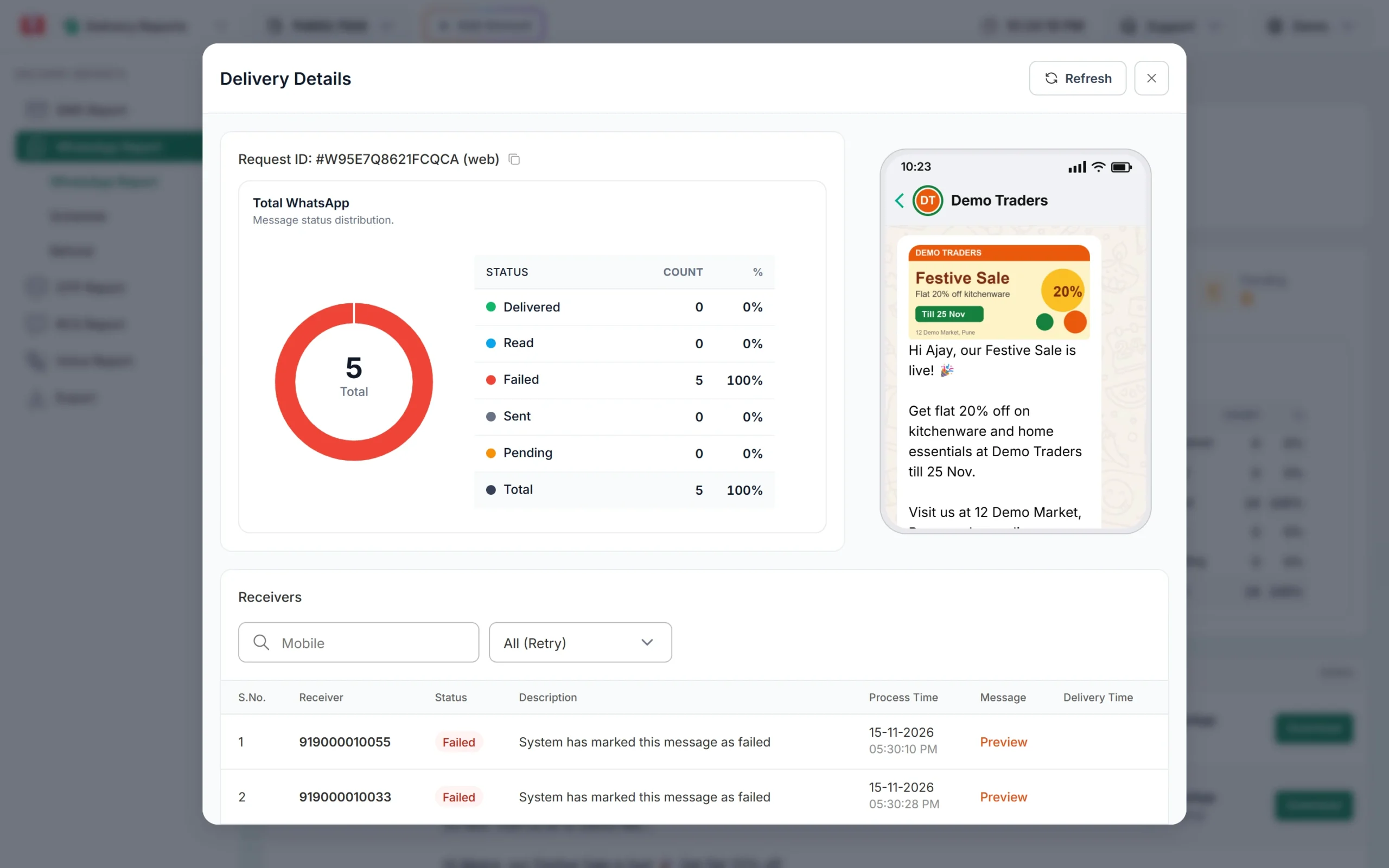
A campaign where all 5 messages failed. -
See the refund in Transaction History
Open Transaction History in the WhatsApp sidebar. The refund appears as a Credited row named “Failed WhatsApp Refund – <send date> (<Request ID>)” with a “Refund” tag. In the example, the campaign sent on 15-11-2026 was refunded on 17-11-2026 at 03:40 AM: ₹4.75 for 5 failed marketing messages.
Sending in bulk? For high WhatsApp volumes our team offers discounted rates. Talk to our team or see WhatsApp pricing.
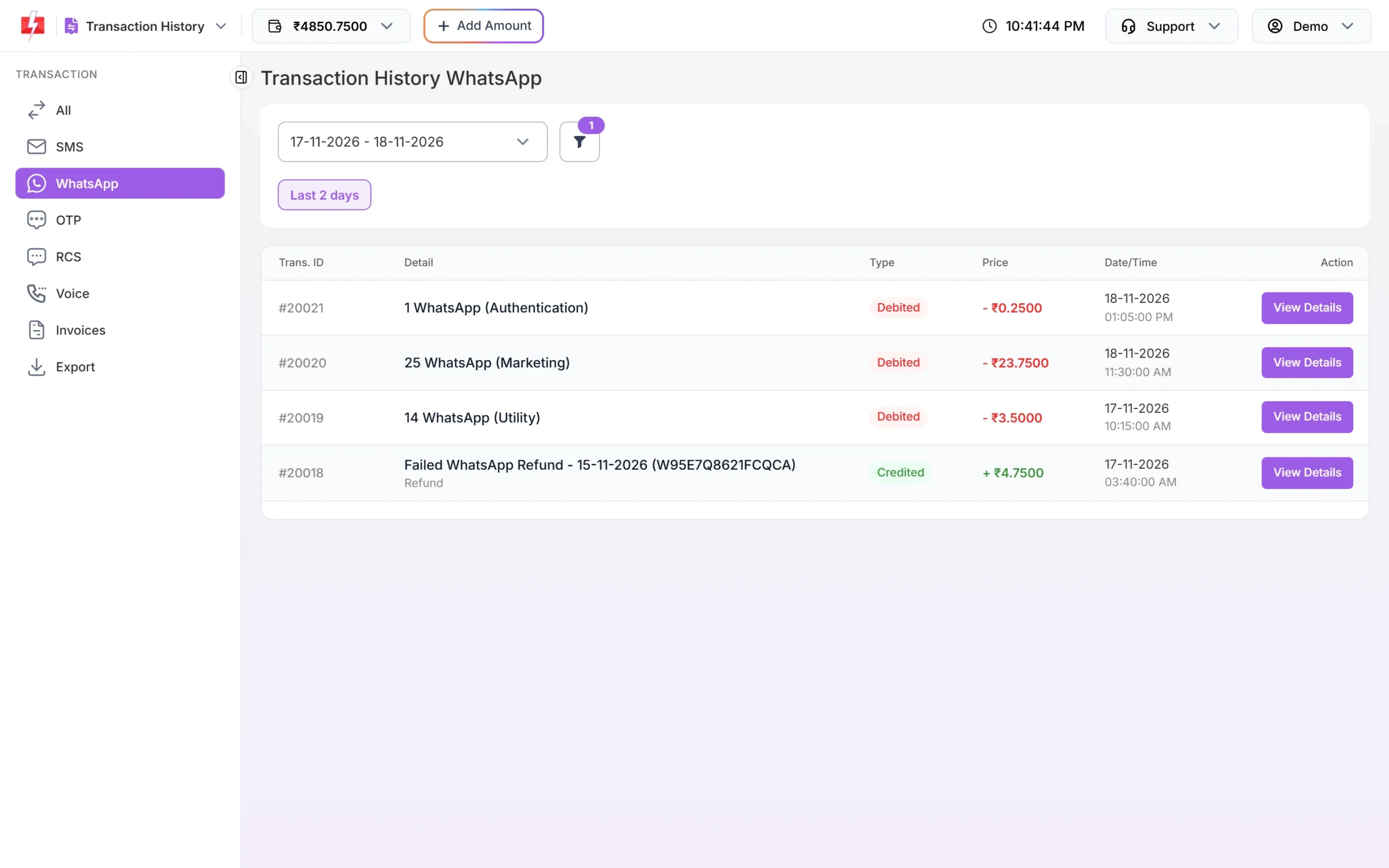
The refund row carries the same Request ID as the campaign. Use the filter’s Refund tab and choose “Refunds only” to list just the refunds.
-
See the month’s totals in the Refund report
Go to Delivery Report > Refund (or Delivery Reports > WhatsApp Report > Refund). Pick a month. The cards show Total Messages, Amount Debited, Amount Refunded and Net Amount. The table lists every campaign of the month with Total, Failed, Debited, Refunded and the net Amount.
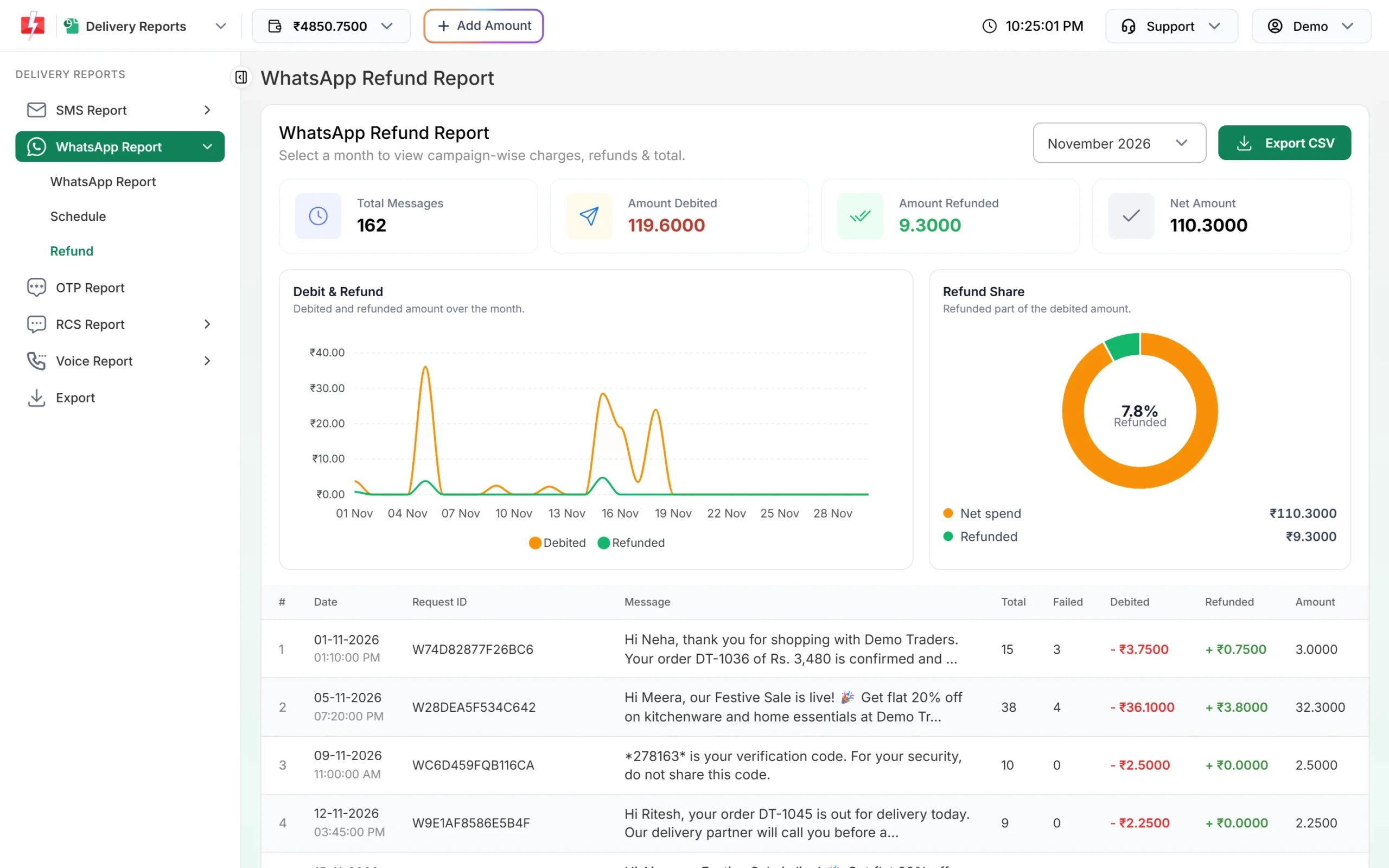
Monthly view of what you paid and what came back. Click Export CSV to download the month. The file is prepared in the background and appears under Export. The Refund report covers January 2026 onwards.
When will my refund arrive?
Refunds are added automatically about two days after the send date, in the early morning. A campaign sent on Monday is refunded on Wednesday morning. Very recent campaigns may still show Pending in the Refund report’s Failed count before the refund run, so check again after two days.
Messages that stay at Sent (accepted by WhatsApp but never delivered or failed) are not refunded in the daily run. They are cleared in the monthly run on the 1st, which covers messages from two months earlier.
Common questions about the Refund report
- Why is Failed higher than what was refunded? The Failed column counts failed, rejected and pending messages. Pending ones may still be refunded in the next run.
- Why does a campaign show ₹0 refunded? All its messages were delivered or read, so nothing was due back.
- Why don’t I see my campaign? Check the month. The report lists campaigns by the month they were sent.
Retry Failed: a second chance for some failures
In WhatsApp Manager > Numbers, each number has a Retry Failed switch. When it is on, Fast2SMS tries again the next morning for yesterday’s template messages that failed with error 131026 (message undeliverable) or 131049 (healthy ecosystem). Retried messages show “Yes (Retry)” in the Receivers filter of Delivery Details.
Frequently asked questions
Am I charged for undelivered WhatsApp messages?
No. Fast2SMS bills WhatsApp on delivery. Failed and undelivered messages are refunded to your wallet automatically.
Why was money taken before the messages were delivered?
The full campaign amount is held from your wallet when you send. Whatever fails is refunded about two days later.
Do I need to ask support for a refund?
No. Refunds are automatic. You get an SMS and a Transaction History entry for each one.
Are messages to numbers not on WhatsApp refunded?
Yes. They fail with a reason such as “Message Undeliverable (Error: 131026)” and are refunded like any other failure.
Is the 131049 healthy ecosystem error refunded?
Yes. Every failed message is refunded, whatever the error code.
What if I cancel a scheduled campaign?
The full amount is credited back to your wallet as soon as you cancel, as long as the scheduled time has not passed.