
The WhatsApp green tick is now a blue tick. Meta gives it to an Official Business Account (OBA): a WhatsApp API number of a verified, well-known business. To apply, your business must be verified by Meta, the number must be on the API for at least 30 days with an approved display name and two-step verification, and your business must be notable. This guide explains who qualifies, how to apply and what to do if Meta says no.
यह गाइड हिंदी में पढ़ें: WhatsApp green tick कैसे मिलेगा: शर्तें, आवेदन और reject होने पर क्या करें
Green tick or blue tick: what changed?
For years people called the WhatsApp verified badge the “green tick”. Meta’s current documentation says an Official Business Account shows a blue checkmark next to its name. The meaning is the same: WhatsApp has confirmed that this number belongs to an authentic, notable business. People still search for “WhatsApp green tick”, so you will see both names.
There are now two ways a business can get a verified badge on WhatsApp:
| Official Business Account (OBA) | Meta Verified for business | |
|---|---|---|
| What it is | Badge given by Meta to notable businesses on the WhatsApp Business API | Paid Meta subscription for businesses |
| Cost | No fee to request | Monthly subscription paid to Meta |
| Main condition | Verified business, notable brand, number rules below | Meta checks the business through its activity on Meta apps or documents |
| Guaranteed? | No, Meta reviews each request | No, Meta says a subscription does not guarantee the badge |
| Where you request it | Meta’s WhatsApp Manager, for each phone number | Meta’s subscription flow (launched first on the WhatsApp Business app) |
This guide is about the Official Business Account, because that is the badge for numbers on the WhatsApp Business API, which is what Fast2SMS uses.
Who can get the WhatsApp blue tick (OBA)?
At the time of writing, Meta lists these conditions:
- Business verification done. Your Meta business portfolio must be verified. You do this in Security Center in Meta Business Suite with a document such as your GST certificate.
- 30 days on the platform. The number must be registered on the WhatsApp Business Platform for at least 30 days.
- Approved display name. The number’s display name must be approved. It should be your real business name in normal title case, without emoji or symbols.
- Two-step verification on. The number must have a two-step verification PIN set.
- Policy compliance. You follow the WhatsApp Business Messaging Policy.
- A notable business. Meta describes this as a well-known business with a substantial presence in news articles from publications with large audiences.
Meta also says OBA is not given to test accounts, to employees of a business, or to WhatsApp Business app numbers. If your number is connected through coexistence (the same number on the Business app and the API), ask our team before you apply.
Check that your number is ready
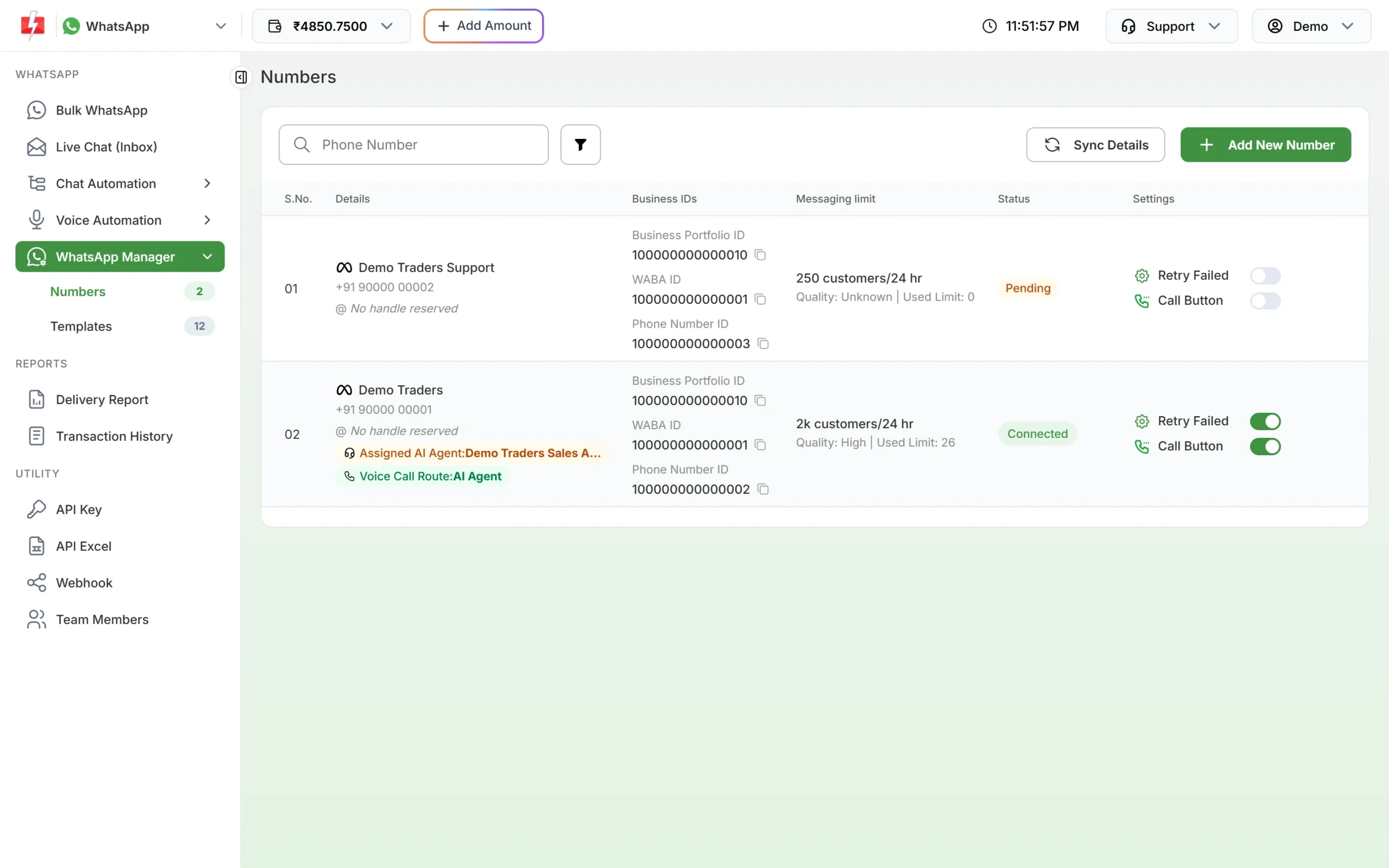
In Fast2SMS, open WhatsApp Manager > Numbers. The number should be Connected and should not show a red Unverified badge, which would mean the display name is not approved yet. Note the Business Portfolio ID and Phone Number ID. You need them in Meta and when you contact support.
How to apply for the WhatsApp green tick (blue tick)
The request is made in Meta’s WhatsApp Manager. Its screens can change slightly over time.
-
Open your number in Meta’s WhatsApp Manager
In Fast2SMS, click the three-dot menu on the number and choose Meta Manager. This opens your WhatsApp account in Meta in a new tab. In Meta’s WhatsApp Manager, go to Overview and click the phone number.
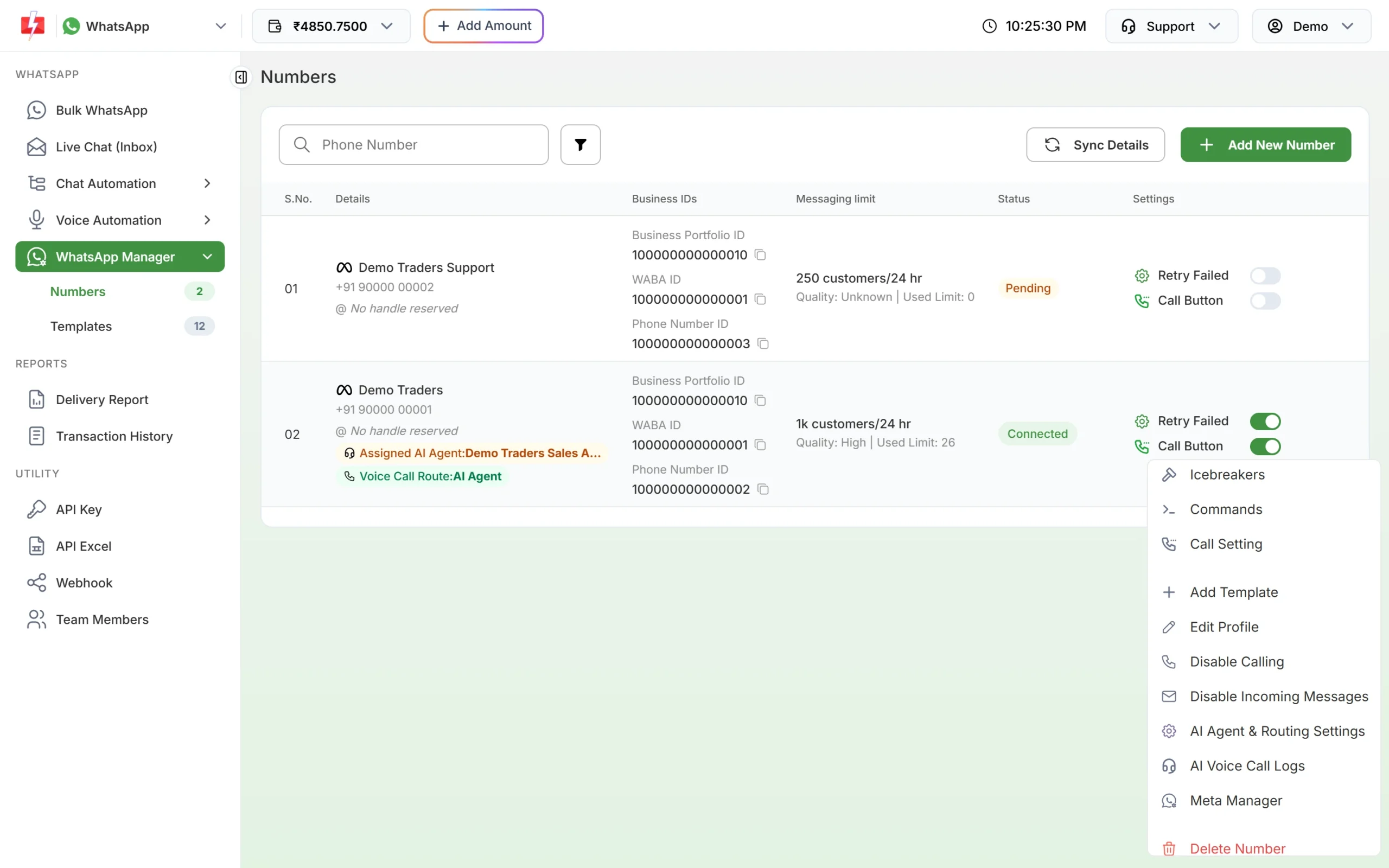
Meta Manager opens your WhatsApp account in Meta. -
Turn on two-step verification
If two-step verification is not on yet, set a 6-digit PIN for the number. Keep the PIN safe. Meta asks for it to change the PIN later or to delete the number.
-
Open the Official business account section
Under Phone numbers, open the Profile tab and find Official business account. Click Submit Request.
-
Add proof that your business is notable
Meta needs to see that your business is well known. When the form asks for supporting links, add links to news articles about your business in well-known publications. Links to your own website or social pages alone do not show this.
-
Wait for Meta’s decision
Meta sends a notification once it has reviewed the request. If it is approved, the blue tick appears next to your business name on that number.
Green tick request rejected: what next?
Meta does not always explain a rejection. These are the usual gaps and what to do:
| Likely reason | What to do |
|---|---|
| Not enough independent news coverage | Wait until your business has real coverage in well-known publications, then apply again. |
| Business not verified | Complete Meta business verification first. |
| Display name not approved or not matching your brand | Fix the display name and wait for approval. |
| Number on the platform for less than 30 days | Wait until it completes 30 days. |
| Two-step verification off | Set the PIN and apply again later. |
After a rejection, Meta asks you to wait 30 days before you submit a new request. You can keep sending messages and editing your business profile (photo, description, email, website) in the meantime. In Fast2SMS you do that from Edit Profile in the number menu.
Do you need the green tick to use the WhatsApp API?
No. Most businesses send WhatsApp messages without a blue tick. Customers still see your approved display name, your profile photo and your business details. What matters more for delivery is a good quality rating, approved templates and messages that customers expect. A complete business profile also builds trust, and you can fill it in Fast2SMS today.
Frequently asked questions
Is the WhatsApp green tick still available?
Yes, but Meta now shows it as a blue checkmark for Official Business Accounts. People still call it the green tick.
How much does the WhatsApp green tick cost?
Requesting an Official Business Account has no fee from Fast2SMS. Meta Verified is a separate paid subscription from Meta, and it does not guarantee a badge either.
How long does green tick approval take?
Meta does not publish a fixed time. You get a notification in Meta once the review is done.
Can a small business get the blue tick?
Only if Meta sees it as notable, which means real coverage in well-known news publications. Size alone does not decide it.
Can I apply again after rejection?
Yes, after 30 days. Use that time to fix the gaps listed above.
Will I lose the blue tick if I change my display name?
It can affect the status. For Official Business Account numbers, Meta handles display name changes through its support team.
Can Fast2SMS get the green tick for me?
We guide you through business verification and the request for free, but only Meta can approve the badge.