
A WhatsApp message that is “Delivered” but not “Read” has reached the customer’s phone, but WhatsApp has not reported that it was opened. Either the customer has not opened the chat yet, or they have turned off read receipts, so it was read but never marked as read. This page explains both cases, how to check read numbers in Fast2SMS and how to get more of your messages read.
Why a WhatsApp message is delivered but not read
- The customer has not opened the chat yet. The message is on their phone and will be marked Read when they open it.
- Read receipts are turned off. If the customer has switched off read receipts in WhatsApp privacy settings, the message usually stays at Delivered even after they read it. So your real read rate is often higher than the report shows.
- Notifications are muted or the chat is archived. The customer may not notice new messages from your business.
- The message did not look interesting. The first line in the notification decides whether people open it.
How to check read numbers in Fast2SMS
-
Look at the Read card and chart
Open Delivery Report > WhatsApp Report. The Read card shows how many messages were opened in the selected dates. The Delivered card counts messages that were delivered but not read, so add both to get everything that reached phones.
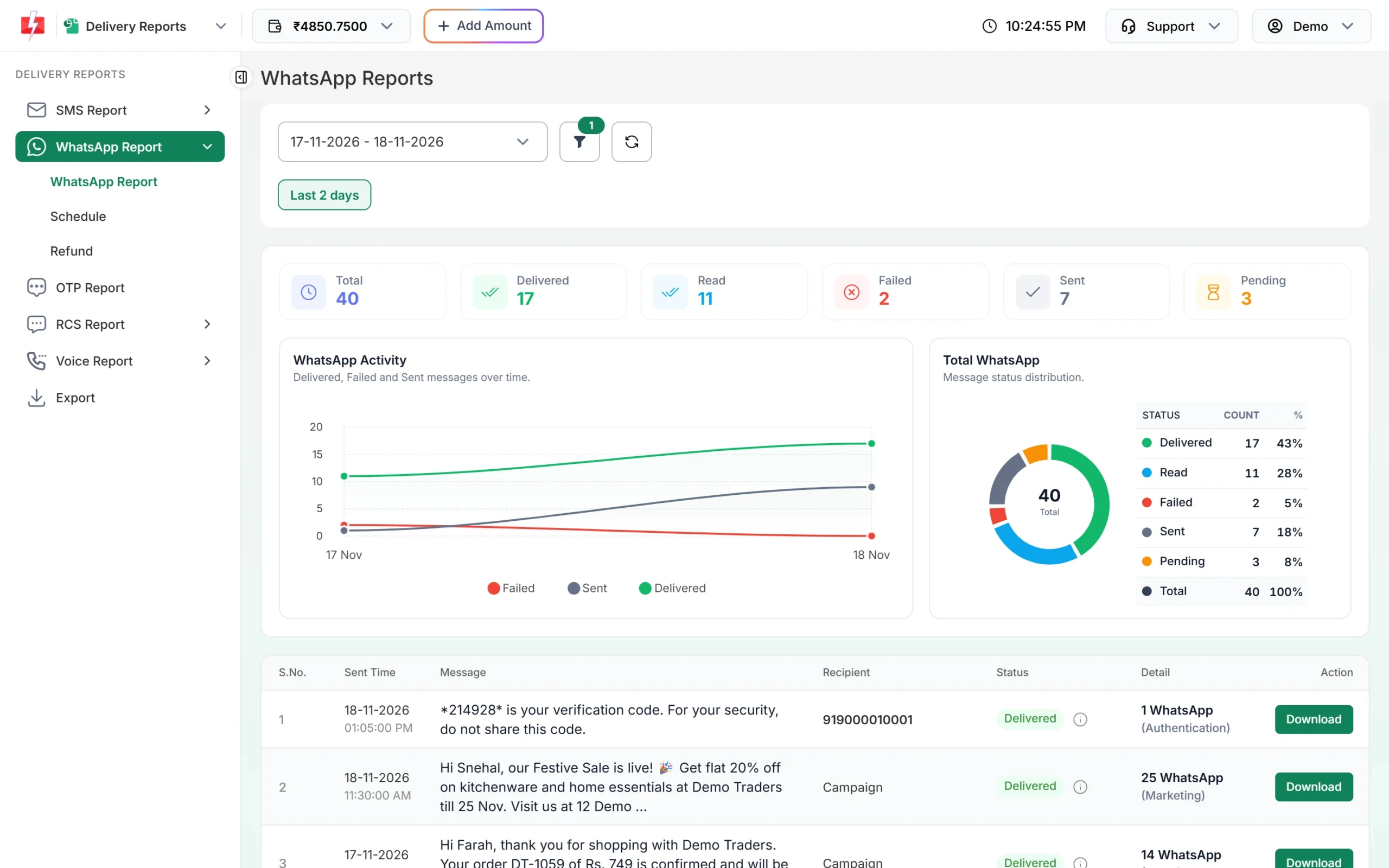
Delivered and Read are counted separately. -
Check a single campaign
Hover over the info icon next to the campaign’s status to see its counts, or click the message to open Delivery Details. The Receivers table shows which numbers are Delivered and which are Read, with the Delivery Time.
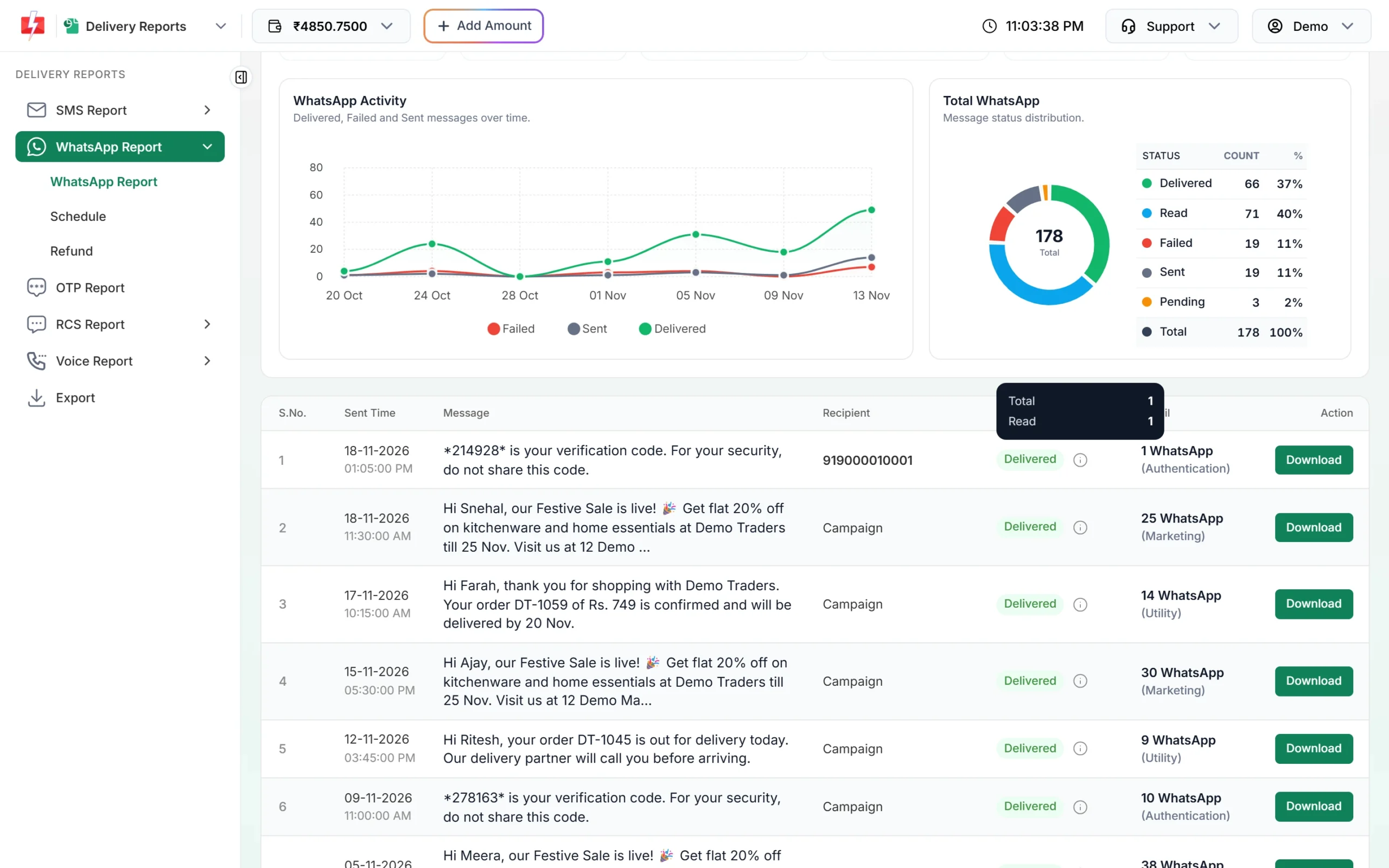
Status counts for one campaign. -
Export to follow up
Use Export under Delivery Reports to download the full report, then pick out numbers that stayed at Delivered. You can send them a different, better template later.
How to get more WhatsApp messages read
- Put the main point first. The notification shows only the start of the message. “Your order DT-1059 is out for delivery” gets opened; “Dear valued customer” does not.
- Use the customer’s name. Add a variable for the name in your template and fill it from your list.
- Add an image header. A clear product photo or offer banner stands out in the chat.
- Send at sensible times. Avoid late night and very early morning. Test a few times of day and compare read counts.
- Send only to interested people. Customers who opted in and bought recently open far more than an old list.
- Add buttons. A quick reply such as “Show me” or a “Shop Now” link gives people something to do, and a reply opens the 24-hour window so you can chat.
Frequently asked questions
Can I see read status if the customer turned off read receipts?
No. WhatsApp respects the customer’s privacy setting, so those messages usually stay at Delivered.
What is a good WhatsApp read rate?
It depends on your list and message. Compare your own campaigns over time instead of chasing a fixed number.
Am I charged for messages that were delivered but not read?
Yes. Delivered messages are charged whether or not they are read. Only failed and pending messages are refunded.
Does Delivered mean the customer got a notification?
It means the message reached the phone. Whether a notification shows depends on the customer’s phone and WhatsApp settings.
Can I message non-readers again with an offer?
Yes, with a new approved template after some days. Do not repeat the same message, and respect anyone who opted out.