
Bulk SMS and WhatsApp for housing societies and property management replace the notice board and the overloaded residents’ group: maintenance bills reach each flat with its own amount, water and power notices reach everyone, and complaints come to one inbox your team can manage. This guide shows which channel to use for each message, sample templates, the rules to follow and how to set it up in Fast2SMS.
It is written for cooperative housing societies, apartment owners’ associations, gated communities, facility management companies and property managers who handle rent and tenants.
Which channel for which society message
Most society messages are about a resident’s own flat or the building they live in, so they are service messages. Festival and event invitations are better treated as promotional. Payment reminders have their own rules on voice calls, explained below.
| Message | Best channel | Why |
|---|---|---|
| Maintenance bill for the month | WhatsApp utility, SMS backup | Each flat gets its own amount and a link to its own bill. |
| Payment received | SMS (Service Implicit) | Instant proof for the resident, on any phone. |
| Maintenance or rent due reminder | SMS or WhatsApp utility | Linked to the resident’s own account. Not allowed on voice calls. |
| Water cut, power shutdown, lift maintenance | SMS plus a Simple voice call | Urgent. A call reaches elderly residents who miss texts. |
| AGM or committee meeting notice | WhatsApp utility with the agenda PDF, SMS backup | The agenda travels with the notice. |
| Visitor entry approval or gate pass | Smart OTP | The guard verifies the code before letting a visitor in. |
| Complaint registered and resolved | WhatsApp, with Live Chat for follow-up | Residents can reply with photos of the problem. |
| Festival celebration or event | WhatsApp marketing with a poster | An invitation, best with an image. |
Sample DLT SMS templates for societies
DLT portals accept societies and associations as Principal Entities, so your society can register in its own name. Then register templates like these. Keep three variables or fewer, each tagged for its type, and whitelist any link or call-back number on the portal.
| Use | Example template to register | Category |
|---|---|---|
| Bill generated | YourSociety maintenance bill for flat {#alphanumeric#} is Rs {#numeric#}, due by {#alphanumeric#}. | Service Implicit |
| Payment received | YourSociety has received Rs {#numeric#} for flat {#alphanumeric#}. Receipt: {#url#} | Service Implicit |
| Due reminder | Reminder from YourSociety: Rs {#numeric#} for flat {#alphanumeric#} is pending. Please pay by {#alphanumeric#}. | Service Implicit |
| Water or power notice | YourSociety notice: {#alphanumeric#} will be off on {#alphanumeric#} for maintenance. We regret the trouble. | Service Implicit |
| Meeting notice | YourSociety {#alphanumeric#} meeting is on {#alphanumeric#} in the clubhouse. Agenda: {#url#} | Service Implicit |
| Visitor OTP | {#numeric#} is the entry code for your visitor at YourSociety. Share it only with your guest. | Service Implicit |
| Complaint update | Your YourSociety complaint {#alphanumeric#} is now {#alphanumeric#}. For help call {#cbn#}. | Service Implicit |
| Festival invite | YourSociety invites all residents to {#alphanumeric#} celebrations on {#alphanumeric#} at the clubhouse. | Promotional |
WhatsApp templates: utility vs marketing
A bill, receipt, notice about the resident’s building or an update on their complaint is Utility. Festival invitations, vendor offers and anything that sells is Marketing. A utility template can carry a PDF, which suits a meeting agenda sent to everyone. For a separate PDF bill per flat, use a “View bill” button with a dynamic link, or send through the API with each flat’s own PDF link.
| Template | Category | Example body | Header / button |
|---|---|---|---|
| maintenance_bill | Utility | Dear {{1}}, the maintenance bill for flat {{2}} for {{3}} is Rs {{4}}. The bill is attached. | Visit website (dynamic URL): View bill |
| payment_received | Utility | Dear {{1}}, we have received Rs {{2}} for flat {{3}}. Thank you. | None |
| building_notice | Utility | Dear resident of {{1}}, {{2}} will be unavailable on {{3}} from {{4}} due to maintenance work. | Call Phone Number: Society office |
| complaint_update | Utility | Your complaint {{1}} about {{2}} is {{3}}. Reply here if the problem continues. | None |
| festival_invite | Marketing | Dear {{1}}, join us for {{2}} celebrations on {{3}} at the clubhouse. | Image header |
Voice calls for urgent notices
A Simple voice call plays a recorded notice to every resident. It is useful for water cuts, power shutdowns, fire drills and urgent safety notices. A Key Press call can ask “Press 1 if you will attend the general body meeting” and save each answer.
Sample script (Simple): “Namaste, this is the YourSociety office. Water supply to all wings will be off tomorrow from 10 AM to 4 PM for tank cleaning. Please store water tonight. Thank you.”
- Say your society or company name clearly in every voice file.
- Calls reach non-DND numbers between 10 AM and 9 PM, and only answered calls are charged.
Smart OTP for visitor entry and resident apps
Smart OTP is our recommended way to send OTPs. Your gate or resident app calls the send and verify API with an OTP ID linked to a DLT OTP template or a WhatsApp authentication template. If the first channel fails, the same code is re-sent on the other within 120 seconds. Societies use it for visitor gate passes, delivery partner entry, resident app logins and confirming a change of the registered mobile number.
How to get started on Fast2SMS (step by step)
-
Import residents by wing or building
Register your society on a DLT portal and add the approved templates under SMS > DLT Manager. Then open Address Book > Add Contact > Upload CSV, map the Name and Number columns and add each file to a group, such as one group per wing or tower.
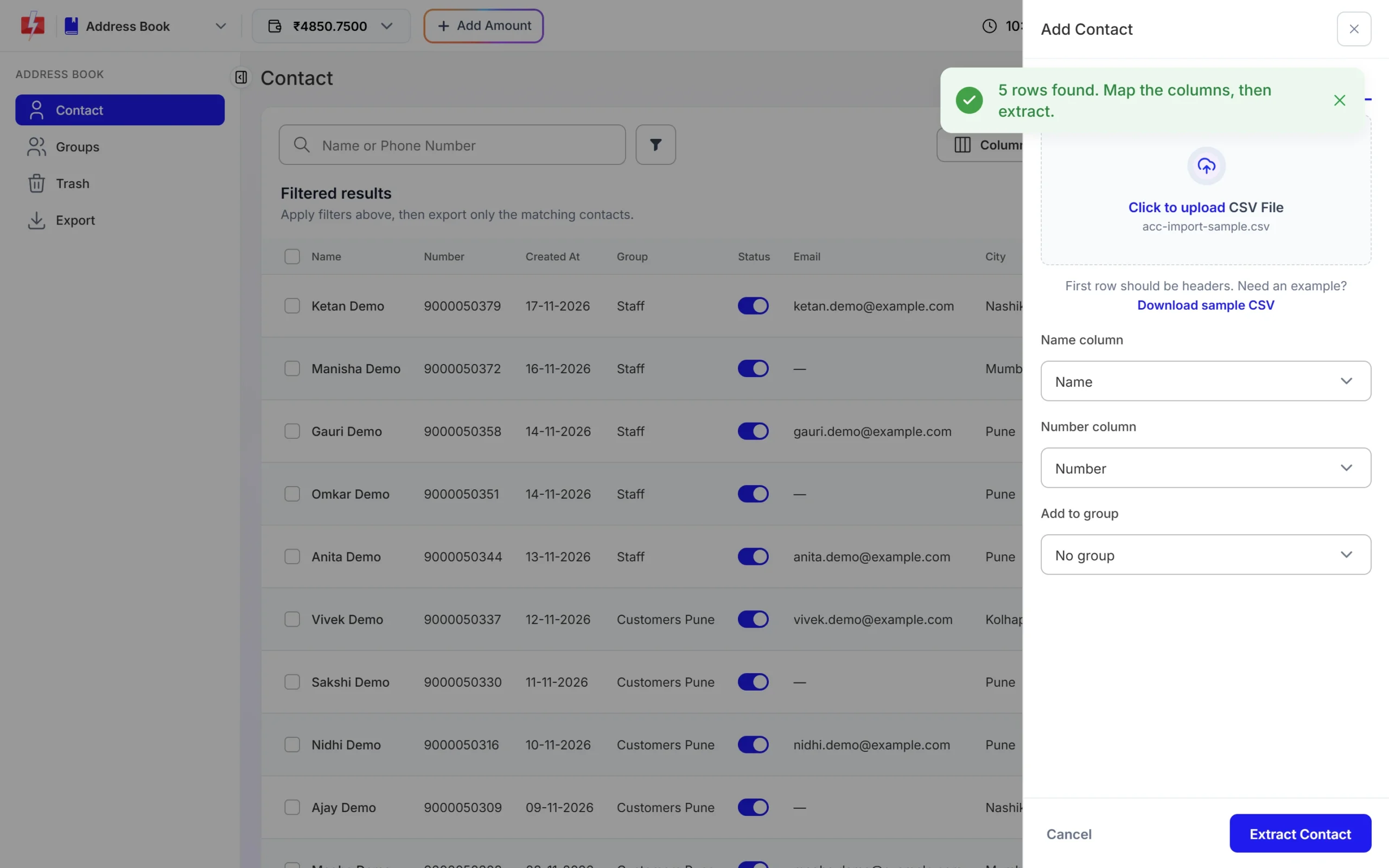
One group per wing makes notices for a single tower easy. -
Send monthly bills from a sheet
Make a sheet with flat number, resident name, amount and mobile number. Open Bulk WhatsApp, choose your number, click CSV File and upload the sheet. Pick the bill template and map each variable to a column. Use Schedule to send on the first of the month.
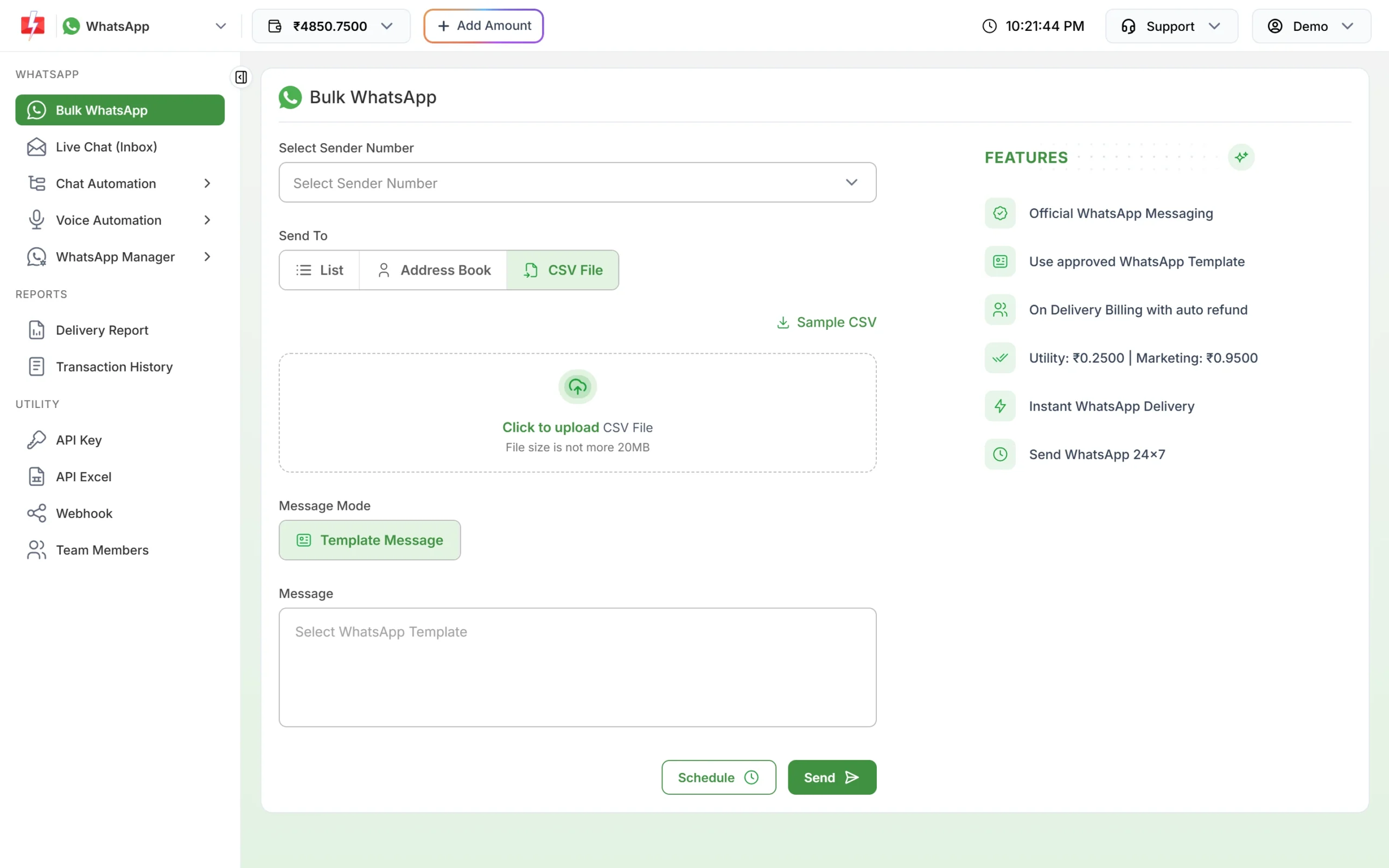
Every flat gets its own amount from the sheet. -
Set auto replies for common questions
Open Chat Automation > Inbox Settings and click Create Auto Reply. Add keywords such as “timing”, “gym”, “plumber” or “bill” and the answer to send. Add an out-of-office message for hours when the office is closed.
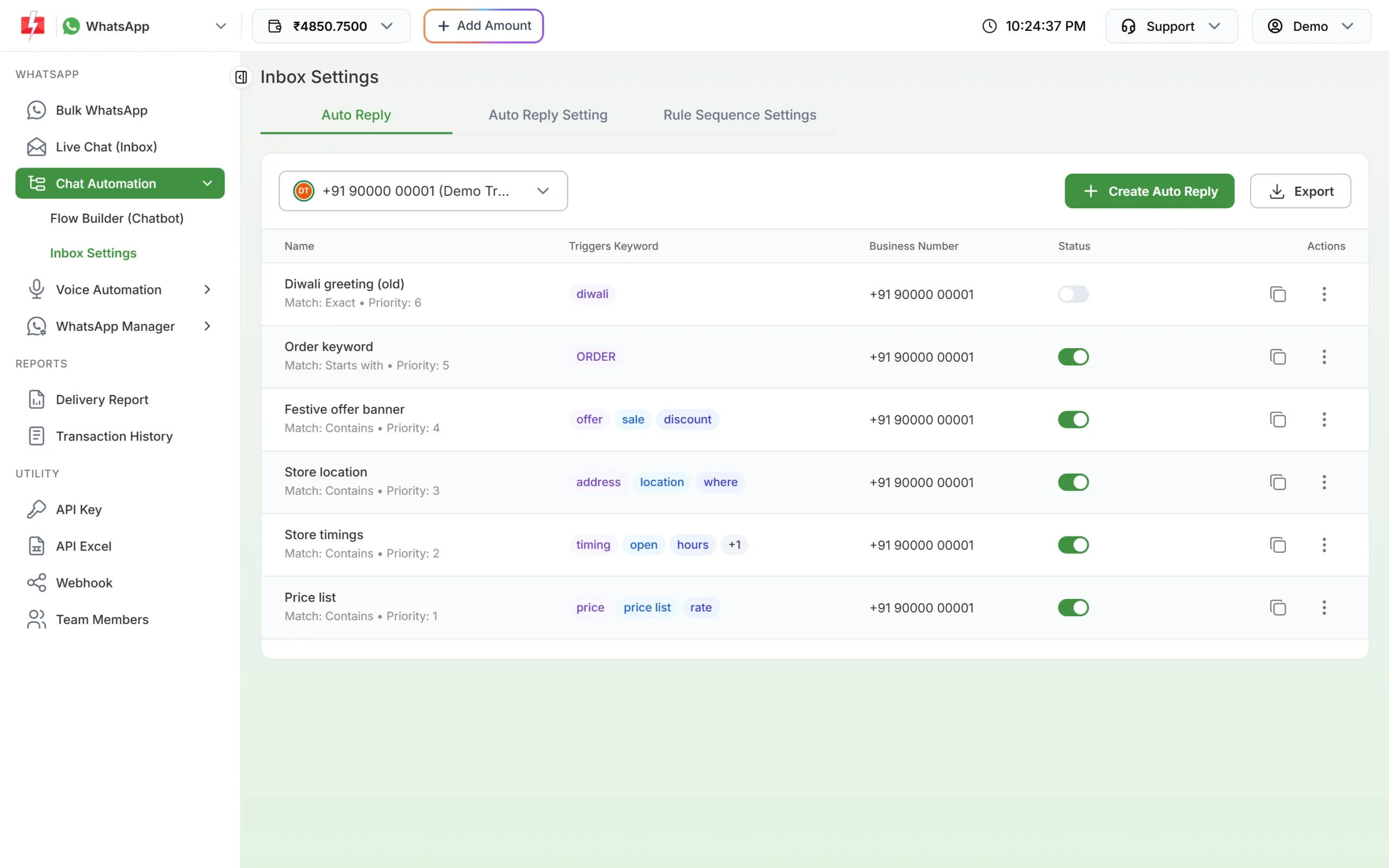
Keyword replies answer routine questions at any hour. -
Handle complaints in Live Chat
Open Live Chat (Inbox). Residents’ messages arrive here with photos and notes. Assign each chat to the right staff member, label it, and close it when the work is done. Add staff under Team Members so each one sees the chats assigned to them.
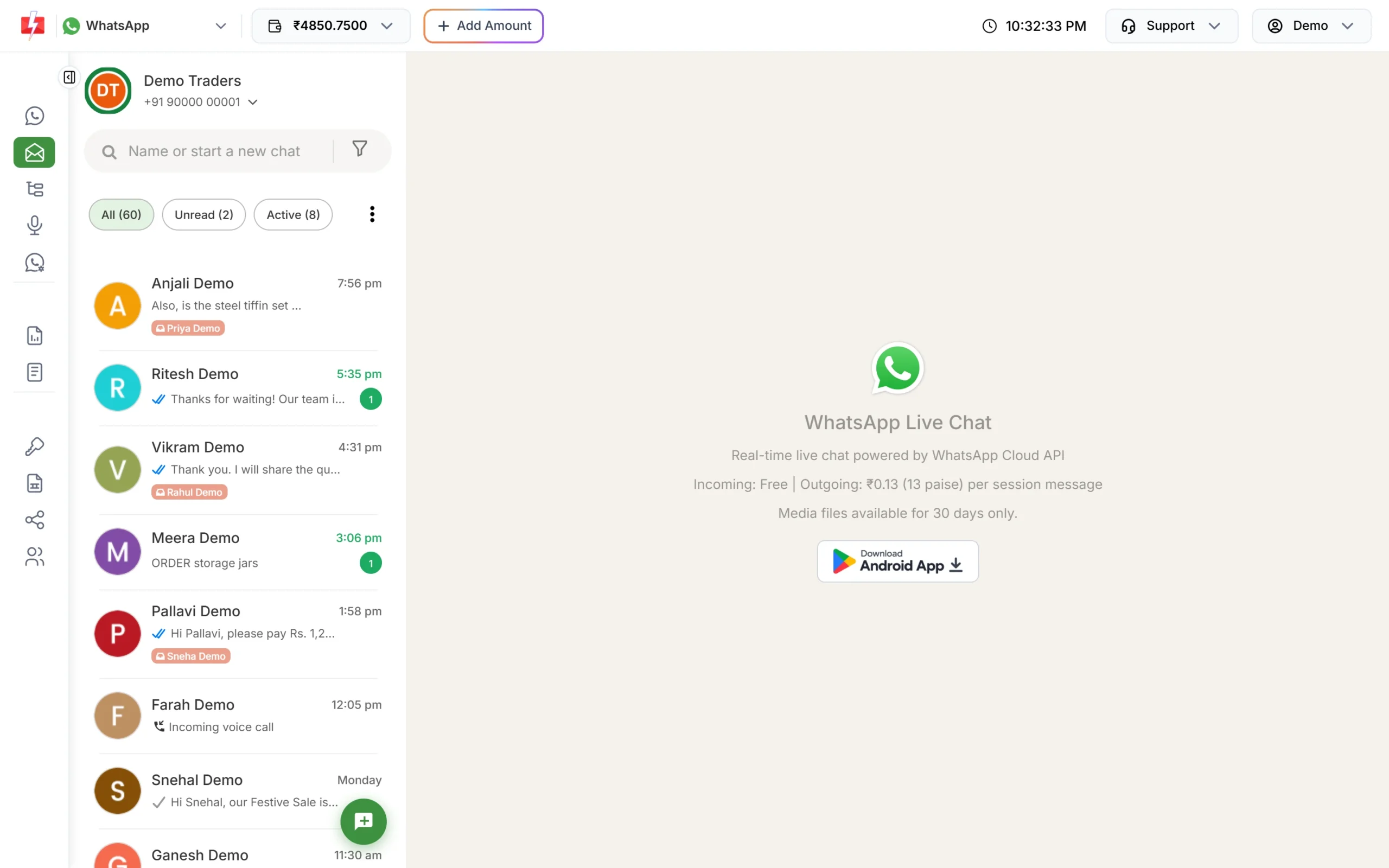
One shared inbox for all resident messages. -
Send an urgent notice as a voice call
Record the notice, upload it under Voice Files and wait for approval. Open Bulk Voice Call, choose Simple, pick the residents’ group from Address Book, select the file and click Send.
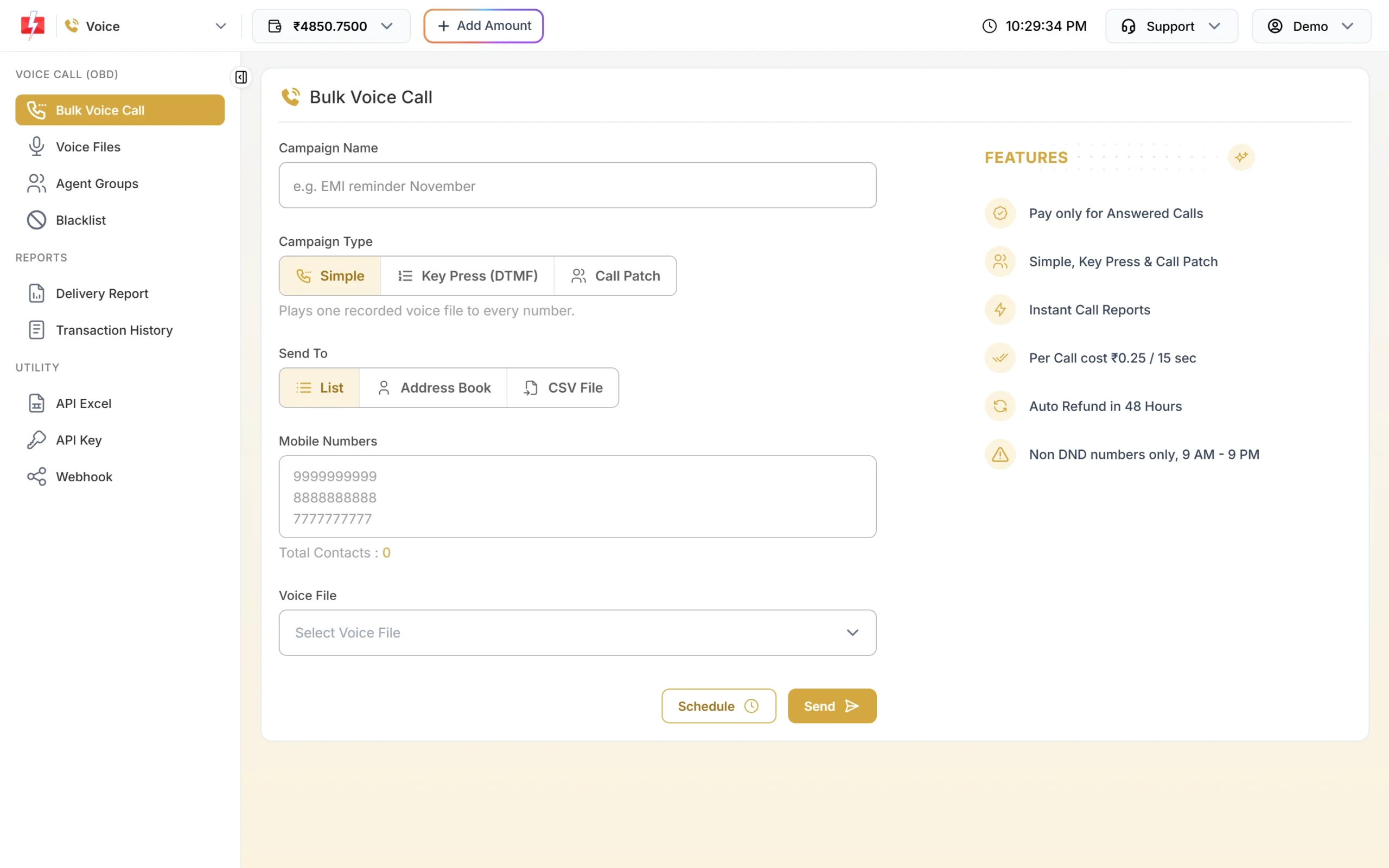
A Simple call reads out your notice to every resident. -
Add visitor OTP to your gate app
Open Smart OTP > Add OTP Template, pick your OTP template, mark the variable that holds the code and add a fallback channel. Click Assign OTP Template and use the OTP ID in your gate app.
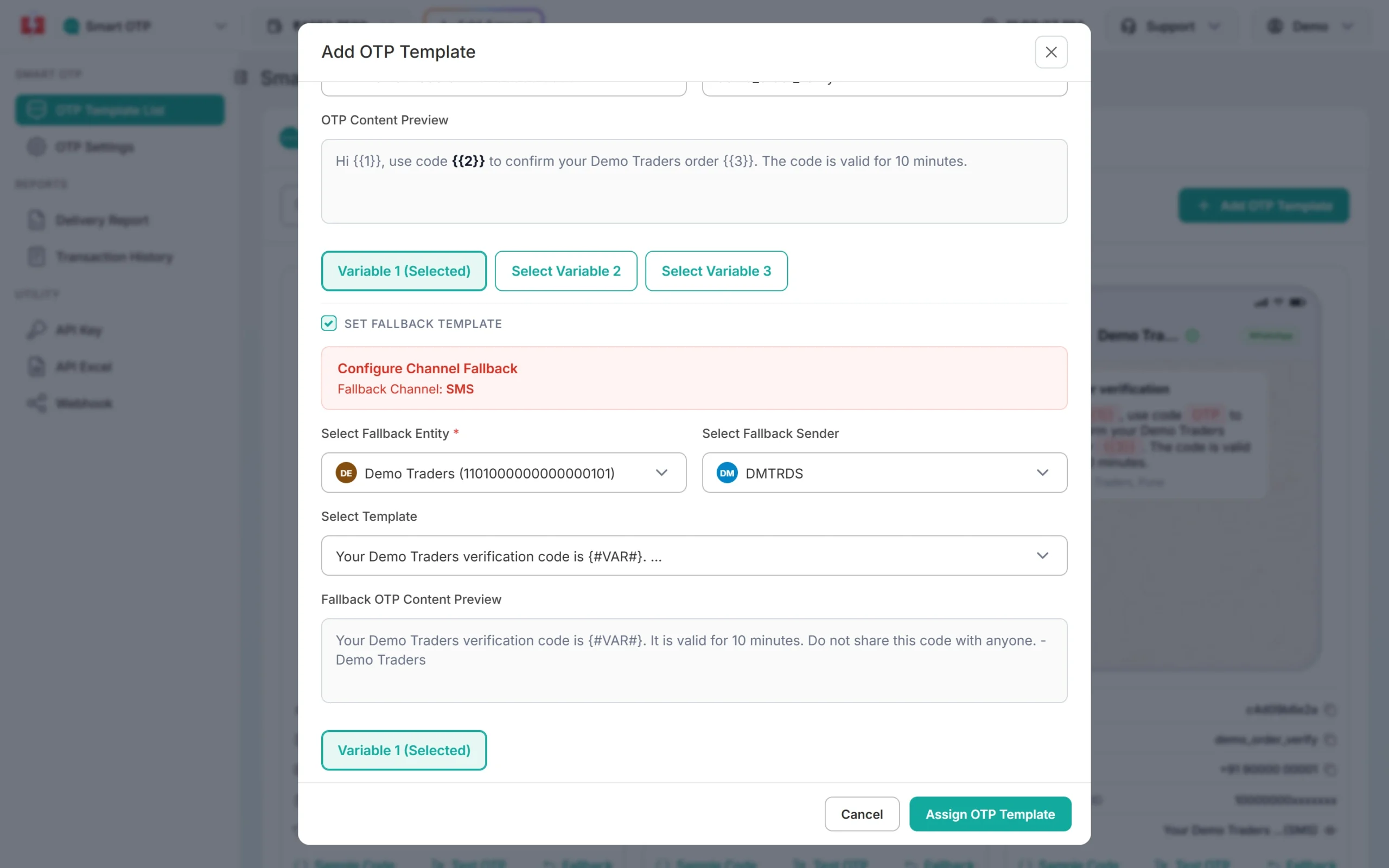
The same code goes by SMS if WhatsApp fails.
Automation that already exists
- CSV variables: one sheet per month sends every flat its own amount and due date.
- Recurring schedules: pick a date range to repeat a reminder at the same time each day.
- Flow Builder: a menu bot with options like “Raise complaint”, “Book clubhouse” and “Talk to office”, which asks questions and hands over to staff.
- API and webhooks: society management software can send bills and OTPs by API, and receive delivery reports and residents’ replies on its own URL.
- Google Sheets: send straight from the sheet where you keep dues. See the integrations page.
Compliance notes
- Use residents’ own numbers from your records, and stop non-essential messages when a resident asks.
- No dues reminders on voice: use SMS or WhatsApp for any payment reminder.
- Keep data private: do not include one resident’s dues or complaints in a message to others.
- DLT match: the SMS must match the approved template exactly, with your values only in the variable places.
How to estimate the cost
DLT SMS are charged per number and per SMS part (160 English characters or 70 Hindi characters per part). WhatsApp is charged per message by category, and utility bills and notices cost less than marketing invitations. Failed and pending WhatsApp messages are refunded automatically about two days later. Voice is charged per 15-second pulse for answered calls only, with unanswered calls refunded about an hour after the campaign ends. DLT entity registration costs ₹5,900 per year including GST (at the time of writing).
See current rates on the SMS pricing, WhatsApp pricing and voice call pricing pages.
Sending in bulk? For high WhatsApp volumes our team offers discounted rates. Talk to our team or see WhatsApp pricing.
Frequently asked questions
Can a housing society register on DLT?
Yes. DLT portals accept societies and associations, not only companies. Check which documents your chosen portal asks for, as GST is not the only accepted proof.
Can I send maintenance reminders by voice call?
No. Payment due reminders on voice calls are allowed only for banks, NBFCs and their collection partners. Use SMS or WhatsApp.
Is a water cut notice transactional or promotional?
Register it as Service Implicit. It is a service update for residents of the building, so it reaches DND numbers and is not limited to daytime hours.
Can I send each flat its own bill amount?
Yes. Upload a CSV with one row per flat and map the amount and flat number columns to the template variables.
Can residents reply to the society on WhatsApp?
Yes. Replies arrive in Live Chat. Inside 24 hours of a resident’s message you can reply freely, after that only with an approved template.
Is this better than a residents’ WhatsApp group?
For official notices, yes. Messages reach each resident directly, you get a delivery report, and residents’ numbers are not shown to everyone in a group.