
A payment reminder SMS to your existing customers is registered on DLT as Service Implicit, and a “payment received” SMS sent right after the customer pays is Transactional. Below are 14 payment and due reminder SMS templates for shops, distributors, service businesses, subscriptions and housing societies, each with its DLT category, variable tags, a sample message, the character count and SMS parts. After the templates you will find a simple reminder schedule and the steps to send them from Fast2SMS.
Payment reminder SMS: category and rules at a glance
| Message | DLT category | Reaches DND numbers | Sending time |
|---|---|---|---|
| Invoice raised, due soon, due today, overdue, renewal due | Service Implicit | Yes | Any time |
| Payment received, part payment received | Transactional | Yes | Any time |
| “Pay today and get 5% off” | Promotional | No | 10 AM to 9 PM |
A reminder about money a customer already owes you is service information, so it does not need separate consent. The moment you add a discount or an offer, the message becomes promotional. Replace “Demo Traders” in the samples with your own brand.
Invoice and due date reminder templates
1. Invoice raised
DLT category: Service Implicit. Variables: {#alphanumeric#}, {#numeric#}.
Dear {#alphanumeric#}, your Demo Traders invoice {#alphanumeric#} for Rs {#numeric#} has been raised. Please pay by the due date. - Demo TradersSample message (118 characters, English, 1 SMS): Dear Ramesh, your Demo Traders invoice INV2041 for Rs 8450 has been raised. Please pay by the due date. – Demo Traders
2. Payment due in a few days
DLT category: Service Implicit. Variables: {#numeric#}, {#alphanumeric#}.
Reminder: Rs {#numeric#} is due on {#alphanumeric#} for your Demo Traders account {#alphanumeric#}. Please ignore if already paid. - Demo TradersSample message (118 characters, English, 1 SMS): Reminder: Rs 8450 is due on 25 Nov for your Demo Traders account DT2041. Please ignore if already paid. – Demo Traders
3. Due today, with a payment link
DLT category: Service Implicit. Variables: {#numeric#}, {#url#}.
Your Demo Traders payment of Rs {#numeric#} is due today. Pay online here: {#url#} Please ignore if already paid. - Demo TradersSample message (145 characters, English, 1 SMS): Your Demo Traders payment of Rs 8450 is due today. Pay online here: https://demotraders.in/pay/2041 Please ignore if already paid. – Demo Traders
Whitelist your payment page domain as a CTA on the DLT portal before you send. Keep the link short: the Fast2SMS API cuts each variable value at 40 characters.
4. UPI payment request
DLT category: Service Implicit. Variables: {#numeric#}, {#alphanumeric#}.
Your Demo Traders bill of Rs {#numeric#} is due on {#alphanumeric#}. Pay by UPI to demotraders@okbank or at our store. - Demo TradersSample message (116 characters, English, 1 SMS): Your Demo Traders bill of Rs 2360 is due on 25 Nov. Pay by UPI to demotraders@okbank or at our store. – Demo Traders
The UPI ID is fixed text here because it never changes. If you use different UPI IDs, register one template for each.
Overdue and outstanding balance templates
5. Payment overdue
DLT category: Service Implicit. Variables: {#alphanumeric#}, {#numeric#}, {#cbn#}.
Dear {#alphanumeric#}, your payment of Rs {#numeric#} to Demo Traders is overdue. Please pay soon to avoid a break in service. Call {#cbn#} for help. - Demo TradersSample message (150 characters, English, 1 SMS): Dear Ramesh, your payment of Rs 8450 to Demo Traders is overdue. Please pay soon to avoid a break in service. Call 9000000001 for help. – Demo Traders
6. Outstanding balance (distributors and wholesalers)
DLT category: Service Implicit. Variables: {#alphanumeric#}, {#numeric#}.
Dear {#alphanumeric#}, your outstanding balance with Demo Traders is Rs {#numeric#} as on {#alphanumeric#}. Kindly clear it at the earliest. - Demo TradersSample message (142 characters, English, 1 SMS): Dear Shree Ganesh Stores, your outstanding balance with Demo Traders is Rs 42500 as on 18 Nov. Kindly clear it at the earliest. – Demo Traders
7. Payment failed or cheque returned
DLT category: Service Implicit. Variables: {#numeric#}, {#alphanumeric#}, {#cbn#}.
Your payment of Rs {#numeric#} to Demo Traders for invoice {#alphanumeric#} could not be completed. Please try again or call {#cbn#}. - Demo TradersSample message (135 characters, English, 1 SMS): Your payment of Rs 8450 to Demo Traders for invoice INV2041 could not be completed. Please try again or call 9000000001. – Demo Traders
Renewal, bill and maintenance templates
8. Subscription or plan renewal
DLT category: Service Implicit. Variables: {#alphanumeric#}, {#url#}.
Your Demo Traders plan {#alphanumeric#} expires on {#alphanumeric#}. Renew here to continue without a break: {#url#} - Demo TradersSample message (132 characters, English, 1 SMS): Your Demo Traders plan Gold12 expires on 30 Nov. Renew here to continue without a break: https://demotraders.in/renew – Demo Traders
9. Monthly bill
DLT category: Service Implicit. Variables: {#alphanumeric#}, {#numeric#}, {#url#}.
Your Demo Traders bill for {#alphanumeric#} is Rs {#numeric#}. View and pay here: {#url#} - Demo TradersSample message (109 characters, English, 1 SMS): Your Demo Traders bill for Nov 2026 is Rs 1180. View and pay here: https://demotraders.in/bill – Demo Traders
10. Society maintenance or rent due
DLT category: Service Implicit. Variables: {#numeric#}, {#alphanumeric#}.
Dear resident, maintenance of Rs {#numeric#} for flat {#alphanumeric#} for {#alphanumeric#} is due. Please pay by the 10th. - Demo ResidencySample message (113 characters, English, 1 SMS): Dear resident, maintenance of Rs 3500 for flat B402 for December is due. Please pay by the 10th. – Demo Residency
Payment received templates
11. Payment received
DLT category: Transactional. Variables: {#numeric#}, {#alphanumeric#}.
Received Rs {#numeric#} from {#alphanumeric#} against invoice {#alphanumeric#}. Thank you for your payment. - Demo TradersSample message (102 characters, English, 1 SMS): Received Rs 8450 from Ramesh Kumar against invoice INV2041. Thank you for your payment. – Demo Traders
12. Part payment received, balance due
DLT category: Transactional. Variables: {#numeric#}.
Thank you. We received Rs {#numeric#} from you. Balance due on your Demo Traders account is Rs {#numeric#}. - Demo TradersSample message (108 characters, English, 1 SMS): Thank you. We received Rs 5000 from you. Balance due on your Demo Traders account is Rs 3450. – Demo Traders
Hindi payment reminder templates
Many customers read a reminder faster in their own language. Hindi SMS are Unicode, so 1 part holds 70 characters. The reminder below uses 2 parts; the receipt fits in 1.
13. Due reminder (Hindi)
DLT category: Service Implicit. Variables: {#alphanumeric#}, {#numeric#}.
प्रिय {#alphanumeric#}, Demo Traders का Rs {#numeric#} का भुगतान {#alphanumeric#} तक देय है। कृपया समय पर भुगतान करें।Sample message (91 characters, Unicode, 2 SMS parts): प्रिय Ramesh, Demo Traders का Rs 8450 का भुगतान 25 Nov तक देय है। कृपया समय पर भुगतान करें।
14. Payment received (Hindi)
DLT category: Transactional. Variables: {#numeric#}.
Rs {#numeric#} का भुगतान प्राप्त हुआ। धन्यवाद। - Demo TradersSample message (54 characters, Unicode, 1 SMS): Rs 8450 का भुगतान प्राप्त हुआ। धन्यवाद। – Demo Traders
A simple reminder schedule
| When | Template | Tip |
|---|---|---|
| When the invoice is raised | 1. Invoice raised | Sets the amount and due date in the customer’s mind |
| 3 days before the due date | 2 or 4. Due soon | Give a UPI ID or payment link so paying takes one step |
| On the due date | 3. Due today | Send in the morning, when people can act on it |
| A few days after the due date | 5. Overdue | Stay polite and give a number to call |
| As soon as money arrives | 11 or 12. Payment received | Stops further reminders and builds trust |
Tips for reminder SMS that get approved and get paid
- Be polite and factual. Amount, due date, how to pay, and “please ignore if already paid”. Threatening words lead to rejections and complaints.
- No offers inside a reminder. “Pay today and get 5% off” makes it promotional. Register a separate promotional template if you want to run such an offer.
- Do not put sensitive data in an SMS. Show only an invoice number or the last 4 digits of an account, never full account or card numbers.
- Tag variables correctly. Amounts in
{#numeric#}(digits only, no commas), names, invoice numbers and dates in{#alphanumeric#}, payment links in{#url#}and support numbers in{#cbn#}. - Do not over-remind. Customers can report unwanted messages, and TRAI’s 2025 rules made action against senders faster. Two or three reminders per due date is plenty.
- Write Rs, not the rupee symbol, to keep English SMS at 160 characters per part.
How to add your reminder templates in Fast2SMS and send them
Reminders usually go to a list with a different name, amount and date for each customer. The fastest way is a CSV file from your billing software. Here is the full path from DLT approval to sending.
-
Register the template on your DLT portal
Log in to the DLT portal where your business is registered and add a content template. Pick the category shown with the template, link it to one approved header, paste the text with its variable tags and add a sample message with realistic values. If the text has a
{#url#},{#urlott#}or{#cbn#}variable, whitelist that link or phone number as a CTA on the portal first. Once the portal approves it, note the Content Template ID and take a screenshot of the approved row. -
Add it in DLT Manager
In the Fast2SMS SMS app, open DLT Manager > Content Template and click Add Content Template. Select your entity, tick the Sender ID, enter the Content Template ID, choose Service Implicit as the Template Type (this option covers both Transactional and Service Implicit templates), paste the approved text exactly as the portal shows it in Copy-Paste Approved Message Text, upload the screenshot and click Submit.
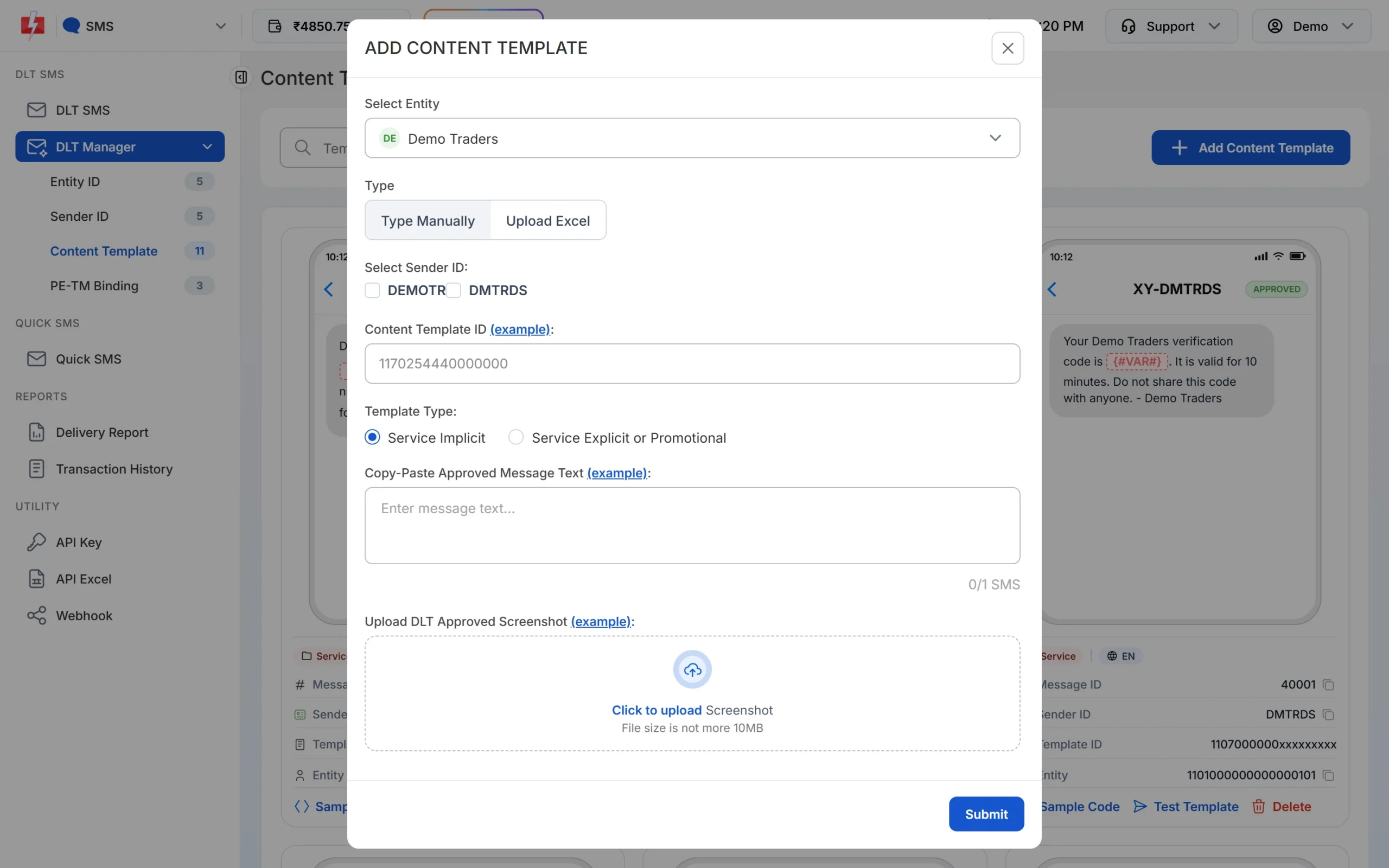
Paste the text exactly as it was approved, including spaces and full stops. -
Wait for Approved and note the Message ID
The template is saved as Pending while Fast2SMS checks it against your screenshot. When the card shows APPROVED, it also shows a Message ID. That short number is what you pass as
messagein the API. The card shows every variable as {#VAR#}, whatever tag you registered. Use Test Template to send one real SMS to your own number before a campaign.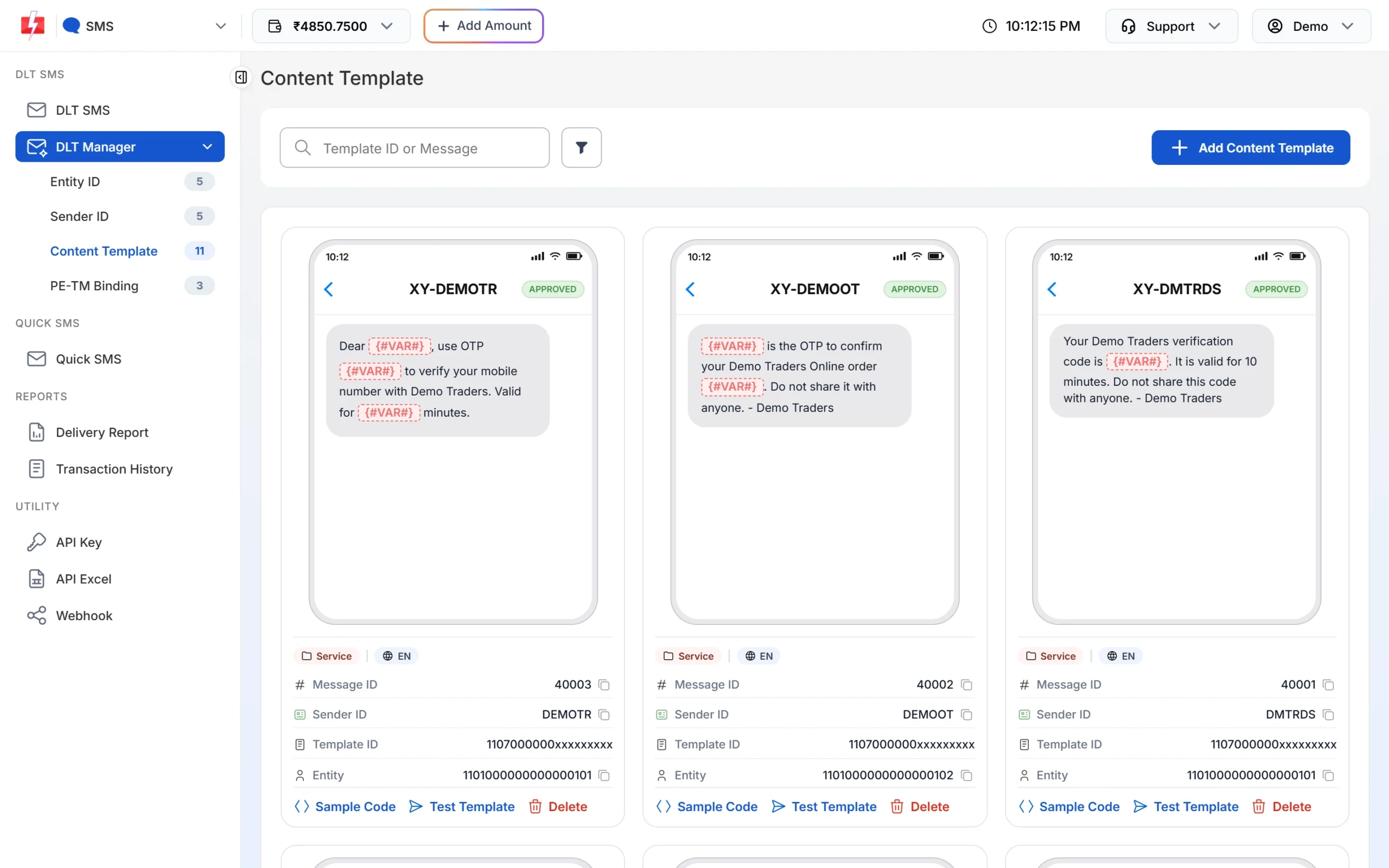
Each approved card shows its Message ID and the Test Template button. -
Pick the template on the DLT SMS page
Open DLT SMS, choose the Sender ID and add numbers under Send To: type them in List, pick contacts from Address Book or upload a CSV File. Then click Select DLT Template. The picker has All, Service Implicit and Service Explicit tabs.
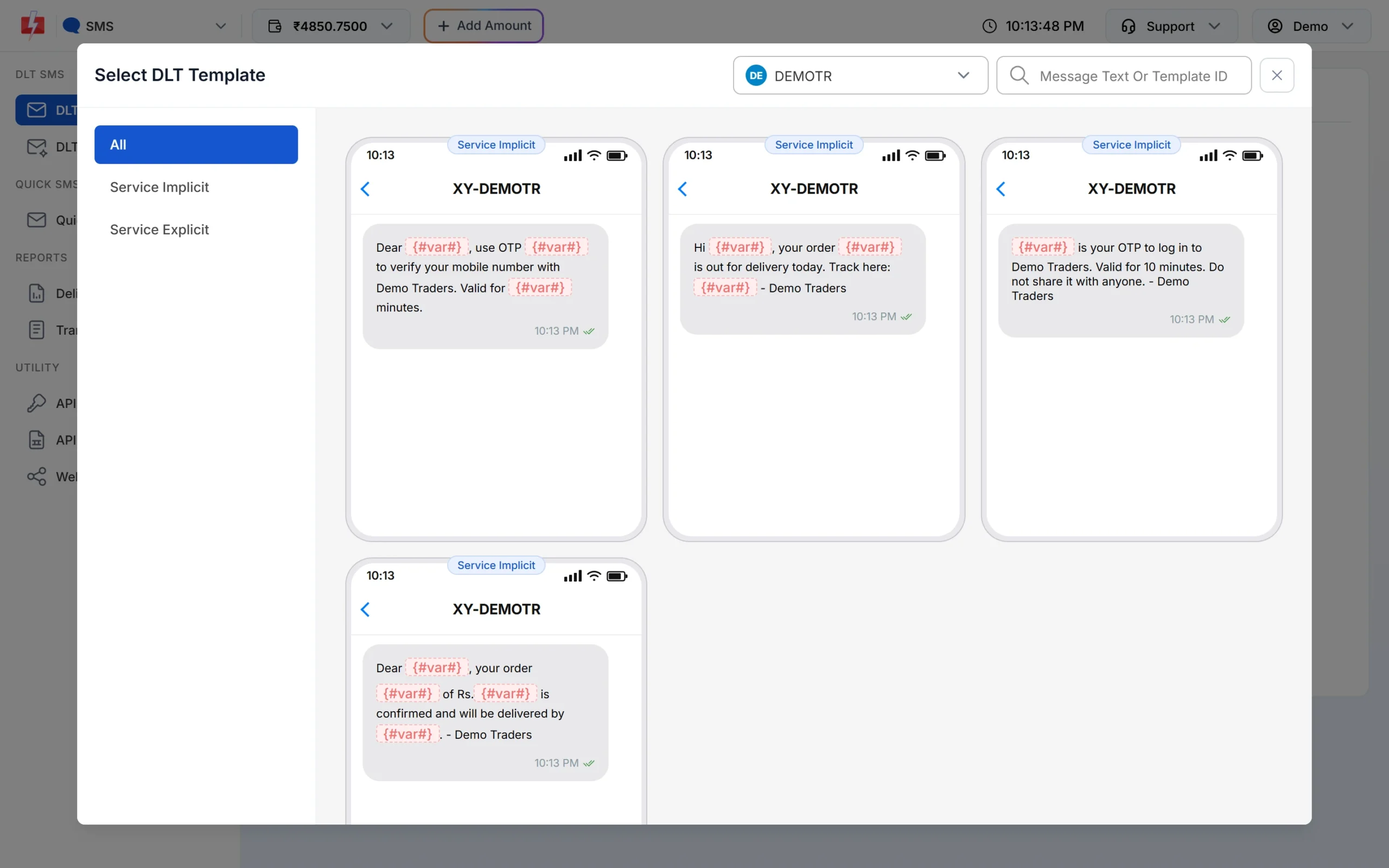
Only approved templates linked to the chosen sender are listed. -
Fill the variables and check the preview
The page shows one box for each variable. As you type, the phone preview shows the final SMS and the counter under it shows characters and SMS parts, such as 107/1 SMS. To send each person their own name, amount or date, use CSV File and map each variable to a column.
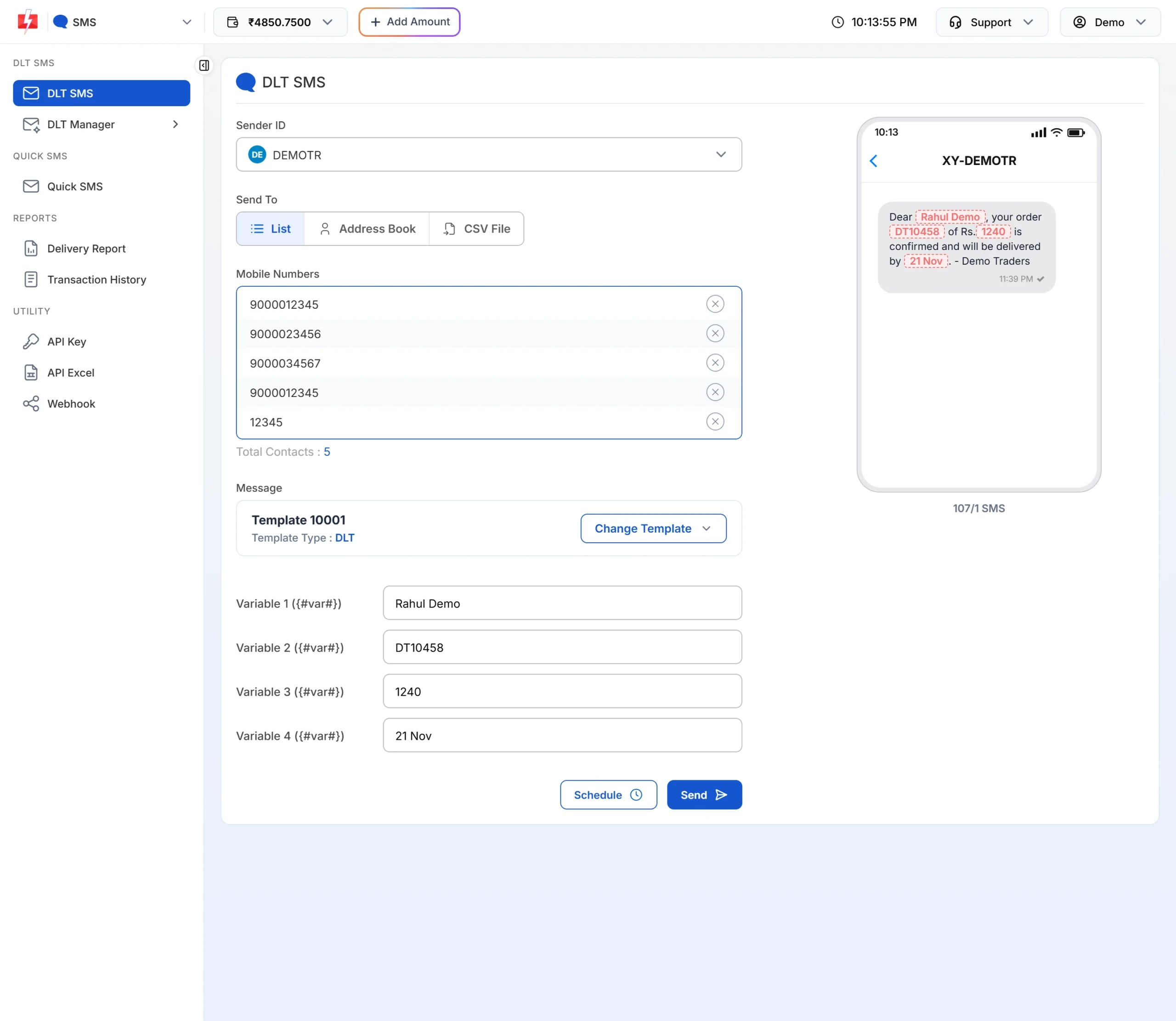
The counter shows how many parts each SMS will use. -
Check the cost, then send or schedule
Click Send. The Message Preview & Confirmation popup shows the cost per SMS, total messages, total, duplicate, valid and invalid numbers, and the total cost. Duplicates and invalid numbers are not charged. Click Confirm & Send, or close it and use Schedule to pick a date and time.
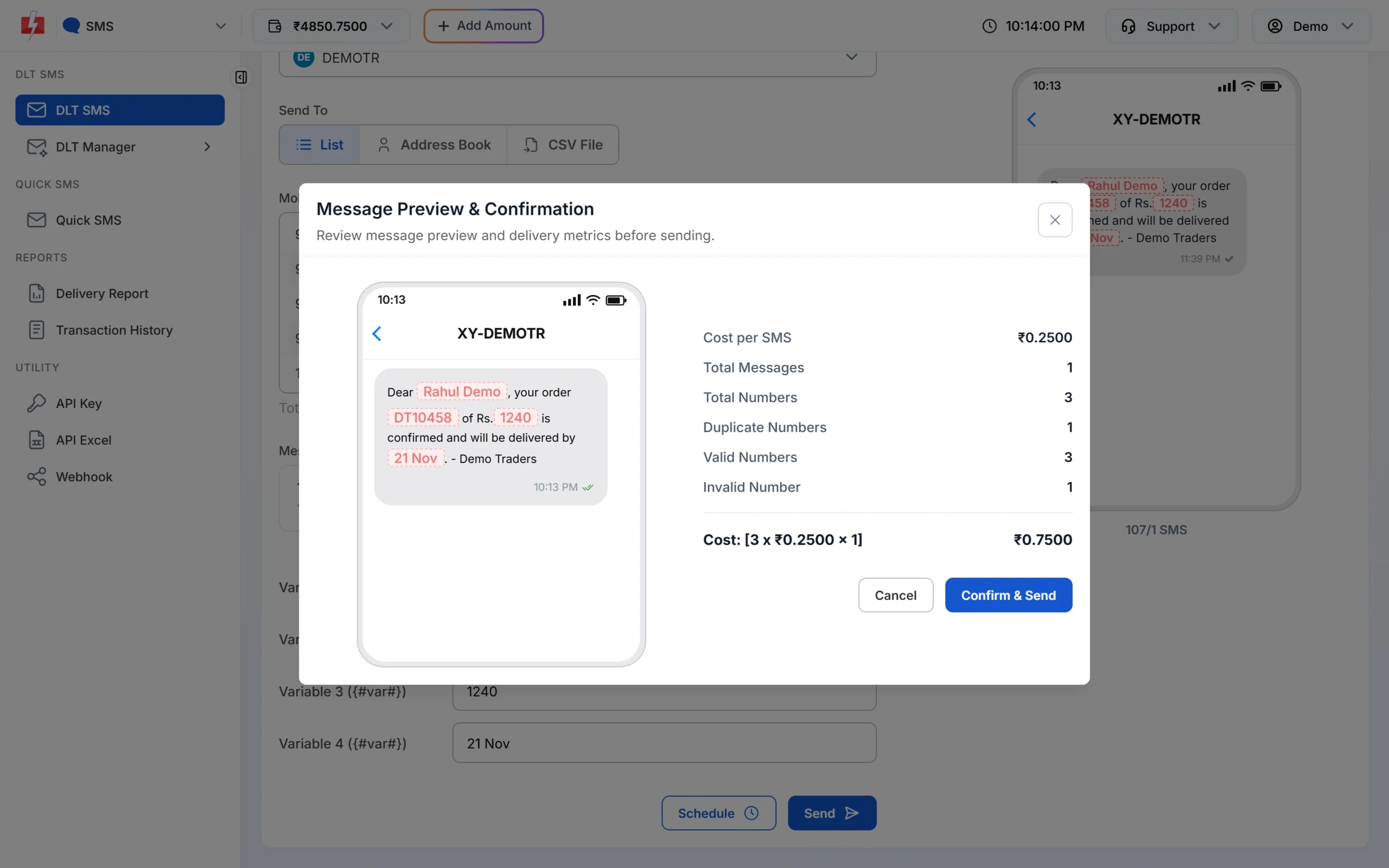
Nothing is sent until you click Confirm & Send.
Each SMS part is charged as one SMS for every valid number, so a template that runs into 2 parts costs twice as much per person as a 1-part template. Keep the text short to save money. See the current rates on the bulk SMS pricing page.
Sending in bulk? For high SMS volumes our team offers discounted rates. Talk to our team or see SMS pricing.
Frequently asked questions
Is a payment reminder SMS transactional or promotional?
Neither. A reminder about an existing bill is a service message, so register it as Service Implicit. Only the “payment received” confirmation right after a payment is Transactional.
Can payment reminders be sent to DND numbers?
Yes. Service Implicit SMS reach DND numbers, at any time of day.
Can I add a payment link in a reminder SMS?
Yes, with a {#url#} variable. Whitelist the link’s domain as a CTA on your DLT portal first, or the SMS fails.
How do I send different amounts to different customers?
Upload a CSV file with columns for the mobile number, name, amount and due date, then map each template variable to a column on the DLT SMS page.
Can I send reminders automatically every month?
From the panel you can schedule a campaign for a date. For fully automatic reminders, call the DLT SMS API from your billing software on each due date.
Should I write the amount with commas?
Not in a {#numeric#} variable. It accepts digits only, so send 42500, not 42,500.
Can I send payment reminders on WhatsApp too?
Yes. A WhatsApp utility template can carry a “Pay now” button. Many businesses send SMS for reach and WhatsApp for one-tap payment.