
Click-to-WhatsApp ads are Facebook or Instagram ads with a button that opens a WhatsApp chat with your business. Instead of filling a form, the customer taps the ad and starts a conversation, and your team or chatbot replies on WhatsApp. This guide explains how Click-to-WhatsApp ads work, how to create one in Meta Ads Manager, what Meta charges for the chats, and how to set up Fast2SMS so every ad lead gets a quick answer.
How Click-to-WhatsApp ads work
- A person sees your ad on Facebook or Instagram and taps the button.
- WhatsApp opens on their phone with a chat to your business number. The ad can put a ready message in the box, such as “Hi, I want the Diwali offer”.
- They send it. Because the customer wrote first, a 24-hour customer service window opens and you can reply with normal messages, photos and price lists.
- Your reply comes from your business number. With Fast2SMS, the chat lands in Live Chat (Inbox), where your automatic replies and team can take over.
The ad itself is bought and paid for in Meta Ads Manager. Fast2SMS handles the WhatsApp side: the number, the inbox, the automation and the follow-up templates.
What you need before you start
- A Facebook Page for your business and access to Meta Ads Manager with a payment method for the ad budget.
- A WhatsApp Business number connected to your Facebook Page. If it is not linked, Ads Manager asks you to connect it when you pick WhatsApp as the destination.
- For the team inbox and automation: the same number connected to the WhatsApp Business API in Fast2SMS, with status Connected in WhatsApp Manager > Numbers.
How to create a Click-to-WhatsApp ad in Ads Manager
WhatsApp’s own guide lists these steps. Meta changes Ads Manager screens often, so the labels you see may differ slightly.
-
Create a campaign
Open Ads Manager, click Create, choose a campaign objective (for example Engagement, Leads or Sales) and name the campaign.
-
Choose WhatsApp as the destination
In the ad set, under the conversion or destination section, select Messaging apps and then WhatsApp. Pick your WhatsApp business number.
-
Set budget, dates and audience
Set the start and end dates, the daily or total budget, and who should see the ad (location, age, interests). WhatsApp recommends running the ad for at least seven days so Meta can learn who responds.
-
Make the ad and the first message
Upload the image or video, write the ad text, and set the message customers will see when WhatsApp opens. Keep the pre-filled text short and clear, for example “Hi, send me the price list”. Then publish.
Set up Fast2SMS to reply to ad leads
An ad can bring many chats in a few hours. If nobody answers, you pay for clicks that go nowhere. Set these up before the ad goes live.
-
Turn on a welcome, out-of-office and delayed reply
Go to Chat Automation > Inbox Settings > Auto Reply Setting. Write a welcome message (text, image, audio or video) for first-time chats. Turn on Out of Office Message with your working hours, and Delayed Response Message so a customer who waits gets a short note. Click Save Settings.
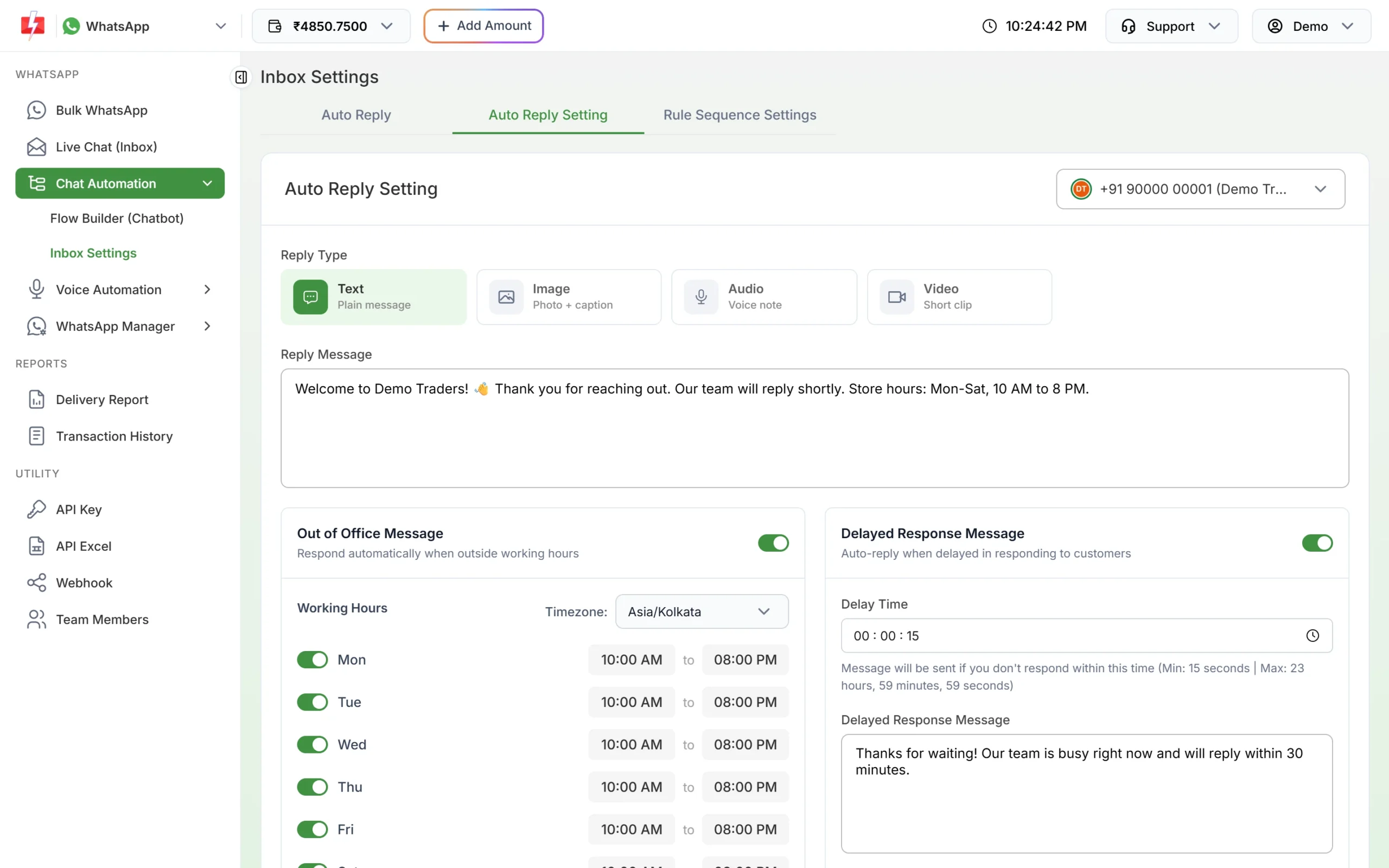
Welcome, out-of-office and delayed replies for each number. -
Answer the ad’s message automatically
In the Auto Reply tab, click Create Auto Reply. Add the ad’s words as keywords (for example “price list” or “diwali offer”), set Match Type to Contains, and write the reply with your offer or price list. Auto replies match text messages and button taps.
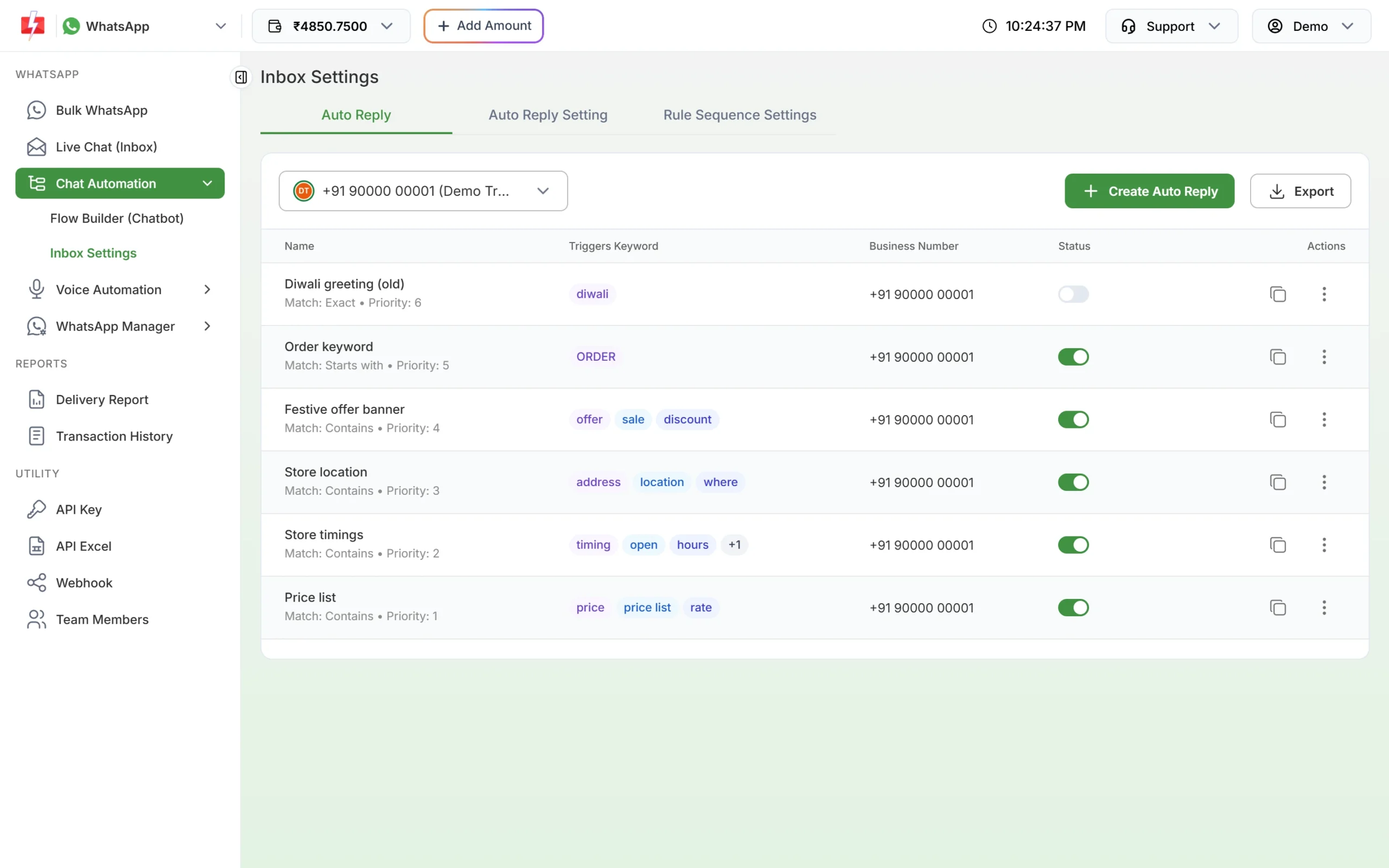
Keyword auto replies for common ad questions. -
Or start a chatbot menu
For more than one answer, build a menu in Chat Automation > Flow Builder (Chatbot): a list of options such as “Today’s offers”, “Track my order” and “Talk to our team”, with the last option assigning the chat to an agent. Flow keywords match the whole message, so use the exact ad text as the keyword, or add a regex.
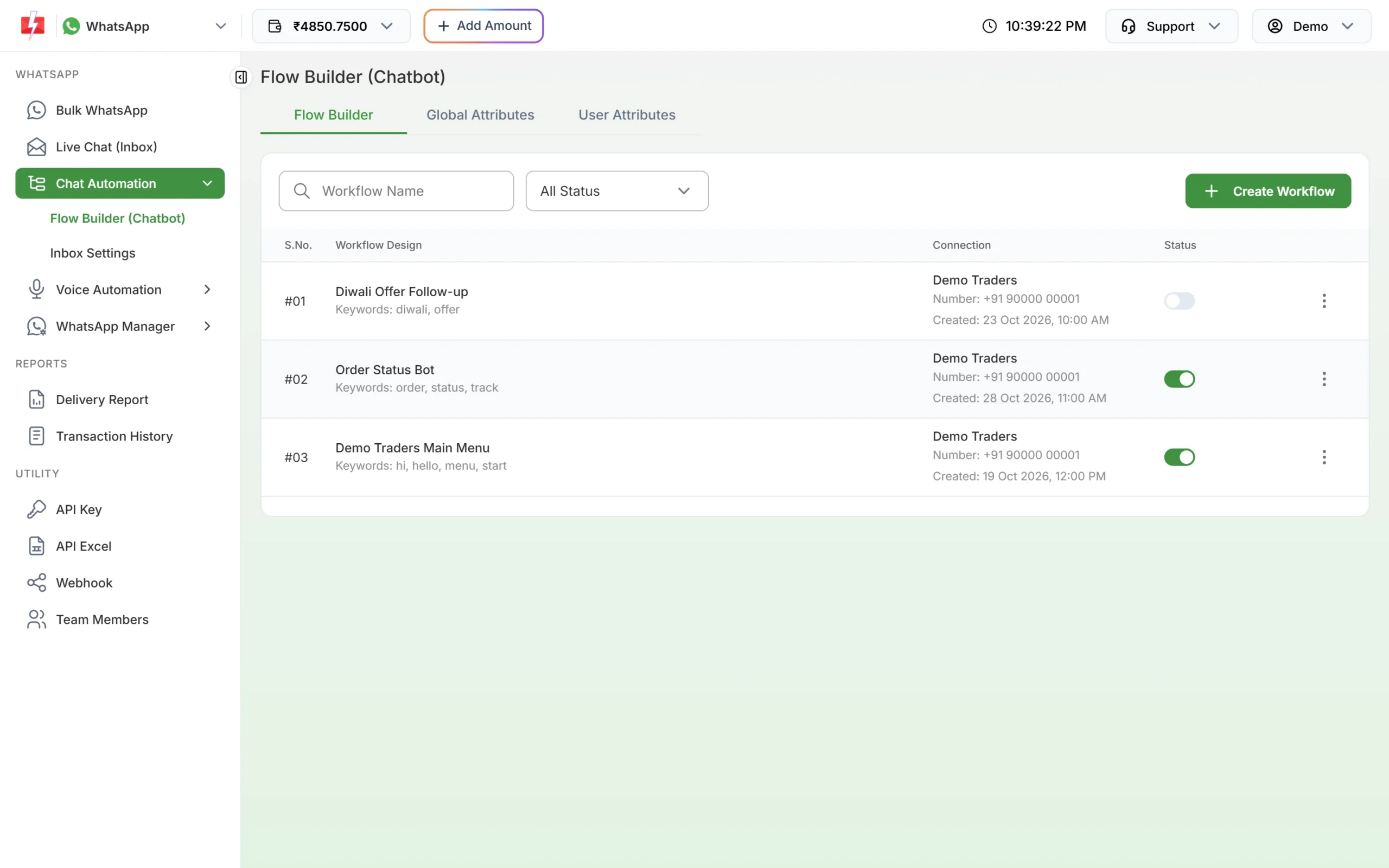
Each workflow starts on its own keywords. -
Label ad leads and follow up
In Live Chat (Inbox), add a label such as “New Lead” to chats from the ad, and assign them to your sales team with Transfer To. Later you can filter by label to see who has not bought yet.
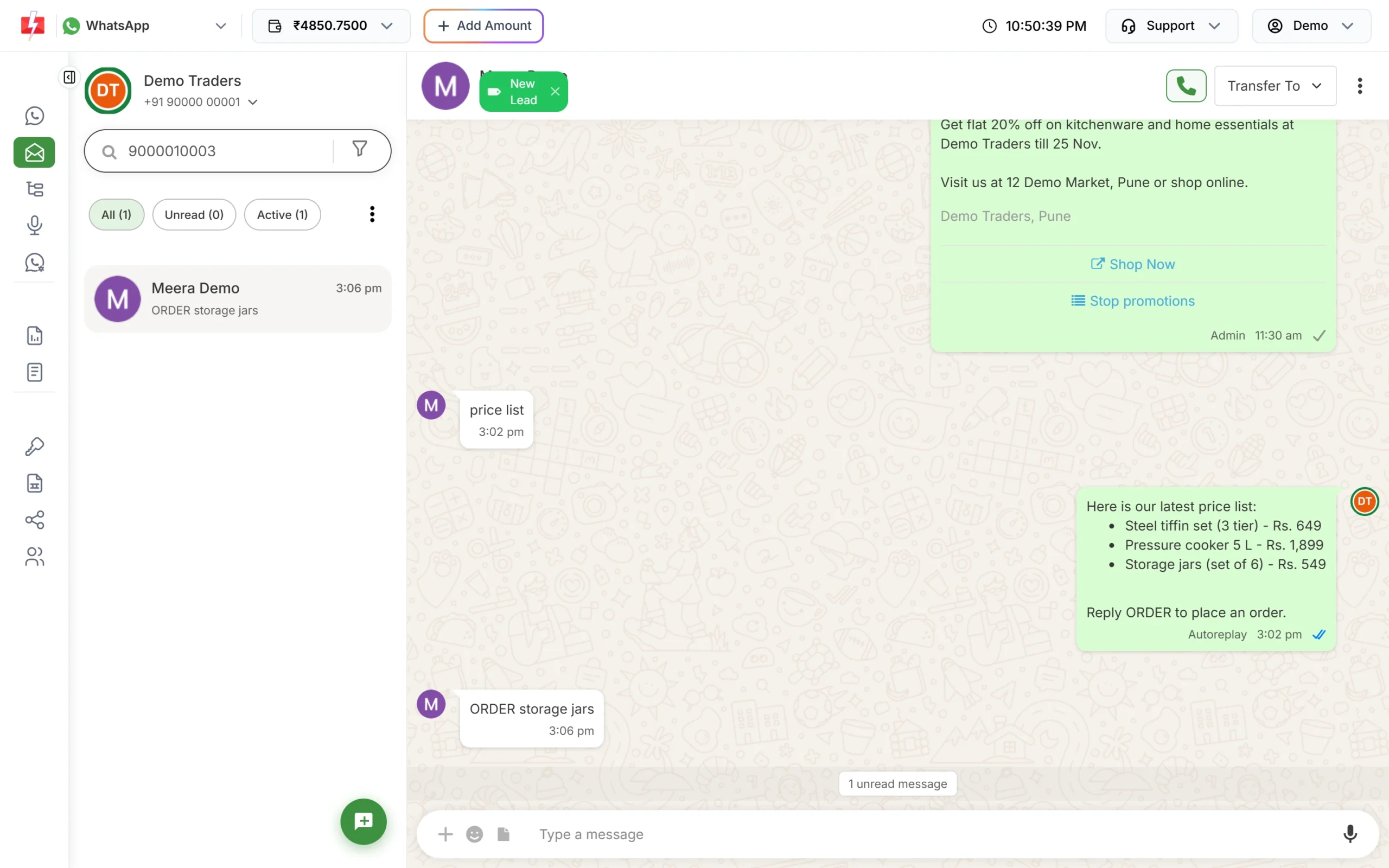
An ad lead labelled “New Lead” gets the price list automatically.
What Click-to-WhatsApp chats cost
There are two separate costs.
- The ad: your ad budget is paid to Meta in Ads Manager.
- The WhatsApp messages: Meta has a “free entry point” rule. At the time of writing, when someone messages you from a Click-to-WhatsApp ad on the WhatsApp Android or iOS app and you reply within the 24-hour window, Meta does not charge that reply and opens a free window that can last up to 7 days. Chats started from WhatsApp Desktop or Web do not qualify.
On Fast2SMS, incoming messages are free and Live Chat replies are charged at the session rate, ₹0.13 per message at the time of writing. Automatic replies are charged at the same session rate. Marketing templates you send later cost ₹0.95 each. Before you run ads, talk to our team about how free entry point chats are billed on your account.
Sending in bulk? For high WhatsApp volumes our team offers discounted rates. Talk to our team or see WhatsApp pricing.
Tips for better Click-to-WhatsApp ads
- Promise one clear thing in the ad: a price list, a free consultation, a festival offer. The first reply should deliver it.
- Reply within minutes. Leads cool down fast. Auto replies cover nights and busy hours.
- Ask before you market. A customer who messaged about one product has not agreed to weekly offers. Ask in the chat if they want offers on WhatsApp, and note it with a tag.
- Use templates for follow-up after 24 hours. Once the window closes, you can only send an approved template.
- Add conversation starters. Icebreakers (up to 4 per number, 80 characters each) give new chatters ready questions to tap.
Common problems and fixes
| Problem | Fix |
|---|---|
| WhatsApp is not offered as the ad destination | Link your WhatsApp Business number to your Facebook Page, then try again in Ads Manager. |
| Chatbot does not start on the ad’s message | Flow keywords must match the whole message. Use the exact pre-filled text as the keyword, add a regex, or use an Auto Reply with Match Type Contains. |
| Two automatic replies fight each other | Only the first matching rule replies. Set the order in Rule Sequence Settings. |
| Cannot reply to an old ad lead | The 24-hour window has closed. Use Send Template with an approved template. |
| Auto replies stopped | Automatic replies need wallet balance, because each one is charged at the session rate. Add money and they resume. |
Frequently asked questions
What is a Click-to-WhatsApp ad?
A Facebook or Instagram ad with a button that opens a WhatsApp chat with your business, so the customer messages you instead of visiting a website.
Can I use Click-to-WhatsApp ads with the WhatsApp Business API?
Yes. Meta supports these ads for numbers on the WhatsApp Business Platform. Chats arrive in your API inbox, which in Fast2SMS is Live Chat (Inbox).
Are messages from Click-to-WhatsApp ads free?
Meta does not charge for messages in the free entry point window when the customer comes from the ad on the WhatsApp mobile app and you reply within 24 hours. Ask our team how this applies to your Fast2SMS rates.
How long should I run a Click-to-WhatsApp ad?
WhatsApp recommends at least seven days, so Meta has time to find people who respond.
Can a chatbot reply to ad leads?
Yes. Use a Flow Builder workflow or a keyword Auto Reply that matches the ad’s pre-filled message.
Do customers from ads count as opted in for marketing?
They started a chat, so you can reply within 24 hours. For later offers, ask them in the chat and keep a record, as Meta’s opt-in rules ask.