
You can use the Fast2SMS DLT Manual API without template_id and entity_id if the template is saved in your DLT Manager. Fast2SMS compares the text you send with your saved templates and fills in the DLT IDs from the one that matches. This page explains how that matching works, what it ignores, when it fails with “Add template in panel before using this api without template_id”, and when you should send the IDs yourself.
Before you start
- Your entity, sender ID and content templates are approved on your DLT portal.
- The templates are added in DLT Manager > Content Template under the right entity and sender.
- Your API key from API Key, with API Access on.
How the matching works
When a route=dlt_manual request is missing template_id or entity_id, Fast2SMS does this:
- It takes your templates in DLT Manager that are not rejected, newest first.
- It cleans both your text and each template: line breaks, extra spaces and non-English characters are removed.
- It compares them without caring about capital or small letters. Each
{#var#}in the template matches any text. - The first template that matches gives the Entity ID and Template ID for the SMS.
- If none matches, the API replies with status_code 500 “Add template in panel before using this api without template_id” and nothing is sent.
entity_id and template_id, Fast2SMS uses them as they are and does not look at DLT Manager.Set it up
-
Add the template in DLT Manager
Open DLT Manager > Content Template and click Add Content Template. Choose the entity, tick the sender IDs, enter the Content Template ID, pick the template type, paste the approved text exactly as on your DLT portal and upload the DLT screenshot. Click Submit.
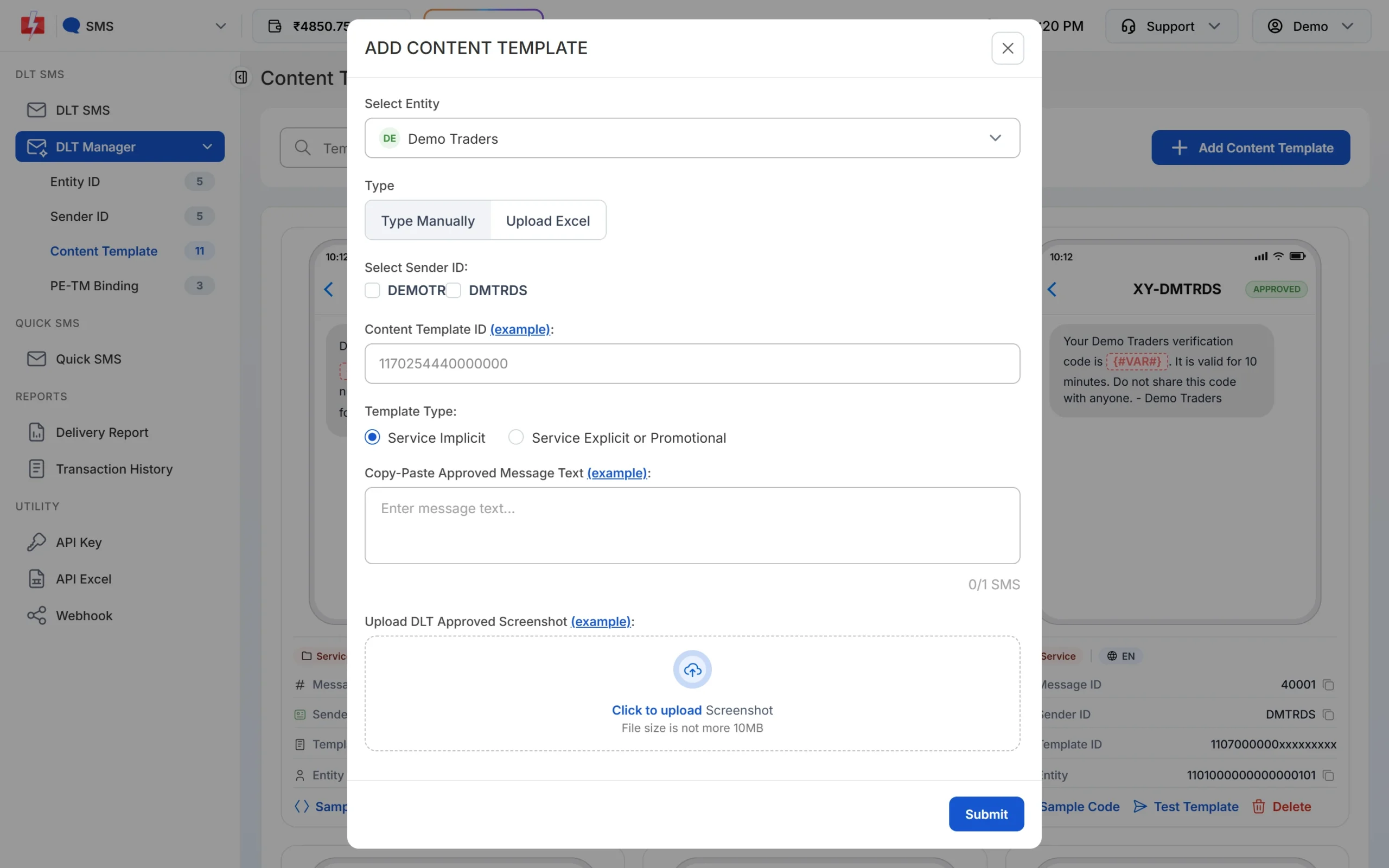
Paste the text exactly as approved. This is what your API text is matched against. -
Check the template is in the list
The new template appears as a card. Make sure the text, sender and entity are right. Once it is approved you can also send it with the DLT SMS route by its Message ID.
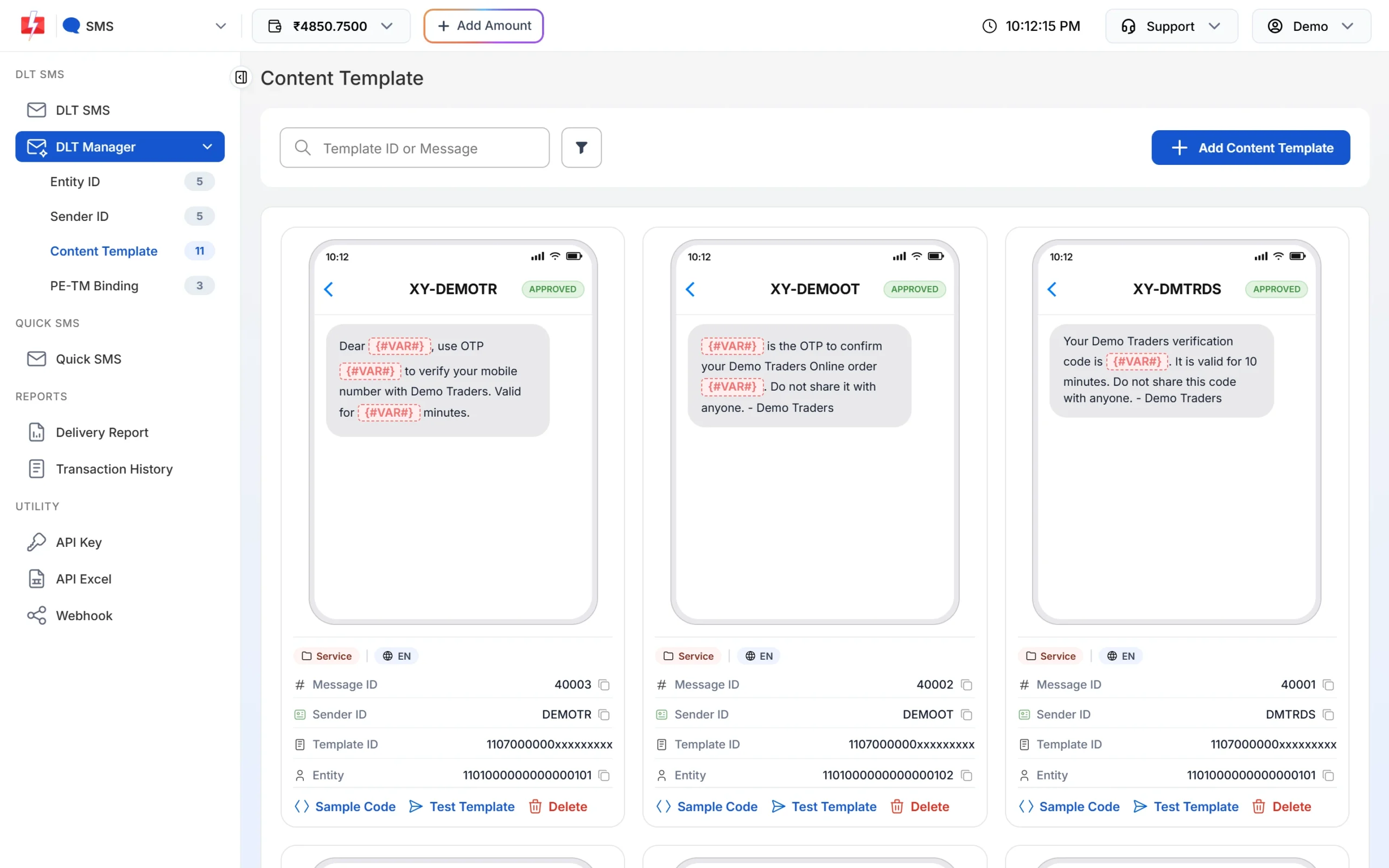
Saved templates are used for matching, newest first. -
Send without the IDs
Leave out
entity_idandtemplate_idand send the filled-in text.
cURL
curl -X POST "https://www.fast2sms.com/dev/bulkV2" \
  -H "authorization: YOUR_API_KEY" \
  -H "Content-Type: application/json" \
  -d '{"route":"dlt_manual","sender_id":"DEMOTR","message":"Dear Rahul, your order DT10458 of Rs.1240 is confirmed and will be delivered by 21 Nov. - Demo Traders","numbers":"9999999999"}'
PHP
<?php
$ch = curl_init('https://www.fast2sms.com/dev/bulkV2');
curl_setopt_array($ch, [
    CURLOPT_POST           => true,
    CURLOPT_RETURNTRANSFER => true,
    CURLOPT_HTTPHEADER     => ['authorization: YOUR_API_KEY', 'Content-Type: application/json'],
    CURLOPT_POSTFIELDS     => json_encode([
        'route'     => 'dlt_manual',
        'sender_id' => 'DEMOTR',
        'message'   => 'Dear Rahul, your order DT10458 of Rs.1240 is confirmed and will be delivered by 21 Nov. - Demo Traders',
        'numbers'   => '9999999999',
    ]),
]);
echo curl_exec($ch);
curl_close($ch);
Python
import requests

r = requests.post(
    "https://www.fast2sms.com/dev/bulkV2",
    headers={"authorization": "YOUR_API_KEY"},
    json={
        "route": "dlt_manual",
        "sender_id": "DEMOTR",
        "message": "Dear Rahul, your order DT10458 of Rs.1240 is confirmed and will be delivered by 21 Nov. - Demo Traders",
        "numbers": "9999999999",
    },
    timeout=20,
)
print(r.json())
Node.js
const res = await fetch("https://www.fast2sms.com/dev/bulkV2", {
  method: "POST",
  headers: { authorization: "YOUR_API_KEY", "Content-Type": "application/json" },
  body: JSON.stringify({
    route: "dlt_manual",
    sender_id: "DEMOTR",
    message: "Dear Rahul, your order DT10458 of Rs.1240 is confirmed and will be delivered by 21 Nov. - Demo Traders",
    numbers: "9999999999",
  }),
});
console.log(await res.json());Matching finds the IDs, the operator checks the text
The matching is loose on purpose: it ignores spaces, line breaks, capital letters and non-English characters. That helps Fast2SMS find the right IDs. The operator’s DLT check is strict. So a text can match in Fast2SMS and still fail at the operator if a word, full stop or space is different from the approved text. Those failures are not refunded.
Always send the text exactly as approved, with only the variable parts changed.
When to send the IDs yourself
- Hindi or other Unicode text. Non-English characters are removed before comparing, so a Hindi text has very little left to compare. Send both IDs.
- Similar templates. If two saved templates differ only in a variable place, the newest one that fits wins, which may not be the one you meant.
- Templates not in DLT Manager. Matching only looks at DLT Manager. If you did not add the template there, send both IDs.
- Old, changed templates. If you changed a template at DLT and added it again, an older saved version may still match. Delete the old card or send the IDs.
Error: “Add template in panel before using this api without template_id”
This comes back with status_code 500 when an ID is missing and no saved template matches your text. Check these:
| Check | Fix |
|---|---|
| The template is not in DLT Manager, or it was rejected | Add it in Content Template. Rejected templates are not used for matching. |
| The fixed words in your text differ from the saved template | Compare word by word. Only the {#var#} places can change. |
| The template is saved under another Fast2SMS account | Use the API key of the account where the template is saved. |
| You sent text from an old version of the template | Update your code to the current approved text. |
The quickest fix is to send entity_id and template_id in the request. Then no matching is needed.
Frequently asked questions
Do I need both entity_id and template_id to skip matching?
Yes. Matching runs when either one is missing. Send both to use your own IDs.
Does the template need to be Approved in DLT Manager for matching?
Matching looks at all saved templates that are not rejected. To be safe, wait until the card shows Approved, which also lets you use the DLT SMS route.
Is matching case-sensitive?
No. But the operator compares your text with the approved text, so keep the capital letters as approved.
Does matching work on /dev/custom?
No. On /dev/custom with route=dlt_manual, entity_id and template_id are required for every item.
Which is better, DLT Manual without IDs or the DLT SMS route?
If the template is in DLT Manager anyway, the DLT SMS route is simpler: you send the Message ID and variable values, and Fast2SMS builds the exact approved text for you.