
Fast2SMS API error 414, “IP is blacklisted from Dev API section”, means API Security is on for your account and the request came from an IP address that is not on your whitelist. Your key is fine. Add the public IP of the server that calls the API to the whitelist, and the error goes away.
The exact error
All Fast2SMS APIs, including Smart OTP, answer with HTTP 401:
{"return":false,"status_code":414,"message":"IP is blacklisted from Dev API section"}“Blacklisted” here only means “not whitelisted”. Your IP was not blocked for spam.
Why it happens
- A new server. You moved the app to a new host or added a server, and its IP is not on the list yet.
- The IP changed. Some cloud servers, home and office connections get a new public IP after a restart.
- More than one outgoing IP. Load balancers, serverless functions and some hosts send requests from several IPs.
- Testing from your laptop. A test with Postman or cURL from your own machine uses your office or home IP.
How to fix error 414
-
Open API Security
Go to Account Setting and click API Security under UTILITY. The page shows the API Security switch, your Whitelisted IPs, and Latest hits by other IP: the IPs that tried to call your API and are not on the whitelist.
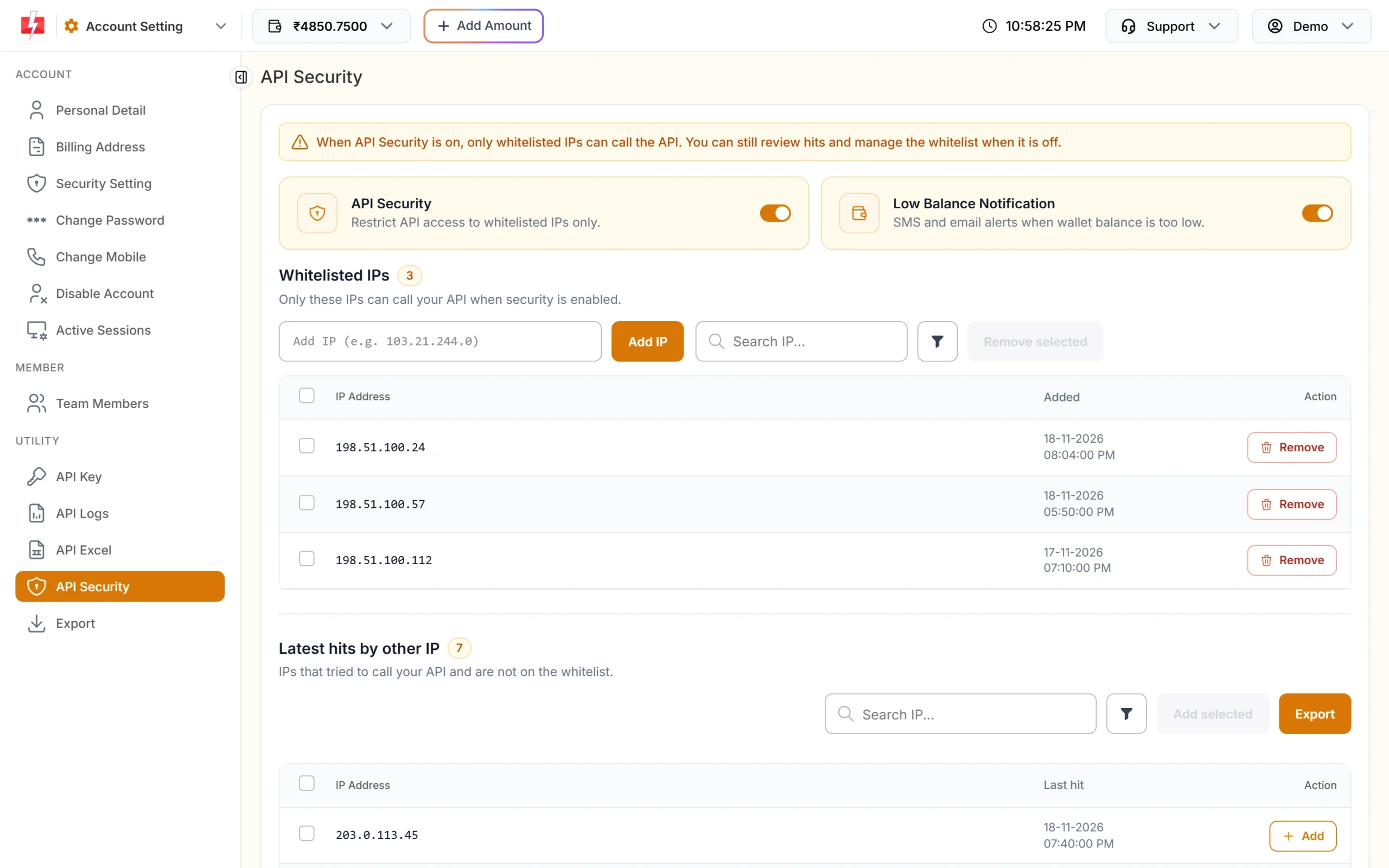
API Security shows whitelisted IPs and IPs that were refused. -
Find the IP that was refused
Look in Latest hits by other IP. If the IP of your server is listed there, click Add on that row. You can tick several rows and click Add selected.
-
Or add the IP by hand
Type the server’s public IP in the Add IP box and click Add IP. You can paste several IPs at once. To find a Linux server’s public IP, run
curl https://api.ipify.orgon that server. -
Send the request again
Retry from the same server. If it still fails, check that the IP you added is the one shown in Latest hits.
You can also switch API Security off (this needs an OTP). Then any IP with your key can call the API. Only do this for a short test, then turn it back on.
Code check
Log the 414 reply with the server name, so you know which machine needs whitelisting:
data = resp.json()
if data.get("status_code") == 414:
    my_ip = requests.get("https://api.ipify.org", timeout=5).text
    log.error("Fast2SMS refused IP %s on %s: add it in API Security", my_ip, socket.gethostname())
Do not retry a 414 in a loop. It will keep failing until the IP is added.
How to avoid it
- Use servers with a fixed public IP for API calls.
- Add the new IP to the whitelist before you move your app to a new server.
- Keep the whitelist short. Remove old IPs with Remove when a server is shut down.
- Check Latest hits by other IP now and then. An IP you do not know there may mean your key has leaked. Reset the key if so.
Frequently asked questions
What does “IP is blacklisted from Dev API section” mean?
API Security is on and the calling IP is not on your whitelist. Add the IP in Account Setting, API Security.
Is my IP blocked by Fast2SMS for spam?
No. Error 414 only means the IP is not on your own whitelist.
Can I add more than one IP?
Yes. Add as many server IPs as you need. The Add IP box accepts several IPs at once.
Which IP should I add, my laptop or my server?
The public IP of the machine that sends the API request. For a live app that is your server.
How do I turn off IP whitelisting?
Switch off API Security on the same page and confirm with the OTP. All IPs with your key can then call the API.