
The Fast2SMS error “Invalid OTP ID” means the Send OTP API could not find the otp_id you sent in the account that owns your API key. The OTP ID is wrong, was deleted, or belongs to a different Fast2SMS account. This page shows how to find the right OTP ID and check your code in a few minutes.
The exact error
The Smart OTP Send API (/dev/otp/send) answers with HTTP 400 and this body:
{"return":false,"status_code":400,"message":"Invalid OTP ID"}Nothing is sent and nothing is charged for this request. The Resend API can return the same error, because Resend runs the full send flow with the OTP ID of the last send.
Why it happens
- Typing or copy mistake. An OTP ID is 10 characters made of the digits 0-9 and the letters a-f, for example
0f6b92c4e8. A missing character or an extra space makes it invalid. - The OTP template was deleted. Deleting a Smart OTP template makes its OTP ID invalid in all API calls. This cannot be undone.
- The DLT entity or sender was deleted. Deleting an entity or a sender ID in DLT Manager also removes the Smart OTP templates linked to it.
- Wrong account. The OTP ID must belong to the same account as the API key. If you have a test account and a live account, the OTP ID from one will not work with the key of the other.
How to fix “Invalid OTP ID”
-
Find the failed call in API Logs
Go to Account Setting and open API Logs. Failed OTP/SEND rows show “Invalid OTP ID” in the Response column. Open View Details and check the
otp_idvalue in the Request Data tab.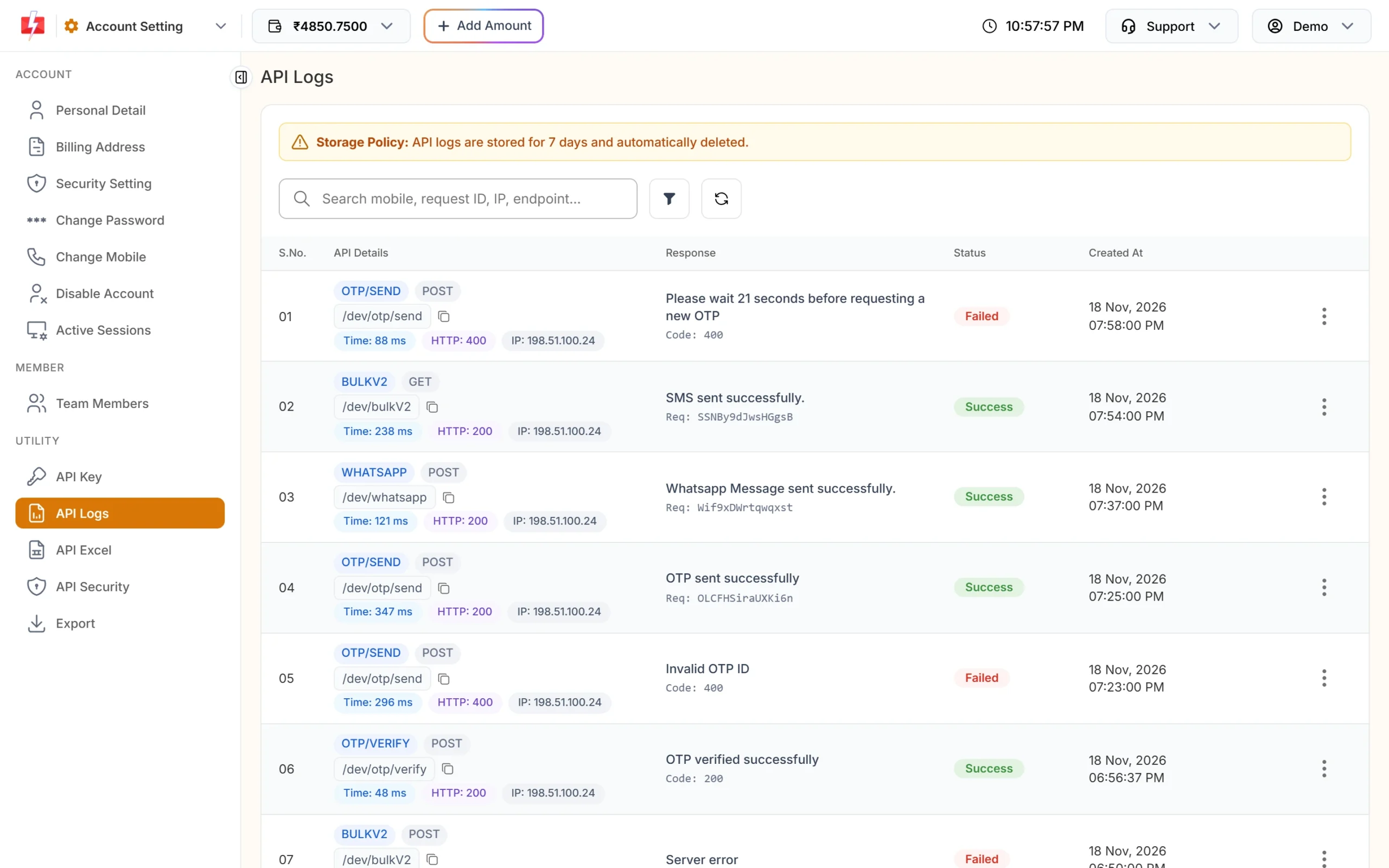
API Logs shows the failed call and its reply. -
Copy the OTP ID from OTP Template List
Open Smart OTP and click OTP Template List. Each card shows its OTP ID with a copy button. Copy it with the button instead of typing it. You can also search the list by OTP ID.
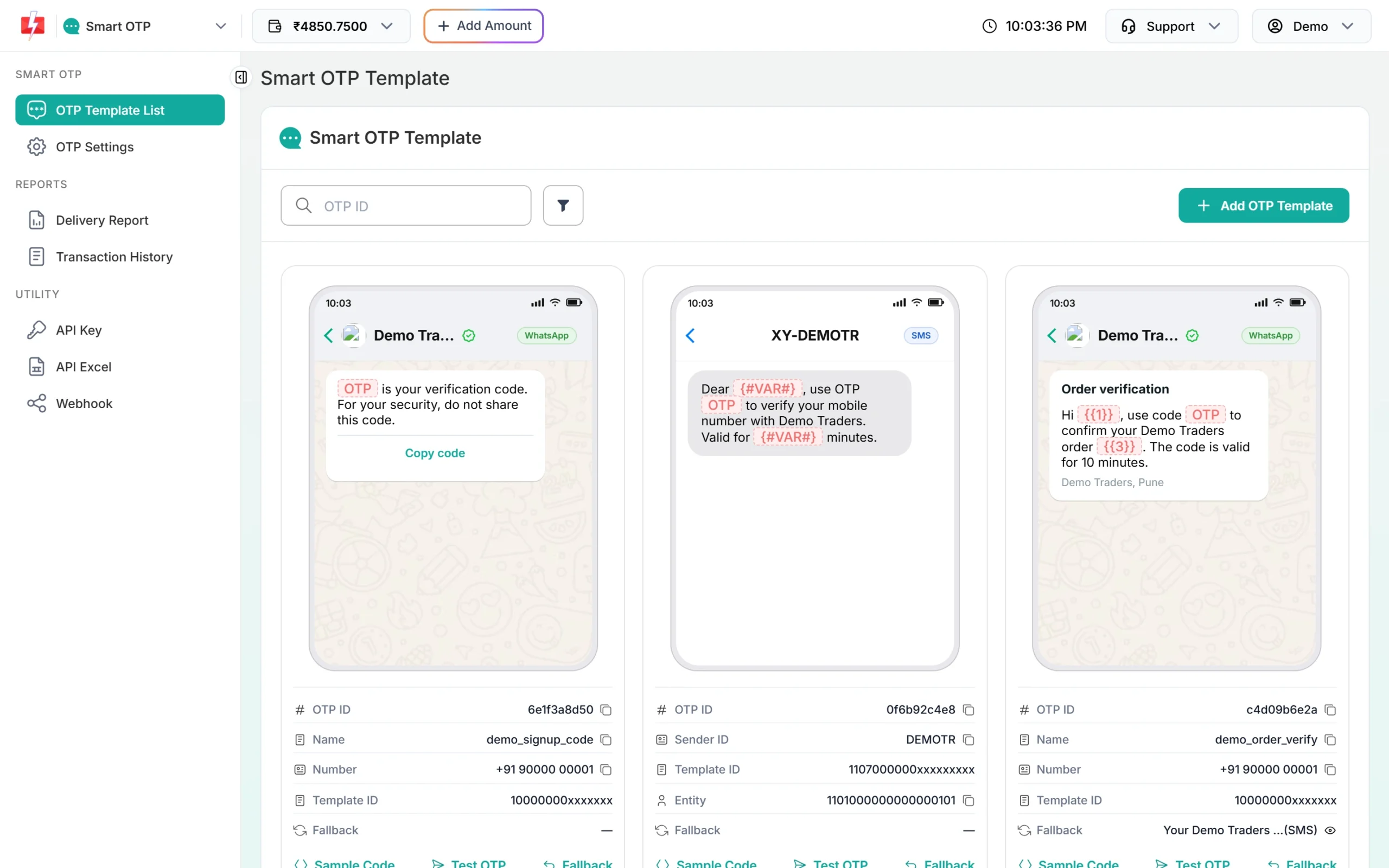
Each card shows the OTP ID to use in the API. -
Create a new OTP template if the old one is gone
If the OTP ID is not in the list, it was deleted. Click Add OTP Template, pick your approved DLT template or WhatsApp template, choose the OTP variable and save. You get a new OTP ID. Update it in your code.
-
Check the API key belongs to the same account
Open API Key in Account Setting and compare the first 4 characters of the key with the key in your server settings. If they differ, your app is using another account’s key.
Code check
Keep the OTP ID in your config, trim it, and send it as a string:
curl -X POST "https://www.fast2sms.com/dev/otp/send" \
  -H "authorization: YOUR_API_KEY" -H "Content-Type: application/json" \
  -d '{"mobile":"9999999999","otp_id":"0f6b92c4e8"}'
OTP_ID = os.environ["F2S_OTP_ID"].strip()
resp = requests.post("https://www.fast2sms.com/dev/otp/send",
headers={"authorization": API_KEY},
json={"mobile": "9999999999", "otp_id": OTP_ID}, timeout=15)
data = resp.json()
if not data.get("return") and data.get("message") == "Invalid OTP ID":
log.error("Check F2S_OTP_ID and the API key account")If the reply is “The otp id field is required.” instead, the field name is wrong or empty. It must be otp_id.
How to avoid it
- Store the OTP ID in an environment variable, not in many places in your code.
- Before you delete a Smart OTP template, entity or sender, check whether a live app still uses it. The delete screen asks you to accept that the OTP ID becomes invalid.
- Use one account per app environment and keep its API key and OTP IDs together.
- Download API Excel for Smart OTP. It lists every active OTP ID with ready sample URLs.
Frequently asked questions
Can I choose my own OTP ID?
No. Fast2SMS creates the OTP ID when you add an OTP template. It is 10 characters long and unique.
Can I restore a deleted OTP ID?
No. A deleted OTP template stays invalid in all API calls. Create a new OTP template and use its new OTP ID.
Is the OTP ID the same as my DLT template ID?
No. The DLT template ID is the 19-digit number from your DLT portal. The OTP ID is the short Smart OTP code shown on the OTP template card.
Am I charged when I get “Invalid OTP ID”?
No. The request is rejected before any message is queued, so there is no charge.
Do I need the OTP ID to verify an OTP?
No. The Verify API needs only mobile and otp. It checks the latest unverified OTP for that number.