
The Fast2SMS Send OTP API sends a one-time password to an Indian mobile number on SMS or WhatsApp with one call. You pass the mobile number and your Smart OTP OTP ID. Fast2SMS creates the code, sends it and keeps it so you can check it later with the Verify OTP API. This page covers the endpoint, every parameter, ready code in cURL, PHP, Python, Node.js, Java, C# and Go, the response and every error.
Before you start
- API key: from API Key under UTILITY in the panel. API Access must be switched on.
- OTP ID: from a Smart OTP template in OTP Template List. The template links your approved DLT template or WhatsApp template to this ID.
- Wallet balance: enough for at least one OTP. Every send is charged.
- A server: call the API from your backend, never from app or browser code, so your API key stays private.
Endpoint and authentication
| URL | https://www.fast2sms.com/dev/otp/send |
| Method | POST (recommended). GET with query parameters also works. |
| Body | JSON, or normal form fields |
| Header | authorization: YOUR_API_KEY |
authorization: Bearer YOUR_API_KEY fails with “Invalid authorization key”.Parameters
| Parameter | Required | Rules |
|---|---|---|
mobile |
Yes | One 10-digit Indian mobile number, as a string. Spaces, +91 and 91 in front are cleaned for you. Only one number per call. |
otp_id |
Yes | The 10-character OTP ID from your Smart OTP template. It must belong to the same account as the API key. |
otp_expiry |
No | How long the OTP stays valid, in minutes. 1 to 10080. Default 15. |
otp_length |
No | Number of digits Fast2SMS makes. 4 to 10. Default 6. Above 10 gives an error, below 4 is changed to 6. |
otp |
No | Your own OTP value, up to 10 characters. Leave it out and Fast2SMS makes a numeric OTP. |
variables_values |
No | Values for the template’s other variables, in order, separated by |. Do not include the OTP. Writing {otp} inside a value puts the OTP there too. |
udf1, udf2, udf3 |
No | Your own reference text, for example a user ID. It comes back in the OTP webhook. |
How variables_values works
Say your DLT template is “Dear {#var#}, use OTP {#var#} to verify your mobile number with Demo Traders. Valid for {#var#} minutes.” and the OTP is set on Variable 2 in your Smart OTP template. Send "variables_values":"Rahul|5". Fast2SMS puts “Rahul” in the first variable, the OTP in the second and “5” in the third. If your template has only the OTP variable, leave variables_values out.
Send your first OTP
-
Copy your OTP ID
Open Smart OTP, then OTP Template List. Click the copy icon next to OTP ID on the template you want to use.
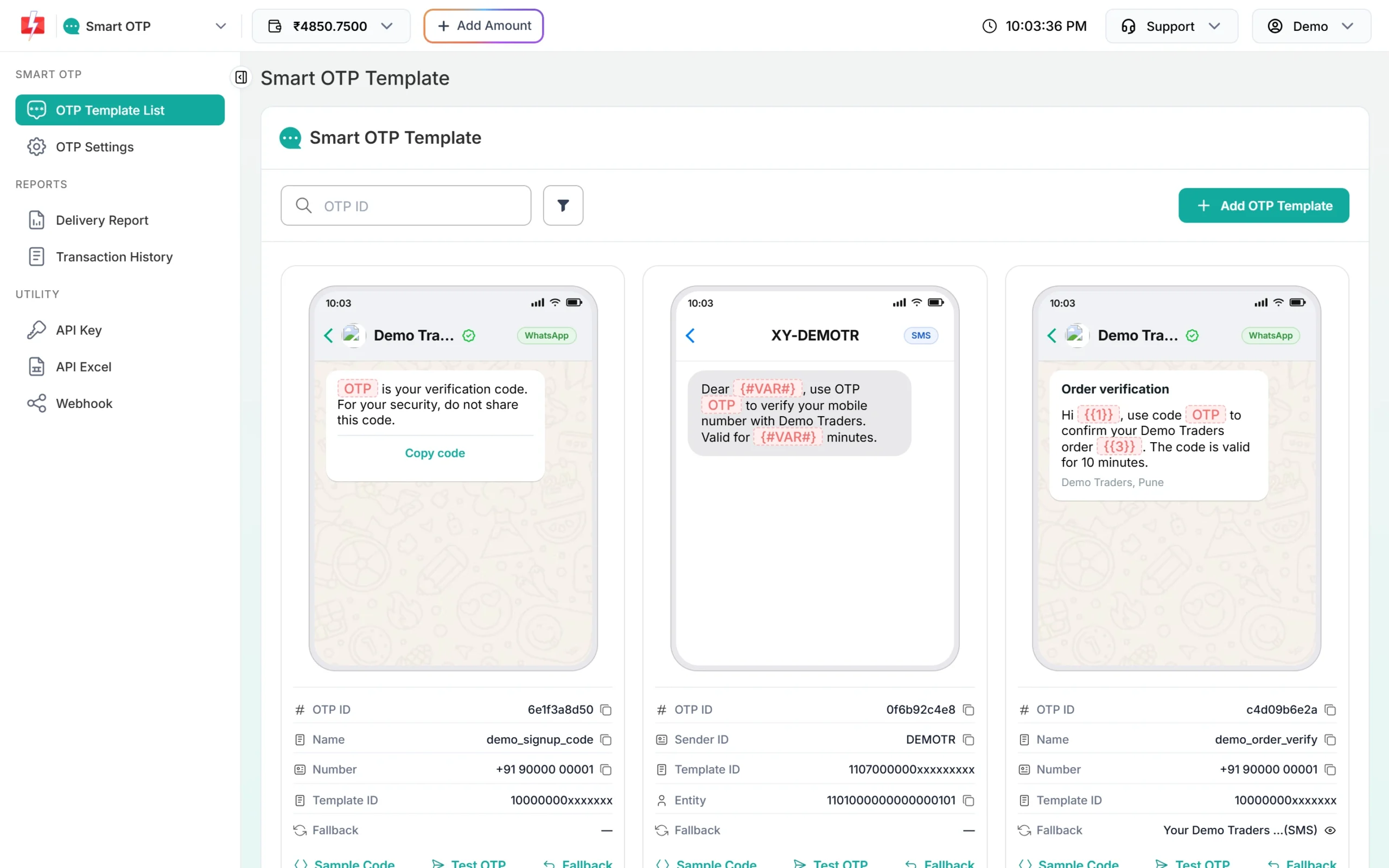
Each card has its own OTP ID. -
Copy your API key
Go to API Key. Click View, enter the OTP sent to your account mobile, and copy the key. Store it in your server’s environment settings, not in your code repository.
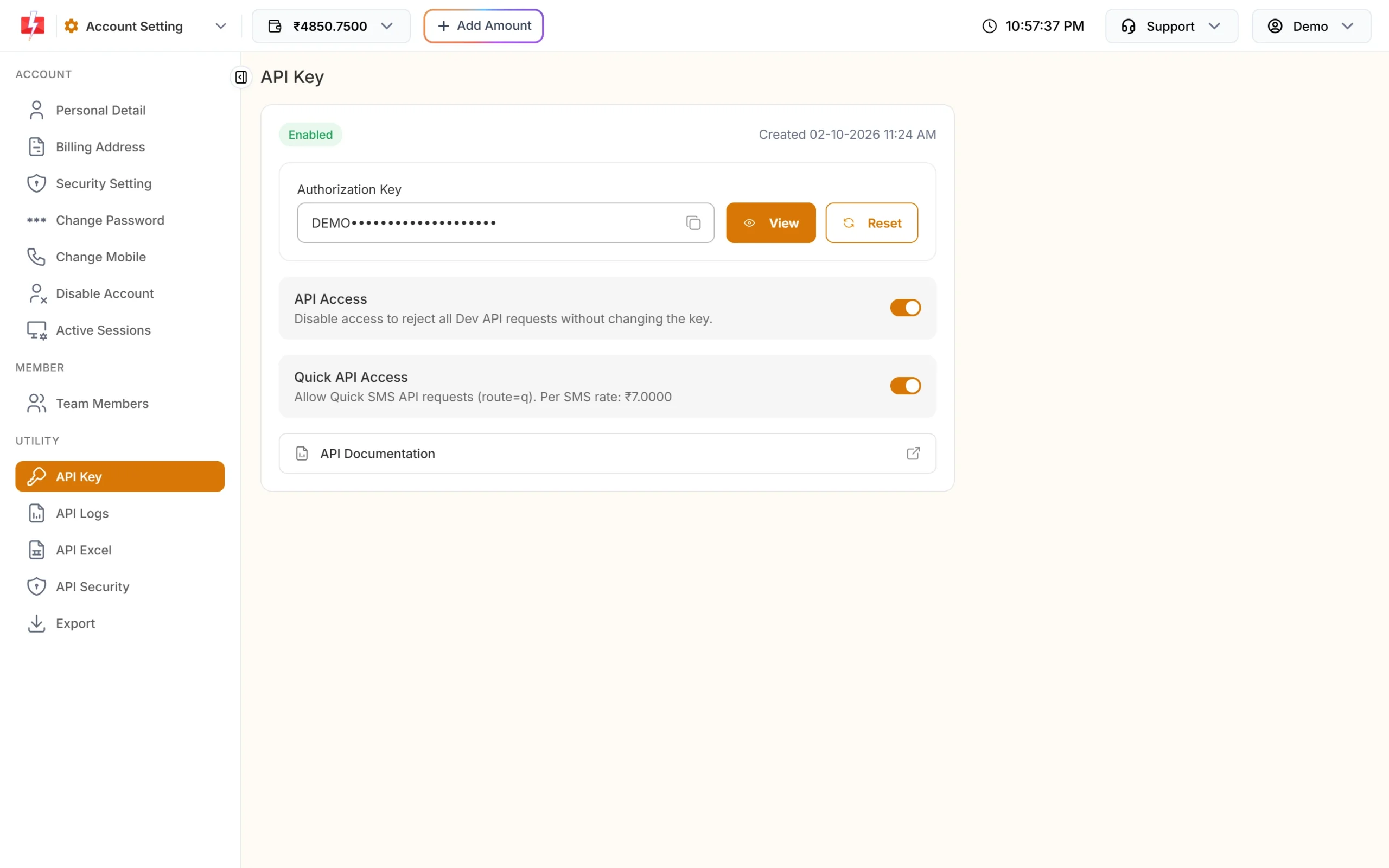
Keep API Access on, or every call is refused. -
Call the API from your server
Use one of the code samples below. Replace
YOUR_API_KEYandYOUR_OTP_ID, and use a real number in place of 9999999999. -
Check the call in API Logs
Every call made with your key shows in API Logs under Account Settings for 7 days. Click a row, then View Details to see the request you sent and the response you got.
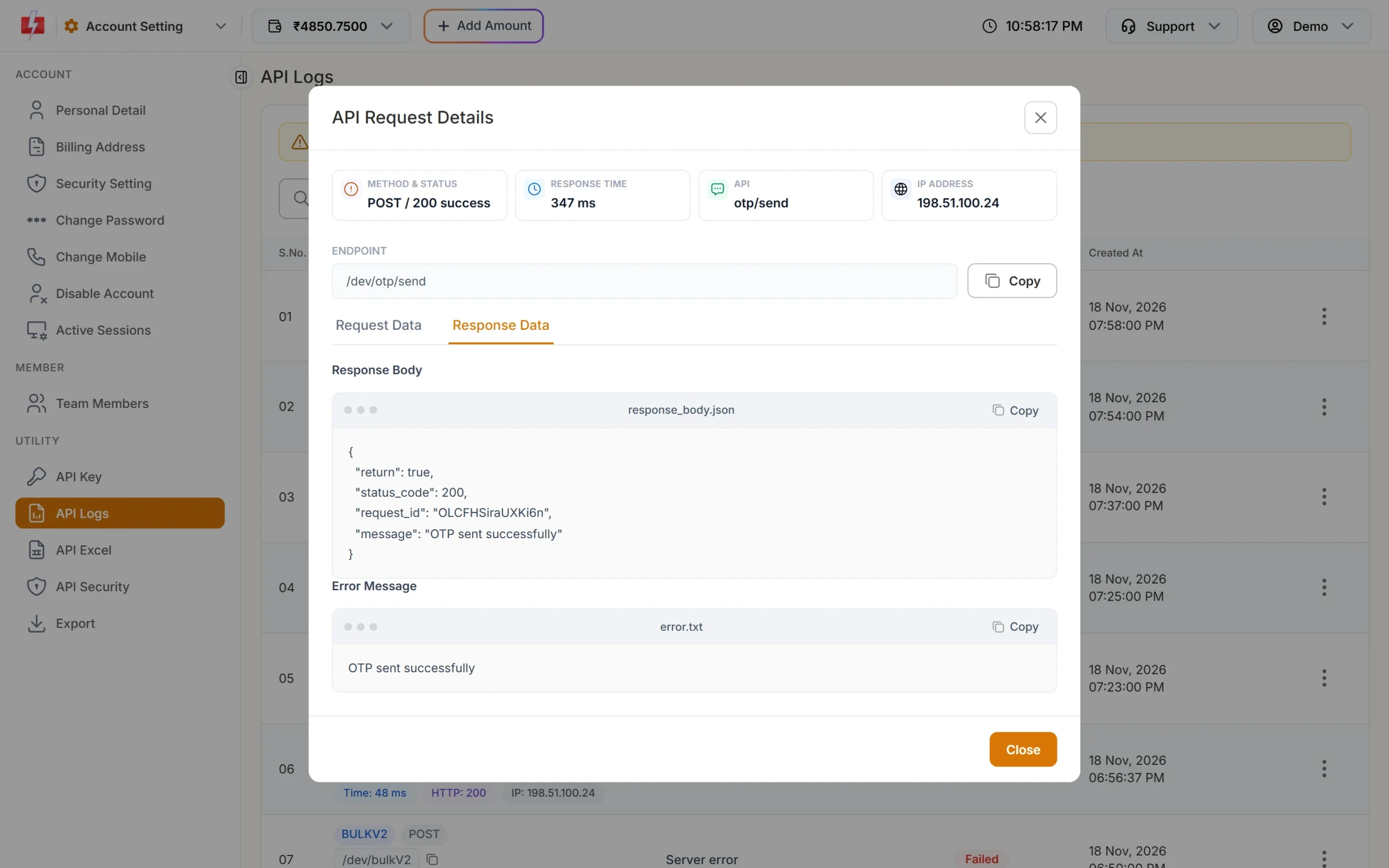
A successful Send OTP call in API Logs.
Code examples
Each example sends a 6-digit OTP that is valid for 5 minutes. They all use POST with a JSON body.
cURL
curl -X POST "https://www.fast2sms.com/dev/otp/send" \
  -H "authorization: YOUR_API_KEY" \
  -H "Content-Type: application/json" \
  -d '{"mobile":"9999999999","otp_id":"YOUR_OTP_ID","otp_expiry":5,"otp_length":6}'
PHP
<?php
$payload = [
    'mobile'     => '9999999999',
    'otp_id'     => 'YOUR_OTP_ID',
    'otp_expiry' => 5,
    'otp_length' => 6,
];

$ch = curl_init('https://www.fast2sms.com/dev/otp/send');
curl_setopt_array($ch, [
    CURLOPT_POST           => true,
    CURLOPT_RETURNTRANSFER => true,
    CURLOPT_TIMEOUT        => 15,
    CURLOPT_HTTPHEADER     => [
        'authorization: YOUR_API_KEY',
        'Content-Type: application/json',
    ],
    CURLOPT_POSTFIELDS     => json_encode($payload),
]);
$body = curl_exec($ch);
$http = curl_getinfo($ch, CURLINFO_HTTP_CODE);
curl_close($ch);

$res = json_decode($body, true);
if ($http === 200 && !empty($res['return'])) {
    echo 'OTP sent. Request ID: ' . $res['request_id'];
} else {
    echo 'Send failed: ' . ($res['message'] ?? 'no response');
}
Python
import requests

API_KEY = "YOUR_API_KEY"

def send_otp(mobile, otp_id):
    r = requests.post(
        "https://www.fast2sms.com/dev/otp/send",
        headers={"authorization": API_KEY},
        json={"mobile": mobile, "otp_id": otp_id, "otp_expiry": 5, "otp_length": 6},
        timeout=15,
    )
    data = r.json()
    if r.status_code == 200 and data.get("return"):
        return data["request_id"]
    raise RuntimeError(data.get("message", "OTP send failed"))

print(send_otp("9999999999", "YOUR_OTP_ID"))
Node.js
Node.js 18 and later have fetch built in.
const API_KEY = "YOUR_API_KEY";

async function sendOtp(mobile, otpId) {
  const res = await fetch("https://www.fast2sms.com/dev/otp/send", {
    method: "POST",
    headers: { authorization: API_KEY, "Content-Type": "application/json" },
    body: JSON.stringify({ mobile, otp_id: otpId, otp_expiry: 5, otp_length: 6 }),
  });
  const data = await res.json();
  if (res.ok && data.return) return data.request_id;
  throw new Error(data.message || "OTP send failed");
}

sendOtp("9999999999", "YOUR_OTP_ID").then(console.log).catch(console.error);
Java
Uses the HttpClient that comes with Java 11 and later.
import java.net.URI;
import java.net.http.HttpClient;
import java.net.http.HttpRequest;
import java.net.http.HttpResponse;

public class SendOtp {
    public static void main(String[] args) throws Exception {
        String json = "{\"mobile\":\"9999999999\",\"otp_id\":\"YOUR_OTP_ID\","
                    + "\"otp_expiry\":5,\"otp_length\":6}";

        HttpRequest request = HttpRequest.newBuilder()
                .uri(URI.create("https://www.fast2sms.com/dev/otp/send"))
                .header("authorization", "YOUR_API_KEY")
                .header("Content-Type", "application/json")
                .POST(HttpRequest.BodyPublishers.ofString(json))
                .build();

        HttpResponse<String> response = HttpClient.newHttpClient()
                .send(request, HttpResponse.BodyHandlers.ofString());

        System.out.println(response.statusCode() + " " + response.body());
    }
}
C# (.NET)
using System;
using System.Net.Http;
using System.Text;

var client = new HttpClient();
var json = "{\"mobile\":\"9999999999\",\"otp_id\":\"YOUR_OTP_ID\",\"otp_expiry\":5,\"otp_length\":6}";

var request = new HttpRequestMessage(HttpMethod.Post, "https://www.fast2sms.com/dev/otp/send");
request.Headers.TryAddWithoutValidation("authorization", "YOUR_API_KEY");
request.Content = new StringContent(json, Encoding.UTF8, "application/json");

var response = await client.SendAsync(request);
var body = await response.Content.ReadAsStringAsync();
Console.WriteLine($"{(int)response.StatusCode} {body}");
Go
package main

import (
	"bytes"
	"encoding/json"
	"fmt"
	"io"
	"net/http"
	"time"
)

func main() {
	payload, _ := json.Marshal(map[string]any{
		"mobile":     "9999999999",
		"otp_id":     "YOUR_OTP_ID",
		"otp_expiry": 5,
		"otp_length": 6,
	})

	req, _ := http.NewRequest("POST", "https://www.fast2sms.com/dev/otp/send", bytes.NewReader(payload))
	req.Header.Set("authorization", "YOUR_API_KEY")
	req.Header.Set("Content-Type", "application/json")

	client := &http.Client{Timeout: 15 * time.Second}
	resp, err := client.Do(req)
	if err != nil {
		panic(err)
	}
	defer resp.Body.Close()

	body, _ := io.ReadAll(resp.Body)
	fmt.Println(resp.StatusCode, string(body))
}Success response
{
  "return": true,
  "status_code": 200,
  "request_id": "Oa1B2c3D4e5F6g7",
  "message": "OTP sent successfully"
}
“OTP sent successfully” means Fast2SMS accepted and queued the OTP. It does not mean the phone received it yet. Save the request_id. It starts with “O” and you can search it in the OTP Report or match it in your OTP webhook to see if it was delivered.
Error responses
Errors come back with "return": false and a message. Show your user a simple message and log the real one.
| HTTP | message | What it means and the fix |
|---|---|---|
| 401 | Authorization key required | No key was sent. Add the authorization header. |
| 401 | Invalid authorization key | The key is wrong, was reset, or has “Bearer” or spaces in front. Copy it again. |
| 401 | Invalid Authentication, Authorization Key Disabled | API Access is off. Turn it on in API Key. |
| 401 | IP is blacklisted from Dev API section | API Security is on and your server IP is not whitelisted. Add it in API Security. |
| 400 | The mobile must be 10 digits. (or another field error) | Fix the field named in the message. |
| 400 | Mobile number format is invalid | mobile was sent as a list. Send one number as text. |
| 400 | Invalid OTP ID | The OTP ID is not in this account or was deleted. Copy it from OTP Template List. |
| 400 | Template is not approved | The Smart OTP template is no longer active. Create it again. |
| 400 | Please wait N seconds before requesting a new OTP | The resend wait from OTP Settings is still running for this number and OTP ID. Wait, or lower the wait. |
| 400 | DLT content not found for this template / Sender ID not found for this template | The linked DLT template or sender was removed. Re-add it in DLT Manager and create a new OTP template. |
| 400 | Entity blocked / Content template blocked / Sender ID blocked | Your DLT entity, template or sender is blocked. Contact support. |
| 400 | WhatsApp template not found for this OTP template | The WhatsApp template was deleted. Create the OTP template again. |
| 400 | WhatsApp Business Number is not active or connected | Reconnect the number in WhatsApp Manager. |
| 400 | Insufficient wallet balance. You need at least ₹… | Add money to your wallet. |
What happens after you call Send OTP
- Older OTPs stop working. A new send to a number cancels every earlier unverified OTP for that number, even one sent with a different OTP ID.
- The wallet is charged when the message goes out. SMS OTPs cost your plan’s SMS rate times the SMS parts. WhatsApp OTPs cost the WhatsApp rate for the template’s category. Each send is its own line in Transaction History, starting with “Smart OTP (SMS” or “Smart OTP (WhatsApp”.
- Fallback runs if set. If the template has a fallback and the first message is reported failed within 120 seconds, the same OTP goes once on the other channel. The fallback is charged too.
- Verify uses the mobile only. When the user types the code, call
/dev/otp/verifywithmobileandotp. No OTP ID is needed.
/dev/otp/resend instead of calling Send again. Send makes a new code and cancels the old one, which confuses users who already have the first SMS.Frequently asked questions
Can I send the OTP to many numbers in one call?
No. The Send OTP API takes one mobile number per call. Call it once per user.
Can I send OTP to international numbers?
No. mobile must be a 10-digit Indian number after cleaning.
Can I use GET instead of POST?
Yes, the same parameters work in the query string. POST is better because a GET URL with your key can end up in server and proxy logs.
Does the API return the OTP it created?
No. The response has the request ID, not the code. If your app needs to know the code, create it yourself and pass it in otp.
Can the OTP have letters?
Codes made by Fast2SMS are numbers only. If you pass your own value in otp it can be up to 10 characters, but a DLT template tagged for numbers needs digits.
Why does the Sample Code in the panel fail when I paste it?
The JSON in the Sample Code window has // optional notes. JSON does not allow comments. Remove them, or drop the optional lines.
Is there a rate limit on Send OTP?
The limits are per number: the resend wait in OTP Settings (10 seconds if you never set it). Add your own limit per user and per IP in your app as well, to stop abuse.