
When the Fast2SMS Verify OTP API rejects a code, it says why: “OTP expired”, “Invalid OTP” or “Maximum verification attempts reached. OTP is no longer valid.” This page explains each of these three OTP verify errors, what the user should see, and which Smart OTP setting controls them.
The three errors
All three come from /dev/otp/verify with HTTP 400:
{"return":false,"status_code":400,"message":"OTP expired"}
{"return":false,"status_code":400,"message":"Invalid OTP"}
{"return":false,"status_code":400,"message":"Maximum verification attempts reached. OTP is no longer valid."}| Message | What it means | What to do |
|---|---|---|
| OTP expired | The OTP is older than the otp_expiry you set when sending it. The default is 15 minutes. |
Send a new OTP. |
| Invalid OTP | The code does not match. One attempt is used up. | Let the user try again. |
| Maximum verification attempts reached. OTP is no longer valid. | Wrong tries reached your Max Verify OTP Limit. The OTP is locked. | Send a new OTP. |
Why each one happens
OTP expired
Each OTP has an expiry in minutes, set by the otp_expiry parameter in the Send call (1 to 10080, default 15). If the user enters the code after that, it is refused even if it is correct. A short expiry, such as 2 minutes, causes this often when SMS reaches the user late.
Invalid OTP
The code is compared as exact text with the latest OTP sent to that number. Common causes:
- The user typed a wrong digit, or a space came in with a pasted code.
- A newer OTP was sent, and the user typed the older code. Every new send cancels older codes for that number.
- Your code turned the OTP into a number, so a code like
012345became12345.
Maximum verification attempts reached
The setting Max Verify OTP Limit (Per SMS) in OTP Settings decides how many tries one OTP allows. It can be 1 to 100. If you never saved OTP Settings, it is 10. After the last try, the OTP stops working.
How to fix and tune it
-
Check your verify limit
Open Smart OTP, then OTP Settings. Set Max Verify OTP Limit (Per SMS) to a number that fits your users, for example 5, and click Save Settings.
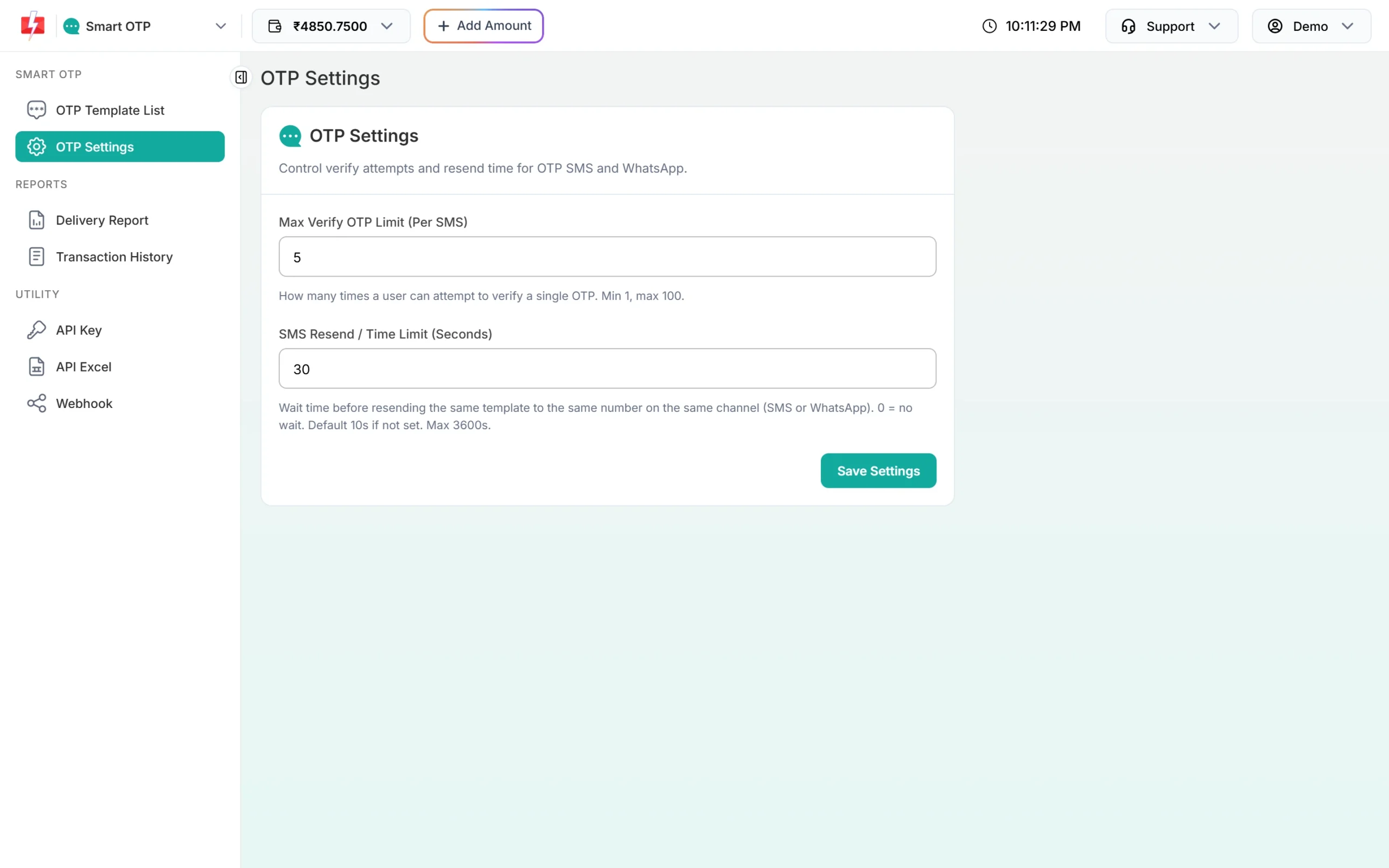
Max Verify OTP Limit sets the number of tries per OTP. -
Set a sensible expiry when you send
Pass
otp_expiryin minutes in the Send call. 5 to 15 minutes works for most login flows. -
Clean the code before you verify
Remove spaces and keep the OTP as text. Send it as a string field
otptogether with the samemobileyou used for Send.
Code check
$code = preg_replace('/\s+/', '', $_POST['otp']);   // keep as string
$ch = curl_init("https://www.fast2sms.com/dev/otp/verify");
curl_setopt_array($ch, [
  CURLOPT_POST => true, CURLOPT_RETURNTRANSFER => true,
  CURLOPT_HTTPHEADER => ["authorization: YOUR_API_KEY", "Content-Type: application/json"],
  CURLOPT_POSTFIELDS => json_encode(["mobile" => "9999999999", "otp" => $code]),
]);
$res = json_decode(curl_exec($ch), true);
$msg = $res['message'] ?? '';
if ($msg === 'Invalid OTP') { /* "Wrong code, try again" */ }
elseif ($msg === 'OTP expired' || str_starts_with($msg, 'Maximum verification')) {
  /* "Code no longer valid. Tap Send code for a new one." */
}How to avoid these errors
- Do not send a new OTP while the user is still typing the last one.
- Show how many minutes the code is valid for on the code screen.
- Tell the user clearly when they must request a new code, and offer the button right there.
- Do not set the verify limit to 1 unless you really need it. One typing mistake would lock the code.
Frequently asked questions
How long is a Fast2SMS OTP valid?
15 minutes by default. You can set 1 to 10080 minutes with otp_expiry in each Send call.
How many wrong tries are allowed?
10 by default. You can set 1 to 100 in OTP Settings under Max Verify OTP Limit.
Can a locked OTP be used again after too many tries?
No. Send a new OTP. The locked one stays invalid.
Why does a correct code say Invalid OTP?
Usually a newer OTP was sent to the same number, so only the newest code works. Also check that no spaces or lost leading zeros changed the code.
Does a wrong attempt cost money?
No message is sent during verify. Charges apply to OTP sends and resends.