
An OTP login is only as safe as the rules around it. This guide covers OTP security best practices for apps and websites that use Fast2SMS: the right OTP length and expiry, how many tries and resends to allow, how to stop OTP abuse and SMS pumping, and how to keep your API key safe. Each tip says what Smart OTP already does for you and what you should add in your own app.
Quick checklist
- Use 6-digit codes that expire in 5 to 10 minutes.
- Allow 3 to 5 verify tries per code.
- Wait 30 to 60 seconds between sends to the same number.
- Limit OTP requests per number, per IP and per session in your app.
- Add a CAPTCHA or similar check before the “Send OTP” button on public pages.
- Call Fast2SMS only from your server. Never put the API key in an app or web page.
- Turn on API Security so only your server IPs can use your key.
- Check API Logs and the OTP report for sudden spikes.
1. OTP length: use 6 digits
A 4-digit code has 10,000 possible values. A 6-digit code has 1,000,000. With a limit of 5 tries, a guesser has a much smaller chance against 6 digits, and users can still type it easily.
Smart OTP makes 6-digit codes by default. You can set otp_length from 4 to 10 in the Send OTP call. A value below 4 is changed to 6. If you pass your own code in otp, make it random and at least 6 digits, using your language’s secure random function, never a simple counter or the time.
2. OTP expiry: keep it short
A code that works for hours is a code that can leak and still be used. For login and signup, 5 to 10 minutes is a common choice. Smart OTP uses 15 minutes if you do not set otp_expiry, and you can set 1 to 10080 minutes.
{"mobile":"9999999999","otp_id":"YOUR_OTP_ID","otp_expiry":5,"otp_length":6}Tell users the time limit in the message, for example “Valid for 5 minutes”. If your DLT template has a variable for the minutes, fill it with variables_values so the text always matches your otp_expiry.
3. Limit wrong tries and resends
Set these in Smart OTP, under OTP Settings:
- Max Verify OTP Limit (Per SMS): 3 to 5 for most apps. When the limit is reached, the code is cancelled.
- SMS Resend / Time Limit (Seconds): 30 to 60 seconds. This stops one number getting OTP after OTP.
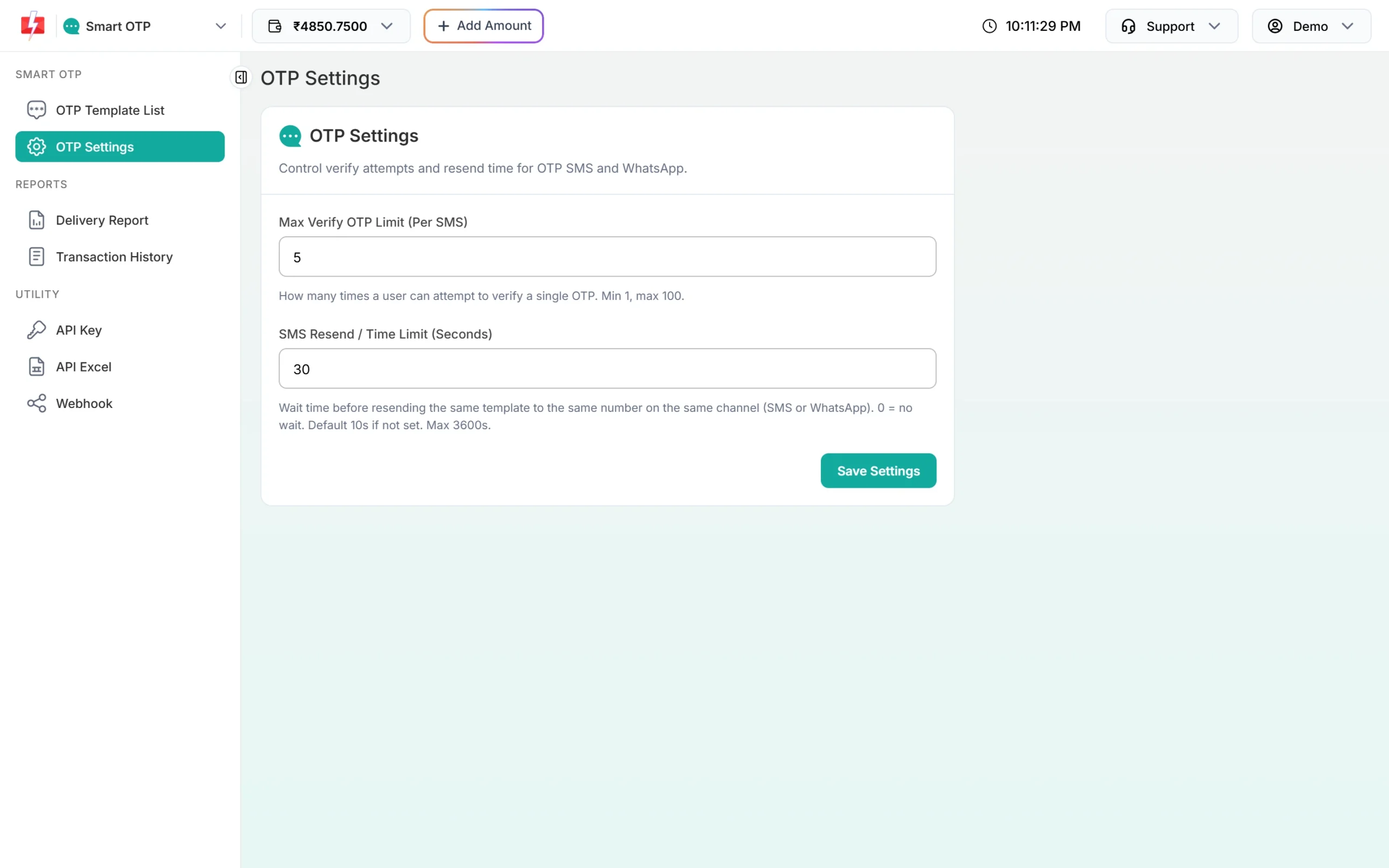
Smart OTP also has fixed limits on the Resend OTP API: within 10 minutes of the last send, and at most 5 sends of one OTP ID to one number in that time. Each new Send OTP cancels older codes for that number, so only the newest code can be used.
4. Stop OTP abuse and SMS pumping
SMS pumping is when bots hit your “Send OTP” form again and again with many numbers. You pay for every message, and the bots gain from the traffic. Signs: a sudden rise in OTP sends, many numbers that never verify, and many requests from a few IPs.
The settings above limit sends per number. Bots use many different numbers, so you also need limits in your own app:
- Per IP: for example, no more than 10 to 20 OTP requests per IP per hour.
- Per number: for example, no more than 5 OTP requests per number per hour, on top of the resend wait.
- Per session or device: a fresh session should not be able to request OTPs for many numbers.
- A human check: a CAPTCHA or similar check before the OTP is sent on signup and login pages.
- Number checks: accept only 10-digit Indian mobiles starting with 6, 7, 8 or 9 before you call the API.
- A daily budget: keep only the balance you need, and turn on Low Balance Notification in API Security so you hear about a sudden drain.
A simple limiter in Python shows the idea. Use a shared store such as Redis in production.
import re
import time
from collections import defaultdict

WINDOW = 3600          # one hour
MAX_PER_NUMBER = 5
MAX_PER_IP = 20
hits = defaultdict(list)

def allowed(key, limit):
    now = time.time()
    hits[key] = [t for t in hits[key] if now - t < WINDOW]
    if len(hits[key]) >= limit:
        return False
    hits[key].append(now)
    return True

def can_send_otp(mobile, ip):
    if not re.fullmatch(r"[6-9]\d{9}", mobile):
        return False
return allowed("ip:" + ip, MAX_PER_IP) and allowed("m:" + mobile, MAX_PER_NUMBER)5. Keep your API key safe
-
Call Fast2SMS from your server only
Anyone can read an API key inside an Android app, an iOS app or website JavaScript. Your app should ask your server to send the OTP, and your server calls Fast2SMS. Keep the key in an environment variable, not in your code repository.
-
Turn on API Security
Open Account Settings, then API Security. Add your server’s public IP under Whitelisted IPs with Add IP, then switch on API Security. Calls from any other IP are refused with “IP is blacklisted from Dev API section”. The Latest hits by other IP list shows IPs that tried to use your key and are not whitelisted.
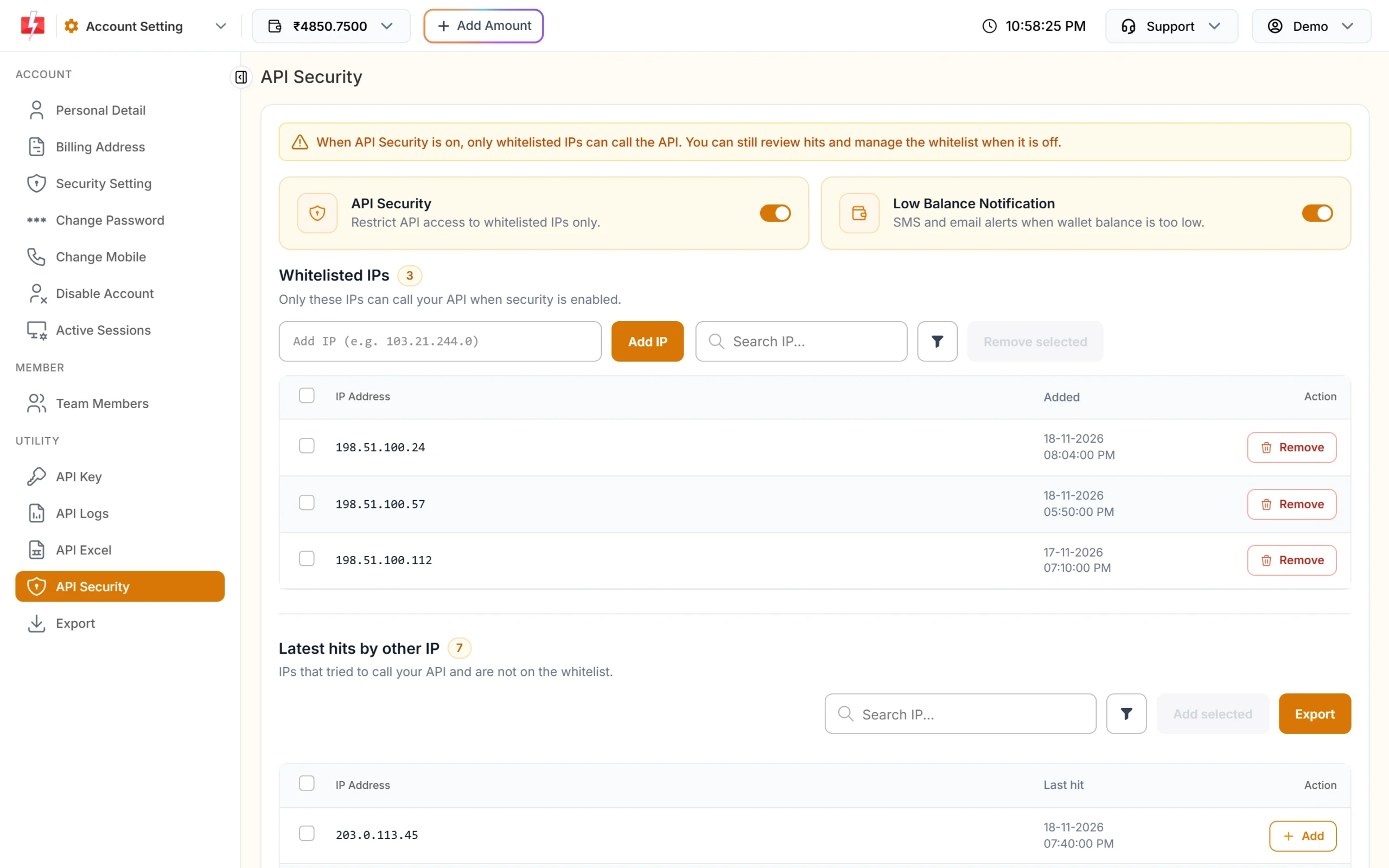
Only whitelisted IPs can call the API when API Security is on. -
Reset the key if it leaks
On the API Key page click Reset. The old key stops working at once. Update the new key on your server. Switching API Access off blocks all API calls without changing the key, which helps in an emergency.
-
Watch API Logs
API Logs show every call made with your key for the last 7 days, with the endpoint, IP, HTTP code and response. A row with an IP you do not know is a warning sign.
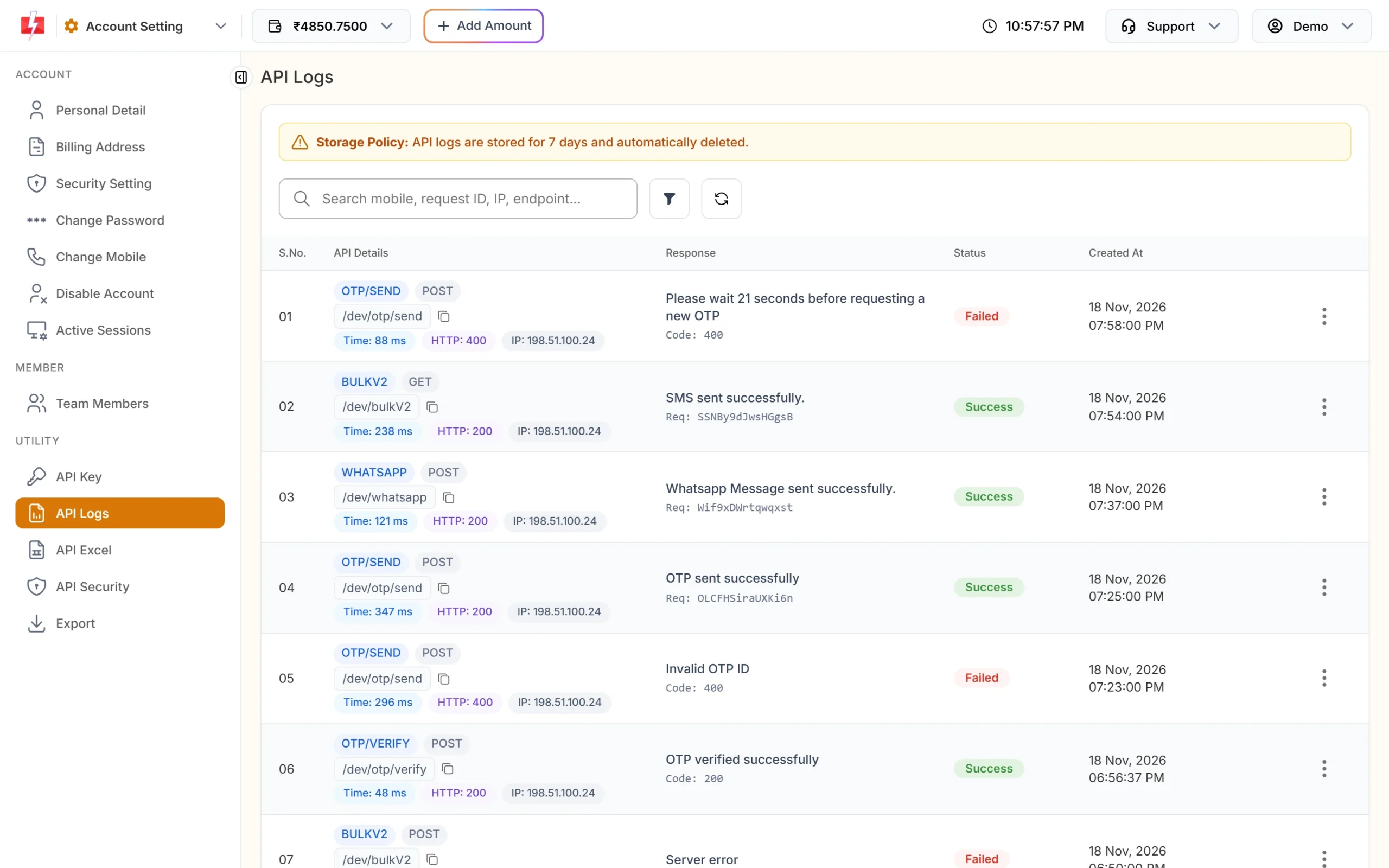
Search API Logs by mobile, request ID, IP or endpoint.
6. Verify safely
- Decide “verified” on your server, based on the Verify OTP answer “OTP verified successfully”. Never trust a flag sent from the browser.
- Do not send the OTP to the browser or app in any response. With Smart OTP your server never needs to know the code.
- Send the OTP as text in the verify call, so a leading zero is not lost.
- Tie the verify step to the same session that asked for the OTP, so a code cannot be used to log in to another session.
7. Write a clear OTP message
- Say who it is from and what it is for: “482913 is your OTP to log in to YourBrand.”
- Say how long it is valid.
- Add “Do not share this code with anyone.” Many scams start with “please tell me the OTP”.
- Do not add links in OTP messages. Links make an OTP look like phishing.
For SMS, this text must match your approved DLT template. For WhatsApp, Authentication templates use a fixed text with an optional security line and expiry line.
Frequently asked questions
What is the best OTP length?
6 digits for most logins. It is hard to guess with a small try limit and easy to type. Smart OTP uses 6 by default.
How long should an OTP be valid?
5 to 10 minutes for login and signup. Set it with otp_expiry. The Smart OTP default is 15 minutes.
How many wrong attempts should I allow?
3 to 5. Set it in Max Verify OTP Limit (Per SMS) in OTP Settings.
Does Fast2SMS limit OTPs to one number?
Yes. The resend wait in OTP Settings and the Resend OTP limits apply per number. Add your own limits per IP and per session to stop bots that use many numbers.
What should I do if my API key leaks?
Reset it on the API Key page, update your server, turn on API Security with your server IPs, and check API Logs for calls you did not make.
Is it safe to send OTP from a mobile app directly?
No. The API key would be inside the app. Send the request to your own server and call Fast2SMS from there.
Can I see which OTPs were never verified?
Yes. Export the OTP report from Delivery Reports. The file has Verified and Verified At columns. Many sends with “No” can point to abuse.