
The Fast2SMS OTP verification widget adds a mobile number check to any website or app. Your visitor types a number, gets a code by SMS or WhatsApp, types it in, and your server gets a signed proof that the number is real. You copy two lines of HTML into your page and run one small backend file on the platform you already use.
This page explains how the widget works, which kit to pick for your platform, the 5-minute setup and the security rules. Each kit has its own README with the exact steps.
What the OTP widget does
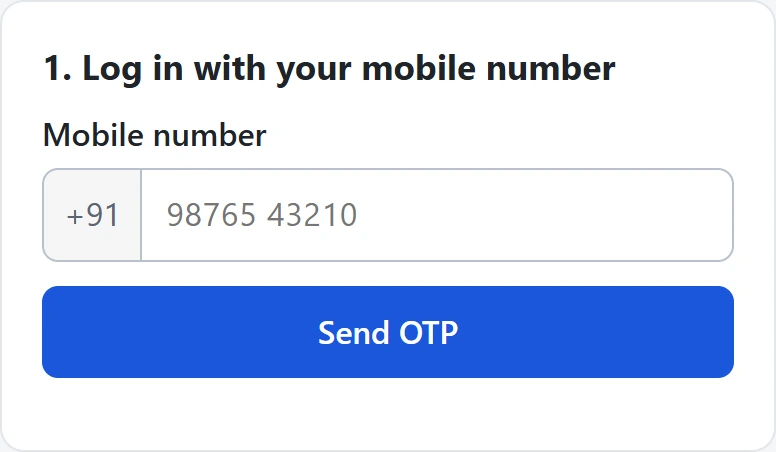
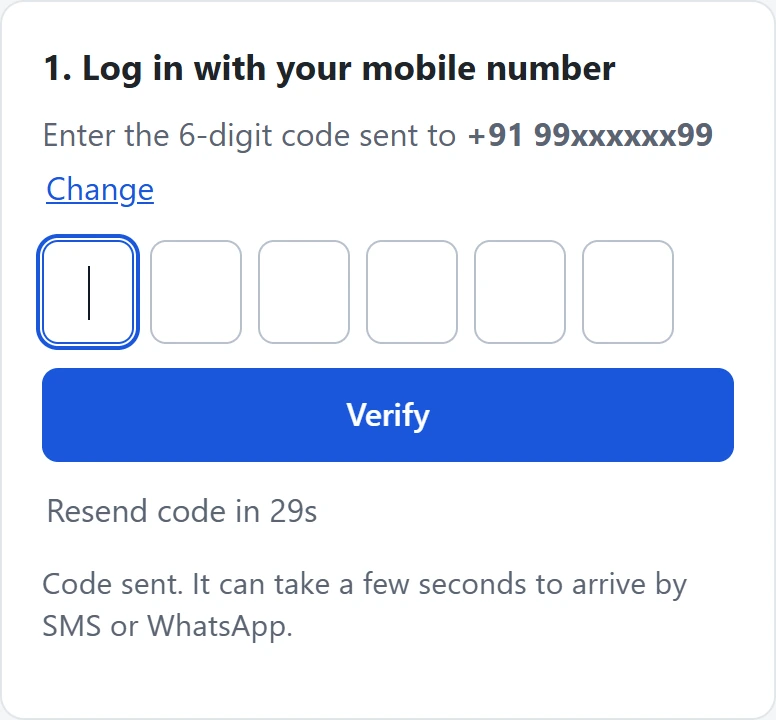
The widget is one JavaScript file with no dependencies (about 25 KB, 8 KB gzipped). It shows:
- a mobile number field with +91 in front and a Send OTP button,
- 6 code boxes that accept paste and the phone’s SMS autofill,
- a resend timer and plain-English error messages.
It sends codes through Smart OTP, our recommended way to send OTPs. Smart OTP works on SMS and WhatsApp, with fallback from one channel to the other, on a priority route. The OTP template you pick in the panel decides the channel.
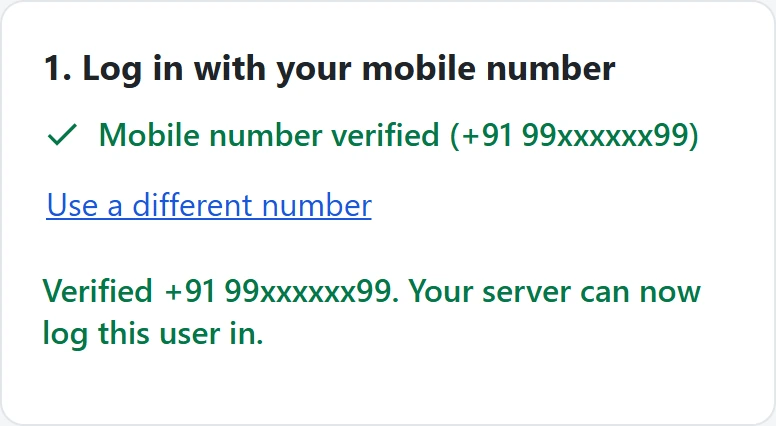
When the code is right, the widget shows “Mobile number verified” and hands your page a signed, one-time token. Your server checks that token before it trusts the number.
How it works
The widget never calls Fast2SMS. It posts JSON to your own backend (for example /f2s-otp). The backend holds your API key, checks the limits, calls the Smart OTP send, verify and resend APIs, and answers the widget. That is why every setup has two parts: a backend kit and the widget.
Download the kits
The all-in-one zip has every backend, every example, the widget, the test mock and the full JSON contract. If you only need the browser part (because you will write your own backend), take the widget zip.
Download the complete OTP widget kit (zip)Download .zip
Download the browser-only OTP widget kit (zip)Download .zip
Choose your setup
| You have… | Backend kit | Add the widget with… |
|---|---|---|
| PHP hosting (cPanel, shared hosting) | php-single-file: one file, no Composer |
2 lines of HTML |
| A WordPress site | wordpress: a plugin that is also the backend |
the shortcode [f2s_otp] |
| A Laravel app | laravel |
a Blade view |
| A Node.js / Express server | node-express |
2 lines of HTML, or the React or Vue example |
| Next.js | the route handler in the nextjs example |
the Next.js client component |
| Python (Flask or Django) | python-flask or django |
2 lines of HTML or the Django template |
| A static site, Webflow, Wix or Shopify (no server) | cloudflare-worker, or vercel-netlify-function |
2 lines of HTML, or the Shopify theme section |
| No website, you just need a form | google-apps-script: a Google-hosted form that saves verified numbers to a Google Sheet |
share the link, or embed it in an iframe |
| A mobile app | any backend above | the Flutter, Android (Kotlin), iOS (Swift) or React Native example |
What we tested
No test called the real Fast2SMS API and no real SMS or WhatsApp message was sent. Every run used a local copy of the Smart OTP API (a mock server whose right code is always 123456), with the browser tests in headless Chrome. This is the status of each kit at the time of writing:
| Kit | Status |
|---|---|
| Widget, plain HTML example | Run: 47 browser and API checks against each of 7 backends |
| PHP single file, Node.js Express, Flask, Django | Run: 47 of 47 checks each, plus unit tests for PHP, Node and Flask |
| React example | Run: 3 of 3 checks |
| Cloudflare Worker, Vercel / Netlify function | Partly run: 47 of 47 checks with a stand-in for each platform, not yet deployed there |
| Google Apps Script | Partly run: 17 of 17 checks with stand-ins for Google’s services, not yet run on Google |
| WordPress plugin | Partly run: 10 of 10 checks with stand-ins for WordPress, not yet installed on a real site |
| React Native | Partly run: the client file was run against the Node backend; the screen was not |
| Laravel | Not run yet: syntax check only. It uses the same PHP core as the PHP single-file kit |
| Next.js, Vue, Shopify, Flutter, Android, iOS | Not run yet: reviewed only |
Set up the OTP widget in 5 minutes
-
Create a Smart OTP template and copy its OTP ID
In the panel, open Smart OTP > OTP Template List and click Add OTP Template. On the SMS Channel tab, pick your DLT entity, sender and approved OTP template, then click the variable that should carry the code. For WhatsApp, use the WhatsApp Channel tab with an approved Authentication or Utility template. Tick SET FALLBACK TEMPLATE if you want the other channel as a backup, then click Assign OTP Template.
Copy the 10-character OTP ID from the new card. It decides the channel, the template and the fallback for every code the widget sends. Use Test OTP on the card to check that the template sends.
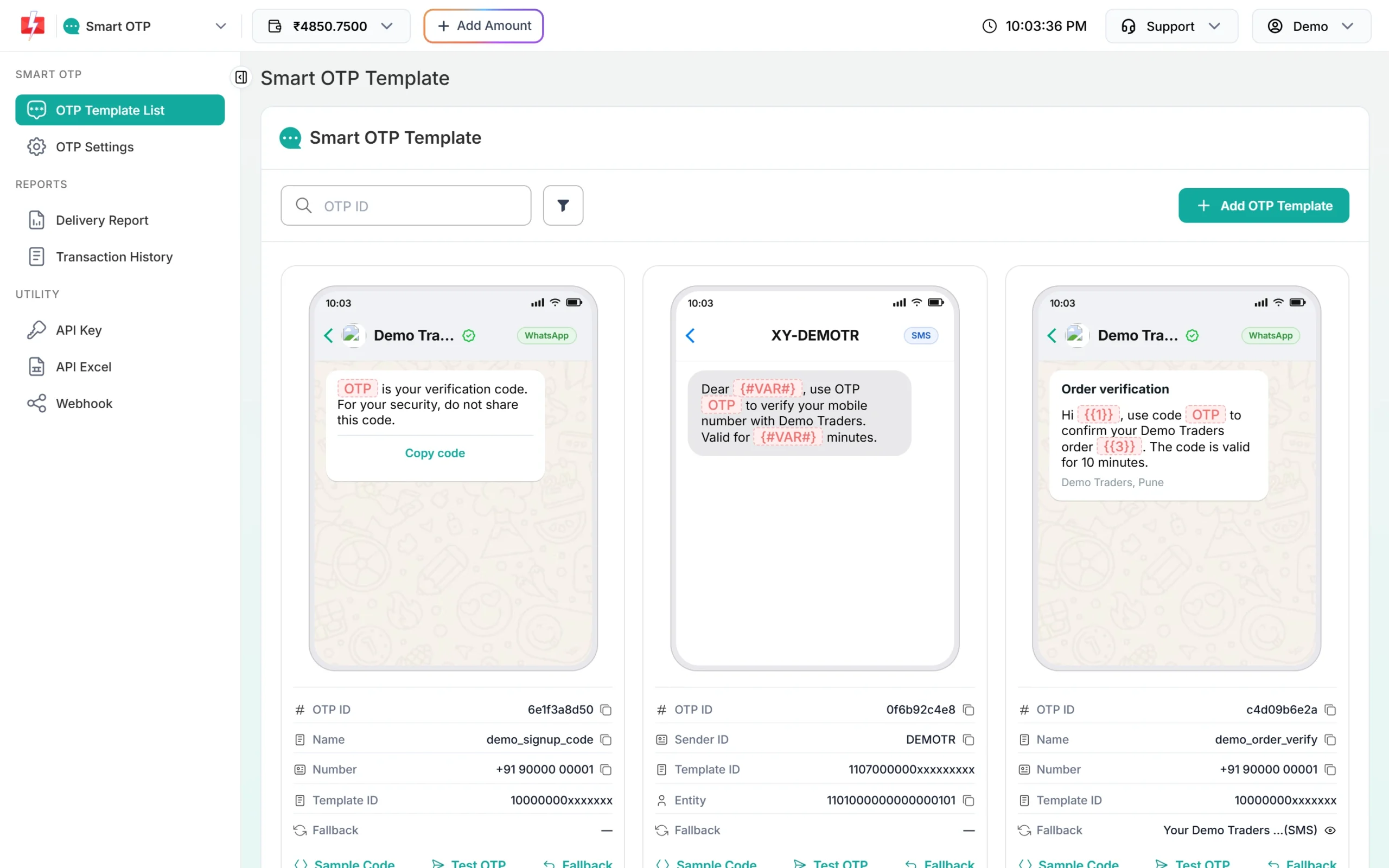
Each template card shows its 10-character OTP ID with a copy icon. -
Copy your API key
Under Utility in the left menu, click API Key. Click View (the panel first asks for an OTP sent to your registered mobile) and copy the Authorization Key. Check that API Access is switched on. This key will live only in your backend’s settings, never in a page or an app.
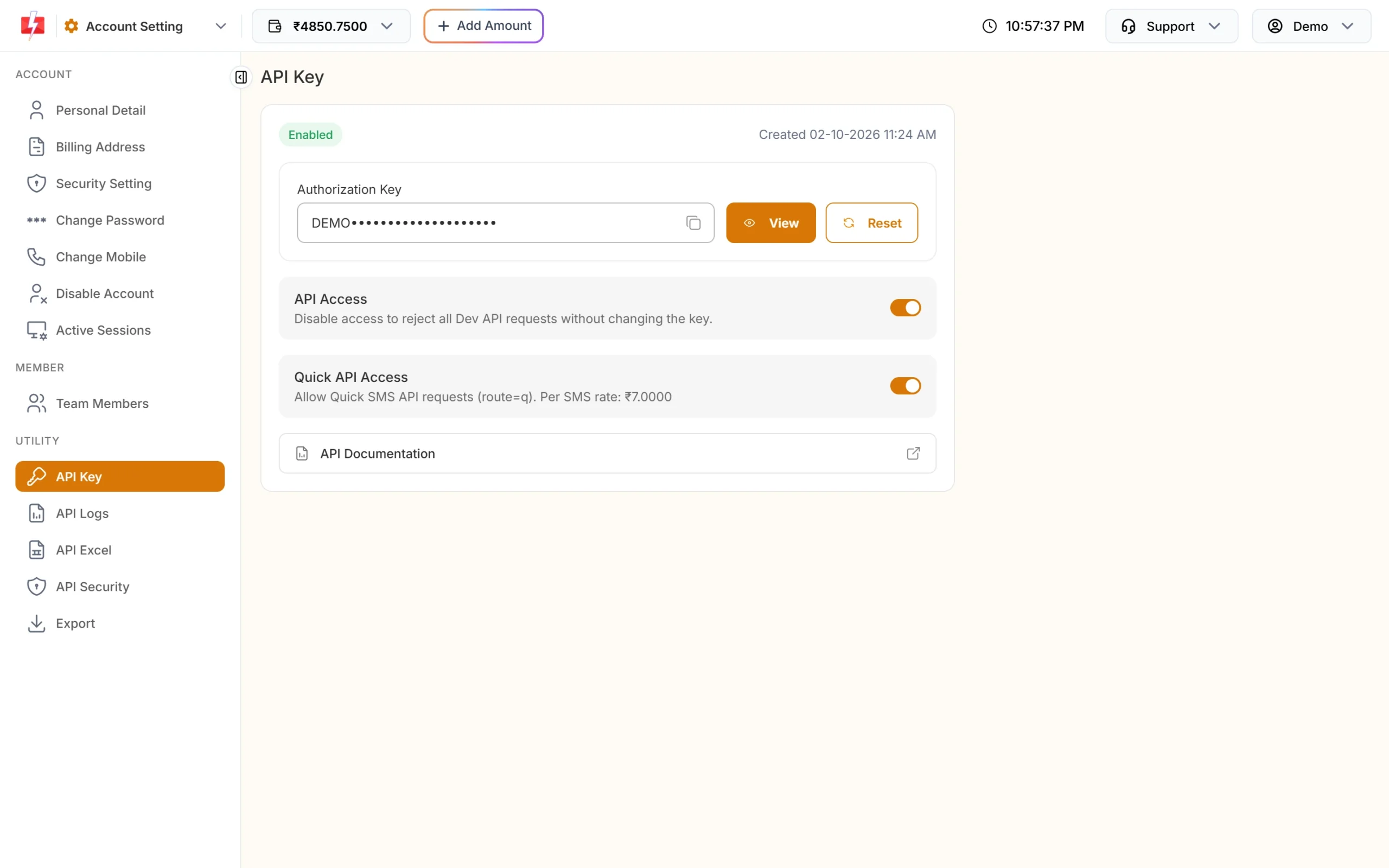
Copy the Authorization Key. API Access must be on. -
Put the key and the OTP ID in your backend’s settings
Every backend kit reads the same three required settings:
FAST2SMS_API_KEY,F2S_OTP_IDandF2S_TOKEN_SECRET(32 or more random characters, which signs the tokens). Put them in the environment,.env,wp-config.phpor the platform’s secret store, as the kit’s README says. The backend refuses to start, or refuses every request, while one of them is missing or wrong, and its log says which one. -
Add the widget to your page
Copy
f2s-otp-widget.min.jsto your site and add two lines where the box should appear.data-endpointis the URL of your backend:<script src="/f2s-otp-widget.min.js" defer></script> <div data-f2s-otp data-endpoint="/f2s-otp"></div>The endpoint path depends on the kit:
/f2s-otp.phpfor PHP,/api/f2s-otpon Vercel or Netlify, and the fullhttps://URL of your Worker for Cloudflare. -
Check the token on your server
When the number is verified, the widget fires
f2s:verifiedwith a token, or puts it in a hiddenf2s_tokenfield of your form. Your server checks it with the kit’s helper before it logs the user in or saves the form. The helper returns the verified 10-digit number, or nothing. A token works only once, for 10 minutes by default, and only for the number it was made for.
Make an existing form wait for OTP
Add data-f2s-protect to your form. The form cannot be submitted until the number is verified, and the widget adds a hidden f2s_token field:
<form action="/signup" method="post" data-f2s-protect data-endpoint="/f2s-otp" data-mobile-field="phone">
  <input name="name" required>
  <input name="phone" type="tel" required>
  <div data-f2s-slot></div>
  <button type="submit">Create account</button>
</form>
Without data-mobile-field, the widget shows its own phone field. Without data-f2s-slot, the box goes just before the submit button. If the visitor edits the phone field after verifying, the token is cleared.
f2s_token in your form handler with the kit’s helper. Use the number the helper returns, not the posted phone field.Security: what the backend does for you
- The API key stays on the server. It goes only into the
authorizationheader to Fast2SMS, never into a page, an app, a URL or a log line. - Other sites cannot use your backend. It checks the page’s
Originand a requiredX-F2S-Widgetheader, which also blocks CSRF. List extra sites inF2S_ALLOWED_ORIGINS. - Limits run before any paid call: a resend wait, sends per number and per IP address, wrong codes per code, and an optional Cloudflare Turnstile or reCAPTCHA check (off by default).
- Logs are masked. They show
98xxxxxx10and a masked IP, never the full number, the OTP, the key or a token. - Visitors see neutral messages for account problems such as a low balance or a wrong OTP ID. You see the real reason in your log.
- The backend never retries a send that may have reached Fast2SMS, so a slow network cannot charge you twice.
For more ways to stop fake sign-ups and SMS pumping, read OTP fraud and SMS pumping protection.
Limits and settings
All kits share the same settings. Change limits in settings, not in code:
| Setting | Required | Default | What it does |
|---|---|---|---|
FAST2SMS_API_KEY |
Yes | Your API key, the bare key (no Bearer) |
|
F2S_OTP_ID |
Yes | The 10-character OTP ID from the template card | |
F2S_TOKEN_SECRET |
Yes | 32 or more random characters; signs tickets and tokens | |
F2S_OTP_IDS |
No | More OTP IDs a page may pick with data-otp-id, comma separated |
|
F2S_ALLOWED_ORIGINS |
No | same site only | Other sites whose pages may call this backend |
F2S_RESEND_WAIT |
No | 30 | Seconds between sends to one number |
F2S_LIMIT_PER_NUMBER |
No | 5 | Sends per number per hour |
F2S_LIMIT_PER_IP |
No | 20 | Sends per IP address per hour |
F2S_MAX_VERIFY |
No | 5 | Wrong codes allowed per code |
F2S_TOKEN_TTL |
No | 600 | Seconds a verified token stays valid |
F2S_OTP_EXPIRY / F2S_OTP_LENGTH |
No | 15 min / 6 digits | Code expiry (1 to 10080 minutes) and length (4 to 10) |
F2S_CAPTCHA / F2S_CAPTCHA_SECRET |
No | off | turnstile or recaptcha, plus its secret key |
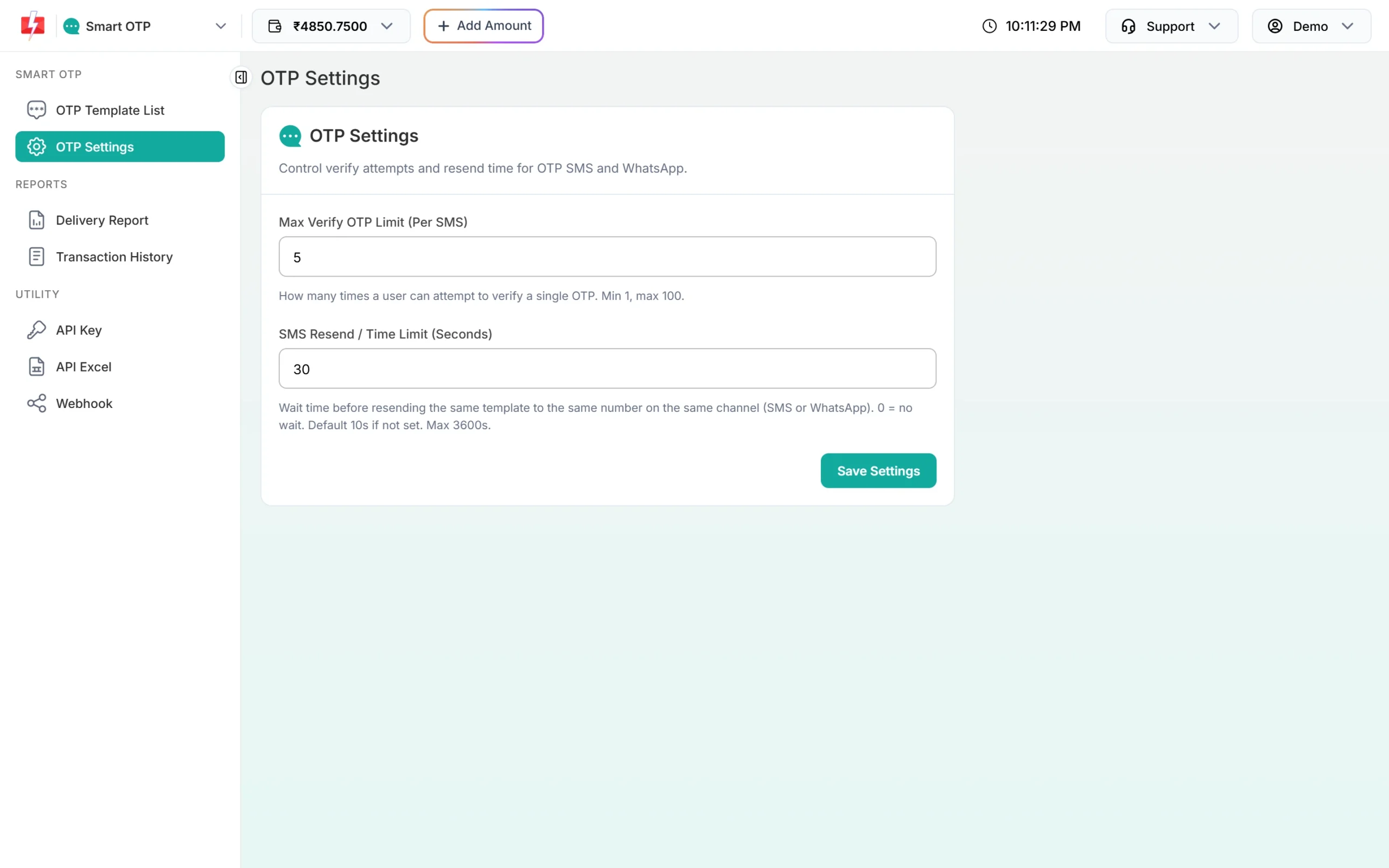
Fast2SMS also has its own limits in Smart OTP > OTP Settings: Max Verify OTP Limit and SMS Resend / Time Limit. The widget’s limits apply first, on your backend.
Sending, resending and cost
A new code for a number cancels any older code. “Code sent” means Fast2SMS accepted the request, not that the phone got it. Delivery shows in Smart OTP > Delivery Report. Smart OTP sends to Indian mobile numbers only: 10 digits, starting with 6 to 9.
Resend sends the same code again, it does not make a new one. Fast2SMS allows it within 10 minutes of the first send, and up to 5 sends to one number in that time, counting the first.
Every send and every resend is charged at your Smart OTP rate, and a fallback message on the second channel is charged too. Verify is free. The Test OTP button on a template card is also a real, charged send. See the current rates on the OTP SMS page.
Sending in bulk? For high OTP volumes our team offers discounted rates. Talk to our team or see OTP pricing.
Widget, starter kit or your own code?
- The widget is for adding a verify box to pages you already have: a sign-up form, a lead form, a checkout step. It gives you a token and leaves the rest of your app alone.
- The OTP login starter kits are complete server-rendered login pages with sessions, for example OTP login in PHP or Node.js Express OTP login. Use one when you are building the login page itself.
- Your own code can call the Smart OTP API directly from your server. See the Smart OTP setup guide for the send, verify and resend calls.
Common problems and fixes
| What you see | Why | Fix |
|---|---|---|
| “We could not send the code right now.” | An account or setup problem. Your server log names it: failed reason=... |
invalid_otp_id: copy the OTP ID again, from the same account as the key. insufficient_balance: recharge with Add Amount. template_inactive: create a new OTP template. Auth error: check the key, switch on API Access, or whitelist the server IP in API Security. |
| “This page is not allowed to use this OTP service.” | The page is on another domain | Add its origin (https:// plus the domain, no path) to F2S_ALLOWED_ORIGINS. |
| “Please wait N seconds…” | The resend wait: the widget’s own, or Fast2SMS’s | Wait. Change F2S_RESEND_WAIT, or SMS Resend / Time Limit in OTP Settings. |
| “Too many requests” | The per-number or per-IP limit was hit | Wait an hour, or raise F2S_LIMIT_PER_NUMBER / F2S_LIMIT_PER_IP. |
| “Too many wrong tries” | F2S_MAX_VERIFY, or Max Verify OTP Limit in OTP Settings |
The visitor asks for a new code. |
| The code never arrives | Sent is not the same as delivered | Check Smart OTP > Delivery Report, and use Test OTP on the template card. |
| Your form handler says “not verified” | The token is missing, was used already, is older than 10 minutes, or is for another number | Verify again. Check the token once, when the form is submitted. |
| Nothing shows on the page | The script did not load, or data-f2s-otp is missing |
Check the script path. If you add the box later with JavaScript, call Fast2smsOtp.init(). |
| “Could not reach the server.” | Wrong data-endpoint, the backend is down, or a CORS problem |
Open the endpoint URL and check the browser console. |
Frequently asked questions
Is the Fast2SMS OTP widget free?
Yes. The kits are free and MIT licensed. You pay only for the OTPs you send from your Fast2SMS wallet; verify calls are free.
Can I put my API key in the page and skip the backend?
No. Anyone can read a key that is in a page or an app and spend your balance with it. The widget has no client-only mode on purpose: the key stays in your backend.
Does the widget work for WhatsApp OTP?
Yes. The channel comes from your Smart OTP template. Use a WhatsApp template, or an SMS template with WhatsApp as the fallback, and put its OTP ID in the backend.
Can I use two templates, for example one for sign-up and one for login?
Yes. Add the second OTP ID to F2S_OTP_IDS on the backend and set data-otp-id on that widget. The backend refuses any OTP ID that is not on its list.
Does the widget work in a mobile app?
The app examples (Flutter, Android, iOS, React Native) call the same backend with the same JSON. They have not been run on devices yet, so test them in your own app first.
Can I change the colours and texts?
Yes. Every colour and size is a CSS variable, such as --f2s-primary, and every text can be changed through the texts option of Fast2smsOtp.mount().
Does resend send a new code?
No. Resend sends the same code again, within 10 minutes of the first send and up to 5 sends to one number. Each resend is charged.
Does the widget work for numbers outside India?
No. Smart OTP sends to Indian mobile numbers only, and the backend refuses anything that is not a 10-digit number starting with 6 to 9.