
This guide shows how to build a phone number login with OTP using Fast2SMS Smart OTP: the screens, the server calls, resend and lockout rules, and how to stop bots from draining your wallet. The same flow covers signup mobile verification and password reset by OTP. It is written for developers and product owners planning OTP login for a website or app in India.
The flow at a glance
Fast2SMS creates the code, sends it on SMS or WhatsApp, and checks it. Your server never stores the OTP. It only decides who may ask for one and what happens after a correct code.
Before you start
- An approved OTP template: a DLT content template for SMS, or a WhatsApp authentication template. Add the DLT template in DLT Manager first.
- A Smart OTP template that links it and gives you an OTP ID.
- API key with API Access on, kept on your server.
- Wallet balance. Every send and resend is charged. Verify is free.
Set up Smart OTP in the panel
-
Create the OTP template
Open Smart OTP, OTP Template List, and click Add OTP Template. Choose the channel, the entity and sender (for SMS) and your approved template, then pick which variable holds the OTP. Tick SET FALLBACK TEMPLATE to add the other channel as a backup, then click Assign OTP Template.
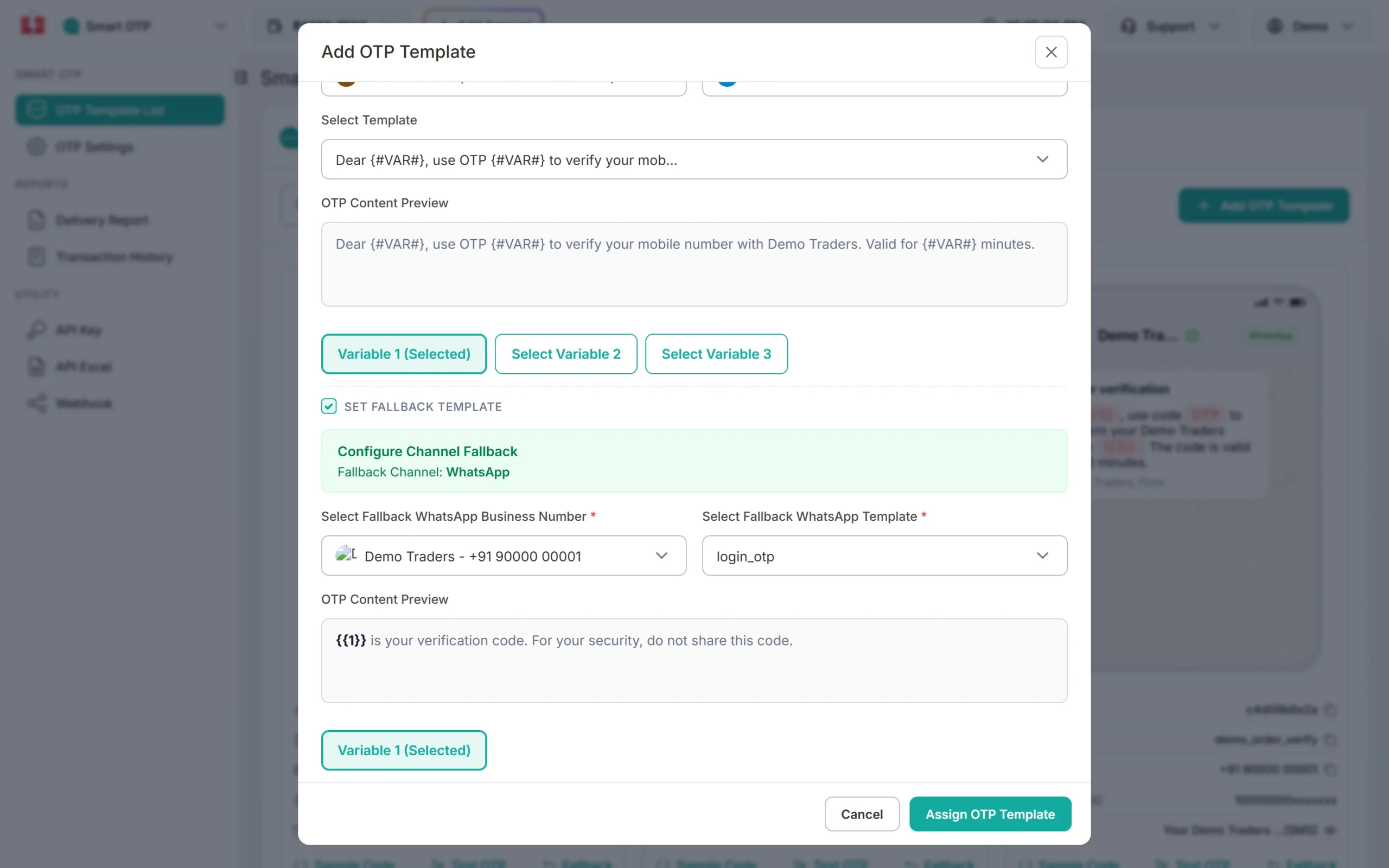
An SMS OTP template with a WhatsApp fallback. -
Copy the OTP ID
The new card in OTP Template List shows the OTP ID. Copy it into your server settings with the API key.
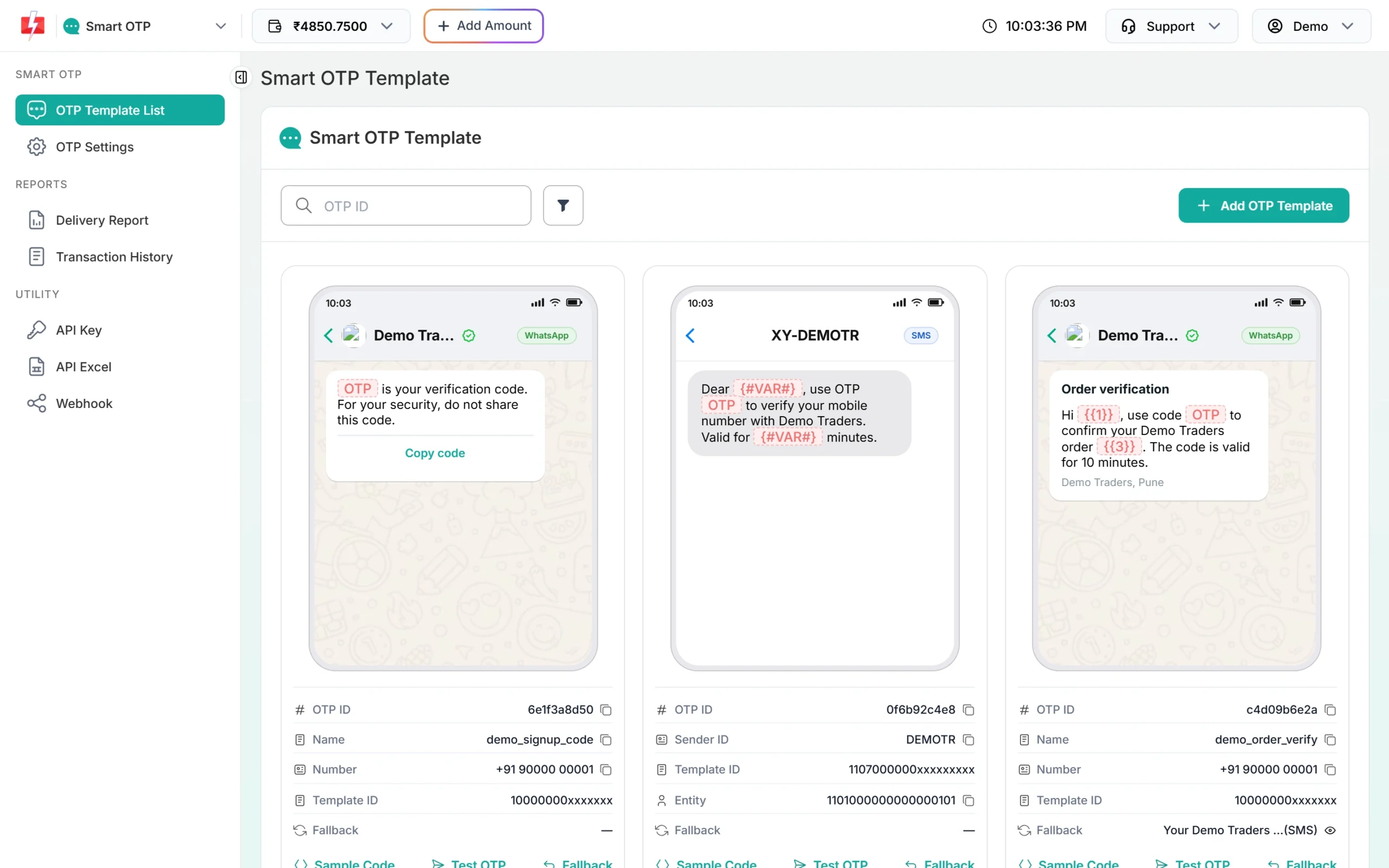
One OTP ID is enough for login, signup and password reset. -
Set the wait time and attempts
Open OTP Settings. Max Verify OTP Limit (1 to 100, default 10) is how many wrong codes one OTP allows. SMS Resend / Time Limit (0 to 3600 seconds, default 10) is the minimum wait before the same number can get another OTP. A login screen usually works well with 3 to 5 attempts and a 30 to 60 second wait.
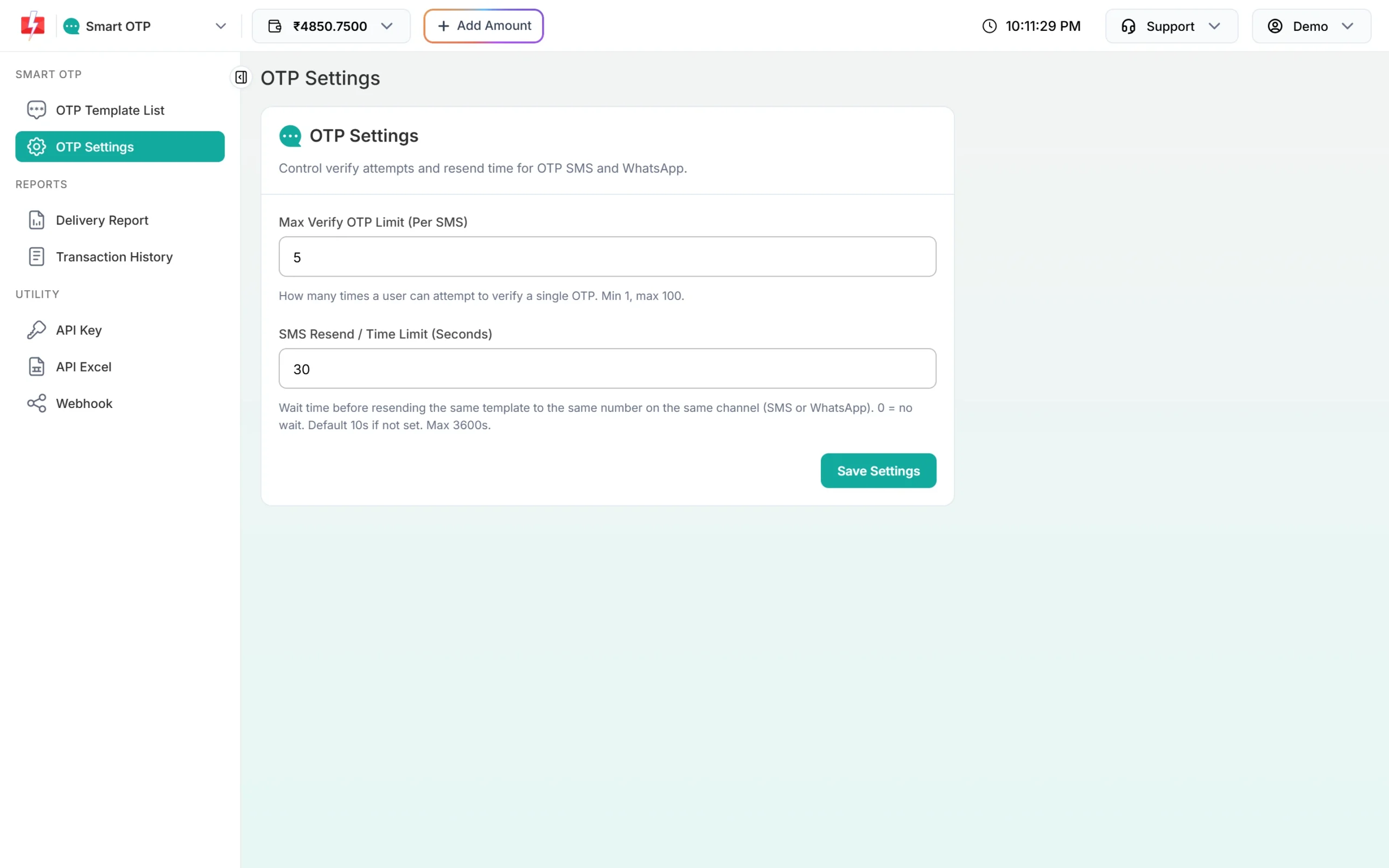
Your Resend button timer should match the wait set here.
The screens and what each one calls
| Screen / action | Your server calls | Notes |
|---|---|---|
| Enter mobile, tap Send OTP | POST /dev/otp/send with mobile, otp_id, otp_expiry |
Each new send cancels older OTPs for that mobile. |
| Enter code, tap Verify | POST /dev/otp/verify with mobile, otp |
No OTP ID needed. Checks the latest unverified OTP for the mobile. |
| Tap Resend after the timer | POST /dev/otp/resend with mobile |
Same code again, charged. Up to 5 sends in 10 minutes, counting the first. |
| Tap Change number | nothing | Go back to the first screen. The next send to the new number is a fresh OTP. |
Server code (Node.js example)
This Express example covers login, signup and password reset with one set of routes. The purpose field decides what happens after a correct code. The in-memory limits are for clarity; use Redis or your database in production.
import express from "express";
const app = express();
app.use(express.json());

const KEY = process.env.FAST2SMS_API_KEY;
const OTP_ID = process.env.FAST2SMS_OTP_ID;

async function f2s(path, body) {
  const res = await fetch("https://www.fast2sms.com" + path, {
    method: "POST",
    headers: { authorization: KEY, "Content-Type": "application/json" },
    body: JSON.stringify(body),
    signal: AbortSignal.timeout(15000),
  });
  const data = await res.json().catch(() => ({ message: "Non-JSON response" }));
  return { ok: res.ok && data.return === true, http: res.status, message: data.message };
}

// --- simple abuse limits (move to Redis in production) ---
const hits = new Map();
function tooMany(key, max, windowMs) {
  const now = Date.now();
  const list = (hits.get(key) || []).filter((t) => now - t < windowMs);
  list.push(now);
  hits.set(key, list);
  return list.length > max;
}

const clean = (m = "") => String(m).replace(/\D/g, "").slice(-10);
const valid = (m) => /^[6-9]\d{9}$/.test(m);

app.post("/auth/otp/send", async (req, res) => {
  const mobile = clean(req.body.mobile);
  const purpose = req.body.purpose;               // "login", "signup" or "reset"
  if (!valid(mobile)) return res.status(400).json({ error: "Enter a valid mobile number" });
  if (tooMany("ip:" + req.ip, 20, 3600e3) || tooMany("m:" + mobile, 5, 3600e3)) {
    return res.status(429).json({ error: "Too many requests. Try again later." });
  }
  // signup: refuse if the mobile already has an account; reset: refuse quietly if it has none
  const r = await f2s("/dev/otp/send", { mobile, otp_id: OTP_ID, otp_expiry: 5 });
  if (!r.ok) return res.status(400).json({ error: r.message });
  res.json({ sent: true, purpose });
});

app.post("/auth/otp/resend", async (req, res) => {
  const mobile = clean(req.body.mobile);
  if (!valid(mobile)) return res.status(400).json({ error: "Enter a valid mobile number" });
  const r = await f2s("/dev/otp/resend", { mobile });
  r.ok ? res.json({ sent: true }) : res.status(400).json({ error: r.message });
});

app.post("/auth/otp/verify", async (req, res) => {
  const mobile = clean(req.body.mobile);
  const otp = String(req.body.otp || "").trim();
  if (!valid(mobile) || !/^\d{4,10}$/.test(otp)) return res.status(400).json({ error: "Enter the code you received" });

  const r = await f2s("/dev/otp/verify", { mobile, otp });
  if (!r.ok) return res.status(400).json({ error: r.message });

  // Code is correct. Now act on the purpose:
  // login  -> find user by mobile, create session
  // signup -> mark mobile as verified, continue registration
  // reset  -> issue a short-lived reset token, show "set new password"
  res.json({ verified: true });
});

app.listen(3000);
The same three calls in other languages are in the PHP, Python, Java and C# guides linked at the end.
Rules that shape the user experience
Expiry
Set otp_expiry in minutes on each send (1 to 10080, default 15). For login, 5 to 10 minutes is enough. After that, verify returns “OTP expired”.
Resend
- Resend sends the same code. Tell the user “We sent the same code again”, so they do not wait for a different one.
- It only works within 10 minutes of the first send, and up to 5 sends in total including the first. After that, call send again for a new code.
- Calls inside the wait time get “Please wait N seconds before requesting a new OTP”. Show a visible countdown.
Wrong codes and lockout
- Each wrong code returns “Invalid OTP” and uses one attempt.
- When the attempts set in OTP Settings are used up, the OTP is dead: “Maximum verification attempts reached. OTP is no longer valid.” The user needs a new OTP.
- Add your own limit on top, such as no more than a few OTP sends per mobile per hour, so one person cannot keep guessing with fresh codes.
One OTP at a time
A new send to a number cancels every older OTP for it, even under another OTP ID. If your page sends an OTP on load or on refresh, the code in the user’s hand stops working. Send only when the user taps the button.
Signup and password reset
- Signup: verify the mobile before you create the account, or create it as “unverified” and switch it after a correct code. Do not let an unverified number log in.
- Password reset: do not reveal whether a number has an account. Show the same “If this number is registered, you will get a code” message either way. After a correct code, give a short-lived reset token and ask for the new password on the next screen.
- Change of mobile number: send the OTP to the new number and only update it after a correct code.
Protect your wallet from OTP abuse
Every send is charged, so bots that hit your send endpoint cost you money. Simple defences:
- Limit sends per IP, per device and per mobile per hour on your server.
- Accept only 10-digit Indian mobiles starting with 6 to 9 if you serve India only.
- Add a captcha or app attestation on the send step when you see spikes.
- Keep the API key only on the server, and use API Security to allow only your server’s IP.
- Watch the OTP report: many sends with low delivery or no verifies usually means abuse.
Check delivery and verification
The Delivery Report under Smart OTP shows each OTP with its status (Delivered, Failed, Sent, Pending, and Read for WhatsApp). The OTP digits are masked. When a fallback was used, the request shows a second receiver row on the other channel.
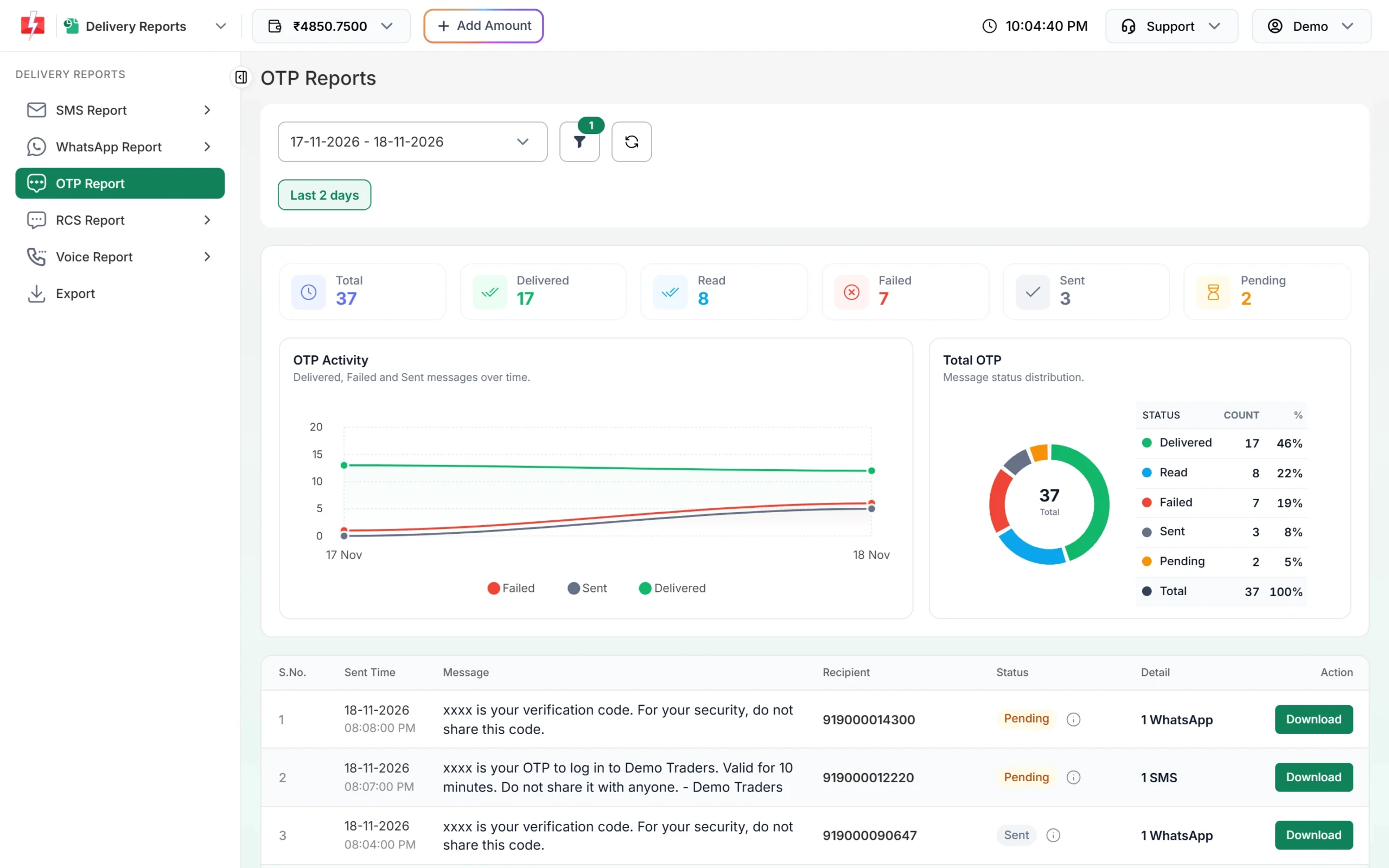
To see which OTPs were verified, export the OTP report. The file has Verified (Yes, No or Expired) and Verified At columns. For live status on your server, add an OTP webhook under Webhook, OTP.
Common problems and fixes
- “OTP not found or already verified” on a fresh code: a second send went out (double tap, page reload), which cancelled the first. Disable the button while sending.
- “Please wait N seconds…” right after the first send: your Resend button is active too early. Start the timer at the wait set in OTP Settings.
- “Invalid OTP ID”: the OTP ID is from another account or was deleted.
- “Invalid authorization key”: the key has “Bearer ” in front, or is wrong.
- Users say the code never came: check the request in the OTP report. If SMS failed, add a WhatsApp fallback to the template.
Frequently asked questions
Do I need to store the OTP in my database?
No. Smart OTP keeps the code and checks it when you call verify. You store only whether the user passed.
Can I use my own OTP value?
Yes. Pass otp (up to 10 characters) on send. Fast2SMS still verifies it.
What OTP length should I use?
6 digits is the default and a good choice. otp_length can be 4 to 10; values below 4 are changed to 6.
Is there a limit on resends?
Yes. 5 sends of the same OTP in 10 minutes, counting the first, so 4 resends. Plus the wait time between sends from OTP Settings.
Can I send login OTP on WhatsApp?
Yes. Use a WhatsApp authentication template in Smart OTP, or add WhatsApp as the fallback for an SMS template.
Can I use DLT SMS for OTP instead?
Yes. Send your approved OTP template with route=dlt and the code in variables_values. Then your server must create, store, expire and check the code itself.
Is verify charged?
No. Only send and resend are charged.