
This guide adds Laravel OTP verification with the Fast2SMS OTP widget. The kit is a controller, a cache store, a config file and a route snippet that you copy into your app. Visitors verify their mobile number by SMS or WhatsApp through Fast2SMS Smart OTP, and your route checks a signed token before it creates an account or logs someone in.
Download the Laravel OTP widget kit (zip)Download .zip
Before you start
- A Fast2SMS account with wallet balance, and an approved DLT OTP template (SMS) or WhatsApp Authentication/Utility template.
- A Laravel 10, 11 or 12 app.
Set up Laravel OTP verification
-
Create a Smart OTP template and copy its OTP ID
In the panel, open Smart OTP > OTP Template List and click Add OTP Template. On the SMS Channel tab, pick your DLT entity, sender and approved OTP template, then click the variable that should carry the code. For WhatsApp, use the WhatsApp Channel tab with an approved Authentication or Utility template. Tick SET FALLBACK TEMPLATE if you want the other channel as a backup, then click Assign OTP Template.
Copy the 10-character OTP ID from the new card. It decides the channel, the template and the fallback for every code the widget sends.
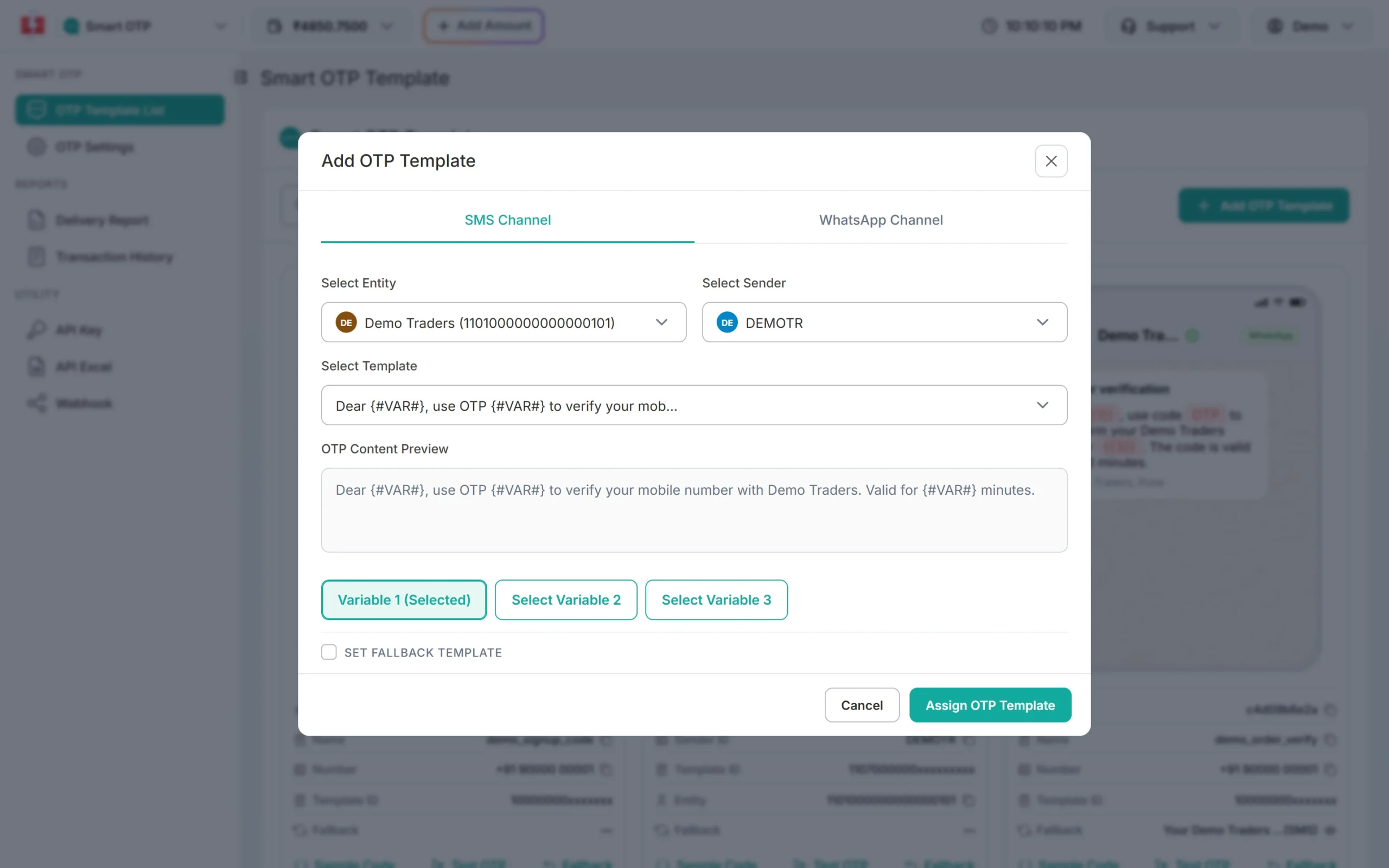
Pick the entity, sender and DLT template, then the variable that carries the OTP. -
Copy your API key
Under Utility in the left menu, click API Key. Click View (the panel first asks for an OTP sent to your registered mobile) and copy the Authorization Key. Check that API Access is switched on. This key will live only in your backend’s settings, never in a page or an app.
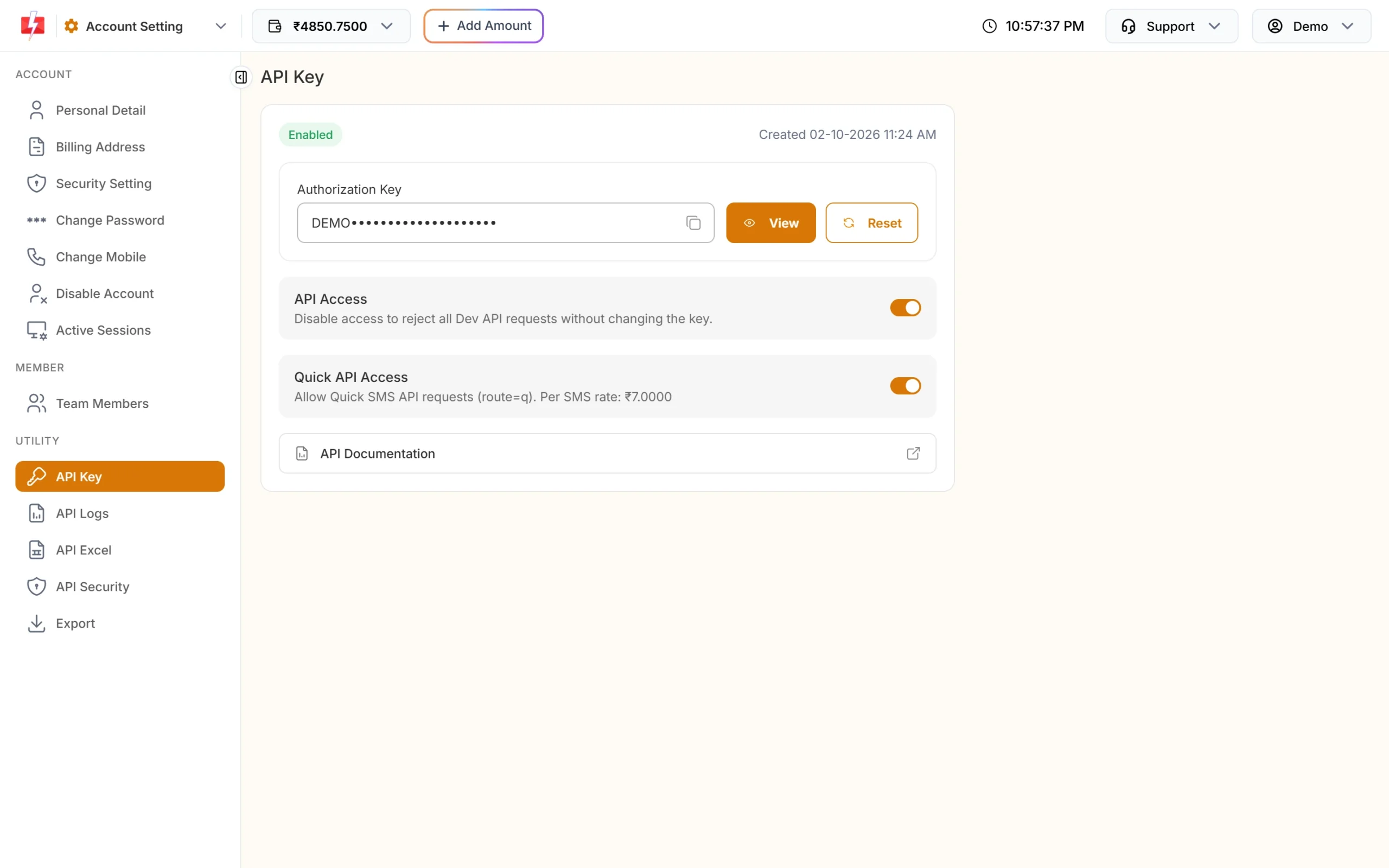
Copy the Authorization Key. API Access must be on. -
Copy the files and fill in .env
From the kit, copy
app/,config/f2s-otp.phpandpublic/f2s-otp-widget.min.jsinto your app. Add the three required settings to.env:FAST2SMS_API_KEY=YOUR_API_KEY F2S_OTP_ID=YOUR_OTP_ID F2S_TOKEN_SECRET=at-least-32-random-charactersThen run
php artisan config:clear. -
Add the route
Paste the route from
routes/f2s-otp-routes.phpintoroutes/web.php:// routes/web.php use App\Http\Controllers\F2sOtpController; Route::match(['post', 'options'], '/f2s-otp', F2sOtpController::class) ->withoutMiddleware([\Illuminate\Foundation\Http\Middleware\ValidateCsrfToken::class]) ->middleware('throttle:30,1');This switches off Laravel’s CSRF token check for
/f2s-otponly, because the endpoint has its own protection (an origin check and a requiredX-F2S-Widgetheader). It also adds Laravel’sthrottle:30,1limit on top of the kit’s own limits. On Laravel 10, add'f2s-otp'to$exceptinVerifyCsrfTokeninstead of thewithoutMiddlewareline. -
Add the widget to a Blade view
<script src="{{ asset('f2s-otp-widget.min.js') }}" defer></script>
<div data-f2s-otp data-endpoint="{{ url('/f2s-otp') }}"></div>
To make a form wait for OTP, add
data-f2s-protectand the samedata-endpointto the<form>.resources/views/f2s-otp-demo.blade.phpin the kit shows a login box and a protected form. -
Check the token in your route or controller
use App\Http\Controllers\F2sOtpController;
use Illuminate\Http\Request;

Route::post('/signup', function (Request $request) {
    $v = F2sOtpController::verifyToken($request->input('f2s_token'), $request->input('phone'));
    abort_unless($v, 403, 'Mobile number not verified.');
    // $v['mobile'] is the verified 10-digit number. A token works only once.
    // create the account or log the user in here
});
For OTP login, find the user by
$v['mobile']and callAuth::login()here. Never log a user in from the browser event alone.
Good to know
- Limits use Laravel’s cache. The
filestore is fine on one server. With more than one server, use a shared store such asredisordatabase. - Visitor IP: the kit uses
$request->ip(), which follows Laravel’s TrustProxies setting. LeaveF2S_TRUST_PROXYempty in Laravel. - Logs go to
Log::info. They show98xxxxxx10and never contain the OTP, the key or a full number. - Same core as plain PHP:
app/Support/F2sOtp/f2s-otp.phpis the same PHP core the PHP single-file and WordPress kits use, so tokens and limits behave the same everywhere. - API Security: if it is on in your account, whitelist your server’s outgoing IP. See IP whitelisting.
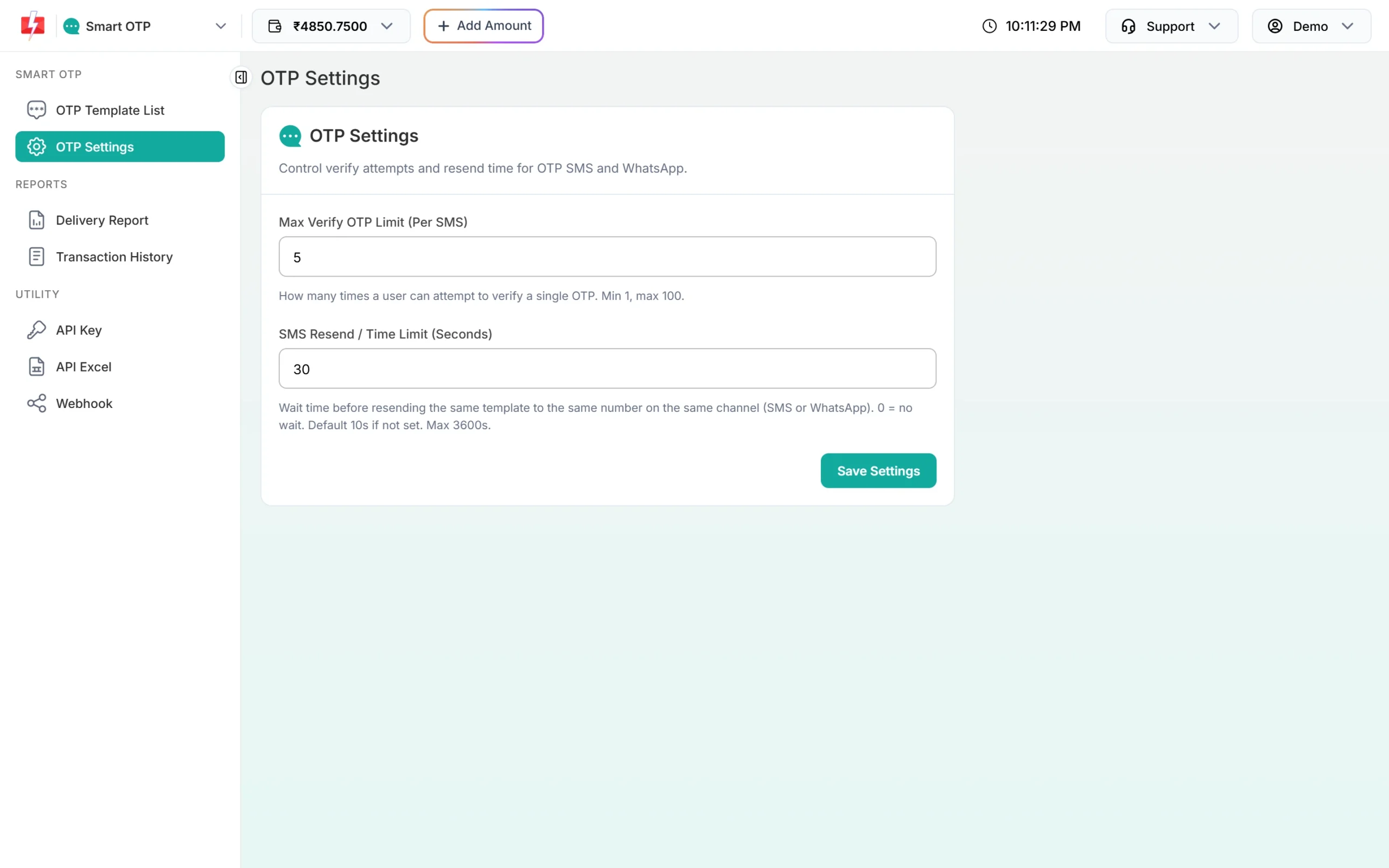
Settings
All settings go in .env; config/f2s-otp.php reads them. Change limits there, not in code.
| Setting | Required | Default | What it does |
|---|---|---|---|
FAST2SMS_API_KEY |
Yes | Your API key, the bare key (no Bearer) |
|
F2S_OTP_ID |
Yes | The 10-character OTP ID from the template card | |
F2S_TOKEN_SECRET |
Yes | 32 or more random characters; signs tickets and tokens | |
F2S_OTP_IDS |
No | More OTP IDs a page may pick with data-otp-id, comma separated |
|
F2S_ALLOWED_ORIGINS |
No | same site only | Other sites whose pages may call this backend |
F2S_RESEND_WAIT |
No | 30 | Seconds between sends to one number |
F2S_LIMIT_PER_NUMBER |
No | 5 | Sends per number per hour |
F2S_LIMIT_PER_IP |
No | 20 | Sends per IP address per hour |
F2S_MAX_VERIFY |
No | 5 | Wrong codes allowed per code |
F2S_TOKEN_TTL |
No | 600 | Seconds a verified token stays valid |
F2S_OTP_EXPIRY / F2S_OTP_LENGTH |
No | 15 min / 6 digits | Code expiry (1 to 10080 minutes) and length (4 to 10) |
F2S_CAPTCHA / F2S_CAPTCHA_SECRET |
No | off | turnstile or recaptcha, plus its secret key |
Sending, resending and cost
Before every paid call, the controller checks the origin, the header, the resend wait and the limits. A new code for a number cancels the older one. Delivery shows in Smart OTP > Delivery Report.
Resend sends the same code again, it does not make a new one. Fast2SMS allows it within 10 minutes of the first send, and up to 5 sends to one number in that time, counting the first.
Every send and every resend is charged at your Smart OTP rate, and a fallback message on the second channel is charged too. Verify is free. The Test OTP button on a template card is also a real, charged send. See the current rates on the OTP SMS page.
Sending in bulk? For high OTP volumes our team offers discounted rates. Talk to our team or see OTP pricing.
Common problems and fixes
| What you see | Why | Fix |
|---|---|---|
419 Page Expired on /f2s-otp |
Laravel’s CSRF check still runs on the route | Use the withoutMiddleware line, or on Laravel 10 add 'f2s-otp' to $except. |
| Every request fails and the log lists settings | A required setting is missing, or the config is cached | Check .env, then run php artisan config:clear. |
| “We could not send the code right now.” | An account or setup problem. Your server log names it: failed reason=... |
invalid_otp_id: copy the OTP ID again, from the same account as the key. insufficient_balance: recharge with Add Amount. template_inactive: create a new OTP template. Auth error: check the key, switch on API Access, or whitelist the server IP in API Security. |
| “This page is not allowed to use this OTP service.” | The page is on another domain | Add its origin (https:// plus the domain, no path) to F2S_ALLOWED_ORIGINS. |
| “Please wait N seconds…” | The resend wait: the widget’s own, or Fast2SMS’s | Wait. Change F2S_RESEND_WAIT, or SMS Resend / Time Limit in OTP Settings. |
| “Too many requests” | The per-number or per-IP limit was hit | Wait an hour, or raise F2S_LIMIT_PER_NUMBER / F2S_LIMIT_PER_IP. |
| Your form handler says “not verified” | The token is missing, was used already, is older than 10 minutes, or is for another number | Verify again. Check the token once, when the form is submitted. |
Frequently asked questions
Which Laravel versions does the kit target?
Laravel 10, 11 and 12. It has not been run on a real Laravel install yet, so test it on staging first.
Do I need a Composer package?
No. You copy a controller, a cache store, a config file and the shared PHP core into your app.
Why switch off CSRF for the OTP route?
The widget sends JSON without Laravel’s CSRF token. The endpoint has its own CSRF protection: it checks the page’s origin and requires the X-F2S-Widget header.
I want a full OTP login page in Laravel. Which kit?
Use the Laravel OTP login starter kit. The widget adds verification to pages you already have.
Can I use it with Livewire or Inertia?
The widget is plain JavaScript and fires an f2s:verified event with the token, so you can pass the token to your component and check it on the server. That setup is not included in the kit.
Is verify charged?
No. Each send and each resend is charged; verify is free.