
This guide adds PHP OTP verification to a site on cPanel or any shared hosting, with no Composer and no framework. The whole backend is one file, f2s-otp.php. You upload it with the widget script, add two lines of HTML, and visitors can verify their mobile number by SMS or WhatsApp before they log in or submit a form.
Download the PHP OTP widget kit (zip)Download .zip
Before you start
- A Fast2SMS account with wallet balance. Every send and resend is charged.
- For SMS OTP: an approved DLT entity, sender ID and OTP content template in DLT Manager. For WhatsApp OTP: a connected WhatsApp number with an approved Authentication or Utility template.
- PHP 8.1 or newer with the
curlextension. Most PHP hosting has both. - Access to your hosting files (cPanel File Manager or FTP).
Set up PHP OTP verification in 6 steps
-
Create a Smart OTP template and copy its OTP ID
In the panel, open Smart OTP > OTP Template List and click Add OTP Template. On the SMS Channel tab, pick your DLT entity, sender and approved OTP template, then click the variable that should carry the code. For WhatsApp, use the WhatsApp Channel tab with an approved Authentication or Utility template. Tick SET FALLBACK TEMPLATE if you want the other channel as a backup, then click Assign OTP Template.
Copy the 10-character OTP ID from the new card. It decides the channel, the template and the fallback for every code the widget sends. Use Test OTP on the card to check that the template sends.
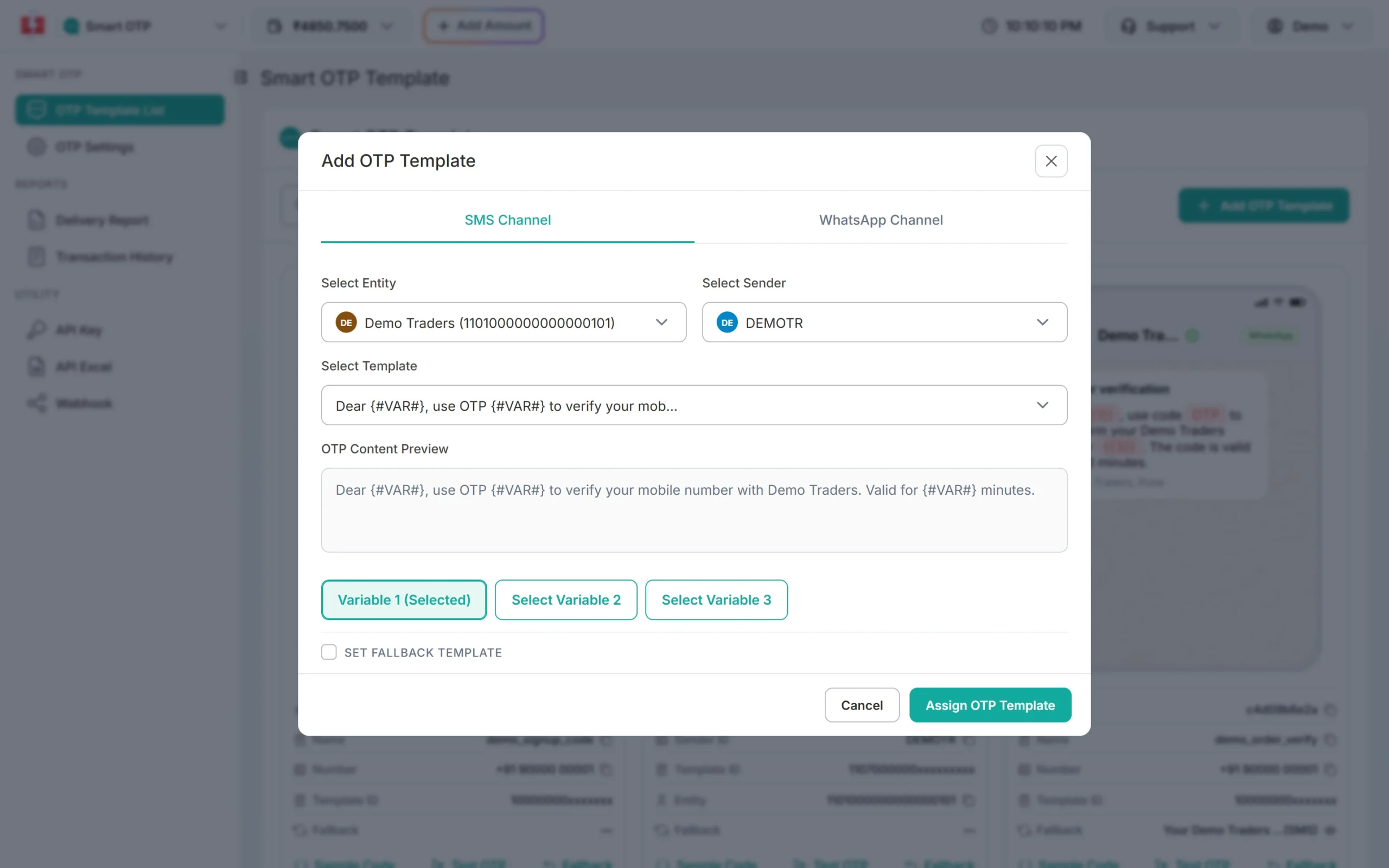
Pick the entity, sender and DLT template, then the variable that carries the OTP. -
Copy your API key
Under Utility in the left menu, click API Key. Click View (the panel first asks for an OTP sent to your registered mobile) and copy the Authorization Key. Check that API Access is switched on. This key will live only in your backend’s settings, never in a page or an app.
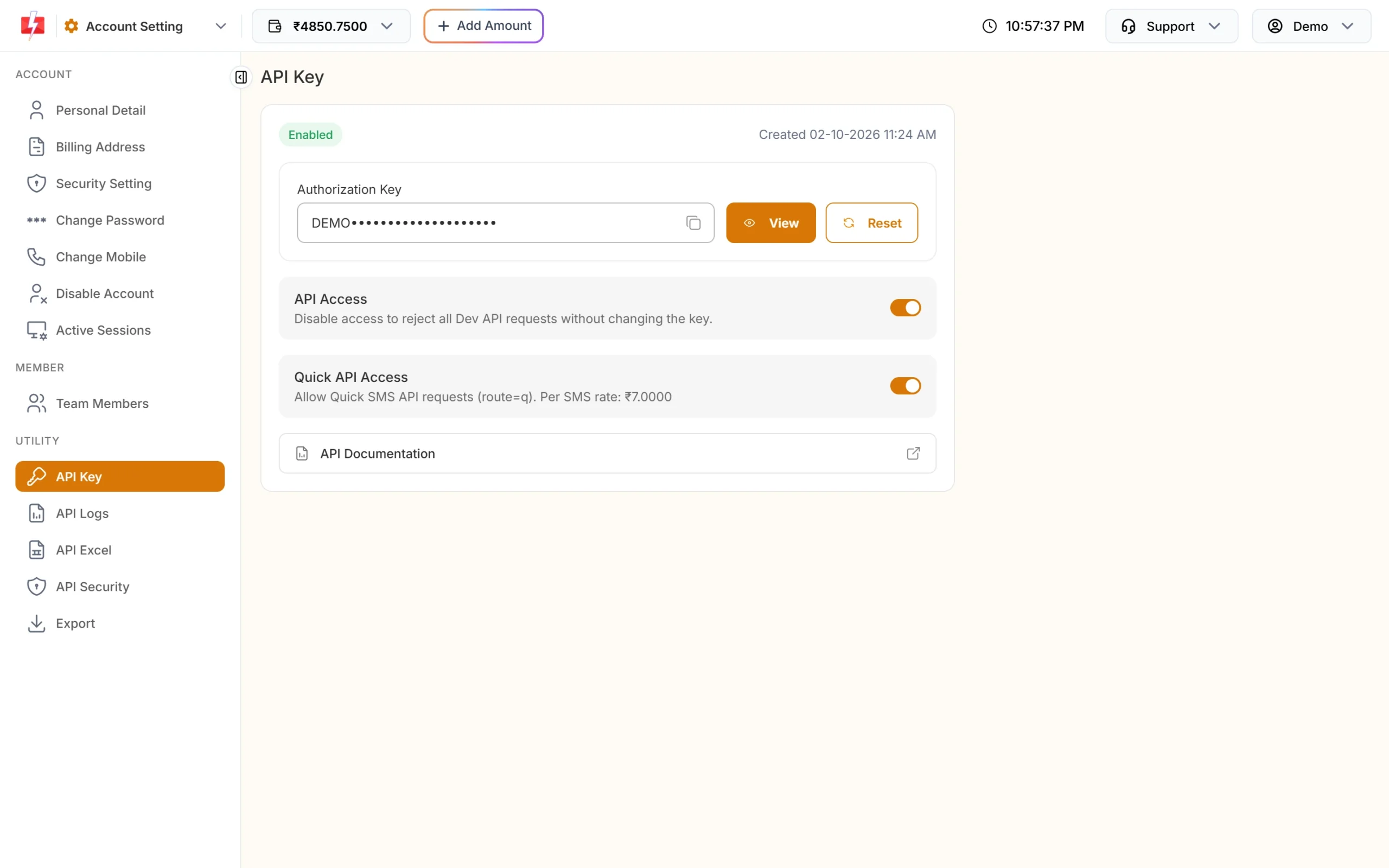
Copy the Authorization Key. API Access must be on. -
Fill in the settings file
Unzip the kit. Copy
f2s-otp-config.sample.phptof2s-otp-config.phpand fill in the three required values. Make the secret withphp -r "echo bin2hex(random_bytes(32));", or use any other 32 or more random characters.return [ 'FAST2SMS_API_KEY' => 'YOUR_API_KEY', 'F2S_OTP_ID' => 'YOUR_OTP_ID', 'F2S_TOKEN_SECRET' => 'paste 64 random characters here', // optional limits, defaults shown 'F2S_RESEND_WAIT' => 30, 'F2S_LIMIT_PER_NUMBER' => 5, 'F2S_LIMIT_PER_IP' => 20, 'F2S_MAX_VERIFY' => 5, ];Put
f2s-otp-config.phpone folder above your web root if your host allows it, for example next topublic_html, so nobody can download it.f2s-otp.phplooks there first, then in its own folder. Environment variables with the same names also work. -
Upload two files
Upload
public/f2s-otp.phpandpublic/f2s-otp-widget.min.jsto your web root (usuallypublic_html). If you have a shell, check the settings withphp f2s-otp.php check. Without a shell, a missing setting makes every request fail, and your PHP error log names the setting. -
Add the widget to a page
Paste these two lines into any page, where the box should appear:
<script src="/f2s-otp-widget.min.js" defer></script>
<div data-f2s-otp data-endpoint="/f2s-otp.php"></div>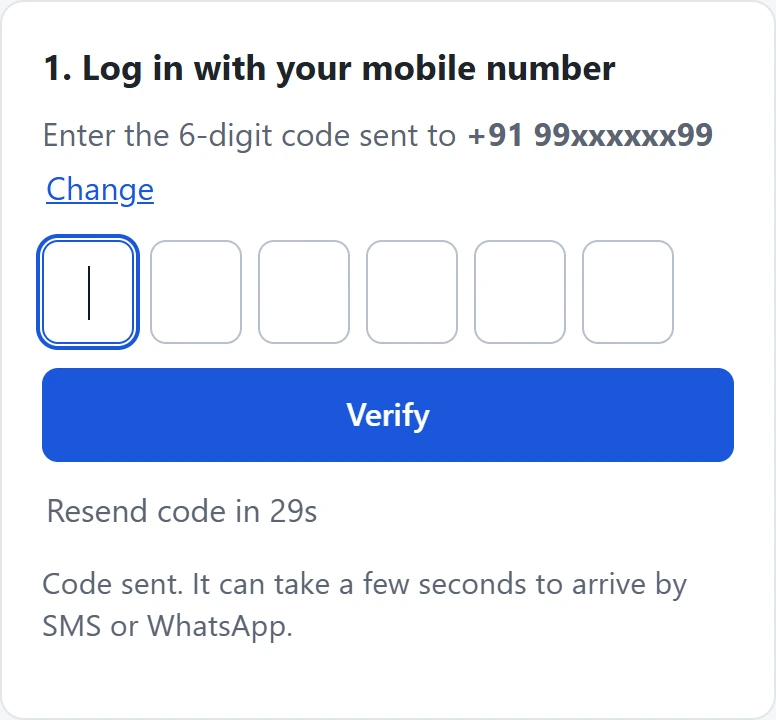
After Send OTP the visitor sees the code boxes and a resend timer. -
Check the token in your form handler
After a correct code, the widget gives your page a signed token. To make a form wait for OTP, add
data-f2s-protect data-endpoint="/f2s-otp.php"to the<form>; the widget then adds a hiddenf2s_tokenfield. In the PHP file that receives the form, check it before you save anything:require __DIR__ . '/f2s-otp.php'; $v = \F2sOtp\verify_token($_POST['f2s_token'] ?? '', $_POST['phone'] ?? null); if ($v === null) { http_response_code(403); exit('Mobile number not verified.'); } // $v['mobile'] is the verified 10-digit number. A token works only once.public/demo-signup.phpin the kit is a complete example handler.
Try it on your computer first
In the kit folder, start PHP’s built-in server and open http://127.0.0.1:8000. The demo page has a login box and a protected sign-up form.
php -S 127.0.0.1:8000 -t publicTo test without sending real SMS, run the fake Fast2SMS server in the mock folder (it needs Python 3; the right code is always 123456) and set FAST2SMS_BASE_URL=http://127.0.0.1:4010, FAST2SMS_API_KEY=TEST_KEY_OK and F2S_OTP_ID=a1b2c3d4e5. Remove FAST2SMS_BASE_URL before you go live.
Good to know on shared hosting
- Limits are kept in small files in the system temp folder. To use another folder, set
F2S_STORE_DIR. With several servers behind a load balancer, give them a shared folder. - Cloudflare or another proxy in front of your site: set
F2S_TRUST_PROXYto1, so the per-IP limit sees the visitor’s IP and not the proxy’s. Do not set it otherwise. - API Security: if it is switched on in your account, add your hosting server’s outgoing IP address to the whitelist, or Fast2SMS refuses the key. See how to whitelist IP addresses.
- Another domain: if a page on a different domain uses this backend, add that origin to
F2S_ALLOWED_ORIGINS. - Logs go to PHP’s error log. They show
98xxxxxx10, never the full number, the OTP or the key.
How sending works
The widget posts JSON to f2s-otp.php with one of three actions: send, verify or resend. The file checks the page’s origin, the resend wait and the limits, then calls Fast2SMS Smart OTP with your key in the authorization header. Fast2SMS makes a 6-digit code that is valid for 15 minutes, unless you set F2S_OTP_LENGTH or F2S_OTP_EXPIRY. A new code for a number cancels the older one.
Resend sends the same code again, it does not make a new one. Fast2SMS allows it within 10 minutes of the first send, and up to 5 sends to one number in that time, counting the first.
Every send and every resend is charged at your Smart OTP rate, and a fallback message on the second channel is charged too. Verify is free. The Test OTP button on a template card is also a real, charged send. See the current rates on the OTP SMS page.
Sending in bulk? For high OTP volumes our team offers discounted rates. Talk to our team or see OTP pricing.
Common problems and fixes
| What you see | Why | Fix |
|---|---|---|
| Every request fails and the log lists settings | A required setting is missing or wrong | Set FAST2SMS_API_KEY, F2S_OTP_ID (10 characters) and F2S_TOKEN_SECRET (32 or more). |
| “We could not send the code right now.” | An account or setup problem. Your server log names it: failed reason=... |
invalid_otp_id: copy the OTP ID again, from the same account as the key. insufficient_balance: recharge with Add Amount. template_inactive: create a new OTP template. Auth error: check the key, switch on API Access, or whitelist the server IP in API Security. |
| “This page is not allowed to use this OTP service.” | The page is on another domain | Add its origin (https:// plus the domain, no path) to F2S_ALLOWED_ORIGINS. |
| “Please wait N seconds…” | The resend wait: the widget’s own, or Fast2SMS’s | Wait. Change F2S_RESEND_WAIT, or SMS Resend / Time Limit in OTP Settings. |
| “Too many requests” | The per-number or per-IP limit was hit | Wait an hour, or raise F2S_LIMIT_PER_NUMBER / F2S_LIMIT_PER_IP. |
| The code never arrives | Sent is not the same as delivered | Check Smart OTP > Delivery Report, and use Test OTP on the template card. |
| Your form handler says “not verified” | The token is missing, was used already, is older than 10 minutes, or is for another number | Verify again. Check the token once, when the form is submitted. |
Frequently asked questions
Does this PHP OTP kit need Composer or a framework?
No. It is one PHP file that needs PHP 8.1 or newer with curl. It runs on cPanel, other shared hosting and a VPS.
Where do I keep the API key on shared hosting?
In f2s-otp-config.php, one folder above public_html if your host allows it. Never put the key in an HTML or JavaScript file.
Can I use the widget on a WordPress site on the same hosting?
Use the WordPress plugin kit instead. It runs the same PHP code inside WordPress and adds the [f2s_otp] shortcode.
I want a full OTP login page, not a box. Which kit?
Use the PHP OTP login starter kit. It is a complete login page with sessions. The widget is for adding a verify step to pages you already have.
Why does the visitor see a general error when my balance is low?
On purpose. Visitors see a neutral message for account problems. The real reason, such as insufficient_balance, is in your PHP error log.
Is verify charged?
No. Sends and resends are charged; verify is free.