
This guide shows how to send SMS and OTP from Node.js with the Fast2SMS API. It uses the fetch that is built into Node.js 18 and later, so you install nothing extra (an axios version is included too). You will send a DLT SMS, send and verify an OTP with Smart OTP, get delivery reports in an Express webhook, and handle errors safely. A complete module is at the end.
Before you start
- Node.js 18 or later (for built-in
fetch). On older versions, use the axios example. - API key from API Key under UTILITY, with API Access on.
- DLT SMS: an approved sender ID and template in DLT Manager, and the template’s Message ID.
- OTP: a Smart OTP template and its OTP ID from OTP Template List.
- Wallet balance. Each SMS, OTP send and resend is charged.
- Backend only. Run this in Node.js on your server. Never put the key in React, Vue, React Native or any browser bundle.
Collect the IDs from the panel
-
Copy the API key
Open Account Setting, then API Key. Click View, type the OTP sent to your account mobile, then copy the Authorization Key.
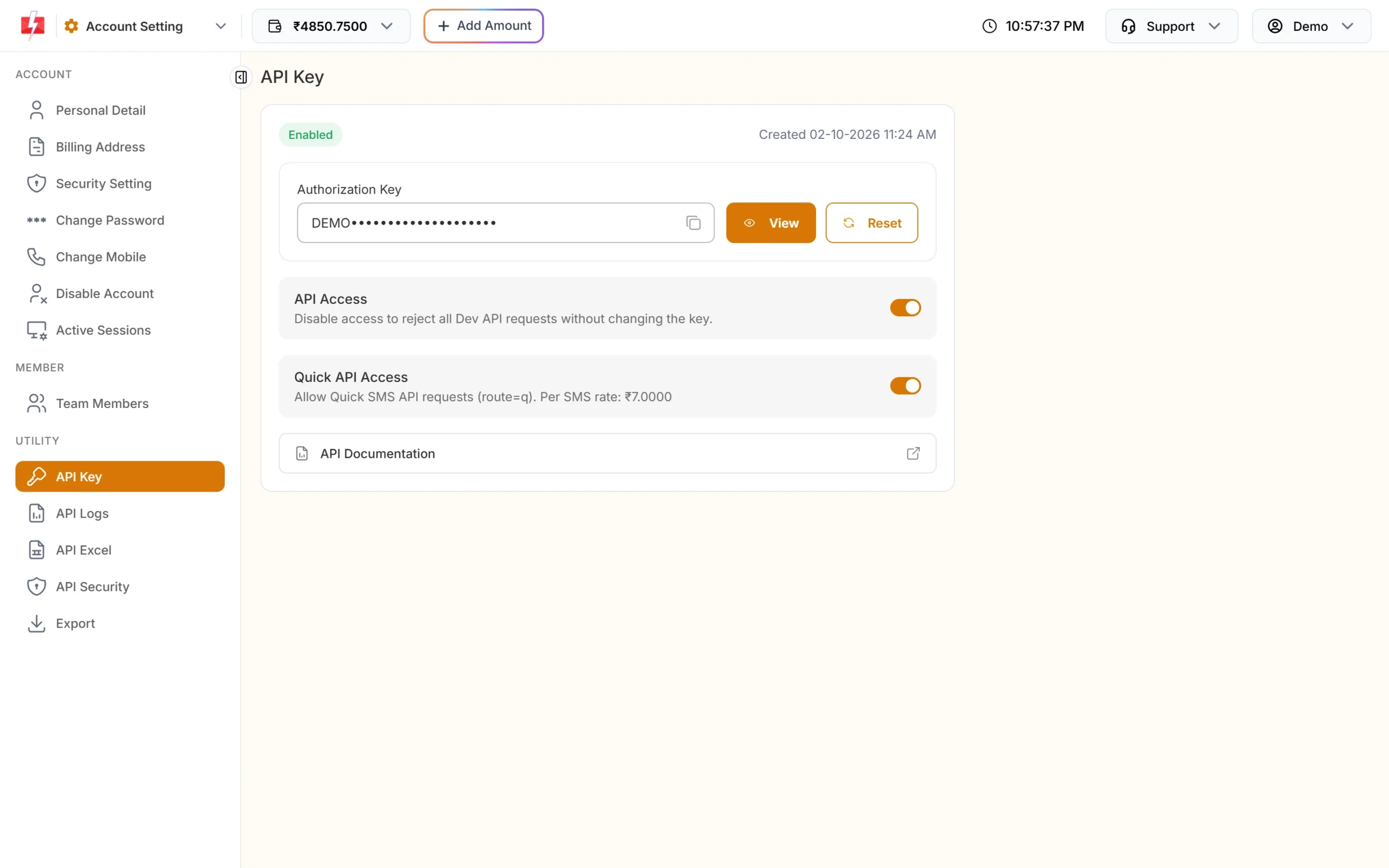
Store this key in an environment variable. -
Copy the Message ID and sender ID
Open DLT Manager, Content Template. Copy the Message ID and Sender ID from the same approved template card.
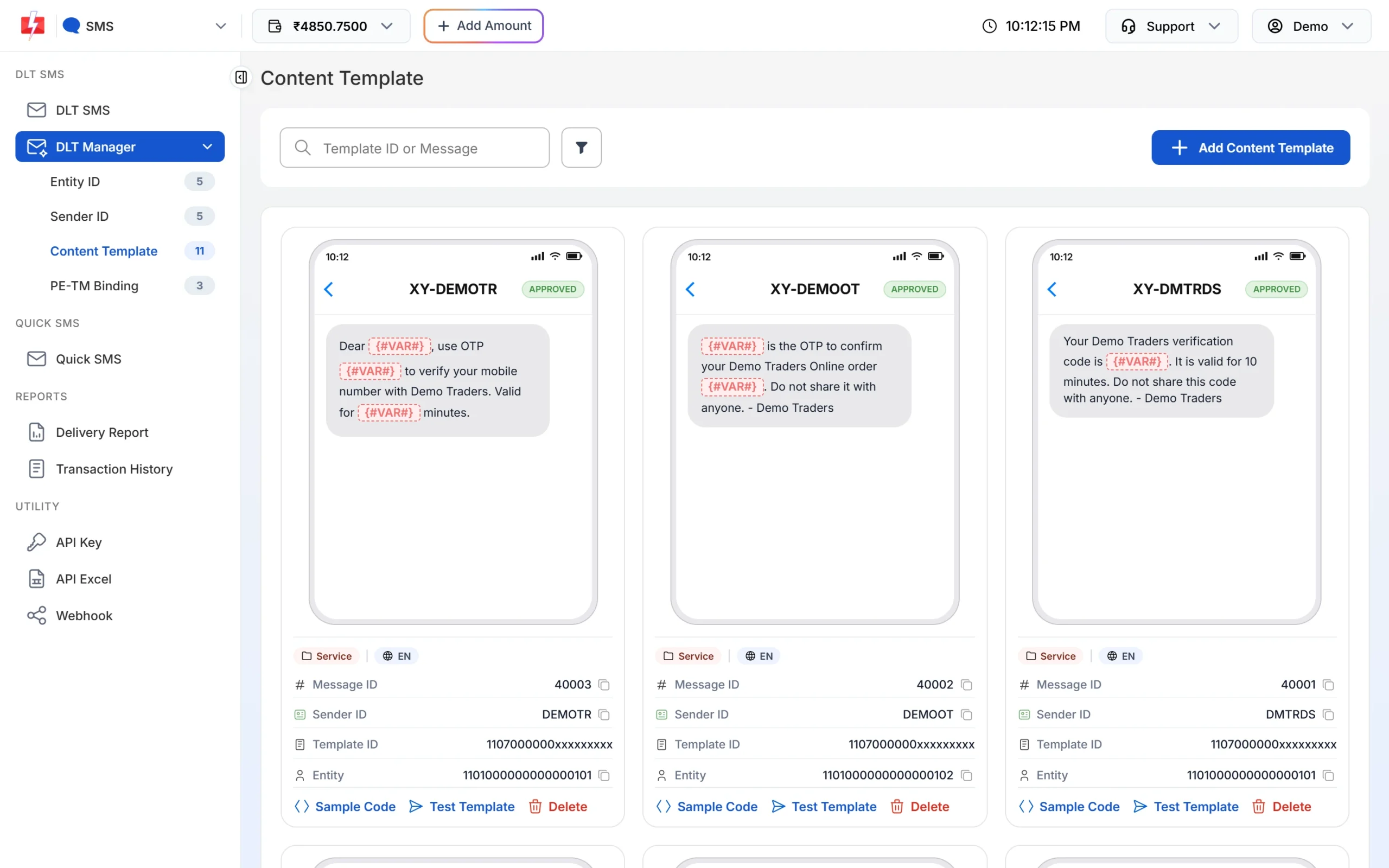
Message ID is what the API calls message. -
Copy the OTP ID
Open Smart OTP, OTP Template List, and copy the OTP ID from the card you want.
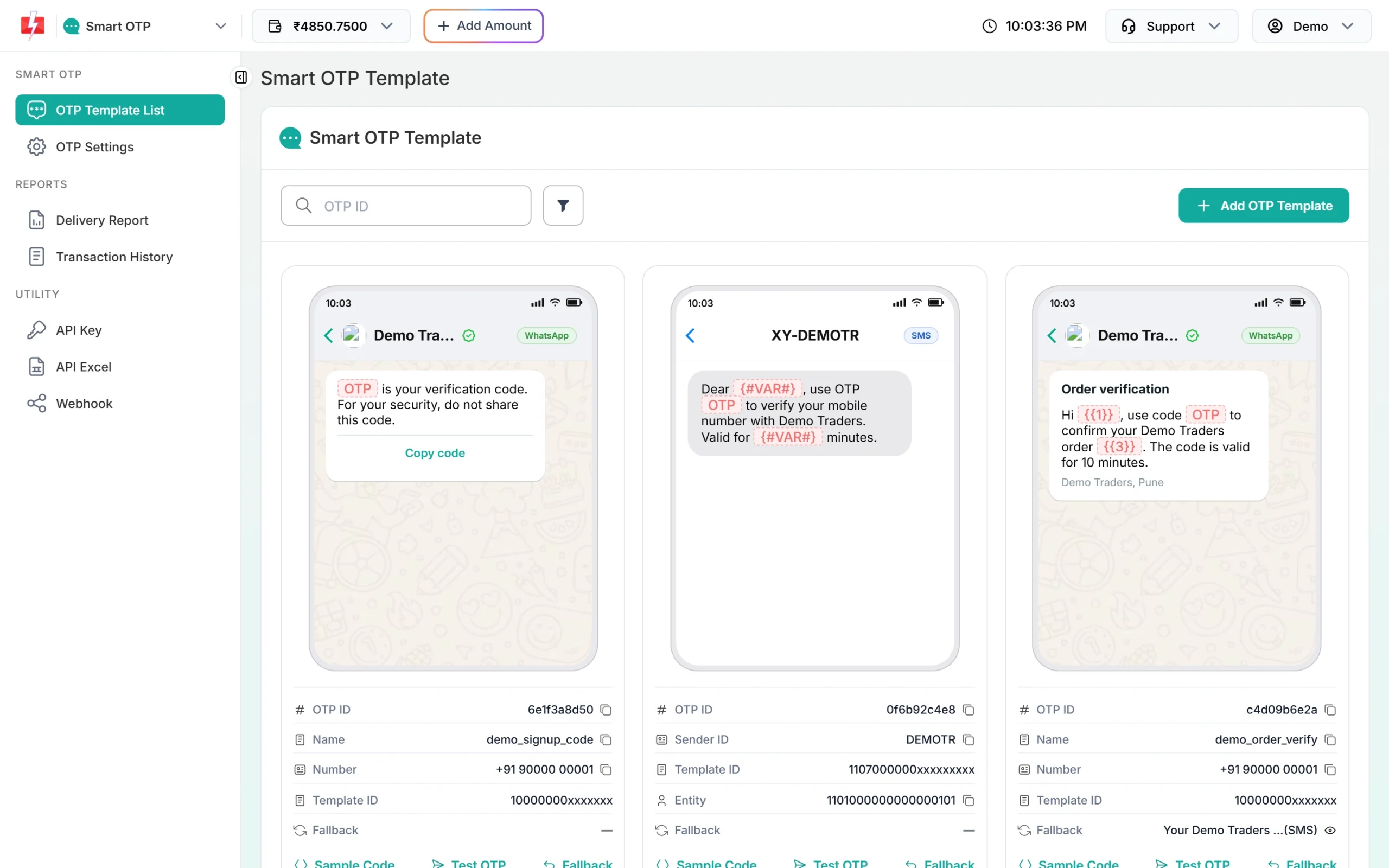
Copy the OTP ID with the icon next to it.
Set up the project
mkdir sms-demo && cd sms-demo
npm init -y
npm install express            # only needed for the webhook receiver
export FAST2SMS_API_KEY="YOUR_API_KEY"
Add "type": "module" to package.json to use import. With a .env file, Node.js 20.6 and later can load it with node --env-file=.env app.js.
A small helper for every call:
const BASE_URL = "https://www.fast2sms.com";
const API_KEY = process.env.FAST2SMS_API_KEY;

export async function f2sPost(path, body) {
  const res = await fetch(BASE_URL + path, {
    method: "POST",
    headers: {
      authorization: API_KEY,
      "Content-Type": "application/json",
      Accept: "application/json",
    },
    body: JSON.stringify(body),
    signal: AbortSignal.timeout(15000),
  });
  let data;
  try {
    data = await res.json();
  } catch {
    return { ok: false, http: res.status, data: { message: "Non-JSON response" } };
  }
  return { ok: res.ok && data.return === true, http: res.status, data };
}Bearer ${API_KEY}. The OTP endpoints do not remove “Bearer ” and answer “Invalid authorization key”.Send a DLT SMS
Send to /dev/bulkV2 with route: "dlt". The example template is Message ID 10001 on sender DEMOTR with four variables.
const { ok, http, data } = await f2sPost("/dev/bulkV2", {
  route: "dlt",
  sender_id: "DEMOTR",                                  // exact case
  message: "10001",                                     // Message ID from DLT Manager
  variables_values: ["Rahul", "DT10458", "1240", "21 Nov"].join("|"),
  numbers: ["9999999999", "8888888888"].join(","),
  udf1: "order-DT10458",                                // optional, returned in webhooks
});

if (ok) {
  console.log("Queued:", data.request_id);              // S...
} else {
  console.error("Not sent:", data.status_code ?? http, data.message);
}- One value per
{#var#}, in order, joined with|. Each value is cut to 40 characters. - The reply’s
messageis an array,["SMS sent successfully."], which means queued. - To send later, add
schedule_time: "25-11-2026-10-30"(DD-MM-YYYY-HH-MM, IST) or a Unix timestamp.
Same call with axios
import axios from "axios";

const { data } = await axios.post(
  "https://www.fast2sms.com/dev/bulkV2",
  { route: "dlt", sender_id: "DEMOTR", message: "10001",
    variables_values: "Rahul|DT10458|1240|21 Nov", numbers: "9999999999" },
  { headers: { authorization: process.env.FAST2SMS_API_KEY }, timeout: 15000,
    validateStatus: () => true }   // read error bodies instead of throwing
);
console.log(data.return ? data.request_id : data.message);
validateStatus: () => true stops axios from throwing on 400 and 401, so you can read Fast2SMS’s error message.
Send, verify and resend an OTP
Smart OTP creates the code and checks it, so your Node.js app does not need to store OTPs.
// 1. Send
const sent = await f2sPost("/dev/otp/send", {
  mobile: "9999999999",
  otp_id: "YOUR_OTP_ID",
  otp_expiry: 5,     // minutes, 1 to 10080, default 15
  otp_length: 6,     // 4 to 10, default 6
});
console.log(sent.ok ? "OTP sent" : sent.data.message);

// 2. Verify the code the user typed
const check = await f2sPost("/dev/otp/verify", { mobile: "9999999999", otp: "482913" });
if (check.ok) {
  console.log("Verified");               // create the session here
} else {
  console.log(check.data.message);       // Invalid OTP, OTP expired, ...
}

// 3. Resend the same OTP (charged again)
const again = await f2sPost("/dev/otp/resend", { mobile: "9999999999" });
console.log(again.ok ? "Sent again" : again.data.message);- Verify needs only the mobile and code. It checks the latest unverified OTP for that number.
- A new send to the same number cancels older OTPs. Send only when the user taps the button.
- Resend repeats the same code. It works up to 10 minutes after the first send and 5 sends in total, counting the first.
- Too soon? You get “Please wait N seconds before requesting a new OTP”. The wait is in OTP Settings (default 10 seconds).
Delivery status: DLR API or webhook
Use one method per message flow. Fetching a DLR by API can stop the webhook from sending those rows later.
DLR API
async function deliveryReport(requestId) {
  const res = await fetch(`https://www.fast2sms.com/dev/dlr/${encodeURIComponent(requestId)}`, {
    headers: { authorization: process.env.FAST2SMS_API_KEY },
    signal: AbortSignal.timeout(15000),
  });
  const data = await res.json();
  if (!data.success) return [];
  return data.data[0].delivery_status.map((r) => ({ mobile: r.mobile, status: r.status }));
}

console.log(await deliveryReport("Sa1B2c3D4e5F6g7"));  // Delivered / Failed / Sent
Express webhook receiver
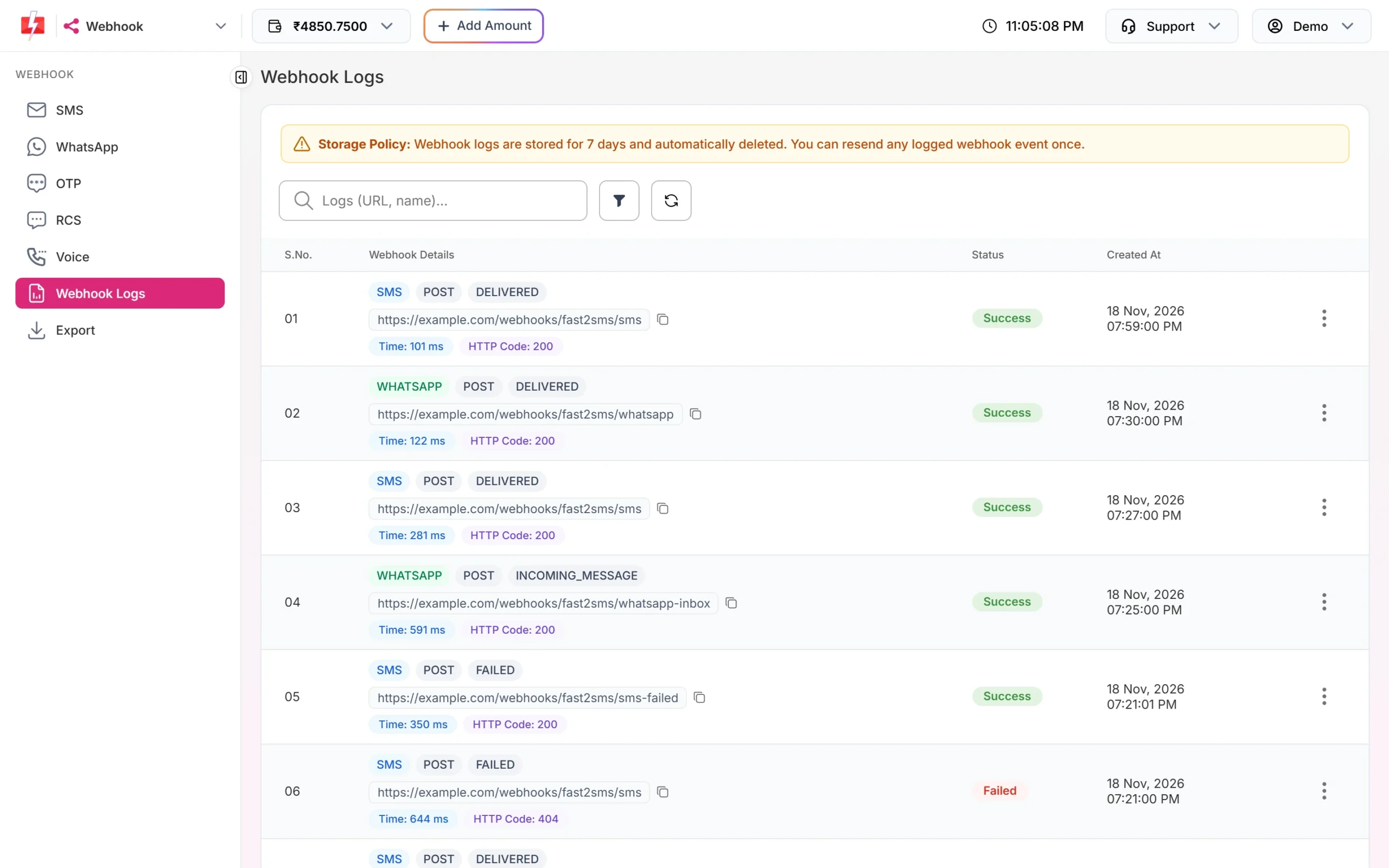
Create a webhook in the panel under Webhook, SMS or OTP, with format Standard Webhook, method POST, content type JSON and your public URL. Each attempt then shows in Webhook Logs.
import express from "express";

const app = express();
app.use(express.json());

app.post("/fast2sms/webhook", (req, res) => {
  // Optional: a header you added in the webhook's Headers tab
  if (req.get("X-Webhook-Token") !== process.env.MY_WEBHOOK_TOKEN) {
    return res.sendStatus(401);
  }
  const { request_id, mobile, status, status_description, udf1 } = req.body;
  // status is "delivered" or "failed". Save it, then answer fast.
  console.log(request_id, mobile, status, status_description, udf1);
  res.sendStatus(200);
});

app.listen(3000);
Answer within 10 seconds. If your server times out or returns 408, 429 or 5xx, Fast2SMS tries again up to 3 times, 60 seconds apart. Webhooks fire only for API sends, for reports that come within 24 hours.
Error handling
- Check
data.return. A low balance can reply HTTP 200 withreturn: falseand status_code 416. - No automatic retries on sends. If a request times out after it reached Fast2SMS, retrying can send and charge twice. Retry once only for connection errors such as
ECONNREFUSEDor DNS failures. Verify is free and safe to retry once. - Use a timeout (
AbortSignal.timeout) so a slow network does not hang your request handler. - Check API Logs in the panel to see what your code really sent in the last 7 days.
| Reply | Fix |
|---|---|
| 412 Invalid Authentication, Check Authorization Key | Copy the current key from API Key. The env variable may be empty. |
| Invalid authorization key (OTP) | Remove “Bearer ” and check the key. |
| 413 Authorization Key Disabled | Turn API Access on. |
| 414 IP is blacklisted from Dev API section | Whitelist your server’s public IP in API Security. Serverless platforms change IPs often. |
| 406 Invalid Sender ID | Use the approved sender in the exact case. |
| 424 Invalid Message ID | Use the Message ID (not the 19-digit Template ID) linked to that sender. |
| 411 Invalid Numbers | Use 10-digit Indian mobiles starting with 6 to 9. |
| 416 You don’t have sufficient wallet balance | Recharge. |
| Invalid OTP ID | Copy the OTP ID again from the same account. |
| Please wait N seconds before requesting a new OTP | Show a timer on the Resend button. |
| Invalid OTP / OTP expired / Maximum verification attempts reached | Let the user retry, or send a fresh OTP. |
| OTP not found or already verified (HTTP 404) | Already used or replaced. Send a new OTP. |
Full copy-paste example: fast2sms.js
// fast2sms.js - Node.js 18+, no dependencies
const BASE_URL = "https://www.fast2sms.com";

export class Fast2SMS {
  constructor(apiKey = process.env.FAST2SMS_API_KEY) {
    if (!apiKey) throw new Error("FAST2SMS_API_KEY is not set");
    this.apiKey = apiKey;
  }

  async #call(method, path, body) {
    let res;
    try {
      res = await fetch(BASE_URL + path, {
        method,
        headers: {
          authorization: this.apiKey,
          "Content-Type": "application/json",
          Accept: "application/json",
        },
        body: body ? JSON.stringify(body) : undefined,
        signal: AbortSignal.timeout(15000),
      });
    } catch (err) {
      return { ok: false, http: 0, message: `Network error: ${err.message}`, raw: null };
    }
    let data;
    try {
      data = await res.json();
    } catch {
      return { ok: false, http: res.status, message: "Non-JSON response", raw: null };
    }
    const msg = Array.isArray(data.message) ? data.message.join(" ") : data.message ?? "";
    return {
      ok: res.ok && (data.return === true || data.success === true),
      http: res.status,
      statusCode: data.status_code ?? null,
      requestId: data.request_id ?? null,
      message: msg,
      raw: data,
    };
  }

  sendDlt(senderId, messageId, variables, numbers, extra = {}) {
    return this.#call("POST", "/dev/bulkV2", {
      route: "dlt",
      sender_id: senderId,
      message: String(messageId),
      variables_values: variables.join("|"),
      numbers: numbers.join(","),
      ...extra,
    });
  }

  sendOtp(mobile, otpId, { expiry = 5, length = 6, variables } = {}) {
    const body = { mobile, otp_id: otpId, otp_expiry: expiry, otp_length: length };
    if (variables?.length) body.variables_values = variables.join("|");
    return this.#call("POST", "/dev/otp/send", body);
  }

  verifyOtp(mobile, otp) {
    return this.#call("POST", "/dev/otp/verify", { mobile, otp });
  }

  resendOtp(mobile) {
    return this.#call("POST", "/dev/otp/resend", { mobile });
  }

  deliveryReport(requestId) {
    return this.#call("GET", `/dev/dlr/${encodeURIComponent(requestId)}`);
  }
}

// Usage (in an ES module):
// import { Fast2SMS } from "./fast2sms.js";
// const f2s = new Fast2SMS();
// const sms = await f2s.sendDlt("DEMOTR", 10001, ["Rahul", "DT10458", "1240", "21 Nov"], ["9999999999"]);
// console.log(sms.ok ? sms.requestId : sms.message);
// const otp = await f2s.sendOtp("9999999999", "YOUR_OTP_ID");
// const check = await f2s.verifyOtp("9999999999", "482913");
// console.log(check.ok ? "verified" : check.message);
The DLR API replies with success rather than return, so the class accepts both. A ready Express starter kit with this client, send, verify and resend routes, a mock server and tests is also available from Fast2SMS.
Common problems and fixes
- fetch is not defined: you are on Node.js 16 or older. Upgrade to 18 or later, or use axios.
- The key is undefined: the environment variable is not loaded in that process (PM2, Docker, systemd). Set it in the process config.
- req.body is undefined in the webhook: add
app.use(express.json())before the route, and keep the webhook’s content type as JSON. - Webhook works in tests but not live: localhost and private URLs are refused. Use a public HTTPS URL.
- Two SMS for one order: a retry library or a queue retry resent after a timeout. Turn retries off for send calls.
Frequently asked questions
Is there an npm package for Fast2SMS?
You do not need one. The API is plain HTTPS with JSON. The class above uses only built-in fetch.
Can I call the Fast2SMS API from the browser or React?
No. The API key would be visible to anyone. Call your own Node.js backend from the browser, and let the backend call Fast2SMS.
Does it work with Next.js API routes or serverless functions?
Yes, as long as the code runs on the server side and the key is a server environment variable. If you turn on API Security, remember that serverless IPs can change.
How do I send to many numbers?
Join them with commas in numbers. Invalid numbers are skipped and not charged.
Can I generate the OTP myself?
Yes. Pass otp to Send OTP (up to 10 characters) and Fast2SMS still verifies it. Or send your own DLT OTP template with route=dlt and check the code in your app.
Is verify charged?
No. Send and resend are charged; verify is not.