
Every RCS agent (a bot in Fast2SMS) has one use case that decides what it may send. Google defines four: OTP, transactional, promotional and multi-use. In India, at the time of writing, only the first three are available, so a business that sends both offers and order updates needs two bots. This page explains each use case with Google’s own examples and helps you pick the right ones.
The four RCS agent use cases
| Use case | What it is for | What it must not send | In India |
|---|---|---|---|
| OTP | One-time passwords for login (2FA), password reset or confirming an online payment | Product information, notifications, offers, discounts | Available |
| Transactional | Updates and alerts about a product or service the customer already has | Offers, promotions, discounts or upgrades | Available |
| Promotional | Sales and marketing to new or existing customers | OTPs or login codes, and time-sensitive service or transaction information | Available |
| Multi-use | Conversations that mix transactional and promotional messages | Login OTPs, password resets, or only one kind of message | Not available |
OTP agents
An OTP agent sends one-time passwords and nothing else. Google lists 2FA for account login, password resets and completing online payments as its uses. It cannot carry product news or offers, not even a line at the end of the OTP.
Example: “123456 is your Demo Traders login code. It is valid for 10 minutes. Do not share it with anyone.”
In Fast2SMS, an RCS OTP is sent with the RCS API, and your own app creates and checks the code. For logins that must work on every phone, Smart OTP is the recommended way, because RCS reaches only phones with RCS on.
Transactional agents
A transactional agent talks about something the customer already bought or uses. Google’s examples include:
- Fraud and suspicious activity alerts
- Purchase, appointment and ticket confirmations
- Boarding passes, gate changes, shipping updates and appointment changes
- Account statements, account status, warranty and product safety information
- Requests for feedback on a purchase or service
- Editorial content such as news alerts
Example: “Your order DT-1187 is out for delivery. Delivery partner: 9999999999.” with a Dial a Number button.
In Fast2SMS, a transactional bot has no sending-hour window and no monthly limit, but the Bulk RCS page says it is “Only for Informative Messages”. An offer added to an order update breaks that rule.
Promotional agents
A promotional agent sells. Google’s examples are offers, promotions, discounts and upgrades, and follow-ups to finish a purchase the customer started, such as an abandoned cart reminder.
Example: a rich card titled “Weekend Mega Sale” with a photo, “Up to 50% off on home and kitchen” and a “Shop the sale” button.
Promotional bots carry the most rules. In Fast2SMS they can send only from 7:00 AM to 10:00 PM, and each number can get up to 4 promotional RCS a month. Google also rates promotional agents by reputation (High, Medium or Low, from user feedback and spam reports, Low for new agents), and in India this limits how many customers and how many messages per customer a promotional agent can reach over 28 days.
Multi-use agents (not in India)
Google’s multi-use agent can mix transactional and promotional messages in one conversation, for example a boarding pass followed by a seat upgrade offer. Google says multi-use is not available in India. If you need both kinds of message, use one transactional bot and one promotional bot under the same brand.
Which bots should your business have?
| Your business sends | Bots you need |
|---|---|
| Only offers and new arrivals | Promotional |
| Only order, booking or payment updates | Transactional |
| Offers and order updates (most shops) | Promotional and transactional |
| Login codes for an app or website | OTP, or Smart OTP on SMS and WhatsApp |
| Bank, NBFC or fintech: OTPs, alerts and offers | OTP, transactional and promotional |
See your bots and their use case in Fast2SMS
-
Open RCS Manager
Go to RCS Manager > Bots. Each bot shows its name, Bot ID, category (OTP, promotional or transactional), usage and status. Only Active bots can send. To ask for another bot, click Add Bot or contact support.
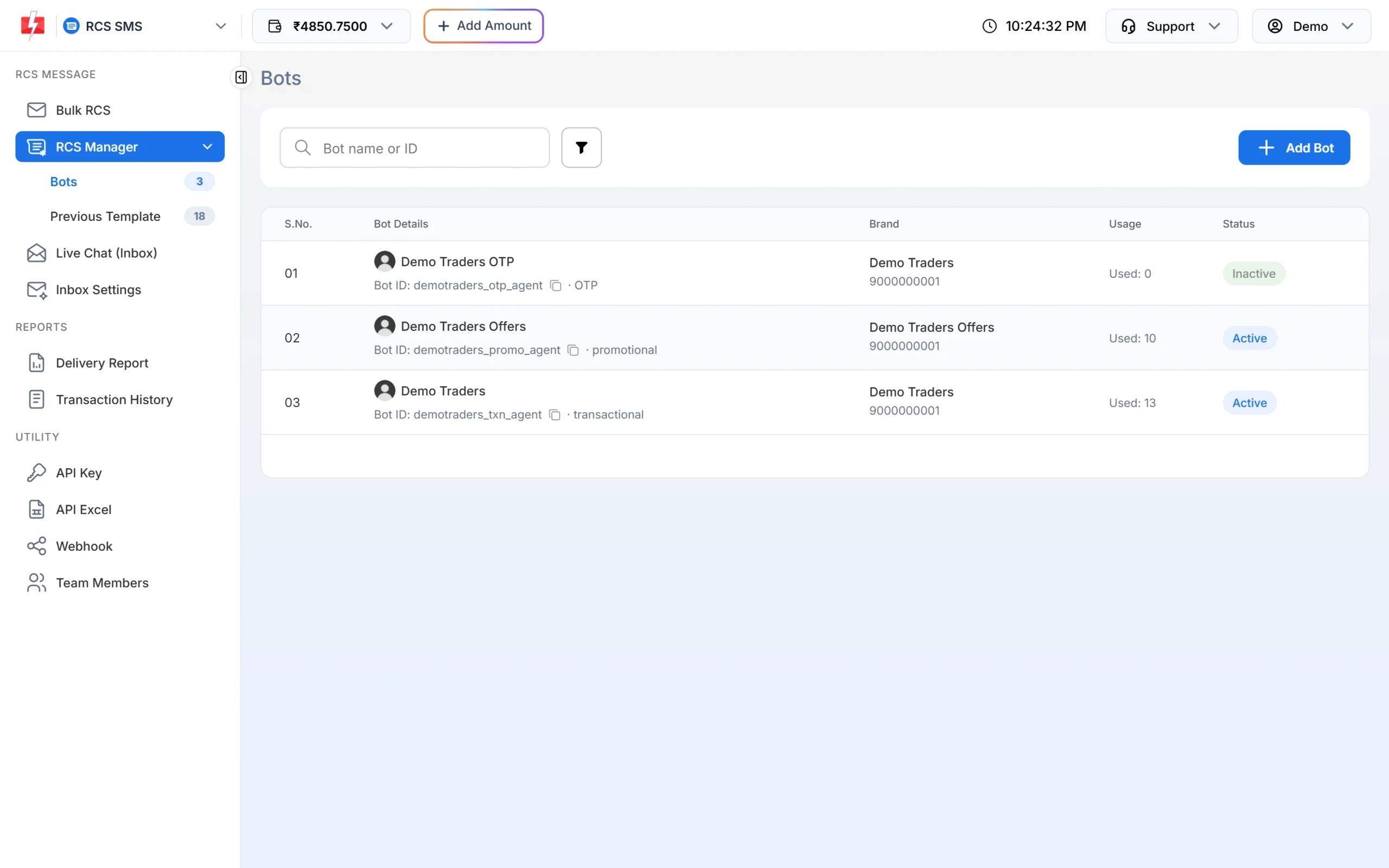
One brand can have an OTP, a promotional and a transactional bot. -
Pick the right bot when you send
On Bulk RCS, the RCS BOT list shows each active bot with its category in brackets, such as (Promotional) or (Transactional). Choose by the message, not by habit. Add New RCS Bot at the bottom of the list starts a request for another bot.
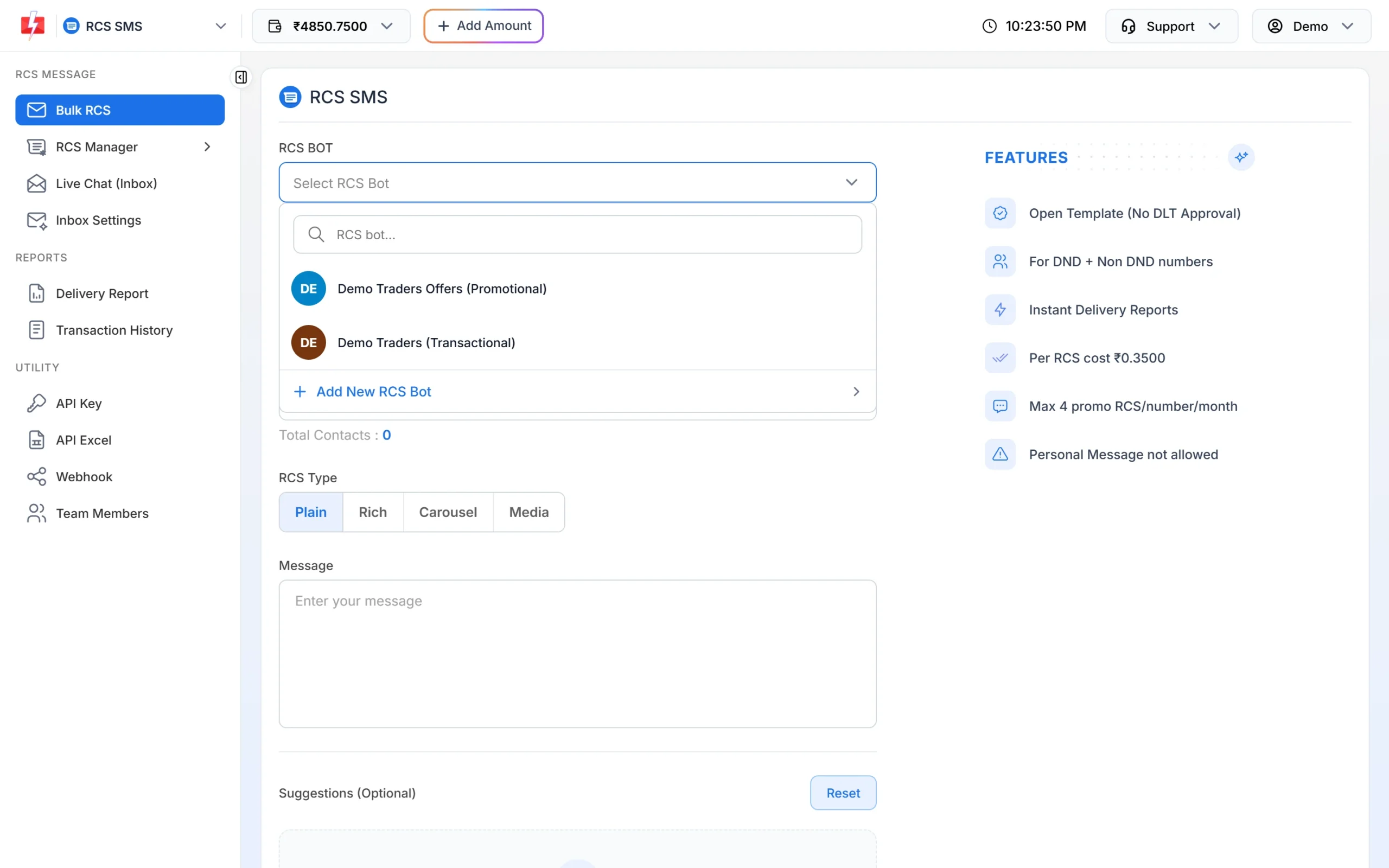
The category in brackets tells you what the bot may send. -
For API sends, use the matching Bot ID
The RCS API sends from whichever
bot_idyou pass. Keep the transactional Bot ID in your order system and the promotional one in your marketing tool, so offers never go out from the wrong bot.
Common mistakes
- “Thank you for your order. Use code SAVE10 next time.” The order part is transactional, the code is an offer. Send the offer separately from the promotional bot.
- Sending an OTP from the promotional bot. Google does not allow OTPs on promotional agents.
- Using the transactional bot at night for a sale because the promotional bot cannot send after 10:00 PM. Schedule the offer for the morning instead.
Frequently asked questions
What is an RCS agent?
It is the business sender customers see: a name, logo and purpose. Fast2SMS calls it a bot and gives each one a Bot ID.
Can one RCS agent send both offers and updates in India?
No. That would need a multi-use agent, which Google does not offer in India. Use a promotional bot and a transactional bot.
Can I change my bot from transactional to promotional?
A bot keeps the category it was approved with. For another kind of message, request another bot with Add Bot or through support.
Is an abandoned cart reminder transactional or promotional?
Promotional. Google lists follow-ups to finish a purchase the customer started as promotional.
Is a feedback request transactional?
Yes, if it asks about a purchase or service the customer already has. Google lists requests for feedback as transactional.
Can an OTP message include a link to my offers?
No. OTP agents may not include product information or offers.
Why is my OTP bot Inactive?
Only Active bots can send. Contact Fast2SMS support with the Bot ID shown in RCS Manager > Bots.