
To measure an RCS campaign in Fast2SMS, open Delivery Report > RCS Report for delivered, failed and Non-RCS counts, open the campaign to see which numbers Read the message, check replies in Live Chat (Inbox), and use the Refund tab for what the campaign really cost. Button clicks are not counted in the RCS report, so track them with UTM tags on your Open URL links.
This page shows where each number lives, the simple formulas to turn them into rates, and a worked example.
The numbers you can get, and where
| Number | Where in Fast2SMS |
|---|---|
| Total, Delivered, Failed, Sent, Pending | Cards at the top of RCS Report, for the dates you pick |
| Non-RCS count | Total RCS donut, and in each campaign’s Delivery Details |
| Read, per number | Receivers table in Delivery Details (Read messages are counted inside Delivered) |
| Failure reasons | Description column in Delivery Details |
| Replies | Live Chat (Inbox) for the bot |
| Money spent and refunded | RCS Report > Refund: Amount Debited, Amount Refunded, Net Amount per campaign |
| Link clicks | Not in the RCS report. Use UTM tags and your website analytics |
How to pull the numbers for one campaign
-
Open RCS Report and set the dates
Go to Delivery Report > RCS Report. It opens on the last 2 days. Click the filter icon to choose a wider Date Range, or filter by RCS Bot or Message Type to compare promotional and transactional sends, or rich and plain messages.
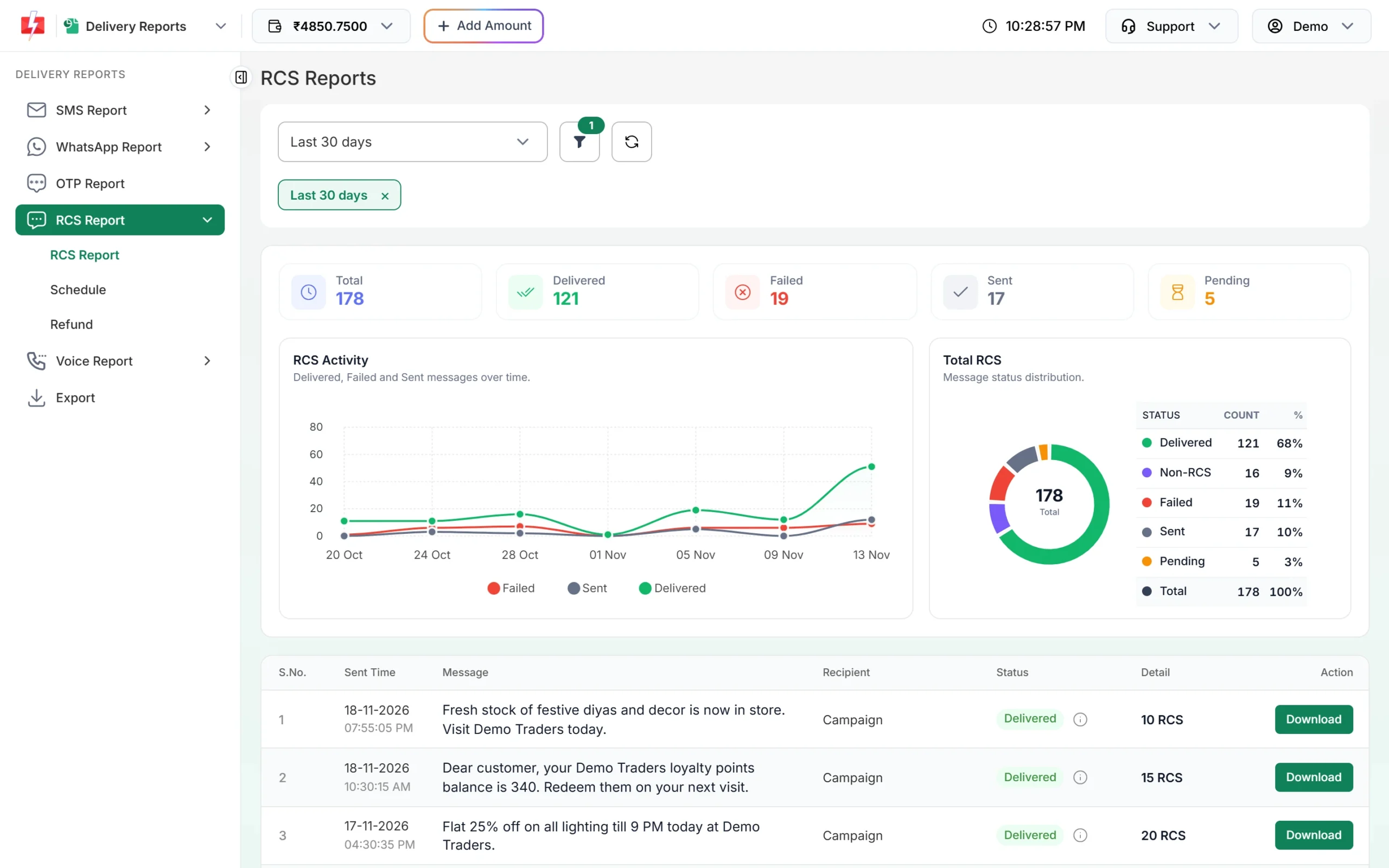
Totals, trend and status split for the selected dates. -
Open the campaign
Click the campaign row. Delivery Details shows its own donut (Delivered, Non-RCS, Failed, Sent, Pending) and the Receivers table. Numbers that opened the message show Read. Use Refresh for the latest status, and Download on the main list to work with the per-number list in a spreadsheet.
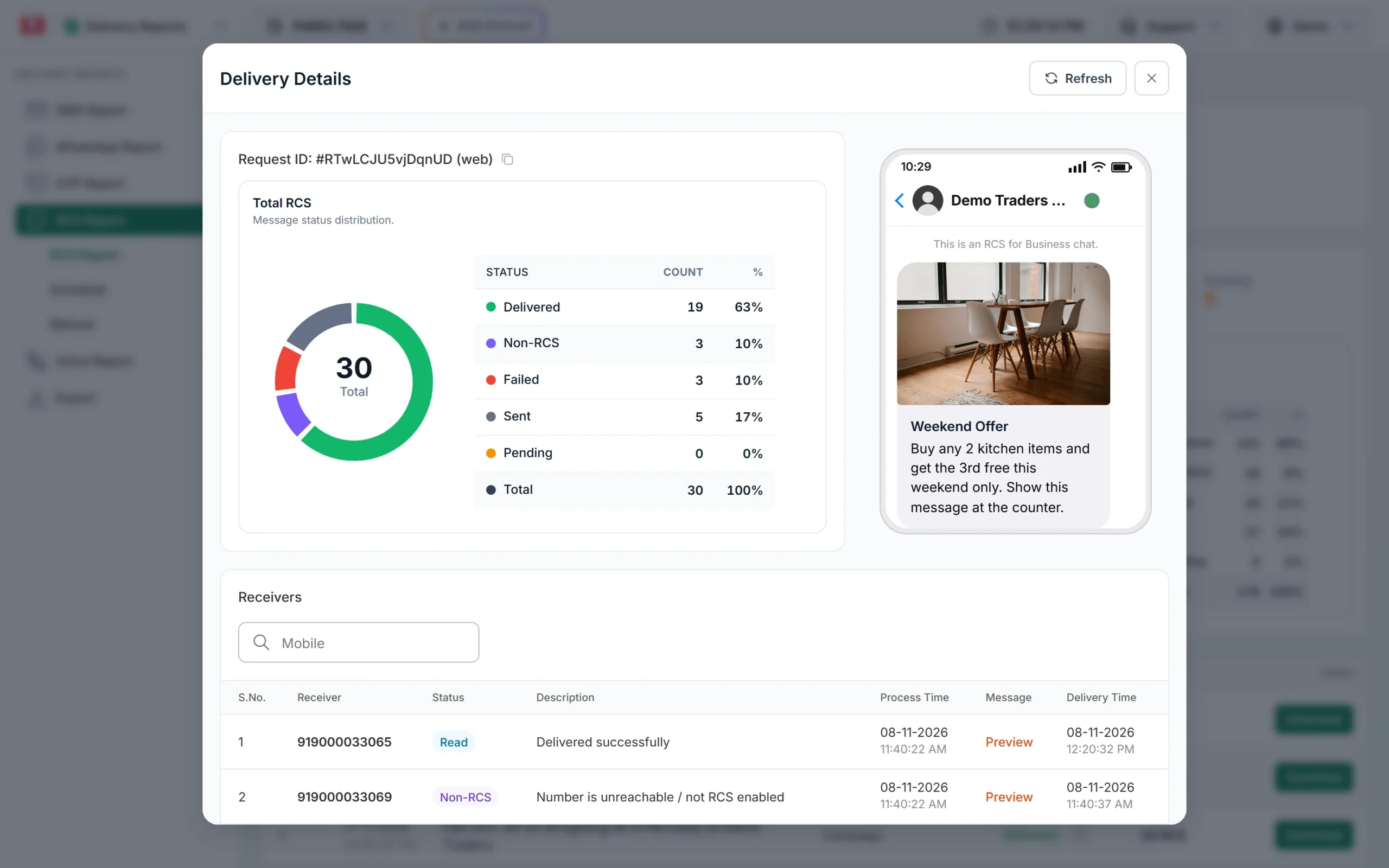
One campaign: 30 numbers, 19 delivered, 3 Non-RCS, 3 failed, 5 sent. -
Check the real cost
Open RCS Report > Refund and pick the month. Each campaign row shows Total, Failed, Debited, Refunded and the final Amount after refunds. Refunds for Failed and Non-RCS numbers are made within 48 hours, so check this a couple of days after the send.
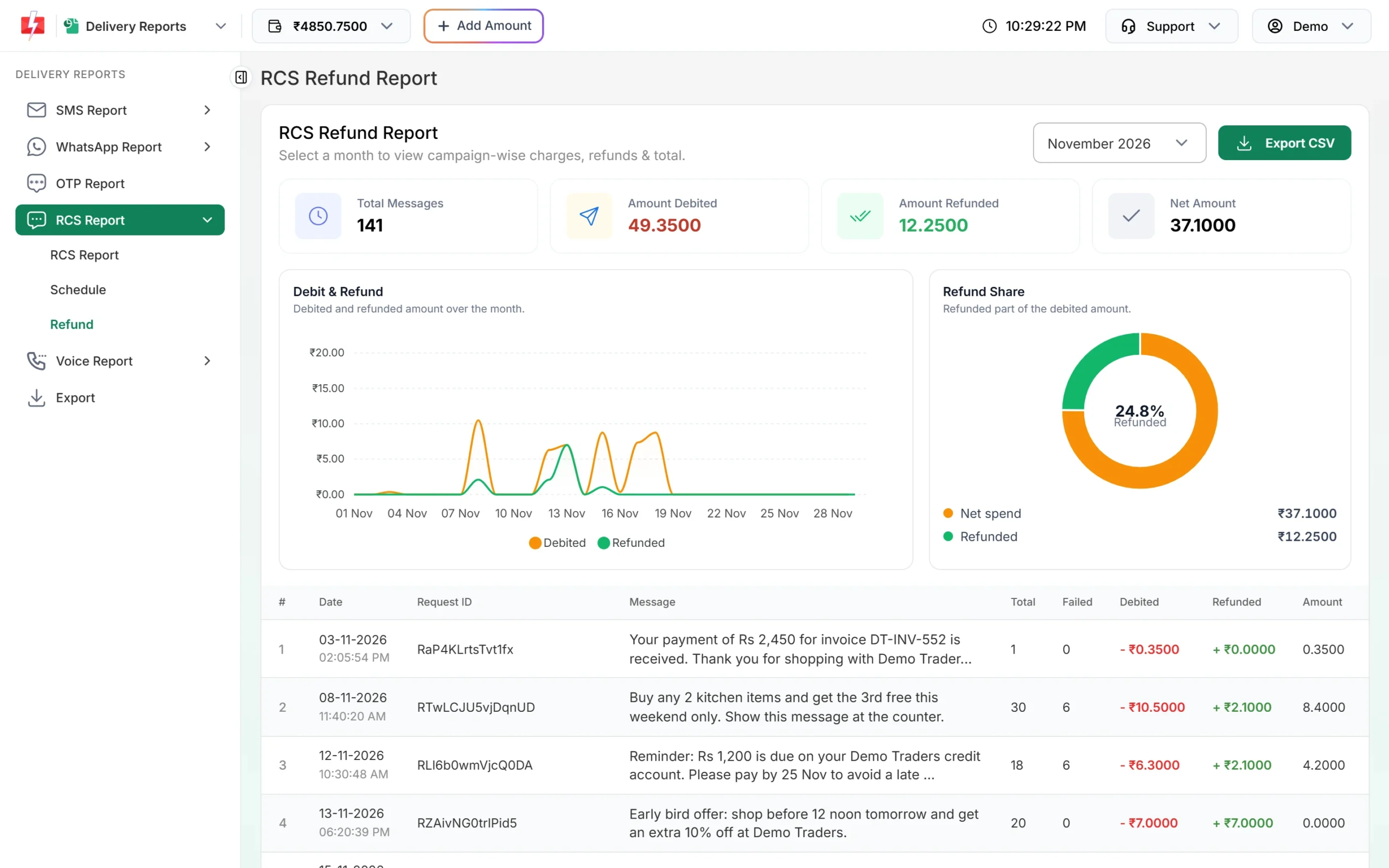
Debited, refunded and net amount for each campaign. -
Count the replies
Open Live Chat (Inbox) and pick the bot. Customers who replied after the campaign appear in the chat list, with an unread count. Questions like “Is the offer valid on…” are a good sign the message was read and understood.
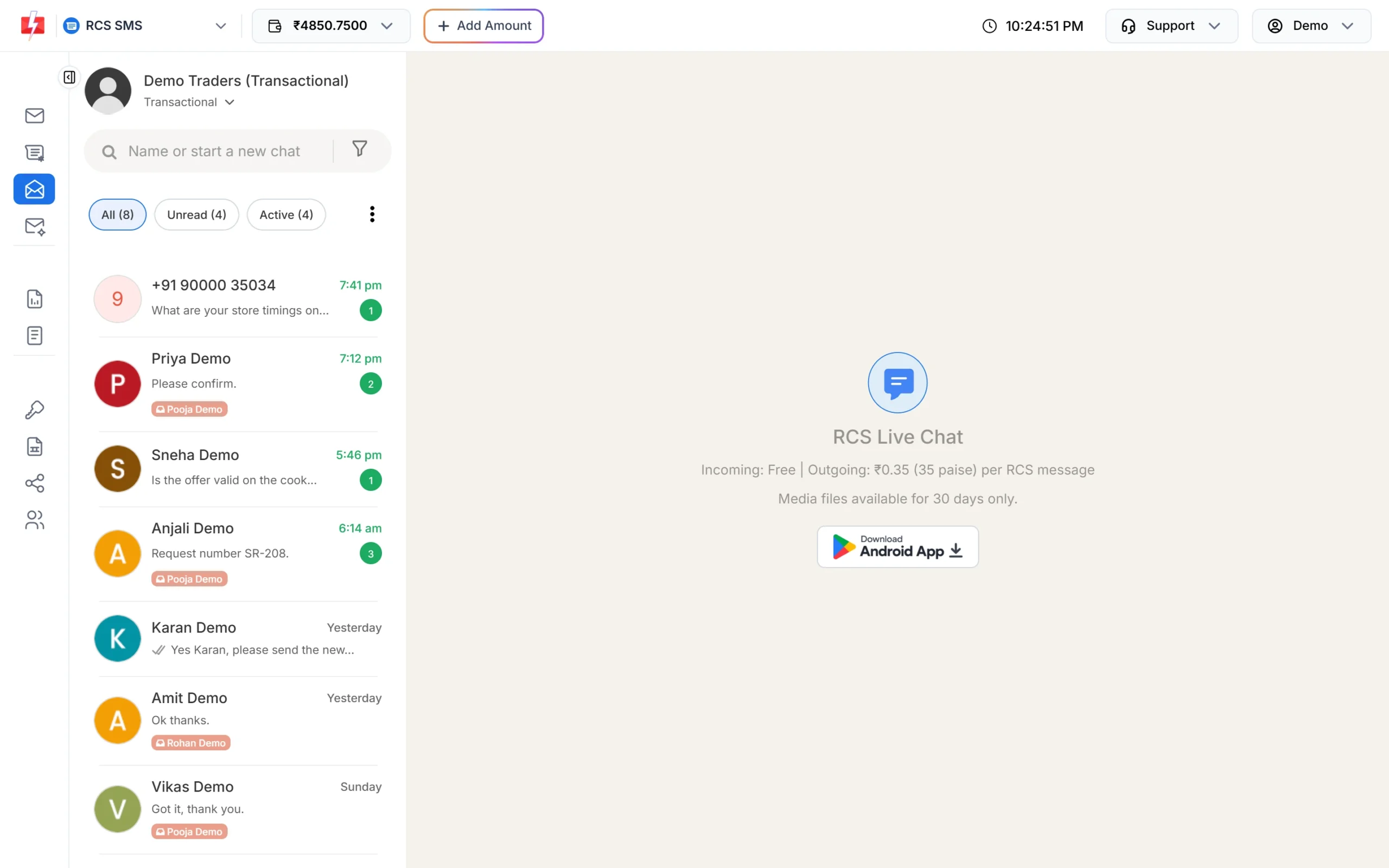
Replies to your campaign land here.
The formulas
| Rate | Formula | What it tells you |
|---|---|---|
| RCS reach | (Total minus Non-RCS) divided by Total | How much of your list can get RCS at all |
| Delivery rate | Delivered divided by Total | How many phones got the message |
| Read rate | Read divided by Delivered | How many opened it. Best for comparing titles, images and send times |
| Click rate | Visits from the campaign’s UTM link divided by Delivered | How many tapped your Open URL button |
| Reply rate | Customers who replied divided by Delivered | Interest and questions |
| Cost per delivered | Net Amount divided by Delivered | What one delivered message really cost after refunds |
| Cost per order | Net Amount divided by orders from the UTM link or a campaign coupon | Whether the campaign paid for itself |
A worked example
Take the campaign in the screenshot above: 30 numbers, 19 Delivered, 3 Non-RCS, 3 Failed, 5 Sent. In the Refund tab the same request shows ₹10.50 debited, ₹2.10 refunded for the 6 Failed and Non-RCS numbers, and ₹8.40 net.
- RCS reach: (30 − 3) ÷ 30 = 90%
- Delivery rate: 19 ÷ 30 = 63%
- Cost per delivered: ₹8.40 ÷ 19 = about ₹0.44
The 5 Sent numbers were charged but have not confirmed delivery. Sent is not refunded. If the Read count among the 19 delivered is low, try a clearer title or a better image next time. At the time of writing the RCS rate is ₹0.35 per message for every type. See the RCS pricing page for the current rate.
Sending in bulk? For high RCS volumes our team offers discounted rates. Talk to our team or see RCS pricing.
Track button clicks with UTM tags
The RCS report shows delivery and read status, not which button a customer tapped. To count clicks, add UTM tags to every Open URL link, then read the visits in your website analytics:
https://www.example.com/diwali-sale?utm_source=rcs&utm_medium=message&utm_campaign=diwali_2026- Use a new
utm_campaignvalue for each campaign. - In a carousel, give each card’s button its own
utm_content, such asutm_content=card1, to see which product drew taps. - For store visits, add a code to the message (“Show this message at the counter”) and count how many customers use it.
- Dial a Number taps show up as calls to that number. A separate number for RCS campaigns makes them easy to count.
For API sends: get read status on your server
If you send RCS by API, add an RCS webhook under Webhook. It can send delivered, failed, sent and read updates, and customer replies, to your server with the request_id, the number and your udf1 to udf3 values. Webhooks fire only for API sends, not for campaigns sent from the panel.
How to improve weak numbers
| What you see | What to try |
|---|---|
| Many Non-RCS | Your list has many phones without RCS. Reach them by SMS or WhatsApp. |
| Many Failed with Not Reachable | Send earlier in the day so phones have time to come online within 6 hours. |
| Failed with Monthly Limit Reached (4 Promo RCS Allowed) | Those numbers already got 4 promotional RCS this month. Plan fewer, stronger offers. |
| Delivered but few Read | Make the title say the offer. Use one clear image. Try a different send time. |
| Read but few clicks | Make the button text an action (“Shop the sale”) and the landing page load fast on mobile. |
Frequently asked questions
Can RCS messages be tracked?
Yes. Fast2SMS shows Delivered, Read, Sent, Failed and Non-RCS for each number. Link clicks are tracked with UTM tags in your own website analytics.
Does RCS have read receipts?
Yes. When the customer opens the message and the phone reports it, the number shows Read in Delivery Details. Read messages are also counted inside Delivered.
Why is my message delivered but not read?
The customer has not opened it yet, or the phone has not reported it as read. Check again later with Refresh in Delivery Details.
Can I see who clicked a button?
Not in the RCS report. Use UTM-tagged links to count visits from the campaign on your website.
Is there a separate Read filter in the RCS report?
The Delivery Status filter lists Delivered, Pending, Failed, Sent, Non-RCS and Rejected. Read messages are counted inside Delivered, and each Read number is marked in the campaign’s Receivers table.
How long does it take for refunds to show in the report?
Failed and Non-RCS numbers are refunded within 48 hours of sending. Check the Refund tab after that for the final cost.
How far back can I compare campaigns?
The date filter goes up to Last 3 months, and Custom Date lets you set your own range.