
The RCS messages that work best are short, come from the right bot, and give the customer one clear next step. This page lists RCS best practices for transactional and marketing messages, with ready example texts for orders, deliveries, reminders and offers that you can adapt and send from Fast2SMS.
It is for shop owners, D2C brands, clinics, schools and service businesses that already have an approved RCS bot, or are about to get one.
RCS best practices in short
- Use the right bot. Order, payment and service updates go from a transactional bot. Offers and sales go from a promotional bot. A transactional bot is “Only for Informative Messages”.
- Message only people who opted in. Your RCS approval needed an opt-in form, and Google’s policy says to message only users who explicitly opted in.
- Send promotions at the right time. Promotional bots can only send from 7:00 AM to 10:00 PM. A night schedule moves to 7:01 AM.
- Plan for the monthly limit. One number can get at most 4 promotional RCS a month. Save these for your best offers.
- One message, one action. A short title, two or three lines, and one or two buttons such as “Track order” or “Shop now”.
- Use the card for the picture, not for text. Put the offer in the title and text, and use the image to show the product.
- Do not ask for passwords, card numbers or OTPs to be sent back. Mask account and card numbers (for example XXXX1234).
- Test on a real phone first. Send to your own number and a colleague’s before the full list.
How to send one of these examples
-
Pick the bot that matches the message
Open Bulk RCS and click RCS BOT. The category is shown in brackets, such as (Promotional) or (Transactional). For an offer, choose the promotional bot. For an order or payment update, choose the transactional bot.
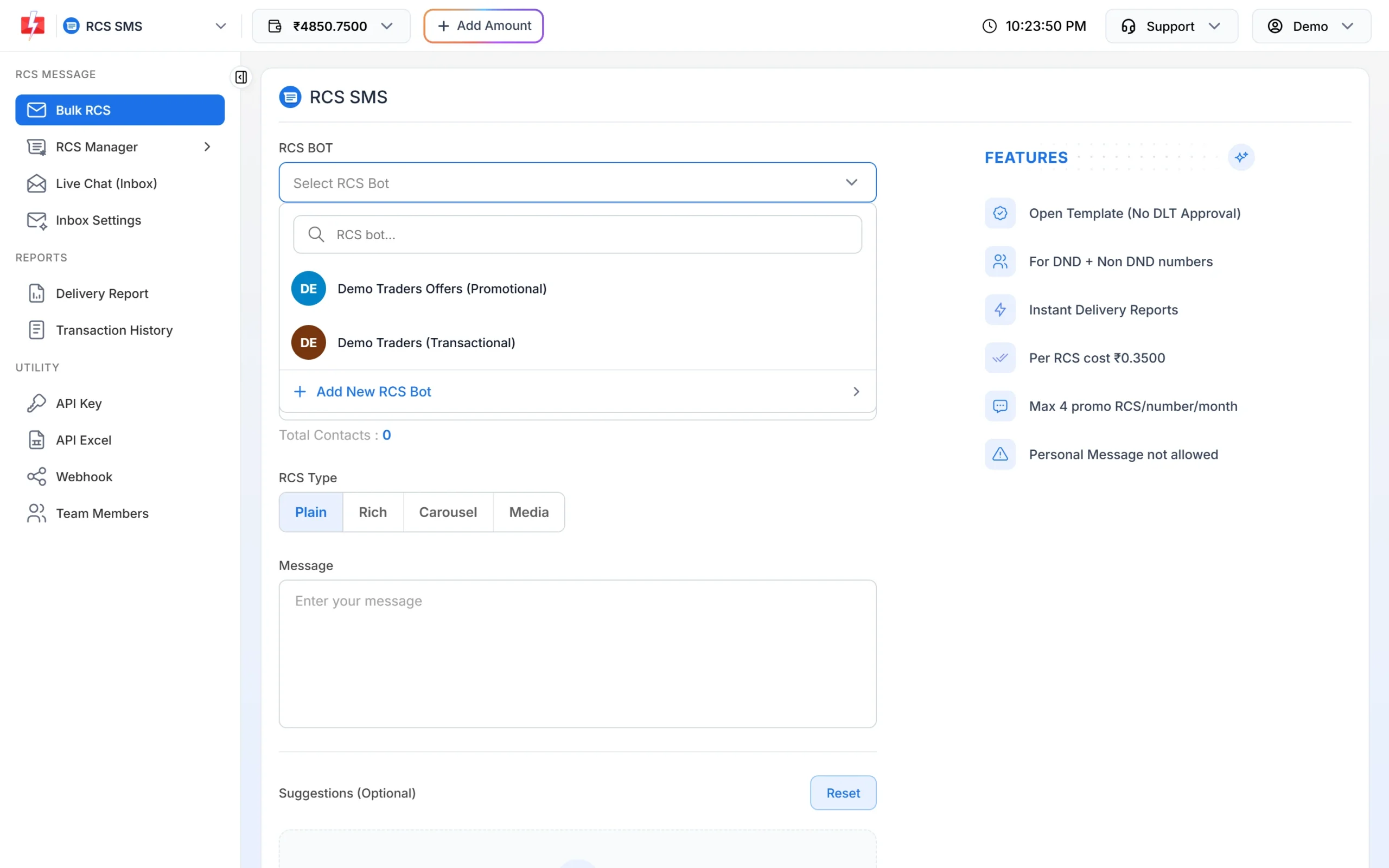
Choose a promotional or transactional bot. -
Choose the type and paste your text
Pick Plain for updates, Rich for one offer with an image, or Carousel for several products. Paste the example text from below and change the details.
-
Add a button and send a test
Click Add Suggestion to add a button (Open URL, Dial a Number or View Location). Send to your own number first, then check how it looks under RCS Manager > Previous Template.
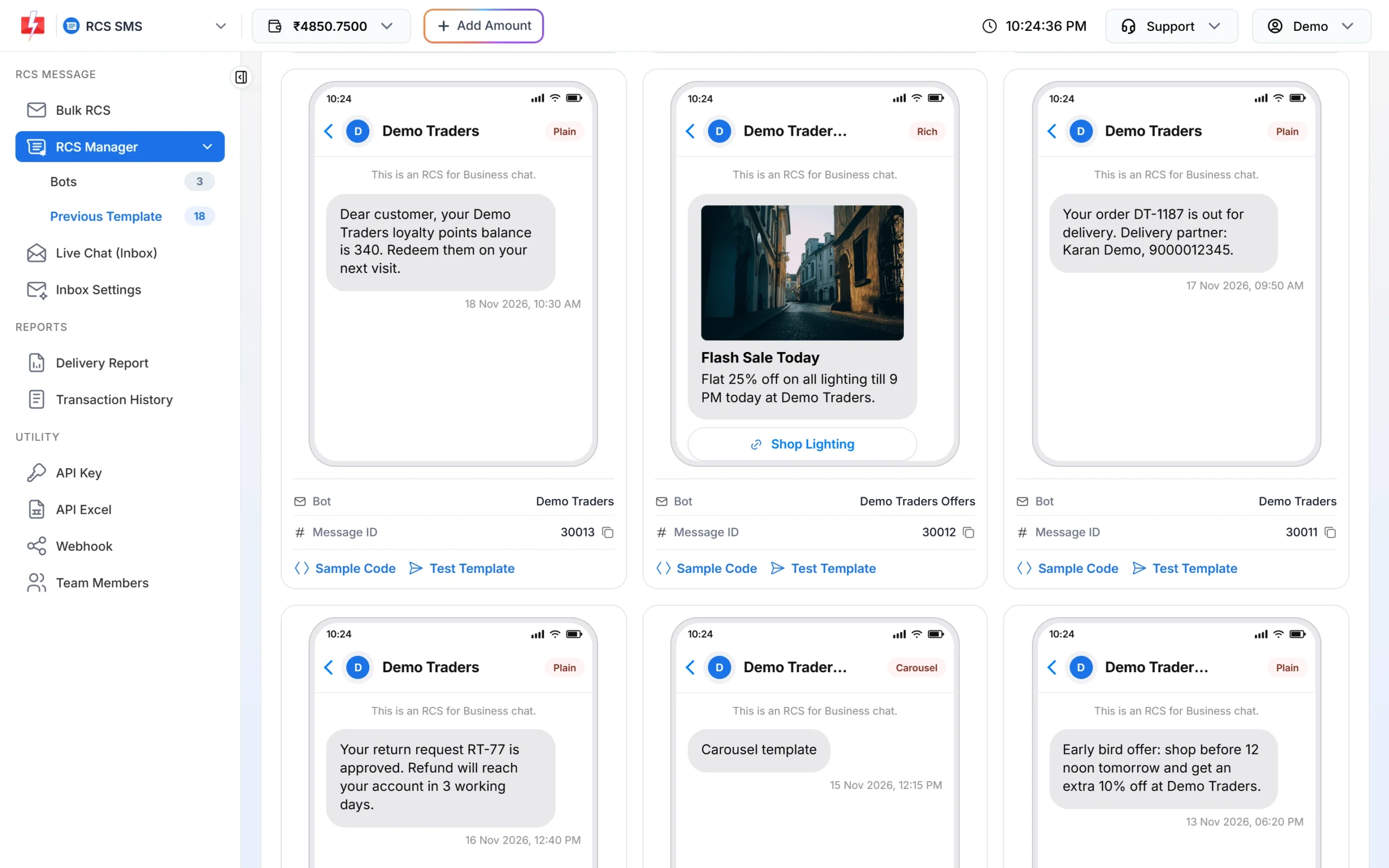
Examples of plain update messages and a rich offer card.
Transactional RCS message examples
Send these from a transactional bot. They work well as Plain messages with one button. In Bulk RCS every number gets the same text, so for messages with a different order number or amount for each customer, send them one by one through the RCS API.
| Use | Example text | Button |
|---|---|---|
| Order confirmed | Thank you for your order #4521. We will pack it today and send you the tracking details once it ships. | Open URL: “View order” |
| Shipped | Good news: your order #4521 has shipped. Expected delivery: Thu, 21 Nov. | Open URL: “Track order” |
| Out for delivery | Your order #4521 is out for delivery today. Please keep your phone reachable. | Dial a Number: “Call support” |
| Payment received | We received your payment of Rs 2,450 for invoice 1187. Thank you. | Open URL: “Download invoice” |
| Payment reminder | Reminder: Rs 1,200 for your plan is due on 25 Nov. Pay online to avoid a late fee. | Open URL: “Pay now” |
| Appointment reminder | Your appointment is on Sat, 23 Nov at 11:00 AM at our Andheri clinic. | View Location: “Get directions” |
| Return or refund | Your return request RT-77 is approved. The refund will reach your account in 3 working days. | Open URL: “Refund status” |
| Service request | Your service request SR-208 is booked. Our technician will call you before the visit. | Dial a Number: “Call us” |
Tips for transactional RCS
- Lead with the fact the customer needs: the order number, date, amount or status.
- Keep offers out of transactional messages. Sales content belongs on the promotional bot.
- Use the same wording every time for the same event, so customers recognise it.
- If the message is urgent, also plan an SMS for numbers that show Non-RCS in the report.
Marketing RCS message examples
Send these from a promotional bot, between 7:00 AM and 10:00 PM. A Rich card with a product photo, or a short Carousel of a few products, shows the offer better than plain text.
| Use | Title | Text | Button |
|---|---|---|---|
| Weekend sale | Weekend Mega Sale | Up to 50% off on home and kitchen. Starts Saturday 10 AM. | Open URL: “Shop the sale” |
| New arrivals | New Arrivals | Fresh stock of festive diyas and decor is now in store. | Open URL: “View collection” |
| Flash sale | Flash Sale Today | Flat 25% off on all lighting till 9 PM today. | Open URL: “Shop lighting” |
| Store visit | Buy 2, get 1 free | Buy any 2 kitchen items and get the 3rd free this weekend. Show this message at the counter. | View Location: “Find our store” |
| Early bird | Early bird offer | Shop before 12 noon tomorrow and get an extra 10% off. | Open URL: “Shop now” |
| Real estate site visit | 2 BHK homes in Wakad | Book a free site visit this Sunday. Ready to move flats with parking. | Dial a Number: “Book a visit” |
Tips for marketing RCS
- Spend your 4 a month wisely. Each number can get only 4 promotional RCS a month. Messages over the limit fail with “Monthly Limit Reached (4 Promo RCS Allowed)” and are refunded.
- Give a reason to act now: a date, a time limit or a limited stock line.
- Carousels for choice: one product per card, each with its own “Buy now” button to that product’s page.
- Answer replies. Customers often reply with questions. Set up auto replies and watch Live Chat (Inbox).
Check how your messages perform
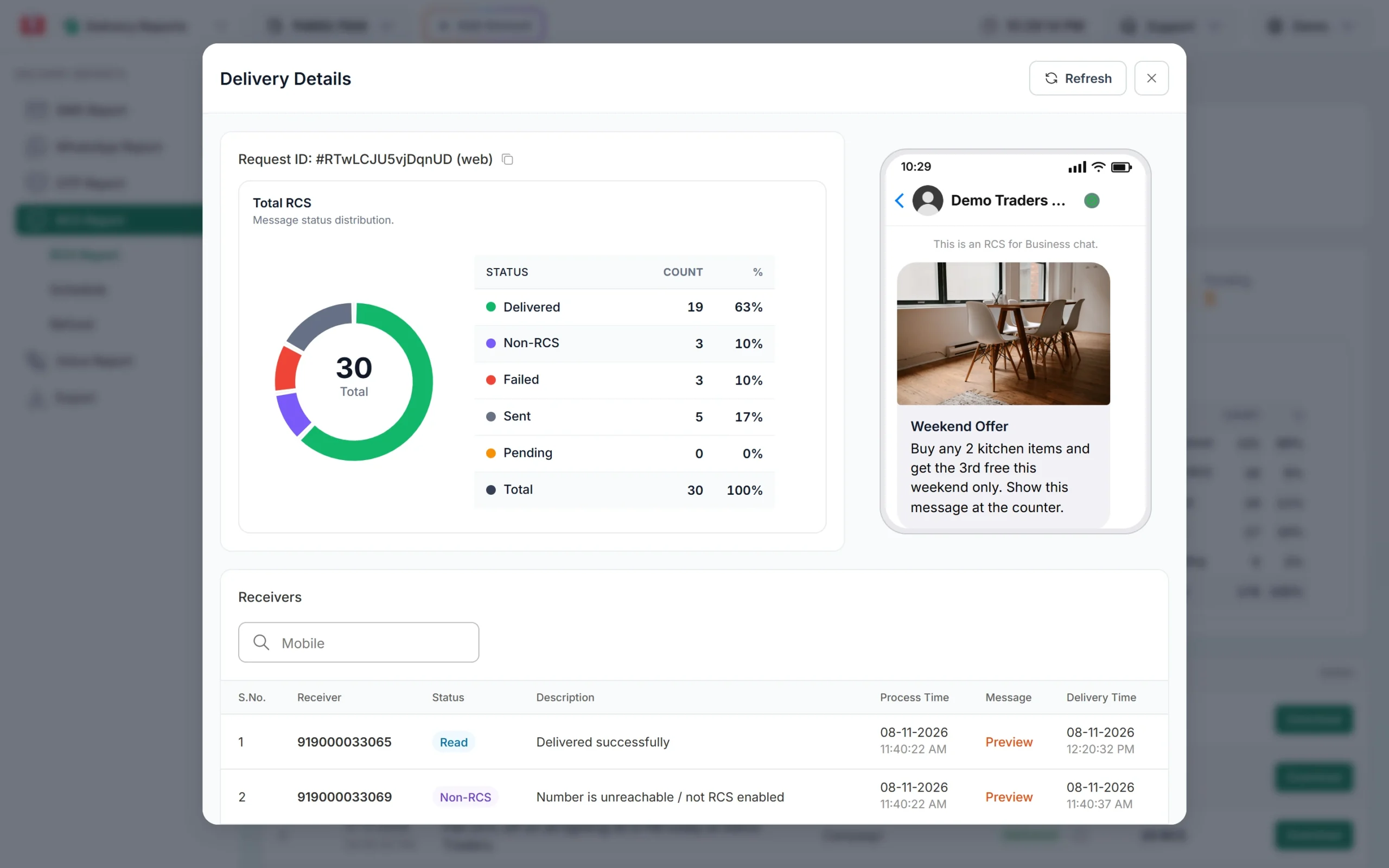
Open Delivery Report > RCS Report and click a campaign. The Delivery Details popup shows how many messages were Delivered (including Read), Non-RCS, Failed, Sent and Pending. A high Read count tells you the message was opened. Customer replies show in Live Chat. Compare campaigns to see which titles, images and send times work best for your customers.
Frequently asked questions
Can I send offers from a transactional RCS bot?
No. A transactional bot is only for informative messages. Send offers from a promotional bot.
What time can I send promotional RCS?
Between 7:00 AM and 10:00 PM. Transactional bots do not have this window.
How many marketing RCS can one customer get?
Up to 4 promotional RCS per number per month. Transactional messages have no monthly limit.
Can I add the customer’s name or order number?
Not in Bulk RCS, which sends the same content to everyone. To send different details to each customer, use the RCS API, which sends one number per call.
Plain or rich: which is better?
Use Plain for updates people need to read quickly. Use Rich or Carousel for offers and products, where a picture helps.
Can I see who clicked a button?
The RCS report shows delivered and read status for each number. For link clicks, use tracking on your own website page.