
To send RCS business messages you need proof that customers agreed to hear from you (opt-in), a way to stop messaging people who say no (opt-out), and content that follows Google’s RCS policy. This guide explains the RCS opt-in rules for approval in Fast2SMS, how to handle STOP requests, which content is not allowed, and what happens when customers report spam.
Breaking these rules can get an RCS application rejected or an approved bot suspended, so read this before your first campaign.
RCS opt-in: what you need for approval
Fast2SMS asks for opt-in proof before your RCS brand goes to the operator. On Create RCS, one of the required questions is “Do you have an opt-in form on your website?”. The application cannot go ahead if you answer No.
-
Add an opt-in checkbox to your website
Put a checkbox on your “Contact Us” or “Sign-up” page, next to the mobile number field. The registration form suggests this text:
“I would like to receive communication from [BRAND NAME] via SMS, RCS, Email & WhatsApp for services, offers, and updates.”
Leave the box unticked by default, so the customer chooses it.
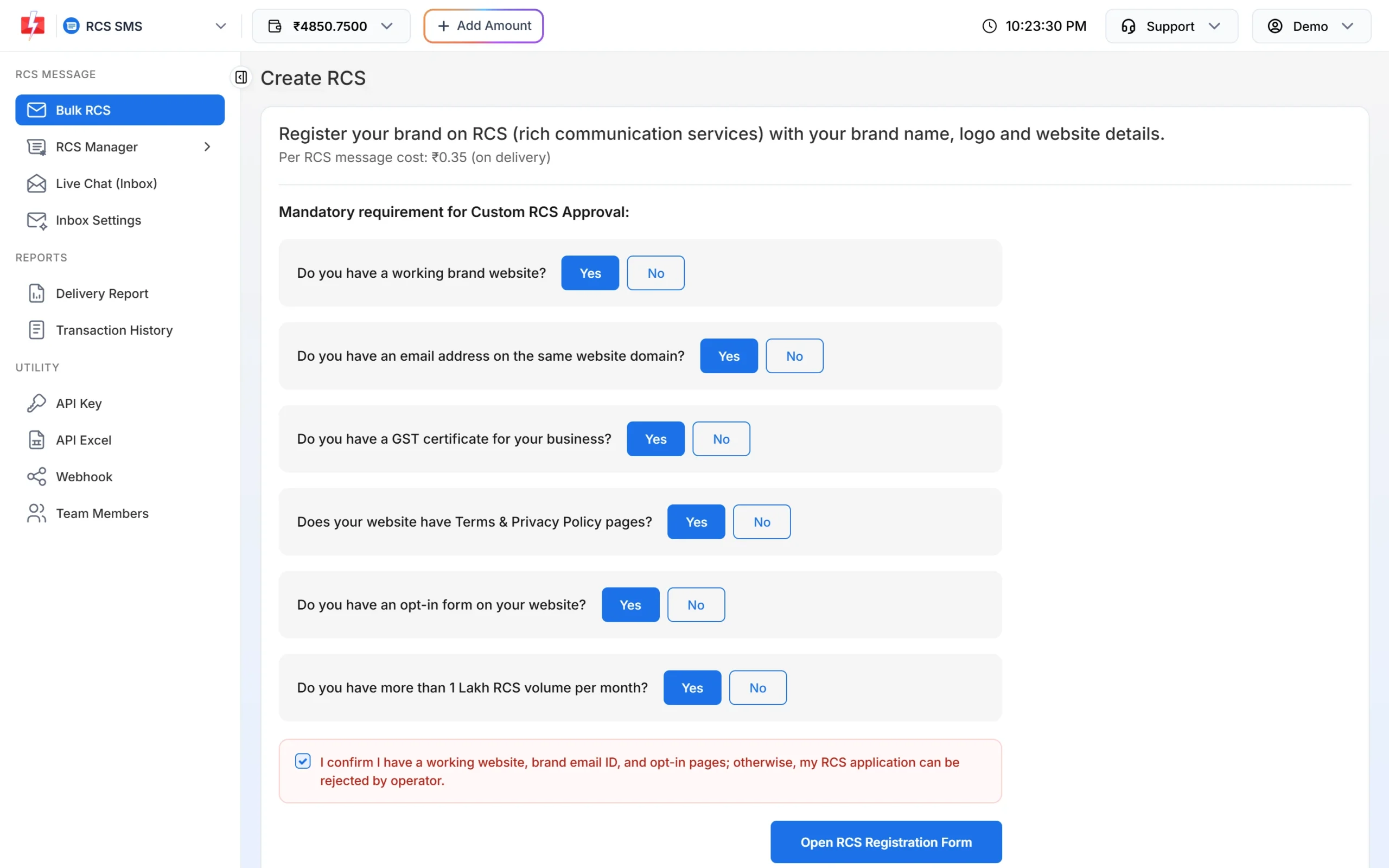
The opt-in form is one of the mandatory requirements. -
Give the opt-in page link in the registration form
In the RCS Registration Form, under OPT-IN PROOF, enter the page address in Customer Opt-In URL. The form says this is “mandatory else operator will reject application”. It also shows an example screenshot of a correct form.
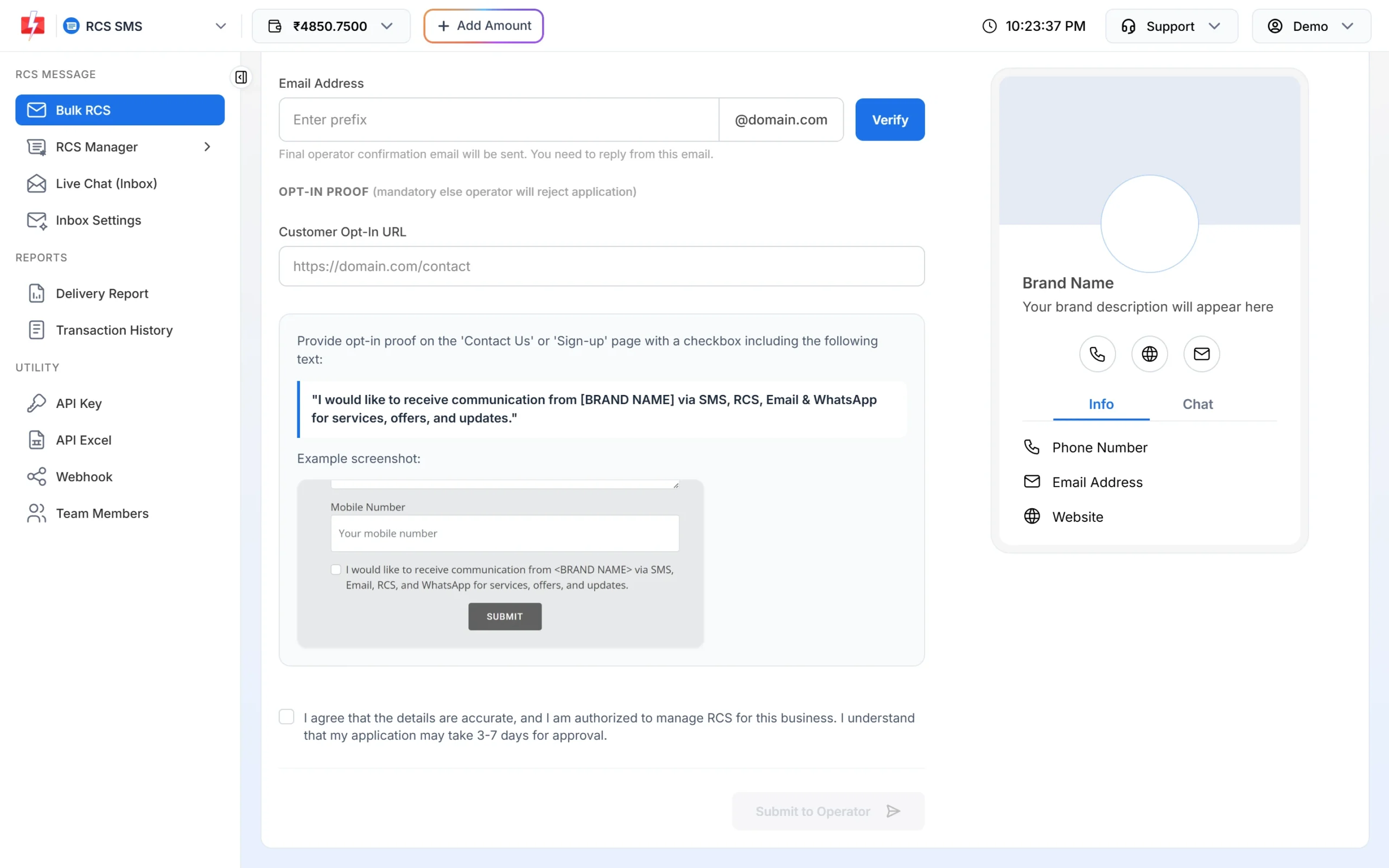
Opt-in proof in the RCS Registration Form. -
Keep a record of each consent
Save when and where each customer opted in (date, page, number). Google’s Acceptable Use Policy says consent should be informed, freely given, specific, revocable and recorded. If a customer complains, this record shows they agreed.
DND does not replace consent. RCS from Fast2SMS can reach both DND and non-DND numbers, but you still need the customer’s opt-in for your brand.
How to handle RCS opt-out (STOP)
Google’s policy says you must promptly honour opt-out requests such as “STOP” or the same word in your customers’ language, and that an opt-out applies across all of a brand’s promotional agents. Google’s platform does not keep an opt-out list for you, and the Fast2SMS RCS panel does not have a separate opt-out list either, so keep your own.
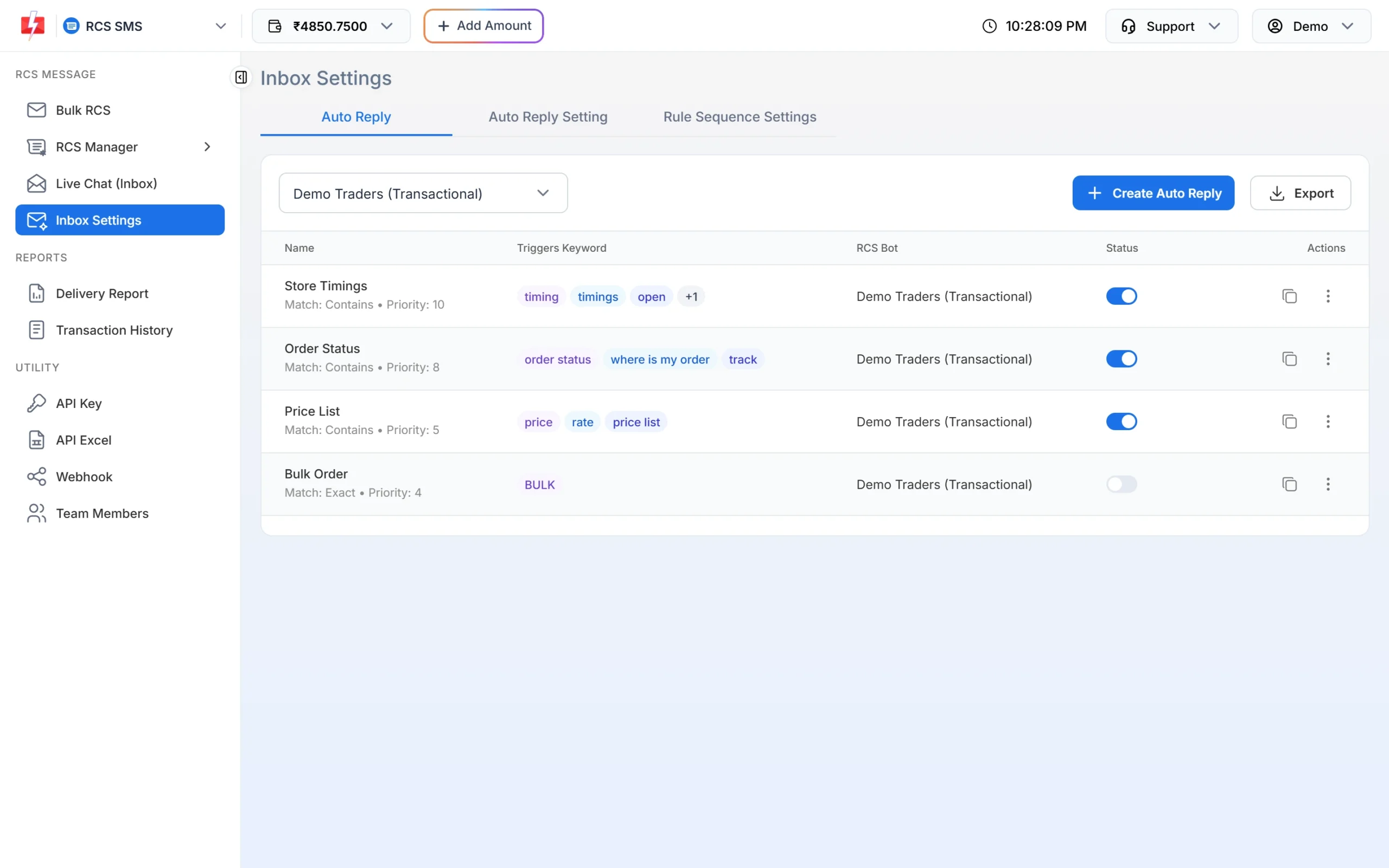
- Catch STOP replies. In Inbox Settings > Auto Reply, click Create Auto Reply, add keywords such as STOP, UNSUBSCRIBE and the words your customers use, and reply with a short confirmation, for example: “You will not get offers from us on RCS any more.”
- Find them in Live Chat. Customers’ STOP replies arrive in Live Chat (Inbox). Check it after every campaign.
- Remove the numbers before the next campaign. Delete them from your Address Book groups and from the CSV files you upload. If you send by API, mark them as opted out in your own database.
- Apply it everywhere. A customer who said STOP to your offers bot should not get offers from your other promotional bots either.
Content that is not allowed on RCS
Google’s RCS Acceptable Use Policy lists content that is prohibited and content that is restricted. At the time of writing, these include:
| Type | Examples from Google’s policy |
|---|---|
| Prohibited content | Child sexual abuse, dangerous and illegal activities, harassment, hate speech, misleading content, non-consensual intimate imagery, sexually explicit content, tobacco, violence and gore, violent organisations, vulgar language, copyright infringement |
| Political content | Political content in business-to-customer messages, such as campaigns, opinion polls and election predictions, is prohibited |
| Prohibited practices | Fraud and scams, phishing (asking for passwords or financial details), malware, account hijacking, impersonating a person, company or government body |
| Restricted content | Regulated goods and services such as alcohol, gambling, healthcare products and services, and fireworks. These may be promoted only on a limited basis and may not reach every user |
Fast2SMS adds its own rules: personal messages are not allowed, and transactional bots are only for informative messages. Offers go from a promotional bot, which can send from 7:00 AM to 10:00 PM and up to 4 promotional RCS per number per month.
Never ask for sensitive data in a plain RCS message. Google’s policy says passwords, financial details and national ID numbers must not be collected outside a secure flow and must be masked when sent. Show only the last digits of an account or card number.
What happens if customers report your RCS as spam
Customers can report or block a business in their messaging app. Google’s terms say Google may review your activity and end-user spam reports. Under its policy, Google can suspend an agent straight away, and repeated or uncorrected problems can lead to suspension of the whole account. A suspended brand may be reviewed again once the problem is fixed, and the most serious cases are suspended permanently.
To keep spam reports low:
- Message only people who opted in for your brand.
- Do not send the same promotion again and again.
- Use your real brand name and logo, and make the offer clear (price, dates, conditions).
- Answer replies in Live Chat, and act on every STOP.
- Never buy, sell or share phone number lists.
Frequently asked questions
Is opt-in mandatory for RCS in India?
Yes, for approval in Fast2SMS. You need an opt-in form on your website and its link in the registration form, or the operator can reject the application.
What text should my RCS opt-in checkbox have?
The registration form suggests: “I would like to receive communication from [BRAND NAME] via SMS, RCS, Email & WhatsApp for services, offers, and updates.”
How do customers unsubscribe from RCS?
They usually reply STOP or block the business in their app. Set a STOP auto reply in Inbox Settings and remove those numbers from your lists.
Does Fast2SMS remove STOP numbers automatically?
The RCS panel has no separate opt-out list, so remove opted-out numbers from your Address Book groups, files and database before the next send.
Can I send election or political messages by RCS?
Google’s RCS policy prohibits political content such as campaigns and opinion polls in business-to-customer messages. Use another channel that allows it.
Can I promote alcohol or gambling on RCS?
These are restricted by Google. Gambling and alcohol may be promoted only on a limited basis, and messages may not reach every user.
What happens if my RCS bot is suspended?
You cannot send from it until Google’s review is cleared. Contact Fast2SMS support with your Bot ID so we can help with the next steps.