
Customers in India can report an RCS business chat as spam or block it from inside Google Messages. Each report goes to Google, and Google uses spam reports to rate your RCS agent. Too many reports can lower how many people your promotional messages reach, or get the agent suspended. The causes are almost always the same: messages people did not agree to, too many offers, or offers that mislead.
This page explains what a spam report does, what triggers one, and the habits that keep your RCS bot safe in India.
What a customer can do with your RCS message
| Customer action in Google Messages | What happens |
|---|---|
| Unsubscribe | The app sends STOP from the customer’s number to your business. You must stop sending non-essential messages such as offers. The chat stays open. |
| Block | Your chat moves to the customer’s Spam & blocked folder and they stop seeing your messages. |
| Report as spam | Blocks you and sends your sender details and up to 10 recent business messages to Google. The report may also go to the customer’s mobile operator. |
Unsubscribe is the mild one. Block and report are the ones that hurt, so it is better to make STOP easy than to have customers press Report.
What spam reports do to your RCS bot
They lower your reputation
Google rates every RCS agent High, Medium or Low reputation based on user feedback and spam reports. New agents start at Low. In India, at the time of writing, Google limits promotional agents by reputation over a rolling 28 days:
| Reputation | Initial messages per user (28 days) | Unique users reached (28 days) |
|---|---|---|
| High | 8 | 300 million |
| Medium | 4 | 25 million |
| Low (default) | 2 | 1 million |
Replies to messages that a customer started are not counted in these limits. Separately, the Bulk RCS page in Fast2SMS shows a limit of 4 promotional RCS per number per month for promotional bots.
They can get the agent suspended
Google’s RCS Acceptable Use Policy counts content or behaviour that leads to user spam reports as spam. Google says it may suspend an agent straight away when it finds a policy violation, and may suspend the whole account after several violations or one serious one. A suspended agent can be reactivated once the business shows it now follows the rules, and Google does not approve new agents while a suspended one is still uncorrected.
Why India is watched closely
In June 2022 Google stopped businesses from sending promotional RCS in India for a time, saying some businesses were abusing its anti-spam policies. Today, before a brand can send RCS from Fast2SMS, registration asks for a working website, a GST certificate and an opt-in form on the website.
What triggers spam reports
| Trigger | Why customers report it | What to do instead |
|---|---|---|
| No opt-in, or a bought list | They do not know your brand or never agreed | Send only to customers who ticked your opt-in box or bought from you |
| Too many offers | The same promotion again and again feels like a flood | Plan a few strong offers a month instead of daily blasts |
| Offers from a transactional bot | An “order update” chat suddenly sells things | Send offers only from your promotional bot |
| Misleading offers | “Free” that is not free, hidden charges, fake urgency | State the price, dates and conditions. Google’s policy asks businesses to disclose the full cost to the customer |
| STOP ignored | They already said no once | Remove STOP numbers from every list before the next send |
| Irrelevant content | A message that has nothing to do with what they bought | Send to the right group from your Address Book |
| Content that is not allowed | Political messages, scams, or restricted products pushed hard | Check the RCS content rules before you send |
How to stay safe, using Fast2SMS
-
Pick the right bot every time
On Bulk RCS, the RCS BOT list shows each bot with its category in brackets. The FEATURES box on the right shows its rules, such as “Max 4 promo RCS/number/month” and “Personal Message not allowed”.
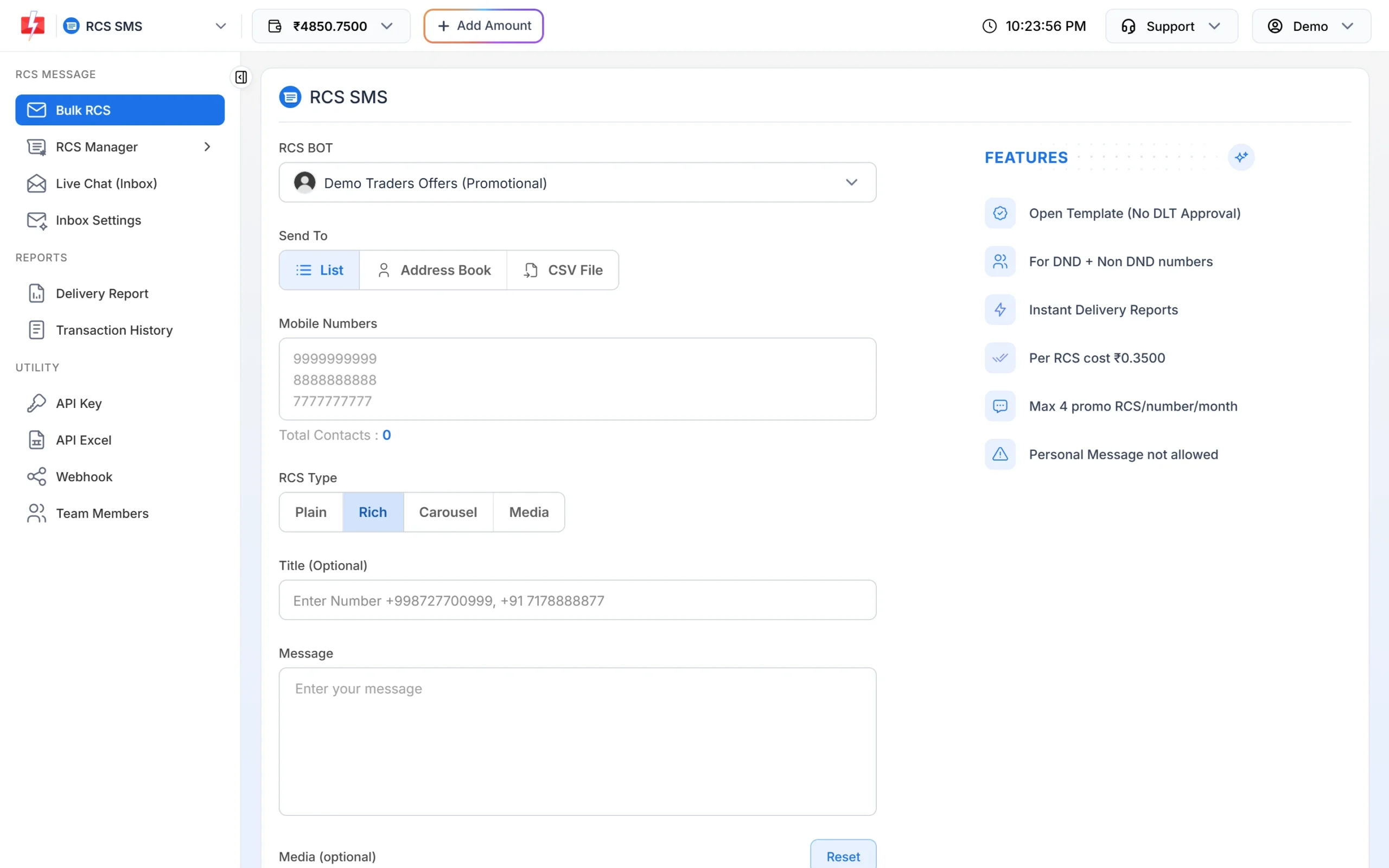
The rules for the selected bot appear next to the form. -
Catch STOP replies automatically
Under Inbox Settings > Auto Reply, click Create Auto Reply and add keywords such as STOP and UNSUBSCRIBE with a short confirmation reply. Then remove those numbers from your Address Book groups and files.
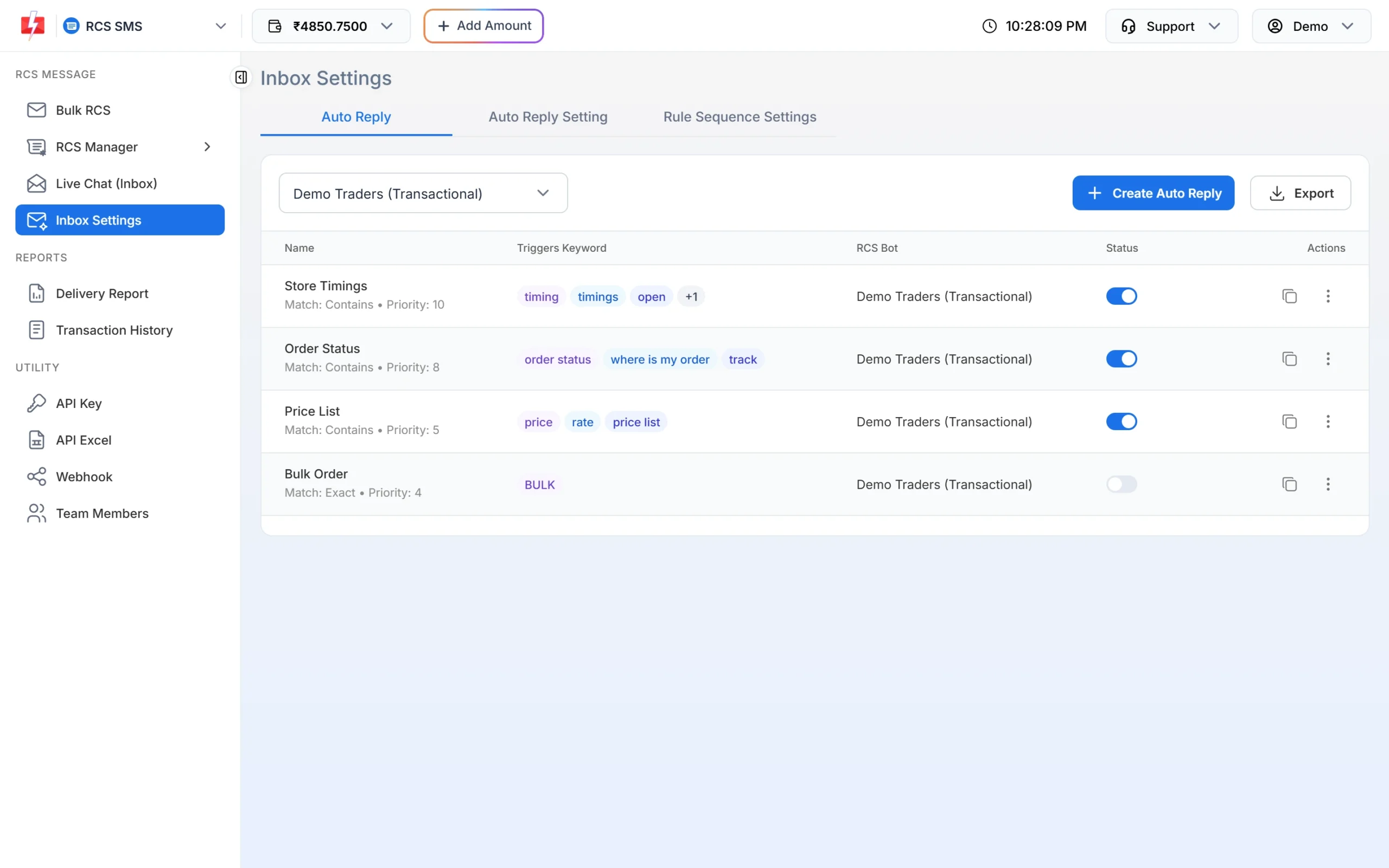
Add a keyword rule for STOP replies. -
Read the replies after every campaign
Open Live Chat (Inbox) after each send. Angry replies, “who is this” and STOP messages are early warning signs. Answer questions, and remove people who do not want offers.
-
Watch your report
In Delivery Report > RCS Report, a drop in Read numbers from the same list can mean people have lost interest or blocked you. Send less often, or send to a smaller, more interested group.
If your RCS bot is suspended
You cannot send from a suspended bot. Contact Fast2SMS support with the Bot ID from RCS Manager > Bots. Be ready to explain what changed: how you collect opt-in, how you handle STOP and which messages you send from which bot. Meanwhile, reach customers who need updates through SMS or WhatsApp.
Frequently asked questions
What happens when a customer reports my RCS message as spam?
Your chat is blocked for that customer, and your sender details and up to 10 recent messages go to Google, and possibly to the operator. Reports count against your agent’s reputation.
Will one spam report get my bot blocked?
Google does not publish a fixed number. Reports lower your reputation, and Google may suspend an agent for policy violations. Keep reports rare by messaging only opted-in customers.
Is unsubscribing the same as reporting spam?
No. Unsubscribe sends STOP to your business and the chat stays. Report as spam blocks you and sends a report to Google.
Why did Google stop business RCS in India in 2022?
Google said some businesses were abusing its anti-spam policies to send promotional messages to users in India, so it paused promotional RCS while it worked on the experience.
Do spam rules apply to transactional RCS?
Yes. A customer can report any business chat. Transactional bots are also only for informative messages, so an offer from one is a common reason for complaints.
Can I message a customer again after they said STOP?
Not with offers, unless they opt in again. Google Messages treats a new message from the customer to your business as a request to subscribe again.
Are RCS spam reports the same as TRAI UCC complaints?
No. UCC complaints are made under TRAI rules against SMS and calls. RCS spam reports go through Google Messages to Google.