
This page lists every WhatsApp API error code that Meta publishes for the WhatsApp Cloud API, with a one-line meaning and what to do about it. It also shows where you find the error code for a failed message in your Fast2SMS panel, so you can match the code to the fix in a minute.
Codes are grouped the same way Meta groups them: authorization, integrity, templates, phone numbers, throttling and others. The list follows Meta’s error code page at the time of writing. Meta adds and retires codes, so always read the details text that comes with the error too.
How WhatsApp error codes work
When a WhatsApp message or request fails, Meta returns an error with a few parts:
- Code: a number such as 131026 or 2388040. This is what you look up below.
- Title or message: a short name, for example “(#130429) Rate limit hit”.
- Details: a longer reason in plain words. This is often the most useful part, because one code can have several causes.
- fbtrace_id: a reference you can quote if you ever raise a ticket with Meta.
Some errors come back at once, when the request is made. Others come later, in the delivery status of the message. Meta says titles and sub-codes are being phased out, so match on the code and the details, not on the title.
Where to find the error code in Fast2SMS
-
Filter the WhatsApp report to failed messages
Click Delivery Report in the WhatsApp sidebar. You land on WhatsApp Reports. Pick a date range, click the filter button, choose Delivery Status and select Failed. The list now shows only campaigns with failed messages.
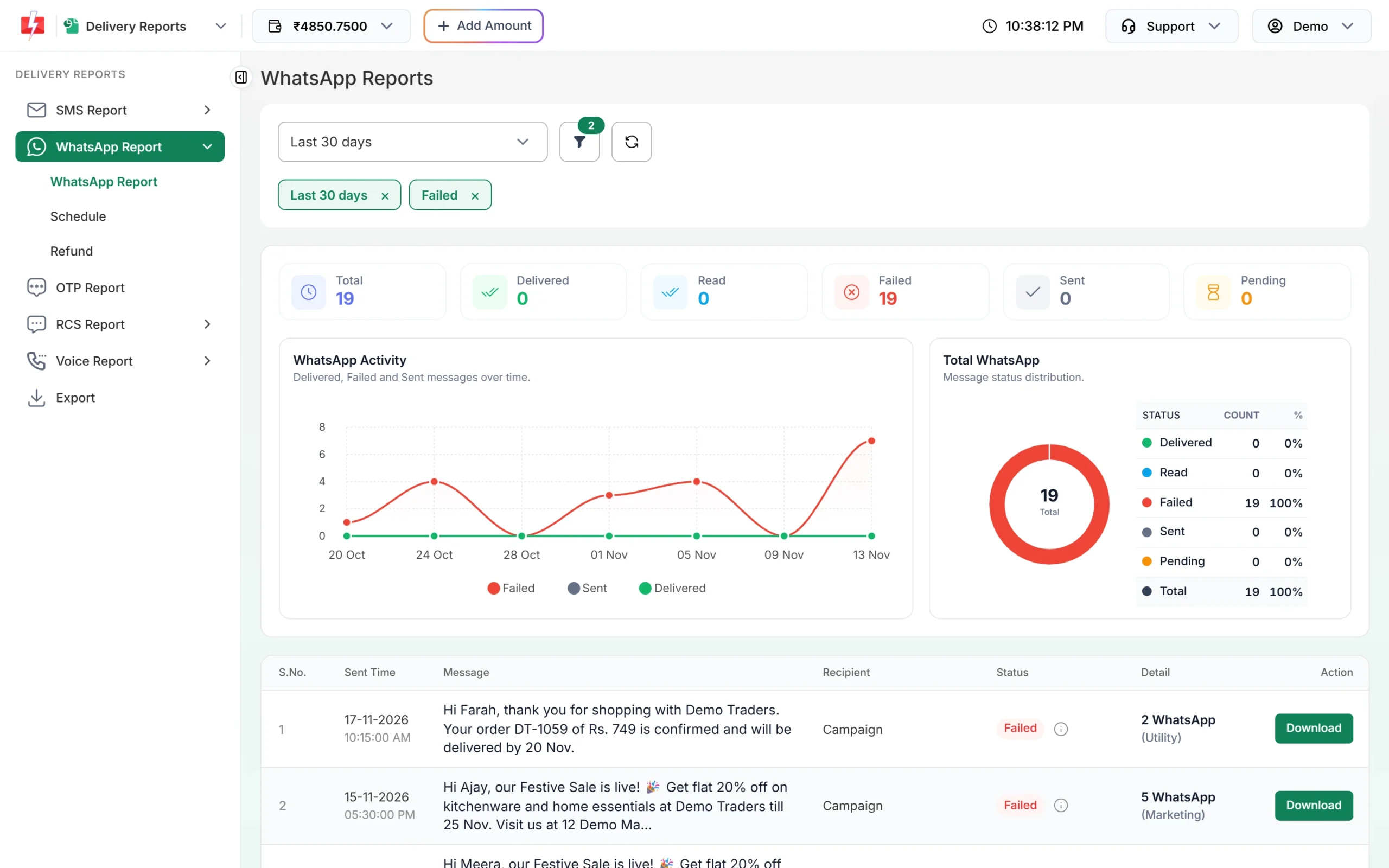
WhatsApp Reports with the Failed filter on. -
Open the campaign and read the Description column
Click the message text of a campaign to open Delivery Details. In the Receivers table, the Description column shows why each number failed. For most Meta errors it shows Meta’s reason followed by the code, in the form “reason (Error: code)”. Error 131026 shows as “Message Undeliverable (Error: 131026)”.
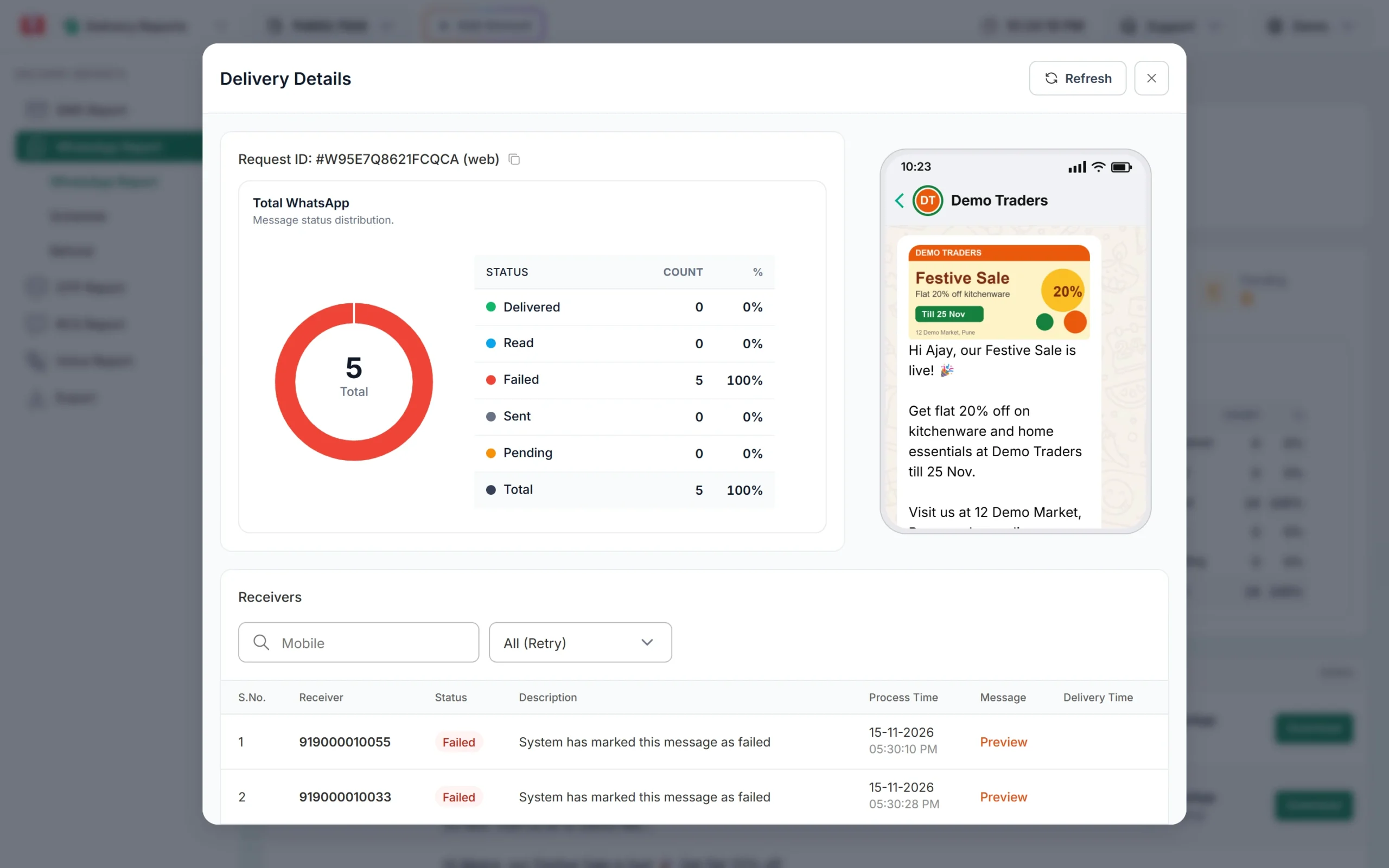
The Description column holds the failure reason for each number. -
For template errors, read the message on screen
Errors in the template creation group (codes starting with 2388) appear when you click Submit Template in WhatsApp Manager. The pop-up message starts with “Failed to submit template.” followed by Meta’s reason. Fix the field it names and submit again.
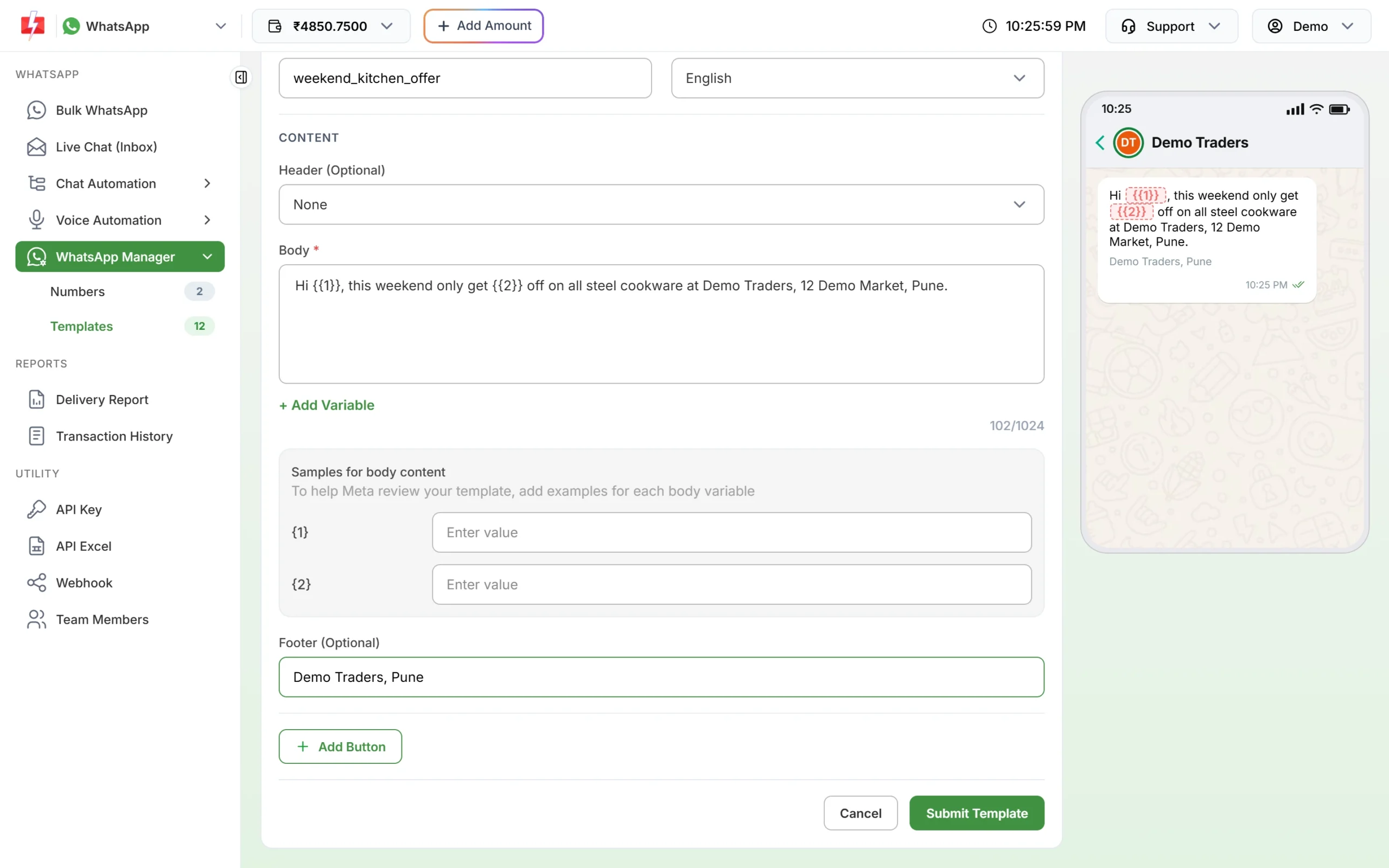
Template errors show when you submit this form.
If you send through the API, the delivery report for a request ID (and the “On Failed” webhook event) carries the same error details.
Authorization errors
| Code | Meaning | What to do |
|---|---|---|
| 0 | The access token could not be authenticated (expired, invalidated or access removed) | Get a new access token |
| 3 | The app lacks a capability or permission the endpoint needs | Check the token’s permissions and add the missing one |
| 10 | Permission not granted or removed | Check token permissions and account eligibility |
| 190 | The access token has expired | Get a new access token |
| 200 | No access token was sent with the request | Send a valid access token |
| 200-299 | A permission in this range is missing or removed | Check the token’s permissions |
Integrity errors
| Code | Meaning | What to do |
|---|---|---|
| 368 | The WhatsApp Business Account is restricted or disabled for a policy violation | Review the violation and request a review with Meta |
| 130497 | The account cannot message users in certain countries | Check which countries your business category may message |
| 131031 | Account locked, or data in the request (such as the two-step PIN) did not match the account | Check policy enforcement and confirm the PIN |
Template creation errors
| Code | Meaning | What to do |
|---|---|---|
| 2388039 | The template’s status cannot change right now (for example, it is in review) | Wait for approval or rejection, then edit |
| 2388040 | A field is longer than its character limit | Shorten the field named in the details |
| 2388047 | Header formatting is invalid | Fix the header as the details say |
| 2388072 | Body formatting is invalid | Fix the body as the details say |
| 2388073 | Footer formatting is invalid | Fix the footer as the details say |
| 2388293 | Too many variables for the length of the message | Add more fixed words or use fewer variables |
| 2388299 | A variable is at the very start or end of the template | Put words before the first and after the last variable |
Send template errors
| Code | Meaning | What to do |
|---|---|---|
| 2388019 | The account has reached its maximum number of templates | Delete templates you no longer use |
Phone number migration errors
| Code | Meaning | What to do |
|---|---|---|
| 2388012 | This phone number is already in the account | Use the existing entry or a different number |
| 2388091, 2388093 | The number is not being migrated, so it cannot get a migration code | Register and verify the number the normal way |
| 2388103 | The number cannot be migrated (several possible reasons, such as no approved display name) | Read the details; fix the named cause or register normally |
| 2494100 | The business phone number is in maintenance mode | Try again after a few minutes |
Template insights errors
| Code | Meaning | What to do |
|---|---|---|
| 200005 | Template insights are not available for this account yet | Nothing to do for now |
| 200006 | Template insights cannot be turned off once on | Not needed |
| 200007 | Template insights are not turned on for this account | Turn on template analytics in WhatsApp Manager |
WhatsApp Business Account errors
| Code | Meaning | What to do |
|---|---|---|
| 2593079 | The account is already marked for migration to a different partner | Contact support (the old OBO model is retired) |
| 2593085 | The account is not valid for an OBO ownership move | Contact support (the old OBO model is retired) |
Synchronization errors
| Code | Meaning | What to do |
|---|---|---|
| 2593107 | The contacts or chat history sync was already used for this number | Offboard and onboard the number again |
| 2593108 | Sync was asked for more than 24 hours after onboarding | Offboard and onboard the number again |
Throttling errors
| Code | Meaning | What to do |
|---|---|---|
| 4 | App-level API call limit reached | Slow down and retry later |
| 80007 | WhatsApp Business Account rate limit reached | Slow down and retry later |
| 130429 | Messages-per-second limit for the number reached | Send more slowly and retry |
| 131048 | Sending limited because many messages were blocked or reported as spam | Check quality and improve opt-in and content |
| 131056 | Too many messages to the same person in a short time | Wait before messaging that person again |
| 131064 | Account limited after repeated wrong template categories | Use the correct category; the limit lifts after the enforcement period |
| 133016 | Too many register or deregister attempts for the number | Wait until the number is unblocked |
Other errors
| Code | Meaning | What to do |
|---|---|---|
| 1 | Invalid request or a server problem | Check the request format and WhatsApp status |
| 2 | Temporary downtime or overload | Retry later |
| 33 | The business phone number no longer exists | Check the phone number ID |
| 100 | A parameter is unsupported, misspelt or wrong (see Unsupported POST request error) | Check the request against the API reference |
| 130403 | The customer has blocked your number | Do not retry |
| 130472 | Marketing message held back as part of a Meta experiment | No fix needed |
| 131000 | Something went wrong, cause unknown | Retry; contact support if it continues |
| 131005 | Access denied, permission missing | Check permissions |
| 131008 | A required parameter is missing | Add the missing field |
| 131009 | A parameter value is invalid (often the phone number format) | Check values and number format |
| 131016 | Service temporarily unavailable | Retry later |
| 131021 | Sender and recipient are the same number | Send to a different number |
| 131026 | Message undeliverable (not on WhatsApp, old app or terms not accepted) | Check the number; use SMS for those contacts |
| 131037 | The number needs an approved display name | Get the display name approved |
| 131042 | Billing or payment problem on the account | Fix the payment setup |
| 131045 | The phone number is not registered | Register the number |
| 131047 | More than 24 hours since the customer last replied | Send an approved template |
| 131049 | Not delivered to keep user engagement healthy (see healthy ecosystem error) | Wait at least 24 hours before retrying |
| 131050 | The customer stopped marketing messages from you | Do not retry |
| 131051 | Message type not supported | Use a supported type |
| 131052 | Media sent by the customer could not be downloaded | Ask the customer to send it again |
| 131053 | Your media could not be uploaded (often an unsupported file type) | Check the file type and size |
| 131057 | The business account is in maintenance mode | Wait and retry |
| 131063 | Marketing templates are switched off on the Cloud API for this account | Send marketing through the Marketing Messages API |
| 132000 | Number of variables sent does not match the template | Send exactly the template’s variables |
| 132001 | Template name or language not found, or not approved | Check name, language and approval |
| 132005 | Translated text is too long | Shorten the translation |
| 132007 | Template content breaks policy | Edit as per the review rules |
| 132012 | A variable value is in the wrong format | Match the expected format (text, media, currency) |
| 132015 | Template paused for low quality | Edit the template and wait for approval |
| 132016 | Template disabled after being paused too often | Create a new template |
| 132068 | The Flow is blocked | Fix the Flow |
| 132069 | The Flow is throttled | Fix the Flow |
| 133000 | An earlier deregistration did not finish | Deregister again, then register |
| 133004 | Registration server temporarily unavailable | Retry later |
| 133005 | Wrong two-step verification PIN | Use the right PIN or reset it |
| 133006 | The number must be verified before registering | Verify, then register |
| 133008 | Too many PIN attempts | Wait for the time given in the details |
| 133009 | PIN entered too fast | Wait and try again |
| 133010 | The phone number is not registered | Register the number first |
| 133015 | The number was recently deleted and deletion is still running | Wait about 5 minutes |
| 134011 | WhatsApp Payments terms not accepted | Accept the terms |
| 135000 | Generic user error in the request | Check the request; contact support if it continues |
Marketing Messages API errors
| Code | Meaning | What to do |
|---|---|---|
| 100 | Only template messages are allowed on this API | Send a template |
| 131009 | Invalid values, or ad sync not finished | Fix values; wait about 10 minutes |
| 131055 | Only marketing templates are supported | Use a marketing template |
| 132018 | Template parameter problem | Fix the parameters and resend |
| 134100 | Only marketing category templates are allowed | Use a marketing template |
| 134101 | New template is still syncing | Wait about 10 minutes, then retry |
| 134102 | Template unavailable (sync failed or account not eligible) | Check eligibility; contact support |
| 1752041 | Duplicate onboarding request | No action needed |
Fast2SMS reasons that are not Meta codes
Some failures are stopped by Fast2SMS before the message reaches Meta, or are marked by Fast2SMS. You see these texts in the Description column:
| Text you see | What it means |
|---|---|
| Template is PAUSED / Template is REJECTED | The template was paused or rejected by Meta before the message went out. Edit it or use another approved template. |
| You can not send message to your own number | The recipient is the same as your sender number. |
| System has marked this message as failed | Meta accepted the message but sent no status for 24 hours, so it was marked failed (and refunded). |
| Batch cancelled by user | The campaign was cancelled. |
| This template was created by Meta Direct Send and can only be used with Direct Send… | The template was made by Meta’s Direct Send feature and cannot be sent as a normal template. Pick another template. |
Frequently asked questions
Where can I see the WhatsApp error code for a failed message?
Open Delivery Report, click the campaign and look at the Description column in Delivery Details. The code appears at the end, as “(Error: code)”.
Am I charged when a WhatsApp message fails with an error?
No. Every failed message is refunded to your Fast2SMS wallet automatically, whatever the error code.
What is the most common WhatsApp API error?
For most senders it is 131026, message undeliverable. It usually means the number is not on WhatsApp or the person uses an old app version.
Do I need a Meta access token to send WhatsApp through Fast2SMS?
No. Fast2SMS handles the connection to Meta for numbers you connect with Login with Facebook. Your API calls use your Fast2SMS API key in the authorization header.
Why does the same error code have different reasons?
Meta uses one code for several related causes. The details text tells you which one applies, so read it along with the code.
Will Fast2SMS retry failed WhatsApp messages?
Only if you turn on Retry Failed for the number in WhatsApp Manager. It retries messages that failed with 131026 or 131049, the next morning.