
WhatsApp errors 133005, 133008 and 133009 are two-step verification PIN errors. They appear when a business number is being registered on the WhatsApp Business Platform and the 6-digit PIN is wrong (133005), has been guessed too many times (133008) or was entered too quickly (133009). This page explains what each means and how to reset the PIN safely.
What two-step verification is
Two-step verification protects a WhatsApp Business API number with a 6-digit PIN. Whenever the number is registered again, for example when it is moved to a new provider or reconnected, the same PIN must be given. This stops anyone else from taking over your number.
What the errors mean
| Code | Meaning (Meta, at the time of writing) | What to do |
|---|---|---|
| 133005 | The two-step verification PIN is incorrect | Enter the right PIN, or reset it |
| 133008 | Too many PIN guesses for this number | Wait for the time given in the error details, then try again |
| 133009 | The PIN was entered too quickly | Wait as the error details say, then try again slowly |
Related: error 133010 means the number is not registered at all, and 133016 means there were too many register or deregister attempts, so you must wait until the number is unblocked.
How to fix a wrong or forgotten PIN
-
Find the PIN if you set one before
The PIN was set by whoever first connected the number to the API: you, your developer or your previous provider. Ask them before guessing. Every wrong guess brings you closer to error 133008.
-
Open Meta’s WhatsApp Manager
In Fast2SMS, go to WhatsApp Manager > Numbers, open the three-dot menu of the number and click Meta Manager. This opens Meta’s WhatsApp Manager for that account in a new tab, on the templates page. From there, open the phone numbers section and select your number. You need admin access to the business portfolio.
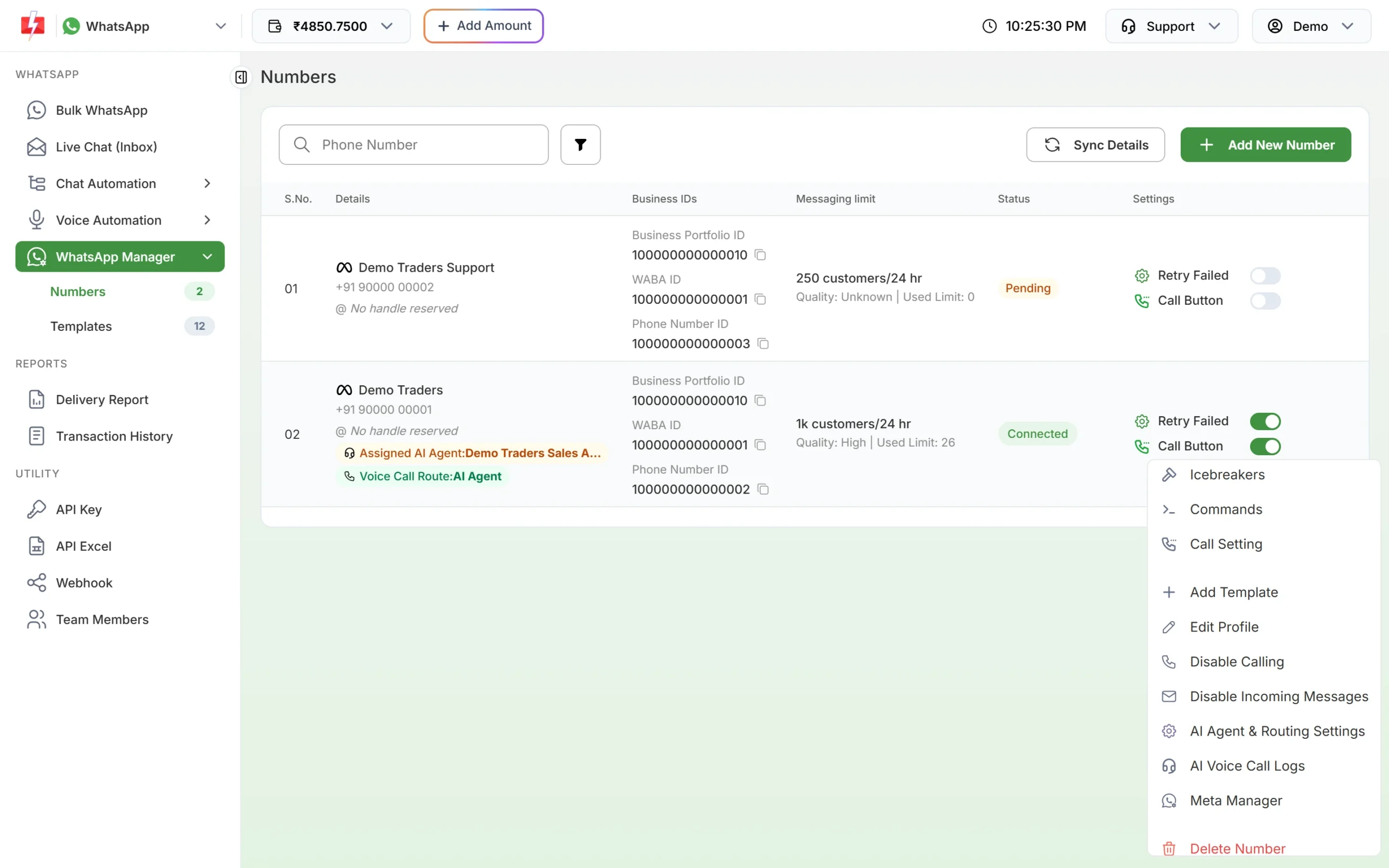
Meta Manager opens Meta’s own WhatsApp Manager. -
Turn two-step verification off, then set a new PIN
Meta’s advice for a forgotten PIN is to disable two-step verification for the phone number and then set a new 6-digit PIN. Save it somewhere safe, such as your company password manager.
-
Register the number again
Go back to Fast2SMS and connect the number with Add New Number and Login with Facebook. If you are asked for the PIN, use the new one. Then click Sync Details and check the number shows Connected.
If you hit 133008 (too many guesses)
Stop trying. The error details tell you how long to wait. Use that time to find the right PIN or to reset it in Meta’s WhatsApp Manager as above. Guessing again during the wait does not help.
Frequently asked questions
Is the two-step PIN the same as the OTP I got on SMS?
No. The OTP (verification code) proves you own the phone number. The two-step PIN is a separate 6-digit code you set to protect the number.
Who can reset the PIN?
A person with admin access to the business portfolio that owns the WhatsApp Business Account, in Meta’s WhatsApp Manager.
Does resetting the PIN stop my messages?
The PIN is only asked for when the number is registered. Your templates are not removed by a PIN change; just use the new PIN for any future registration.
Can Fast2SMS support see my PIN?
Never share your PIN in chat or email. If you need help, share only the Phone Number ID and WABA ID from the Numbers tab.
Why does the error say to wait?
Meta limits PIN attempts to protect the number from people trying to guess it. The wait time is in the error details.