
This page gives 15 WhatsApp marketing message examples you can copy and submit as Meta-approved templates: welcome offers, new arrivals, back in stock, cart reminders, win-back messages, birthday offers, referrals, event invitations and more. Each WhatsApp marketing template has a name, body, buttons and sample values, and follows Meta’s format rules. It is for shop owners, D2C brands, clinics, coaching centres and service businesses that send offers on the WhatsApp Business API.
What makes a good WhatsApp marketing message
- The first line says why you are writing. “Hi Priya, the steel tiffin you asked about is back” beats “Greetings from our company”.
- One offer and one action. One discount or news item, and one main button such as “Shop Now” or “Book a slot”.
- Personal details in variables. Name, product, amount and dates go in {{1}}, {{2}} and so on, so each customer gets their own version.
- An easy way to stop. Add a quick reply button “Stop promotions” to every marketing template.
- Short. The body can be up to 1,024 characters, but most good offers fit in 3 to 4 lines.
Marketing or Utility: pick the right category
Meta decides the price by category and checks your choice during review. Utility templates must be non-promotional and about something the customer did or asked for. Anything with an offer, a product push or a “we miss you” is Marketing.
| Message | Category |
|---|---|
| Order confirmed, shipped, out for delivery | Utility |
| Payment received, invoice, fee due reminder | Utility |
| Appointment reminder for a booked slot | Utility |
| New arrivals, discounts, back in stock, cart reminder with a coupon | Marketing |
| Birthday wishes, festival wishes, thank-you messages, event invitations | Marketing |
| Order update with “also see our sale” added at the end | Marketing (mixed content counts as marketing) |
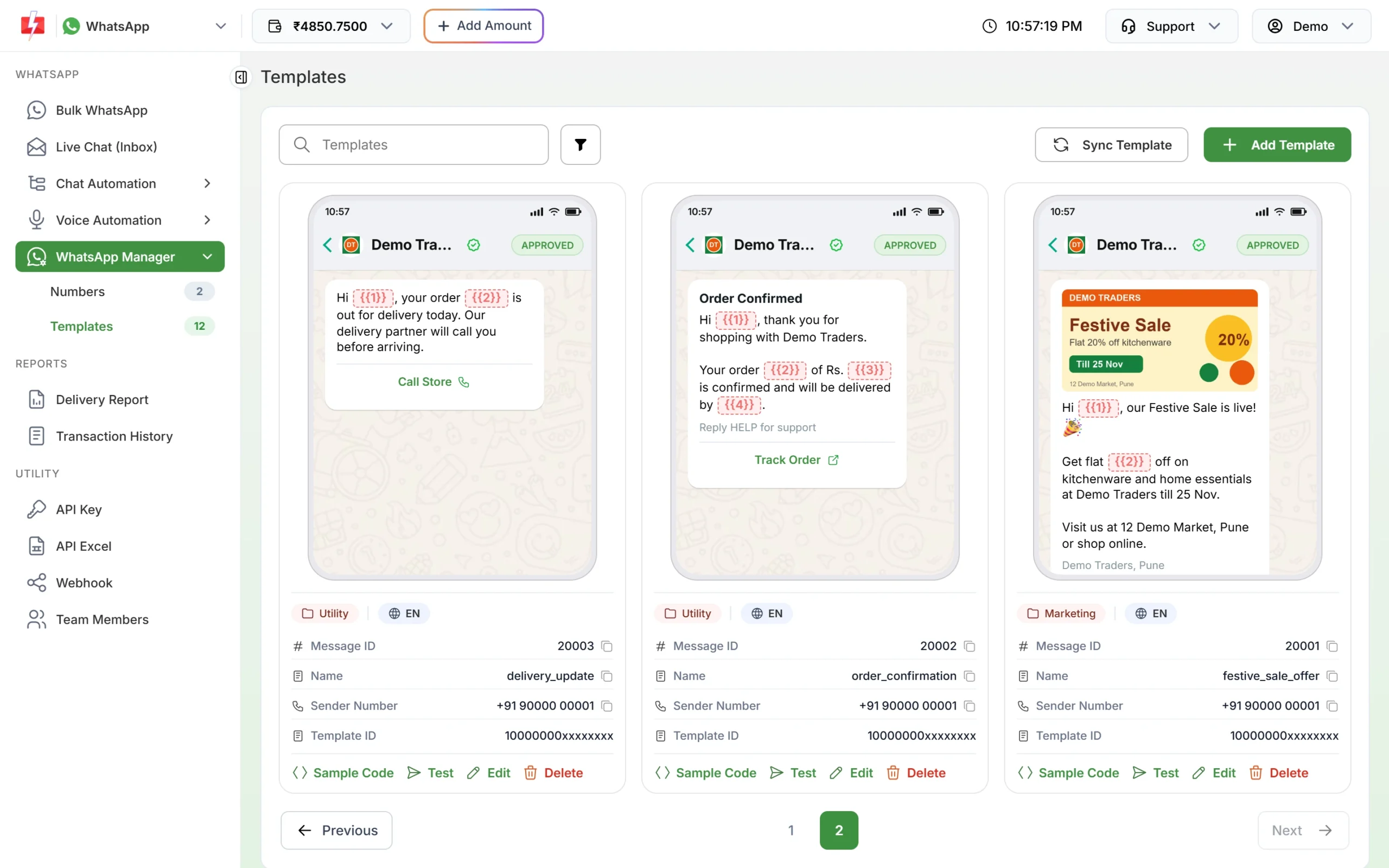
15 WhatsApp marketing template examples
1. Welcome offer for a new customer
Name: welcome_first_order_offer
Hi {{1}}, welcome to Demo Traders. Thank you for joining us on WhatsApp. Here is {{2}} off on your first order with code {{3}}. The code works for the next 7 days.Buttons: Visit website “Shop Now”, Custom “Stop promotions”. Samples: Priya, 10%, WELCOME10
2. New arrivals
Name: new_arrivals_update. Header: Image of the new collection.
Hi {{1}}, our new {{2}} collection has just arrived at Demo Traders. Be among the first to see it in store or online this week.Buttons: Visit website “See New Arrivals”, Custom “Stop promotions”. Samples: Rahul, kitchen storage
3. Back in stock
Name: back_in_stock_alert
Hi {{1}}, good news. The {{2}} you were looking for is back in stock at Demo Traders. Stock is limited, so order soon to get yours.Buttons: Visit website “Buy Now”. Samples: Anjali, 3-tier steel tiffin
4. Cart reminder with a coupon
Name: cart_reminder_coupon
Hi {{1}}, you left {{2}} in your cart at Demo Traders. Complete your order today and get an extra {{3}} off with code {{4}} at checkout.Buttons: Visit website “Complete Order” (link to your cart page). Samples: Sneha, a pressure cooker, 5%, CART5
5. Price drop
Name: price_drop_alert
Hi {{1}}, the price of {{2}} has dropped from {{3}} to {{4}} at Demo Traders. The new price is valid while stock lasts.Buttons: Visit website “View Product”, Custom “Stop promotions”. Samples: Vikas, Storage jars set of 6, Rs. 699, Rs. 549
6. We miss you (win-back)
Name: win_back_offer
Hi {{1}}, it has been a while since your last visit to Demo Traders. We have saved {{2}} off for you on your next order till {{3}}. We would love to see you again.Buttons: Visit website “Shop Now”, Custom “Stop promotions”. Samples: Kiran, 15%, 30 November
7. Birthday offer
Name: birthday_offer
Hi {{1}}, happy birthday from all of us at Demo Traders. Enjoy {{2}} off on anything you like this week with code {{3}}. Have a lovely day.Buttons: Visit website “Shop Now”, Custom “Stop promotions”. Samples: Neha, 20%, BDAY20
8. Refer a friend
Name: refer_friend_reward
Hi {{1}}, share Demo Traders with a friend. When they place their first order with your code {{2}}, you both get {{3}} off. Thank you for spreading the word.Buttons: Custom “Send me details”. Samples: Arjun, ARJUN50, Rs. 50
9. Loyalty points reminder
Name: loyalty_points_reminder
Hi {{1}}, you have {{2}} reward points with Demo Traders. Use them on your next purchase before {{3}} and save on your favourite items.Buttons: Visit website “Use Points”. Samples: Meera, 420, 31 December
10. Store event or workshop invitation
Name: store_event_invite. Header: Image of the event.
Hi {{1}}, you are invited to a free {{2}} at Demo Traders, 12 Demo Market, Pune on {{3}} at {{4}}. Seats are limited, so reply Yes to book yours.Buttons: Custom “Yes, book me”, Custom “Not this time”. Samples: Gauri, cooking demo, Saturday, 5 PM
11. Free slots available (clinics, salons, gyms)
Name: slots_available_offer
Hi {{1}}, we have a few free slots this week for {{2}} at Demo Clinic. Book before {{3}} and get a free {{4}} with your visit.Buttons: Call Phone Number “Call to Book”, Custom “Stop promotions”. Samples: Rachna, a skin check-up, Friday, consultation
12. Course admissions open (coaching and schools)
Name: admissions_open_course
Hi {{1}}, admissions are open for our {{2}} batch starting {{3}}. Early registrations get {{4}} off the fee. Tap below to see the timetable.Buttons: Visit website “View Details”, Custom “Call me back”. Samples: Omkar, Class 12 Science, 1 April, 10%
13. Product launch
Name: product_launch_news. Header: Video or image of the product.
Hi {{1}}, meet our new {{2}}. It is available from today at Demo Traders, and early buyers get {{3}} off this week.Buttons: Visit website “Shop Now”. Samples: Manisha, non-stick cookware set, 10%
14. Feedback with a thank-you coupon
Name: feedback_thank_you_coupon
Hi {{1}}, how did you like your {{2}}? Tell us in one tap below. As a thank you, here is {{3}} off on your next order with code {{4}}.Buttons: Custom “Loved it”, Custom “It was okay”, Custom “Not happy”. Samples: Ketan, storage jars, 5%, THANKS5
15. Last day reminder
Name: offer_last_day_reminder
Hi {{1}}, today is the last day of {{2}} at Demo Traders. Your {{3}} discount ends tonight, so do not miss it.Buttons: Visit website “Shop Now”, Custom “Stop promotions”. Samples: Sakshi, our weekend sale, 20%
How to create and send one of these templates
-
Create the template
Go to WhatsApp Manager > Templates > Add Template, choose Marketing, type the name, pick the language and paste the body. Click + Add Variable for each {{n}} and fill the sample boxes. Add the footer and buttons, then click Submit Template.
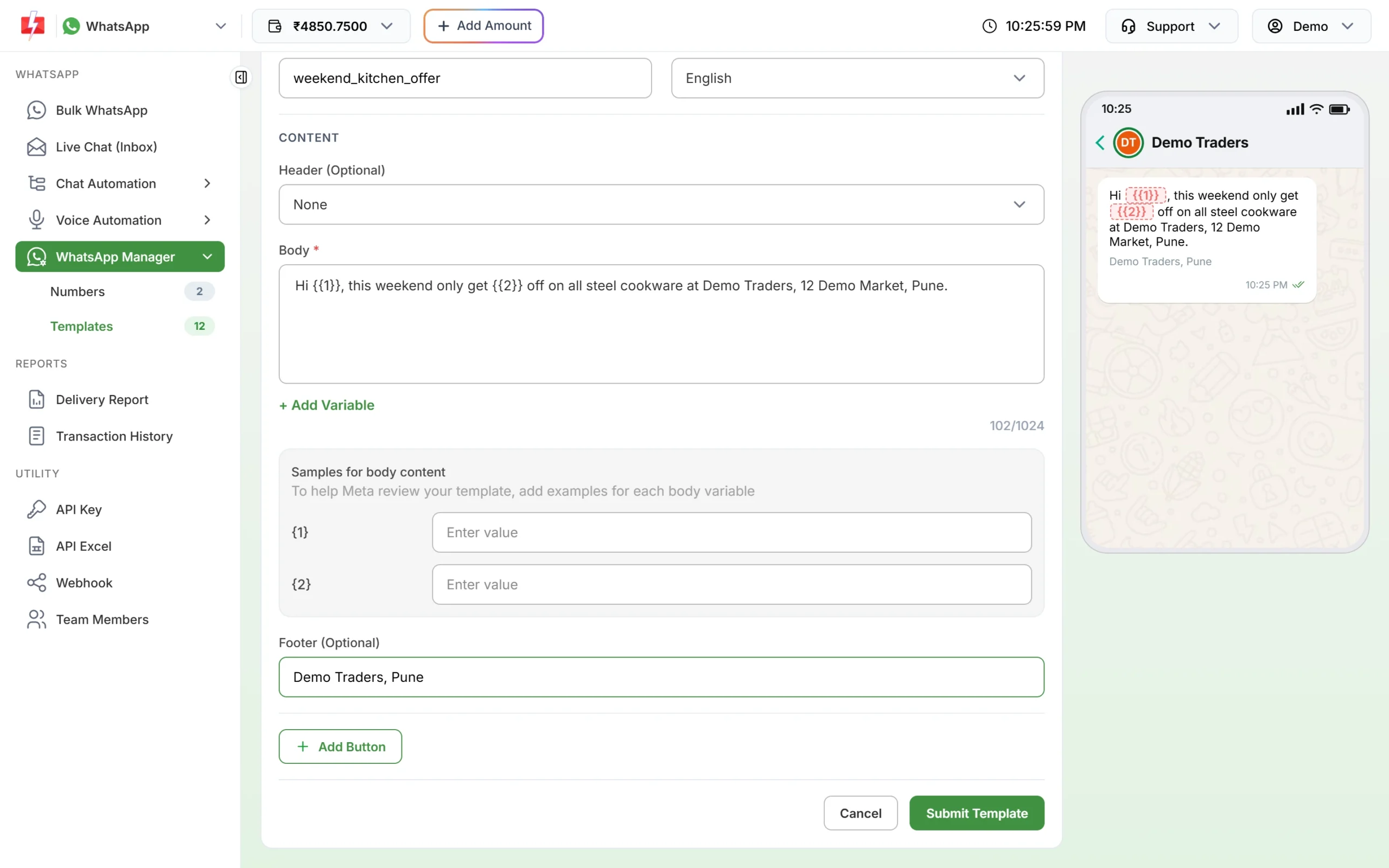
The live preview shows how the template looks on WhatsApp. -
Test it on your own phone
Once the status is APPROVED, click Test on the template card. Enter your mobile number, fill the variables and click Send Test WhatsApp to see the real message.
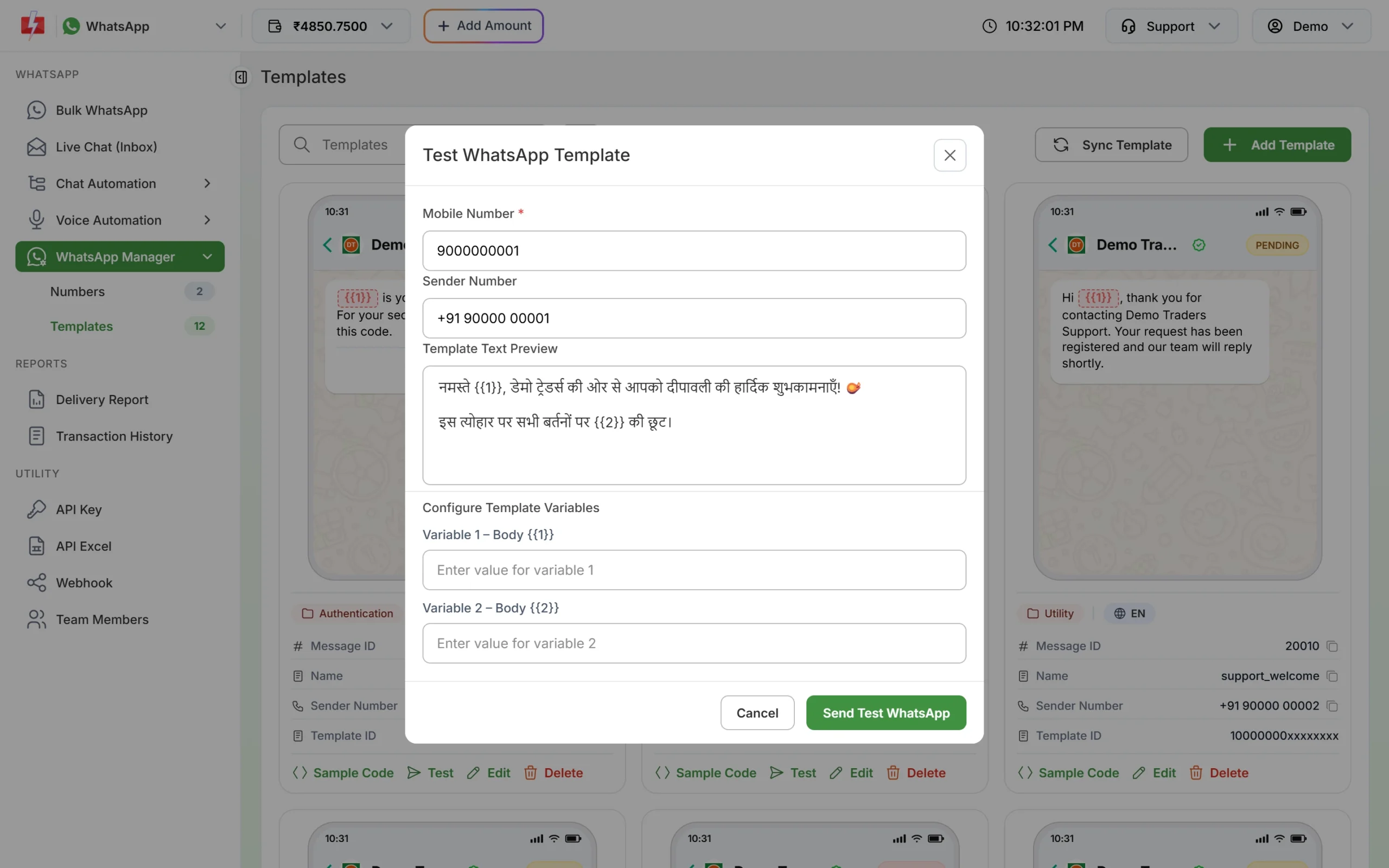
Send a test to yourself before the campaign. -
Send it to your list
Open Bulk WhatsApp, choose the sender number, add your opted-in customers by List, Address Book or CSV File, choose the template and fill the variables. For a CSV file, map each variable to a column so names and offers change per customer. Click Send, check the cost and click Confirm & Send.
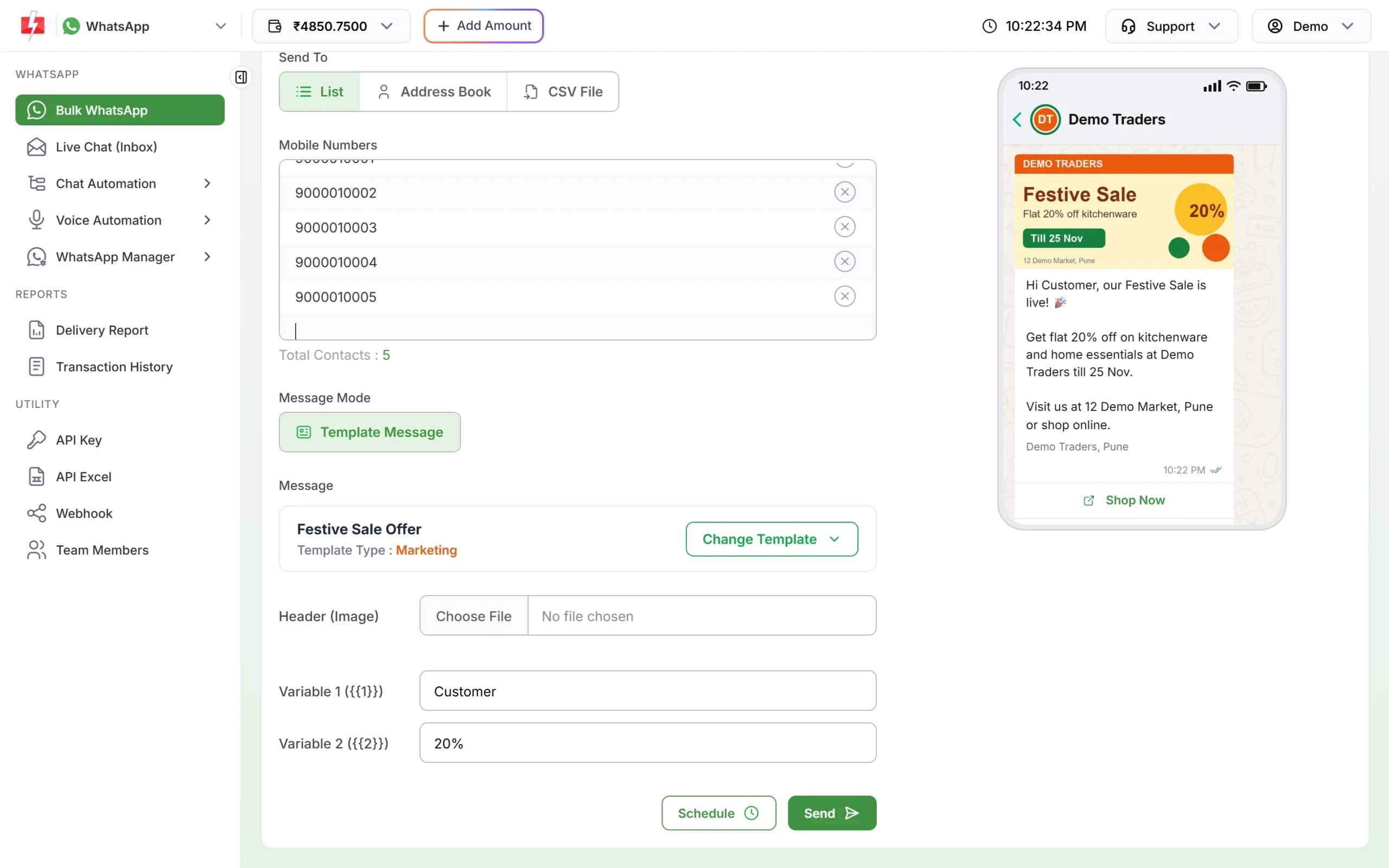
Fill the header image and variables before you send.
What marketing messages cost
At the time of writing a Marketing template costs ₹0.95 per message on Fast2SMS, and a Utility template costs ₹0.25. There is no setup or monthly fee, and failed messages are refunded to your wallet automatically. If a customer replies, your answers within 24 hours are session messages at ₹0.13 each. See the WhatsApp pricing page for current rates.
Sending in bulk? For high WhatsApp volumes our team offers discounted rates. Talk to our team or see WhatsApp pricing.
Frequently asked questions
How do I write a WhatsApp marketing message that gets approved?
Choose the Marketing category, start with “Hi {{1}},” rather than a variable, end with a normal sentence, number variables in order and give a real sample for each one.
Can I send a marketing message as a Utility template to save money?
No. Meta checks the category and can reject the template or change it to Marketing. Repeated wrong categories can lead to restrictions on your account.
How many buttons can a marketing template have?
In Fast2SMS you can add up to 3 Custom quick replies, 2 Visit website buttons, 1 Call Phone Number and 1 Copy offer code button.
Can I use emojis in WhatsApp marketing templates?
Yes, a few emojis in the body are fine. Keep them light so the message stays easy to read.
How often should I send marketing messages?
Meta does not set a number, but customers who get too many offers block businesses. Once or twice a week at most, to customers who asked for offers, is a safe start.
Why did some customers not receive my marketing message?
Meta limits marketing messages to people who rarely read them, and these fail with error 131049. Customers who stopped your marketing messages fail with 131050. Both are refunded.