
Here are ready-to-submit WhatsApp festival templates for Diwali, Holi, New Year, Eid, Christmas and festive sales, written to pass Meta’s review. Copy one, change the shop name and offer, submit it as a Marketing template in Fast2SMS, and send it to your opted-in customers once it is approved. Each WhatsApp festival message below lists the name, header, body, footer, buttons and the sample values Meta asks for.
Rules every festival template must follow
Most festival templates are rejected for small format mistakes, not for the offer. Check these before you submit:
- Category is Marketing. Meta treats festival wishes, offers, invitations and “thank you” messages as marketing, even when there is no discount. Do not submit them as Utility. Meta can reject the template or move it to Marketing.
- Variables in order and inside the text. Use {{1}}, {{2}}, {{3}} in order. The body cannot start or end with a variable, so begin with “Hi {{1}},” and end with a normal sentence.
- A sample for every variable. Give real-looking values like “Priya” or “20%”, not “test”.
- Limits: body up to 1,024 characters, text header and footer up to 60 characters each, and each button label within Meta’s 25-character limit.
- No year in the text if you want to reuse the template every year. Put dates in a variable.
- One language per template. Fast2SMS offers English, Hindi and Gujarati. Make a separate template for each language.
- Submit early. Meta’s review can take up to 24 hours. Submit at least a week before the festival so you have time to fix a rejection.
How to submit a festival template in Fast2SMS
-
Open Add Template
Go to WhatsApp Manager > Templates and click Add Template. Under Choose Template Type, click Marketing.
-
Paste the name, header and body
Type the name (small letters, numbers and underscores), choose the language, pick the header type and paste the body. Click + Add Variable to insert each {{n}} so the numbering stays right, and fill every box under “Samples for body content”.
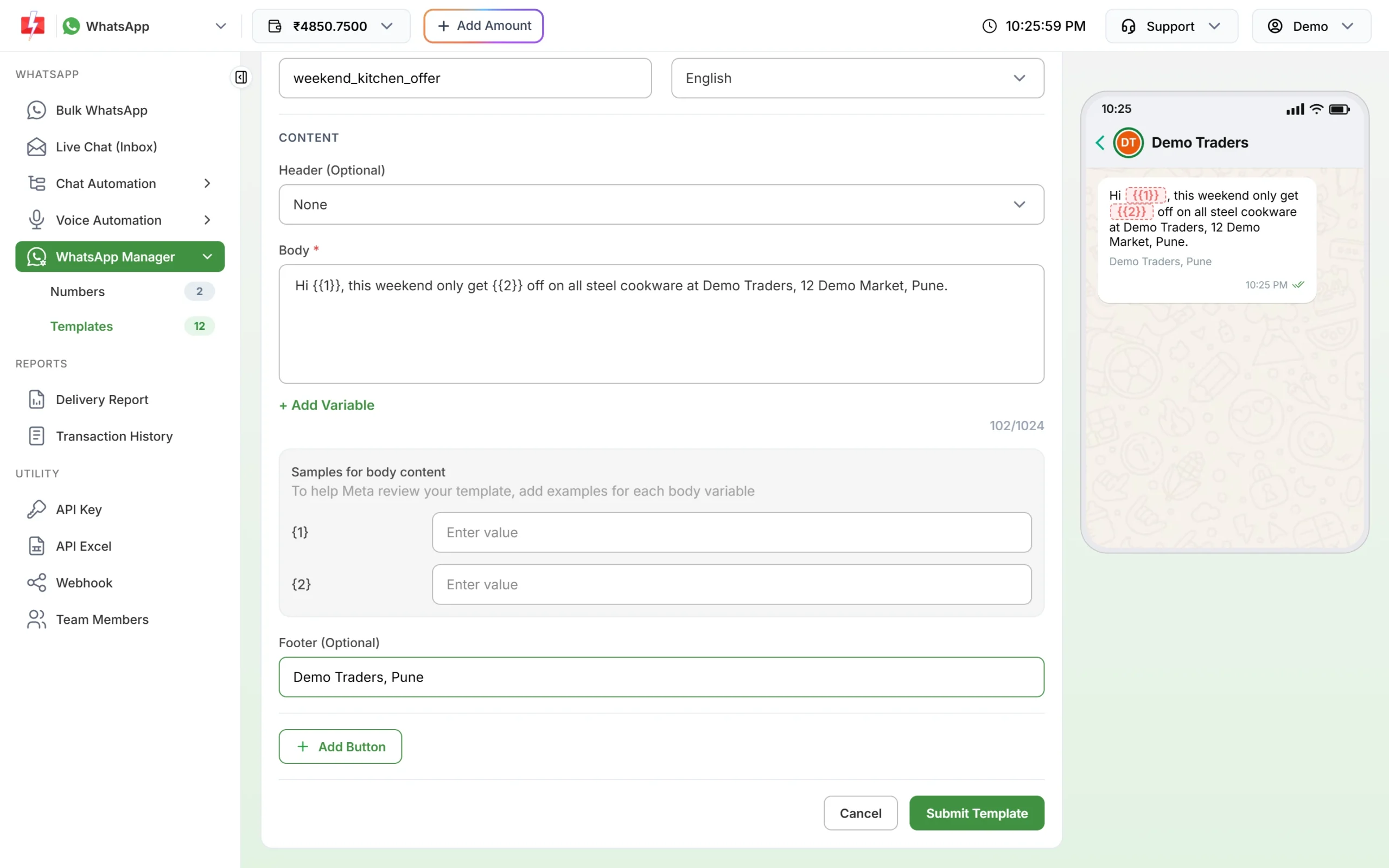
A marketing template with two variables, their sample boxes and a footer. -
Add the footer and buttons, then submit
Add a footer such as your shop name and city. Click Add Button for a website link, a call button or a “Stop promotions” quick reply. Check the phone preview and click Submit Template, then Create Template.
Diwali WhatsApp templates
1. Diwali offer with image
| Name | diwali_festive_offer |
| Header | Image (your Diwali banner, JPG or PNG up to 5MB) |
| Body | Hi {{1}}, Diwali greetings from Demo Traders. This festive season, get {{2}} off on all kitchenware and home decor. Use code {{3}} in store or online. The offer is valid till {{4}}. Light up your home this Diwali. |
| Footer | Demo Traders, Pune |
| Buttons | Visit website: “Shop Now”. Custom: “Stop promotions” |
| Samples | {{1}} Priya, {{2}} 20%, {{3}} DIWALI20, {{4}} 3 November |
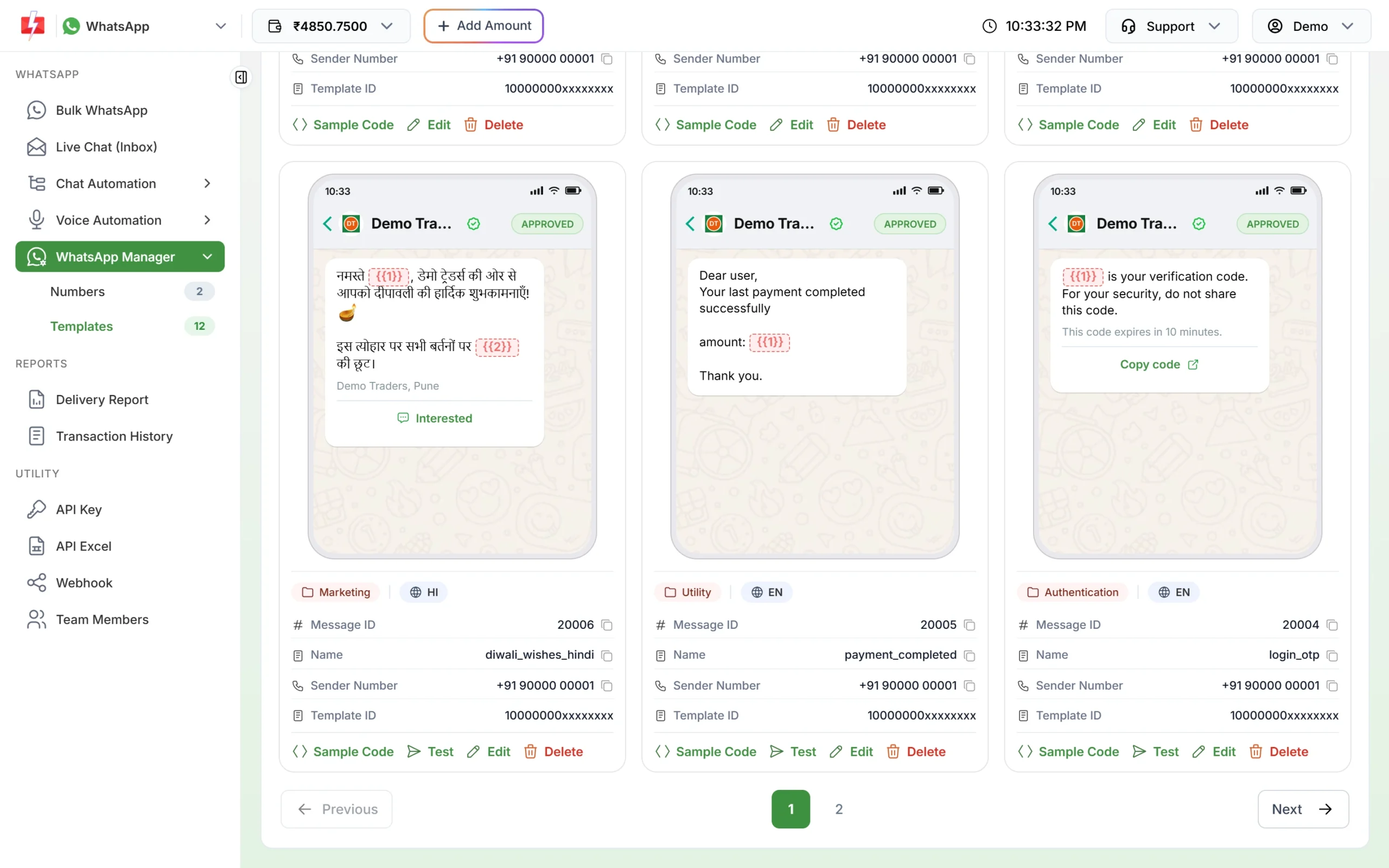
2. Diwali wishes in Hindi
| Name | diwali_wishes_hindi (language: Hindi) |
| Header | None |
| Body | नमस्ते {{1}}, डेमो ट्रेडर्स की ओर से आपको दीपावली की हार्दिक शुभकामनाएँ। इस त्योहार पर सभी बर्तनों पर {{2}} की छूट पाएँ। ऑफर सीमित समय के लिए है। |
| Footer | Demo Traders, Pune |
| Buttons | Custom: “Interested” |
| Samples | {{1}} प्रिया, {{2}} 20% |
3. Diwali thank-you wishes (no offer)
| Name | diwali_thank_you |
| Body | Hi {{1}}, everyone at Demo Traders wishes you and your family a happy and safe Diwali. Thank you for shopping with us this year. We look forward to serving you again. |
| Buttons | Custom: “Stop promotions” |
| Samples | {{1}} Rahul |
Holi WhatsApp templates
4. Holi sale
| Name | holi_colour_sale |
| Header | Text: Holi Sale is live |
| Body | Hi {{1}}, add some colour to your Holi. Get {{2}} off on summer clothing at Demo Traders from {{3}} to {{4}}. Visit our store or shop online with the button below. |
| Buttons | Visit website: “Shop Now”. Custom: “Stop promotions” |
| Samples | {{1}} Anjali, {{2}} 25%, {{3}} 12 March, {{4}} 15 March |
5. Holi wishes with store timing
| Name | holi_wishes_store |
| Body | Hi {{1}}, Happy Holi from the Demo Traders family. May your day be full of colour, sweets and laughter. On Holi our store opens at {{2}} for your last-minute shopping. |
| Buttons | Call Phone Number: “Call Store” |
| Samples | {{1}} Vikas, {{2}} 4 PM |
New Year WhatsApp templates
6. New Year offer for past customers
| Name | new_year_thank_you_offer |
| Header | Image (New Year banner) |
| Body | Hi {{1}}, thank you for choosing Demo Traders this year. Start the new year with {{2}} off on your next order. Use code {{3}} before {{4}}. Wishing you a happy and healthy New Year. |
| Buttons | Visit website: “Order Now”. Custom: “Stop promotions” |
| Samples | {{1}} Sneha, {{2}} 15%, {{3}} NEWYEAR15, {{4}} 10 January |
7. New Year wishes
| Name | new_year_wishes |
| Body | Hi {{1}}, the team at Demo Traders wishes you a very happy New Year. Thank you for your trust. We have new arrivals coming soon, and you will be the first to know. |
| Samples | {{1}} Arjun |
Eid WhatsApp templates
8. Eid Mubarak offer
| Name | eid_mubarak_offer |
| Header | Image (Eid banner) |
| Body | Hi {{1}}, Eid Mubarak from all of us at Demo Traders. Celebrate with {{2}} off on dry fruits and sweet boxes till {{3}}. Reply to this message to order, or visit our store. |
| Buttons | Custom: “Order now”. Custom: “Stop promotions” |
| Samples | {{1}} Ayesha, {{2}} 10%, {{3}} Sunday |
9. Eid wishes
| Name | eid_wishes |
| Body | Hi {{1}}, wishing you and your loved ones a joyful Eid. May this day bring peace and happiness to your home. Warm wishes from Demo Traders. |
| Samples | {{1}} Imran |
Christmas WhatsApp templates
10. Christmas sale
| Name | christmas_gift_sale |
| Header | Text: Christmas Sale |
| Body | Hi {{1}}, Merry Christmas from Demo Traders. Our Christmas sale is on, with {{2}} off on cakes, gifts and decorations till {{3}}. Tap the button below to see the gift list. |
| Buttons | Visit website: “See Gifts”. Custom: “Stop promotions” |
| Samples | {{1}} Maria, {{2}} 20%, {{3}} 25 December |
11. Christmas and year-end wishes
| Name | christmas_wishes |
| Body | Hi {{1}}, Merry Christmas and season’s greetings from Demo Traders. Thank you for being part of our story this year. Have a wonderful holiday. |
| Samples | {{1}} Joseph |
Festive sale and flash sale templates
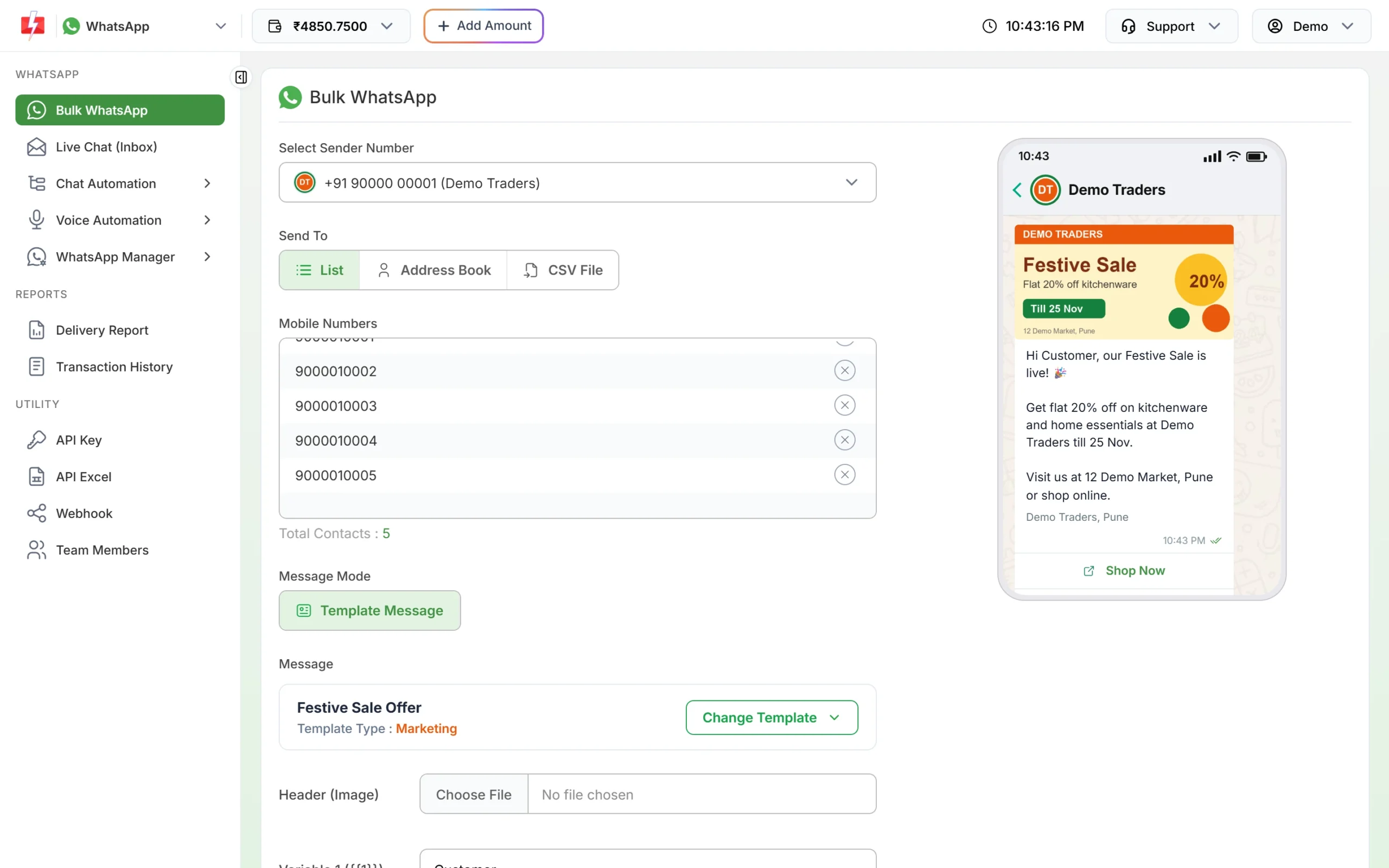
12. Festive sale with image
| Name | festive_sale_offer |
| Header | Image (sale banner) |
| Body | Hi {{1}}, our Festive Sale is live. Get flat {{2}} off on kitchenware and home essentials at Demo Traders till {{3}}. Visit us at 12 Demo Market, Pune or shop online. |
| Footer | Demo Traders, Pune |
| Buttons | Visit website: “Shop Now”. Custom: “Stop promotions” |
| Samples | {{1}} Ajay, {{2}} 20%, {{3}} 25 Nov |
13. One-day flash sale
| Name | flash_sale_one_day |
| Body | Hi {{1}}, a one-day flash sale starts at Demo Traders today at {{2}}. Get up to {{3}} off on selected items while stock lasts. Tap Shop Now to see the deals. |
| Buttons | Visit website: “Shop Now”. Custom: “Stop promotions” |
| Samples | {{1}} Neha, {{2}} 11 AM, {{3}} 40% |
14. End of season sale
| Name | end_of_season_sale |
| Body | Hi {{1}}, our end of season sale is here. Shop your favourites at up to {{2}} off from {{3}} to {{4}}. New stock arrives right after, so this is the best time to save. |
| Buttons | Visit website: “Shop Now”. Custom: “Stop promotions” |
| Samples | {{1}} Kiran, {{2}} 50%, {{3}} 1 July, {{4}} 7 July |
Other festivals
Use the same pattern for Raksha Bandhan, Navratri, Ganesh Chaturthi, Pongal, Onam or Independence Day sales. Change the greeting line and the products, keep “Hi {{1}},” at the start and a plain sentence at the end. Meta rejects a template whose body and footer exactly copy another template in your account, so change the wording for each festival.
How to send the festival campaign
-
Pick the right list
Send offers only to customers who agreed to get offers on WhatsApp. Upload them as a CSV or Excel file in Bulk WhatsApp, or pick an Address Book group.
-
Schedule it for the festival morning
Choose your approved template, upload the banner for the image header, fill the variables, then click Schedule. Pick the date and time and click Schedule again. The amount is taken from your wallet when you schedule, and a cancelled schedule is credited back.
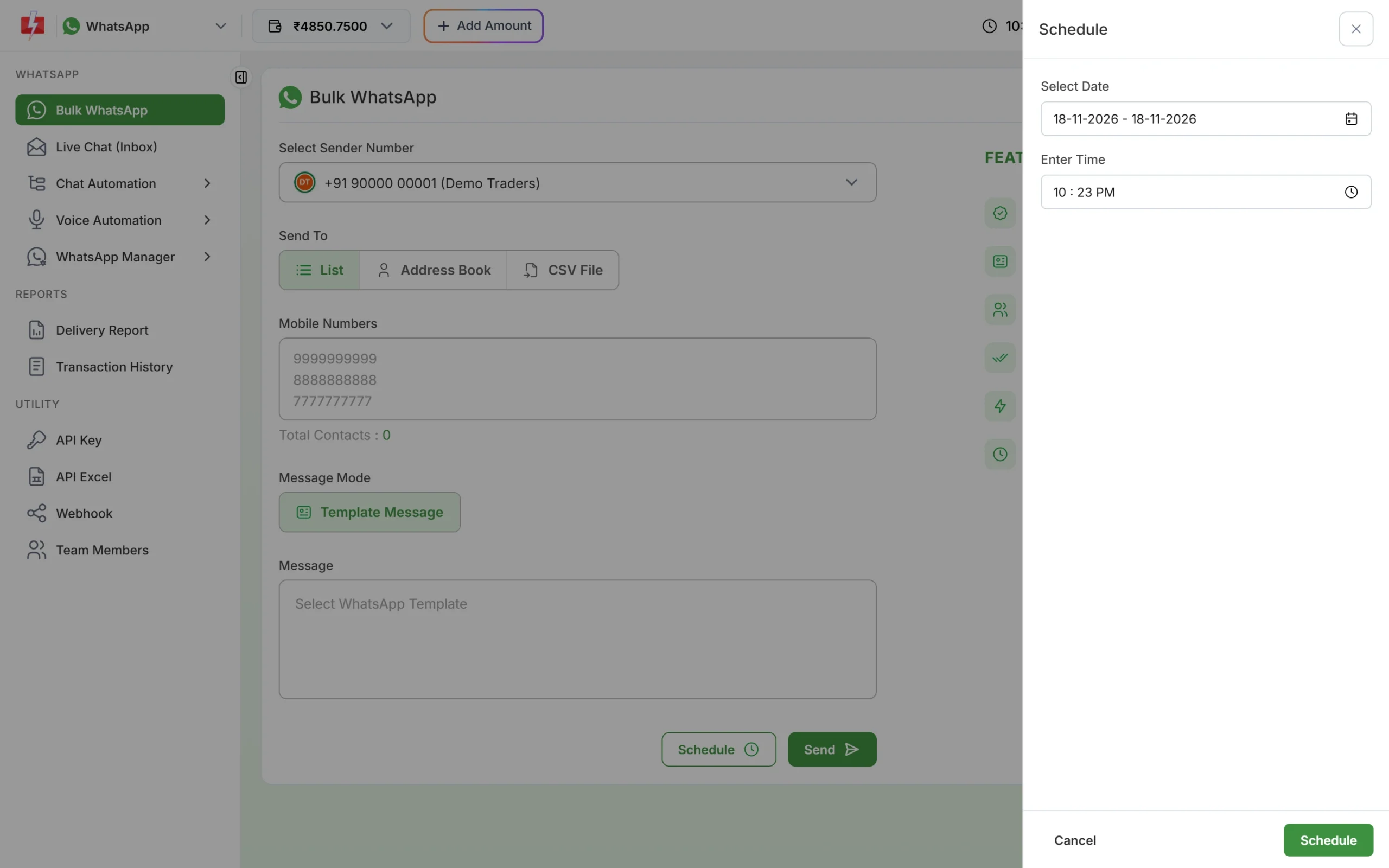
Schedule the campaign for the festival morning. -
Check the report
After sending, open Delivery Report to see how many were delivered and read. Failed messages are refunded to your wallet automatically.
What a festival campaign costs
Festival templates are Marketing templates. At the time of writing a Marketing message costs ₹0.95 on Fast2SMS, so a Diwali offer to 1,000 opted-in customers costs about ₹950. Duplicate numbers are sent once and invalid numbers are not charged. The exact total appears in Message Preview before you confirm. See the WhatsApp pricing page for current rates.
Sending in bulk? For high WhatsApp volumes our team offers discounted rates. Talk to our team or see WhatsApp pricing.
Tips so festival messages do not get you blocked
- Send once or twice per festival, not every day of the season.
- Always add a “Stop promotions” button. A customer who can stop in one tap does not need to block you.
- Personalise. Use the name and something the customer bought, not one text for everyone.
- Expect some marketing messages not to deliver. Meta limits how many marketing messages a person gets when they rarely read them. These fail with error 131049. Meta asks you to wait at least 24 hours before trying again. If you turn on the Retry Failed toggle in WhatsApp Manager > Numbers, Fast2SMS re-sends the previous day’s messages that failed with this error, once each morning.
Frequently asked questions
Is a Diwali greeting a Utility or Marketing template?
Marketing. Meta counts greetings, wishes and offers as marketing, even without a discount.
How early should I submit a festival template?
At least a week before. Meta’s review can take up to 24 hours, and a rejection needs time to fix and resubmit.
Can I use the same festival template every year?
Yes, while it stays approved. Leave the year out of the text and put dates in variables.
Can I send festival wishes in Hindi or Gujarati?
Yes. Choose Hindi or Gujarati as the template language and write the whole body in that language. Make one template per language.
Can I add a Diwali image to the template?
Yes. Choose an Image header (JPG or PNG up to 5MB). You upload the actual banner each time you send the campaign.
Why was my festival template rejected?
Common reasons are a variable at the start or end, missing samples, the wrong category or a copy of another template. Fix the issue and submit again.
Can I send festival wishes to all my contacts?
Only to people who agreed to get messages from you. Sending to cold or bought lists leads to blocks and a lower quality rating.