
A WhatsApp utility template is a message the customer expects because of something they did, like placing an order or paying a bill, and it has no promotion in it. A marketing template is anything that sells, invites or persuades. Authentication templates are only for one-time passwords. This guide shows WhatsApp utility vs marketing template examples side by side, so you can see why one line of offer text turns an order update into a marketing message.
Utility, marketing and authentication in one minute
Meta decides the category during review. The category you pick in the form is your request, not the final answer. At the time of writing, Meta’s own definitions are:
| Category | What it is for | Meta’s examples |
|---|---|---|
| Utility | Follows an action or request by the customer. Must be non-promotional, and either specific to that customer or essential to them (for example a safety alert). | Order confirmation, account balance update, feedback survey about a specific order |
| Marketing | Anything that promotes, from awareness to sales. Also any mixed message (an order update with a promo) and any template that is unclear, such as a body that is only {{1}}. | “15% off your next order”, subscription renewal reminder, prompt to download an app |
| Authentication | One-time passwords only. Utility and marketing templates must not carry passcodes. | Login code, signup verification code |
Why the category matters
The category sets the price of every message. In Fast2SMS the rate is taken per message from the template category. At the time of writing the connect page shows Auth/Utility at ₹0.25 and Marketing at ₹0.95 per message, and your own account may have different rates. You can see your rates on the WhatsApp connect page, in the Bulk WhatsApp features box and in the confirmation pop-up before every campaign.
Sending in bulk? For high WhatsApp volumes our team offers discounted rates. Talk to our team or see WhatsApp pricing.
The category also decides which messages Meta limits. Marketing messages can be held back for customers who already get many offers, and customers can stop marketing messages from a business. Utility messages about their own order or payment are treated as service.
Utility vs marketing: examples side by side
Each pair below is the same situation written two ways. The first stays utility. The second becomes marketing because of the part in bold.
| Situation | Utility version | Marketing version |
|---|---|---|
| Order confirmed | Hi {{1}}, your order {{2}} of Rs. {{3}} is confirmed and will be delivered by {{4}}. Reply HELP for support. | Hi {{1}}, your order {{2}} is confirmed. Use code SAVE10 to get 10% off your next order. |
| Payment received | Dear {{1}}, we have received your payment of Rs. {{2}} for invoice {{3}}. Thank you. | Dear {{1}}, we have received your payment of Rs. {{2}}. Upgrade to our premium plan today and save more. |
| Out for delivery | Hi {{1}}, your order {{2}} is out for delivery today. Our delivery partner will call you before arriving. | Hi {{1}}, your order {{2}} is out for delivery. While you wait, check out our new arrivals. |
| Appointment | Hi {{1}}, this is a reminder of your appointment with {{2}} on {{3}}. Reply 1 to confirm or 2 to reschedule. | Hi {{1}}, book your next appointment this week and get a free consultation. |
| Feedback | Hi {{1}}, how was your delivery of order {{2}}? Rate it from 1 to 5 by replying to this message. | Hi {{1}}, tell us what you think of our new festive range and stand a chance to win a gift. |
| Plan ending | Hi {{1}}, the payment of Rs. {{2}} for your plan on {{3}} did not go through. Please check your payment method. | Hi {{1}}, your plan ends on {{2}}. Renew now to keep enjoying all benefits. (Meta lists renewal reminders as marketing.) |
Five habits that keep a template utility
-
Tie it to one customer action
Mention the order, payment, booking or request the message is about, with a variable for its number, amount or date. A message that could go to every customer on your list reads as a broadcast.
-
Leave out offers, discounts and “shop now”
Words like sale, offer, discount, cashback, upgrade, new arrivals or “don’t miss” pull a template into marketing. Put those in a separate marketing template.
-
Use service buttons
A Visit website button labelled “Track Order” or “Download Invoice”, or a Call Phone Number button for support, fits utility. A “Shop Now” button does not.
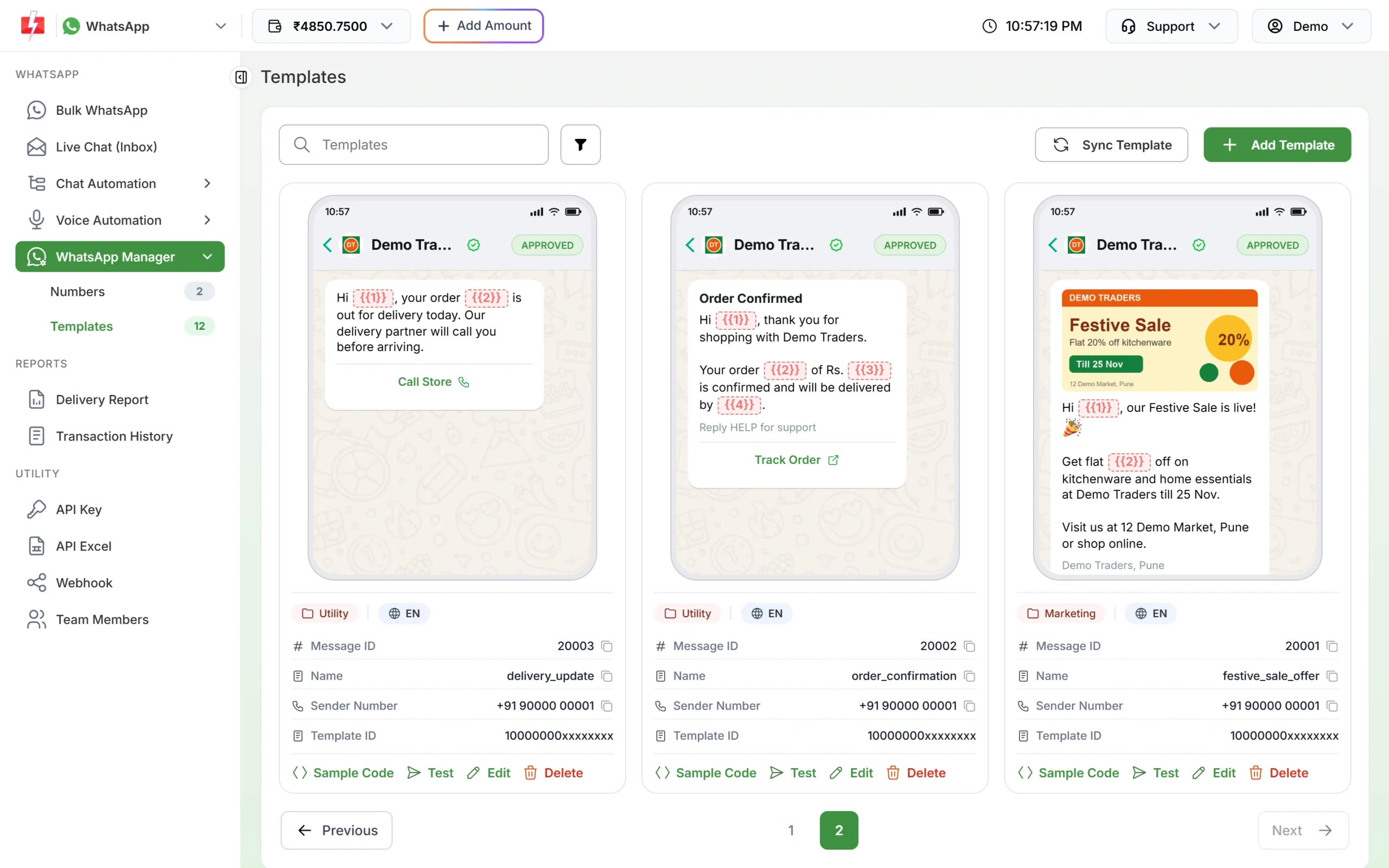
Utility templates with service buttons, and a marketing offer template next to them. -
Keep the body clear without the variables
Meta treats unclear templates as marketing. “Hi {{1}}, {{2}}” says nothing on its own. Write the fixed text so a reviewer can tell what the message is about, and give real-looking samples for each variable.
-
Never put a passcode in a utility template
Any one-time code belongs in an Authentication template. Meta does not allow passcodes in utility or marketing templates.
How to pick the category in Fast2SMS
-
Open the template form
Go to WhatsApp Manager > Templates and click Add Template. Choose the sender number at the top right if you have more than one.
-
Choose the template type
Under Choose Template Type, click Marketing, Utility or Authentication. Authentication opens a different form with code delivery options and fixed content.
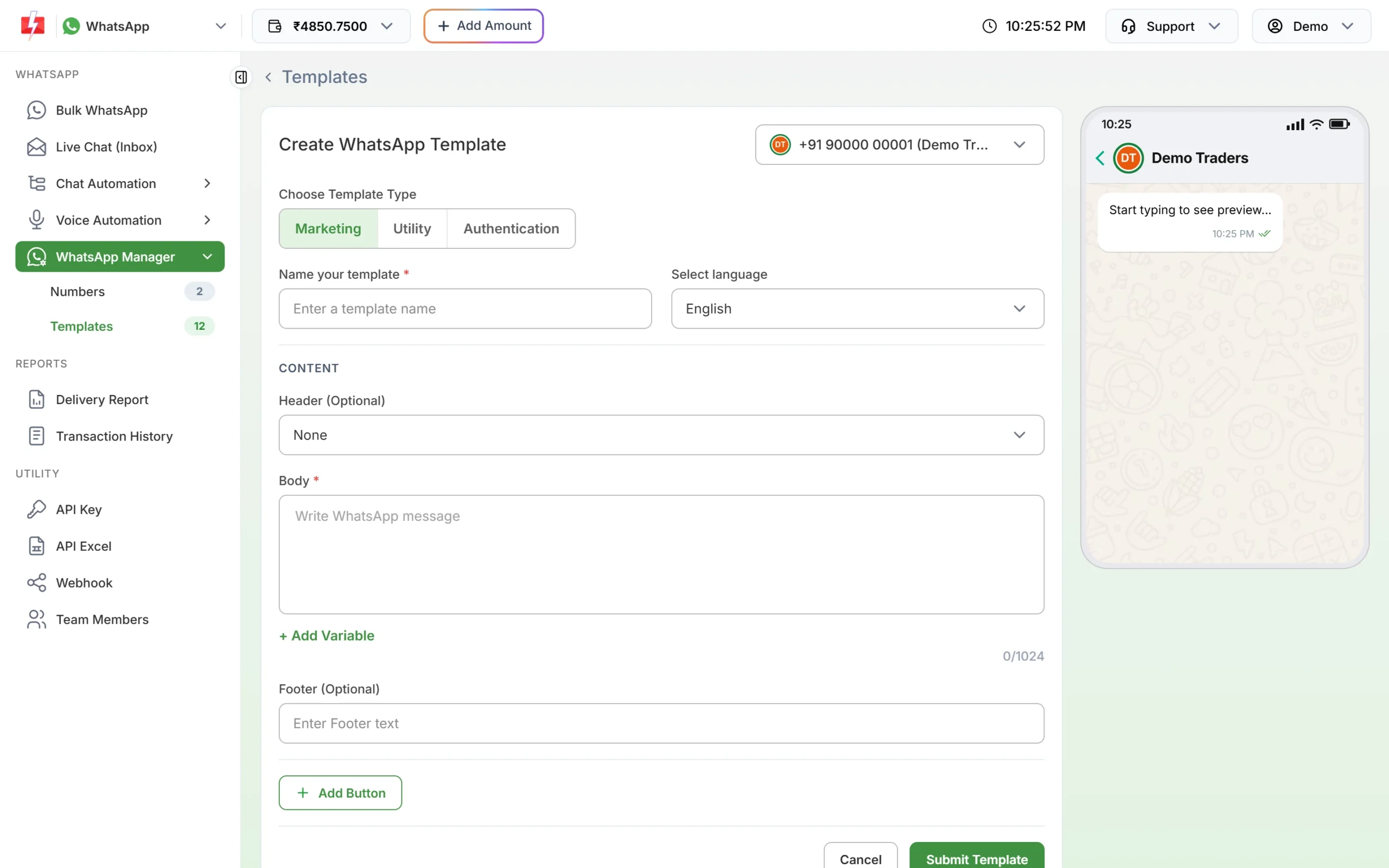
The three template types at the top of the form. -
Write the body and submit
Write the message, add variables with + Add Variable, fill the samples, then click Submit Template. Meta reviews it, usually within 24 hours.
-
Check the category after approval
Each template card shows its category and language under the preview. If you submitted a template as Utility and the card shows Marketing, Meta approved it as marketing.
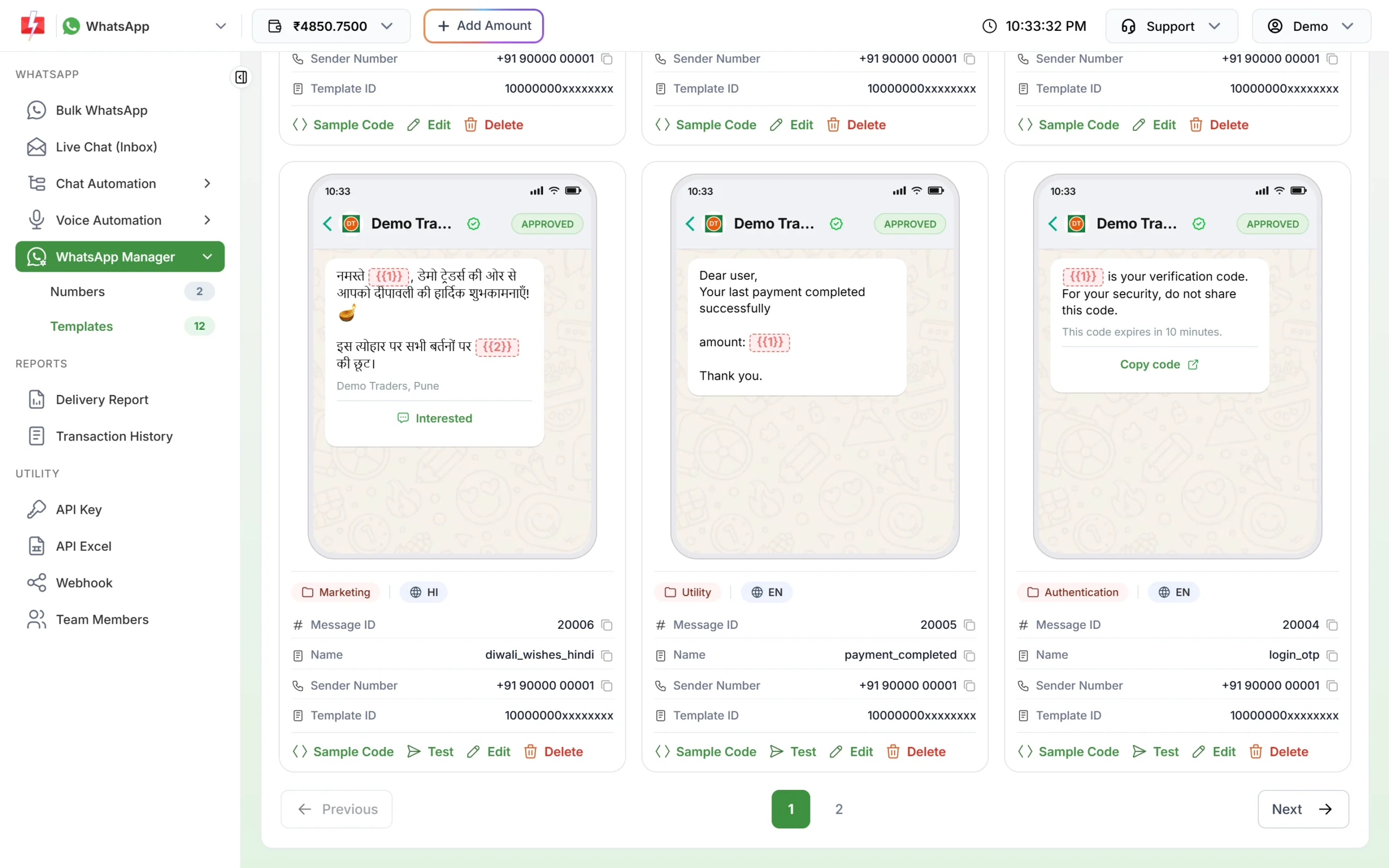
The category badge on each template card.
What happens when Meta changes the category
- At submission: since April 2025, a template sent as utility that Meta sees as marketing is approved as marketing instead of being rejected. Some are still rejected with the reason INCORRECT_CATEGORY.
- After approval: Meta reviews approved templates again from time to time. A utility template can be moved to marketing, usually with a day’s notice. It stays approved and keeps working, but at the marketing rate.
- Review: you can ask Meta to review a category change within 60 days, in Meta’s WhatsApp Manager. From the Numbers page in Fast2SMS, open the number’s menu and click Meta Manager to reach it.
- Passcodes in the wrong category: if Meta finds a marketing or utility template that is really an OTP message, it rejects it from the first day of the next month, and that cannot be reviewed. Move those to an authentication template before that happens.
Meta does not let you change the category of an approved template. To use a different category, create a new template with the right type and send it for review. See editing an approved template or its category.
Frequently asked questions
What is the difference between utility and marketing templates on WhatsApp?
Utility templates are non-promotional messages about something the customer did, like an order or payment. Marketing templates promote, offer or invite. Any message that mixes the two counts as marketing.
Can I add a small offer at the end of an order update?
You can, but the whole template then becomes marketing and is charged at the marketing rate. Send the offer in a separate marketing template.
Is a payment reminder utility or marketing?
A reminder about a specific bill or due amount of that customer, with no offer in it, fits utility. A reminder that pushes a renewal or upgrade is marketing, as Meta lists renewal reminders under marketing.
Why did my utility template get approved as marketing?
Meta found promotional or unclear wording in it. Remove the promotional part and submit a new utility template, or ask Meta for a review in WhatsApp Manager.
Can I send OTPs with a utility template?
No. One-time passwords must use an authentication template. Meta rejects passcodes in other categories.
Which category is cheapest?
In Fast2SMS, utility and authentication share the lower rate and marketing costs more. Check the rates shown in your panel, as they can differ per account.
Are welcome messages utility?
A message that only confirms something the customer just did, such as a support request they raised, can be utility. A welcome that introduces your products or offers is marketing.