
WhatsApp Template Rejected? 100+ Approval Questions Answered
If your WhatsApp template was rejected, is stuck in review, got moved to a different category or was suddenly paused, this guide is for you. It is written for Indian businesses that send order updates, reminders, invoices, OTPs and offers on the WhatsApp Business API: D2C brands, shops, clinics, schools, coaching centres, CA firms and app teams.
You will get plain answers to more than 100 real questions about Meta’s template review: which category to pick, why templates get rejected and how to fix each reason, how variables, headers and buttons should be set up, what happens to your cost when Meta changes a category, and what to do when a template is paused. There are also side-by-side examples of rejected and approved templates you can adapt for your own business.
Signup NowSchedule Free Meeting
Quick answers
- Meta reviews most WhatsApp templates within minutes; some take up to 24 hours.
- Most rejections come from the wrong category, badly placed variables, missing sample values or policy-breaking content.
- Utility is only for updates about something the customer already did; anything promotional is Marketing.
- If Meta moves a template from Utility to Marketing, your cost changes too: on Fast2SMS, ₹0.95 instead of ₹0.25 per message.
- Templates get paused when customers block or report them; repeated pauses lead to the template being disabled.
- A rejected template can be edited and resubmitted under the same name.
- Authentication (OTP) templates use Meta’s fixed wording; you choose options, not the text.
In this guide
- How WhatsApp template review works
- Choosing the right category: marketing, utility or authentication
- Most common rejection reasons and how to fix them
- Variables and sample values
- Headers, footers and buttons
- Category changes by Meta and pricing impact
- Template quality, pausing and disabling
- Editing, deleting, resubmitting and languages
- Good vs rejected template examples
- Getting help with template approval
- Wrap-up
How WhatsApp template review works
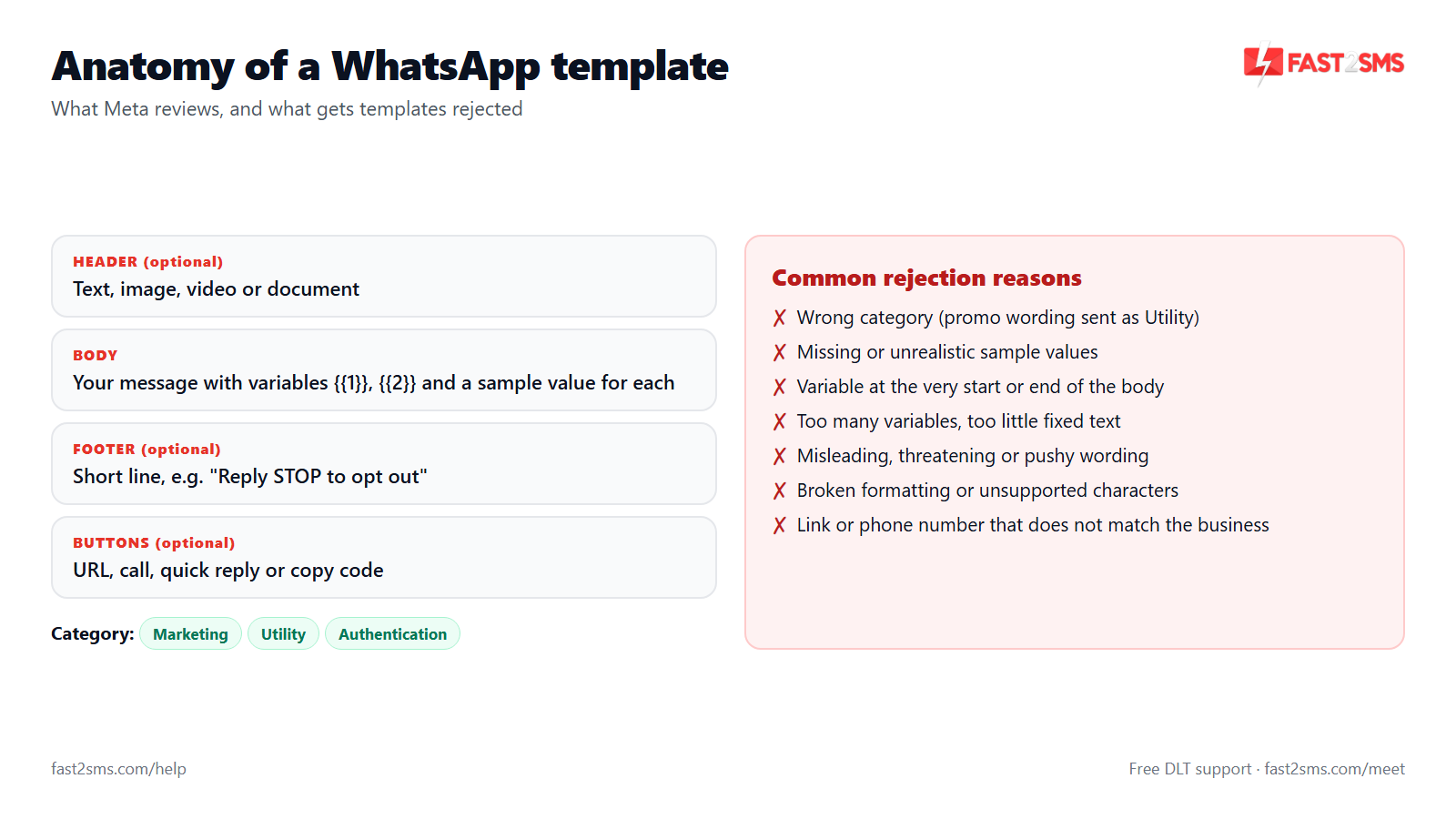
A template is a pre-approved message format. You need one to start a conversation with a customer, or to message them after the 24-hour customer service window has closed. Before you can send it, Meta checks the wording, category, variables, media and buttons against its WhatsApp Business policies. Most of this check is automated, which is why results often come back in minutes, and why small formatting mistakes get caught every single time.
What is a WhatsApp message template?
A WhatsApp message template is a fixed message format, approved by Meta, that a business uses to message customers first or to reach them outside the 24-hour customer service window. Each template has a name, a category, a language, body text and optional header, footer and buttons. Placeholders like {{1}} let you fill in a name, order number or amount for each customer when you send it.
Why do I need an approved template to message customers on WhatsApp?
Meta requires an approved template for every business-initiated message so that people do not get spam from businesses sending whatever they like. When a customer messages you, a 24-hour window opens and you can reply freely with normal session messages. Outside that window, only approved templates can be sent. Our guide to WhatsApp session message pricing explains how the window works in practice.
Who approves WhatsApp templates, Meta or my API provider?
Meta approves or rejects every WhatsApp template; your API provider does not make that decision. Providers pass your template to Meta through the WhatsApp Business API and show you the result in their panel. A good provider can help you write a template that is far more likely to pass and explain a rejection in plain language, but nobody outside Meta can force an approval.
How long does WhatsApp template approval take?
Most WhatsApp templates are reviewed within a few minutes of submission, and Meta says review can take up to 24 hours. Simple utility templates with clean formatting are usually the fastest. If you are planning a campaign or a new automation, submit templates a day ahead so a rejection does not delay your launch.
Why is my WhatsApp template still pending after 24 hours?
A template pending for more than 24 hours usually needs a manual look from Meta, or there is an issue with the business account, such as a restriction, a policy flag or incomplete setup. Do not keep submitting the same text under new names, because that only adds clutter. Check your account status in WhatsApp Manager, then raise the delay with your provider’s support team with the template name.
What do the statuses Approved, Pending, Rejected, Paused and Disabled mean?
Approved means you can send the template, Pending means Meta is still reviewing it, Rejected means it failed review and needs changes, Paused means Meta stopped it for a while because of poor quality, and Disabled means it has been switched off after repeated quality problems. Some panels also show “In appeal” after you ask Meta to review a decision again.
Does Meta review templates manually or automatically?
Meta reviews most templates automatically, and people get involved in some cases, such as appeals or content the system cannot classify with confidence. That is why a template can be rejected within seconds for something as small as a misplaced variable. Automated review applies the rules strictly, so fix every detail before submitting instead of hoping a borderline template slips through.
Can an approved template be rejected later?
An approved template is not normally moved back to rejected, but Meta keeps checking it after approval and can change its category, lower its quality rating, pause it or disable it. So approval is not the end of the story. Keep templates honest, relevant and sent only to customers who opted in, and they will stay usable for a long time.
Where can I see why my template was rejected?
You can see the rejection reason in WhatsApp Manager inside Meta Business Suite, and most providers show the same reason next to the template in their own panel. Meta also sends a notification to the business account. The reason is often short, such as “invalid format” or “incorrect category”, so use the rejection table later in this guide to match it with a fix.
Do I need Meta business verification to get templates approved?
No, you do not need business verification to submit templates and get them approved, but verification raises your account limits, including how many customers you can message and how many templates you can keep. An unverified account is fine for testing and small volumes. If you plan regular campaigns or high-volume alerts, complete verification early so limits do not hold you back.
Choosing the right category: marketing, utility or authentication
Every template must be submitted as Marketing, Utility or Authentication. The category decides how Meta reviews the template, what content is allowed in it and what you pay per message. Choosing the wrong one is the most common reason for a rejection or a later category change, so decide the category first and write the text to fit it.
| Category | Use it for | Example | Fast2SMS price per message |
|---|---|---|---|
| Marketing | Offers, sales, new arrivals, festive greetings, event invites, re-engagement | “Our Diwali sale is live. Get 20% off all kurtas this weekend.” | ₹0.95 |
| Utility | Updates on an order, booking, payment or account the customer already has | “Hi Priya, your order ORD4521 has been shipped.” | ₹0.25 |
| Authentication | One-time passwords for login, signup, password reset or confirming an action | “482913 is your verification code.” | ₹0.25 |
| Session message (not a template) | Replies inside the 24-hour window after the customer messages you | Chatbot and live chat replies | ₹0.13 |
What is the difference between marketing and utility templates?
A utility template gives the customer information about something they already did or agreed to, like an order, payment or appointment, while a marketing template tries to sell, promote or bring them back. If a message contains an offer, discount or a push to buy, it is marketing, even when it also mentions order details. The purpose of the whole message decides the category, not one line.
What counts as a utility template on WhatsApp?
A utility template is a message tied to a specific order, booking, account or request the customer has made, such as an order confirmation, shipping update, payment receipt, invoice, appointment reminder, fee due notice or account alert. It must be useful to that customer and contain no promotion at all. A good test: would the customer be annoyed if they did not get this message?
What counts as a marketing template?
A marketing template is any message meant to promote your products, services, offers or brand, including sales, coupon codes, new arrivals, festive greetings, event invites, “we miss you” messages and product recommendations. When in doubt, Meta treats anything that is not strictly a transactional update or an OTP as marketing. Marketing templates should only go to customers who agreed to receive offers.
When should I use an authentication template?
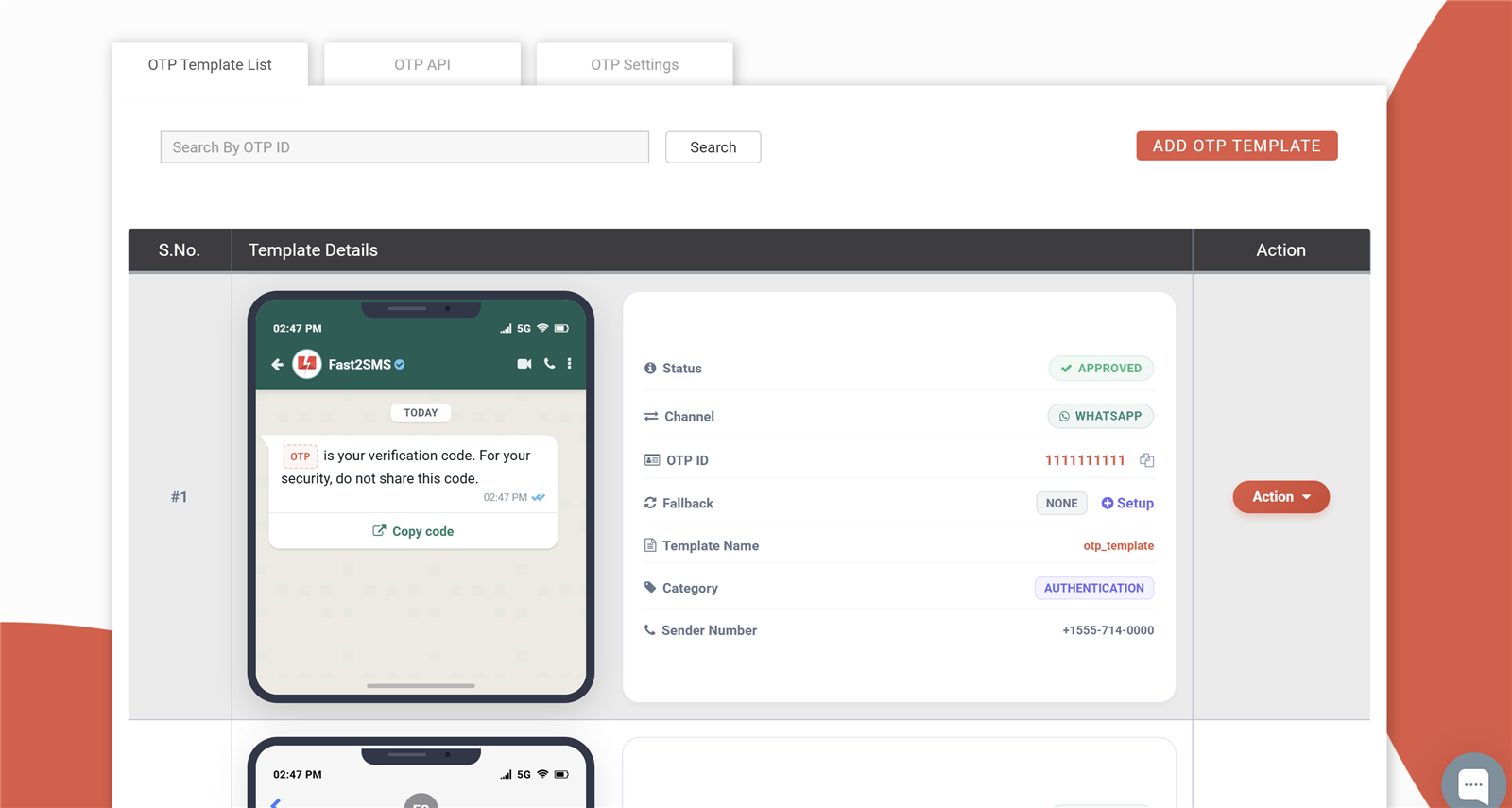
Use an authentication template only for one-time passwords and verification codes that let a user log in, sign up, reset a password or confirm an action. Meta gives authentication templates a fixed format, so you pick options like a copy code button, a security note and an expiry time rather than writing your own text. See how this works in Smart OTP with WhatsApp and SMS fallback.
Can I send an OTP using a utility template?
No, OTPs and verification codes should be sent with an authentication template, and Meta can reject or re-categorize a utility template that is used for codes. Authentication templates also give you copy code and autofill buttons that make entering the OTP easier for users. On Fast2SMS, utility and authentication templates cost the same ₹0.25 per message, so there is no saving in misusing utility.
Is a festive greeting like “Happy Diwali” utility or marketing?
A festive greeting is a marketing template, even when it has no offer in it, because it is sent to build your brand rather than to update the customer about a transaction. Submit Diwali, Eid, Christmas, Holi, new year and birthday wishes as marketing. If you want to add a discount code to the greeting, that only makes the marketing category more obvious.
Is a payment reminder a utility template?
Yes, a payment reminder is a utility template when it refers to a real amount the customer owes you, such as an invoice, EMI, school fee or a subscription renewal they signed up for. It becomes marketing if you add upsells like “upgrade to premium and save more”. Keep the tone polite and factual, because threatening wording is a common reason for rejection.
Is an abandoned cart message utility or marketing?
An abandoned cart message is treated as marketing, because its goal is to get the customer to finish a purchase they have not made yet, not to update them about a completed transaction. Submit cart recovery and “you left something in your cart” messages as marketing templates from the start, so Meta does not change the category later and surprise you with a higher bill.
Is a feedback or review request utility or marketing?
A feedback request is judged by its purpose: a short question about one specific order or visit the customer just completed is sometimes accepted as utility, while a general survey, a review request with a reward or any mention of other products is marketing. If you are not sure, submit it as marketing. Meta will change the category anyway if it disagrees with your choice.
What happens if I choose the wrong category?
If you choose the wrong category, Meta may reject the template or approve it under the category it thinks is correct, which changes what you pay for every message sent with it. Choosing utility for promotional content does not save money for long, because Meta checks the content. The category changes section below explains the cost impact in rupees.
Can one template be both utility and marketing?
No, every template has exactly one category, and a template that mixes transactional details with promotion is treated as marketing as a whole. If you want to send an order update and also tell the customer about a sale, create two templates: a clean utility template for the update and a separate marketing template for the offer, sent only to people who opted in.
Which category should a clinic appointment reminder use?
A clinic appointment reminder for a booking the patient made is a utility template, as long as it only shares the date, time, doctor, clinic address and perhaps a reschedule button. If you add health checkup packages or discounts, it becomes marketing. The same rule applies to salon bookings, coaching class schedules, service centre visits and table reservations.
Which WhatsApp template category is the cheapest?
On Fast2SMS, utility and authentication templates are the cheapest templates at ₹0.25 per message, marketing templates cost ₹0.95, and replies inside the 24-hour window cost ₹0.13 as session messages. So the lowest-cost way to talk to customers is to get them to message you first and reply inside the window, for example with a free WhatsApp chatbot.
Most common rejection reasons and how to fix them
Most rejected templates fail for the same handful of reasons. Meta’s review looks at format first (variables, length, characters) and then content (category, policy, clarity). The table below lists the reasons we see most often, an example that fails, and the fix. After the table you will find answers to specific rejection questions.
| Rejection reason | Example that gets rejected | Fix |
|---|---|---|
| Wrong category | Utility: “Your order is confirmed. Use code SAVE10 on your next order.” | Remove the offer and keep it utility, or submit the promotional version as marketing. |
| Variable at the start or end | “{{1}}, your appointment is confirmed for {{2}}” | Add text before the first and after the last variable: “Hi {{1}}, your appointment is confirmed for {{2}}. See you soon.” |
| Too many variables for the text | “Order {{1}} {{2}} {{3}} at {{4}}.” | Write full sentences around each variable, or merge values into fewer variables. |
| Malformed or skipped variables | “{1}”, “{{ 1 }}”, or {{1}} followed by {{3}} with no {{2}} | Use two curly braces on each side and number them in order: {{1}}, {{2}}, {{3}}. |
| Missing or weak sample values | Sample “test” for a customer name and “123” for an amount | Give realistic samples: “Priya”, “ORD4521”, “₹1,499”. |
| Commerce policy violation | Promoting alcohol, tobacco, betting or prescription drugs | These products cannot be promoted on WhatsApp; no rewording fixes it. |
| Threatening or abusive tone | “Pay today or our recovery team will visit your house.” | State the amount and due date politely and offer a way to pay or get help. |
| Asking for sensitive data | “Reply with your card number and CVV to verify.” | Never ask for card details, PINs or passwords in chat; send a secure link to your own site. |
| Vague or misleading content | “Important update for you. Check now.” | Say who you are and exactly what the update is about. |
| Suspicious or broken link | A public link shortener, or a link that does not open | Use a working full link on your own domain, ideally as a URL button. |
| Language mismatch | Devanagari Hindi text submitted with English selected | Select the language that matches the body text. |
| Spammy formatting | “HURRY!!! LAST CHANCE!!!” with a row of emojis | Use normal sentence case, correct spelling and one or two emojis at most. |
Why is my WhatsApp template rejected?
Most WhatsApp templates are rejected for one of a few reasons: the wrong category, a variable at the start or end, too many variables for the amount of text, missing sample values, or content that breaks Meta’s policies. Read the exact reason shown in WhatsApp Manager or your panel, match it in the table above, fix that one issue properly and resubmit.
What does an “incorrect category” rejection mean?
An “incorrect category” rejection means Meta decided your content does not fit the category you chose, most often because a template submitted as utility contains promotional words or an offer. You have two choices: remove the promotional part and keep it as utility, or resubmit the full message as marketing. In some cases Meta simply approves it under the correct category instead of rejecting it.
Why was my template rejected for “invalid format”?
An invalid format rejection usually points to a problem with variables or characters, such as single curly braces, spaces inside the braces, skipped numbers, a variable at the start or end, or special characters inside a placeholder. Check that every variable is typed exactly as {{1}}, {{2}} and so on, in order, and that each one has a sample value.
Why does Meta reject a template that starts or ends with a variable?
Meta does not allow the body to start or end with a variable, because the fixed text around variables is how review understands what the message really is. “{{1}}, your order is on the way” gets rejected, while “Hi {{1}}, your order is on the way. Thank you for shopping with us.” passes. Always close the body with a fixed sentence, not a placeholder.
Why is my template rejected for “too many variables”?
Meta rejects templates where variables make up too much of the message compared with the fixed text, because such a template could be filled with almost any content, including spam. Add clear fixed wording around each variable, drop variables you do not really need and make sure someone reading the template with the samples removed still understands its purpose.
Can a template be rejected for spelling or grammar mistakes?
Yes, poor spelling, broken grammar, random capital letters and heavy punctuation can lead to rejection, because they are typical of spam and make the purpose unclear. Write the template as you would write an important message to a valued customer: clear sentences, correct spelling and normal capitalisation. Hinglish is fine as long as it is written consistently and reads naturally.
Why was my template rejected for violating the WhatsApp Commerce Policy?
A Commerce Policy rejection means the product or service in your template is something Meta does not allow businesses to sell or promote on WhatsApp, such as alcohol, tobacco, drugs, weapons, adult content, real-money gambling and certain regulated medical or financial products. No change in wording fixes this, because the offer itself is not allowed on the platform.
Can I send loan or EMI reminder templates on WhatsApp?
Yes, loan, EMI and bill payment reminders are allowed as utility templates when they relate to the customer’s actual account and use polite, factual language. Templates that threaten, shame or pressure the customer, or talk about contacting family or employers, are likely to be rejected. Include the amount, the due date, how to pay and a number to call for help.
Why was my template rejected when it looks fine to me?
When a template looks fine but still gets rejected, the cause is usually small: a sample value that does not suit the variable, a purpose that is not clear enough, a link review cannot verify, or promotional wording you did not notice. Read the exact reason, change one thing at a time and ask a colleague to read it as a customer would. Fresh eyes spot problems fast.
Can I use shortened links like bit.ly in WhatsApp templates?
It is safer to avoid public link shorteners in templates, because review cannot see the final destination and shortened links are common in spam, which raises the risk of rejection and low quality. Use a full, working link on your own domain, or a URL button with a dynamic part at the end. Customers also trust links that show your brand name more.
Can I ask for card numbers or passwords in a WhatsApp template?
No, templates must not ask customers to share sensitive details such as full card numbers, CVV, UPI PIN, net banking passwords or government ID numbers in the chat. Meta rejects such templates, and they expose customers to fraud. If you need information from the customer, send a secure link to your own website or app where they can enter it safely.
Can I submit the same template again under a different name after rejection?
You can, but submitting the same rejected text again under a new name rarely helps, because review will see the same problem and reject it again. Meta also does not allow two templates with the same name in the same language. Fix the actual reason first, then edit and resubmit the original template, which keeps your template list clean.
Do emojis cause WhatsApp template rejection?
A few emojis in marketing or utility templates are normally fine, but a message packed with emojis, or one that uses emojis in place of words, looks like spam and can hurt approval and quality. Authentication templates do not let you add your own emojis at all, since Meta sets their text. Use one or two emojis only where they add meaning.
Why was my template rejected as a scam or misleading?
A scam or misleading rejection means review thinks the message could trick people, for example by promising prizes, pretending to be a bank or government office, creating false urgency or hiding who is sending it. Name your business clearly, describe the real offer honestly and remove “you have won” or “your account will be blocked” style wording.
Does the business name in a template need to match my WhatsApp profile?
It helps when the business name in your template matches your WhatsApp display name or is clearly your own brand, because both reviewers and customers then know exactly who is messaging. Using a different brand name, or a well-known brand you are not authorised to represent, can lead to rejection for impersonation and can also get your number reported.
Variables and sample values
Variables are the placeholders that change for each customer: a name, order number, amount, date or tracking ID. In most panels they are written as {{1}}, {{2}} and so on. Meta asks you to give a sample value for each one, so the reviewer can see what a real message will look like. A large share of format rejections come from variables, so this section is worth reading closely.
How do I add variables in a WhatsApp template?
Add a variable by typing {{1}} where the first changing value should appear, {{2}} for the second, and so on, using two curly braces on each side and numbering them in order. Most template editors also have an “Add variable” button that inserts the next number for you, which avoids typing mistakes. Every variable you add then needs a sample value.
How many variables can a WhatsApp template have?
There is no small fixed number you need to stay under; what Meta checks is whether there is enough fixed text around the variables for the message to make sense. A long, clear message can carry several variables, while a short one with four or five placeholders gets rejected. A simple rule: every variable should sit inside a normal, readable sentence.
What are sample values in a WhatsApp template?
Sample values are example contents you enter for each variable while submitting, such as “Priya” for {{1}} or “ORD4521” for {{2}}, so Meta can review a complete, realistic message. They are used only for review and are never sent to customers. Samples are required for every variable, including those in a text header and in a dynamic URL button.
Why do sample values matter for template approval?
Sample values matter because Meta reviews the message as it will look with those values filled in, so weak or misleading samples can cause a rejection on their own. A sample like “abc” or “test” gives no context, and a sample that contains a discount can make a utility template look promotional. Use real-looking but made-up data that fits each variable.
Can I use one variable for the whole message?
No, a template where a single variable stands for all or most of the message will be rejected, because it would let you send any content without review. Write the full message as fixed text and use variables only for the small parts that really change, like the customer’s name, the amount, the date or a tracking number.
Can two variables be placed next to each other?
Avoid placing variables side by side like “{{1}} {{2}}”, because it weakens the fixed text around them and is a common cause of invalid format rejections. Use one variable for the combined value, such as the full name instead of first and last name separately, or add words between them, for example “on {{1}} at {{2}}”.
Can I use variables in the header and buttons?
Yes, a text header can hold one variable and a URL button can hold one variable at the end of the link, but the footer cannot contain any variables. Each of these variables also needs its own sample value at submission. Image, video and document headers work differently: you upload a sample file instead of adding a text variable.
Can a variable contain a website link?
A body variable can technically carry a link, but templates that depend on a variable to insert unknown links look risky and attract rejections and low quality ratings. The cleaner approach is a URL button with your fixed domain and a dynamic part at the end, such as an order ID. Customers see a tidy “Track order” button instead of a long raw link.
What characters are not allowed in variable values when sending?
When you send a template, the values you pass for variables should not contain line breaks, tab characters or long runs of spaces, and Meta rejects the message if they do. Keep each value to a single clean line. If you need an address or a list on separate lines, put those line breaks in the fixed template text instead.
Do WhatsApp variables work like DLT SMS variables?
No, they are separate systems: WhatsApp templates use placeholders like {{1}} and are approved by Meta, while DLT SMS templates use typed tags like {#numeric#} and {#url#} and are approved on an operator DLT portal. If you send the same alert on both channels, you need an approval on each. Our guide to DLT variable tagging covers the SMS side.
Can I use named variables instead of numbered ones?
Yes, Meta also supports named variables such as {{customer_name}} alongside numbered ones like {{1}}, but you should use one style consistently within a template, and your provider’s panel and API must support it. Numbered variables are still the most widely supported option, so use them if you are unsure or if your software sends values by position.
Why does my message fail even though the template is approved?
An approved template can still fail at send time if the number of values you pass does not match its variables, if a value is empty, if the language code is wrong or if a required media header is missing. Check the API response or delivery report for the reason, and compare your request with the API docs. On Fast2SMS, failed WhatsApp messages are refunded automatically within 48 hours.
Headers, footers and buttons
Besides the body, a template can have an optional header on top, a footer at the bottom and buttons below the message. Headers can be text, image, video or document. Buttons let customers reply with one tap, open a link, call you or copy a code. Each part has its own rules, and a mistake in any single part gets the whole template rejected.
What types of headers can a WhatsApp template have?
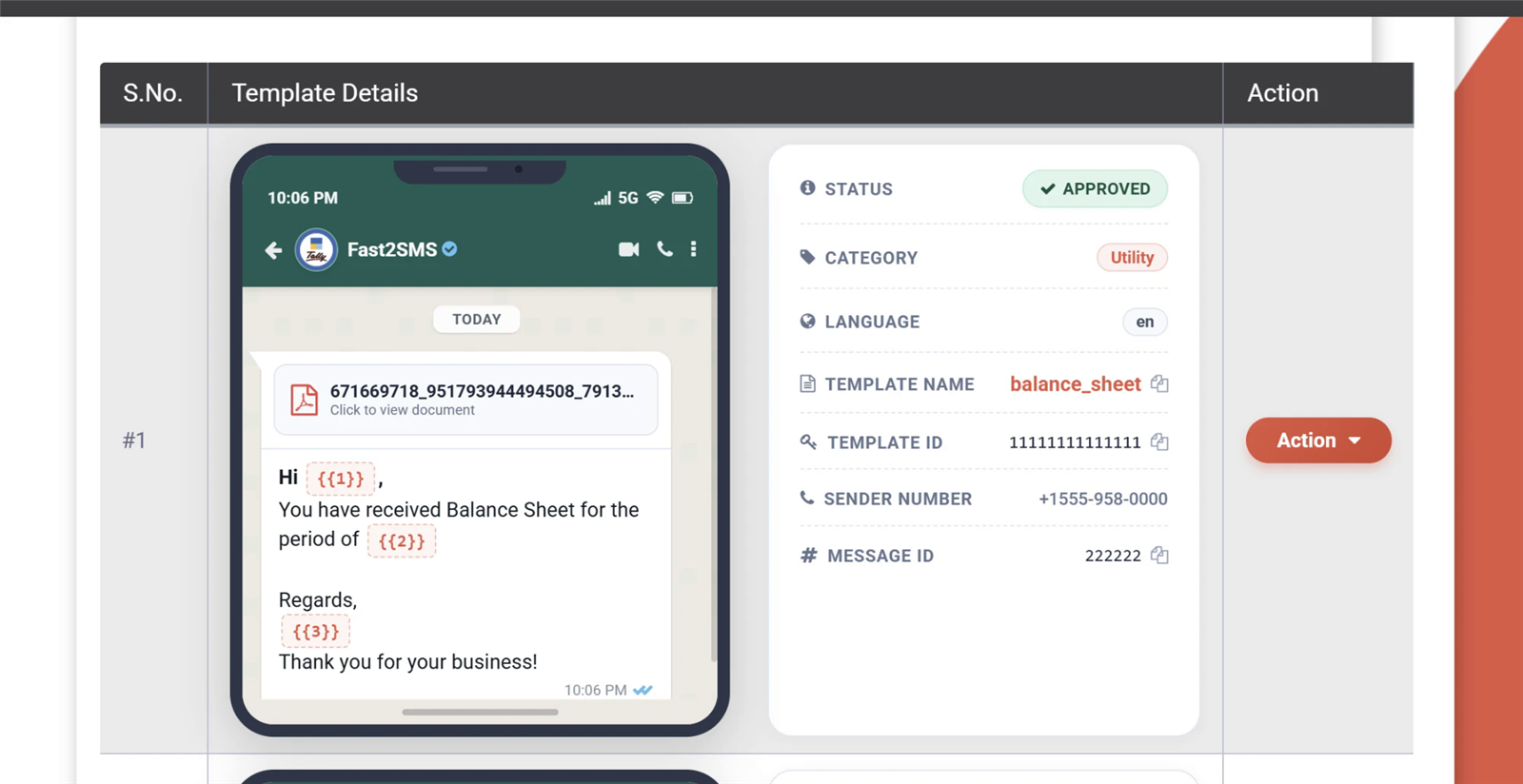
A WhatsApp template header is optional and can be text, an image, a video or a document such as a PDF; some utility templates can also use a location header. A text header works as a short title, while media headers show a picture, clip or file above the body, which suits invoices, tickets, product launches and event passes.
How long can a text header be?
A text header can be up to 60 characters long and can contain one variable, so treat it as a short title like “Order shipped” or “Invoice {{1}}” rather than a place for the main message. Keep the details in the body, where you have far more room. Header text should also match the body, not tease something unrelated.
What is the character limit for the template body?
The template body can be up to 1,024 characters, counting spaces and the fixed text around your variables. In practice, shorter messages are read and acted on more often. For utility messages, put the key facts in the first line: what happened, the one number that matters and what the customer should do next.
What file types can I use in image, video and document headers?
Image headers take JPG or PNG files, video headers take MP4, and document headers are normally PDF files. Keep files small so they open quickly on mobile data. You upload a sample file when you submit the template, and each time you send it you pass the real file link or media ID for that customer, such as their own invoice.
Why was my template with an image header rejected?
An image header template is usually rejected because the sample image breaks policy, has nothing to do with the text, carries misleading claims, or because the body itself has a category or variable problem. Use a clean, relevant sample like your product or logo. The image you send later can change, but it must stay in line with what the template was approved for.
Can I send invoices as PDF on WhatsApp using a template?
Yes, use a template with a document header and attach each customer’s invoice PDF when sending; submit it as utility if it only covers that invoice and payment details. Accountants and billing teams do this every day. For a real set of working examples, see our 20 Tally WhatsApp templates approved by Meta, covering invoices, receipts, reminders and reports.
What can I put in the template footer?
The footer is an optional short line of plain text below the body, up to 60 characters, often used for the brand name, support hours or a note like “Reply STOP to opt out”. It cannot contain variables or links. Keep important details out of the footer, because it appears in smaller grey text and many customers skip it.
What button types are available in WhatsApp templates?
WhatsApp templates support quick reply buttons, URL buttons, phone number buttons and copy code buttons, and authentication templates have their own OTP buttons such as copy code and one-tap autofill. Some accounts also see flow and catalogue buttons for forms and product lists. You can mix button types within Meta’s limits on how many of each you add.
How many buttons can a WhatsApp template have?
A template can have up to 10 buttons in total, with at most 2 URL buttons, 1 phone number button and 1 copy code button, and the rest as quick replies. On the phone, WhatsApp shows the first few buttons directly and puts the rest behind a “See all options” link, so place the most useful button first.
How long can button text be?
Button labels can be up to 25 characters, so keep them short and action-based, like “Track order”, “Pay now”, “Call clinic”, “Download invoice” or “Talk to us”. A clear label also helps during review, because it shows exactly what happens when the customer taps it. Avoid vague labels like “Click here” or “Know more”.
How do I add a dynamic URL button?
A dynamic URL button uses a fixed base link with one variable at the very end, such as https://yourstore.in/track/{{1}}, where {{1}} is replaced with the order ID or reference each time you send. The variable can only go at the end of the URL, and you must enter a full sample link during submission so review can check it.
Why was my URL button rejected?
A URL button is usually rejected because the link does not open, points to a domain unrelated to your business, uses a public shortener, or has the variable somewhere other than the end. Test the link in a browser before submitting, use your own domain and make sure the landing page matches what the message promises, such as a real tracking page.
What is a copy code button in a WhatsApp template?
A copy code button lets the customer copy a coupon or offer code to their clipboard with one tap, which is handy in marketing templates with discount codes. You enter a sample code at submission and pass the real code for each send. For login and signup codes, use the copy code option inside an authentication template rather than this marketing button.
How do quick reply buttons work?
Quick reply buttons are tappable replies like “Yes, confirm”, “Reschedule” or “Stop offers” that send that text back to you as a message from the customer. That reply opens the 24-hour customer service window, so you can continue the conversation with session messages from a chatbot or live chat. The WhatsApp chatbot API can route each button to the right reply.
Can I add a call button with any phone number?
You can add one phone number button, and it should be a working business number you control, entered with the country code, such as +91 for India. A number that is switched off, unanswered or belongs to someone else hurts customer trust and invites complaints. Call buttons work well for clinics, service centres, schools and sales teams.
Category changes by Meta and pricing impact
Meta checks whether the category you picked matches the content. If it decides you chose wrong, it can approve the template under the correct category, and it can also review approved templates later and update their category. WhatsApp is priced per message by category, so a change from utility to marketing raises your cost directly. Here is how that works with Fast2SMS rates.
Why did Meta change my WhatsApp template category?
Meta changed your template category because its review found that the content fits a different category than the one you selected, most often a utility template that contains promotional words, offers, product suggestions or brand messaging. Meta applies the category it believes is correct so that pricing and user protections match what the message actually does.
How will I know if my template category has changed?
You will see the new category next to the template in WhatsApp Manager and in your provider’s panel, and Meta usually sends a notification to the business account as well. Check your templates regularly, especially high-volume utility templates like order updates, because a change affects every message you send after it and can quietly raise your monthly bill.
How does a category change affect my WhatsApp cost?
A category change affects your cost because WhatsApp templates are priced by category: on Fast2SMS, a utility template costs ₹0.25 per message and a marketing template costs ₹0.95. If Meta moves your order update template to marketing, each message costs ₹0.70 more. For 10,000 messages, that is ₹2,500 as utility against ₹9,500 as marketing.
Can I appeal a template category change?
Yes, you can request a review of a category decision from WhatsApp Manager if you are confident the original category was right. Before you appeal, read the template as a customer would and remove anything that could look promotional. If the content really does promote something, creating a new, clean utility template is usually quicker than arguing the case.
How do I stop Meta from changing utility templates to marketing?
Keep utility templates strictly about the customer’s own transaction: what happened, the key details and what they can do next. Leave out discounts, “shop now” lines, product suggestions, festive wishes and brand slogans. Put all promotion in separate marketing templates that you send only to customers who opted in to offers, and your utility templates will usually stay utility.
Can I change the category of an approved template myself?
No, you cannot switch an approved template to a different category yourself; to use another category, create a new template with that category and matching content. Once the new template is approved, update your API calls, plugins or campaigns to use it, and delete the old one if you no longer need it, so nobody on your team sends the wrong version.
Does a category change apply to messages I already sent?
A category change applies to messages sent after the change, while messages already sent were billed under the category that applied when they went out. That is why spotting a change early matters for high-volume senders. On Fast2SMS, billing is on a delivery basis, so you pay only for messages that are actually delivered, whatever the category.
Is WhatsApp marketing still worth it at the higher price?
Marketing templates cost more than utility, ₹0.95 against ₹0.25 per message on Fast2SMS, but they can pay off when you send a relevant offer to customers who opted in and actually want to hear from you. Send fewer, better targeted campaigns instead of blasting your whole list. Our guide to sending bulk WhatsApp messages covers list building and timing.
Why is my marketing template not delivered to some customers?
Some marketing templates are not delivered because Meta applies per-user limits on how many marketing messages a person can receive from businesses, to protect people from overload. A customer who recently got many marketing messages may be skipped. This does not mean your template is faulty, and on Fast2SMS failed WhatsApp messages are refunded automatically within 48 hours.
How can I lower my WhatsApp template costs?
Lower your costs by using utility templates only for real updates, keeping promotion to fewer and better targeted marketing sends, and encouraging customers to message you so you can reply at the ₹0.13 session rate through a chatbot or live chat. For large monthly volumes, ask sales about high-volume rates. This WhatsApp API pricing comparison shows what to check when comparing providers.
Template keeps getting rejected or moved to marketing?
Bring your template text, category and the rejection reason, and the Fast2SMS team will go through the wording, variables and buttons with you at no cost. Schedule a free meeting, call +91-6262778811 or email [email protected].
Template quality, pausing and disabling
After approval, Meta keeps watching how customers react to each template. If people block your number, report the message as spam or give negative feedback, the template’s quality rating drops. A low-quality template can be paused, and repeated problems lead to it being disabled. Poor quality across your templates can also pull down your phone number’s quality rating and hold back your messaging limit.
What is WhatsApp template quality rating?
Template quality rating is Meta’s score for how customers respond to a specific template, shown as high (green), medium (yellow), low (red) or pending when there is not enough data yet. It is based on signals such as blocks, spam reports and other feedback from people who received it. A falling rating is an early warning that the template may soon be paused.
Why was my WhatsApp template paused?
Your template was paused because its quality dropped after customers blocked your number, reported the message or gave negative feedback soon after receiving it. Meta pauses it for a while so you can fix the problem before more people are annoyed. This almost always happens when a message goes to people who did not expect it, or gets sent too often.
How long does a WhatsApp template stay paused?
Under Meta’s current rules, the first pause lasts about 3 hours and a second pause lasts about 6 hours, after which the template becomes active again. If quality drops a third time, the template is disabled. Use the pause to check who you sent it to, how often, and whether the wording could feel pushy or confusing.
What happens when my template is disabled?
A disabled template can no longer be sent, and you generally cannot bring it back in the same form, so you need to create a new template with better content and send it to a better targeted audience. Before you recreate it, fix whatever caused the complaints, such as an old contact list or too many sends, or the new template will run into the same problem.
Can I send messages from a paused template?
No, messages sent with a paused template will fail until the pause ends, so switch important sends to another approved template or wait it out. If the paused template runs an automation, like order updates from your online store, keep a backup template approved and ready. On Fast2SMS, failed WhatsApp messages are refunded automatically within 48 hours.
Does a low-quality template affect my phone number?
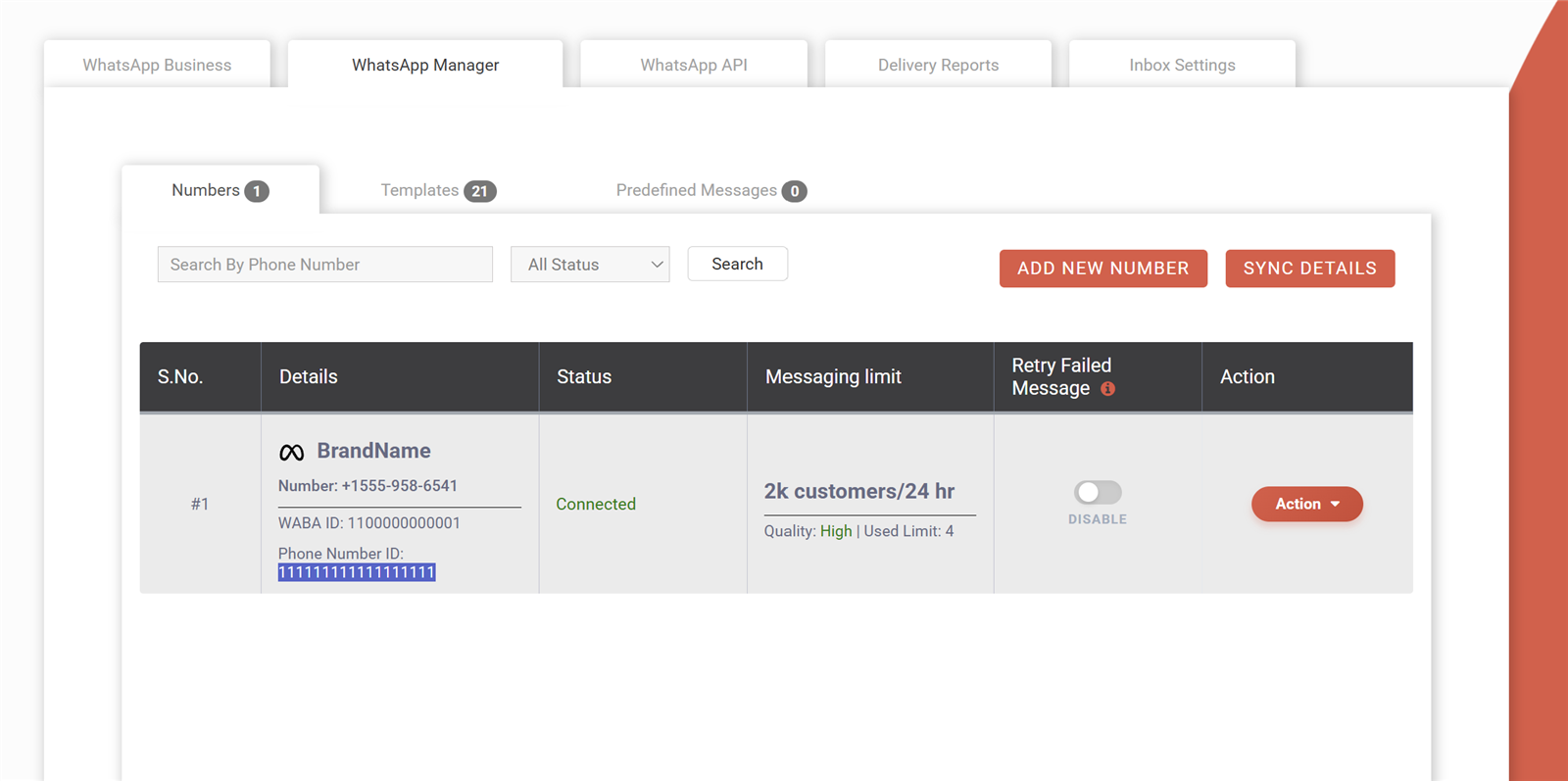
Yes, repeated low quality across your templates can lower your phone number’s quality rating, and a low number rating stops your messaging limit from growing and can put the number at risk. Your messaging limit, the number of unique customers you can start conversations with in 24 hours, moves up to higher tiers only while quality stays good.
How can I improve a template’s quality rating?
Improve quality by sending only to customers who opted in, keeping the message clearly relevant to them, sending at sensible times and frequencies, naming your business and giving an easy way to opt out, such as a “Stop offers” quick reply. Old purchased lists and too-frequent marketing are the usual causes of low ratings, not the template wording alone.
Why is my template quality showing as pending?
A pending quality rating simply means Meta has not yet collected enough customer feedback to rate the template, which is normal for new or rarely used templates. You can keep sending messages as usual. The rating updates once enough people have received the template and reacted to it, or chosen not to react at all.
Do customers blocking me affect template approval?
Blocks mainly affect a template after approval rather than the first review, but they hit hard there, because they lower quality and can pause or disable the template people blocked you over. A pattern of blocks also drags down your phone number’s quality rating. Clean, opted-in contact lists matter much more than clever wording.
Should I add an opt-out option to marketing templates?
Yes, adding an opt-out such as a “Stop promotions” quick reply button is a good habit for marketing templates, because people who can opt out easily are less likely to block or report you. Honour every opt-out quickly by removing that customer from marketing lists in your CRM or panel, while still sending them utility updates they need.
Can a paused template recover to high quality?
Yes, a template can recover after it becomes active again, because its rating reflects recent customer feedback, so better targeted sends slowly improve it. Fix the audience and frequency before sending again. If the template itself was the problem, for example too pushy or unclear, a fresh rewritten template is often the quicker route back to good quality.
Editing, deleting, resubmitting and languages
Templates are not fixed forever. You can edit a rejected template and resubmit it, edit an approved one within Meta’s limits, delete templates you no longer use and add translations in other languages under the same template name. Each language version is reviewed on its own, so a Hindi version can be approved or rejected separately from the English one.
Can I edit a rejected WhatsApp template and resubmit it?
Yes, you can edit a rejected template and submit it again for review, and you do not need to create a new template name to do it. Fix the specific reason Meta gave, recheck the category, variables and sample values, then resubmit. If the same template keeps failing, rewrite it properly instead of making tiny changes each time.
Can I edit an approved WhatsApp template?
Yes, you can edit the content of an approved template, and the edited version goes through Meta’s review again before it is used. Meta limits how often an approved template can be edited, currently about once in 24 hours and up to 10 times in 30 days. You cannot change its name or language this way.
Does editing an approved template need fresh approval?
Yes, every edit to an approved template sends it back to Meta for review, and the new wording must be approved before it goes out to customers. Plan edits outside your busiest sending hours. If the template powers a live automation such as OTP or order alerts, consider creating a new template for the change so the working one keeps running meanwhile.
How do I delete a WhatsApp template?
You can delete a template from WhatsApp Manager or from your provider’s template list by choosing the delete option on that template, and deleting a template name removes all its language versions. Messages already sent are not affected. Any plugin, automation or API call still using that template will start failing, so update them first.
Can I reuse the name of a deleted template?
Not straight away: Meta blocks a deleted template’s name from being reused for a period, currently 30 days, so pick a new name if you need the template sooner. A simple habit is adding a version number, such as order_shipped_v2, whenever you replace a template. It also makes it clear to your team which version is current.
What are the naming rules for WhatsApp templates?
Template names can use only lowercase letters, numbers and underscores, with no spaces or special characters, for example order_shipped or fee_reminder_v2. Customers never see the name; it is for you and your developers. Pick names that describe the use case, so anyone on your team can find the right template quickly.
Can I create the same template in multiple languages?
Yes, you can add several language versions under the same template name, such as English, Hindi, Marathi or Tamil, and Meta reviews each version separately. When sending, you pass the language code so the right version reaches each customer. Keep the meaning, variables and buttons the same across versions, so one API call works for all of them. The WhatsApp message API guide shows the request format.
Why was my Hindi WhatsApp template rejected?
A Hindi template is often rejected because the selected language does not match the text, for example Devanagari Hindi submitted with English selected, or because the translation changes the meaning compared with the other versions. Select Hindi for Devanagari text, check the translation with a native speaker and keep variables and buttons aligned with your English version.
Can I write Hinglish WhatsApp templates?
Yes, Hinglish templates written in Latin script, like “Aapka order ship ho gaya hai”, are widely used in India, and most businesses submit them under English since the script is Latin. Keep spelling consistent and the message easy to understand. For Devanagari, create a proper Hindi version instead of mixing both scripts in one template.
Do different language versions cost differently?
No, the price depends on the template category, not the language, so an English and a Hindi utility template cost the same ₹0.25 per message on Fast2SMS, and both marketing versions cost ₹0.95. Only delivered messages are billed, and failed ones are refunded automatically within 48 hours, whichever language you send.
What should I do if my template keeps getting rejected?
If a template keeps getting rejected, stop making small edits and rewrite it from scratch: choose the category first, write one clear purpose, use fewer variables with text around them, give realistic samples and remove any promotional words from utility. Compare it with the examples in the next section. If it still fails, ask for a review or get help from your provider.
How many templates can I create on one WhatsApp Business account?
Meta caps the number of templates per WhatsApp Business account, and the cap is higher once your business is verified. Most small and medium businesses never reach it. Still, delete old test and unused templates regularly so your list stays manageable and nobody on your team sends an outdated version by mistake.
Good vs rejected template examples
The fastest way to learn what passes is to compare similar templates side by side. Below are realistic examples for common Indian use cases. Each rejected version is followed by a version that is likely to be approved, with a note on why. Variables are highlighted, and the sample values are listed under each approved version.
Example 1: Order shipped update
REJECTED · SUBMITTED AS UTILITY
{{1}}, your order {{2}} is shipped! Use code EXTRA15 for 15% off your next order. Shop now at {{3}}
Why it fails: it starts and ends with a variable, and the discount code makes it promotional, so it does not fit utility.
LIKELY APPROVED · UTILITY
Hi {{1}}, your order {{2}} has been shipped and should reach you in {{3}} days. You can track it using the button below. Thank you for shopping with Kavya Fashions.
Button: URL “Track order” to https://yourstore.in/track/{{1}}
Samples: {{1}} Priya, {{2}} ORD4521, {{3}} 3. Why it works: fixed text before and after every variable, only order information, and the brand is named.
Example 2: School fee reminder
REJECTED · SUBMITTED AS UTILITY
LAST WARNING!!! Pay {{1}} immediately or your child will not be allowed to sit in class.
Why it fails: threatening tone, all caps and heavy punctuation, no school name and no clear detail of what the amount is for.
LIKELY APPROVED · UTILITY
Dear parent, this is a reminder from Green Valley School that the term fee of ₹{{1}} for {{2}} is due by {{3}}. You can pay online using the button below or at the school office. For any questions, please call the accounts desk.
Buttons: URL “Pay fee” · Phone “Call accounts”
Samples: {{1}} 18,500, {{2}} Aarav Sharma, Class 6B, {{3}} this Friday. Why it works: polite and factual, names the school, and tells the parent exactly how to pay or get help.
Example 3: Festive offer
REJECTED OR RE-CATEGORIZED · SUBMITTED AS UTILITY
Hi {{1}}, Happy Diwali! Flat 30% off on all sweet boxes, today only. Order fast before stock runs out!!!
Why it fails: a greeting with an offer is marketing, not utility, and the false urgency and exclamation marks look spammy.
LIKELY APPROVED · MARKETING
Happy Diwali from Mishra Sweets, {{1}}! Our festive gift boxes are now 30% off at all our stores and on our website this week. Tap the button below to copy your code and use it at checkout.
Buttons: Copy code (sample DIWALI30) · Quick reply “Stop offers”
Samples: {{1}} Rohan. Why it works: the right category, an honest offer, a clear action and an easy opt-out.
Example 4: Login OTP
REJECTED · SUBMITTED AS UTILITY
Your OTP for login is {{1}}. Also check out our new premium plans at {{2}}
Why it fails: OTPs belong in an authentication template, the plan promotion is marketing, and it ends with a variable.
LIKELY APPROVED · AUTHENTICATION
{{1}} is your verification code. For your security, do not share this code.
Options: expiry note “This code expires in 10 minutes.” · Copy code button
Why it works: this is Meta’s fixed authentication format; you only switch on the security note, expiry and button. Nothing promotional is added.
Example 5: Clinic appointment confirmation
REJECTED · SUBMITTED AS UTILITY
Appointment {{1}} {{2}} {{3}} confirmed.
Why it fails: three variables side by side with almost no fixed text, so the purpose is unclear and the variable ratio is too high.
LIKELY APPROVED · UTILITY
Hello {{1}}, your appointment with {{2}} at Sunrise Dental Clinic is confirmed for {{3}}. Please arrive 10 minutes early and bring any previous reports. Use the buttons below if you need to change your visit.
Buttons: Quick reply “Confirm” · Quick reply “Reschedule”
Samples: {{1}} Meera, {{2}} Dr. Anil Rao, {{3}} Saturday at 11:30 AM. Why it works: full sentences around each variable, one clear purpose, and replies open the chat for rescheduling.
Where can I find WhatsApp template examples that are already approved?
You can study real approved template sets published by providers and software makers, such as our 20 Tally WhatsApp templates approved by Meta for invoices, receipts, payment reminders and reports. Use them as a pattern for structure, category and variable placement, then adapt the wording to your own business instead of copying it word for word.
Should I copy template wording from other businesses?
You can borrow the structure and ideas, but write the final wording in your own voice and include your business name, because a generic copied template gives no context about who is sending it. Review looks at clarity and purpose, and a specific template that clearly comes from your business is also more likely to be trusted by customers.
What makes a good utility template?
A good utility template tells the customer what happened, gives the one or two details they need and says what to do next, all in plain language with your business name. It has fixed text around every variable, no offers or product suggestions, and one helpful button like “Track order”, “Pay now”, “Download invoice” or “Reschedule”.
What makes a good marketing template?
A good marketing template has one clear offer, a reason it matters to the customer, a simple call to action and an easy way to opt out. It names your business, avoids fake urgency and all-caps, and uses an image only if it shows the real product or offer. Send it only to people who agreed to receive offers from you.
Getting help with template approval
Most template problems can be solved with the answers above. When you are still stuck, the right help depends on whether it is a review question, a policy issue or an account problem. Here is where to go and what to share so the problem gets fixed quickly.
How do I request a second review of a rejected template?
You can ask Meta for a second review of a rejected template from WhatsApp Manager in Meta Business Suite, where rejected templates show an option to request a review. Use it when you are confident the template follows the rules and the rejection looks like a mistake. If the rejection was fair, editing and resubmitting is usually faster than waiting on an appeal.
Who can help me get my WhatsApp templates approved?
Your WhatsApp API provider is the best first stop, because it can check templates before you submit them and explain rejections in plain language. At Fast2SMS you can book a free meeting with the team for WhatsApp help, or email support with the template text and rejection reason, and we will suggest a version that is more likely to pass.
What details should I share with support about a rejected template?
Share the template name, language, category, full body text, header and button details, the sample values you used and the exact rejection reason shown. A screenshot of the template in WhatsApp Manager or your panel also helps a lot. With all this in one message, support can spot the problem quickly without a long back-and-forth.
How can I start sending approved WhatsApp templates quickly?
Sign up free at Fast2SMS, connect your number through embedded signup in minutes, create your first utility template using the tips in this guide and use the free ₹50 test credit to send test messages. There is no setup fee or monthly fee; you pay per message from a prepaid wallet. See how to get WhatsApp Cloud API access with no monthly or setup fee.
More 100-question guides
- DLT registration A to Z
- SMS not delivered: every DLT and delivery error
- Bulk SMS in India: 100+ questions
- OTP via SMS and WhatsApp
- WhatsApp Business API in India
- WhatsApp marketing without getting banned
- RCS business messaging in India
Wrap-up
Most WhatsApp template rejections come down to a few fixable things: choose the category that matches the purpose, keep fixed text around every variable, give realistic sample values, keep utility free of promotion and send only to people who opted in. Get those right and most templates are approved within minutes and stay at good quality. If you run a WordPress or WooCommerce store, our guide to the WhatsApp Business API for WordPress shows how approved templates plug into order updates, and WhatsApp OTP for WordPress covers login codes.
Signup NowSchedule Free Meeting
Sales: +91-6262778811 · [email protected] | Support: [email protected]