
The best time to send a WhatsApp broadcast is when your customers are free to read and act on it, and that differs by business. A restaurant offer works before mealtimes, a school notice when parents are home, a B2B update during office hours. This guide gives sensible starting times by industry, explains the rules that affect timing, and shows how to test your own best time with scheduling and the delivery report in Fast2SMS.
Is there a time limit for WhatsApp marketing in India?
TRAI’s time window for promotional messages applies to SMS and calls, not to WhatsApp. Meta does not set fixed sending hours either, and Fast2SMS can send WhatsApp messages 24×7. That does not mean any time is fine. A sale message at 11 PM wakes people up, gets muted or blocked, and blocks lower your number’s quality rating. Treat roughly 9 AM to 9 PM as polite hours for marketing, and keep night sends for messages people expect, such as OTPs and order alerts.
Starting times by industry
These are starting points based on when customers are usually free, not measured results. Test them with your own list.
| Business | Try sending | Why |
|---|---|---|
| Restaurants, cloud kitchens | 11:00 AM-12:00 PM and 6:00-7:30 PM | Just before people decide what to eat |
| Retail, fashion, e-commerce | Weekday evenings after 7 PM, weekend late mornings | Free time to browse |
| Schools, coaching, edtech | 6:00-8:00 PM | Parents and students are home |
| B2B, wholesalers, distributors | Weekdays 10:00 AM-12:00 PM | Office hours, before the day gets busy |
| Clinics, labs, salons | The evening before the slot (reminders), late morning (offers) | Time to plan the next day |
| Real estate | Friday evening and Saturday morning | Before weekend site visits |
| Festival and sale launches | Morning of the first day, plus 1-2 days before | People plan purchases ahead |
How to find your own best time
-
Split your list into two groups
Take one campaign and split your contacts into two similar halves, for example by alternate rows in your sheet. Use the same template for both, so only the time is different.
-
Schedule each group at a different time
In Bulk WhatsApp, fill in the sender, contacts and template for the first group, click Schedule, choose the date and time and confirm. Repeat for the second group at the other time, for example 11 AM and 7 PM on the same day. The schedule time must be at least a minute in the future.
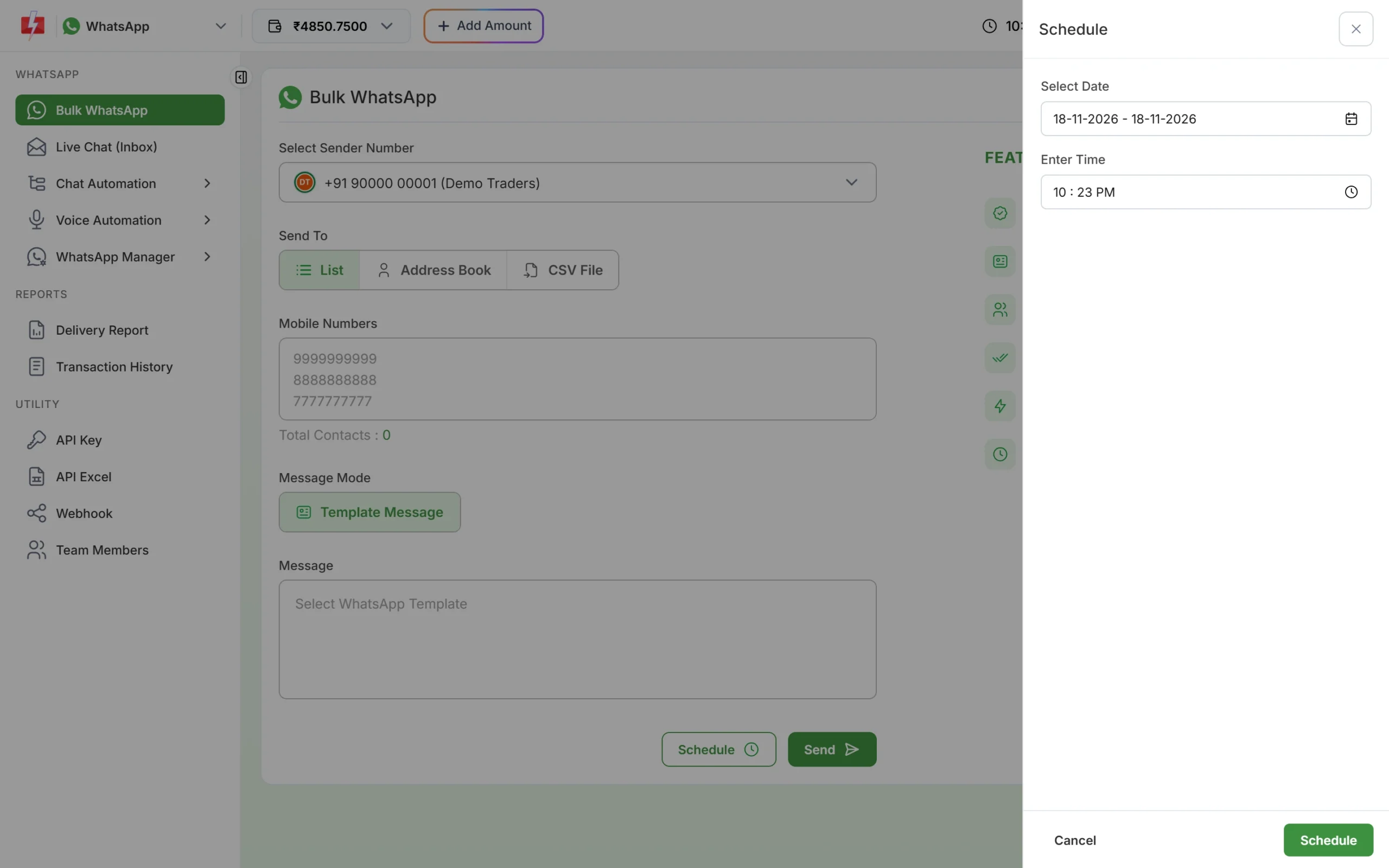
Pick the date and time; a date range repeats the campaign on each day. Scheduled campaigns are listed in Delivery Report > Schedule. If you change your mind, click Cancel before the time and the amount is credited back to your wallet.
-
Compare the read rate
A day after both have gone, open Delivery Report, switch the range to cover both campaigns and click each campaign’s detail. The donut shows how many messages were Delivered, Read and Failed. The time with the higher Read share, and more replies in Live Chat, is your better slot.
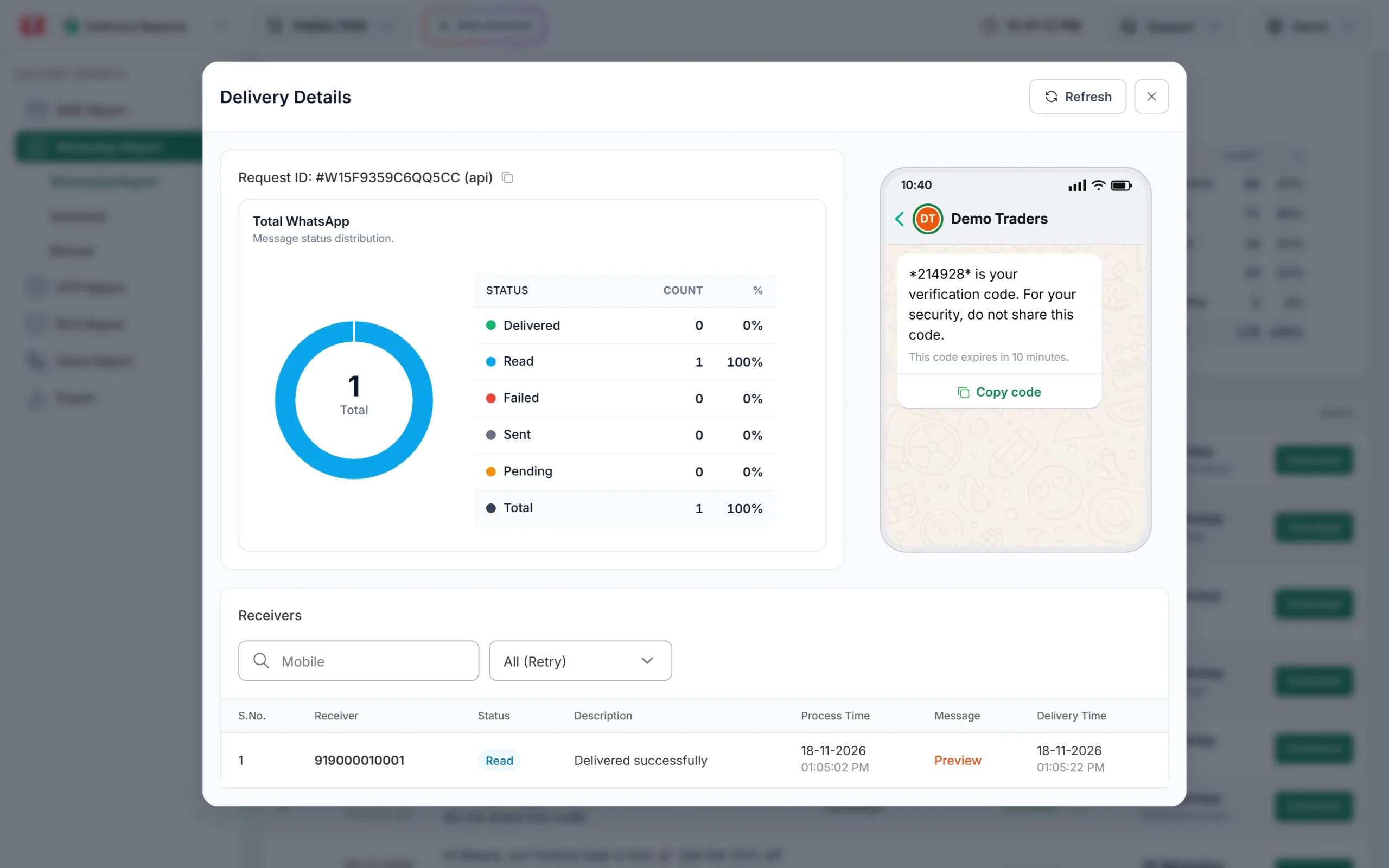
Read share per campaign tells you which time worked better. -
Repeat with a different day
Try weekday against weekend next. After three or four tests you will have a clear pattern for your own customers, which is more useful than any general list.
Other things that affect timing
- Messaging limit: limits start at the tier Meta gives your business: often 250 unique customers per 24 hours for a new, unverified business and 2,000 (2K) once the business is verified (at the time of writing). A bigger list has to be spread over days, so plan important campaigns early.
- Too many marketing messages: Meta limits how many marketing messages one person gets from businesses. If you send right after other brands, some of yours may fail with a “healthy ecosystem” reason. Failed messages are refunded to your wallet automatically.
- Be ready to reply: send when your team is online. Replies inside 24 hours are cheaper session messages, and fast answers turn interest into orders. Set an out-of-office message for replies that come after hours.
- Frequency: one or two marketing messages a week is easier on customers than daily blasts.
What it costs
Timing does not change the price. At the time of writing a marketing message costs ₹0.95, a utility message ₹0.25 and a session reply ₹0.13. A scheduled campaign is charged when it is queued, and a cancelled schedule is credited back. See the WhatsApp pricing page.
Sending in bulk? For high WhatsApp volumes our team offers discounted rates. Talk to our team or see WhatsApp pricing.
Frequently asked questions
What is the best day to send WhatsApp marketing messages?
It depends on your customers. Retail and food often do well on weekends, B2B on weekdays. Test two days with the same template and compare the read rate.
Can I send WhatsApp marketing messages at night?
Technically yes, as WhatsApp has no TRAI time window. It is not a good idea, because night messages get muted or blocked more often.
Can I schedule a WhatsApp campaign for later?
Yes. Click Schedule on the Bulk WhatsApp page and pick the date and time.
Does sending time affect delivery?
Delivery depends on the customer’s phone being online and Meta’s rules, not on the hour. Reading and replying depend on the hour.
Can I send the same message every day at a fixed time?
Yes. Choose a date range when scheduling and the campaign goes on each day in the range at that time. The cost is multiplied by the number of days.