
WhatsApp marketing works when customers are happy to get your messages, and it fails when they block or report you. The best practices are simple: message only opted-in customers, send fewer and more personal offers, use the right template category, give an easy way to stop, and watch your quality rating and delivery report after every campaign. This page is a checklist of 15 WhatsApp marketing best practices to avoid blocks, paused templates and account restrictions, with the place in Fast2SMS where you check each one.
यह गाइड हिंदी में पढ़ें: WhatsApp marketing कैसे करें: नियम, template, खर्च और step by step तरीका
Why blocks matter so much
Meta rates every business number on how customers react to its messages, mainly blocks and spam reports, over the last seven days. The rating shows as High, Medium or Low. A low rating stops your messaging limit from growing, can get templates paused, and repeated problems can lead Meta to restrict or remove the account. One careless campaign to a cold list can undo months of good work.
Before you send: your list
- Message only opted-in customers. Meta’s rule: the person agreed to get messages from your business on WhatsApp, and your business was named. Having a number is not permission. Bought, rented or scraped lists bring the most blocks.
- Split your list by interest. Send the kitchenware offer to people who bought kitchenware. A smaller, relevant list gets more reads and fewer blocks than everyone at once.
- Remove people who opted out. Delete numbers that replied STOP, tapped “Stop promotions” or failed with error 131050 (they stopped your marketing messages in WhatsApp).
- Check your number before a big send. In WhatsApp Manager > Numbers, look at the Messaging limit column, for example “Quality: High”. Click Sync Details for fresh values from Meta.
- Start new numbers with your best customers. Your limit starts at Meta’s tier for your business, often 250 unique customers in 24 hours for a new, unverified business and 2,000 (2K) after verification. Use the first campaigns for customers who know you well, so early feedback is good and Meta raises your limit.
The template: what you send
- Use the right category. Offers, wishes, launches and reminders with a discount are Marketing. Order and payment updates are Utility. Meta checks this, can move a template to Marketing, and may restrict accounts that keep labelling marketing as utility.
- Make the first line personal. Start with the customer’s name and a reason they care about: something they bought, asked for or left in the cart.
- One offer, one button. A clear message with one action button gets better results than a long list of deals.
- Always add a way out. A quick reply button such as “Stop promotions” lets customers leave without blocking you. Pair it with an auto reply that confirms the opt-out.
- Test before you send. On an APPROVED template card, click Test, enter your own number and check the message on your phone.
When and how often you send
- Send at sensible hours. Daytime and early evening, when customers are awake and shopping. A late-night offer is a common reason people block a business.
- Do not send the same offer every day. Once or twice a week at most for most businesses, and only what you promised when they opted in.
- Do not resend at once to error 131049. Meta limits how many marketing messages a person gets when they rarely read them. Meta asks you to wait at least 24 hours before trying again. Marketing messages sent within 24 hours of the customer writing to you do not count toward this limit.
- Answer replies quickly. A customer who replies and gets no answer feels ignored. Use Live Chat (Inbox), keyword auto replies and a delayed-response message so every reply gets a response.
After you send: read the report
- Read the Delivery Report after every campaign. Open Delivery Report, filter by Failed and open a campaign’s details to see each number’s failure reason. A high failure or low read rate means the list or the message needs work before the next send.
-
Filter the report to failed messages
In Delivery Report, choose a date range and set Delivery Status to Failed. The cards show totals for Delivered, Read, Failed, Sent and Pending.
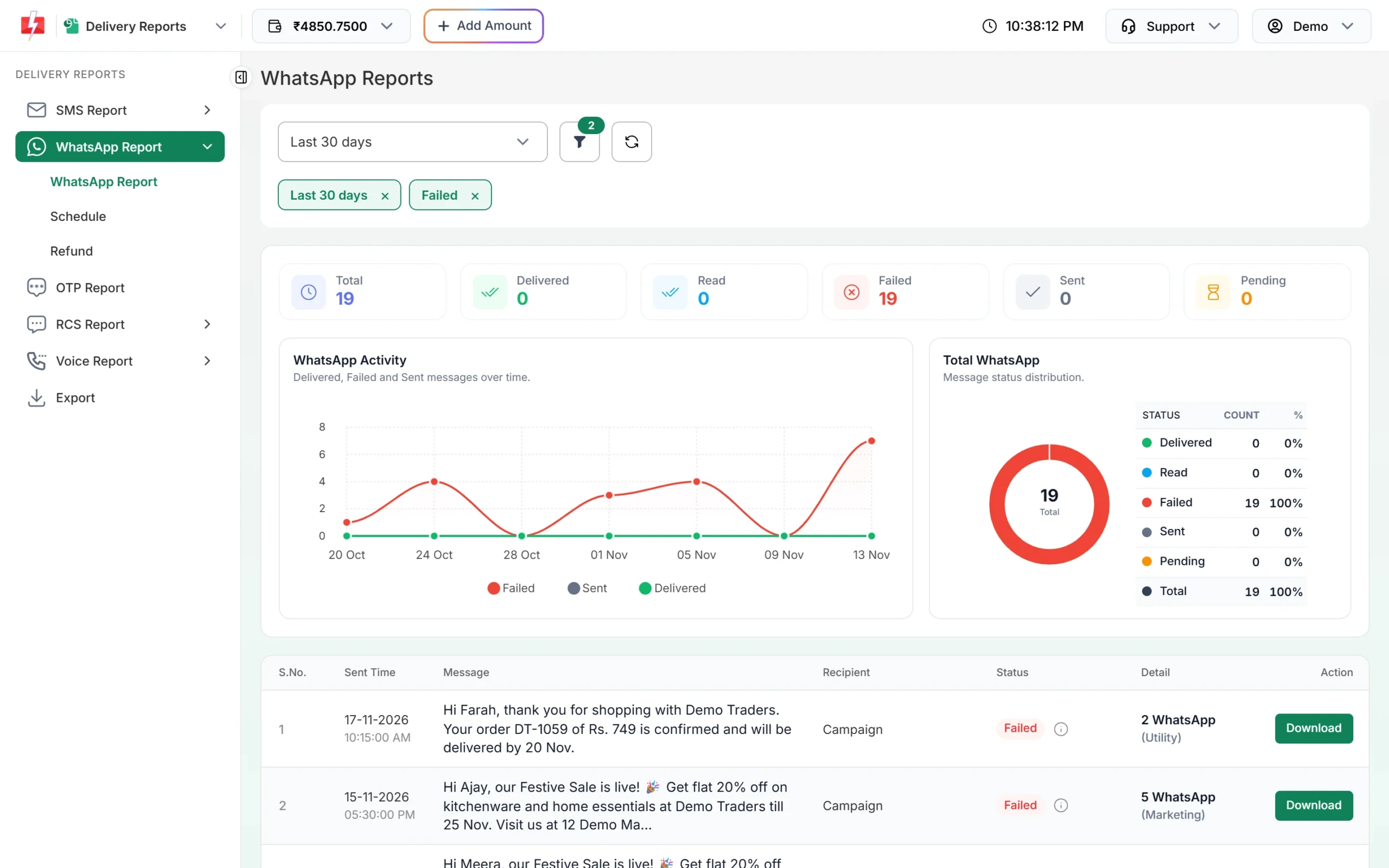
Filter to failed messages to spot problem campaigns. -
Open the campaign details
Click a campaign to open Delivery Details. The Receivers table shows each number’s status and the description of why it failed. Failed messages are refunded to your wallet automatically.
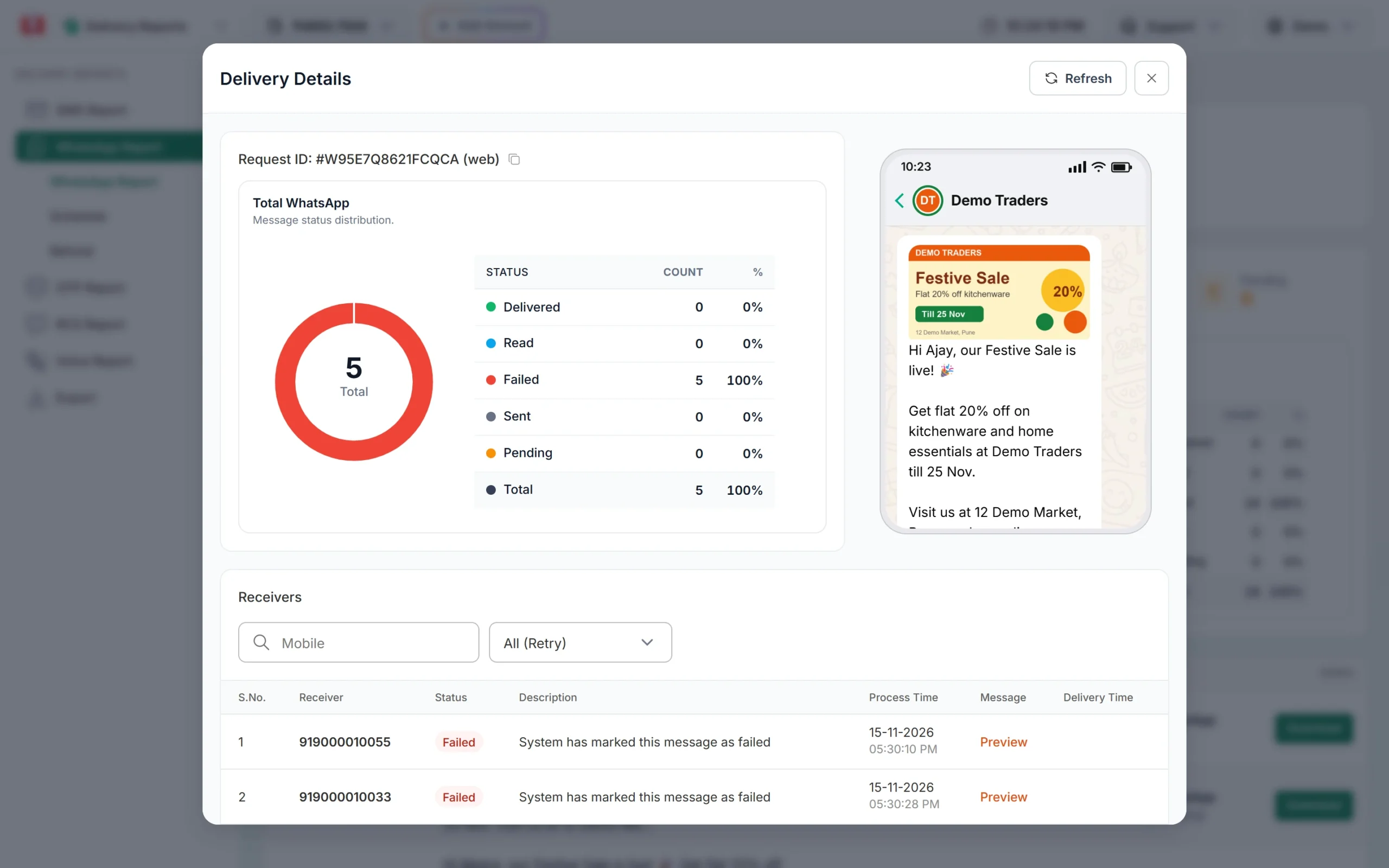
Each failed number with its reason.
Warning signs and what to do
| What you see | What it means | What to do |
|---|---|---|
| Quality Medium or Low in WhatsApp Manager > Numbers | Customers are blocking or reporting you | Pause marketing, send only to your most engaged customers, improve the message |
| Template status PAUSED or DISABLED | Meta saw poor feedback on that template | Stop using it and write a better one. Queued messages with it fail and are refunded. |
| Error 131048 | Sending was restricted because many messages were blocked or flagged as spam | Check quality, clean the list, slow down |
| Error 131049 | Meta held back a marketing message to protect the customer’s inbox | Wait at least 24 hours before retrying, and make offers more relevant |
| Error 131050 | The customer stopped your marketing messages | Remove them from marketing lists. Do not retry. |
| Many reads but no replies or sales | The offer is not interesting enough | Test a different offer or a smaller, better-matched list |
What never to do
- Do not send bulk messages from the normal WhatsApp or WhatsApp Business app, or with unofficial “bulk sender” tools. WhatsApp bans numbers for this.
- Do not upload bought or scraped number lists.
- Do not label offers as Utility to pay less.
- Do not keep messaging someone who asked you to stop, on WhatsApp or anywhere else.
- Do not send marketing templates to United States numbers. At the time of writing, Meta does not deliver marketing templates to US phone numbers.
What good campaigns cost
At the time of writing a Marketing template costs ₹0.95 per message on Fast2SMS, Utility and Authentication templates cost ₹0.25, and Live Chat replies cost ₹0.13. Failed messages, including blocked or opted-out numbers, are refunded automatically. A smaller list of interested customers often costs less and sells more than a large cold list. See the WhatsApp pricing page for current rates.
Sending in bulk? For high WhatsApp volumes our team offers discounted rates. Talk to our team or see WhatsApp pricing.
Frequently asked questions
How do I avoid getting my WhatsApp business number banned?
Use the official WhatsApp Business API, message only opted-in customers, use approved templates in the right category and give an easy way to stop. Avoid unofficial bulk tools.
How many marketing messages can I send per day?
Your messaging limit sets how many unique customers you can start chats with in 24 hours, starting at Meta’s tier for your business (often 250 before business verification and 2K after). For each customer, once or twice a week is a safe rhythm.
What is a good WhatsApp quality rating?
High (green). Medium means some customers are blocking or reporting you, and Low means you should stop marketing and fix your list and messages.
Why are some marketing messages not delivered?
Common reasons are Meta’s per-user marketing limit (131049), the customer stopping your marketing messages (131050) or a number that cannot receive the message. The Delivery Report shows the reason for each number.
Should I retry failed WhatsApp messages?
Only for temporary failures, and not within 24 hours for 131049. Never retry numbers that opted out.
Does adding a Stop button reduce my results?
It usually protects them. A customer who can tap “Stop promotions” does not need to block or report you, which keeps your quality rating up.