
To block a customer on the WhatsApp Business API in Fast2SMS, open their chat in Live Chat (Inbox), click the three-dot menu at the top right, choose Block and confirm. The block is also sent to WhatsApp, so that person can no longer message your business number, and you cannot message them until you unblock.
Use it for spam, abuse or people who keep sending messages you cannot handle. For a customer who only wants to stop offers, there is a better option, explained below.
How to block a contact
-
Open the chat
Go to Live Chat (Inbox) and make sure the right business number is selected at the top left. Search for the customer by name or number and open the conversation.
-
Choose Block from the menu
Click the three dots next to Transfer To. The menu shows Contact info, the chat status options, Block, Delete chat and Remove transfer chats. Click Block.
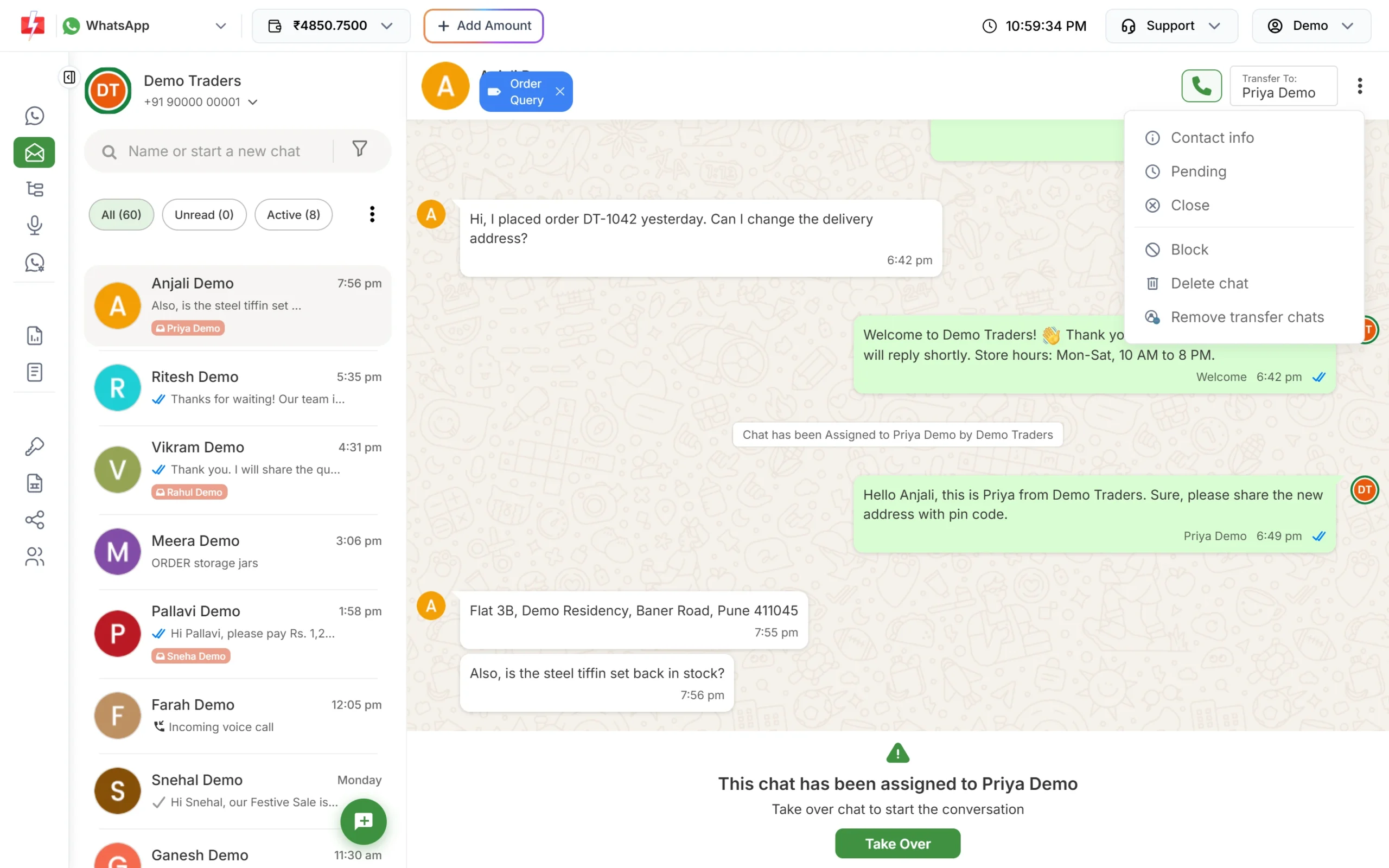
Block is in the chat’s three-dot menu. -
Confirm
Fast2SMS asks “Block {name}?” and explains that this person won’t be able to message you. Confirm, and the reply box is replaced by an Unblock bar.
How to unblock a contact
Open the same chat in Live Chat. Click Unblock in the bar at the bottom, or choose Unblock from the three-dot menu. The customer can message you again, and you can reply as usual inside the 24-hour window or send an approved template.
WhatsApp’s rules for blocking
| Rule (at the time of writing) | What it means for you |
|---|---|
| You can block only users who messaged your number in the last 24 hours | Block soon after the unwanted message. An older chat may not be accepted by WhatsApp. |
| A block works per business number | If you have two numbers, block the person on each number where they write to you. |
| Messages to a blocked user fail | Remove blocked numbers from your campaign lists so they do not show as failed. |
| The blocklist holds up to 64,000 users per number | Enough for almost every business. |
Block or opt-out: which one to use
When a customer replies STOP or asks for no more offers, do not block them. Take their number out of your marketing lists, and keep sending only what they still need, such as order updates. Blocking also stops them from contacting you about an order or a complaint, which can lead to reports against your number.
Frequently asked questions
Will the customer know I blocked them?
Fast2SMS does not send them any message about it. They simply cannot reach your business number any more.
Does blocking delete the chat?
No. The chat stays in Live Chat with an Unblock bar. Use Delete chat (account owner only) if you also want to remove the messages.
Can a customer block my business?
Yes. Customers can block or report your number in WhatsApp at any time. Many blocks can lower your quality rating, so send messages people expect.
Why was the block refused?
Most often the customer has not messaged your number in the last 24 hours. WhatsApp only allows blocking people who wrote to you recently.