
WhatsApp for coaching institutes and bulk SMS do different jobs in a coaching business. WhatsApp is where students and parents ask about fees and batches, get class links and receive test results; SMS is the backup that reaches everyone, even without data. This guide is for coaching centres, tuition classes and edtech apps. It covers the messages you send, sample DLT and WhatsApp templates, voice and OTP use, and the exact setup in Fast2SMS.
Coaching messages and the right channel for each
| Message | Best channel | Why |
|---|---|---|
| “What are the fees?” “Batch timings?” | WhatsApp auto reply or chatbot | Answers in seconds, any hour, without a counsellor. |
| Free demo class booked | WhatsApp utility plus SMS | Confirms the slot right after the student books. |
| Class starts in 1 hour (with link) | WhatsApp utility with a “Join class” button | One tap opens the class. SMS works as backup. |
| Class cancelled or shifted | SMS, plus a voice call for parents | Reaches students without data and parents who do not read texts. |
| Test score and rank | WhatsApp utility or SMS with a result link | Each student gets only their own result. |
| Fee instalment due | SMS and WhatsApp utility with a pay link | SMS for reach, WhatsApp for one-tap payment. |
| App sign-up and login | Smart OTP (WhatsApp one-tap auto-fill or SMS) | Fast codes on a priority route with a fallback channel. |
| New batch, scholarship test | WhatsApp marketing, promotional SMS or RCS | Promotional, so send only to people who opted in, within allowed hours. |
| Monthly parents’ meeting | Key Press voice call | Parents press 1 to confirm; you see the count. |
Sample DLT SMS templates for coaching institutes
Register these on your DLT portal after changing them to your own wording and brand. They are examples, not pre-approved templates. Notice that everything about an enrolled student or a booked demo is a service message, while anything that sells a new course is promotional.
| Use | DLT category | Sample template (example) |
|---|---|---|
| Demo class booked | Service Implicit | Hi {#var#}, your free demo class for {#var#} is booked on {#var#} at {#var#}. Address: {#var#} – Demo Classes |
| Class reminder | Service Implicit | Hi {#var#}, your {#var#} class starts at {#var#} today. Join here: {#url#} – Demo Classes |
| Class rescheduled | Service Implicit | Dear Student, the {#var#} class of batch {#alphanumeric#} on {#var#} is shifted to {#var#}. – Demo Classes |
| Test result | Service Implicit | Hi {#var#}, your score in {#var#} is {#numeric#} out of {#numeric#}. See your analysis: {#url#} – Demo Classes |
| Fee instalment due | Service Implicit | Dear {#var#}, instalment {#numeric#} of Rs.{#numeric#} for {#var#} is due on {#var#}. Pay: {#url#} Ignore if paid. – Demo Classes |
| Fee received | Transactional | Received Rs.{#numeric#} from {#var#} on {#var#} towards {#var#}. Receipt {#alphanumeric#}. – Demo Classes |
| App login OTP | Transactional | {#numeric#} is your OTP to log in to the Demo Classes app. Valid for {#numeric#} minutes. Do not share it. – Demo Classes |
| Scholarship test | Promotional | Demo Classes scholarship test on {#var#}. Win up to {#numeric#}% fee waiver for the {#var#} batch. Register: {#url#} – Demo Classes |
WhatsApp templates: utility vs marketing
| Template name | Category | Body (example) | Buttons |
|---|---|---|---|
| class_reminder | Utility | Hi {{1}}, your {{2}} class with {{3}} starts at {{4}} today. Tap below to join. | Visit website “Join class” (dynamic URL) |
| test_result | Utility | Hi {{1}}, your result for {{2}} is out. Score: {{3}}. Rank in batch: {{4}}. | Visit website “See analysis” |
| fee_instalment_due | Utility | Dear {{1}}, instalment {{2}} of Rs. {{3}} for {{4}} is due on {{5}}. | Visit website “Pay now” |
| new_batch_offer | Marketing | Hi {{1}}, a new {{2}} batch starts on {{3}}. Enrol before {{4}} to get early-bird fees. | Copy offer code, “Stop promotions” quick reply |
| signup_otp | Authentication | Fixed wording set by Meta with your code | One-tap auto-fill or Copy code |
For an Android app, an authentication template can use One-tap auto-fill or Zero-tap auto-fill: you add your app’s package name and signature hash (up to 5 apps), and the code fills in the app without typing. Copy code works for any app or website.
Students who message you first (“Hi”, “fees”) open a 24-hour window. Inside it you can reply with normal messages, auto replies and chatbot answers. After 24 hours you need an approved template again.
Voice calls for coaching institutes
A voice call is useful for parents. Use Simple for one recorded announcement and Key Press (DTMF) when you need an answer.
Sample Key Press script: “Namaste, this is Demo Classes. The parents’ meeting for the JEE batch is on Sunday at 11 AM. Press 1 if you will attend. Press 2 if you cannot come.”
OTP for edtech apps and student portals
Sign-up OTP is often the busiest message an edtech app sends. Smart OTP is the recommended way: it sends the code on a priority route by SMS (with your DLT OTP template) or WhatsApp (with an authentication template), checks the code when the student enters it, limits wrong tries and resends, and can fall back to the other channel with the same code. Your developer gets an OTP ID per template and uses the send and verify APIs. If your developers already create and check codes themselves, they can send the OTP through the DLT SMS API with your approved OTP template instead.
How to get started on Fast2SMS
Before you start: a Fast2SMS account with wallet balance, your DLT entity, sender ID and templates approved and added in DLT Manager (for SMS), and a WhatsApp Business number connected in the WhatsApp app.
-
Send class reminders to a batch from a CSV
Open WhatsApp > Bulk WhatsApp, choose your sender number and click the CSV File tab. Upload your batch list (CSV or Excel, up to 20 MB), choose the mobile number column, then pick your class_reminder template and map each variable to a column, such as student name, subject and time.
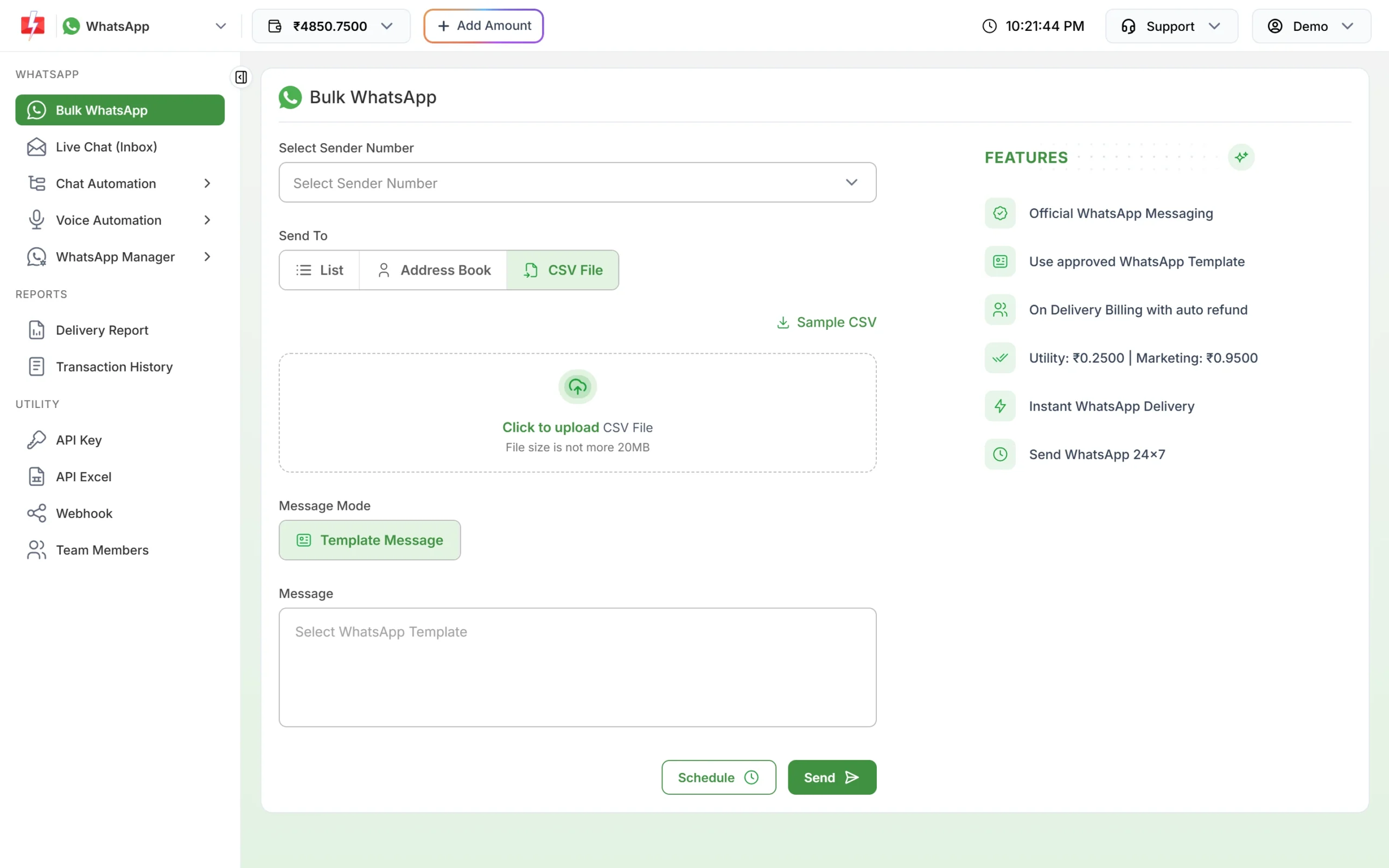
Upload the batch list and map template variables to columns. -
Answer common questions with auto replies
Go to Chat Automation > Inbox Settings and click Create Auto Reply. Add keywords such as “fees”, “timing”, “address”, choose a match type (Exact, Starts with or Contains) and write the answer. Higher priority rules run first. Turn rules on or off with the status switch.
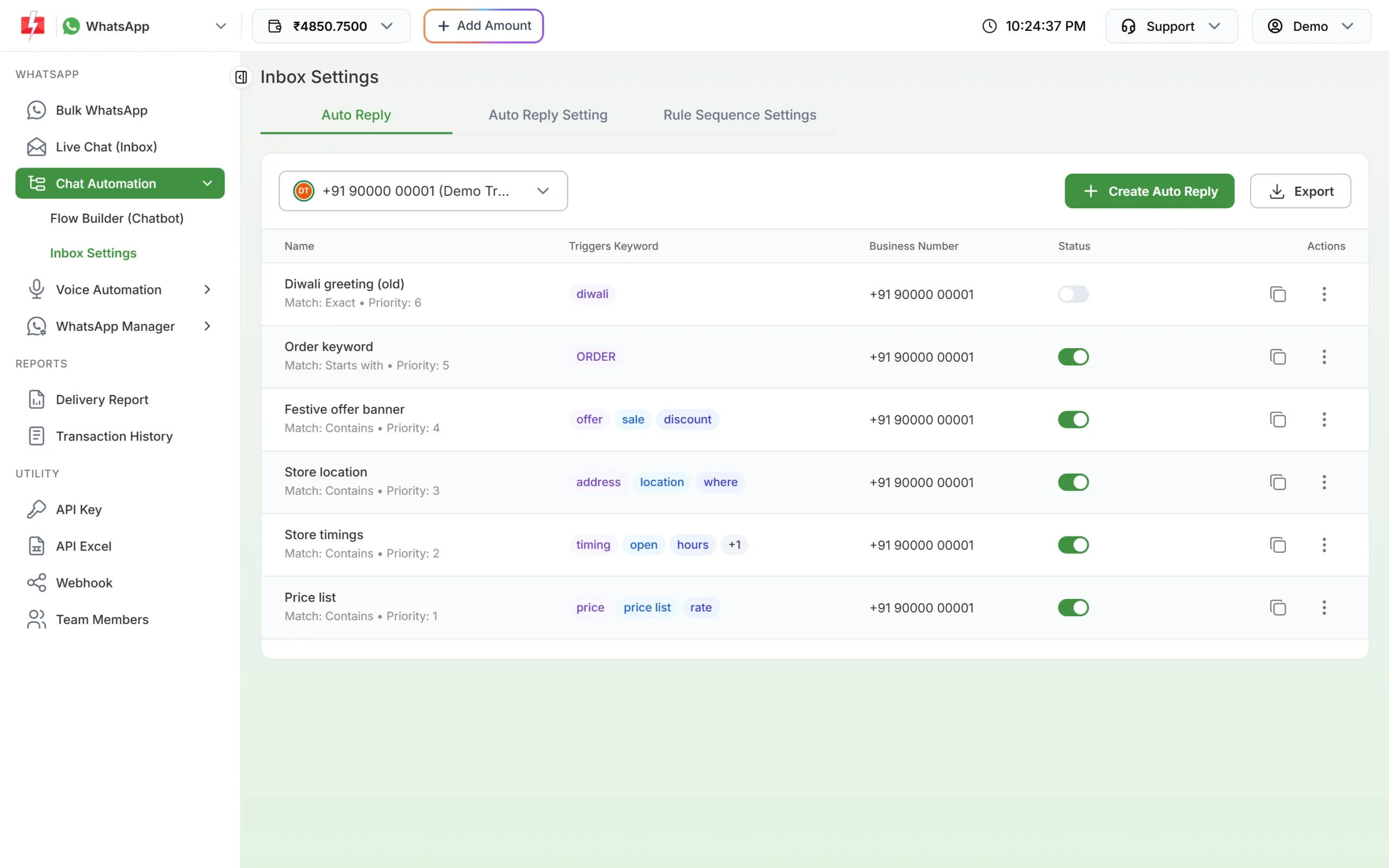
Keyword rules reply to common questions instantly. In the Auto Reply Setting tab you can also set a welcome message and an out-of-office message with your centre’s working hours.
-
Check the cost before a fee reminder goes out
In SMS > DLT SMS, pick your sender ID, add the numbers, select the fee template and click Send. The Message Preview & Confirmation popup shows the cost per SMS, total numbers, duplicate and invalid numbers and the total cost. Duplicates and invalid numbers are not charged. Click Confirm & Send only when the numbers look right.
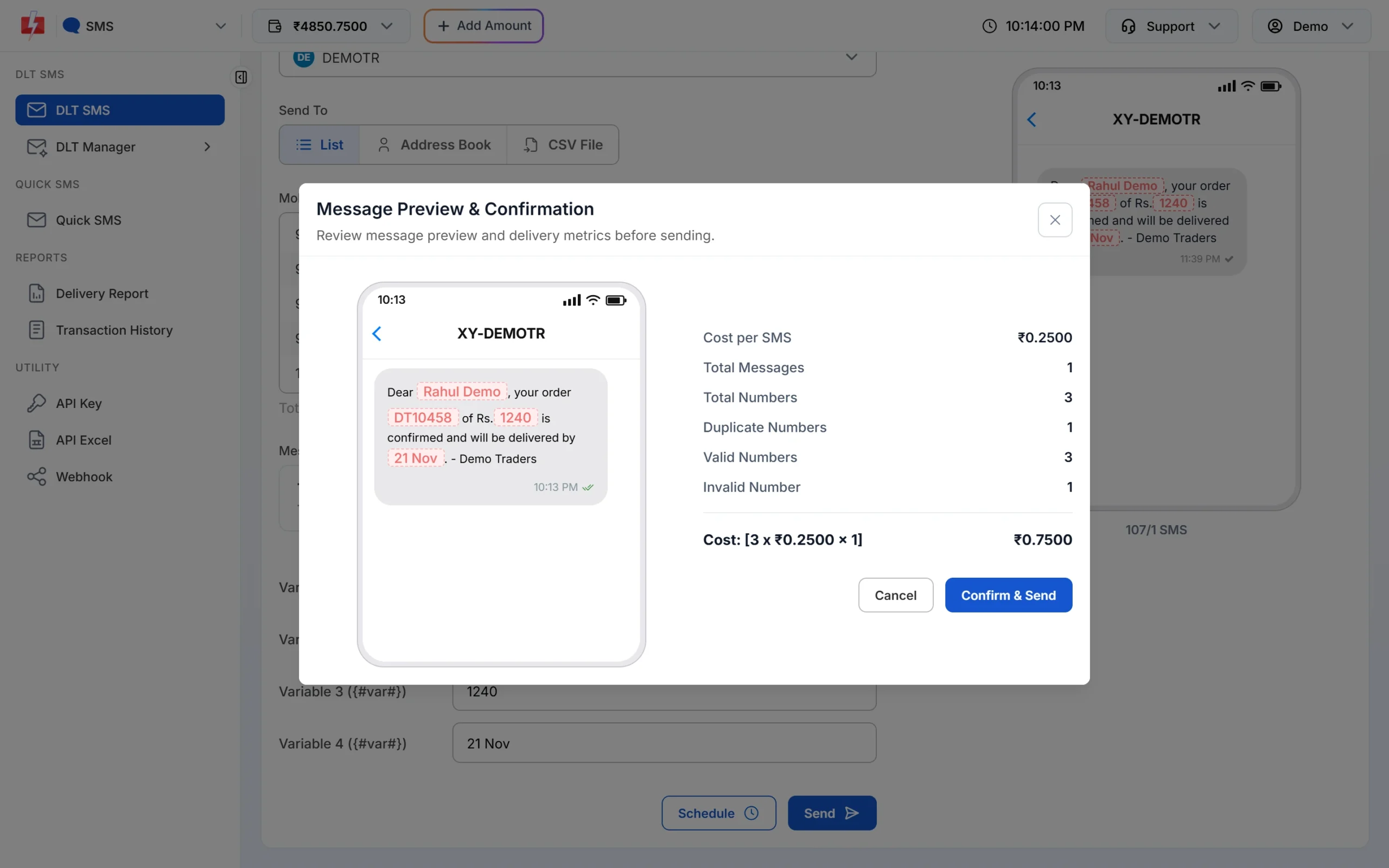
Check counts and cost, then confirm. -
Call parents when a class is cancelled
Open Voice > Bulk Voice Call, enter a campaign name, choose Simple, add the parents’ numbers and pick an approved voice file. Click Send or Schedule. New recordings are uploaded in Voice Files as MP3 or WAV, or recorded in the browser, and are usable once the operator approves them.
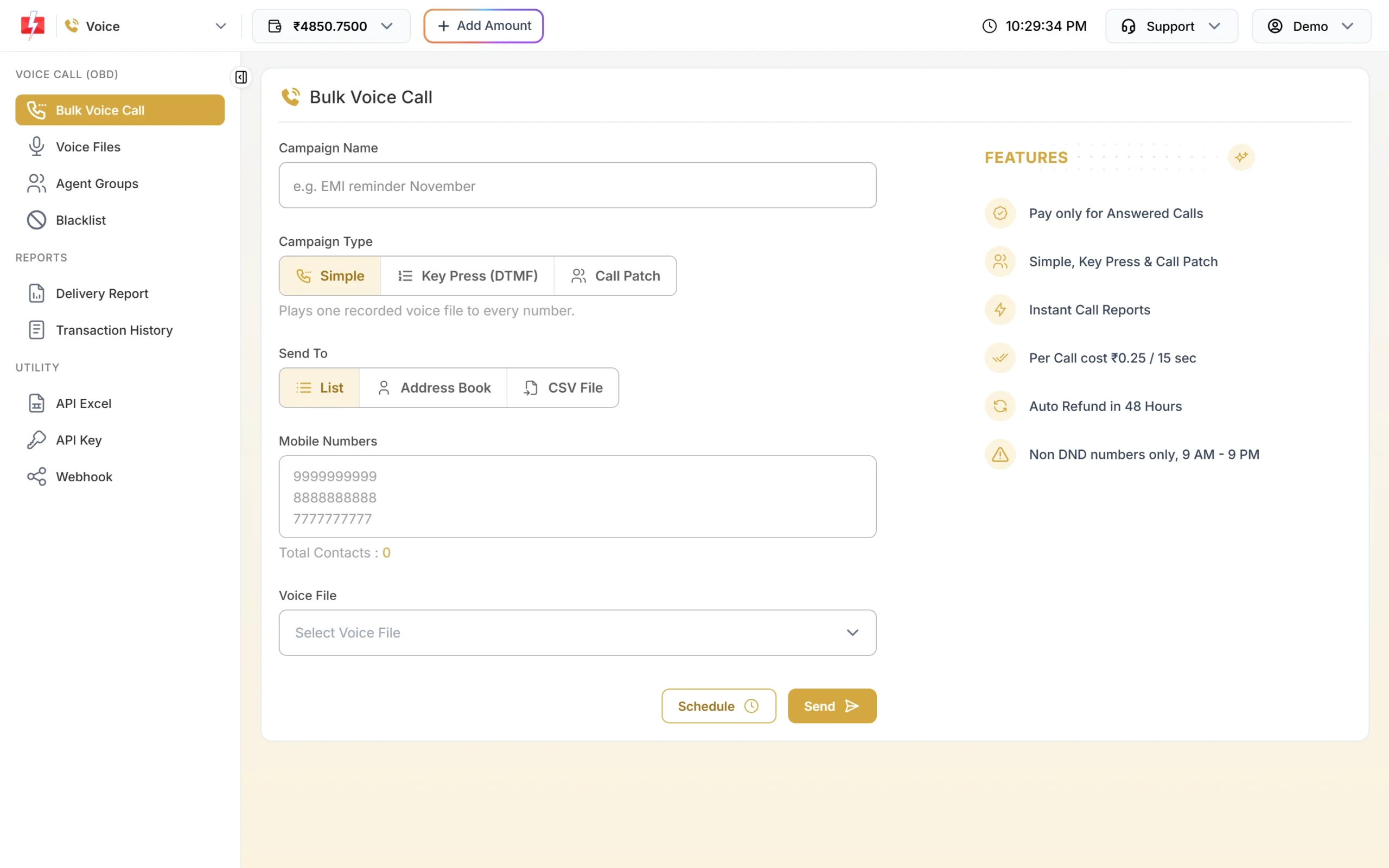
A Simple call plays one recording to every number. -
Connect your app or LMS through the API
Open Account Setting > API Excel, choose the channel (SMS, WhatsApp, RCS, Smart OTP or Voice) and click Download Excel. The file lists your approved templates with sample API requests, which your developer can use to send reminders and results from your LMS. Your API key is under API Key.
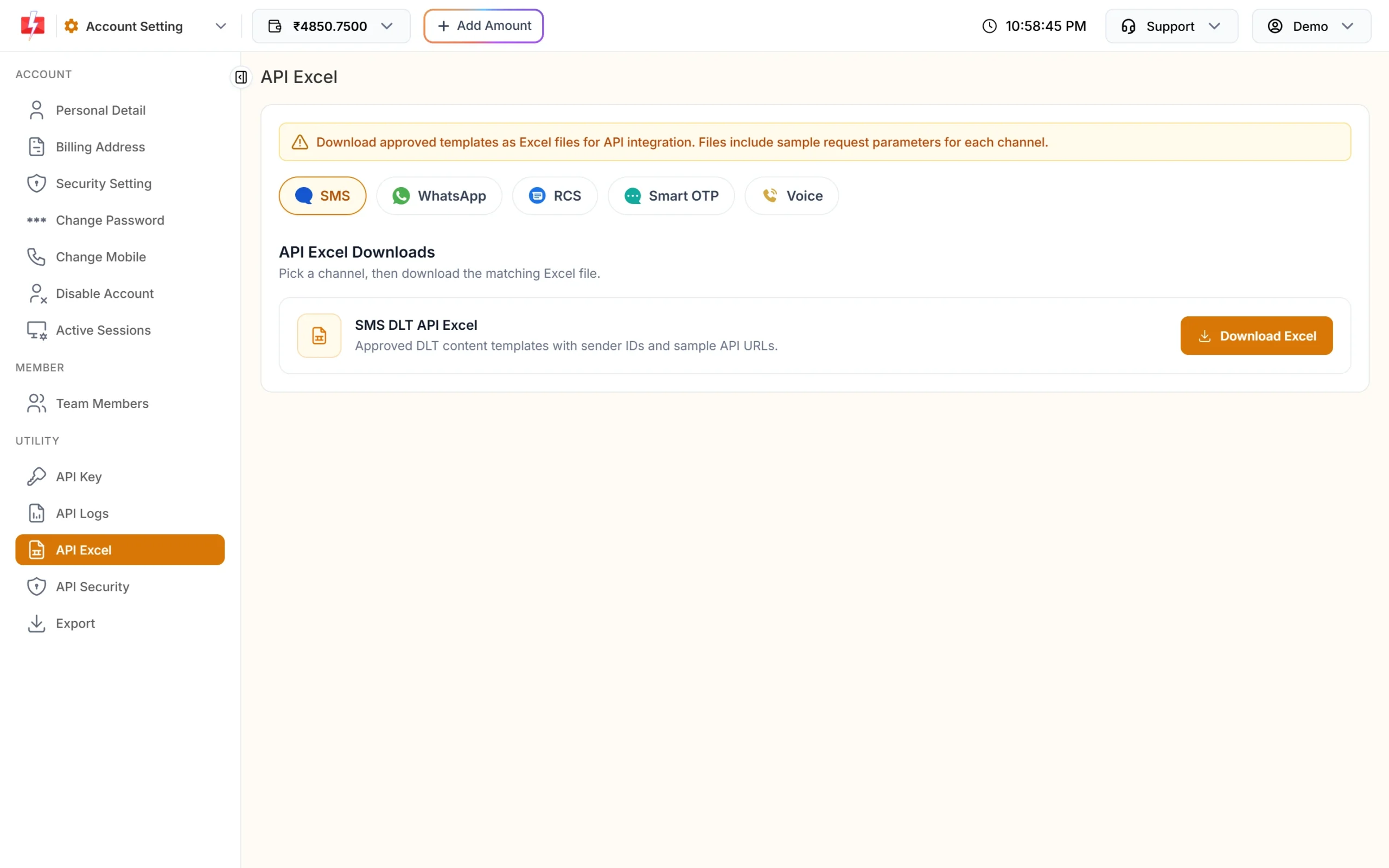
Download your templates with sample API requests. -
See who read the message
Open Delivery Reports > WhatsApp Report. The cards show Total, Delivered, Read, Failed, Sent and Pending, and each campaign row has a Download button for the per-number report. Use it to call students who did not receive a test schedule.
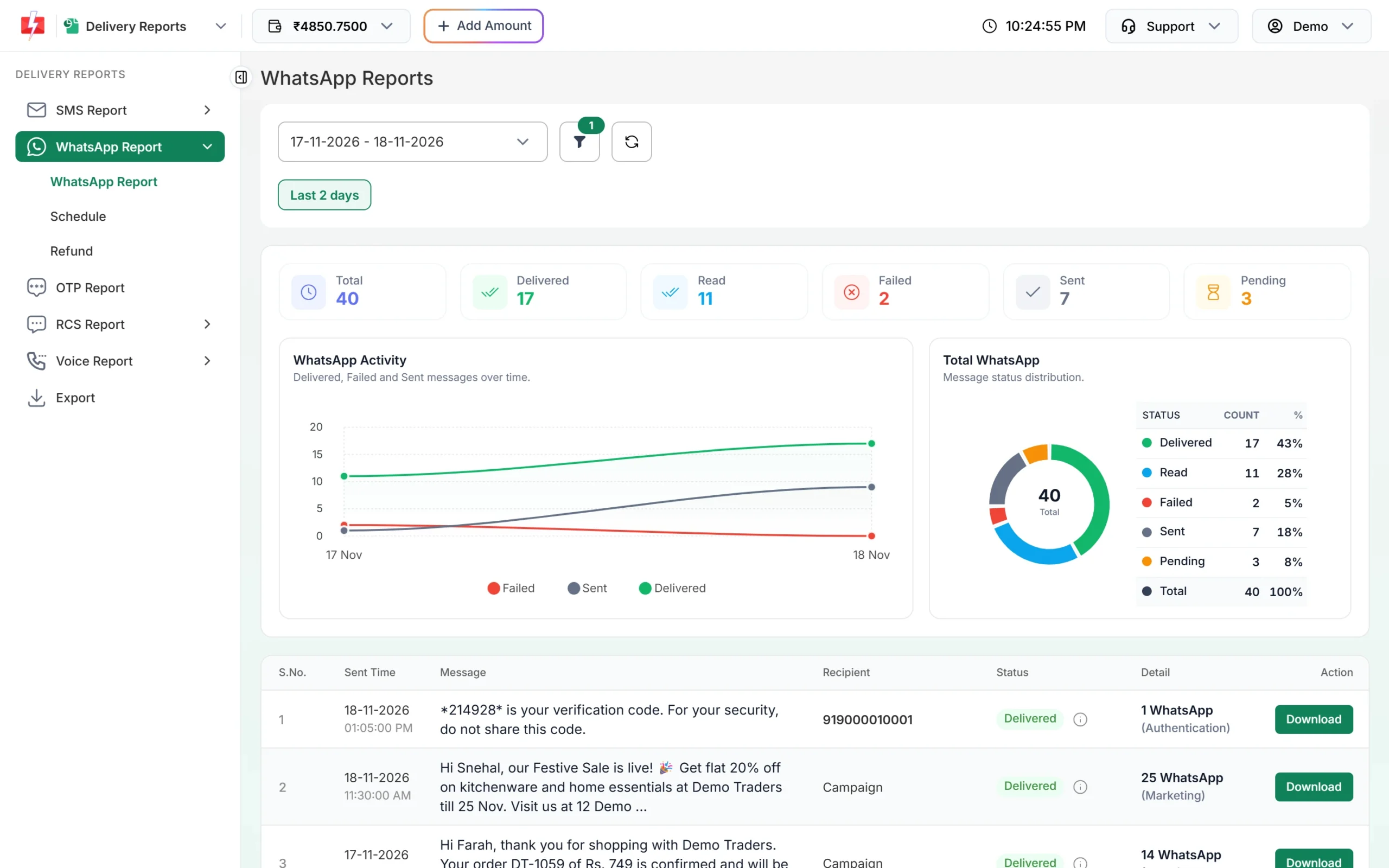
Delivered and Read counts for each campaign.
Automation options
- API: send DLT SMS, WhatsApp templates, voice campaigns and Smart OTP from your app, LMS or fee software.
- Webhooks: receive delivery status, and incoming WhatsApp replies, in your system, for example to mark which students confirmed a class.
- Flow Builder chatbot: a WhatsApp menu for courses, fees, batch timings and “talk to a counsellor”, with handover to a team member.
- CSV or Excel upload and scheduling: send personalised reminders without a developer, now or at a set time, or once a day over a date range.
- Integrations: Google Sheets, Pabbly Connect, HubSpot, Zoho Campaigns and other tools listed on the Integrations page.
Compliance notes
- DLT and PE-TM: SMS must use approved templates and headers, with your PE-TM chain to Fast2SMS completed.
- Promotional timing: new-batch and scholarship SMS go out only between 10 AM and 9 PM and do not reach DND numbers without consent. TRAI also requires an opt-out option in promotional messages.
- WhatsApp opt-in: add a consent line on your enquiry and admission forms. Keep separate consent for updates and for offers, and add a “Stop promotions” button to marketing templates. Never message bought lead lists.
- Minors and privacy: many coaching students are under 18. Send results and fee messages to the number registered for that student, never share rank lists with personal marks in a group broadcast, and do not ask for Aadhaar or bank details over chat.
- Voice: recordings must name your institute, and admission and fee-collection calls are not allowed.
How to estimate the cost
For a batch of students, multiply the number of students by the messages each gets in a month, per channel. SMS cost is numbers x SMS parts x your per-SMS rate (bulk SMS pricing). WhatsApp cost depends on the template category, with utility usually cheaper than marketing; failed messages are refunded automatically (WhatsApp pricing). Voice is charged per pulse for answered calls only (voice call pricing). The Calculate Credits tab under Add Amount shows how many messages a recharge buys.
Frequently asked questions
Is WhatsApp or SMS better for a coaching institute?
Use both. WhatsApp is better for links, PDFs, replies and chat. SMS reaches every number without data and is the safer backup for urgent changes.
Can I send each student their own test score?
Yes. Upload a CSV with name, test and score columns and map them to the template variables. Each student gets only their own row.
Which DLT category is a demo class confirmation?
Service Implicit, since it is an update about a booking the student made. A course offer is Promotional.
Can we promote new batches on voice calls?
No. Admission promotions are on the operator’s not-allowed list for voice files. Use WhatsApp marketing templates, promotional SMS or RCS for that.
Can WhatsApp OTP fill in automatically in our app?
Yes, on Android, with an authentication template using one-tap or zero-tap auto-fill and your app’s package name and signature hash.
Can students ask doubts on our WhatsApp number?
Yes. Messages arrive in Live Chat (Inbox), where you or your team members reply. Incoming messages are free; replies within 24 hours are charged as session messages.