
Bulk SMS for insurance companies and agents is mostly about the policy lifecycle: proposal, payment, policy issue, renewal and claim. SMS carries the short alerts every policyholder must get, WhatsApp delivers the policy PDF and claim updates, a recorded call reminds people who ignore texts before their policy lapses, and Smart OTP verifies proposals and portal logins. This guide maps each message to a channel, gives sample templates, lists the rules that apply to insurance messaging, and shows the setup in Fast2SMS.
It is written for life, health and general insurers, brokers, corporate agents and individual agents who manage their own customer lists. Treat it as product guidance, and have your compliance team approve the message text.
Which channel for which insurance message
Policy servicing messages are expected by the customer, so they are service messages. Selling a new policy, a top-up or a rider is promotional. Keep the two apart in every channel.
| Message | Best channel | Why |
|---|---|---|
| Proposal received / medical check-up booked | SMS (Service Implicit) | Short, expected and must reach the proposer even on DND. |
| Proposal or portal OTP | Smart OTP | Priority route with automatic fallback to the other channel. |
| Premium received | SMS and WhatsApp utility | SMS as proof, WhatsApp with the receipt as a PDF. |
| Policy issued | WhatsApp utility with a document header | The policy PDF opens inside the chat and stays there for later. |
| Renewal due (30, 15 and 7 days before) | SMS, WhatsApp utility with a pay button | Repeated nudges on two channels. Schedule them in advance. |
| Grace period ending | SMS plus a Key Press voice call | A call reaches people who skip texts, and the key press tells you who has paid. |
| Claim registered / documents pending / settled | SMS and WhatsApp utility | WhatsApp lets the customer reply with photos of documents in Live Chat. |
| Nominee or KYC update | WhatsApp utility with a link button | The customer can act from the message. |
| New plan, top-up or rider offers | WhatsApp marketing, promotional SMS or RCS | Promotional rules apply: consent, DND and sending hours. |
Sample DLT SMS templates for insurers and agents
These are examples to adapt and register on your DLT portal under your own entity. They are not pre-approved. Keep the company name fixed, use typed variables, keep to three variables or fewer and whitelist every link and callback number.
| Use | Example template to register | Category |
|---|---|---|
| Medical check-up | Your medical check-up for YourInsure proposal {#alphanumeric#} is booked on {#alphanumeric#}. To change it, call {#cbn#}. | Service Implicit |
| Proposal OTP | {#numeric#} is your OTP to verify your YourInsure proposal. Do not share it with anyone. | Service Implicit |
| Premium received | Premium of Rs {#numeric#} received for YourInsure policy {#alphanumeric#}. Thank you. | Service Implicit |
| Policy issued | Your YourInsure policy {#alphanumeric#} has been issued. Download your policy at {#url#} | Service Implicit |
| Renewal due | Your YourInsure policy {#alphanumeric#} is due for renewal on {#alphanumeric#}. Renew online at {#url#} | Service Implicit |
| Claim registered | Your claim {#alphanumeric#} with YourInsure is registered. Track the status at {#url#} | Service Implicit |
| Documents pending | To process your YourInsure claim {#alphanumeric#}, please share: {#alphanumeric#}. Upload at {#url#} | Service Implicit |
| Claim settled | Your YourInsure claim {#alphanumeric#} has been settled for Rs {#numeric#}. | Service Implicit |
| Top-up offer | Increase your health cover with a YourInsure top-up from Rs {#numeric#} a month. Read the policy terms before you buy: {#url#} | Promotional |
WhatsApp templates for insurance: utility vs marketing
A WhatsApp Utility template must be about the customer’s own policy or claim and must not contain any selling. Add a line about a new plan and Meta treats it as Marketing, which costs more. Only Authentication templates can carry OTPs.
| Template | Category | Example body | Extras |
|---|---|---|---|
| renewal_reminder | Utility | Hi {{1}}, your policy {{2}} is due for renewal on {{3}}. Premium due: Rs {{4}}. | Visit website (dynamic URL): Renew now |
| policy_issued | Utility | Hi {{1}}, your policy {{2}} is issued. Your policy document is attached. Please keep it safe. | Document header (PDF) |
| claim_update | Utility | Hi {{1}}, the status of your claim {{2}} is now: {{3}}. | Visit website: Track claim |
| premium_receipt | Utility | Hi {{1}}, we received Rs {{2}} for policy {{3}}. The receipt is attached. | Document header (PDF) |
| topup_offer | Marketing | Hi {{1}}, you can raise your health cover with a top-up plan. Talk to us to see if it fits you. | Call Phone Number button |
| portal_login | Authentication | Fixed by Meta: “{{1}} is your verification code.” | Copy code button |
Meta’s policy restricts sharing health information where the law forbids it, so do not put diagnoses, hospital notes or test results in a message. Keep claim updates to the claim number and status, and let the customer open details on your portal.
Voice calls for renewals
A recorded call works well for the last reminder before a policy lapses. A Key Press campaign records who has already paid, and a Call Patch campaign connects the customer to your advisors.
Sample script (Key Press): “Namaste, this is YourInsure. Your policy renewal is due this week. Renew on time to keep your cover active. If you have already renewed, press 1. To talk to your advisor, press 2.”
- Every voice file is approved by the operator and must say your company name clearly.
- Investment advice and health claims are not allowed in voice files, so do not promise returns on an investment-linked plan or make claims about treatment.
- Calls go to non-DND numbers only, between 10 AM and 9 PM. You pay only for answered calls.
- TRAI requires IRDAI-regulated entities to make service and transaction calls to existing customers from 1600-series numbers. The Bulk Voice Call form has no caller ID setting, so talk to our support team before planning service calls.
Smart OTP for proposals and portals
Use Smart OTP to verify the proposer’s mobile number on an online proposal form, to log customers in to your portal or app, and to confirm a claim intimation came from the policyholder’s own number. The code goes on SMS or WhatsApp on a priority route, and a failed send is re-sent on the other channel within 120 seconds. Your app calls the send API with the OTP ID and checks the code with the verify API.
RCS for policy updates
RCS shows your brand name and logo in the customer’s normal messages app. A Rich message can carry a title, an image and up to 4 buttons such as “Download policy” or “Call us”. Brand registration needs a working website, an email on the same domain, a GST certificate, Terms and Privacy pages and an opt-in form on your website.
How to get started on Fast2SMS (step by step)
-
Add your approved DLT templates
After registering on your DLT portal, open SMS > DLT Manager, add your entity and sender IDs, then add each template under Content Template. Approved cards show the Message ID you use in the API, the sender ID, the Template ID and the entity, with a Test Template button.
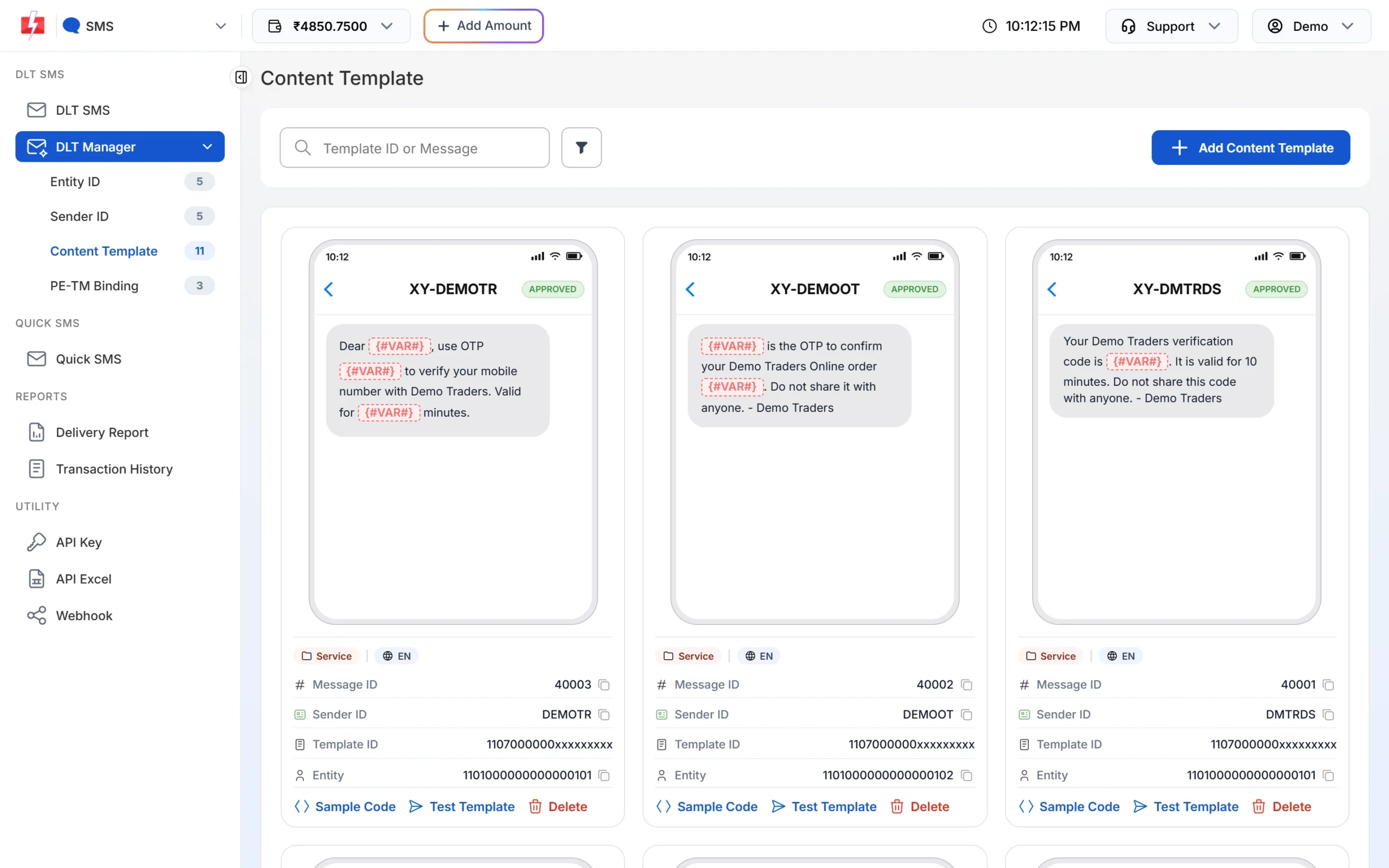
Test a template on your own number before the first campaign. -
Create your WhatsApp policy templates
Open WhatsApp Manager > Templates > Add Template. Choose Utility for renewal and claim templates, set the header to Document for policy PDFs, write the body with variables and fill Samples for body content so Meta can review it. Click Submit Template.
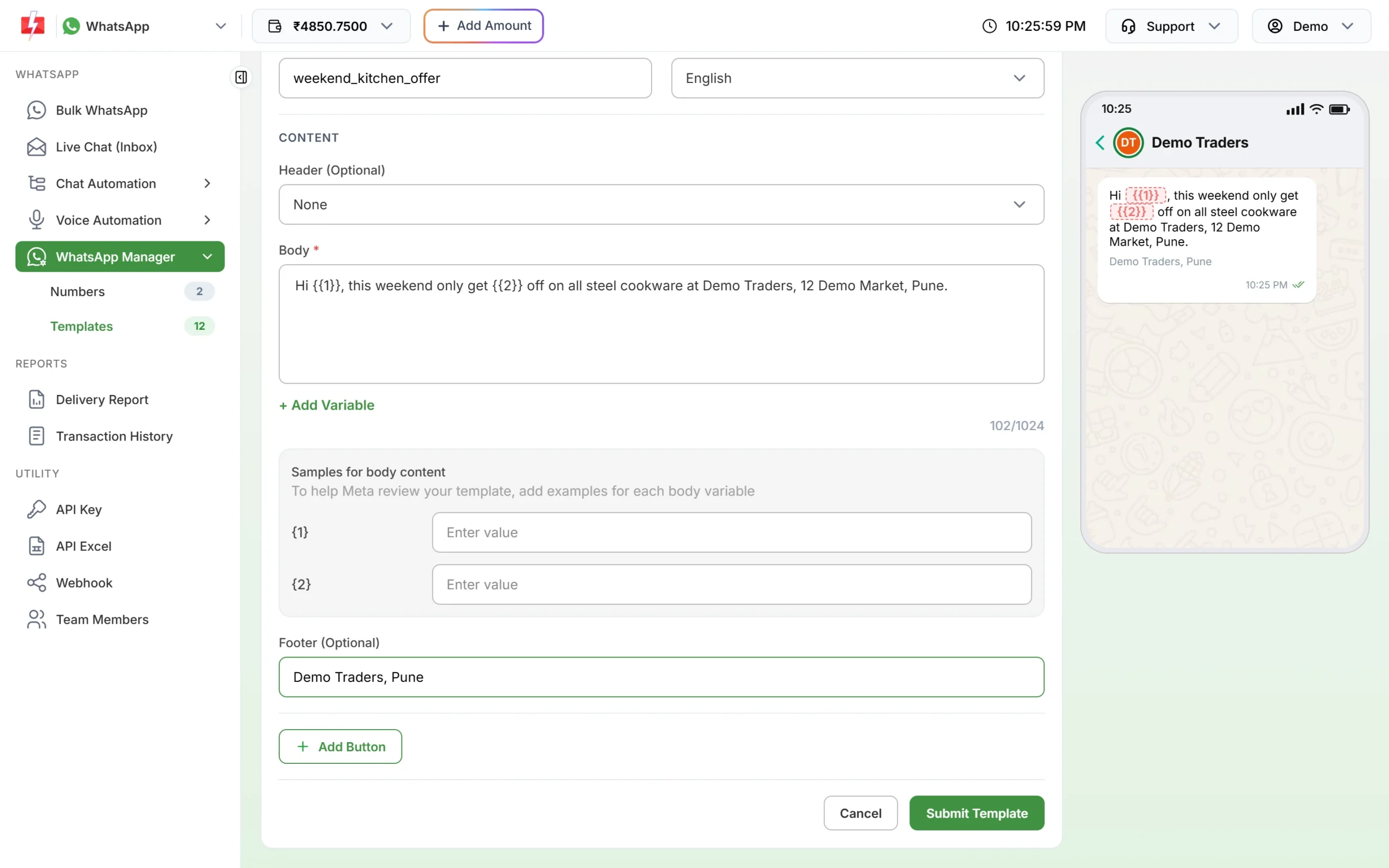
Fill a sample for every variable to help approval. -
Schedule renewal reminders in advance
In Bulk WhatsApp or DLT SMS, pick the template and upload the month’s renewal list as a CSV with one column per variable. Click Schedule, choose the date and time and confirm. Scheduled sends can be cancelled from the Delivery Report, and the amount returns to your wallet.
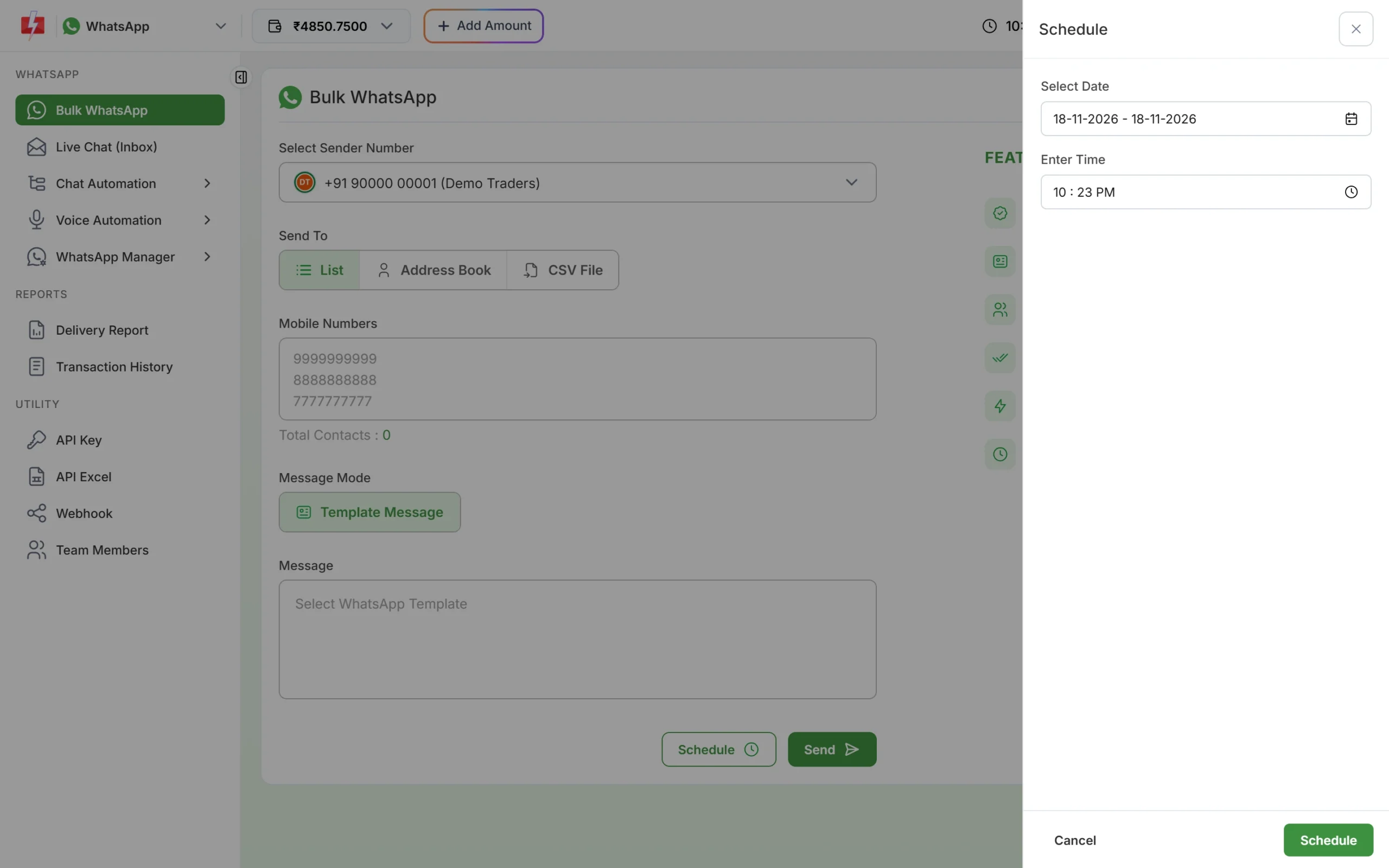
Choose a date range to repeat the same send daily. -
Run a Key Press reminder call
Open Voice > Bulk Voice Call, name the campaign, choose Key Press (DTMF), add the numbers, pick your approved menu file and tap the keys you allow, such as 1 and 2. Click Send and check the cost in the confirmation popup.
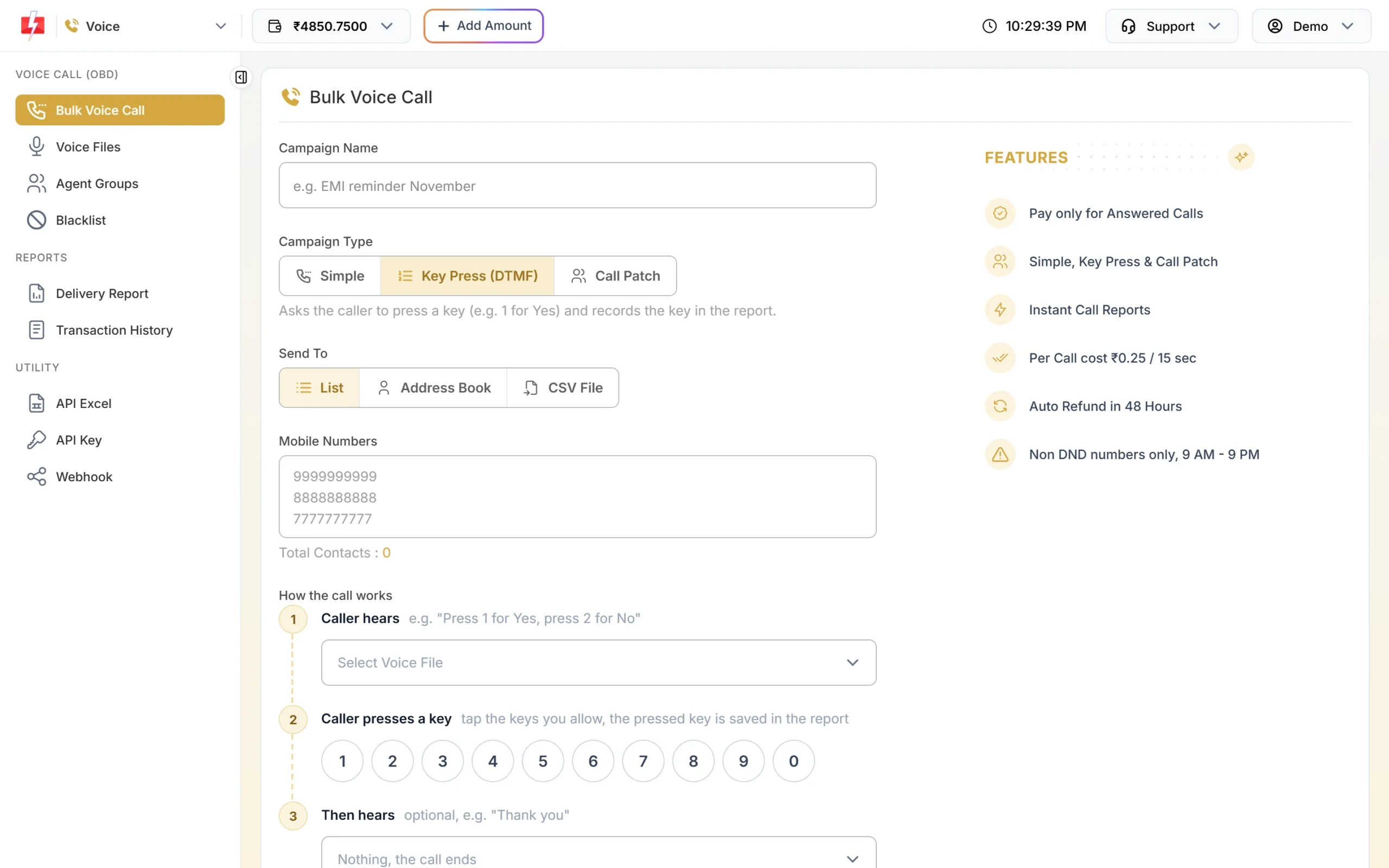
The caller hears the menu and presses a key. -
See who pressed which key
Open Delivery Report > Voice Report and click the campaign. The Key column shows each customer’s choice. Download the report and pass the “talk to advisor” list to your team.
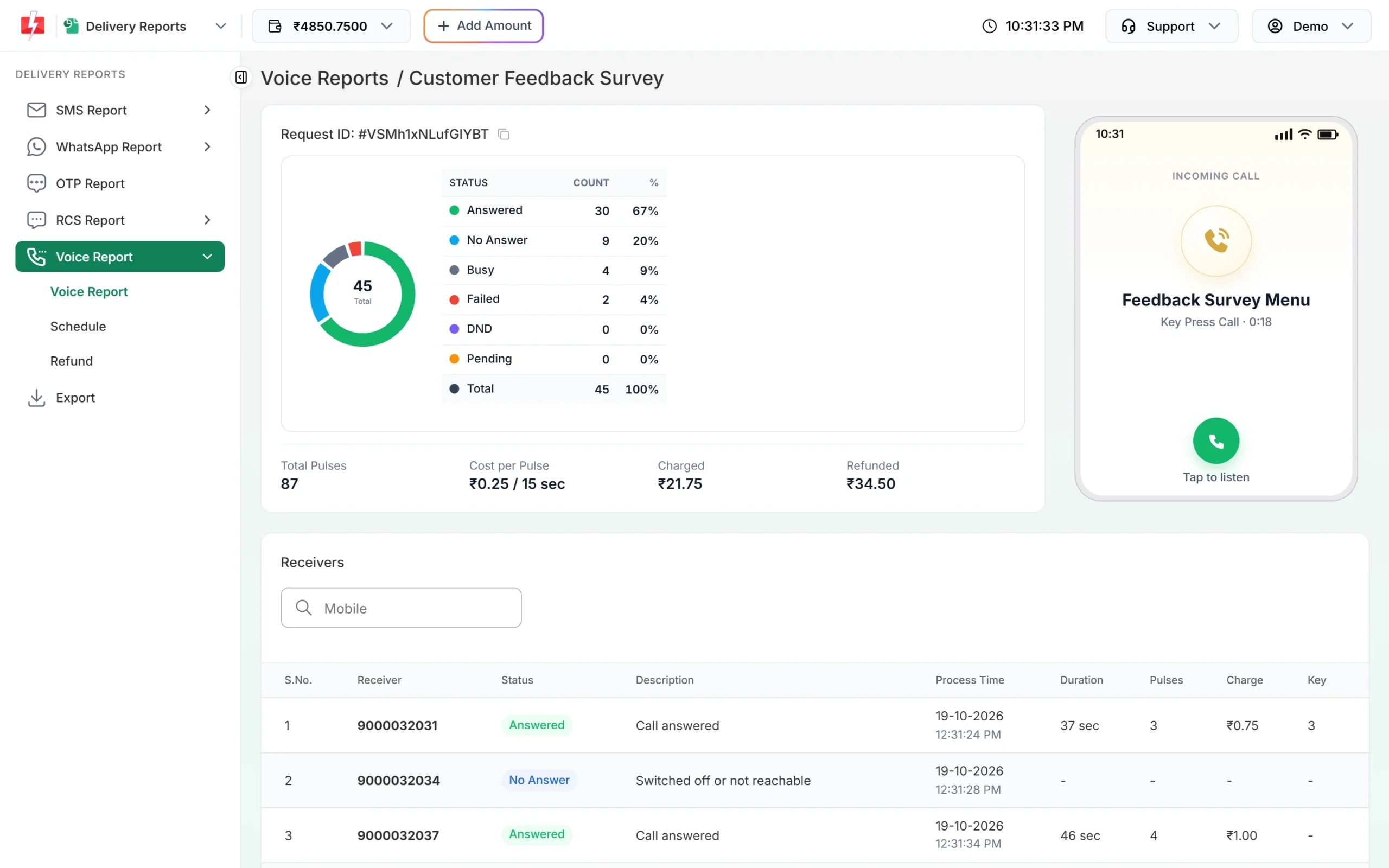
Answered, No Answer and the key each person pressed. -
Answer claim questions in Live Chat
Customers often reply to a claim update with a question or a photo of a document. Open Live Chat (Inbox) to reply within 24 hours of their message. Add your claims staff under Team Members so each person sees the chats assigned to them.
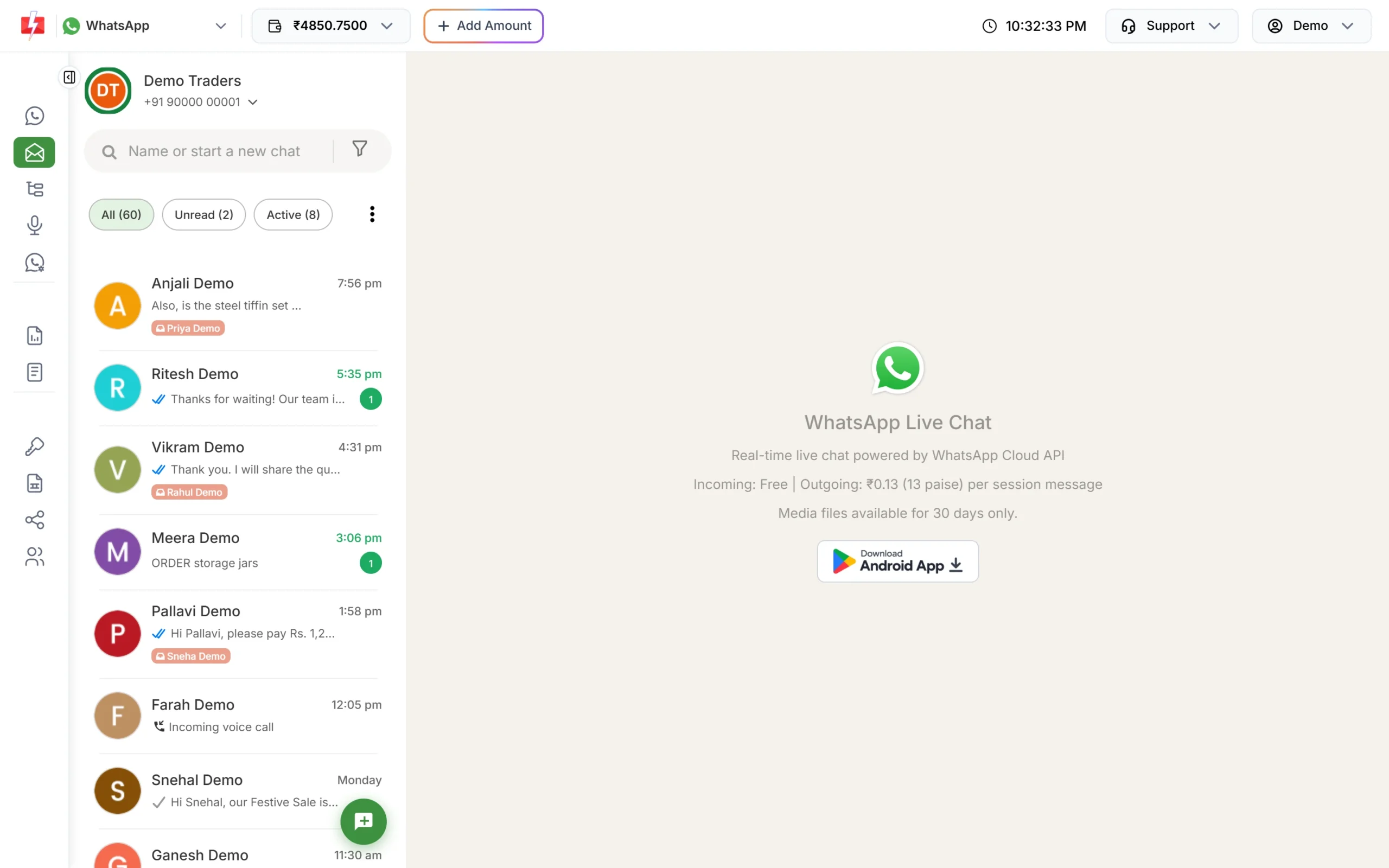
Every reply from customers lands in one shared inbox.
Automation options
- API from your policy system: trigger SMS, WhatsApp and OTPs when a policy is issued, a premium is received or a claim status changes.
- Webhooks: get the delivery status of messages sent through the API, and incoming WhatsApp replies, on your own URL, to keep proof that a renewal notice was delivered.
- CSV and scheduling: upload the renewal list each month and schedule the 30, 15 and 7 day reminders in one sitting.
- Chat automation: keyword auto replies (for example “claim” or “renew”), welcome and out-of-office messages, and a Flow Builder chatbot that collects a policy number before passing the chat to an agent.
- CRM connectors: HubSpot, Freshworks, Pipedrive and others are listed on the integrations page.
Compliance notes for insurance messaging
- Advertisement rules: IRDAI’s Insurance Advertisements and Disclosure Regulations, 2021 cover communications meant to lead to the sale of a policy. Have promotional SMS, WhatsApp and RCS copy approved by your compliance team before you register it.
- No sensitive data: never send health details, full bank or card numbers, or passwords. Send a link to your secure portal instead.
- Never ask for OTPs: say in your templates that you never ask for an OTP or PIN.
- Consent and DND: offers go only to people who agreed to hear from you. Promotional SMS do not reach DND numbers and are sent between 10 AM and 9 PM.
- Calls: 10 AM to 9 PM, non-DND only, and the 1600-series rule for service calls by IRDAI-regulated entities.
How to estimate the cost
SMS are charged per number and per part, so keep renewal texts short. WhatsApp is charged by category, and a policy PDF on a utility template costs the same as a text utility message. Voice is charged per 15-second pulse for answered calls, with unanswered calls refunded. RCS is charged per message by type. See the current rates on the SMS pricing, WhatsApp pricing, voice call pricing and RCS pricing pages.
Frequently asked questions
Which DLT category should insurers use for renewal reminders?
Service Implicit. A renewal notice for an existing policy is a service message. A pitch for a new plan is promotional.
Can I send the policy document on WhatsApp?
Yes. Create a Utility template with a Document header and attach the PDF when you send.
Can an individual insurance agent use Fast2SMS?
Yes. Register your own entity, sender ID and templates on a DLT portal for SMS, or connect your own WhatsApp Business number.
Will renewal SMS reach customers on DND?
Yes, if the template is Service Implicit. Promotional messages do not reach DND numbers.
Can voice calls be used to sell insurance?
Voice files are checked by the operator. Investment advice and health claims are rejected, and calls go to non-DND numbers only. Keep voice for reminders to your own customers.
How do I know which customers already renewed after a reminder call?
Use a Key Press campaign with “press 1 if renewed”. The Voice Report shows each person’s key, and you can download it as Excel.