
Bulk SMS for hotels and travel businesses carries the details a guest needs on the move: booking confirmed, pickup time, check-in instructions and any change of plan. WhatsApp carries the vouchers, e-tickets and itineraries as PDFs and lets guests ask questions during the trip. Recorded calls bring in package enquiries, and Smart OTP secures your booking site. This guide maps each travel message to the right channel, gives sample templates and shows the setup in Fast2SMS.
It is written for hotels, resorts, homestays, tour operators, travel agencies and bus or cab operators that send booking and trip updates to their own guests.
Which channel for which travel and hotel message
A guest needs different messages before, during and after the trip. Messages about their own booking are service messages and go out at any hour. Package offers and seasonal deals are promotional.
| Message | Best channel | Why |
|---|---|---|
| Booking confirmed with voucher | WhatsApp utility with a PDF, plus SMS | The voucher opens in the chat. SMS confirms the booking even without data. |
| Payment received / balance due | SMS (Service Implicit) and WhatsApp utility | Money messages need a delivery report you can show the guest. |
| Pickup driver and vehicle details | SMS (Service Implicit) | Arrives in seconds on any phone, even on a weak network at a station. |
| Pre-arrival: check-in time, directions | WhatsApp utility with a button | A “Call reception” or “View on map” link button helps late-night arrivals. |
| Schedule change or delay | SMS and WhatsApp utility with a validity period | Urgent. A validity period stops an old update from arriving hours later. |
| Requests during the stay (towels, late checkout) | WhatsApp Live Chat | Guests write any time, your front desk replies from one shared inbox. |
| Booking site login or guest verification | Smart OTP | Priority route with automatic fallback to the other channel. |
| Feedback after checkout | WhatsApp utility with reply buttons | One tap to rate the stay or the tour. |
| Holiday packages, season offers | WhatsApp marketing, RCS carousel, promotional SMS | Pictures sell trips. Promotional rules apply. |
Sample DLT SMS templates for hotels and travel
These are examples to adapt and register on your DLT portal under your own business name. They are not pre-approved. Use typed variables, keep to three variables or fewer, and whitelist every link and callback number first.
| Use | Example template to register | Category |
|---|---|---|
| Hotel booking | Your stay at YourHotel is confirmed from {#alphanumeric#} to {#alphanumeric#}. Booking ID {#alphanumeric#}. | Service Implicit |
| Tour booking | Your YourTravels tour {#alphanumeric#} starts on {#alphanumeric#}. Your itinerary: {#url#} | Service Implicit |
| Balance due | Balance of Rs {#numeric#} is due for your YourTravels booking {#alphanumeric#}. Pay here: {#url#} | Service Implicit |
| Pickup details | YourTravels pickup tomorrow at {#alphanumeric#}. Driver and vehicle: {#alphanumeric#}. Help desk: {#cbn#} | Service Implicit |
| Check-in info | Welcome to YourHotel. Check-in is from {#alphanumeric#}. For directions or early arrival, call {#cbn#}. | Service Implicit |
| Schedule change | Your YourTravels departure {#alphanumeric#} is now at {#alphanumeric#}. We are sorry for the change. | Service Implicit |
| Booking OTP | {#numeric#} is your OTP to confirm your booking with YourHotel. Do not share it with anyone. | Service Implicit |
| Feedback | Thank you for staying at YourHotel. Please rate your stay here: {#url#} | Service Implicit |
| Package offer | {#alphanumeric#} holiday packages from YourTravels start at Rs {#numeric#}. See the details at {#url#} | Promotional |
WhatsApp templates for travel: utility vs marketing
Booking, payment and trip updates are Utility templates. Package deals are Marketing. Mixing a discount into a booking confirmation turns the whole template into marketing. A Utility template can also carry a Message validity period of 30 seconds to 15 minutes, which suits time-critical updates.
| Template | Category | Example body | Extras |
|---|---|---|---|
| booking_voucher | Utility | Hi {{1}}, your booking {{2}} is confirmed for {{3}}. Your voucher is attached. | Document header (PDF) |
| pre_arrival | Utility | Hi {{1}}, we look forward to welcoming you on {{2}}. Check-in starts at {{3}}. | Call Phone Number: Call reception |
| trip_update | Utility | Hi {{1}}, your departure for booking {{2}} has changed to {{3}}. | Validity period, Call Phone Number |
| stay_feedback | Utility | Hi {{1}}, thank you for staying with us. How was your stay? | Custom buttons: Excellent, Good, Needs work |
| season_packages | Marketing | Hi {{1}}, our {{2}} packages are open for booking, with stays from Rs {{3}}. | Image header, Visit website: View packages |
| booking_code | Authentication | Fixed by Meta: “{{1}} is your verification code.” | Copy code button |
Voice calls for travel businesses
Voice is useful for two travel jobs: a reminder the evening before a group tour, and enquiries for packages from past guests. A voice file is one recording for everyone, so keep it general and put each guest’s pickup time in the SMS.
Sample script (Call Patch): “Namaste, this is YourTravels. Our winter holiday packages are now open, with hotel, transport and sightseeing included. To talk to our holiday expert, press 1. Thank you.”
- Voice files that promote immigration, visa, PR or work permit services are not allowed. Agencies that sell visa services should keep that out of voice.
- Bulk calls go only to Indian mobile numbers that are not on DND, between 10 AM and 9 PM. A campaign sent after 8:50 PM is scheduled for 10 AM the next morning.
- You pay only for answered calls. Unanswered calls are refunded to your wallet.
Smart OTP for bookings
Use Smart OTP to verify the guest’s mobile number before you hold a room or seat, to log guests in to your booking site, and on any guest login page that can call an API. The code goes on SMS or WhatsApp on a priority route, and a failed send is re-sent on the other channel within 120 seconds. Your site calls the send API with an OTP ID and the verify API with the code the guest types.
RCS for holiday packages
An RCS Carousel can show 2 to 10 destination cards, each with a photo, a short description and buttons such as “View package” or “Call us”. It appears in the phone’s own messages app with your brand name and logo. Promotional RCS can reach a number at most 4 times a month, between 7 AM and 10 PM.
How to get started on Fast2SMS (step by step)
-
Send pickup details from a CSV
After your DLT templates are approved, open SMS > DLT SMS. Choose your sender ID, select CSV File under Send To and upload tomorrow’s guest list with columns for name, pickup time and vehicle. Pick the template and map each variable to a column.
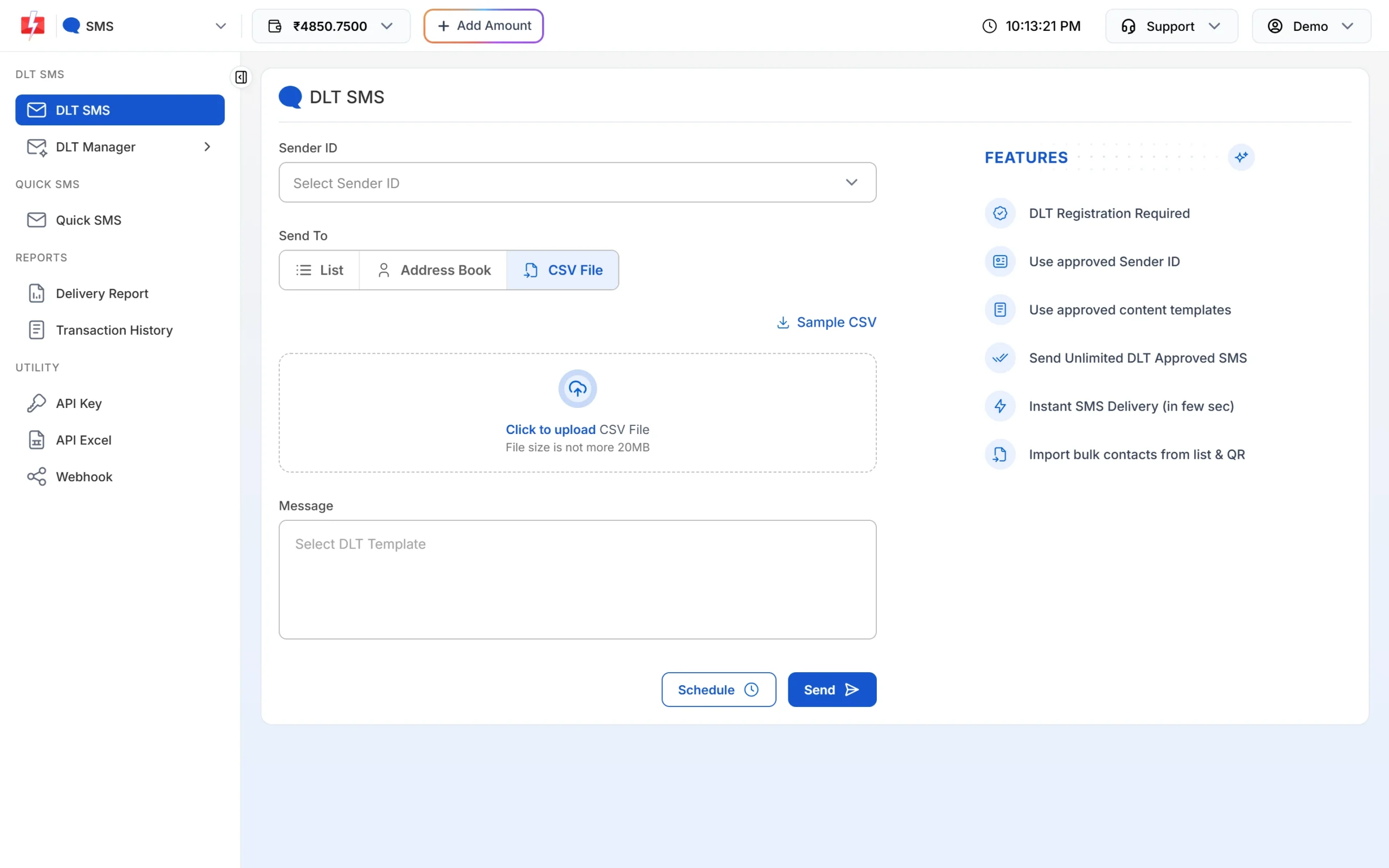
One row per guest, one column per variable. -
Send vouchers on WhatsApp
Open Bulk WhatsApp, pick your sender number and the voucher template. A template with a media or document header shows a file chooser for that campaign. Fill the variables and check the phone preview before you click Send.
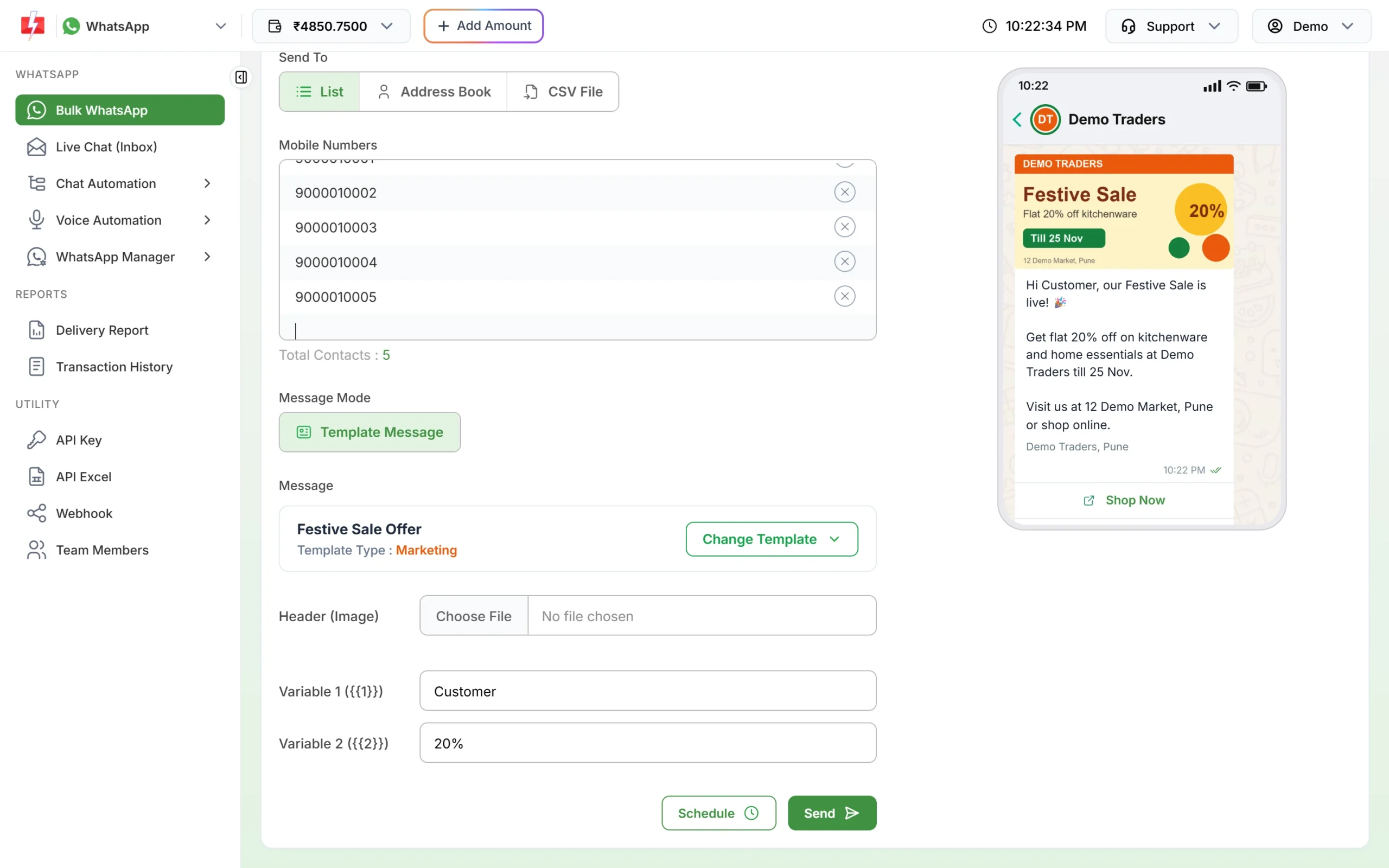
The preview shows exactly what the guest will see. -
Give your front desk their own logins
Open Account Setting > Team Members > Add Agent. Enter the name, mobile, email and password, choose Chat Agent or Admin and tick WhatsApp access for your number. Agents log in at the agent URL or with the Android app.
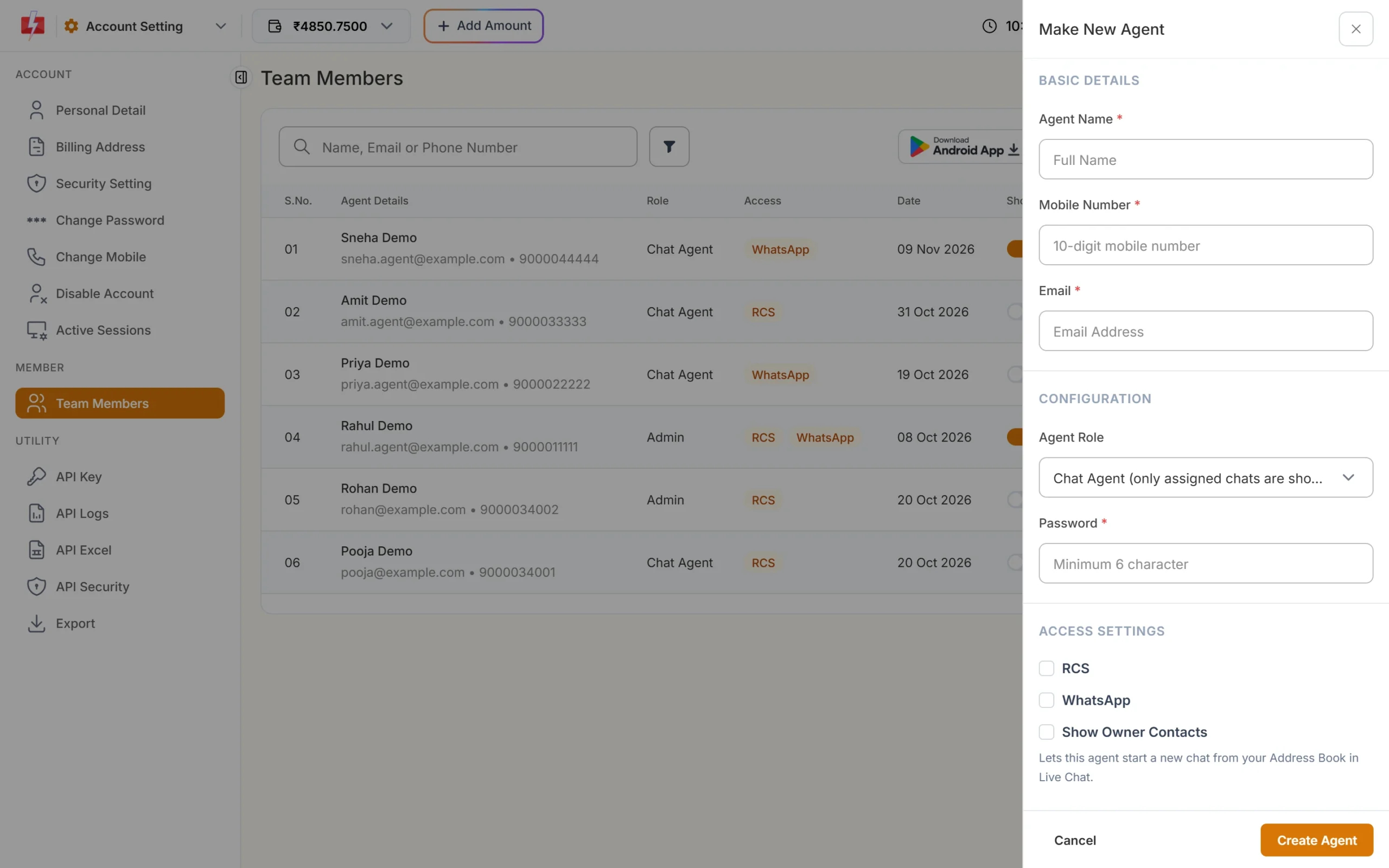
Chat Agents see only the chats assigned to them. -
Reply to guest requests in Live Chat
Guests who reply to a voucher or pre-arrival message land in Live Chat (Inbox). Assign each chat to the right person, and use labels such as “Arriving today”. You can reply freely within 24 hours of the guest’s last message, and with a template after that.
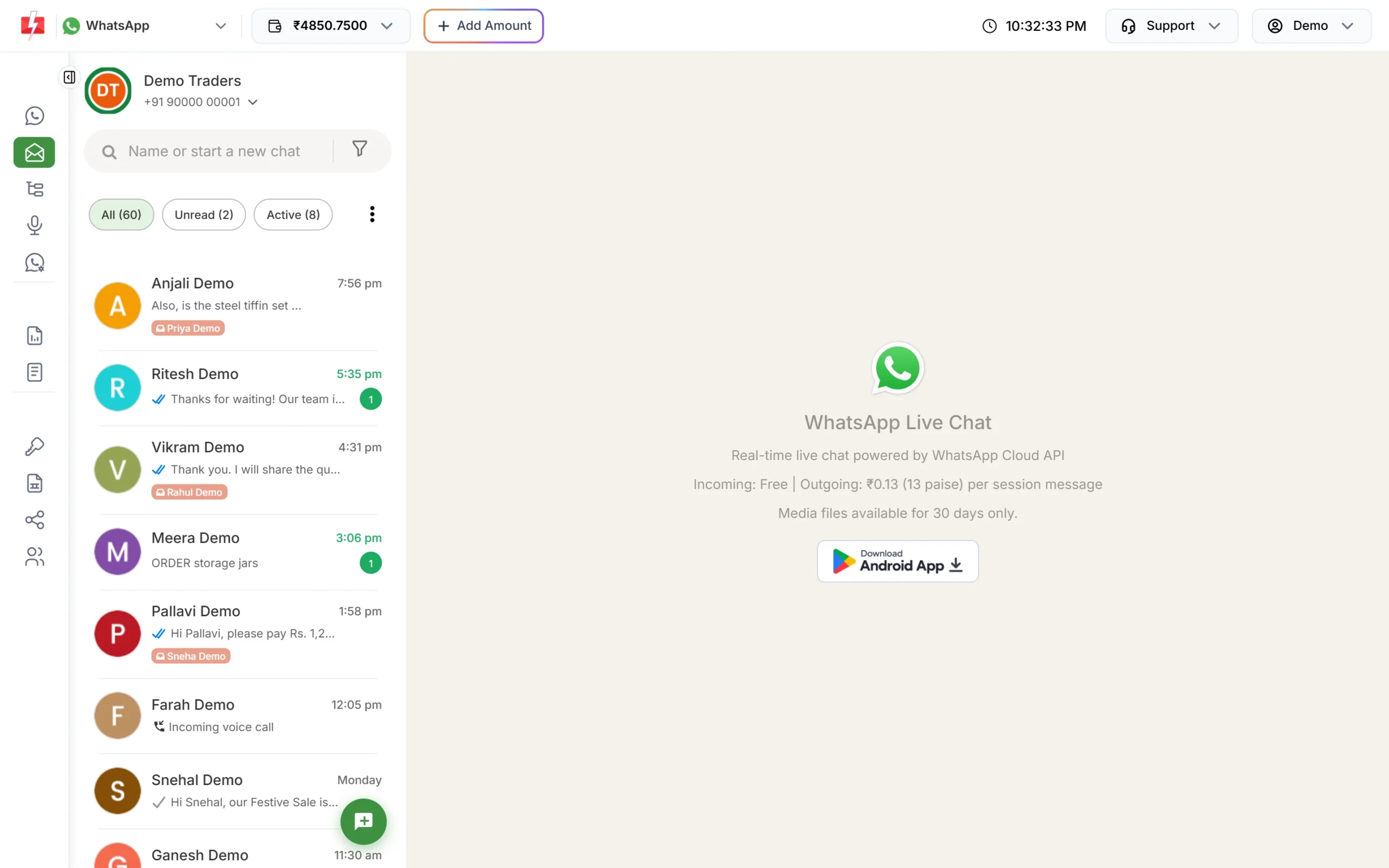
All guest chats in one inbox. -
Show packages as an RCS carousel
Once your RCS brand is approved, open RCS > Bulk RCS, pick your promotional bot, add numbers and choose Carousel. Fill each card’s title, description, image and buttons.
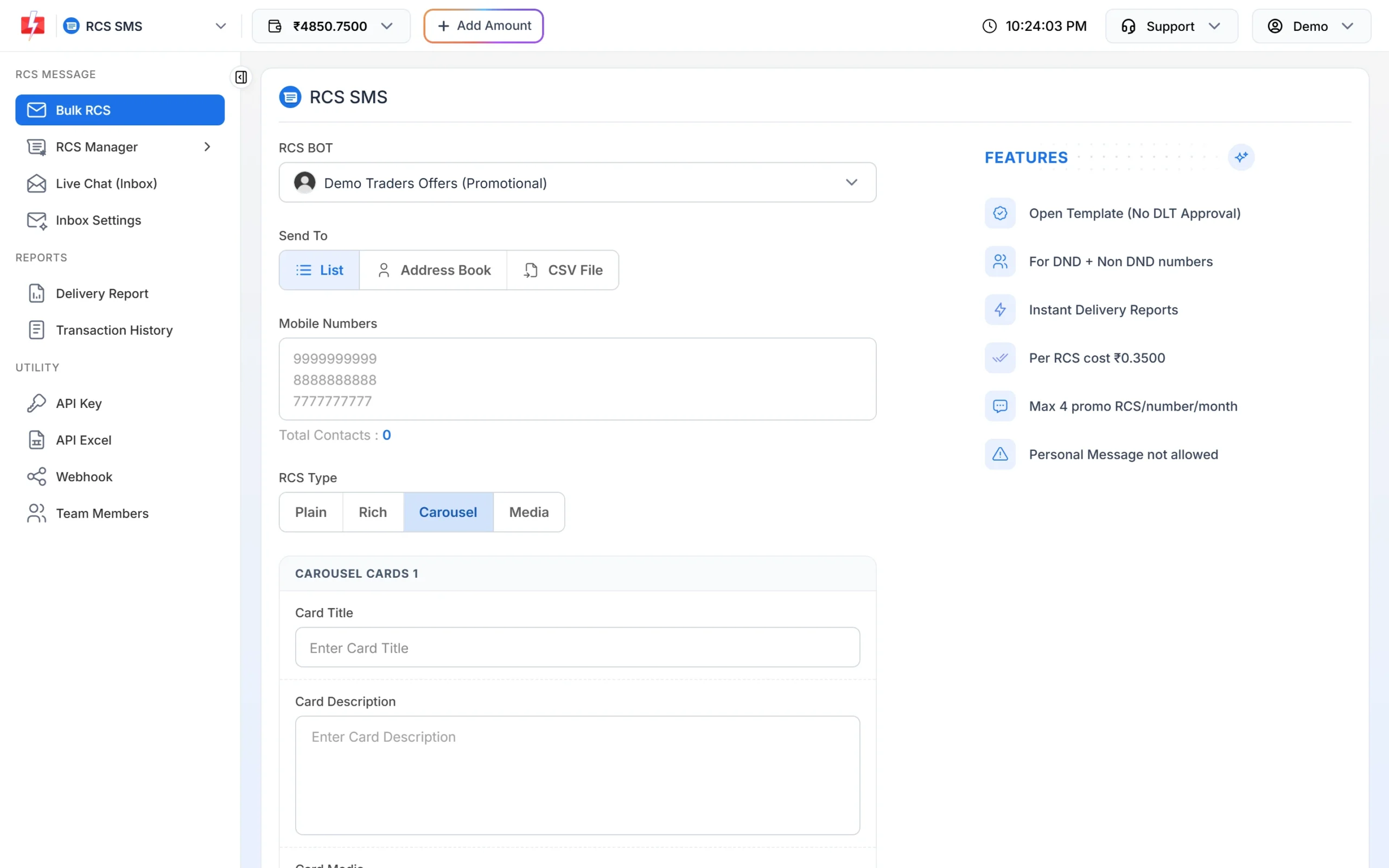
Each card can have its own image and buttons. -
Connect enquiry calls to your sales team
Create an agent group under Voice > Agent Groups. In Bulk Voice Call, choose Call Patch, pick your menu file, set “Press 1 connect to” your sales group and choose the file that plays if no agent picks up.
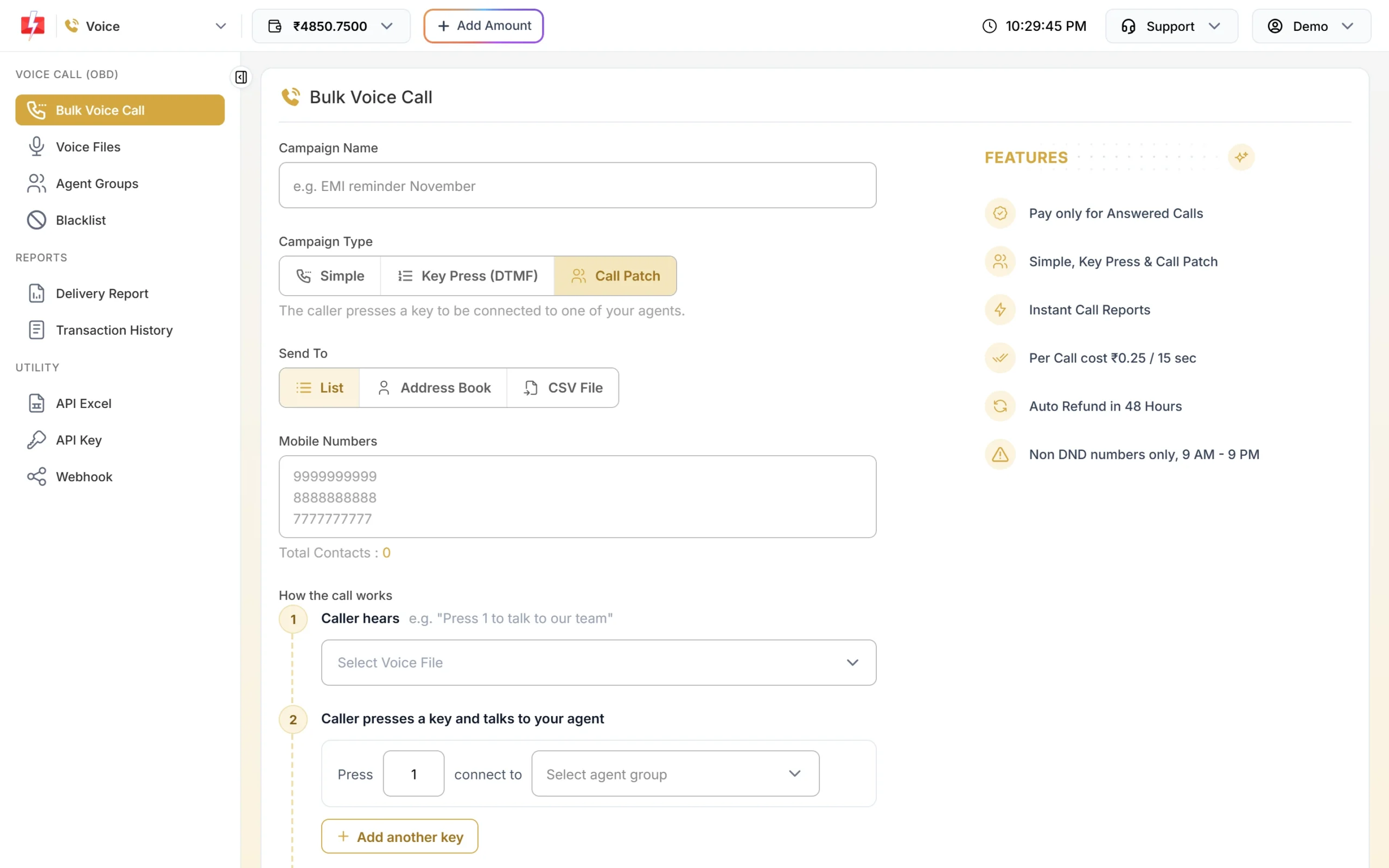
Interested callers reach your team in one key press.
Automation options
- API from your booking engine or PMS: send the confirmation, voucher and pre-arrival message the moment a booking is made.
- Webhooks: receive delivery reports of API sends and guest WhatsApp replies on your server, so a failed pickup SMS can trigger a call from your desk.
- Scheduling: schedule pre-arrival messages for the day before check-in, or repeat a daily departure reminder across a date range.
- Chat automation: a welcome message with reception hours, keyword replies for “wifi”, “checkout” or “directions”, and a Flow Builder menu for common requests.
- Integrations: Google Sheets, HubSpot, Zoho Campaigns and others are on the integrations page.
Compliance notes for travel and hospitality
- Service vs promotional: keep offers out of booking templates. Promotional SMS do not reach DND numbers and Fast2SMS sends them between 10 AM and 9 PM.
- Consent: ask for WhatsApp consent on your booking form, and honour opt-outs.
- No sensitive data: never send ID proof numbers, passport details or card numbers in a message. Ask guests to share documents at check-in or through a secure link.
- Voice content: no visa or immigration promotions in voice files, and always say your brand name.
How to estimate the cost
SMS are charged per number and per part, so keep pickup texts short. WhatsApp is charged per message by category, and a PDF voucher on a utility template is charged as one utility message. Voice is charged per 15-second pulse for answered calls only. RCS is charged per message by type, and failed or non-RCS messages are refunded. See current rates on the SMS pricing, WhatsApp pricing, RCS pricing and voice call pricing pages.
Frequently asked questions
Which DLT category should a hotel use for booking SMS?
Service Implicit. Booking, payment, pickup and check-in messages are expected by the guest. Package offers are promotional.
Can I send e-tickets and vouchers on WhatsApp?
Yes. Create a Utility template with a Document header and attach the PDF when you send.
Will booking SMS reach guests on DND?
Yes, on a Service Implicit template. DND blocks promotional messages only.
Can I send each guest their own pickup time in one campaign?
Yes. Upload a CSV with a column for the pickup time and map it to the template variable.
Can a travel agency promote visa services by voice call?
No. Voice files about immigration, visa, PR or work permit services are rejected.
Can my front desk staff reply to guests on WhatsApp?
Yes. Add them under Team Members and assign chats to them in Live Chat.