
To close (disable) your Fast2SMS account, open Account Setting, click Disable Account, press CLICK HERE FOR DISABLE ACCOUNT, enter the OTP sent to your registered mobile and confirm with your password. You are logged out at once and cannot log in again. Only the Fast2SMS support team can turn the account back on. Read the checklist below before you do it, because you will lose access to your reports, invoices and contacts.
What happens when you disable your account
- You are logged out and cannot log in again. The login page shows “Your account is blocked, contact Fast2SMS support to enable it.”
- You stop getting SMS and email notifications from Fast2SMS.
- API calls with your key are rejected, so any website or plugin that sends through your account stops sending.
- You get an SMS saying your Fast2SMS account has been blocked. If your email is verified, you also get an email titled “Your Fast2SMS Account Blocked”.
- There is no button to undo it yourself. To use the account again, you must contact support.
Checklist before you disable
Once you are logged out, you cannot open the panel to download anything. Do these first:
- Download your GST invoices from Transaction History, Invoices.
- Export your transaction history from Transaction History, Export.
- Export your contacts from Address Book, Export.
- Download any delivery report exports you need for your records.
- Check your wallet balance. Read the refund policy or ask support about any unused balance before you close the account.
- Remove the API key from your website, plugins and software, so they stop calling the API.
How to disable your Fast2SMS account
-
Open Disable Account
On the dashboard, click Account Setting, then Disable Account in the left menu. The page shows your registered mobile number and a note explaining what happens after disabling.
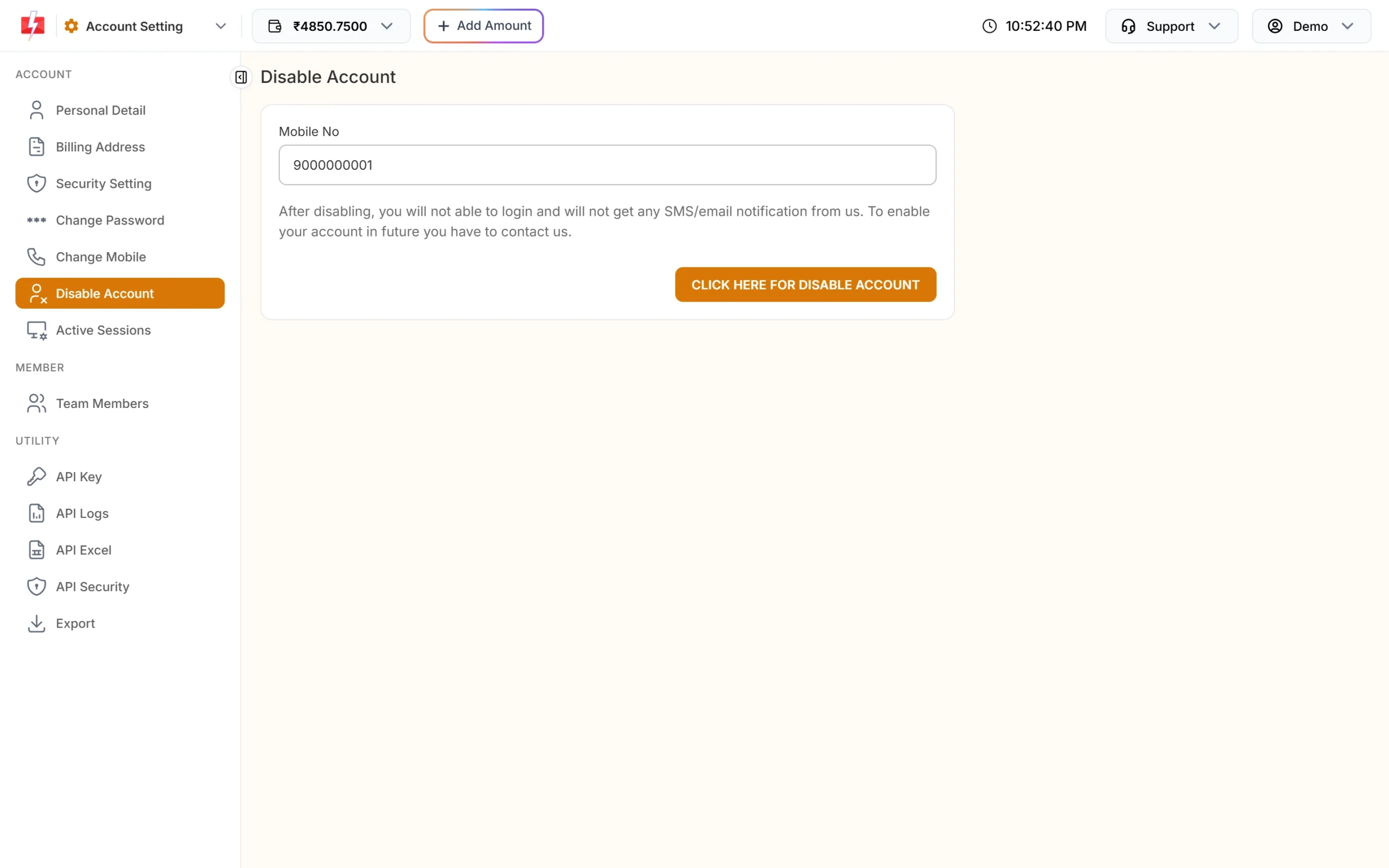
Read the note before you continue. -
Request the OTP
Click CLICK HERE FOR DISABLE ACCOUNT. An OTP is sent to your registered mobile by SMS and WhatsApp. You see “OTP sent successfully via SMS & WhatsApp to mobile” with your number.
-
Enter the OTP and your password
In the Verify OTP box, type the OTP. When it is accepted you see “OTP verified successfully, Please enter current password.” Enter your Current Password and click Verify OTP.
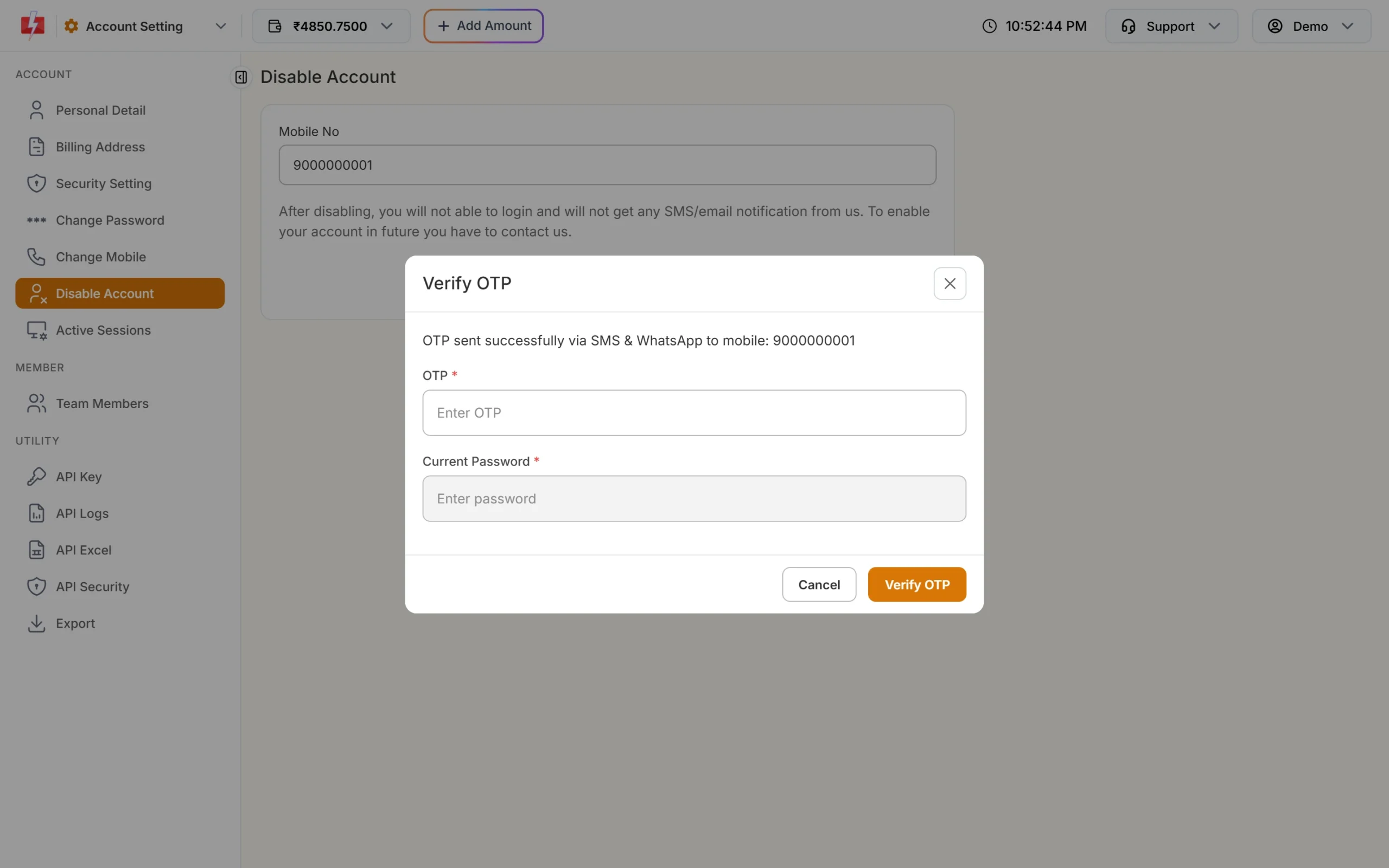
OTP and password confirm that it is really you. -
You are logged out
You see “Account Disable successfully” and you are logged out of the panel.
How to enable a disabled account again
You cannot re-enable it from the login page. Write to [email protected] and ask the team to enable your account. Mention your registered mobile number so they can find it.
Other options if you only want a break
| If you want to | Do this instead |
|---|---|
| Stop all API sending for now | Turn off API Access on the API Key page. Your key and account stay as they are. |
| Stop someone else from using your account | Change your password, log out other devices in Active Sessions and turn on 2F Authentication. |
| Stop a staff member’s access | Turn off their Status switch or delete them in Team Members. |
| Stop a leaked API key | Reset the key on the API Key page. |
Common problems and fixes
“OTP expired. Please request a new OTP.”
The OTP is valid for 10 minutes. Close the box and click the button again.
“Maximum attempts reached. Please resend OTP.”
Three wrong OTPs were entered. Request a new OTP.
“Please wait to send new OTP.”
Wait 30 seconds between OTP requests.
“Request block try after some time.”
After 5 failed tries, OTP checks are blocked for 60 minutes. Try again after an hour.
I disabled my account by mistake
Contact support at [email protected]. Only the support team can enable it again.
Frequently asked questions
How do I delete my Fast2SMS account?
Use Account Setting, Disable Account. Enter the OTP sent to your mobile and your password. You are logged out and cannot log in again.
Can I enable my account again after disabling it?
Yes, but only through support. There is no self-service option to turn it back on.
Will my API key still work?
No. API calls from a disabled account are rejected.
Will I still get SMS or emails from Fast2SMS?
No. After disabling, you do not get SMS or email notifications from Fast2SMS.
Can I download my invoices after disabling?
No, because you cannot log in. Download all invoices and reports before you disable the account.
What happens to my wallet balance?
Check the refund policy and talk to support before you disable, so any balance question is settled first.
Can team members disable the account?
No. Only the account owner can open the Disable Account page.