
If your company is based outside India, or you send SMS to Indian numbers through a global SMS API, DLT rules still apply. To reach Indian customers from your own sender ID over Indian (local) routes, the sending business must be registered on DLT, and every SMS must carry a registered Entity ID and Template ID. Without DLT, SMS can only go over international routes, where the sender usually shows as a random number. This page explains both routes, what DLT for foreign businesses means in practice, and how to pass the Entity ID and Template ID with Fast2SMS.
Two ways an SMS reaches an Indian phone
| Local route (DLT) | International route (ILDO) | |
|---|---|---|
| DLT registration | Required: entity, header, templates and PE-TM chain | Not required |
| Sender the customer sees | Your registered header with an operator prefix, for example XY-DEMOTR | Usually a random number, not your brand name |
| Message wording | Must match a registered template exactly | Free text, but content is still subject to operator rules |
| Cost | Lower | Usually much higher than local routes |
| Trust | Customers recognise your brand name | A random number looks like spam to many customers |
ILDO stands for International Long Distance Operator, the operators that carry SMS coming into India from abroad. A sender ID that is not DLT-registered is replaced with a number. For OTPs, alerts and anything customers must trust, the local DLT route is the one to plan for.
Can a foreign company register on DLT?
DLT registration is done as a Principal Entity on one of the six Indian operator portals. The forms are built around Indian business documents, such as a business PAN, TAN, GSTIN, CIN and a letter of authorisation. In practice this means:
- If you have an Indian company, branch or LLP, that Indian entity registers on DLT and sends the SMS. Its name goes on the headers and templates.
- If you have no Indian legal entity, you will not have the Indian documents the portals ask for. Check with the portal’s support before you apply, or use international routes, WhatsApp or email to reach Indian customers.
- Your SMS provider registers as a telemarketer, not for you. The Principal Entity must be the business whose name is in the message.
The registration fee is ₹5,900 per year including GST (at the time of writing), the same on every portal. One registration works for all operators. See DLT registration fees and validity.
Sending in bulk? For high SMS volumes our team offers discounted rates. Talk to our team or see SMS pricing.
Where the Entity ID and Template ID go
Every provider that sends DLT SMS in India needs the same three things with each message: your registered header (sender ID), your Entity ID and the Template ID of the approved template. Global SMS APIs usually take them as extra fields or message attributes for India. Check your current provider’s India guide for the exact field names. In Fast2SMS you have two options:
| Fast2SMS API | Entity ID | Template ID | Other DLT needs |
|---|---|---|---|
DLT SMS API (route=dlt) |
Saved once in DLT Manager | Saved once in DLT Manager. You send the short Message ID | PE-TM chain with the Fast2SMS TM ID. |
DLT Manual API (route=dlt_manual) |
entity_id |
template_id |
Same as above. Useful when moving code from another provider, since you already pass these IDs. |
Example: an OTP SMS with the DLT Manual API
curl -X POST "https://www.fast2sms.com/dev/bulkV2" \
  -H "authorization: YOUR_API_KEY" \
  -H "Content-Type: application/json" \
  -d '{"route":"dlt_manual","sender_id":"DMTRDS","message":"Your Demo Traders verification code is 482913. It is valid for 10 minutes. Do not share this code with anyone. - Demo Traders","entity_id":"YOUR_ENTITY_ID","template_id":"YOUR_TEMPLATE_ID","numbers":"9999999999"}'
The text must match your registered template exactly. Extra line breaks, spaces, punctuation or a change in letter case can make operators block the SMS.
How to move your India SMS to Fast2SMS
Your DLT registration belongs to your business, not to your SMS provider, so you keep it when you switch.
-
Add your DLT records in DLT Manager
Add your Entity ID, your sender IDs and your content templates under DLT Manager. You can upload the header and template Excel exported from your DLT portal. Each template card then shows the Message ID to use in the API.
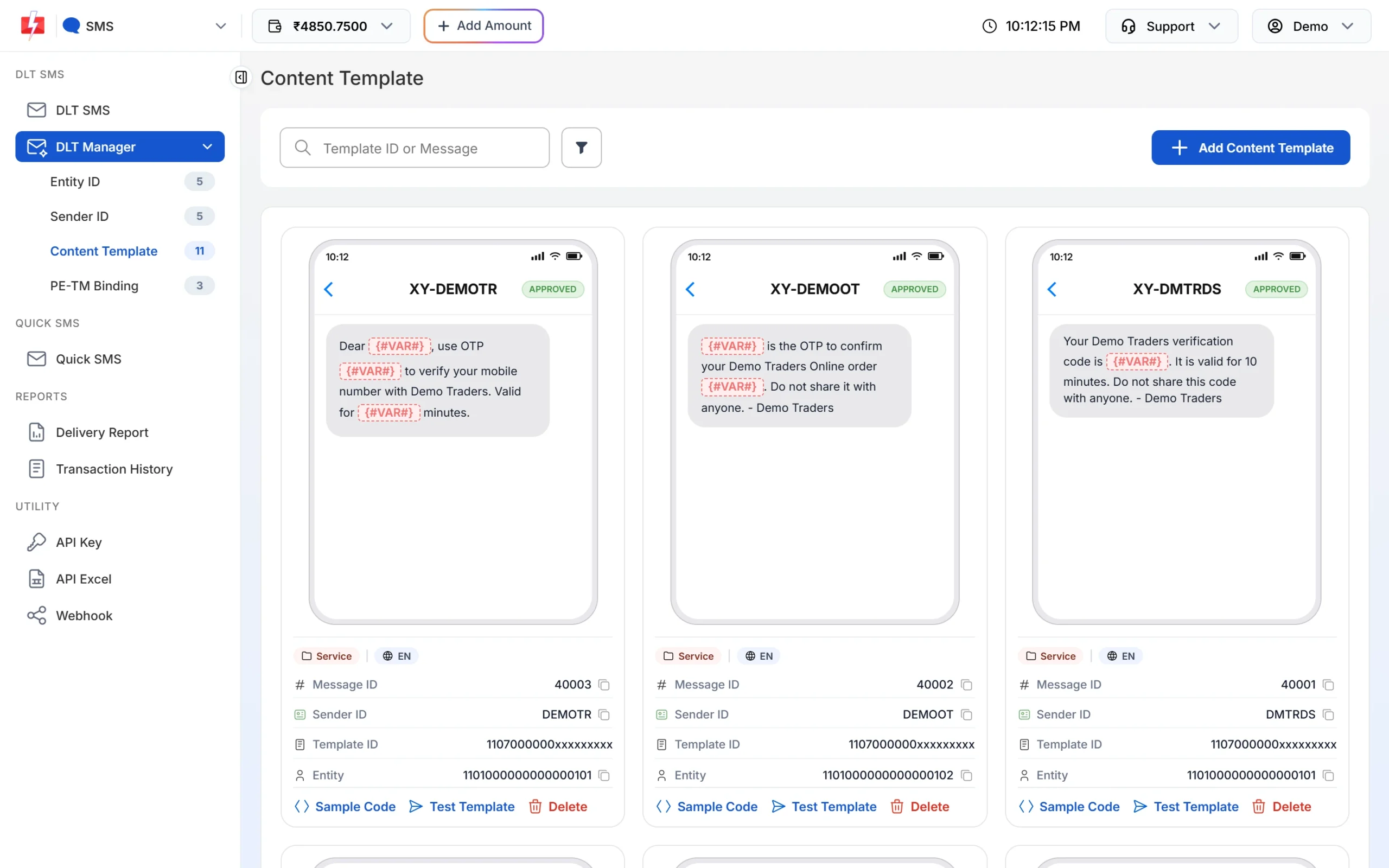
Each template shows its Message ID, Template ID and Entity ID. -
Add Fast2SMS to your PE-TM chain
On your DLT portal, send a chain request to TM ID 1702178720558766591 (SID GROUPS PRIVATE LIMITED). Then open DLT Manager > PE-TM Binding, tick the confirmation, upload the screenshot and documents and submit. Approve the chain once more on your portal when Fast2SMS has approved it.
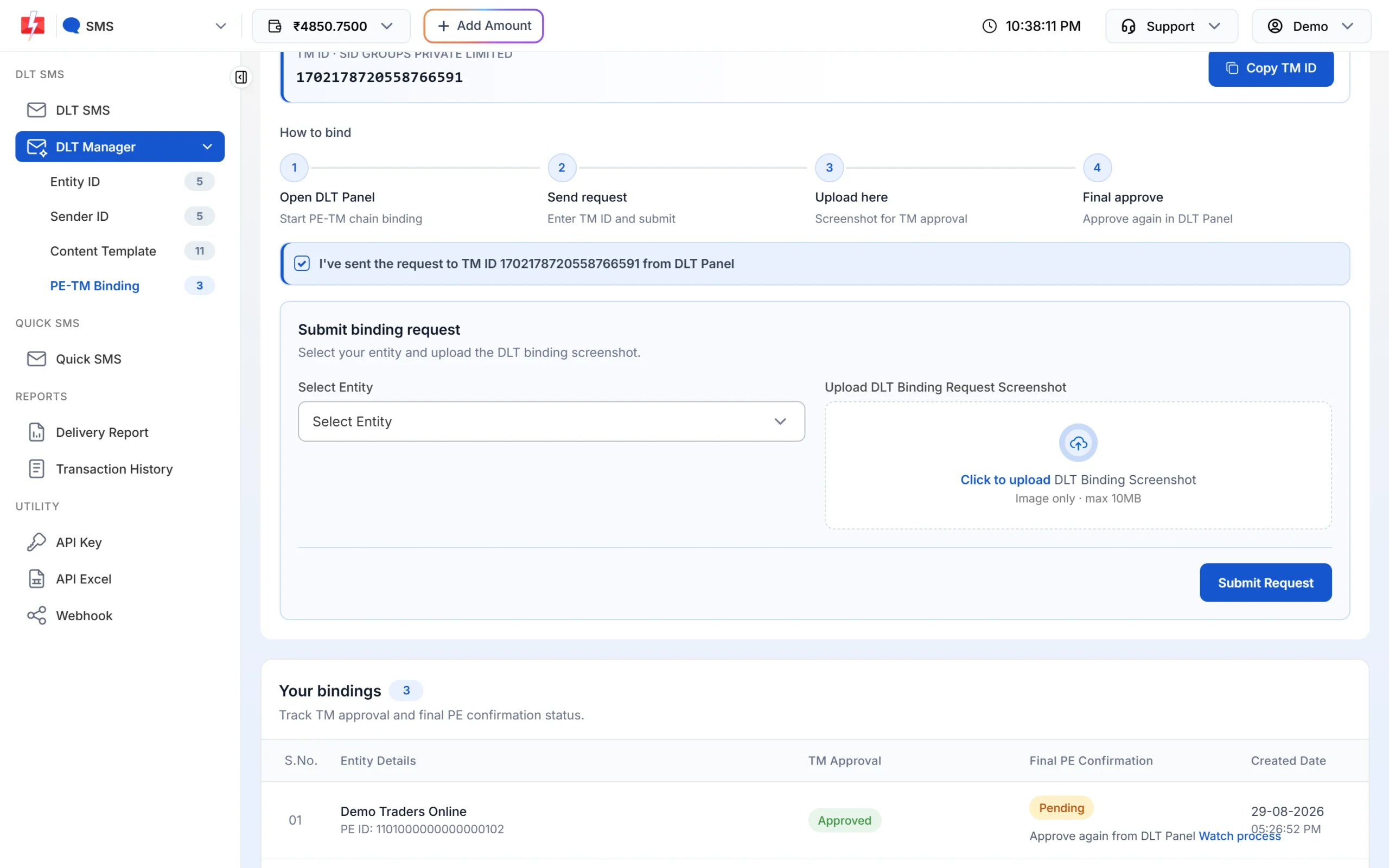
Submit your chain request on the PE-TM Binding page. -
Change your API calls
Use the DLT SMS API with the Message ID, or the DLT Manual API with the
entity_idandtemplate_idyou already pass today. Use the headerauthorizationwith your Fast2SMS API key. Send a test to your own number before switching all traffic.
Common problems and fixes
| Problem | Likely cause | Fix |
|---|---|---|
| SMS arrive from a random number instead of your header | The message went over an international route, or the header is not DLT-registered with your provider | Register the header, add the IDs to every send and confirm your provider uses local routes |
| Operator blocked the message | Text does not match the template, or Entity ID or Template ID missing | Copy the approved template text exactly and pass both IDs |
| Template ID rejected as invalid | Template ID wrong, too long or not linked to your sender | Use the 19-digit DLT template ID registered with that header |
| Everything is set but SMS still fail | No approved PE-TM chain with the provider’s telemarketer | Complete the chain on your DLT portal and give the final approval |
Frequently asked questions
Do international senders need DLT registration?
Only to use local Indian routes with their own sender ID. International (ILDO) routes do not need DLT, but the sender shows as a number and the cost is higher.
Can a company outside India register on DLT?
The portals ask for Indian documents such as a business PAN. A company with an Indian entity registers through that entity. Without one, check with the portal’s support first.
Does my DLT registration work with any SMS provider?
Yes. Your entity, headers and templates belong to you. You only add a PE-TM chain to each provider’s telemarketer ID.
Why do my SMS from a global API show a number instead of my brand?
The SMS went over an international route, or the sender was not DLT-registered, so the operator replaced it with a number.
Can Fast2SMS send SMS to numbers outside India?
No. Fast2SMS SMS routes accept Indian mobile numbers only.