
You can send OTP with your own DLT template through the Fast2SMS DLT SMS API (route=dlt) or the DLT Manual API (route=dlt_manual). The SMS goes from your own sender ID with your approved OTP text. Your app creates the code, sends it, and checks it when the user types it in. This page shows both ways with code in PHP, Python and Node.js, and the checks your app must do itself.
Pick the right OTP method first
| Smart OTP | Your DLT template (this page) | |
|---|---|---|
| Who makes the code | Fast2SMS (or you) | Your app |
| Who checks the code | Fast2SMS, with the Verify OTP API | Your app |
| Expiry, resend wait, attempt limit | Built in, set in OTP Settings | You build them |
| WhatsApp fallback | Yes, if set on the template | No |
| Route | Priority OTP route | Normal DLT SMS route |
Smart OTP is our recommended way to send OTPs because it handles the code, expiry and checks for you, and can fall back to WhatsApp. Use your own DLT template when you already have your own OTP logic, or must keep the code inside your system.
Before you start
- An approved DLT OTP template, for example: “Dear {#var#}, use OTP {#var#} to verify your mobile number with Demo Traders. Valid for {#var#} minutes.”
- For the DLT SMS route: the template added in DLT Manager, Approved and linked to your sender. Note its Message ID.
- For the DLT Manual route: the exact approved text, your Entity ID and the Content Template ID.
- Your API key from API Key, with API Access on, and wallet balance.
Set it up
-
Find your OTP template in DLT Manager
Open DLT Manager > Content Template. Find your OTP template and note the Message ID and the Sender ID on its card. In this example the card shows Service, which means Service Implicit, so the OTP can go out at any hour.
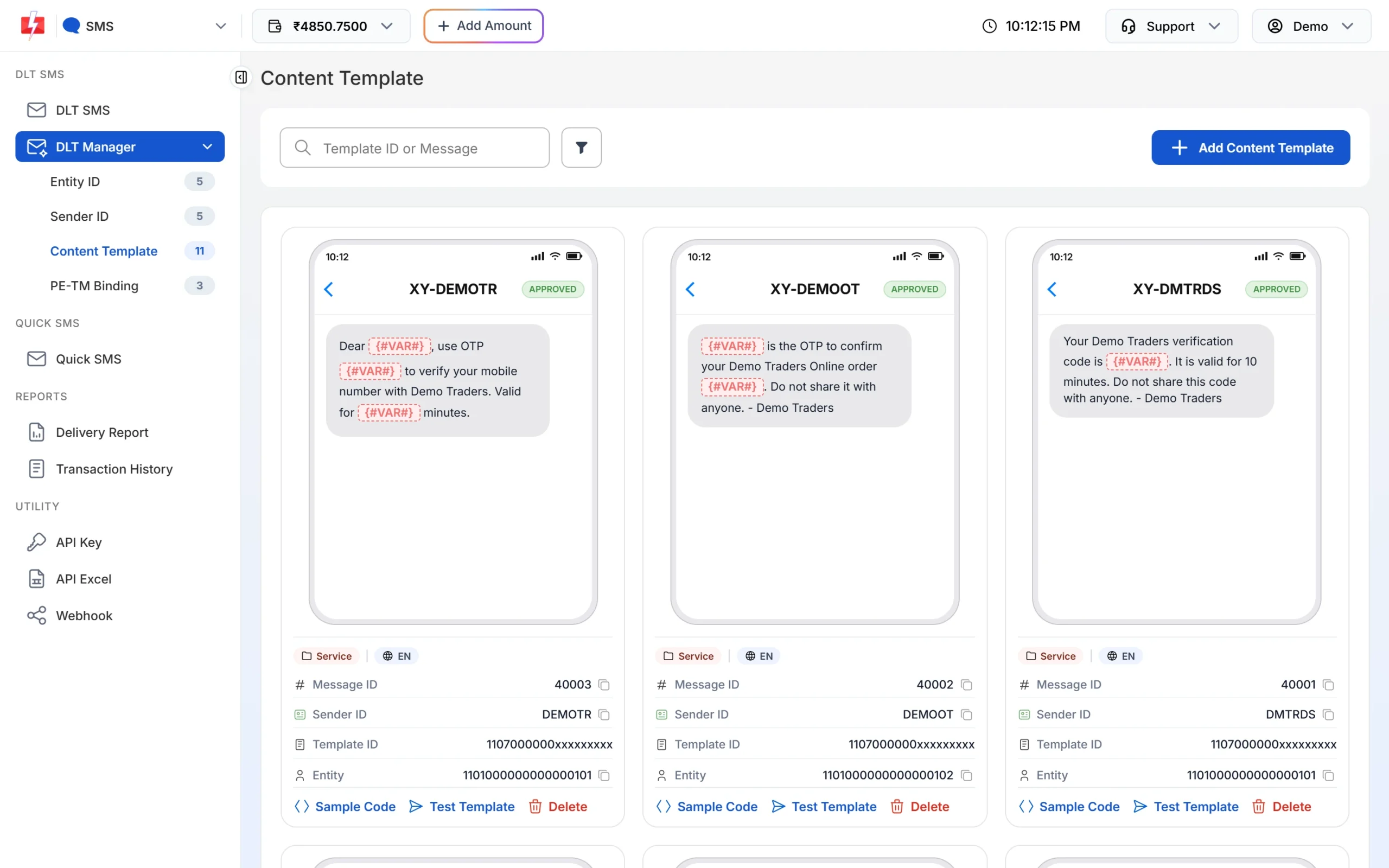
The OTP template on DEMOTR has Message ID 40003 in this example. -
Make the code on your server
Use a secure random number generator. Save a hash of the code with the mobile number, an expiry time and an attempt counter. Never save the plain code or send it back to the browser.
-
Send the SMS
Call
/dev/bulkV2withroute=dlt(Message ID and variables) orroute=dlt_manual(full text and DLT IDs). Checkreturnin the reply. -
Check the code when the user submits it
Compare the hash, check the expiry and count the attempt. After a correct code, delete the record so it cannot be used again.
Send the OTP with the DLT SMS route
The template has 3 variables: name, OTP and minutes. Send them in that order.
curl -X POST "https://www.fast2sms.com/dev/bulkV2" \
  -H "authorization: YOUR_API_KEY" \
  -H "Content-Type: application/json" \
  -d '{"route":"dlt","sender_id":"DEMOTR","message":"40003","variables_values":"Rahul|482913|10","numbers":"9999999999"}'
Send the OTP with the DLT Manual route
curl -X POST "https://www.fast2sms.com/dev/bulkV2" \
  -H "authorization: YOUR_API_KEY" \
  -H "Content-Type: application/json" \
-d '{"route":"dlt_manual","sender_id":"DEMOTR","message":"Dear Rahul, use OTP 482913 to verify your mobile number with Demo Traders. Valid for 10 minutes.","entity_id":"YOUR_ENTITY_ID","template_id":"YOUR_TEMPLATE_ID","numbers":"9999999999"}'Full example: send and verify
Python
import hashlib, hmac, secrets, time
import requests

API_KEY = "YOUR_API_KEY"
SECRET = b"a-long-random-server-secret"
store = {}  # use your database or cache in real code

def _hash(mobile, code):
    return hmac.new(SECRET, f"{mobile}:{code}".encode(), hashlib.sha256).hexdigest()

def send_otp(mobile, name):
    code = f"{secrets.randbelow(10**6):06d}"
    store[mobile] = {"hash": _hash(mobile, code), "expires": time.time() + 600, "tries": 0}
    r = requests.post(
        "https://www.fast2sms.com/dev/bulkV2",
        headers={"authorization": API_KEY},
        json={"route": "dlt", "sender_id": "DEMOTR", "message": "40003",
              "variables_values": f"{name[:40]}|{code}|10", "numbers": mobile},
        timeout=15,
    )
    data = r.json()
    if not data.get("return"):
        raise RuntimeError(data.get("message"))
    return data["request_id"]

def verify_otp(mobile, code):
    rec = store.get(mobile)
    if not rec or time.time() > rec["expires"] or rec["tries"] >= 5:
        store.pop(mobile, None)
        return False
    rec["tries"] += 1
    if hmac.compare_digest(rec["hash"], _hash(mobile, code)):
        store.pop(mobile, None)
        return True
    return False
PHP
<?php
session_start(); // use your database in real code

function send_otp(string $mobile, string $name): string {
    $code = str_pad((string) random_int(0, 999999), 6, '0', STR_PAD_LEFT);
    $_SESSION['otp'] = [
        'mobile'  => $mobile,
        'hash'    => password_hash($code, PASSWORD_DEFAULT),
        'expires' => time() + 600,
        'tries'   => 0,
    ];

    $ch = curl_init('https://www.fast2sms.com/dev/bulkV2');
    curl_setopt_array($ch, [
        CURLOPT_POST           => true,
        CURLOPT_RETURNTRANSFER => true,
        CURLOPT_TIMEOUT        => 15,
        CURLOPT_HTTPHEADER     => ['authorization: YOUR_API_KEY', 'Content-Type: application/json'],
        CURLOPT_POSTFIELDS     => json_encode([
            'route' => 'dlt', 'sender_id' => 'DEMOTR', 'message' => '40003',
            'variables_values' => mb_substr($name, 0, 40) . "|$code|10",
            'numbers' => $mobile,
        ]),
    ]);
    $res = json_decode(curl_exec($ch), true);
    curl_close($ch);
    if (empty($res['return'])) {
        throw new RuntimeException(json_encode($res['message'] ?? 'send failed'));
    }
    return $res['request_id'];
}

function verify_otp(string $mobile, string $code): bool {
    $o = $_SESSION['otp'] ?? null;
    if (!$o || $o['mobile'] !== $mobile || time() > $o['expires'] || $o['tries'] >= 5) {
        unset($_SESSION['otp']);
        return false;
    }
    $_SESSION['otp']['tries']++;
    if (password_verify($code, $o['hash'])) {
        unset($_SESSION['otp']);
        return true;
    }
    return false;
}
Node.js
import crypto from "node:crypto";

const SECRET = "a-long-random-server-secret";
const store = new Map(); // use Redis or your database in real code
const hash = (mobile, code) =>
  crypto.createHmac("sha256", SECRET).update(`${mobile}:${code}`).digest("hex");

export async function sendOtp(mobile, name) {
  const code = String(crypto.randomInt(0, 1000000)).padStart(6, "0");
  store.set(mobile, { hash: hash(mobile, code), expires: Date.now() + 600000, tries: 0 });

  const res = await fetch("https://www.fast2sms.com/dev/bulkV2", {
    method: "POST",
    headers: { authorization: "YOUR_API_KEY", "Content-Type": "application/json" },
    body: JSON.stringify({
      route: "dlt", sender_id: "DEMOTR", message: "40003",
      variables_values: `${name.slice(0, 40)}|${code}|10`, numbers: mobile,
    }),
  });
  const data = await res.json();
  if (!data.return) throw new Error(JSON.stringify(data.message));
  return data.request_id;
}

export function verifyOtp(mobile, code) {
  const rec = store.get(mobile);
  if (!rec || Date.now() > rec.expires || rec.tries >= 5) { store.delete(mobile); return false; }
  rec.tries += 1;
  const ok = crypto.timingSafeEqual(Buffer.from(rec.hash), Buffer.from(hash(mobile, code)));
  if (ok) store.delete(mobile);
  return ok;
}Checks your app must do
Fast2SMS only delivers the SMS on these routes. It does not know the code is an OTP, so add these yourself:
- Expiry: match the minutes in your SMS text (10 in the example).
- Attempt limit: stop after a few wrong codes and ask for a new OTP.
- Resend wait: do not let one number request a new code every few seconds. Each send is a charged SMS.
- Limits per IP and per number: stop bots from using your form to send SMS to many numbers.
- One active code: when you send a new code, replace the old one.
- Check
return: a low balance can come back with HTTP 200 and"return": false. Show the user a clear message if the SMS was not sent.
Common problems and fixes
| Problem | Fix |
|---|---|
| 424 Invalid Message ID | Use the Message ID from DLT Manager, not the 19-digit Template ID, with the sender linked to it. |
| 406 Invalid Sender ID | Use the sender exactly as in DLT Manager, same case. |
| OTP accepted but shows Failed in Delivery Report | On DLT Manual, check the text matches DLT exactly. Check the number is active. |
| Code too long for the variable | Each value is cut to 40 characters. OTP codes are short, but long names in the first variable can be cut. |
| Users get the OTP late at night | Use a Service Implicit OTP template and a letter sender. Promotional templates and numeric senders are held at night. |
Frequently asked questions
Can I send OTP without Smart OTP?
Yes. Use the DLT SMS or DLT Manual route with your own approved OTP template. Your app then makes and checks the code.
Does Fast2SMS verify the OTP on these routes?
No. The Verify OTP API only works for OTPs sent with Smart OTP.
Which is better for OTP, DLT SMS or DLT Manual?
DLT SMS. It builds the approved text from the Message ID, so the OTP cannot fail because of a small text change.
Is an OTP sent this way charged like a normal SMS?
Yes. It is your DLT SMS rate x SMS parts, like any other DLT SMS.
How do I know the OTP was delivered?
Save the request_id and check Delivery Report, set up an SMS webhook, or call the DLR API with the request ID.
Can I use the same template for login and signup?
Yes, if the approved text fits both. The template only has to match what DLT approved.