
DTMF (Dual-Tone Multi-Frequency) is the sound your phone sends down the line when you press a key during a call. Each key plays two tones at the same time, and an IVR system listens for that pair to know which key you pressed. That is how “press 1 for Yes, press 2 for No” works. In Fast2SMS, a Key Press (DTMF) voice campaign uses these tones to save the key each person pressed in your report.
This page explains the DTMF meaning in telecom, how the tones work, how a key press call runs in Fast2SMS, and the dos and don’ts for writing key press menus.
DTMF full form and meaning
DTMF stands for Dual-Tone Multi-Frequency. It is also called touch-tone. “Dual tone” because each key sends two tones together, and “multi-frequency” because the keypad uses eight different frequencies in total. When someone says “DTMF call” or “DTMF IVR”, they mean a call that asks the listener to press keys and reads the answer from these tones.
How DTMF tones work
The keypad is a grid. Every row has a low tone and every column has a high tone. Pressing a key plays its row tone and its column tone together:
| 1209 Hz | 1336 Hz | 1477 Hz | |
|---|---|---|---|
| 697 Hz | 1 | 2 | 3 |
| 770 Hz | 4 | 5 | 6 |
| 852 Hz | 7 | 8 | 9 |
| 941 Hz | * | 0 | # |
So key 5 is 770 Hz plus 1336 Hz. Because every key is a pair of one low and one high tone, the system can tell keys apart clearly, and normal speech or background sound rarely produces the same exact pair.
Where you meet DTMF
- Incoming IVR menus: “For sales, press 1. For support, press 2.” See IVR menu examples.
- Outgoing key press campaigns: a recorded call asks a question and saves the answer, for confirmations, surveys and opt-outs.
- Press to connect: the caller presses a key to be put through to a person. In Fast2SMS this is a Call Patch campaign.
How a key press call works in Fast2SMS
You set up the whole call on the Bulk Voice Call page after choosing Key Press (DTMF) as the Campaign Type. The hint reads “Asks the caller to press a key (e.g. 1 for Yes) and records the key in the report.”
-
Caller hears the question
In How the call works, step 1 Caller hears is your menu file, for example “Press 1 for Yes, press 2 for No”. It must be an approved voice file. Under More options you can also play a greeting before it.
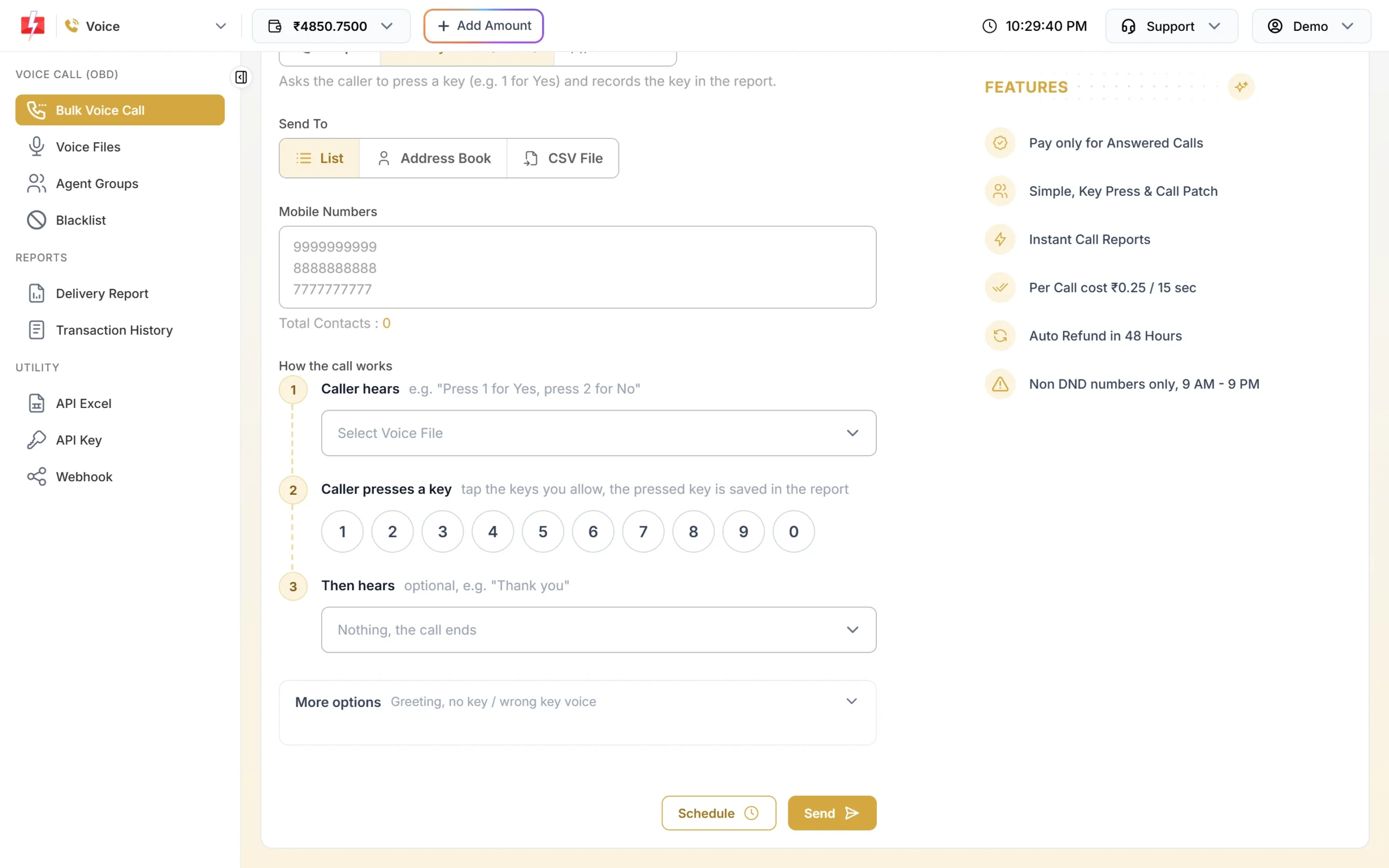
The three steps of a key press call. -
Caller presses a key
In step 2, tap the keys you allow on the keypad. You can choose any of the keys 0 to 9. A key you did not tap counts as a wrong key.
-
The system waits, repeats or corrects
More options controls what happens when the answer does not come: Wait for a key (sec) from 1 to 10 seconds (default 5), Repeat step 1 if no key from 0 to 3 times (default 1), and files to play If no key is pressed and If a wrong key is pressed.
-
Caller hears the closing message
Step 3 Then hears is an optional thank-you file. Leave it on “Nothing, the call ends” if you do not need one.
-
You see the key in the report
Open the campaign from Delivery Report > Voice Report. The Key column shows the key each person pressed, and a dash means no key was pressed. The Excel download has a Key Pressed column, and by API the key comes in the
dtmffield of the voice report and the voice webhook.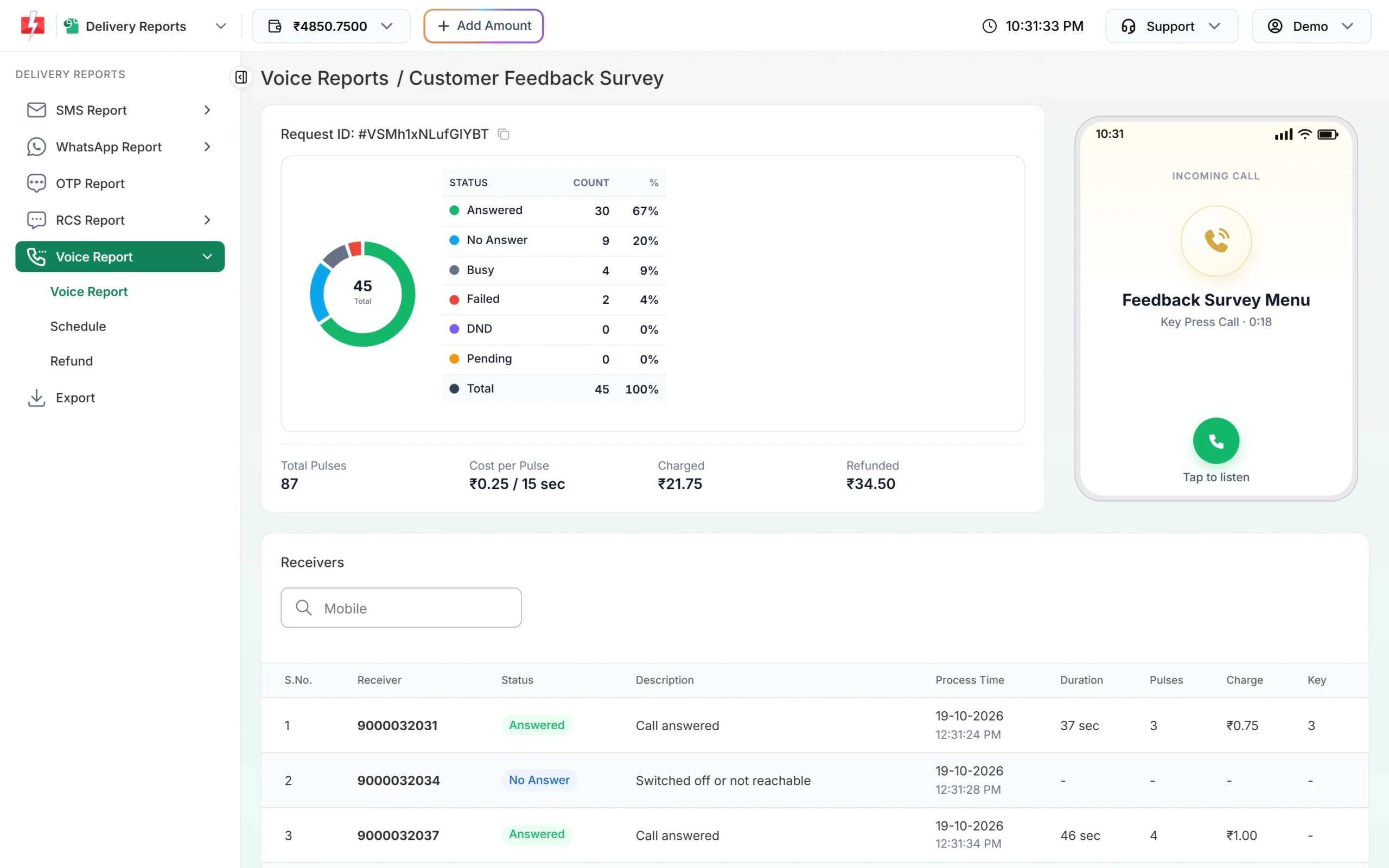
The Key column holds each caller’s answer.
Pressing a key is not charged separately. A key press call is charged by its answered time in 15-second pulses, like any other bulk voice call. A longer wait time and more repeats make the longest possible call longer, so the amount held from your wallet at send time goes up a little; you are still charged only for the real call time, and unanswered calls are refunded. See how pulses and holds work.
Sending in bulk? For high voice call volumes our team offers discounted rates. Talk to our team or see voice call pricing.
Dos and don’ts for key press menus
| Do | Don’t |
|---|---|
| Tap only the keys your menu mentions, for example 1 and 2. | Tap all ten keys “just in case”. Every key then counts as an answer and you lose the wrong-key prompt. |
| Give two or three choices. | Offer five or six options in one recorded menu. People forget the first options by the time the menu ends. |
| Say the keys again at the end of the menu file. | Say the keys only once at the start of a long message. |
| Add short No Key Pressed and Wrong Key Pressed files, and keep the repeat at 1. | Set 3 repeats on a long menu. It raises the held amount and annoys people. |
| Keep the default 5 second wait, and raise it a little for older customers. | Set 1 or 2 seconds. Many people need time to open the keypad on their phone. |
| Offer a key to stop calls, such as 9, and add those numbers to your voice blacklist. | Ignore people who press the stop key. |
| Use Call Patch when “press 1” should reach a real person. | Promise “press 1 to talk to us” in a Key Press campaign. It only saves the key; nobody comes on the line. |
| Say your brand name before the question. | Ask for an OTP, PIN, Aadhaar, PAN or bank details by keypad. These requests are not allowed in voice files. |
A Key Press campaign saves one key per call, so use it for choices, not for typing long numbers like an order ID.
Common problems: “IVR not recognising DTMF”
| What you see | Likely reason | What to do |
|---|---|---|
| Key column shows a dash on an answered call | The person did not press a key in time, or hung up during the menu. | Say the keys clearly, repeat them at the end, add a No Key Pressed file and keep one repeat. |
| Customers say pressing did nothing | Many phones hide the keypad during a call, so people press nothing or press the wrong screen. | Add “open your phone’s keypad and press 1” in your menu file. |
| Wrong-key message plays for a valid answer | That key was not tapped on the keypad in step 2. | Tap every key your menu mentions. |
| “Choose at least one key (0-9) the caller can press.” | No key is selected. | Tap one or more keys in step 2. |
| “Choose the voice file the caller hears first (it asks the caller to press a key).” | Step 1 is empty. | Pick an approved menu file. |
Frequently asked questions
What is the full form of DTMF?
Dual-Tone Multi-Frequency. Each key on a phone keypad sends two tones at once, one low and one high.
What is DTMF in telecom?
It is the signalling used to send key presses during a call. IVR systems, bank phone menus and key press campaigns read DTMF tones to know which key the caller pressed.
Is DTMF the same as IVR?
No. IVR is the automated phone system that plays menus. DTMF is the key-press signal the IVR listens to.
Which keys can I use in a Fast2SMS key press campaign?
Any of the keys 0 to 9. You tap the ones you allow on the keypad in the Bulk Voice Call form.
Does pressing a key cost extra?
No. A key press call is charged by its answered call time in 15-second pulses, the same as a Simple call.
How long does the call wait for a key?
You choose 1 to 10 seconds in Wait for a key (sec). The default is 5 seconds, with the question repeated once if no key is pressed.
Can I get the pressed keys in my own software?
Yes. The voice report API and the voice webhook return the key in the dtmf field for each number. See the key press voice API.