
The Fast2SMS voice API can do more than play a recording. Add dtmf_keys to make an IVR key press call (“Press 1 for Yes, 2 for No”) and get each caller’s key in the report, or add agent_groups to make a call patch campaign that connects the caller to your team when they press a key. Both use the same endpoint, POST https://www.fast2sms.com/dev/voice/bulk. This guide shows the fields, the voice files you need, how charges differ and code in cURL, PHP, Python and Node.js.
Which campaign type you get
| You send | Campaign type | What the caller hears and does |
|---|---|---|
file_id only |
Simple | Hears one recording. See bulk voice call API |
file_id + dtmf_keys |
Key Press (DTMF) | Hears a question, presses one of the allowed keys; the key is saved in the report |
file_id + agent_groups + no_agent_file_id |
Call Patch | Hears a menu, presses a key and is connected to an agent in that key’s group |
For Key Press and Call Patch, file_id is the file that asks the caller to press a key. If you also send menu_file_id, then file_id plays first as a greeting and menu_file_id asks for the key.
Before you start
- Approved voice files: one that asks for a key press (Used As “Menu (press a key)”), and the optional follow-up files. Find their File IDs in Voice Files or with
GET /dev/voice/files. - For Call Patch: at least one agent group, and an approved “No Agent Available” file.
- Paid recharges of ₹100 or more on the account, your API key, and wallet balance for the hold.
Key press (IVR) call by API
-
Choose the keys and files
Decide which keys count as an answer, for example 1 and 2. Pick the menu file that asks the question and, if you want, a thank-you file that plays after a valid key.
-
Send the request
curl -X POST "https://www.fast2sms.com/dev/voice/bulk" \ -H "authorization: YOUR_API_KEY" \ -H "Content-Type: application/json" \ -d '{"campaign_name":"Customer Feedback Survey","numbers":"9999999999,8888888888", "file_id":"30031","dtmf_keys":"1,2,3","thanks_file_id":"30033", "no_input_file_id":"30034","wrong_input_file_id":"30035", "menu_wait_time":5,"reprompt":1}' -
Read the keys pressed
When the campaign is done, the report shows each caller’s key. In the panel, open the campaign from Voice Report: the Key column has the digit pressed. By API, call
GET /dev/voice/report?request_id=V...&numbers=1and readdtmffor each number.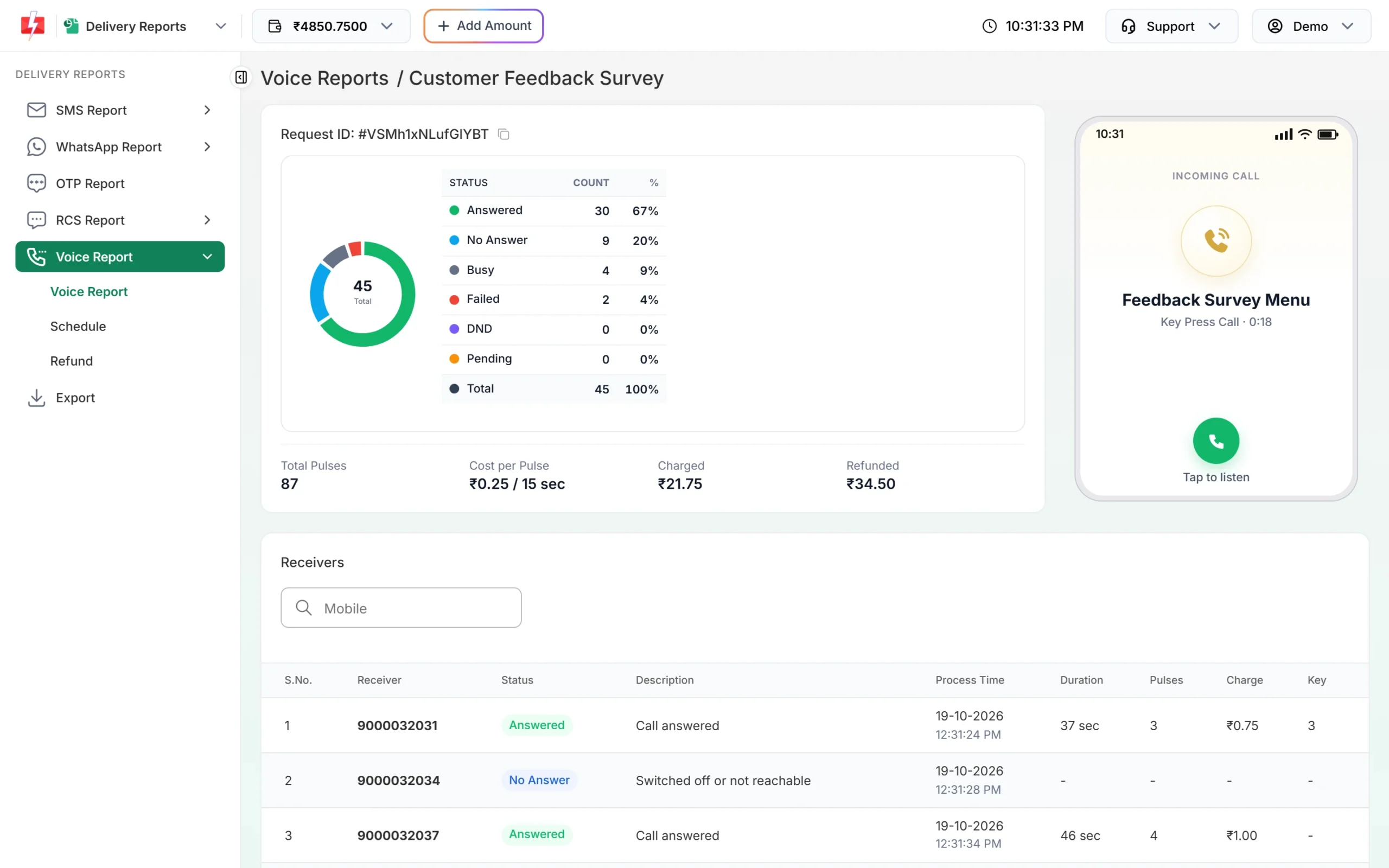
The Key column shows which key each caller pressed.
Key press fields
| Field | Rules |
|---|---|
dtmf_keys |
The keys you accept, 0 to 9, separated by commas, for example 1,2 |
file_id |
The menu file that asks for a key (required) |
thanks_file_id |
Plays after a valid key. Without it the call ends after the key |
welcome_file_id or menu_file_id |
Optional greeting before the question (see above) |
no_input_file_id |
Plays if no key is pressed |
wrong_input_file_id |
Plays if a key outside dtmf_keys is pressed |
menu_wait_time |
Seconds to wait for a key, 1 to 10 (panel default 5) |
reprompt |
How many times to repeat the question if no key is pressed, 0 to 3 (panel default 1) |
These optional fields are not yet on the public API docs page at the time of writing, but they match the options on the Bulk Voice Call page in the panel.
Call patch: connect callers to your agents
-
Create agent groups and copy their Group IDs
Open Agent Groups under VOICE CALL (OBD) and click Create Group. Add a group name and 1 to 50 agents with their 10-digit mobile numbers. The list shows each group’s Group ID with a copy button.
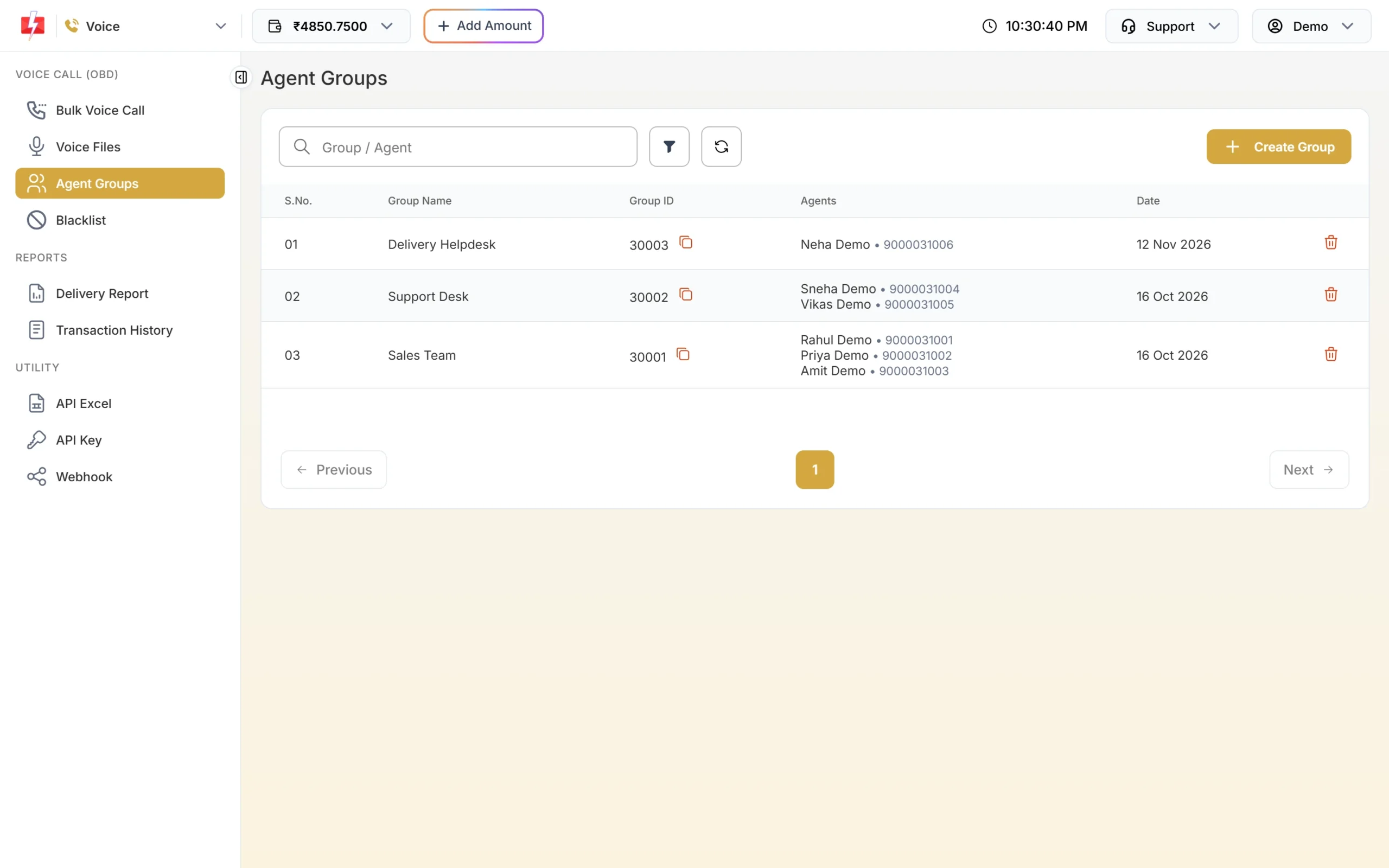
Each group has a Group ID that you map to a key. -
Map keys to groups
Write
agent_groupsas key:GroupID pairs separated by commas.1:30001,2:30002sends callers who press 1 to Sales Team and 2 to Support Desk. Use each key once. -
Send the request
curl -X POST "https://www.fast2sms.com/dev/voice/bulk" \ -H "authorization: YOUR_API_KEY" \ -H "Content-Type: application/json" \ -d '{"campaign_name":"Kitchenware leads","numbers":"9999999999,8888888888", "file_id":"30041","agent_groups":"1:30001,2:30002","no_agent_file_id":"30042"}'file_idis the menu (“Press 1 for sales, 2 for support”) andno_agent_file_idplays when no agent in the group picks up. Both are required for Call Patch. -
See who talked to whom
The report shows, for each caller, the key, the agent who answered, the agent talk time and the charge. In the panel you can also play the call recording, kept for 30 days. By API,
agent_numberandagent_durationcome in the report and the Voice webhook.
Code examples (Key Press)
PHP
<?php
$payload = [
    "campaign_name"  => "Customer Feedback Survey",
    "numbers"        => "9999999999,8888888888",
    "file_id"        => "30031",
    "dtmf_keys"      => "1,2,3",
    "thanks_file_id" => "30033",
];
$ch = curl_init("https://www.fast2sms.com/dev/voice/bulk");
curl_setopt_array($ch, [
    CURLOPT_POST           => true,
    CURLOPT_RETURNTRANSFER => true,
    CURLOPT_HTTPHEADER     => ["authorization: YOUR_API_KEY", "Content-Type: application/json"],
    CURLOPT_POSTFIELDS     => json_encode($payload),
    CURLOPT_TIMEOUT        => 60,
]);
$data = json_decode(curl_exec($ch), true);
curl_close($ch);
echo ($data["return"] ?? false) === true ? $data["request_id"] : ($data["message"] ?? "error");
Python
import requests

payload = {
    "campaign_name": "Kitchenware leads",
    "numbers": "9999999999,8888888888",
    "file_id": "30041",
    "agent_groups": "1:30001,2:30002",
    "no_agent_file_id": "30042",
}
r = requests.post("https://www.fast2sms.com/dev/voice/bulk",
                  headers={"authorization": "YOUR_API_KEY"}, json=payload, timeout=60)
data = r.json()
print(data["request_id"] if data.get("return") else data.get("message"))
Node.js
const res = await fetch("https://www.fast2sms.com/dev/voice/bulk", {
  method: "POST",
  headers: { authorization: process.env.FAST2SMS_API_KEY, "Content-Type": "application/json" },
  body: JSON.stringify({
    campaign_name: "Customer Feedback Survey",
    numbers: "9999999999,8888888888",
    file_id: "30031",
    dtmf_keys: "1,2,3",
    thanks_file_id: "30033",
  }),
});
const data = await res.json();
console.log(data.return === true ? data.request_id : data.message);
How charges differ
- Key Press: the hold per number covers the longest path through your files, plus the wait time and repeats, rounded up to whole pulses. Only answered calls are charged, and never more than the estimate plus one pulse.
- Call Patch: at the time of writing a fixed hold of 40 pulses per number is taken (₹10 per number at ₹0.25 per pulse). After the call, both the caller’s leg and the agent’s leg are charged by the pulse. A very long agent talk can be charged above the hold, as “Voice Call Extra Talk Time”.
- Unanswered and unused amounts come back automatically after the campaign’s report is in. See voice call report and refunds by API.
Sending in bulk? For high voice call volumes our team offers discounted rates. Talk to our team or see voice call pricing.
Common problems and fixes
“Choose the voice file the caller hears first (it asks the caller to press a key).”
Send file_id with an approved menu file.
“Choose the voice file that plays when no agent picks up.”
Call Patch needs no_agent_file_id with an approved file.
“Choose at least one key (0-9) the caller can press.”
Check the format of dtmf_keys, for example 1,2.
“Key N is used twice. Use each key for one agent group only.”
In agent_groups each key may appear once.
“Choose the agent group for key N.” or “Each key must be one digit from 0 to 9.”
Write each pair as key:GroupID, for example 1:30001, with the Group ID from Agent Groups.
Agents do not answer
The caller hears the no-agent file and the report shows “Agent did not answer” or “Agent busy”. Keep enough agents free while the campaign runs, and send smaller batches.
Frequently asked questions
What is a DTMF or key press voice call?
A recorded call that asks the listener to press a key on their phone. The key they press is saved, so you can run surveys, confirmations or interest checks.
Can I get the pressed key on my server?
Yes. The Voice webhook sends one request per number after the campaign’s report is in, including dtmf. You can also read it from the report API.
How many agents can be in one group?
From 1 to 50 agents per group.
Are call patch calls recorded?
Yes. Recordings can be played from the campaign in the Voice Report for 30 days.
Can I delete an agent group that a campaign uses?
Not while a scheduled or running Call Patch campaign uses it.