
The Fast2SMS DLT Manual error “Add template in panel before using this api without template_id” means you sent an SMS with route=dlt_manual without the DLT IDs, and Fast2SMS could not match your text to any template in your DLT Manager. You have two fixes: send entity_id and template_id with the request, or add the template in DLT Manager so the text can be matched.
The exact error
{"return":false,"status_code":500,"message":"Add template in panel before using this api without template_id"}It comes from /dev/bulkV2 with route=dlt_manual. Nothing is sent and nothing is charged.
Why it happens
With DLT Manual, you send the full SMS text with the variables already filled in. Fast2SMS also needs your DLT Principal Entity ID and Content Template ID. If you leave out entity_id or template_id, Fast2SMS tries to find them for you:
- It compares your text with the templates in your DLT Manager that are not rejected, newest first.
- Upper and lower case, line breaks and extra spaces are ignored.
- Each
{#var#}in a template matches any text in that place.
If no template matches, you get this error. Common reasons:
- The template was never added to DLT Manager in this account.
- The fixed words in your text differ from the template, for example “Rs” instead of “Rs.”, or a changed brand name.
- The template in DLT Manager was rejected or deleted.
Matching runs only when one of the two IDs is missing. If you send both, Fast2SMS uses them as they are and does not compare the text.
How to fix it
-
Option 1: send both IDs
Add your 19-digit DLT Content Template ID as
template_idand your DLT Principal Entity ID asentity_id. Both are digits only. You find them in your DLT portal. -
Option 2: add the template in DLT Manager
Go to SMS, open DLT Manager, click Content Template and then Add Content Template. Choose the entity, tick the sender IDs, enter the Content Template ID, choose the template type, paste the approved text exactly and upload the DLT screenshot. Click Submit.
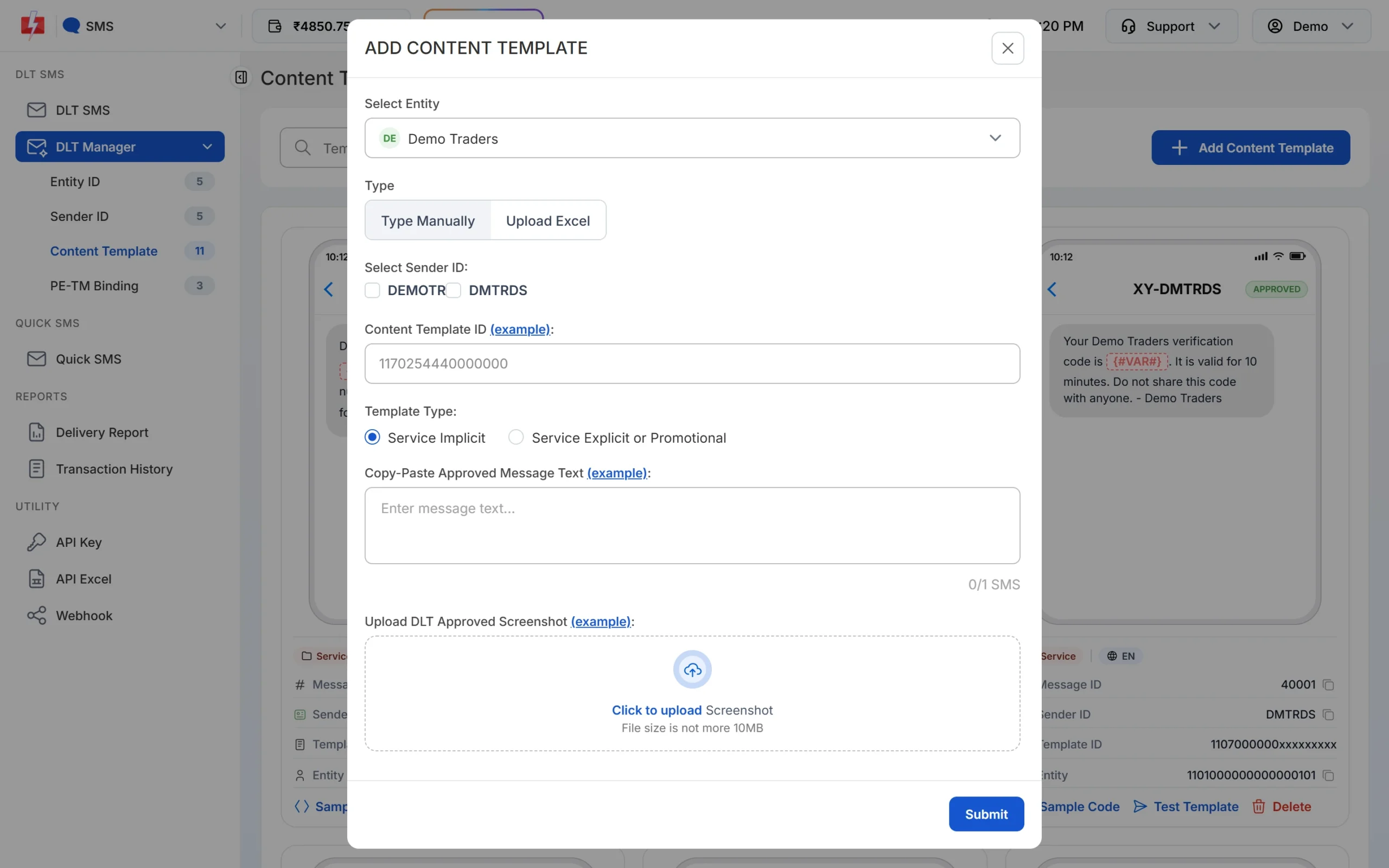
Add the template so DLT Manual can match your text. -
Compare your text with the template
Open the template card in Content Template and check the fixed words, symbols and spelling against the text your code sends.
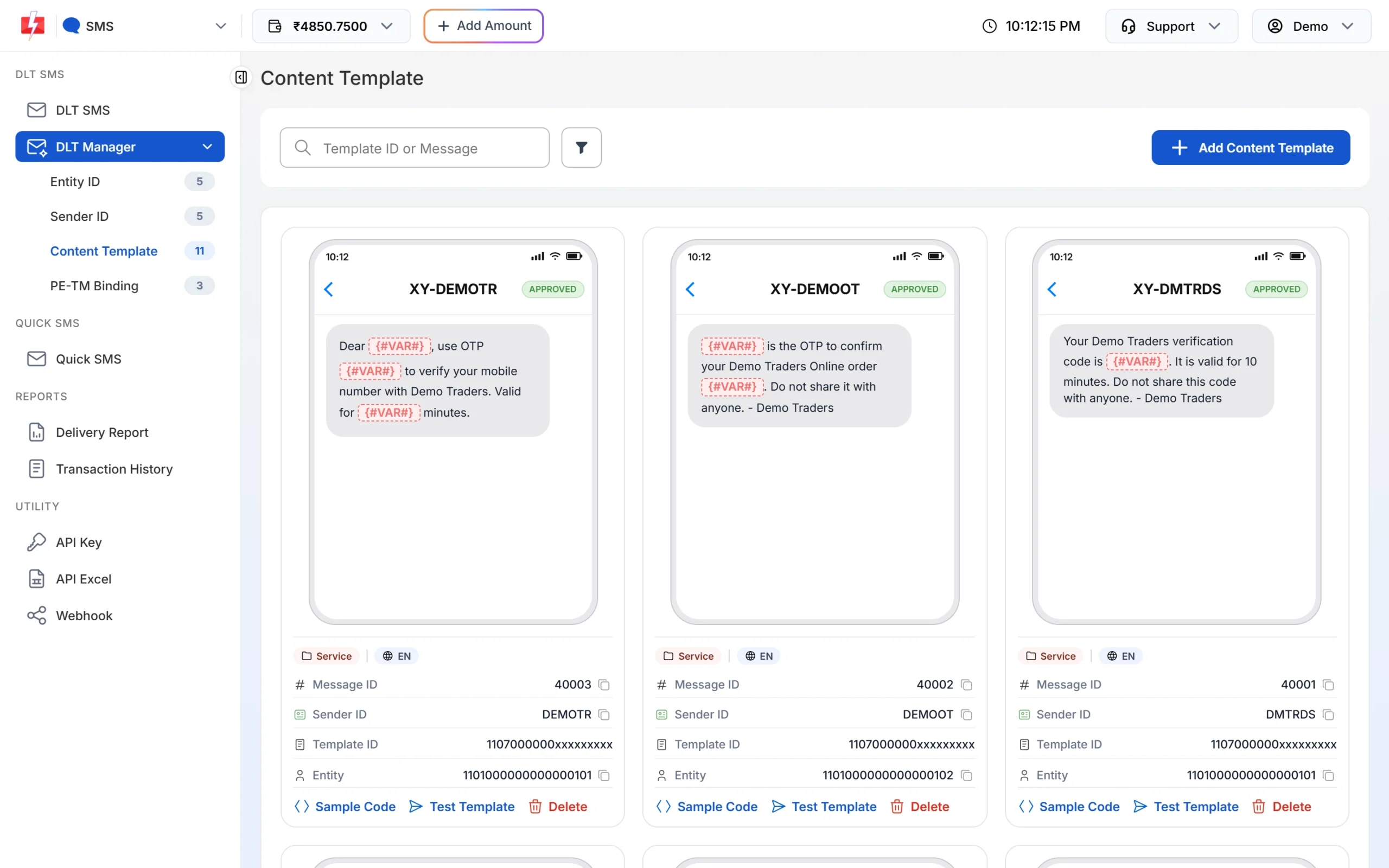
Your text must match the template outside the variables.
Code check
The safest request sends both IDs:
curl -X POST "https://www.fast2sms.com/dev/bulkV2" \
  -H "authorization: YOUR_API_KEY" -H "Content-Type: application/json" \
  -d '{"route":"dlt_manual","sender_id":"DMTRDS",
       "message":"Your Demo Traders verification code is 4821. It is valid for 10 minutes. Do not share this code with anyone. - Demo Traders",
       "entity_id":"1101234567890123456","template_id":"1107123456789012345",
       "numbers":"9999999999"}'
On /dev/custom (many messages in one call) with route=dlt_manual, both IDs are required for every item. There is no matching there.
How to avoid it
- Store the entity ID and template ID next to each message text in your code and always send them.
- Do not edit message wording in code without registering the new wording at DLT.
- Remember that Fast2SMS does not check your DLT Manual text against the template when both IDs are sent. If the text is wrong, the SMS fails at the operator and the charge is not refunded.
Frequently asked questions
Is template_id required for DLT Manual?
It is optional only if your text matches a template saved in DLT Manager. Sending it always is the safest choice.
Where do I find my entity ID and template ID?
In your DLT portal. The entity ID is your Principal Entity ID and the template ID is the 19-digit Content Template ID.
Does a pending template in DLT Manager count for matching?
Matching uses templates that are not rejected, so a pending template can match. Rejected ones never match.
Am I charged for this error?
No. The request stops before sending.
Should I use DLT SMS or DLT Manual?
If your templates are in DLT Manager, route=dlt with the Message ID is simpler, because Fast2SMS builds the text for you.