
An “invalid template ID” error means the operator could not use the DLT Template ID that came with your SMS: it was missing, in the wrong format, or not found on DLT. A “template inactive” error means the ID exists, but the template is not active on DLT right now. In both cases the SMS is stopped during DLT scrubbing and is not delivered.
Below are the exact error texts from Airtel, Jio and SmartPing and how to fix an invalid or inactive template ID in Fast2SMS.
Invalid or inactive template ID: the exact error texts
| Error text | Operator and code | What it means |
|---|---|---|
| Invalid Template id | Airtel 613 | The Template ID is missing or in the wrong format. |
| Content Template ID is invalid | SmartPing 637 and 5304 | Same as above. |
| INVALID_TEMPLATE_ID | Jio 637 (marked deprecated in Jio’s list) | Same as above. |
| The required tag of Template id is missing, TLV_TMPID_NOT_FOUND | Airtel 9025, Jio 674 | No Template ID reached the operator with the message. |
| TEMPLATE_NOT_FOUND, Template not found in DLT | Jio 630, SmartPing 630 | The ID is not registered on DLT. See error 630. |
| TEMPLATE_INACTIVE, Content template inactive | Jio 631, SmartPing 631 and 5311 | The template is registered but not active. |
| Template_id Inactive/Blacklisted | Airtel 805 | The template is inactive or blacklisted. |
| TEMPLATE_SUSPENDED_DUE_TO_NON_USAGE, TEMPLATE_SUSPENDED_BY_CUSTOMER | Airtel 638 and 640, SmartPing 5313 and 5315, Jio 638 and 640 | Suspended for non-use, or from your own DLT account. |
| TEMPLATE_NOT_REGISTERED_TO_ENTITY, Entity not registered for the submitted template | Jio 647, SmartPing 638 | The template belongs to a different Entity ID. |
For codes not listed here, see the full lists for Jio, Airtel and SmartPing.
Why it happens
- Invalid: a digit was typed wrong, your software sends an old Template ID, the template sits under another Entity ID, or the
template_idin your DLT Manual API request is empty or wrong. - Inactive: the template was not used for a long time, someone suspended it on the DLT portal, or it was blacklisted after complaints. Reactivate it on your portal, see how to reactivate a DLT template.
How to fix an invalid template ID or inactive template
-
Find the template in DLT Manager
Go to DLT Manager > Content Template and search by Template ID or a few words of the message. Each card shows the text, Message ID, Sender ID, Template ID (partly hidden) and Entity, with an Approved, Pending or Rejected badge.
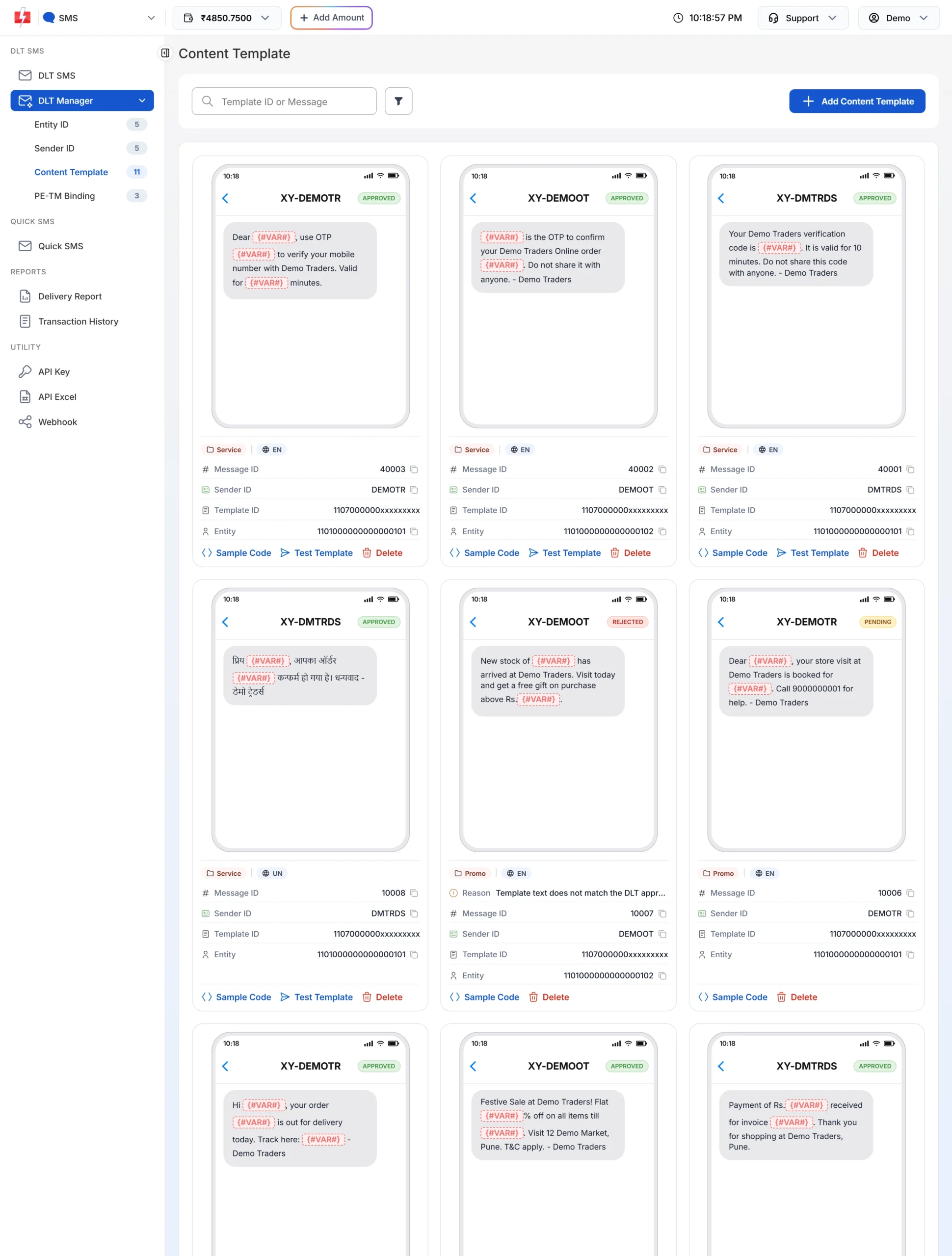
Each card shows the IDs and status of one template. -
Compare it with your DLT portal
Check that the Template ID is the same, the template is active, and it sits under the same Entity ID and header.
-
Correct a wrong ID
A saved Template ID cannot be edited. Delete the wrong template and click Add Content Template to add it again with the ID copied from your portal. The new template gets a new Message ID, so update any API code that uses the old one. A reactivated template does not need to be added again.
-
Send one test SMS
On the approved card, click Test Template, fill the variables and click Send Test SMS to your own number. This is a real SMS, so the normal SMS charge can apply.
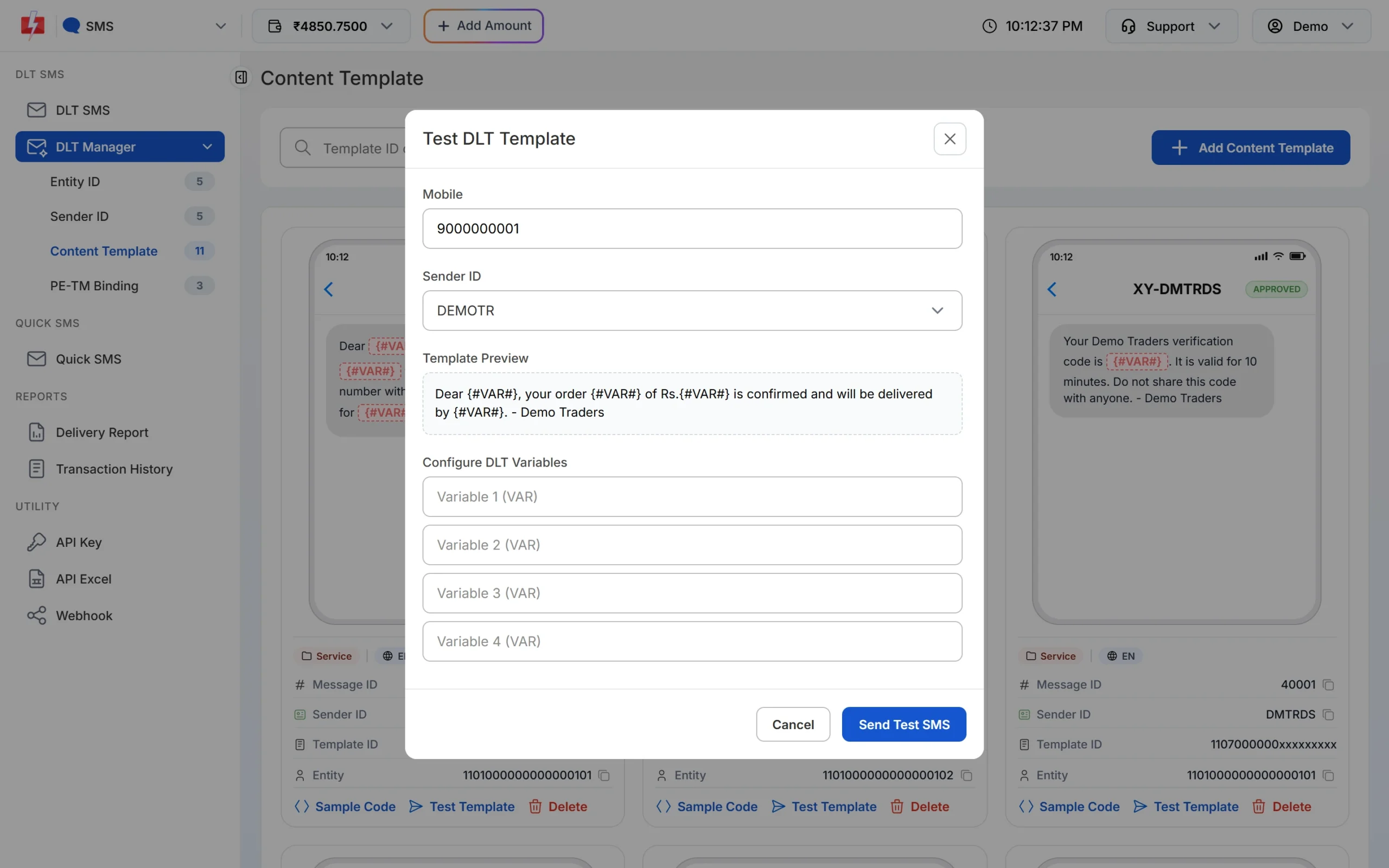
Test the template before you send it to your list.
route=dlt) you send the Fast2SMS Message ID, and Fast2SMS uses the Template ID saved in DLT Manager. If you put the 19-digit DLT Template ID there, Fast2SMS replies with error 424 and nothing is sent. With the DLT Manual API you send the DLT Template ID yourself.Frequently asked questions
What does invalid template ID mean in SMS?
The operator could not use the Template ID sent with the message because it was missing, badly formed or not on DLT. Copy the correct ID from your DLT portal.
What does template inactive mean?
The template is registered on DLT but switched off, for example after long non-use or a suspension. Reactivate it on your DLT portal.
My template is Approved in Fast2SMS. Why is it inactive at the operator?
DLT Manager shows your Fast2SMS record. The operator checks the live status on DLT, which can change later.
Can I edit the Template ID in DLT Manager?
No. Delete the template and add it again with the right ID. It gets a new Message ID.
Am I charged when the template ID is invalid?
If Fast2SMS stops the request first, such as error 424, nothing is sent. If the operator rejects it, DLT SMS are charged when the campaign is sent and failed numbers are not refunded automatically.